Home › Photo & Video

 US
US
1 of 1 storefronts
Content in en-US
Content in en-US
Information
Preview 3 platforms
iPhone 10 images




iPad 10 images


Apple Watch 3 images


What’s New Version 1.1.424
• Fixed incorrect Picture-in-Picture scaling during video recording in Dual Camera mode.
Description
Take an extra digital zoom performance for your camera.
Photos and Videos on a larger scale.
At the Concert Hall or at the Football Stadium, xZoom.app will not be superfluous.
Meet the new horizons with xZoom.app
FREE FEATURES
• Extended digital Zoom In for Photo and Video
• Photo, 4K, FullHD, HD
• JPEG, HEIC, TIFF, Raw and ProRAW
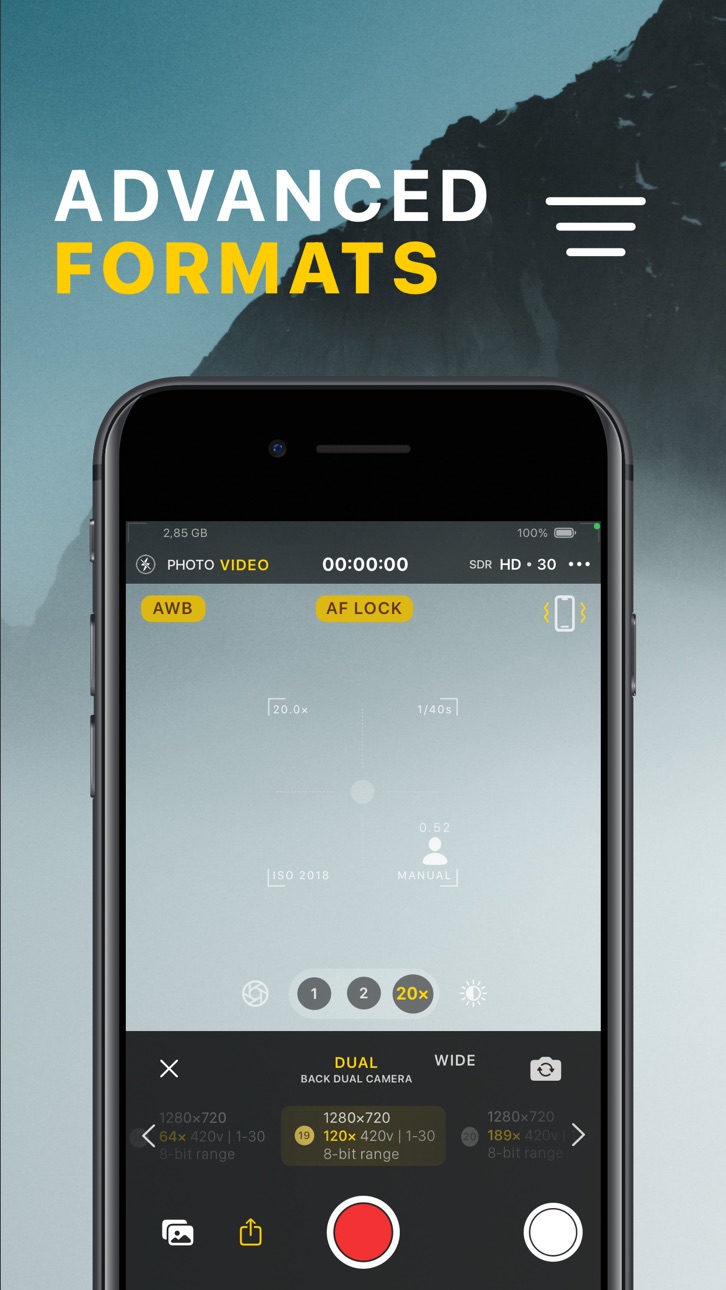
• Extended video formats
• Extended Video stabilization modes
• Pro Active color space mamagment
• Video Frame Rate control
• Dolby Vision support
• "Flashlight" for Photo mode
ADVANCED FEATURES
ISO, AWB, SS, Manual Lens Focus are available in PRO mode (only for Physical cameras).
• F - Manual Focus, sets the Lens Position to get the perfect camera focus
• SS - Shutter Speed, camera exposure time
• ISO - Sensitivity, camere sensor sensitivity to light
• AWB - White Balance
Use the full potential of your camera to get amazing photos and videos.
PRO MODE ACTIVATION
Subscription:
• Weekly plan
• Monthly plan
• Annual plan
Purchase:
• "Lifetime" Pro
The "Weekly" plan has 3 day free trial period. You could activate it and use it until the trial period ends free.
To cancel the activated plan, please, follow to iPhone Settings -> Your Apple Id -> Subscription Management
You could cancel it anytime free, before the trial period ends.
If you do not cancel it during the free trial period the price for "Weekly" plan will be charged automatically.
PLEASE NOTE
• Subscriptions are renewable
• Hybrid Zoom is effective if you have the Telephoto camera
• The 189× is a maximum zoom factor.
• The digital zoom is accomplished by cropping an image down to an area with the same aspect ratio as the original, and scaling the image up to the dimensions of the original.
• The more zoom factor you have the less quality you get. Find the compromise zoom value for you.
• The 48 MP Wide camera sensor gives you the better zoom result.
• The maximum digital zoom value may be different for the each video format.
Supported Codecs:
• ProRes, HEVC, MPEG, HEIC, JPEG
Supported Devices:
• iPhone 7 and newer
Supported iOS version:
• iOS 15 and newer
Terms of Service - https://xzoom.app/terms
Privacy Policy - https://xzoom.app/privacy
Support: hello@xZoom.app
In-App Purchases US pricing
Pro mode renewable Subscriptions Subscription
Weekly Plan · 7 days$0.99
Monthly Plan · Monthly$1.99
Annual Plan · Yearly 7-day free trial$9.99
One-Time Purchases
Lifetime Subscription$24.99
Capabilities
In-App Purchases
Accessibility
ipadiphonemacrealityDevicetvoswatch
Version history 25 versions
Build 886010049v1.1.4242026-05-23 15:55:51
• Fixed incorrect Picture-in-Picture scaling during video recording in Dual Camera mode.
Build 885035393v1.1.4232026-05-19 22:30:09
UI Refinements:
• Updated constant flashlight controls (available only in Photo mode when Flashlight is turned off).
• Updated media playback controls in the Photo gallery.
Multi-Camera Video Recording:
• Added rounded corners and shadow effects for the PiP camera preview in the final video output.
• Improved stability and fixed bugs.
Build 883559683v1.1.4222026-04-26 20:51:30
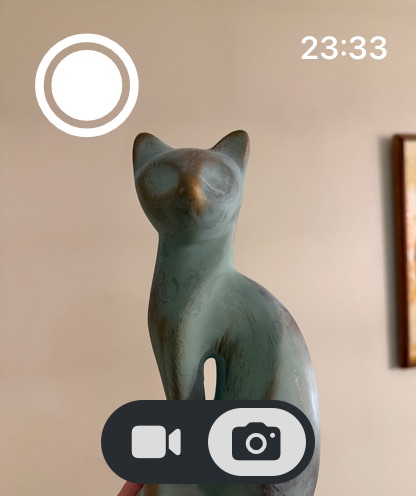
Added Apple Watch support. Use your watch as a remote to control photo and video capture, and zoom.
Build 883234704v1.1.4212026-03-13 17:07:25
• Fixed a video stretching issue that could occur on the first launch when recording in Landscape mode.
• Fixed a video rotation issue on devices running versions earlier than iOS 17 when Portrait Orientation Lock is enabled.
Build 882860528v1.1.4202026-02-27 17:05:33
• Fixed camera rotation issue when exiting Gallery preview mode.
Build 881599059v1.1.4192026-02-26 01:58:26
Stability Improvements & Bug Fixes
UI/UX
• Fixed UI element rotation issues when the app enters background in Landscape mode.
Photo Capture
• Fixed a photo capture issue when location access was denied or not yet determined.
Video Playback
• Fixed video playback in Gallery mode.
Camera Rotation
• Improved camera rotation tracking logic without interrupting the capture session.
• Fixed an issue where the flashlight turned off instantly in Photo mode when rotating the camera.
Photo / Video Mode Switching
• Fixed switching to Video mode in Portrait orientation on some older devices.
Video Stabilization
• The last used stabilization mode is now saved in user settings — no need to enable it every time.
• The selected stabilization mode is now automatically applied when changing camera type.
• Fixed stabilization icon state updates.
Video Recorder
• Refactored video recording logic for improved stability.
• Added a video recorder health check after capture starts.
General Improvements
• Improved video format filtering when switching between cameras.
• Enhanced file naming logic.
• Added capture session pausing while reviewing the photo gallery to optimize memory usage.
That’s all for this update.
We wish you a great day and happy shooting ;)
Build 880636394v1.1.4182025-12-21 14:07:16
• stability improvements and bug fixes
• PRO mode New Year offers
We wish you a Merry Christmas and a Happy New Year!
Build 880350248v1.1.4172025-12-07 23:06:31
We’ve added a User Manual page with a clear overview of the app’s key features and functionality.
• to open the Manual Page, please Go to Settings and tap “Manual”
• an internet connection is required to load the manual content
• this is our first Manual version, so please don't judge us much
• if something feels missing or unclear, feel free to leave feedback on the App Store or email us at hello@xzoom.app
• the Manual will be updated dynamically based on your suggestions and needs
And one more thing…
We wish you an amazing day! Stay tuned.
Build 880179226v1.1.4162025-11-30 13:37:44
Stability improvements and bug fixes:
• fixed wrong PiP Screen appearance in Portrait mode
• fixed 0.5x zoom bug for Triple virtual camera
• connected the start video recording action to the center capture button
• moved the timer value so it no longer overlaps the horizon level
Build 880014928v1.1.4152025-11-23 22:23:58
Black Friday update:
• Use promo code "BLACK" to unlock a discount on the Lifetime PRO upgrade
• Refactored camera rotation logic for smoother performance
• Fixed black screen issue in PiP camera mode
• Resolved UI overlap in Overlay selection mode
• Fixed issue on the initial permissions screen
• Updated localizations on the Settings page
• Added localized "Motion Usage Description" message
Build 878925646v1.1.4142025-11-10 17:19:31
Stability and Improvements:
• Resolved an issue with pausing and resuming video recording
• Fixed incorrect appending of location data to photo metadata
• Fixed a crash that could occur on intro screens when granting camera permissions
• Fixed a crash when adjusting White Balance settings
• Improved alignment of top system information UI elements
• Refined the photo file type selection interface
• Adjusted top zoom scale value for iPhone 17 Pro
• Fixed rotation behavior of UI elements in Portrait mode
• Fixed video rotation issues in Picture-in-Picture and Portrait modes for iPhone 17 series
Build 878401051v1.1.4132025-10-06 22:33:26
• Added camera level indicator for better alignment
• Added support for landscape interface orientation
Build 878269959v1.1.4122025-09-21 03:39:22
New advanced composition guides:
• Default grid with equal proportions
• Phi Grid for advanced photo composition based on the golden ratio
• Fibonacci Spiral Grid for golden ratio–driven framing precision
Build 878074544v1.1.4112025-09-15 14:01:48
• iPhone 17 series support update
Build 877977968v1.1.4102025-09-10 09:48:19
• Fixed issue when switching from Photo to Video MultiCam mode
Build 877386986v1.1.4082025-09-08 08:13:33
• We’ve added support for Apple’s Constant Color API (available on devices newer than iPhone 14 running iOS 18 or later).
This feature allows you to capture images with highly consistent and accurate color fidelity, as if they were taken in a professional studio with controlled lighting. The API automatically manages lighting and camera settings to ensure uniform and precise color across multiple shots—even under varying lighting conditions.
It’s especially valuable for scenarios where accurate color representation is critical, such as artwork, fashion, or product scanning.
To try it out: switch to the Wide camera, select Photo mode, and enable Constant Color capture from the top-right corner of the main screen.
Other updates:
• Refined flashlight mode icons and selection logic
• Added an activity indicator for photo preview processing
• Enhanced burst photo capture performance
• Fixed overlapping numbers on the Zoom In spin-wheel control
• Extended target bias exposure offset limits from [-4.0 … +4.0] to [-8.0 … +8.0]
• General stability improvements and bug fixes
Build 877159068v1.1.4072025-08-19 09:52:26
- New “Request Permissions” screen on first launch for a clearer setup experience
- Refined design of the app introduction screens
- General stability improvements and bug fixes
Build 876647728v1.1.4062025-07-24 09:57:10
- stability improvements for iOS 26
Build 876573685v1.1.4052025-07-22 09:36:35
- iOS 26 beta compatibility and stability improvements
Build 876453544v1.1.4042025-07-21 08:06:02
- added support for remembering the last used camera type
- added automatic restoration of the last exposure settings
- enhanced photo resolution selection logic for different camera types (12 MP, 24 MP, or 48 MP)
- added smooth transitions when switching between cameras
- improved overall stability and fixed various bugs
Build 876142319v1.1.4032025-07-09 13:27:56
- Fixed mirroring issue with the front-facing (portrait) camera
- Fixed incorrect photo orientation
- Improved overall app stability
Build 876046354v1.1.4022025-07-02 07:01:51
Issue fix for MultiCam support on iPhone X devices
Build 875942062v1.1.4012025-06-30 08:18:24
- improved app launch performance
- fixed an issue with missing haptic feedback during interactions
- general stability improvements
Build 874718128v1.1.4002025-06-24 10:07:06
We’ve added Picture-in-Picture (PiP) and Multi-Camera recording!
Now you can switch between front and back cameras while recording — or use both at the same time in Picture-in-Picture mode.
These features are available on iPhones starting from iPhone XS with iOS 13 or later.
To turn them on, head to the app settings and enable Multi Cam mode, or simply tap the "M" button next to the Video mode on the main screen.
Found a bug? Let us know at hello@xzoom.app — we’d love to hear from you!
Build 874169244v1.1.3152025-04-28 04:22:04
- Added support for the physical Camera Control button on iPhone 16 devices.
- Introduced advanced Zoom In control, appearing after a single tap on the Camera Control button.
- Added the LockedCameraCapture extension — quickly launch xZoom Camera from the Control Center, Lock Screen, or via the Action button.
- Fixed an issue where the camera video session could fail to restart after being interrupted.
Price history by region
Currency
Show
Columns
Search
Availability 1 of 1 storefronts
| Region | Language | Price | Ratings | Avg | Version |
|---|---|---|---|---|---|
| US | en-US | Free | 526 | 4.5 | 1.1.424 |
Change log 29 changes · US
✎
releaseNotes updated
• Fixed incorrect Picture-in-Picture scaling during video recording in Dual Camera mode.
✎
description updated
Take an extra digital zoom performance for your camera.
Photos and Videos on a larger scale.
At the Concert Hall or at the Football Stadium, xZoom.app will not
✎
subtitle updated
Photo & Video in Pro mode
✎
name updated
xZoom Cam - PRO Camera
◆
Version 1.1.424 released
• Fixed incorrect Picture-in-Picture scaling during video recording in Dual Camera mode.
◆
Version 1.1.423 released
UI Refinements:
• Updated constant flashlight controls (available only in Photo mode when Flashlight is turned off).
• Updated media playback controls in the Photo gallery.
Multi-Camera Video Recording:
• Added rounded corners and shadow ef
◆
Version 1.1.422 released
Added Apple Watch support. Use your watch as a remote to control photo and video capture, and zoom.
◆
Version 1.1.421 released
• Fixed a video stretching issue that could occur on the first launch when recording in Landscape mode.
• Fixed a video rotation issue on devices running versions earlier than iOS 17 when Portrait Orientation Lock is enabled.
◆
Version 1.1.420 released
• Fixed camera rotation issue when exiting Gallery preview mode.
◆
Version 1.1.419 released
Stability Improvements & Bug Fixes
UI/UX
• Fixed UI element rotation issues when the app enters background in Landscape mode.
Photo Capture
• Fixed a photo capture issue when location access was denied or not yet determined.
Video Playba
◆
Version 1.1.418 released
• stability improvements and bug fixes
• PRO mode New Year offers
We wish you a Merry Christmas and a Happy New Year!
◆
Version 1.1.417 released
We’ve added a User Manual page with a clear overview of the app’s key features and functionality.
• to open the Manual Page, please Go to Settings and tap “Manual”
• an internet connection is required to load the manual content
• this i
◆
Version 1.1.416 released
Stability improvements and bug fixes:
• fixed wrong PiP Screen appearance in Portrait mode
• fixed 0.5x zoom bug for Triple virtual camera
• connected the start video recording action to the center capture button
• moved the timer value so
◆
Version 1.1.415 released
Black Friday update:
• Use promo code "BLACK" to unlock a discount on the Lifetime PRO upgrade
• Refactored camera rotation logic for smoother performance
• Fixed black screen issue in PiP camera mode
• Resolved UI overlap in Overlay select
◆
Version 1.1.414 released
Stability and Improvements:
• Resolved an issue with pausing and resuming video recording
• Fixed incorrect appending of location data to photo metadata
• Fixed a crash that could occur on intro screens when granting camera permissions
• Fi
◆
Version 1.1.413 released
• Added camera level indicator for better alignment
• Added support for landscape interface orientation
◆
Version 1.1.412 released
New advanced composition guides:
• Default grid with equal proportions
• Phi Grid for advanced photo composition based on the golden ratio
• Fibonacci Spiral Grid for golden ratio–driven framing precision
◆
Version 1.1.411 released
• iPhone 17 series support update
◆
Version 1.1.410 released
• Fixed issue when switching from Photo to Video MultiCam mode
◆
Version 1.1.408 released
• We’ve added support for Apple’s Constant Color API (available on devices newer than iPhone 14 running iOS 18 or later).
This feature allows you to capture images with highly consistent and accurate color fidelity, as if they were taken in
◆
Version 1.1.407 released
- New “Request Permissions” screen on first launch for a clearer setup experience
- Refined design of the app introduction screens
- General stability improvements and bug fixes
◆
Version 1.1.406 released
- stability improvements for iOS 26
◆
Version 1.1.405 released
- iOS 26 beta compatibility and stability improvements
◆
Version 1.1.404 released
- added support for remembering the last used camera type
- added automatic restoration of the last exposure settings
- enhanced photo resolution selection logic for different camera types (12 MP, 24 MP, or 48 MP)
- added smooth transitions
◆
Version 1.1.403 released
- Fixed mirroring issue with the front-facing (portrait) camera
- Fixed incorrect photo orientation
- Improved overall app stability
◆
Version 1.1.402 released
Issue fix for MultiCam support on iPhone X devices
◆
Version 1.1.401 released
- improved app launch performance
- fixed an issue with missing haptic feedback during interactions
- general stability improvements
◆
Version 1.1.400 released
We’ve added Picture-in-Picture (PiP) and Multi-Camera recording!
Now you can switch between front and back cameras while recording — or use both at the same time in Picture-in-Picture mode.
These features are available on iPhones starting
◆
Version 1.1.315 released
- Added support for the physical Camera Control button on iPhone 16 devices.
- Introduced advanced Zoom In control, appearing after a single tap on the Camera Control button.
- Added the LockedCameraCapture extension — quickly launch xZoom