Home › Productivity

Calendar: To Do List & Notes
Plan your day with reminders
 US
US
1 of 1 storefronts
Content in en-US
Content in en-US
Information
Apple ID1642199807
Bundle IDcom.mc.calendarOnly
SellerSeller
Min iOS15.0
Min macOS12.0
Device familiesiphone, ipad, ipod
Released2023-04-22
Copyright© PLANNING TECHNOLOGIES
Privacy policyLink ↗
Preview 2 platforms
iPhone 10 images



iPad 7 images


What’s New Version 1.2.1
Improved interface and navigation
Increased stability and performance
Fixed bugs and minor issues
We’d love to hear your feedback — contact us at: planner@plantech.app
Description
MC Calendar is your all-in-one planner for organizing your day, week, month — and even your entire year.
Whether you're managing work, personal goals, or both, this smart calendar app keeps everything in one place — so you stay productive and in control.
Custom Navigation
Customize your experience by choosing which features appear in the bottom navigation bar.
Quick access to what you use most — your app, your way.
Daily Planner & Smart Calendar
Plan your schedule — online or offline.
Sync effortlessly with Google, iCloud, Outlook, Office365, and more.
Use drag & drop to adjust events, attach files, print your schedule, send invites, or even create voice-based events.
Switch between day, week, month, or year views — whatever suits your style.
Tasks & Reminders
Break down tasks into subtasks, convert them into calendar events — or reverse them back.
Everything syncs with your device’s native Reminders app.
Premium features include private task lists, recurring tasks, filters, and smart notifications.
Notes
Capture voice or text notes, add drawings or images, and turn any note into a task when you're ready to act.
Perfect for ideas, checklists, and daily thoughts — all in one place.
Interactive Widgets
Get things done faster with home screen widgets for tasks, notes, and events.
Use voice widgets to add new entries — hands-free.
More Features:
Up to 5 private calendars
Full data backup & restore
App lock for privacy and security
Share events, tasks, and notes with others
Switch accounts while editing
Interface settings that match your workflow
All essential features are free.
Unlock advanced tools with Premium — available as a monthly, annual, or one-time purchase.
MC Calendar brings clarity, flexibility, and focus to your daily planning.
Download today and take control of your time — your way.
Terms of Use
https://mccalendar.app/terms_of_use.html
Privacy Policy
https://mccalendar.app/privacy_policy.html
In-App Purchases US pricing
Pro Features Subscription
Full Access for a Month · Monthly$1.99
Full Access for a Year · Yearly 7-day free trial$14.99
One-Time Purchases
Full Access Forever$29.99
Capabilities
In-App Purchases
Accessibility
ipadiphonemacrealityDevicetvoswatch
Version history 22 versions
Build 881567455v1.2.12026-01-30 15:56:43
Improved interface and navigation
Increased stability and performance
Fixed bugs and minor issues
We’d love to hear your feedback — contact us at: planner@plantech.app
Build 880734322v1.2.02026-01-08 23:48:59
In this update, we improved app stability and fixed minor bugs for a more comfortable user experience.
Build 880009701v1.1.92025-11-26 13:01:13
What’s New
– Fixed an issue where the app could freeze on iOS 26.
– Improved stability and performance.
– Minor interface improvements for an even smoother and more enjoyable experience.
Thank you for using our app! Your support helps us make it better with every update.
Build 877702768v1.1.82025-11-06 13:34:31
What’s New
– Fixed an issue that could cause the app to freeze on iOS 26.
– Improved stability and speed when working with contacts and birthdays.
– Minor interface improvements for a smoother and more pleasant experience.
Thank you for using our calendar!
Your support helps us make the app better with every update.
Build 874784849v1.1.72025-07-20 05:02:37
MC Calendar: Now with Notes
MC Calendar just got better — you can now create notes right inside the app.
Write down thoughts, sketch ideas, save anything important — and when you're ready, turn your notes into tasks with a single tap.
We’ve also added a brand new voice notes widget, so you can capture ideas quickly and hands-free.
And don’t miss our updated interactive app icon — it brings a fresh, dynamic look to your home screen.
We're always listening and improving.
Got feedback? Email us anytime at planner@plantech.app
Build 871578156v1.1.62025-04-14 12:38:06
What's New in MC Calendar
General Improvements
• New interactive app icon – We hope you’ll love it! Like all other icons, it can be found in the "App Icons" section of the main menu.
• No more daily confirmation for the interactive icon – Just open the app, and the date will update automatically.
• Optimized main menu interface – Navigation is now even more convenient.
• New "Notifications" section – Manage incoming messages, including the option to delete them.
• Expanded localization – Improved interface translations and support for four new languages.
UI Updates
• Enhanced calendar view – Dates are now more visually distinct with outlines.
• Updated design for non-working days – Small improvements for better readability.
Task Improvements
• Improved stability for data backups.
• Fixed task display issue in shared widget – Tasks for the current day now appear correctly.
Fixes & Optimization
• Better performance – The app runs faster than ever.
• Minor bug fixes and overall stability improvements.
We’re always here for you! Reach out to us at planner@plantech.app – your feedback means a lot to us.
Build 871112579v1.1.52024-12-16 16:11:52
Introducing the updated version of our app!
We’re continuously working to make your experience even more convenient and enjoyable.
What’s new:
• Enhanced functionality for greater ease of use.
• Minor bug fixes to ensure everything runs smoothly.
Your feedback is important to us, and we’re always here for you!
You can share your thoughts directly in the app: Menu → About → Contact Us.
Build 870599660v1.1.42024-11-27 21:46:50
We are excited to present the updated version of our app, designed to maximize convenience and ensure complete user satisfaction.
What’s new in this version:
• Fixed an issue that caused crashes after updating the operating system.
We truly value your feedback and are always ready to assist you.
Feel free to contact us at planner@plantech.app to share your experience and suggestions. Your opinion is very important to us!
Build 870434502v1.1.32024-11-18 19:36:41
We are excited to present the updated version of our app!
In this version, we fixed minor bugs and introduced improvements to make using the app even more convenient and comfortable for you.
We always value your feedback and are happy to answer any questions.
Feel free to contact us at planner@plantech.app to share your experience and suggestions.
Build 869535828v1.1.22024-11-05 18:26:38
We are excited to present the updated version of the 'MC Calendar' app! In this release, we have introduced several improvements to enhance your comfort and meet your needs:
• Added Reminders with full synchronization with the 'Reminders' app on your device.
• Introduced a new 'Events and Reminders' tab where all your meetings and tasks are conveniently gathered in one place. You can easily find this tab in the main menu or add an icon to the navigation bar for quick access.
• The ability to create subtasks in reminders.
• Convert reminders and tasks into events and vice versa.
• Three new widgets added:
1. Tasks – manage your tasks directly from the screen.
2. Joint Events and Tasks – easily manage joint plans.
3. Voice Task Widget – create voice tasks with one click, just like events.
We always appreciate your feedback and are ready to answer any questions. Feel free to contact us at planner@plantech.app to share your experience and suggestions.
Build 869240030v1.1.12024-09-30 21:11:22
We are excited to present the updated version of the "MC Calendar" app! This version includes several enhancements to improve your experience and meet your needs:
• Improved functionality and fixed minor bugs.
We highly value your feedback and are always ready to answer your questions. Feel free to contact us at planner@plantech.app to share your experiences and suggestions.
Build 866915350v1.1.02024-07-07 20:27:20
We are excited to present the updated version of the "MC Calendar" app! This version includes several enhancements to improve your experience and meet your needs:
• Added the ability to create backups with embedded files and voice recordings without size limitations.
• Improved functionality and fixed minor bugs.
We highly value your feedback and are always ready to answer your questions. Feel free to contact us at planner@plantech.app to share your experiences and suggestions.
Build 865191469v1.0.92024-06-12 12:10:03
With pleasure, we present to you the updated version of the 'MC Calendar' app, where our enhancements are aimed at increasing your comfort and meeting your needs. We are pleased to announce that in this version, we have updated the application icon design to give it a more modern and stylish look.
Additionally, in this version, we have fixed minor bugs and significantly improved functionality.
We highly value your feedback and are always ready to answer your questions. Feel free to contact us at planner@plantech.app to share your experience and suggestions.
Build 864307605v1.0.82024-03-28 04:51:08
With pleasure, we present to you the updated version of the 'MC Calendar' app, where our enhancements are aimed at improving your comfort and meeting your needs.
In this version, we have fixed minor bugs and significantly improved functionality.
We highly value your feedback and are always ready to answer your questions. Feel free to contact us at planner@plantech.app to share your experiences and suggestions.
Build 864113653v1.0.72024-03-05 06:14:22
With pleasure, we present to you the updated version of the 'MC Calendar' app, where our improvements are aimed at enhancing your comfort and meeting your needs.
In this version, the following changes have been made:
- Added the ability to create voice events without any limitations on quantity.
- Added the ability to return to the previous view by swiping back.
- Improved the landscape mode viewing in the 'WEEKLY' format.
- Changed the appearance of the month view format in landscape mode.
We value your feedback and are always ready to answer your questions. Contact us at planner@plantech.app to share your experience and suggestions.
Build 863351050v1.0.62024-02-05 20:23:58
Dear users,
In this version of MC Calendar, we have made the following changes:
• Added a user guide.
• Fixed minor issues.
We are always ready to answer your questions and provide assistance. If you have any inquiries or feedback, feel free to contact our support team at planner@plantech.app.
Thank you for choosing MC Calendar. Your participation and feedback help us make our application even better. Together, we are changing the way you manage your time, making it more convenient and efficient.
Build 860775293v1.0.52023-11-29 15:08:33
With our exciting update, we are proud to introduce a completely unique calendar that will revolutionize your perceptions of planning and time management. This inspiring innovation is truly groundbreaking in the calendar app market, and here's why:
Absolute control over navigation icon customization: Our calendar gives you unlimited customization options, allowing you to choose icons that best reflect your needs and style. You decide which features are at your fingertips, and which icons are used for quick access, whether it's viewing important events, birthdays, or anything else.
Individual and stylish appearance: Now your calendar can reflect your uniqueness and style. Choose icons, themes, and create a personalized calendar that suits your taste.
Maximum ease of use: Our update simplifies working with the calendar, making it more personalized and convenient.
Never before has there been such an opportunity to customize the interface of your calendar, making it perfect for your own preferences and needs. With this update, you get a tool that will help you better manage your time while staying in style.
Don't miss the chance to make your calendar even more beautiful, functional, and tailored to you.
We are always ready to answer your questions and provide assistance. If you have any questions or comments, feel free to contact our support service at planner@plantech.app.
Thank you for choosing MC Calendar. Your participation and feedback help us make our app even better. Together, we are changing how you manage your time, making it more convenient and efficient.
Build 860255110v1.0.42023-10-12 21:48:45
Introducing the New MC Calendar Update: Integration with WhatsApp and Collaborative Calendar Sharing!
Hello, our valued users! We are excited to announce the latest enhancement to our MC Calendar app. In our ongoing efforts to make your scheduling more convenient and efficient, we are proud to introduce the following features:
WhatsApp Integration:
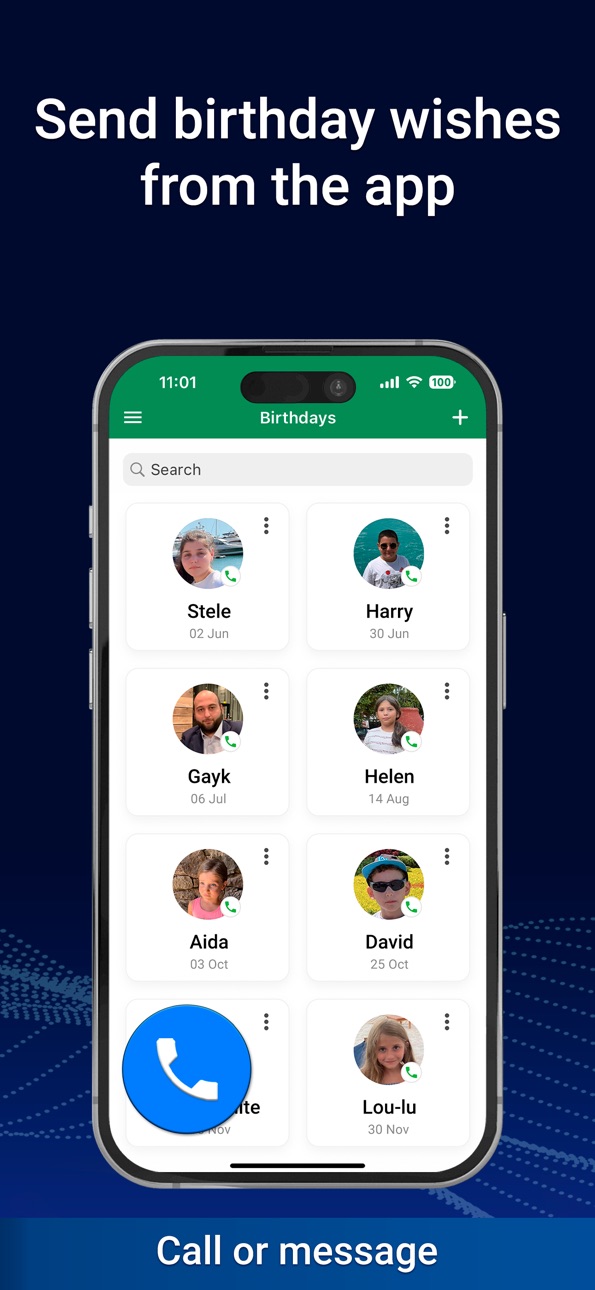
Thanks to our new integration with WhatsApp, you can now call or send your birthday wishes directly from the 'Birthdays' tab.
Calendar Sharing (Collaborative Calendar):
Despite the fact that 'Calendar Sharing' functionalities are provided by calendar and email services rather than the developer, we have created this section with instructions and relevant links.
Now you can easily grant access to your MC Calendar to colleagues, friends, or family members. This collaborative approach opens up new possibilities for team coordination and coordinated planning.
For any questions or assistance, our support team is always ready to help. Contact us at support@plantech.app for assistance.
We appreciate your participation in shaping MC Calendar. Together, we will change how you manage your time!
Build 858833645v1.0.32023-09-04 10:53:26
Welcome to our updated Calendar app! Your trusted time management companion just got even better, providing all the essential features for boosting productivity.
What's New:
New print design: We are thrilled to introduce a stylish and modern print design for calendar events. Printing now becomes a delightful experience.
Redesigned weekend settings: We have made changes to the weekend settings design, making it more intuitive and user-friendly.
We hope these new features will enhance your Calendar experience and make it even more enjoyable and efficient. If you have any questions, feedback, or suggestions, feel free to reach out to us at support@plantech.app. We are always here to help!
Build 856791951v1.0.22023-06-22 19:49:41
PLANNING IS AN IMPORTANT PROCESS.
WITH OUR CALENDAR YOU WILL EASILY COPE WITH THIS TASK.
DON'T FORGET IMPORTANT EVENTS!
In this update:
Added the ability to change the appearance of icons on the bottom navigation bar.
With any questions of your concerns, please contact us at support@plantech.app. We will be glad to help!
Build 856650286v1.0.12023-04-27 09:24:04
PLANNING IS AN IMPORTANT PROCESS.
WITH OUR CALENDAR YOU WILL EASILY COPE WITH THIS TASK.
DON'T FORGET IMPORTANT EVENTS!
In this update:
Minor bugs have been fixed.
Build 851866409v1.02023-04-23 05:04:56
Price history by region
Currency
Show
Columns
Search
Availability 1 of 1 storefronts
| Region | Language | Price | Ratings | Avg | Version |
|---|---|---|---|---|---|
| US | en-US | Free | 34 | 4.6 | 1.2.1 |
Change log 26 changes · US
✎
releaseNotes updated
Improved interface and navigation
Increased stability and performance
Fixed bugs and minor issues
We’d love to hear your feedback — contact us at: planner@pl
✎
description updated
MC Calendar is your all-in-one planner for organizing your day, week, month — and even your entire year.
Whether you're managing work, personal goals, or both,
✎
subtitle updated
Plan your day with reminders
✎
name updated
Calendar: To Do List & Notes
◆
Version 1.2.1 released
Improved interface and navigation
Increased stability and performance
Fixed bugs and minor issues
We’d love to hear your feedback — contact us at: planner@plantech.app
◆
Version 1.2.0 released
In this update, we improved app stability and fixed minor bugs for a more comfortable user experience.
◆
Version 1.1.9 released
What’s New
– Fixed an issue where the app could freeze on iOS 26.
– Improved stability and performance.
– Minor interface improvements for an even smoother and more enjoyable experience.
Thank you for using our app! Your support helps us ma
◆
Version 1.1.8 released
What’s New
– Fixed an issue that could cause the app to freeze on iOS 26.
– Improved stability and speed when working with contacts and birthdays.
– Minor interface improvements for a smoother and more pleasant experience.
Thank you for
◆
Version 1.1.7 released
MC Calendar: Now with Notes
MC Calendar just got better — you can now create notes right inside the app.
Write down thoughts, sketch ideas, save anything important — and when you're ready, turn your notes into tasks with a single tap.
We’
◆
Version 1.1.6 released
What's New in MC Calendar
General Improvements
• New interactive app icon – We hope you’ll love it! Like all other icons, it can be found in the "App Icons" section of the main menu.
• No more daily confirmation for the interactive icon –
◆
Version 1.1.5 released
Introducing the updated version of our app!
We’re continuously working to make your experience even more convenient and enjoyable.
What’s new:
• Enhanced functionality for greater ease of use.
• Minor bug fixes to ensure everything runs
◆
Version 1.1.4 released
We are excited to present the updated version of our app, designed to maximize convenience and ensure complete user satisfaction.
What’s new in this version:
• Fixed an issue that caused crashes after updating the operating system.
W
◆
Version 1.1.3 released
We are excited to present the updated version of our app!
In this version, we fixed minor bugs and introduced improvements to make using the app even more convenient and comfortable for you.
We always value your feedback and are happy to an
◆
Version 1.1.2 released
We are excited to present the updated version of the 'MC Calendar' app! In this release, we have introduced several improvements to enhance your comfort and meet your needs:
• Added Reminders with full synchronization with the 'Reminders
◆
Version 1.1.1 released
We are excited to present the updated version of the "MC Calendar" app! This version includes several enhancements to improve your experience and meet your needs:
• Improved functionality and fixed minor bugs.
We highly value your feedbac
◆
Version 1.1.0 released
We are excited to present the updated version of the "MC Calendar" app! This version includes several enhancements to improve your experience and meet your needs:
• Added the ability to create backups with embedded files and voice record
◆
Version 1.0.9 released
With pleasure, we present to you the updated version of the 'MC Calendar' app, where our enhancements are aimed at increasing your comfort and meeting your needs. We are pleased to announce that in this version, we have updated the applicat
◆
Version 1.0.8 released
With pleasure, we present to you the updated version of the 'MC Calendar' app, where our enhancements are aimed at improving your comfort and meeting your needs.
In this version, we have fixed minor bugs and significantly improved functi
◆
Version 1.0.7 released
With pleasure, we present to you the updated version of the 'MC Calendar' app, where our improvements are aimed at enhancing your comfort and meeting your needs.
In this version, the following changes have been made:
- Added the abili
◆
Version 1.0.6 released
Dear users,
In this version of MC Calendar, we have made the following changes:
• Added a user guide.
• Fixed minor issues.
We are always ready to answer your questions and provide assistance. If you have any inquiries or feedback,
◆
Version 1.0.5 released
With our exciting update, we are proud to introduce a completely unique calendar that will revolutionize your perceptions of planning and time management. This inspiring innovation is truly groundbreaking in the calendar app market, and her
◆
Version 1.0.4 released
Introducing the New MC Calendar Update: Integration with WhatsApp and Collaborative Calendar Sharing!
Hello, our valued users! We are excited to announce the latest enhancement to our MC Calendar app. In our ongoing efforts to make your
◆
Version 1.0.3 released
Welcome to our updated Calendar app! Your trusted time management companion just got even better, providing all the essential features for boosting productivity.
What's New:
New print design: We are thrilled to introduce a stylish and m
◆
Version 1.0.2 released
PLANNING IS AN IMPORTANT PROCESS.
WITH OUR CALENDAR YOU WILL EASILY COPE WITH THIS TASK.
DON'T FORGET IMPORTANT EVENTS!
In this update:
Added the ability to change the appearance of icons on the bottom navigation bar.
With any questions o
◆
Version 1.0.1 released
PLANNING IS AN IMPORTANT PROCESS.
WITH OUR CALENDAR YOU WILL EASILY COPE WITH THIS TASK.
DON'T FORGET IMPORTANT EVENTS!
In this update:
Minor bugs have been fixed.
◆
Version 1.0 released