Home › Business

 US
US
1 of 1 storefronts
Content in en-US
Content in en-US
Information
Preview 2 platforms
iPhone 6 images


iPad 6 images


What’s New Version 1.2.1
Users can now sign into YakChat using their Google accounts
Description
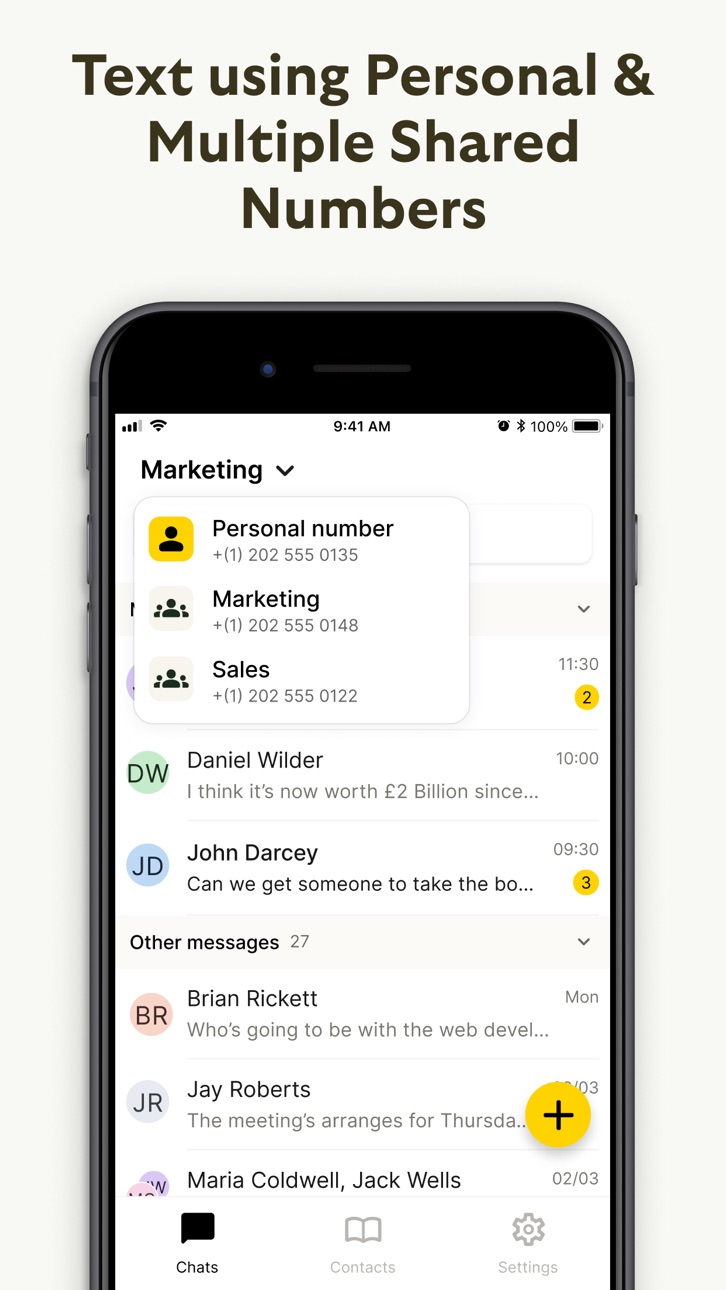
Send/receive SMS messages on your iOS mobile devices, using the same YakChat virtual number you text with on your Microsoft 365 desktop. Start a conversation on, say, your Microsoft Teams desktop, and keep it going when you’re on the move. Text using a virtual number in your own local area or country code, or simply use your existing business number to text and call. YakChat is fully integrated with Microsoft 365 so you can enjoy single sign-on security via Microsoft authentication and send messages to your contacts stored in Outlook, your employee directory or mobile phone. As new texts arrive, YakChat will alert you on all your mobile devices and desktop applications, and because it stores every text message securely in Microsoft Azure, you can archive them as email to stay fully compliant.
Accessibility
ipadiphonemacrealityDevicetvoswatch
Version history 11 versions
Build 874450732v1.2.12025-05-08 10:20:54
Users can now sign into YakChat using their Google accounts
Build 872670387v1.2.02025-03-27 11:33:07
We’ve been busy making improvements! Here’s what’s new in this update:
- Updated API – Enjoy a smoother, more reliable experience.
- New Contact Manager – Organize your contacts with contact tags for better management.
- Chat Archiving – You can now close and archive chats to keep things tidy.
- Improved Contact Search & Details – A refreshed UI for searching contacts, plus a brand-new contact details page with more useful info at a glance.
Build 869374894v1.1.62024-09-30 13:04:40
- Minor bug fixes to resolve connection issues
Build 869207522v1.1.52024-09-26 19:53:30
- You can now open Outlook and Active Directory (AD) contact folders and seamlessly view contacts within these folders.
- Search functionality added! Quickly find contacts inside Outlook contact folders with ease.
Build 866435856v1.1.42024-06-06 15:40:20
- iPad support
- Fixed a bug which sometimes prevented users from replying to a message after navigating to the app from a push notification
- Fixed a bug that prevented some users from sending group chats
Build 865068571v1.1.32024-04-09 18:11:33
- Fixed a bug on the New Message screen that prevented a spinner from disappearing once contacts had been loaded
- Fixed a bug that prevented devices from registering for push notifications properly
- Added better support for OTA updates
Build 864646437v1.1.22024-03-28 19:57:27
Fix for a bug that prevented some users from receiving push notifications
Build 861096251v1.1.02024-01-17 09:38:58
Introducing group chat functionality and a new layout that lets you browse and view all of your contacts
Build 862967575v1.1.12024-01-17 18:18:39
- Minor bug fixes
Build 858696827v1.0.12023-08-01 12:14:00
- Moved to YakChat V2 inboxes
- Contact groups are now accessible from the mobile app
- Updated design in line with desktop updates
- Fixed authentication bugs
- Added 'unread' notification badges in the drawer to alert you when another inbox has received a new message
Build 851774219v1.0.02022-11-02 08:51:09
No pricing data captured yet — comparisons appear once the app has paid storefronts or in-app purchases.
Availability 1 of 1 storefronts
| Region | Language | Price | Ratings | Avg | Version |
|---|---|---|---|---|---|
| US | en-US | Free | 3 | 3.0 | 1.2.1 |
Change log 15 changes · US
✎
releaseNotes updated
Users can now sign into YakChat using their Google accounts
✎
description updated
Send/receive SMS messages on your iOS mobile devices, using the same YakChat virtual number you text with on your Microsoft 365 desktop. Start a conversation on
✎
subtitle updated
SMS text for Teams
✎
name updated
Text365
◆
Version 1.2.1 released
Users can now sign into YakChat using their Google accounts
◆
Version 1.2.0 released
We’ve been busy making improvements! Here’s what’s new in this update:
- Updated API – Enjoy a smoother, more reliable experience.
- New Contact Manager – Organize your contacts with contact tags for better management.
- Chat Archiving – Y
◆
Version 1.1.6 released
- Minor bug fixes to resolve connection issues
◆
Version 1.1.5 released
- You can now open Outlook and Active Directory (AD) contact folders and seamlessly view contacts within these folders.
- Search functionality added! Quickly find contacts inside Outlook contact folders with ease.
◆
Version 1.1.4 released
- iPad support
- Fixed a bug which sometimes prevented users from replying to a message after navigating to the app from a push notification
- Fixed a bug that prevented some users from sending group chats
◆
Version 1.1.3 released
- Fixed a bug on the New Message screen that prevented a spinner from disappearing once contacts had been loaded
- Fixed a bug that prevented devices from registering for push notifications properly
- Added better support for OTA updates
◆
Version 1.1.2 released
Fix for a bug that prevented some users from receiving push notifications
◆
Version 1.1.1 released
- Minor bug fixes
◆
Version 1.1.0 released
Introducing group chat functionality and a new layout that lets you browse and view all of your contacts
◆
Version 1.0.1 released
- Moved to YakChat V2 inboxes
- Contact groups are now accessible from the mobile app
- Updated design in line with desktop updates
- Fixed authentication bugs
- Added 'unread' notification badges in the drawer to alert you when another inb
◆
Version 1.0.0 released