Home › Business

 US
US
1 of 1 storefronts
Content in en-US
Content in en-US
Information
Preview 2 platforms
iPhone 8 images


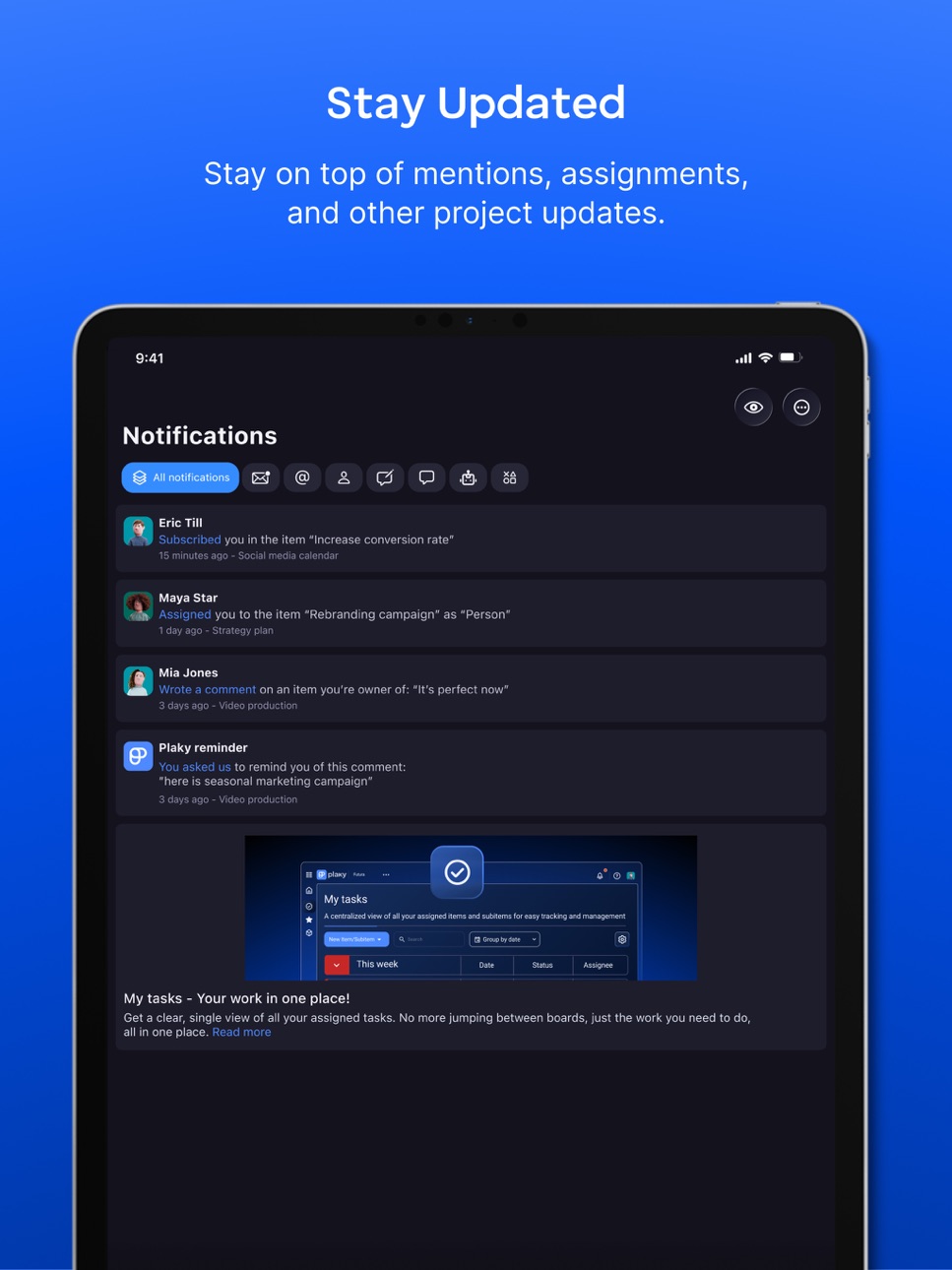
iPad 8 images




What’s New Version 2.2.7
What's new?
iPad bug fixes: Resolved layout and touch‑responsiveness issues specific to iPad, improving usability on larger screens.
Other bug fixes and UI/UX improvements: Multiple chart widget bugs, Add field button in the dropdown menu, and many more.
Description
Organize projects, tasks, and teamwork in one place. Plaky is a project management app that helps teams plan work, track tasks, and collaborate on projects. Create project boards, assign tasks, monitor progress, and keep everyone aligned on what needs to be done.
PROJECT MANAGEMENT
Organize projects using boards and workflows that help teams see progress clearly. Track tasks and manage work without complicated tools.
TASK MANAGEMENT
Create tasks, assign responsibilities, and set deadlines. Add descriptions, checklists, and updates so that work stays clear and organized.
TEAM COLLABORATION
Discuss tasks directly with your team using comments and updates. Keep communication connected to the work.
FILE SHARING
Attach documents, images, and resources to tasks so that teams always have the information they need.
TRACK PROJECT PROGRESS
See task and project status at a glance. Quickly understand what is in progress and what has been completed.
FREE PLAN AVAILABLE
Start with a FREE plan that includes unlimited spaces, boards, and items, task collaboration, and task comments and updates.
ADVANCED FEATURES FOR TEAMS
Plaky also offers advanced capabilities, such as automations, bulk actions, timeline fields, activity logs, viewer role, board ownership management, custom workspace domain, and single sign-on (SSO).
Download the app and create an account for free, or log in using your existing details.
Accessibility
ipadiphonemacrealityDevicetvoswatch
Version history 25 versions
Build 887794376v2.2.72026-07-03 17:48:00
What's new?
iPad bug fixes: Resolved layout and touch‑responsiveness issues specific to iPad, improving usability on larger screens.
Other bug fixes and UI/UX improvements: Multiple chart widget bugs, Add field button in the dropdown menu, and many more.
Build 886519575v2.2.62026-07-02 22:17:38
What's new?
iPad bug fixes: Resolved layout and touch‑responsiveness issues specific to iPad, improving usability on larger screens.
Other bug fixes and UI/UX improvements: Multiple chart widget bugs, Add field button in the dropdown menu, and many more.
Build 886295397v2.2.52026-05-29 21:05:17
What's new?
-Multiple chart widgets: Chart View just got a major upgrade—create up to 30 widgets, duplicate them effortlessly, and apply separate filters for every widget.
-Favorite and Recents widget: We’ve added new Favorite and Recents widgets to the home screen, instantly showing the boards you’ve marked as favorites and the ones you’ve opened most recently. Stay organized and efficient with quick access to the boards you use every day.
-Conflict resolution: We’ve upgraded the conflict‑handling system so you can keep using any board features that aren’t directly involved in a conflict—allowing you to work normally without having to pause the whole board.
-Walkthrough: Start by creating your very first board, then let the interactive walkthrough walk you through all the key elements. In minutes you’ll know exactly how to use items, fields, and board settings to stay on top of your work.
What's fixed?
-UX/UI improvements and bug fixes
Build 886238670v2.2.42026-05-28 18:48:05
What's new?
-Multiple chart widgets: Chart View just got a major upgrade—create up to 30 widgets, duplicate them effortlessly, and apply separate filters for every widget.
-Favorite and Recents widget: We’ve added new Favorite and Recents widgets to the home screen, instantly showing the boards you’ve marked as favorites and the ones you’ve opened most recently. Stay organized and efficient with quick access to the boards you use every day.
-Conflict resolution: We’ve upgraded the conflict‑handling system so you can keep using any board features that aren’t directly involved in a conflict—allowing you to work normally without having to pause the whole board.
-Walkthrough: Start by creating your very first board, then let the interactive walkthrough walk you through all the key elements. In minutes you’ll know exactly how to use items, fields, and board settings to stay on top of your work.
What's fixed?
-UX/UI improvements and bug fixes
Build 883701373v2.2.32026-03-30 23:07:19
What's new?
-Custom color picker: Customize Plaky according to your needs. Custom color picker is now available for statuses, tags, groups, spaces, and teams, allowing for unlimited status -labels and personalized branding. And say goodbye to the 18-status limit: our new custom color functionality gives you the freedom to create infinite statuses.
-Move board to space or folder: Your boards are now mobile! Shift them to any space or folder with just a couple of clicks.
-View improvement: Reorder views with ease and explore our redesigned view list for even faster navigation: opening view list from breadcrumbs.
-Modals button adaptation to iOS 26 system: Buttons just got a makeover! We've updated all modal controls to match the sleek new look of iOS 26.
-Microsoft Sign-in: Microsoft signup/login options are now available to all users.
What's fixed?
-UX/UI improvements and bug fixes
Build 882562326v2.2.22026-02-18 09:21:33
What's new?
- Liquid Glass
- Notification sections
What's fixed?
- UX/UI improvements and bug fixes
Build 882375417v2.2.12026-02-12 21:23:11
What's new?
- Liquid Glass
- Notification sections
What's fixed?
- UX/UI improvements and bug fixes
Build 879697700v2.2.02025-12-10 17:20:55
What's new?
- My tasks: show tasks for other users
What's fixed?
- UX/UI improvements and bug fixes
Build 879210036v2.1.92025-10-25 19:44:25
What's new?
- My tasks new filters
- Completed status
- Comment reminder
What's fixed?
- UX/UI improvements and bug fixes
Build 877834372v2.1.82025-09-05 17:32:47
What's new?
- My tasks: See all tasks assigned to you in one place, so you can stay focused and organized on the go. Customize your view by choosing to group by a specific category, showing or hiding empty groups, and selecting which boards you want to see.
What's fixed?
- UX/UI improvements and bug fixes
Build 877219376v2.1.72025-08-13 21:28:29
What's new?
- Notification improvements:
- Categories: New display of categories, making it quicker and easier to access what matters most.
- Category visibility: You can choose the categories you want to display in the notification panel.
- Faster notification access: We’ve improved the way notifications open to give you a faster and smoother experience. Now you can view and respond to updates more quickly, without unnecessary delays.
- iOS: Plaky/Pumble integrations (Notifications): Go to Notification settings and set the notifications you wish to receive through Pumble.
What's fixed?
- UX/UI improvements and bug fixes
Build 876477198v2.1.62025-07-17 18:38:58
What's new?
- Chart view: You can now visualize your data in charts to better track progress and spot trends.
- Read more option: This helps manage page length and improve user experience by presenting concise overviews initially. Implemented on the Rich Text field and the Comment section
What's fixed?
- UX/UI improvements and bug fixes
Build 875173092v2.1.52025-05-30 12:23:30
What's new?
- Board view configuration: Board view related options are now grouped in one place(Table/Kanban)
- Kanban divide by group option: See items grouped by item group in the Kanban view
- File description: Manage file description also from the iOS app
- Space and viewer type conflict resolution: Now you can resolve conflicts(space/viewer conflict) through the mobile app
What's fixed?
- UX/UI improvements and bug fixes
Build 873924783v2.1.42025-04-10 15:32:48
What's new?
Reorder subitems on Kanban - Now it is possible to reorder subitems on the Kanban using the Drag&Drop function to fit your needs.
Adding a field description - Via the field menu, add a description that explains the purpose of the field.
What's fixed?
UX/UI improvements and bug fixes
Build 872935933v2.1.32025-03-14 21:31:49
What's new?
Hidden search for a cleaner UI
Reorder item groups
Scrollable titles for long entries
Board duplication
What's fixed?
UX/UI improvements and bug fixes
Build 872868824v2.1.22025-02-28 08:17:15
What's new?
-Archive/Trash info banners
-New display of toast messages
What's fixed?
-UX/UI Improvements and bug fixes
Build 872847388v2.1.12025-02-27 20:58:49
What's new?
-Archive/Trash info banners
-New display of toast messages
What's fixed?
-UX/UI Improvements and bug fixes
Build 871470806v2.1.02025-01-02 12:42:01
What's new?
-CAKE.com account
-File upload management
What's fixed?
-UX/UI Improvements and bug fixes
Build 870457142v2.0.92024-11-15 22:07:19
What's new?
-Workspace Switcher for easier navigation.
-Seamless and secure login with Password-free access.
-Workspace/User image improvements.
What's fixed?
-UX/UI Improvements and bug fixes
Build 870185494v2.0.82024-11-04 17:15:40
What's new?
New login/registration flow
What's fixed?
UX/UI Improvements and bug fixes
Build 869201369v2.0.72024-09-23 10:20:11
What's new?
Comment reactions preview
Subitems
What's fixed?
UX/UI Improvements and bug fixes
Build 869154352v2.0.62024-09-21 02:59:08
What's new?
Comment reactions preview
Subitems
What's fixed?
UX/UI Improvements and bug fixes
Build 867766191v2.0.52024-07-26 18:50:22
What's new?
Reactions and replies to comments
Item drag and drop
Pin fields
In-App notification indicator
What's fixed?
Timeline progress bar indicator
UX/UI Improvements and bug fixes
Build 867033349v2.0.42024-06-27 16:07:44
What's new?
Terminology change from ‘Organization’ to ‘Workspace’
Enhanced administration and clarified permissions for admins
New settings for aggregated email notifications
Improved management of user and team avatars and names
What's fixed?
UX/UI improvements
Archive/Trash improvements
Build 866698560v2.0.32024-06-14 18:02:41
- Home page widgets: Tailor your home page by customizing its widgets.
- Conditional coloring - for tracking specific criteria of fields, items, and item groups.
- “Archive” completed or inactive tasks to declutter your main view, and move deleted tasks to “Trash” for easy restoration.
- Breadcrumb navigation in items - Switch quickly between different tabs in items
- Space members: new user management option for space members
- ‘Without current user’: new filtering label
What's fixed?
- New item/field improvement
- Notification redirection improvements
- Timezones improvement
- Users and teams page improvements
- UX/UI improvements
No pricing data captured yet — comparisons appear once the app has paid storefronts or in-app purchases.
Availability 1 of 1 storefronts
| Region | Language | Price | Ratings | Avg | Version |
|---|---|---|---|---|---|
| US | en-US | Free | 15 | 4.1 | 2.2.7 |
Change log 29 changes · US
✎
releaseNotes updated
What's new?
iPad bug fixes: Resolved layout and touch‑responsiveness issues specific to iPad, improving usability on larger screens.
Other bug fixes and UI/UX i
✎
description updated
Organize projects, tasks, and teamwork in one place. Plaky is a project management app that helps teams plan work, track tasks, and collaborate on projects. Cre
✎
subtitle updated
Project Management Tool
✎
name updated
Plaky
◆
Version 2.2.7 released
What's new?
iPad bug fixes: Resolved layout and touch‑responsiveness issues specific to iPad, improving usability on larger screens.
Other bug fixes and UI/UX improvements: Multiple chart widget bugs, Add field button in the dropdown menu,
◆
Version 2.2.6 released
What's new?
iPad bug fixes: Resolved layout and touch‑responsiveness issues specific to iPad, improving usability on larger screens.
Other bug fixes and UI/UX improvements: Multiple chart widget bugs, Add field button in the dropdown menu,
◆
Version 2.2.5 released
What's new?
-Multiple chart widgets: Chart View just got a major upgrade—create up to 30 widgets, duplicate them effortlessly, and apply separate filters for every widget.
-Favorite and Recents widget: We’ve added new Favorite and Recents w
◆
Version 2.2.4 released
What's new?
-Multiple chart widgets: Chart View just got a major upgrade—create up to 30 widgets, duplicate them effortlessly, and apply separate filters for every widget.
-Favorite and Recents widget: We’ve added new Favorite and Recents w
◆
Version 2.2.3 released
What's new?
-Custom color picker: Customize Plaky according to your needs. Custom color picker is now available for statuses, tags, groups, spaces, and teams, allowing for unlimited status -labels and personalized branding. And say goodbye
◆
Version 2.2.2 released
What's new?
- Liquid Glass
- Notification sections
What's fixed?
- UX/UI improvements and bug fixes
◆
Version 2.2.1 released
What's new?
- Liquid Glass
- Notification sections
What's fixed?
- UX/UI improvements and bug fixes
◆
Version 2.2.0 released
What's new?
- My tasks: show tasks for other users
What's fixed?
- UX/UI improvements and bug fixes
◆
Version 2.1.9 released
What's new?
- My tasks new filters
- Completed status
- Comment reminder
What's fixed?
- UX/UI improvements and bug fixes
◆
Version 2.1.8 released
What's new?
- My tasks: See all tasks assigned to you in one place, so you can stay focused and organized on the go. Customize your view by choosing to group by a specific category, showing or hiding empty groups, and selecting which boards
◆
Version 2.1.7 released
What's new?
- Notification improvements:
- Categories: New display of categories, making it quicker and easier to access what matters most.
- Category visibility: You can choose the categories you want to display in the notification p
◆
Version 2.1.6 released
What's new?
- Chart view: You can now visualize your data in charts to better track progress and spot trends.
- Read more option: This helps manage page length and improve user experience by presenting concise overviews initially. Impleme
◆
Version 2.1.5 released
What's new?
- Board view configuration: Board view related options are now grouped in one place(Table/Kanban)
- Kanban divide by group option: See items grouped by item group in the Kanban view
- File description: Manage file description al
◆
Version 2.1.4 released
What's new?
Reorder subitems on Kanban - Now it is possible to reorder subitems on the Kanban using the Drag&Drop function to fit your needs.
Adding a field description - Via the field menu, add a description that explains the purpose of t
◆
Version 2.1.3 released
What's new?
Hidden search for a cleaner UI
Reorder item groups
Scrollable titles for long entries
Board duplication
What's fixed?
UX/UI improvements and bug fixes
◆
Version 2.1.2 released
What's new?
-Archive/Trash info banners
-New display of toast messages
What's fixed?
-UX/UI Improvements and bug fixes
◆
Version 2.1.1 released
What's new?
-Archive/Trash info banners
-New display of toast messages
What's fixed?
-UX/UI Improvements and bug fixes
◆
Version 2.1.0 released
What's new?
-CAKE.com account
-File upload management
What's fixed?
-UX/UI Improvements and bug fixes
◆
Version 2.0.9 released
What's new?
-Workspace Switcher for easier navigation.
-Seamless and secure login with Password-free access.
-Workspace/User image improvements.
What's fixed?
-UX/UI Improvements and bug fixes
◆
Version 2.0.8 released
What's new?
New login/registration flow
What's fixed?
UX/UI Improvements and bug fixes
◆
Version 2.0.7 released
What's new?
Comment reactions preview
Subitems
What's fixed?
UX/UI Improvements and bug fixes
◆
Version 2.0.6 released
What's new?
Comment reactions preview
Subitems
What's fixed?
UX/UI Improvements and bug fixes
◆
Version 2.0.5 released
What's new?
Reactions and replies to comments
Item drag and drop
Pin fields
In-App notification indicator
What's fixed?
Timeline progress bar indicator
UX/UI Improvements and bug fixes
◆
Version 2.0.4 released
What's new?
Terminology change from ‘Organization’ to ‘Workspace’
Enhanced administration and clarified permissions for admins
New settings for aggregated email notifications
Improved management of user and team avatars and names
What's f
◆
Version 2.0.3 released
- Home page widgets: Tailor your home page by customizing its widgets.
- Conditional coloring - for tracking specific criteria of fields, items, and item groups.
- “Archive” completed or inactive tasks to declutter your main view, and move