Home › Music

 US
US
1 of 1 storefronts
Content in en-US
Content in en-US
Information
Preview 2 platforms

iPhone 7 images


iPad 7 images


What’s New Version 2.0.1
• Introducing Audio Tracks and Ableton Link Audio
• Record audio directly into your sessions
• Transfer audio in real time to Ableton Live with Ableton Link Audio
• New FX devices: Erosion and Auto Shift
• Updated Auto Pan with real-time visualisation
Description
Start new musical ideas with a curated selection of sounds and effects. Create beats and melodic parts, sample your world, and continue your tracks in Ableton Live.
Note is a place to form ideas, explore new sounds and find direction. Get your ideas out or just experiment until inspiration hits, using a selection of Ableton Live’s drum kits, synths and melodic instruments. Create your own sound palette by sampling with your phone’s built-in microphone. And use Note’s built-in MIDI Editor to sequence notes, beats and chords or make tweaks as you listen back
Follow your ideas wherever they lead by sending your projects to Live without leaving the app with the help of Ableton Cloud. Open projects from Live’s browser and keep working – you can edit all your MIDI notes, and all your samples and sounds from Note are exactly the same. Ableton Note users get a free license for Ableton Live Lite – simple, intuitive software used by musicians, producers and DJs around the world to write, record, and perform. For Ableton Move users, Note also offers the chance to keep working on a Set from your phone.
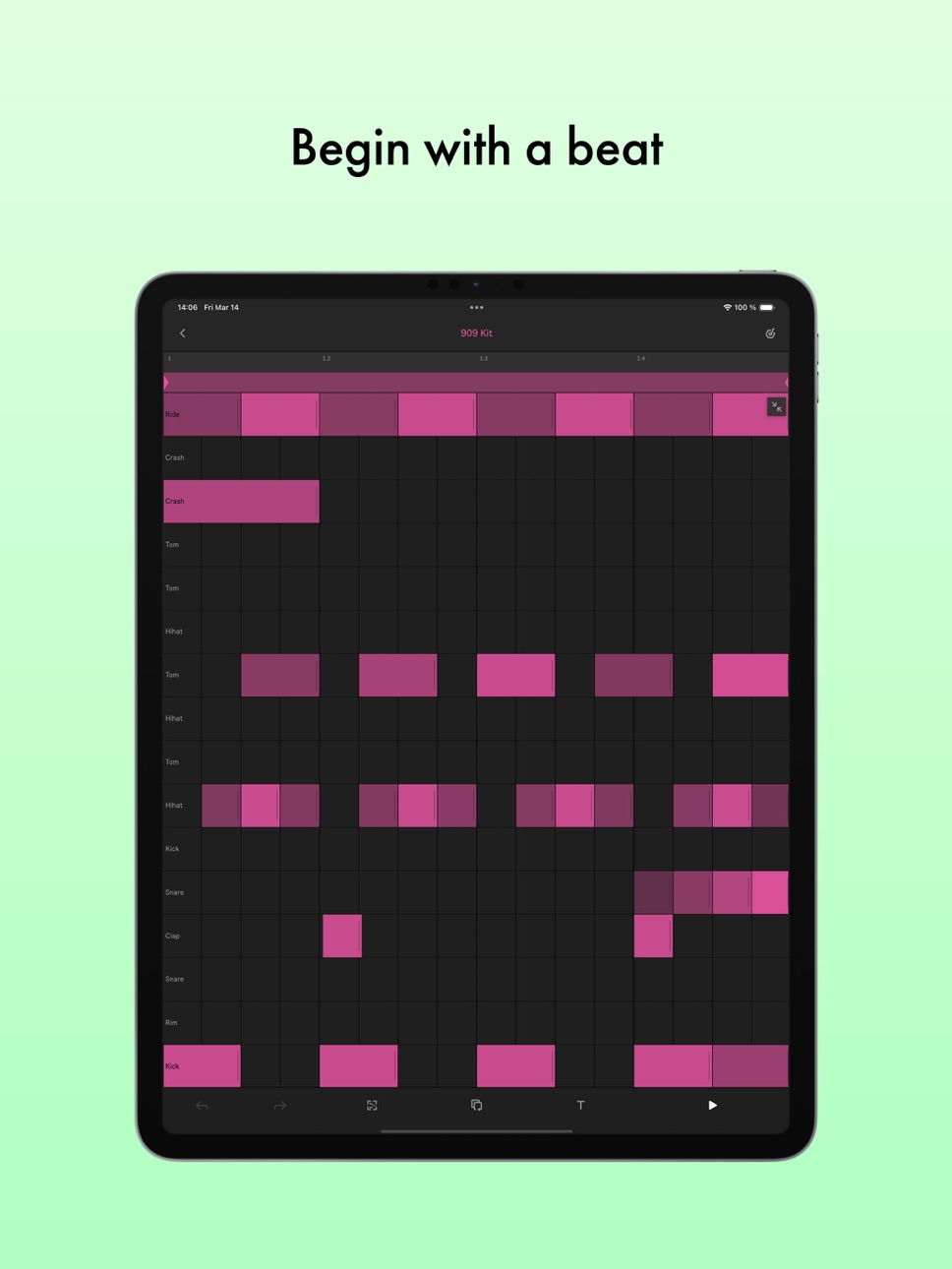
Begin with a beat:
• Choose from 76 Drum Sampler kits
• Tap out a beat using the 16-pad grid, or sequence one with the MIDI Editor
• Play each drum hit melodically using 16 Pitches mode
• Quantize your beat or nudge notes to fix loose timing or mistakes
• Add more layers of rhythm
• Create beat repetitions with Note Repeat
• Change parameters to shape your sound
• Experiment with effects or apply swing for variations
Start with a melody:
• Choose from 317 synth sounds and 60 Melodic Sampler instruments
• Play or program your melody or chord progression with the 25-pad grid, piano roll or MIDI Editor
• Set a key and scale to get instantly harmonic results
• Add more layers of harmony
• Change parameters to shape your sound
• Add effects to experiment with sound design
Sample your environment:
• Create your own kits by recording percussive sounds into Note’s Drum Sampler
• Record tonal sounds to create your own Melodic Sampler instruments
• Manipulate your samples by cutting, filtering or repitching them
• Sequence samples into beats, melodies and chords using the MIDI Editor
• Shape or transform your sounds with effects
• Import your own samples or audio directly from videos
Work with Audio
• Add audio clips from the library
• Warp tempo or adjust pitch of your clips
• Record audio directly using your phone’s built-in microphone
• Connect an audio interface to record external sources
• Combine recorded and imported audio with your beats and melodies
Capture improvisations:
• Play something, then tap the Capture button to keep it
• Play at a tempo that feels comfortable and Note will detect it
• Note will recognize the length of the phrase and create a loop
• Quantize it, add to it, or change the sound
• Connect MIDI hardware to play keys and change the sound of your instruments
Create variations:
• Note features a grid-based Session View layout
• Double your loops to create variation within clips
• Duplicate your clips and create different versions of your ideas
• Add, delete or adjust multiple notes at once with the MIDI Editor
• Create eight tracks with up to eight clips on eight scenes
• Try different clip combinations and song structures
• Export your work as an audio file to listen and share
In-App Purchases US pricing
One-Time Purchases
Drift In-App Purchase$3.99
Capabilities
In-App Purchases
Accessibility
ipadiphonemacrealityDevicetvoswatch
Version history 25 versions
Build 882509270v2.0.12026-05-05 06:30:05
• Introducing Audio Tracks and Ableton Link Audio
• Record audio directly into your sessions
• Transfer audio in real time to Ableton Live with Ableton Link Audio
• New FX devices: Erosion and Auto Shift
• Updated Auto Pan with real-time visualisation
Build 880633129v1.7.32025-12-15 10:10:13
We constantly update Note to bring you new features and improvements:
- New Slicing Mode for Drum Samples
- Ability to add external folders to Note’s Sample Browser
- New Auto Pan-Tremolo Effects Device
- New workflow for zooming and start/end for samples
- "Crop Sample" in sample options
Build 879899084v1.7.22025-11-25 07:28:37
We constantly update Note to bring you new features and improvements:
- New Slicing Mode for Drum Samples
- Ability to add external folders to Note’s Sample Browser
- New Auto Pan-Tremolo Effects Device
- New workflow for zooming and start/end for samples
Build 878832722v1.62025-10-14 06:48:36
Ableton Live's Drift synthesizer, now in Note. A versatile instrument for designing your own sounds – bold leads, deep bass, or subtle textures.
Build 878561138v1.5.22025-10-02 06:59:04
Ableton Live's Drift synthesizer, now in Note. A versatile instrument for designing your own sounds – bold leads, deep bass, or subtle textures.
Build 877781610v1.5.12025-09-03 07:50:09
Ableton Live's Drift synthesizer, now in Note. A versatile instrument for designing your own sounds – bold leads, deep bass, or subtle textures.
Build 876866880v1.5.02025-09-02 06:28:01
Ableton Live's Drift synthesizer, now in Note. A versatile instrument for designing your own sounds – bold leads, deep bass, or subtle textures.
Build 876258791v1.4.32025-07-21 07:42:35
This update to Ableton Note adds Auto Filter as a new effects device.
Build 875362814v1.42025-06-11 06:29:56
This update to Ableton Note adds Auto Filter as a new effects device.
Build 874984995v1.3.22025-05-26 08:39:49
This update introduces Note’s MIDI Editor, allowing you to build or rework your music by sequencing notes and beats directly onto the grid view of your chosen track. Program melodies, drums and chords with just a few taps, listen back and try out different patterns and variations.
Also new in Note 1.3 is 16 Pitches mode for drums: Transpose any drum hit into a bassline or melody, and apply tweaks and transformations to achieve unique musical results.
Build 874209906v1.3.12025-04-24 08:31:50
This update introduces Note’s MIDI Editor, allowing you to build or rework your music by sequencing notes and beats directly onto the grid view of your chosen track. Program melodies, drums and chords with just a few taps, listen back and try out different patterns and variations.
Also new in Note 1.3 is 16 Pitches mode for drums: Transpose any drum hit into a bassline or melody, and apply tweaks and transformations to achieve unique musical results.
Build 873331404v1.32025-04-02 08:04:35
This update introduces Note’s MIDI Editor, allowing you to build or rework your music by sequencing notes and beats directly onto the grid view of your chosen track. Program melodies, drums and chords with just a few taps, listen back and try out different patterns and variations.
Also new in Note 1.3 is 16 Pitches mode for drums: Transpose any drum hit into a bassline or melody, and apply tweaks and transformations to achieve unique musical results.
Build 872264608v1.2.22025-02-27 11:30:11
This Ableton Note update introduces new sound design features and UI improvements:
The Drum Sampler now includes multiple playback effects that can be controlled by an x/y pad.
A brand-new Arpeggiator lets you easily add variety to melodies and basslines.
New Mixing Presets, now featuring a built-in compressor device for a smoother sound.
An improved Browser that conveniently displays the device type next to presets.
All release updates and bug fixes can be found in the Release Notes section of the Help menu in Note’s App Settings.
Build 871886015v1.2.12025-01-22 12:40:10
This Ableton Note update introduces new sound design features and UI improvements:
The Drum Sampler now includes multiple playback effects that can be controlled by an x/y pad.
A brand-new Arpeggiator lets you easily add variety to melodies and basslines.
New Mixing Presets, now featuring a built-in compressor device for a smoother sound.
An improved Browser that conveniently displays the device type next to presets.
All release updates and bug fixes can be found in the Release Notes section of the Help menu in Note’s App Settings.
Build 869206569v1.22024-10-08 08:00:50
This Ableton Note update introduces new sound design features and UI improvements:
The Drum Sampler now includes multiple playback effects that can be controlled by an x/y pad.
A brand-new Arpeggiator lets you easily add variety to melodies and basslines.
New Mixing Presets, now featuring a built-in compressor device for a smoother sound.
An improved Browser that conveniently displays the device type next to presets.
All release updates and bug fixes can be found in the Release Notes section of the Help menu in Note’s App Settings.
Build 866939479v1.1.32024-07-23 09:39:24
Welcome to the latest update of Ableton Note! This release includes a free Live 12 Lite license for all Note users. Simply head to Note’s Settings page and tap “Get Live Lite” to obtain your license.
Build 866236321v1.1.22024-05-28 07:24:28
Welcome to the latest update of Ableton Note! This release includes a free Live 12 Lite license for all Note users. Simply head to Note’s Settings page and tap “Get Live Lite” to obtain your license.
Build 865695855v1.1.12024-05-06 07:15:51
Welcome to the latest update of Ableton Note! This release includes a free Live 12 Lite license for all Note users. Simply head to Note’s Settings page and tap “Get Live Lite” to obtain your license.
Build 865123441v1.12024-04-16 07:37:45
Welcome to the latest update of Ableton Note! This release includes a free Live 12 Lite license for all Note users. Simply head to Note’s Settings page and tap “Get Live Lite” to obtain your license.
Build 864523709v1.0.172024-03-19 07:29:31
Welcome to the latest update of Ableton Note! We've packed this release with some exciting new features:
Uneven Clip Lengths and Extended Clip Duration: Unleash your creativity with the flexibility of uneven clip lengths. Now, each clip can extend up to 16 bars, giving you more room for your musical ideas.
Main FX on the Main Channel: Transform your sound seamlessly with two effect slots now available directly on the Main Channel.
Swing: Inject rhythmic variation into your compositions with the new Swing feature. Add a dynamic groove to your music and bring it to life with enhanced expressiveness.
MIDI Mapping for Dials and Keys: Take control of your music like never before. Fine-tune your creations with precision using MIDI mapping for both dials and keys.
Import Audio from Videos within the App: Effortlessly expand your sonic palette by importing audio directly from videos within the app.
...and that's not all! This update includes many more enhancements to make your experience even more exciting and efficient.
To explore the full list of additions and improvements, be sure to check the detailed release notes available inside the app.
Build 863866190v1.0.162024-02-20 07:45:11
Welcome to the latest update of Ableton Note! We've packed this release with some exciting new features:
Uneven Clip Lengths and Extended Clip Duration: Unleash your creativity with the flexibility of uneven clip lengths. Now, each clip can extend up to 16 bars, giving you more room for your musical ideas.
Main FX on the Main Channel: Transform your sound seamlessly with two effect slots now available directly on the Main Channel.
Swing: Inject rhythmic variation into your compositions with the new Swing feature. Add a dynamic groove to your music and bring it to life with enhanced expressiveness.
MIDI Mapping for Dials and Keys: Take control of your music like never before. Fine-tune your creations with precision using MIDI mapping for both dials and keys.
Import Audio from Videos within the App: Effortlessly expand your sonic palette by importing audio directly from videos within the app.
...and that's not all! This update includes many more enhancements to make your experience even more exciting and efficient.
To explore the full list of additions and improvements, be sure to check the detailed release notes available inside the app.
Build 863439098v1.0.152024-02-13 08:18:13
Welcome to the latest update of Ableton Note! We've packed this release with some exciting new features:
Uneven Clip Lengths and Extended Clip Duration: Unleash your creativity with the flexibility of uneven clip lengths. Now, each clip can extend up to 16 bars, giving you more room for your musical ideas.
Main FX on the Main Channel: Transform your sound seamlessly with two effect slots now available directly on the Main Channel.
Swing: Inject rhythmic variation into your compositions with the new Swing feature. Add a dynamic groove to your music and bring it to life with enhanced expressiveness.
MIDI Mapping for Dials and Keys: Take control of your music like never before. Fine-tune your creations with precision using MIDI mapping for both dials and keys.
Import Audio from Videos within the App: Effortlessly expand your sonic palette by importing audio directly from videos within the app.
...and that's not all! This update includes many more enhancements to make your experience even more exciting and efficient.
To explore the full list of additions and improvements, be sure to check the detailed release notes available inside the app.
Build 861666889v1.0.142023-11-22 16:10:31
We update Ableton Note regularly. Each update update includes performance improvements and bug fixes to make your experience with the app even better.
www.ableton.com/en/release-notes/note/
Love the app? Rate us!
Have a question? Tap Help in the Settings or visit help.ableton.com.
Build 859727731v1.0.132023-09-26 06:28:27
This update to Note adds Chinese language support. You can always access the full release notes through the Help section within the app.
Build 859297942v1.0.122023-09-05 15:07:38
This Ableton Note release brings some exciting updates to browsing, sound content, themes, and more.
User-edited instrument presets can now be saved to the User Library.
The browser has a new search function and now offers the option to favorite presets for an improved browsing experience.
Note’s built-in sound content now includes presets based on Drift, the new subtractive synthesizer introduced in Live 11.3.
Drum pad samples can be copied and pasted into different pads by tapping on a pad and selecting Copy or Paste in the Sample Options menu. Samples can also now be reversed in the Sample Options menu.
A new high contrast theme has been added to the Appearance menu in Note’s App Settings that is ideal when using Note in brighter environments.
All release updates and bug fixes can be found in the Release Notes section of the Help menu in Note’s App Settings.
Price history by region
Currency
Show
Columns
Search
Availability 1 of 1 storefronts
| Region | Language | Price | Ratings | Avg | Version |
|---|---|---|---|---|---|
| US | en-US | USD 6.99 | 663 | 4.2 | 2.0.1 |
Change log 29 changes · US
✎
releaseNotes updated
• Introducing Audio Tracks and Ableton Link Audio
• Record audio directly into your sessions
• Transfer audio in real time to Ableton Live with Ableton Link Aud
✎
description updated
Start new musical ideas with a curated selection of sounds and effects. Create beats and melodic parts, sample your world, and continue your tracks in Ableton L
✎
subtitle updated
A place to start musical ideas
✎
name updated
Ableton Note
◆
Version 2.0.1 released
• Introducing Audio Tracks and Ableton Link Audio
• Record audio directly into your sessions
• Transfer audio in real time to Ableton Live with Ableton Link Audio
• New FX devices: Erosion and Auto Shift
• Updated Auto Pan with real-time vi
◆
Version 1.7.3 released
We constantly update Note to bring you new features and improvements:
- New Slicing Mode for Drum Samples
- Ability to add external folders to Note’s Sample Browser
- New Auto Pan-Tremolo Effects Device
- New workflow for zooming and start/
◆
Version 1.7.2 released
We constantly update Note to bring you new features and improvements:
- New Slicing Mode for Drum Samples
- Ability to add external folders to Note’s Sample Browser
- New Auto Pan-Tremolo Effects Device
- New workflow for zooming and start/
◆
Version 1.6 released
Ableton Live's Drift synthesizer, now in Note. A versatile instrument for designing your own sounds – bold leads, deep bass, or subtle textures.
◆
Version 1.5.2 released
Ableton Live's Drift synthesizer, now in Note. A versatile instrument for designing your own sounds – bold leads, deep bass, or subtle textures.
◆
Version 1.5.1 released
Ableton Live's Drift synthesizer, now in Note. A versatile instrument for designing your own sounds – bold leads, deep bass, or subtle textures.
◆
Version 1.5.0 released
Ableton Live's Drift synthesizer, now in Note. A versatile instrument for designing your own sounds – bold leads, deep bass, or subtle textures.
◆
Version 1.4.3 released
This update to Ableton Note adds Auto Filter as a new effects device.
◆
Version 1.4 released
This update to Ableton Note adds Auto Filter as a new effects device.
◆
Version 1.3.2 released
This update introduces Note’s MIDI Editor, allowing you to build or rework your music by sequencing notes and beats directly onto the grid view of your chosen track. Program melodies, drums and chords with just a few taps, listen back and t
◆
Version 1.3.1 released
This update introduces Note’s MIDI Editor, allowing you to build or rework your music by sequencing notes and beats directly onto the grid view of your chosen track. Program melodies, drums and chords with just a few taps, listen back and t
◆
Version 1.3 released
This update introduces Note’s MIDI Editor, allowing you to build or rework your music by sequencing notes and beats directly onto the grid view of your chosen track. Program melodies, drums and chords with just a few taps, listen back and t
◆
Version 1.2.2 released
This Ableton Note update introduces new sound design features and UI improvements:
The Drum Sampler now includes multiple playback effects that can be controlled by an x/y pad.
A brand-new Arpeggiator lets you easily add variety to melodie
◆
Version 1.2.1 released
This Ableton Note update introduces new sound design features and UI improvements:
The Drum Sampler now includes multiple playback effects that can be controlled by an x/y pad.
A brand-new Arpeggiator lets you easily add variety to melodie
◆
Version 1.2 released
This Ableton Note update introduces new sound design features and UI improvements:
The Drum Sampler now includes multiple playback effects that can be controlled by an x/y pad.
A brand-new Arpeggiator lets you easily add variety to melodie
◆
Version 1.1.3 released
Welcome to the latest update of Ableton Note! This release includes a free Live 12 Lite license for all Note users. Simply head to Note’s Settings page and tap “Get Live Lite” to obtain your license.
◆
Version 1.1.2 released
Welcome to the latest update of Ableton Note! This release includes a free Live 12 Lite license for all Note users. Simply head to Note’s Settings page and tap “Get Live Lite” to obtain your license.
◆
Version 1.1.1 released
Welcome to the latest update of Ableton Note! This release includes a free Live 12 Lite license for all Note users. Simply head to Note’s Settings page and tap “Get Live Lite” to obtain your license.
◆
Version 1.1 released
Welcome to the latest update of Ableton Note! This release includes a free Live 12 Lite license for all Note users. Simply head to Note’s Settings page and tap “Get Live Lite” to obtain your license.
◆
Version 1.0.17 released
Welcome to the latest update of Ableton Note! We've packed this release with some exciting new features:
Uneven Clip Lengths and Extended Clip Duration: Unleash your creativity with the flexibility of uneven clip lengths. Now, each clip can
◆
Version 1.0.16 released
Welcome to the latest update of Ableton Note! We've packed this release with some exciting new features:
Uneven Clip Lengths and Extended Clip Duration: Unleash your creativity with the flexibility of uneven clip lengths. Now, each clip ca
◆
Version 1.0.15 released
Welcome to the latest update of Ableton Note! We've packed this release with some exciting new features:
Uneven Clip Lengths and Extended Clip Duration: Unleash your creativity with the flexibility of uneven clip lengths. Now, each clip ca
◆
Version 1.0.14 released
We update Ableton Note regularly. Each update update includes performance improvements and bug fixes to make your experience with the app even better.
www.ableton.com/en/release-notes/note/
Love the app? Rate us!
Have a question? Tap Help
◆
Version 1.0.13 released
This update to Note adds Chinese language support. You can always access the full release notes through the Help section within the app.
◆
Version 1.0.12 released
This Ableton Note release brings some exciting updates to browsing, sound content, themes, and more.
User-edited instrument presets can now be saved to the User Library.
The browser has a new search function and now offers the option to fav