Home › Lifestyle

 US
US
1 of 1 storefronts
Content in en-US
Content in en-US
Information
Apple ID1627925723
Bundle IDcom.hansjin.daydiary-ios
SellerSeller
Min iOS15.0
Min macOS12.0
Device familiesiphone, ipad, ipod
Released2022-06-06
Copyright© DayDiary
Privacy policyLink ↗
Preview 2 platforms
iPhone 4 images


iPad 4 images



What’s New Version 1.16.92
- The “AI Mind Comment” feature has been newly added.
You can now write a diary entry and receive a warm, empathetic reply as AI reflects on your emotions.
Along with recommended titles, tags, and emotion stickers, it helps you organize your feelings more easily.
Take a moment to reflect on today’s emotions with AI.
Description
Capture your own emotions with photos!
With DayDiary, you can forever cherish today's moments.
# Attach photos to your diary and photo calendar
See the photos you attached on the calendar!
# Explore your emotions with “AI Mind Comment” and receive warm,
empathetic replies along with emotion stickers.
# Viewing notes is as important as writing them!
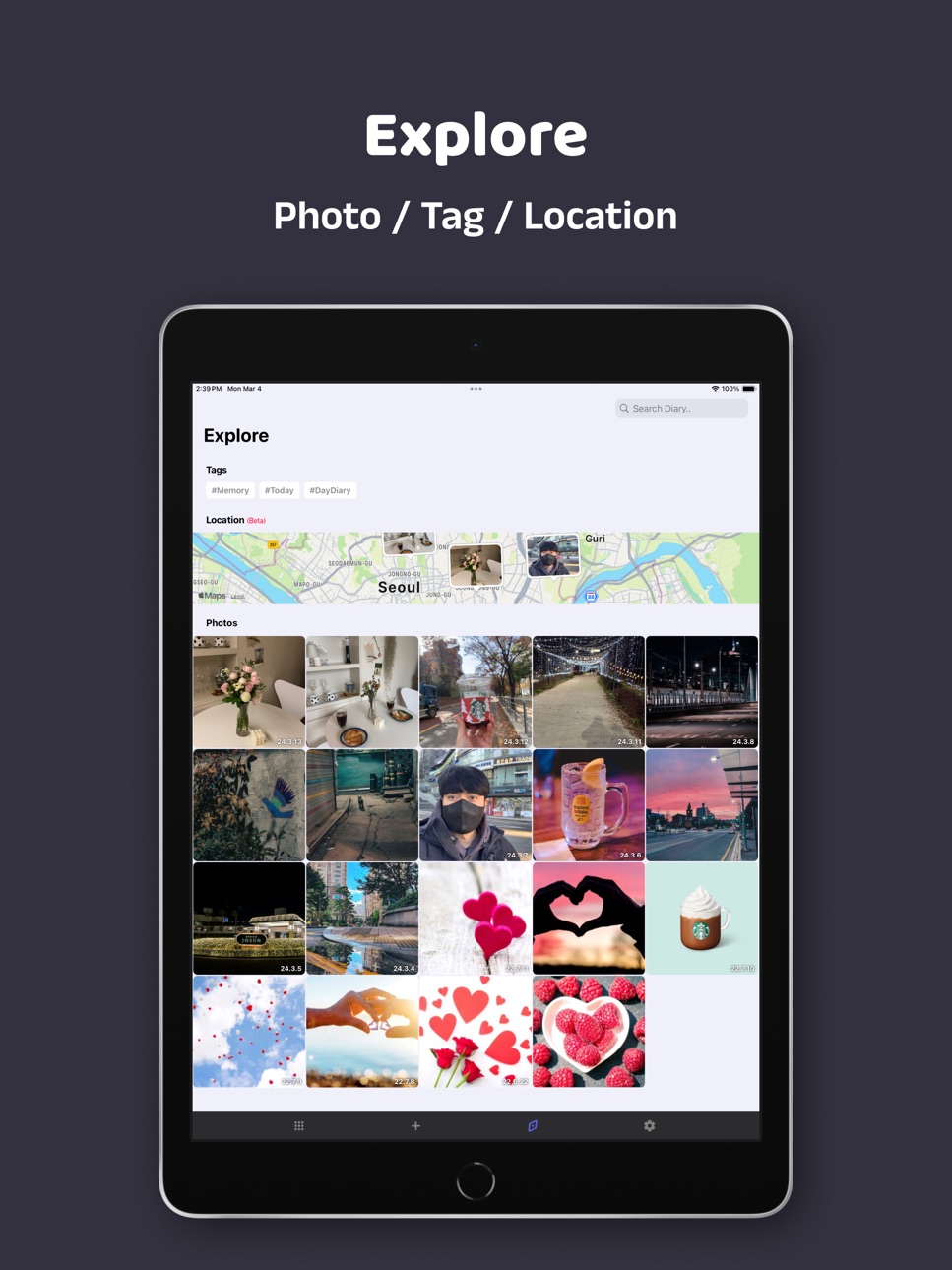
With features like search, photo explore, tagging, and viewing places on the map, you can embark on a journey of memories whenever you like.
# Securely store your diary through account synchronization.
--
Terms with EULA: https://www.apple.com/legal/internet-services/itunes/dev/stdeula/
Capabilities
In-App Purchases
Accessibility
ipadiphonemacrealityDevicetvoswatch
Version history 25 versions
Build 881339755v1.16.922026-01-09 18:20:40
- The “AI Mind Comment” feature has been newly added.
You can now write a diary entry and receive a warm, empathetic reply as AI reflects on your emotions.
Along with recommended titles, tags, and emotion stickers, it helps you organize your feelings more easily.
Take a moment to reflect on today’s emotions with AI.
Build 875887554v1.15.902025-06-26 01:51:38
[Version 1.15.90]
- A new option to customize your note photo layout has been added! Along with the default style,
a new 'Grid Tile' and 'Card View' design is now available.
- Personalize your diary from the Diary Settings screen.
Build 873703705v1.14.872025-04-02 04:30:15
[ver 1.14.87]
- Fixed an issue where some attached photos were not visible in the post creation screen.
- Modified the post creation screen so that pressing the 'Return' key no longer creates a new paragraph. The previous 'New Line' function can now be used by tapping the NewLine icon above the keyboard.
Build 873671440v1.14.852025-04-01 00:55:23
[ver 1.14.84]
- Fixed an issue where some attached photos were not visible on the writing screen.
Build 869873031v1.14.842024-10-24 17:10:23
[ver 1.14.84]
- A feature to copy the content of the text being written has been added.
- Fixed an issue where paragraphs could not be deleted when writing.
Build 869765481v1.13.822024-10-16 19:50:52
[ver 1.13.82]
- Fixed various bugs that occurred due to changes in the writing form.
- Fixed the issue where the [Link] feature was not functioning properly.
Build 869677955v1.13.812024-10-13 10:08:27
[ver 1.13.81]
- For more diverse journal entries, [Font Styles], [Links], and [Time Stamps] features have been added.
- The [Sticker] feature has been added. (v1.12.74)
- To keep your drafts safe while writing, the [Auto-Saving] feature has been added. (v1.12.76)
Build 869603598v1.12.762024-10-09 22:28:25
[ver 1.12.76]
- We've added a [Sticker] feature to help capture your precious moments in a more rich way.
+ (Bugfix) The crash while writing has been fixed.
+ (Bugfix) We added 'auto-saving' to prevent losing your draft due to app crash.
Build 869491860v1.12.742024-10-05 18:11:50
[ver 1.12.74]
- We've added a [Sticker] feature to help capture your precious moments in a more rich way.
Build 869118573v1.11.712024-09-20 04:13:31
[ver 1.11.71]
- After [Social Accounts Linking], a feature has been added that allows you to freely switch between linked accounts.
Build 866527121v1.10.692024-06-11 02:03:44
[ver 1.10.69]
- The [Theme Change] feature has been added to DayDiary!
With a premium membership, you can customize the app with various color themes :)
- Change Light/Dark mode style and calendar start day features have been added.
You can find these features in the AppSettings!
- The feature to collect photos by location has been added.
Build 866015302v1.10.682024-05-17 14:04:31
[ver 1.10.68]
- The [Theme Change] feature has been added to DayDiary!
With a premium membership, you can customize the app with various color themes :)
- Change Light/Dark mode style and calendar start day features have been added.
You can find these features in the AppSettings!
- The feature to collect photos by location has been added.
Build 865583087v1.10.662024-04-30 10:38:34
[ver 1.10.66]
- The [Theme Change] feature has been added to DayDiary!
With a premium membership, you can customize the app with various color themes :)
- Change Light/Dark mode style and calendar start day features have been added.
You can find these features in the AppSettings!
Build 865293874v1.9.652024-04-18 11:55:25
[Ver 1.9.65]
- 'Location' feature has been added to DayDiary! You can now view the photos attached to your diary entries on the map in the Explore tab :)
- The feature to register locations in notes will also be added soon. The map screen is first introduced as a Beta feature!
- PremiumMembership is Added.
Build 865150598v1.9.642024-04-13 16:32:15
[Ver 1.9.64]
- 'Location' feature has been added to DayDiary! You can now view the photos attached to your diary entries on the map in the Explore tab :)
- The feature to register locations in notes will also be added soon. The map screen is first introduced as a Beta feature!
- Finally... I've fixed the issue where notes were being duplicated.
Build 864175592v1.8.622024-03-04 11:49:07
[Ver 1.8.62]
- 'Location' feature has been added to DayDiary! You can now view the photos attached to your diary entries on the map in the Explore tab :)
- The feature to register locations in notes will also be added soon. The map screen is first introduced as a Beta feature!
- Finally... I've fixed the issue where notes were being duplicated.
Build 863432053v1.7.602024-02-06 09:12:24
[ver 1.7.60] Update
- [Tag] has been updated to DayDiary! Add tags to your diary and search tags in the ExploreTab :)
- Fixed bugs in the ExploreTab.
Build 862995278v1.7.592024-01-18 13:19:47
[ver 1.7.58] Update
- [Tag] has been updated to DayDiary! Add tags to your diary and search tags in the ExploreTab :)
- Fixed bugs in the ExploreTab.
Build 862915453v1.7.582024-01-16 01:01:47
[ver 1.7.58] Update
- [Tag] has been updated to DayDiary! Add tags to your diary and search tags in the ExploreTab :)
- Fixed bugs in the ExploreTab.
Build 862424985v1.6.572023-12-25 07:18:16
[ver 1.6.57] Update
- Added a camera method so you can take a photo and attach it immediately in the diary.
- Added a button at the bottom of the diary note screen to view the diary of the previous day and the next day.
- Fixed a performance issue in the ‘Explore’ tab increased.
Build 862246735v1.6.532023-12-16 17:56:29
### Ver 1.6.53 update
- Improved performance when a lot of photos are exist in the Explore tab.
Build 854082834v1.5.512023-01-01 11:12:52
### Ver 1.5.51 update
- A third bottom tab ‘Explore’ has been updated!!
Search your notes and use photos overview!
Build 853827990v1.4.482022-12-10 17:23:52
### Ver 1.4.48 update
- In the calendar, when select a day on which 2 or more diaries are posted, a selection popup can choice has updated.
Build 853771577v1.4.472022-12-07 21:11:49
### Ver 1.4.47 update
- In writing a diary, a photo viewer is added so that you can see your attached photos.
- When you edit a diary, you can edit the order of your attached photos. Change the order by long press the your photos!
Build 853602319v1.4.452022-11-29 00:14:42
### Ver 1.4.45 update
- In diary list screen, the low-quality photos bug has been resolved.
- In diary detail screen, the problem that the photos does not appear immediately has been resolved.
No pricing data captured yet — comparisons appear once the app has paid storefronts or in-app purchases.
Availability 1 of 1 storefronts
| Region | Language | Price | Ratings | Avg | Version |
|---|---|---|---|---|---|
| US | en-US | Free | 16 | 4.3 | 1.16.92 |
Change log 29 changes · US
✎
releaseNotes updated
- The “AI Mind Comment” feature has been newly added.
You can now write a diary entry and receive a warm, empathetic reply as AI reflects on your emotions.
Alon
✎
description updated
Capture your own emotions with photos!
With DayDiary, you can forever cherish today's moments.
# Attach photos to your diary and photo calendar
See the photo
✎
subtitle updated
Easy, beautiful Diary for you.
✎
name updated
DayDiary - Diary, Note
◆
Version 1.16.92 released
- The “AI Mind Comment” feature has been newly added.
You can now write a diary entry and receive a warm, empathetic reply as AI reflects on your emotions.
Along with recommended titles, tags, and emotion stickers, it helps you organize you
◆
Version 1.15.90 released
[Version 1.15.90]
- A new option to customize your note photo layout has been added! Along with the default style,
a new 'Grid Tile' and 'Card View' design is now available.
- Personalize your diary from the Diary Settings screen.
◆
Version 1.14.87 released
[ver 1.14.87]
- Fixed an issue where some attached photos were not visible in the post creation screen.
- Modified the post creation screen so that pressing the 'Return' key no longer creates a new paragraph. The previous 'New Line' functio
◆
Version 1.14.85 released
[ver 1.14.84]
- Fixed an issue where some attached photos were not visible on the writing screen.
◆
Version 1.14.84 released
[ver 1.14.84]
- A feature to copy the content of the text being written has been added.
- Fixed an issue where paragraphs could not be deleted when writing.
◆
Version 1.13.82 released
[ver 1.13.82]
- Fixed various bugs that occurred due to changes in the writing form.
- Fixed the issue where the [Link] feature was not functioning properly.
◆
Version 1.13.81 released
[ver 1.13.81]
- For more diverse journal entries, [Font Styles], [Links], and [Time Stamps] features have been added.
- The [Sticker] feature has been added. (v1.12.74)
- To keep your drafts safe while writing, the [Auto-Saving] feature ha
◆
Version 1.12.76 released
[ver 1.12.76]
- We've added a [Sticker] feature to help capture your precious moments in a more rich way.
+ (Bugfix) The crash while writing has been fixed.
+ (Bugfix) We added 'auto-saving' to prevent losing your draft due to app crash.
◆
Version 1.12.74 released
[ver 1.12.74]
- We've added a [Sticker] feature to help capture your precious moments in a more rich way.
◆
Version 1.11.71 released
[ver 1.11.71]
- After [Social Accounts Linking], a feature has been added that allows you to freely switch between linked accounts.
◆
Version 1.10.69 released
[ver 1.10.69]
- The [Theme Change] feature has been added to DayDiary!
With a premium membership, you can customize the app with various color themes :)
- Change Light/Dark mode style and calendar start day features have been added.
Y
◆
Version 1.10.68 released
[ver 1.10.68]
- The [Theme Change] feature has been added to DayDiary!
With a premium membership, you can customize the app with various color themes :)
- Change Light/Dark mode style and calendar start day features have been added.
Y
◆
Version 1.10.66 released
[ver 1.10.66]
- The [Theme Change] feature has been added to DayDiary!
With a premium membership, you can customize the app with various color themes :)
- Change Light/Dark mode style and calendar start day features have been added.
Y
◆
Version 1.9.65 released
[Ver 1.9.65]
- 'Location' feature has been added to DayDiary! You can now view the photos attached to your diary entries on the map in the Explore tab :)
- The feature to register locations in notes will also be added soon. The map screen i
◆
Version 1.9.64 released
[Ver 1.9.64]
- 'Location' feature has been added to DayDiary! You can now view the photos attached to your diary entries on the map in the Explore tab :)
- The feature to register locations in notes will also be added soon. The map screen i
◆
Version 1.8.62 released
[Ver 1.8.62]
- 'Location' feature has been added to DayDiary! You can now view the photos attached to your diary entries on the map in the Explore tab :)
- The feature to register locations in notes will also be added soon. The map screen i
◆
Version 1.7.60 released
[ver 1.7.60] Update
- [Tag] has been updated to DayDiary! Add tags to your diary and search tags in the ExploreTab :)
- Fixed bugs in the ExploreTab.
◆
Version 1.7.59 released
[ver 1.7.58] Update
- [Tag] has been updated to DayDiary! Add tags to your diary and search tags in the ExploreTab :)
- Fixed bugs in the ExploreTab.
◆
Version 1.7.58 released
[ver 1.7.58] Update
- [Tag] has been updated to DayDiary! Add tags to your diary and search tags in the ExploreTab :)
- Fixed bugs in the ExploreTab.
◆
Version 1.6.57 released
[ver 1.6.57] Update
- Added a camera method so you can take a photo and attach it immediately in the diary.
- Added a button at the bottom of the diary note screen to view the diary of the previous day and the next day.
- Fixed a performanc
◆
Version 1.6.53 released
### Ver 1.6.53 update
- Improved performance when a lot of photos are exist in the Explore tab.
◆
Version 1.5.51 released
### Ver 1.5.51 update
- A third bottom tab ‘Explore’ has been updated!!
Search your notes and use photos overview!
◆
Version 1.4.48 released
### Ver 1.4.48 update
- In the calendar, when select a day on which 2 or more diaries are posted, a selection popup can choice has updated.
◆
Version 1.4.47 released
### Ver 1.4.47 update
- In writing a diary, a photo viewer is added so that you can see your attached photos.
- When you edit a diary, you can edit the order of your attached photos. Change the order by long press the your photos!
◆
Version 1.4.45 released
### Ver 1.4.45 update
- In diary list screen, the low-quality photos bug has been resolved.
- In diary detail screen, the problem that the photos does not appear immediately has been resolved.