Home › Productivity

 US
US
1 of 1 storefronts
Content in en-US
Content in en-US
Information
Apple ID1610705347
Bundle IDcom.constructionconnectivity.floorcloud
SellerSeller
Min iOS13.0
Min macOS11.0
Device familiesiphone, ipad, ipod
Released2022-06-15
Copyright© Construction Connectivity, Inc.
Privacy policyLink ↗
Preview 2 platforms
iPhone 9 images




iPad 7 images


What’s New Version 1.21.0
View-only project access across organizations
- Securely share projects with external stakeholders such as general contractors, subcontractors, clients, and partners.
- View-only users can access project information without making changes, making it easier to collaborate across organizations while maintaining control over project data.
- Invited users may be new to the platform or already part of another organization. Any projects shared with them will appear directly in their project list.
Description
CLīMIT™ is THE only real-time, remote jobsite monitoring platform custom built for the construction industry. Protect your installations and the profitability of your business with our solution.
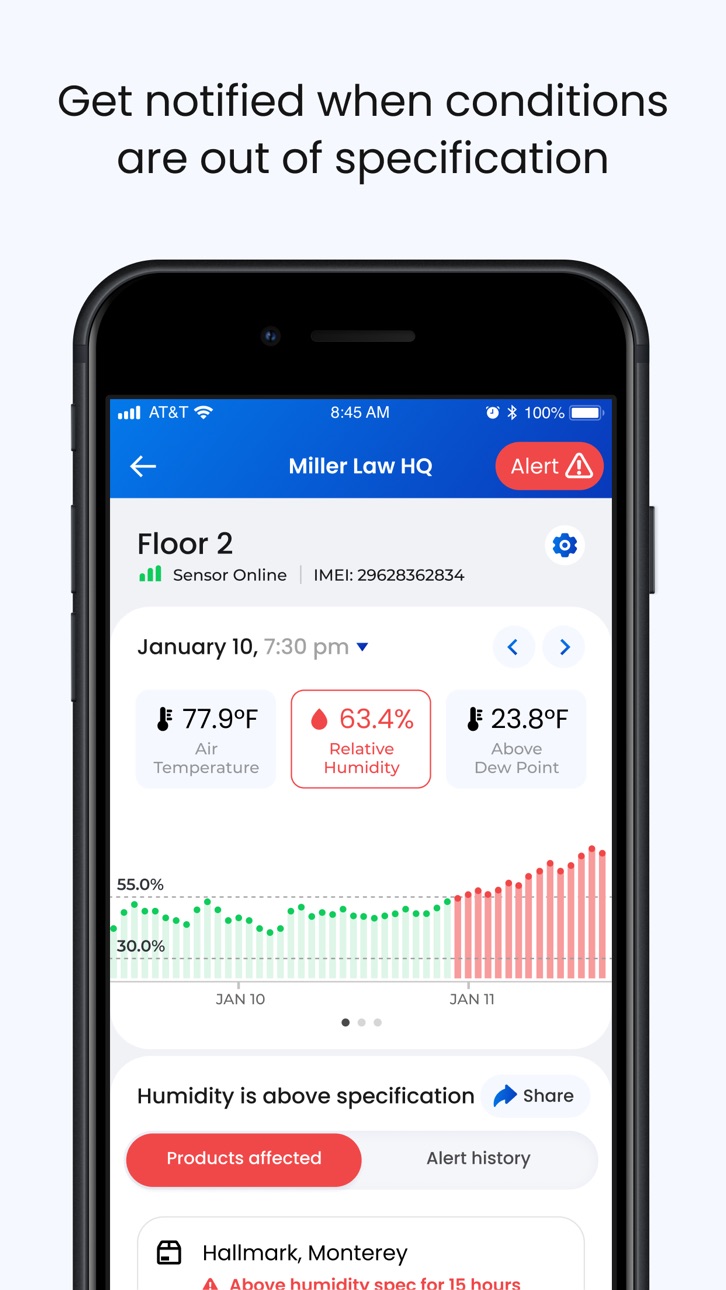
Our sensors do not require Wi-Fi, Bluetooth or power to operate. We utilize a proprietary product specification database, climate sensors and cellular IoT networks to monitor jobsites in real-time to help improve outcomes for all project stakeholders. Our technology helps identify out of specification jobsite conditions as they occur, in real-time, and alert key individuals to take corrective action. We also make it simple for valuable information, such as notes, photos, data graphs to be easily stored in the cloud and retrieved for future analysis.
Mobile and desktop connectivity
Ultimate project visibility
Instantly view & record detailed jobsite conditions across all of your projects before, during, and after installation.
Avoid expensive re-work
Receive real-time alerts based on actual project data detected by our sensors when compared to product manufacturers’ specifications.
Organize & store information
Capture & store important jobsite information (photos, notes, batch codes, etc.) in your secure, organized, CLīMIT™ database for future use.
Keep everyone informed
Easily share content, and maintain a permanent record of it, with any contact in your phone.
Retrieve Job File information
Investigate past climate conditions and locate important photos and notes by selecting calendar dates or more specific filtering criteria.
Simple report generation
Create summary reports efficiently using mobile or desktop applications. Select key project information from the Job File and generate useful reports for key stakeholders. Include ambient, concrete slab conditions and light level graphs.
Manufacturers specification database
Real-time conditions comparison
Instantly access essential specification data from thousands of installation products and industry standards.
Receive manufacturer tips
View helpful installation and safety tips for onsite personnel at point of use.
Store information securely
The CLīMIT™ database is a highly secure and organized digital vault, built with the most advanced AWS encryption technology. The same encryption technology is used by US Government agencies and many of the world’s largest companies.
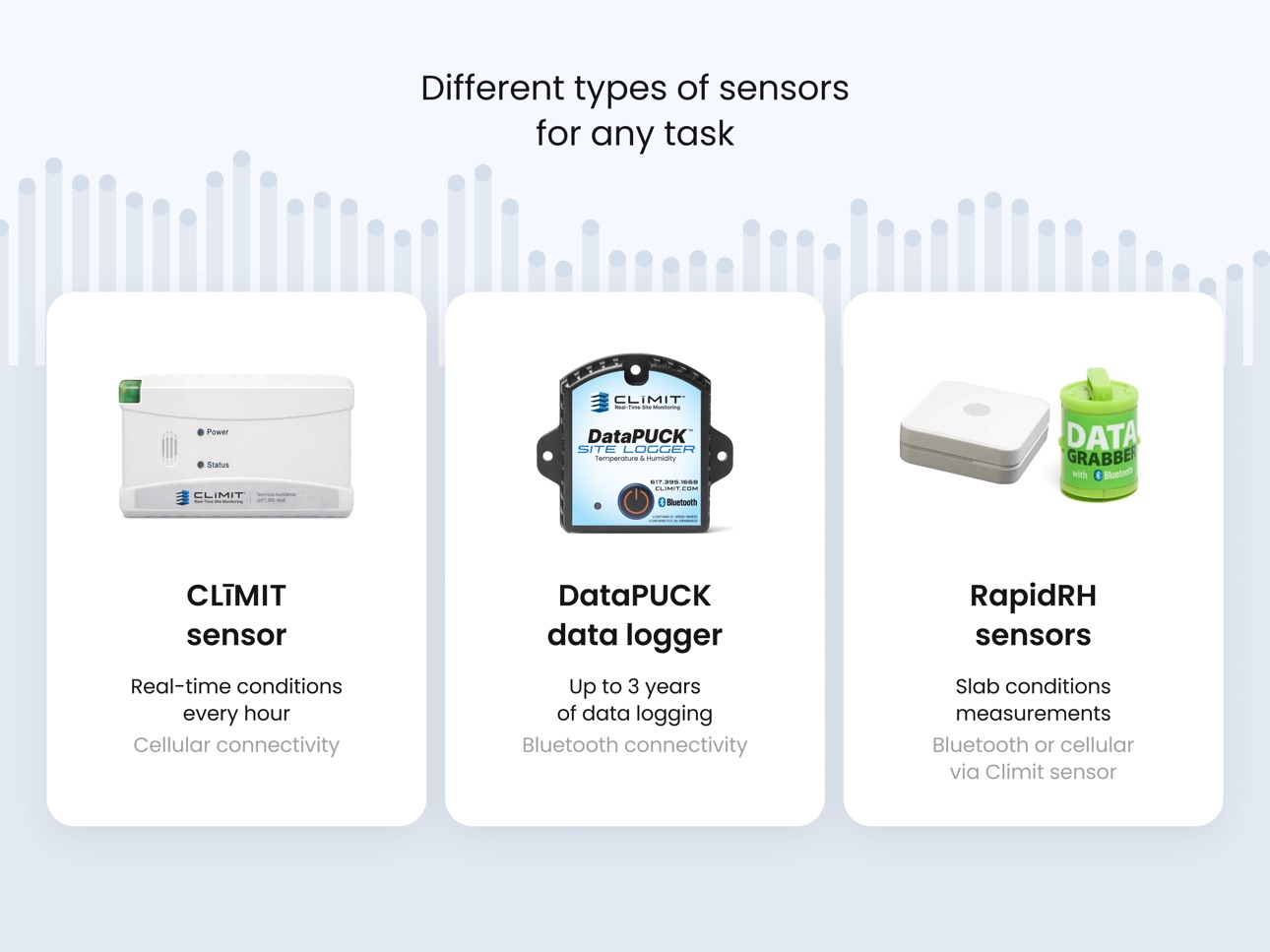
Jobsite Conditions Sensors
- Pre-configured: No Wi-Fi, Bluetooth or password struggles
- Out of the box connectivity to the Verizon network
- Monitor ambient temperature, humidity, dew point and light level
- 3 month battery life – Rechargeable by standard battery pack or 110v outlet
- IP67 rated for protection against dust and moisture
- Device manufacturing meets TS16949, ISO13485, ISO 9001, ISO14001, OHSAA 18001, and BABT PS340 certifications and standards.
Wagner Rapid RH L6 Remote Reading
- Receive real-time concrete relative humidity and temperature data direct to mobile phone via Bluetooth.
- Receive real-time concrete relative humidity and temperature data via CLīMIT sensors remotely.
- View Rapid RH L6 sensor data via interactive trend graphs.
- View historical hourly readings by date of Rapid RH L6 measurements.
- Determine the optimal location for the placement of CLīMIT Jobsite Conditions Sensors to properly connect via Bluetooth with Rapid RH L6 sensors.
- Temperature and humidity graphs with easily customizable date ranges
Accessibility
ipadiphonemacrealityDevicetvoswatch
Version history 25 versions
Build 885902121v1.21.02026-05-25 10:38:06
View-only project access across organizations
- Securely share projects with external stakeholders such as general contractors, subcontractors, clients, and partners.
- View-only users can access project information without making changes, making it easier to collaborate across organizations while maintaining control over project data.
- Invited users may be new to the platform or already part of another organization. Any projects shared with them will appear directly in their project list.
Build 884660153v1.20.02026-04-21 13:00:16
Bug fixes, performance optimizations and general improvements.
Build 883937254v1.19.22026-04-02 08:42:44
Bug fixes, performance optimizations and general improvements.
Build 880815081v1.19.12026-01-26 13:28:47
Project overview
- Sections can be collapsed to show only essential info, or expanded for a detailed view
New project navigation
- Move between key areas and access everything from the More page
Updated job file & photo capture
- The job file now shows the most important events by default – those with notes or photos.
New More page for project details
- The new page gives you quick access to everything related to a project.
Notifications page
- A new page that shows all important notifications.
Build 879148685v1.18.12025-12-11 16:30:18
Automatic reports generation
- In addition to a single report, you can create a schedule to generate reports weekly or monthly
- Configure a report as usual: select project, sections, charts and info to include
- Set when the report should be generated
- When created, the report will be delivered to each email address you specify
- Works both on mobile and web
Build 878626541v1.16.92025-10-06 07:50:11
Bug fixes, performance optimizations and general improvements.
Build 878040931v1.16.82025-09-15 07:45:24
Bug fixes, performance optimizations and general improvements.
Build 877475878v1.16.72025-08-27 10:43:21
Simplified DataPUCK update
- Now it’s easier to start a DataPUCK update. Click on the Update icon on the DataPUCK card on the section details page to start the update sequence.
- DataPUCK is a new long-term monitoring device with Bluetooth connectivity. Contact CLIMIT team to learn more.
Notifications per section
- You can now control notifications for individual sections in projects. You can do this in project settings. Click on All sections text to configure what sections will send you alerts.
- You can also configure this from your notifications settings in Profile.
Build 876301657v1.16.12025-07-11 07:36:05
- Long-term monitoring with DataPUCKs. New sensors with up to 3 years of battery life available for order
- Real-time equilibrium moisture content and light level could be displayed for each CLīMIT sensor
- Edit events in Jobfiles - such as notes, photos, … and everything else
- Users can now upload their photos to give a personal touch to the app
- Bug fixes, performance optimizations, and general improvements.
Build 876217385v1.16.02025-07-10 07:51:46
- Long-term monitoring with DataPUCKs. New sensors with up to 3 years of battery life available for order
- Real-time equilibrium moisture content and light level could be displayed for each CLīMIT sensor
- Edit events in Jobfiles - such as notes, photos, … and everything else
- Users can now upload their photos to give a personal touch to the app
Build 872321474v1.15.22025-02-10 09:42:48
Floorcloud announces its rebrand to CLīMIT, reflecting expanded capabilities across the construction industry .
The transition to CLīMIT enables expanded product technologies, supporting our vision as the go-to solution for interior building monitoring during the many phases of the construction process.
Build 871794186v1.15.12025-01-17 07:28:41
Bug fixes, performance optimizations and general improvements
Build 871227395v1.152024-12-18 17:54:17
In-app sensor location labels
Sensors can now be labeled. Open Sensor settings and assign it a location label. Labels are displayed throughout the app and in the Reports.
Freeze / Pre-Freeze warnings
You will now receive new Freeze and Pre-Freeze alerts, when conditions in any section are near freezing temperatures or below.
All notifications including this one can be turned off in Profile section.
Background media upload
Notes creation is greatly improved – you can now take several photos and create an event instantly. Photos will be uploaded in background automatically. If the connection is poor, upload will resume when you’re back online.
Large documents are also uploaded in background, so you don’t have to wait.
More improvements
Added “View only” user role. These users have no permissions to change anything in a project.
Improved Report section naming and descriptions.
Build 869707877v1.14.12024-10-21 08:12:47
New Floorcloud app icon
A new way to generate reports
- Run a report for multiple projects and sections at the same time
- Select types of graphs, specifications, sensors information, events, and other information to be included in each report
Light level reports
- Light level is captured hourly by every Floorcloud sensor
- Reports show light level in foot candles and how each measurement compares to OSHA specifications
Build 869272327v1.13.52024-09-26 07:44:02
Bug fixes, performance optimizations and general improvements.
Build 868224246v1.13.42024-08-15 09:55:14
Bug fixes, performance optimizations, and general improvements.
Build 867771188v1.13.32024-07-30 14:55:39
- Floorcloud now supports document uploads. Upload project plans, security documents, toolbox talk documents and any other documents you need. PDF, image upload, photo capturing and other formats supported. Easily access all project documents in one place.
- Improved “Add to project” menu layout, highlighting important actions for quick access.
- Ability to invite General contractors to your projects with a limited access level.
- Bug fixes, performance optimizations and general improvements.
Build 866174346v1.12.22024-05-24 07:34:07
Bug fixes, performance optimizations and general improvements.
Build 866068515v1.12.12024-05-20 14:54:51
Bug fixes, performance optimizations and general improvements.
Build 865994097v1.122024-05-17 15:55:50
- User management: Now you can add new users to your organization in the app.
- Dashboard: Headquarters users now have a bird's eye view dashboard to overlook and manage the branch-contractors.
- Project tile update: Now you can tap the project address to open your maps app for navigation.
- Bug fixes, performance optimizations and general improvements.
Build 865529070v1.11.22024-04-28 10:08:39
Bug fixes, performance optimizations and general improvements.
Build 864933677v1.112024-04-04 12:11:47
Simple to use solution for assigning tasks to Floorcloud users!
Build 863374286v1.102024-02-13 16:11:37
GangBox is a news portal that directly connects manufacturers and contractors by providing them product announcements and technical bulletins. Contractors can directly contact manufacturers by simply clicking a button to receive more information and a rapid response.
Build 862425719v1.9.12023-12-23 12:16:07
Bug fixes, performance optimizations and general improvements.
Build 862241146v1.92023-12-20 15:12:50
- iPad optimization
- support for multi-branch contractors
- ability to add your logo to software and reports
- share ambient and slab conditions graphs at any time
- Bug fixes, performance optimizations and general improvements.
No pricing data captured yet — comparisons appear once the app has paid storefronts or in-app purchases.
Availability 1 of 1 storefronts
| Region | Language | Price | Ratings | Avg | Version |
|---|---|---|---|---|---|
| US | en-US | Free | 6 | 5.0 | 1.21.0 |
Change log 29 changes · US
✎
releaseNotes updated
View-only project access across organizations
- Securely share projects with external stakeholders such as general contractors, subcontractors, clients, and par
✎
description updated
CLīMIT™ is THE only real-time, remote jobsite monitoring platform custom built for the construction industry. Protect your installations and the profitability o
✎
subtitle updated
Jobsite Climate Monitoring
✎
name updated
CLIMIT
◆
Version 1.21.0 released
View-only project access across organizations
- Securely share projects with external stakeholders such as general contractors, subcontractors, clients, and partners.
- View-only users can access project information without making changes,
◆
Version 1.20.0 released
Bug fixes, performance optimizations and general improvements.
◆
Version 1.19.2 released
Bug fixes, performance optimizations and general improvements.
◆
Version 1.19.1 released
Project overview
- Sections can be collapsed to show only essential info, or expanded for a detailed view
New project navigation
- Move between key areas and access everything from the More page
Updated job file & photo capture
- The job
◆
Version 1.18.1 released
Automatic reports generation
- In addition to a single report, you can create a schedule to generate reports weekly or monthly
- Configure a report as usual: select project, sections, charts and info to include
- Set when the report should
◆
Version 1.16.9 released
Bug fixes, performance optimizations and general improvements.
◆
Version 1.16.8 released
Bug fixes, performance optimizations and general improvements.
◆
Version 1.16.7 released
Simplified DataPUCK update
- Now it’s easier to start a DataPUCK update. Click on the Update icon on the DataPUCK card on the section details page to start the update sequence.
- DataPUCK is a new long-term monitoring device with Bluetooth
◆
Version 1.16.1 released
- Long-term monitoring with DataPUCKs. New sensors with up to 3 years of battery life available for order
- Real-time equilibrium moisture content and light level could be displayed for each CLīMIT sensor
- Edit events in Jobfiles - such as
◆
Version 1.16.0 released
- Long-term monitoring with DataPUCKs. New sensors with up to 3 years of battery life available for order
- Real-time equilibrium moisture content and light level could be displayed for each CLīMIT sensor
- Edit events in Jobfiles - such as
◆
Version 1.15.2 released
Floorcloud announces its rebrand to CLīMIT, reflecting expanded capabilities across the construction industry .
The transition to CLīMIT enables expanded product technologies, supporting our vision as the go-to solution for interior buildi
◆
Version 1.15.1 released
Bug fixes, performance optimizations and general improvements
◆
Version 1.15 released
In-app sensor location labels
Sensors can now be labeled. Open Sensor settings and assign it a location label. Labels are displayed throughout the app and in the Reports.
Freeze / Pre-Freeze warnings
You will now receive new Freeze and Pre
◆
Version 1.14.1 released
New Floorcloud app icon
A new way to generate reports
- Run a report for multiple projects and sections at the same time
- Select types of graphs, specifications, sensors information, events, and other information to be included in each
◆
Version 1.13.5 released
Bug fixes, performance optimizations and general improvements.
◆
Version 1.13.4 released
Bug fixes, performance optimizations, and general improvements.
◆
Version 1.13.3 released
- Floorcloud now supports document uploads. Upload project plans, security documents, toolbox talk documents and any other documents you need. PDF, image upload, photo capturing and other formats supported. Easily access all project documen
◆
Version 1.12.2 released
Bug fixes, performance optimizations and general improvements.
◆
Version 1.12.1 released
Bug fixes, performance optimizations and general improvements.
◆
Version 1.12 released
- User management: Now you can add new users to your organization in the app.
- Dashboard: Headquarters users now have a bird's eye view dashboard to overlook and manage the branch-contractors.
- Project tile update: Now you can tap the pro
◆
Version 1.11.2 released
Bug fixes, performance optimizations and general improvements.
◆
Version 1.11 released
Simple to use solution for assigning tasks to Floorcloud users!
◆
Version 1.10 released
GangBox is a news portal that directly connects manufacturers and contractors by providing them product announcements and technical bulletins. Contractors can directly contact manufacturers by simply clicking a button to receive more inform
◆
Version 1.9.1 released
Bug fixes, performance optimizations and general improvements.
◆
Version 1.9 released
- iPad optimization
- support for multi-branch contractors
- ability to add your logo to software and reports
- share ambient and slab conditions graphs at any time
- Bug fixes, performance optimizations and general improvements.