Home › Education

 US
US
1 of 1 storefronts
Content in en-US
Content in en-US
Information
Apple ID1604610152
Bundle IDcom.koeglera.timestablesexpert
SellerSeller
Min iOS17.0
Min macOS14.0
Device familiesiphone, ipad
Released2022-03-19
Copyright© Andreas Kögler
Privacy policyLink ↗
Preview 2 platforms
iPhone 10 images





iPad 10 images


What’s New Version 2.5.1
This update includes bug fixes in the statistics display and voice control.
Description
Times tables practice doesn't have to be a struggle.
Kids hear a question, say the answer out loud – and see right away on the colorful grid whether they got it right. No typing, no worksheets, no arguments at the dinner table. Just talking.
Voice input works in more than 10 languages and turns quiet memorization into a real conversation with the iPhone or iPad. During breakfast, in the car, on the couch – wherever works, as long as those times tables start to click.
——— What the app does ———
VOICE INPUT
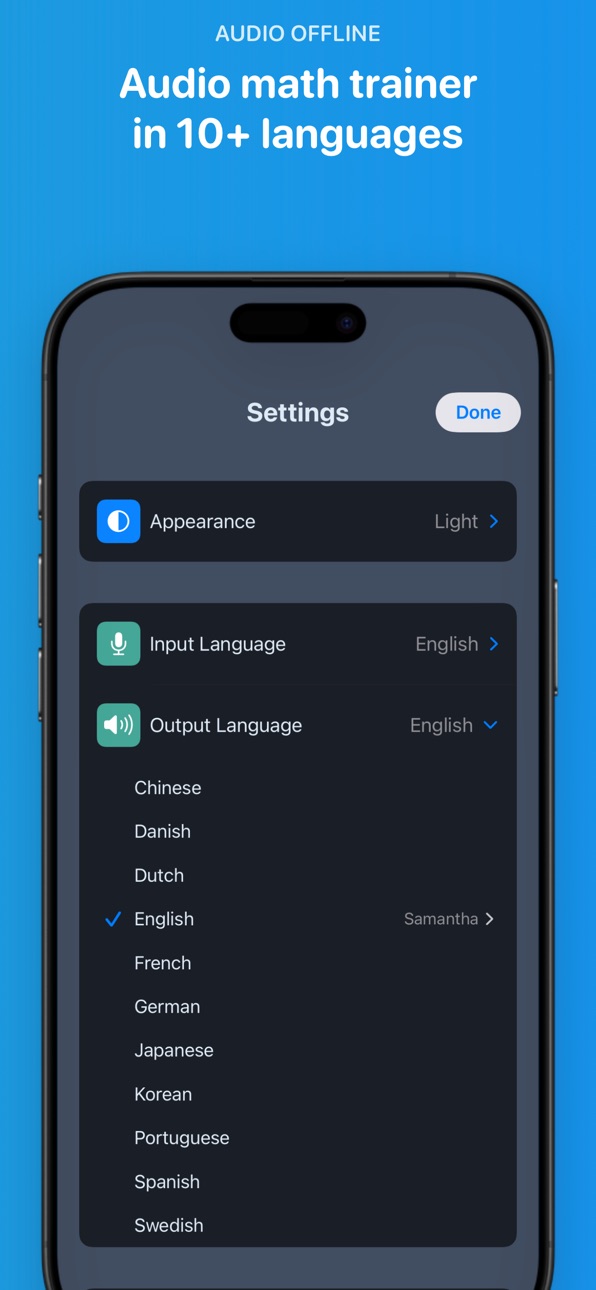
Speak answers instead of typing. In more than 10 languages. Hands-free and genuinely motivating – because kids would rather talk than write any day. Works offline too.
VISUAL MULTIPLICATION GRID
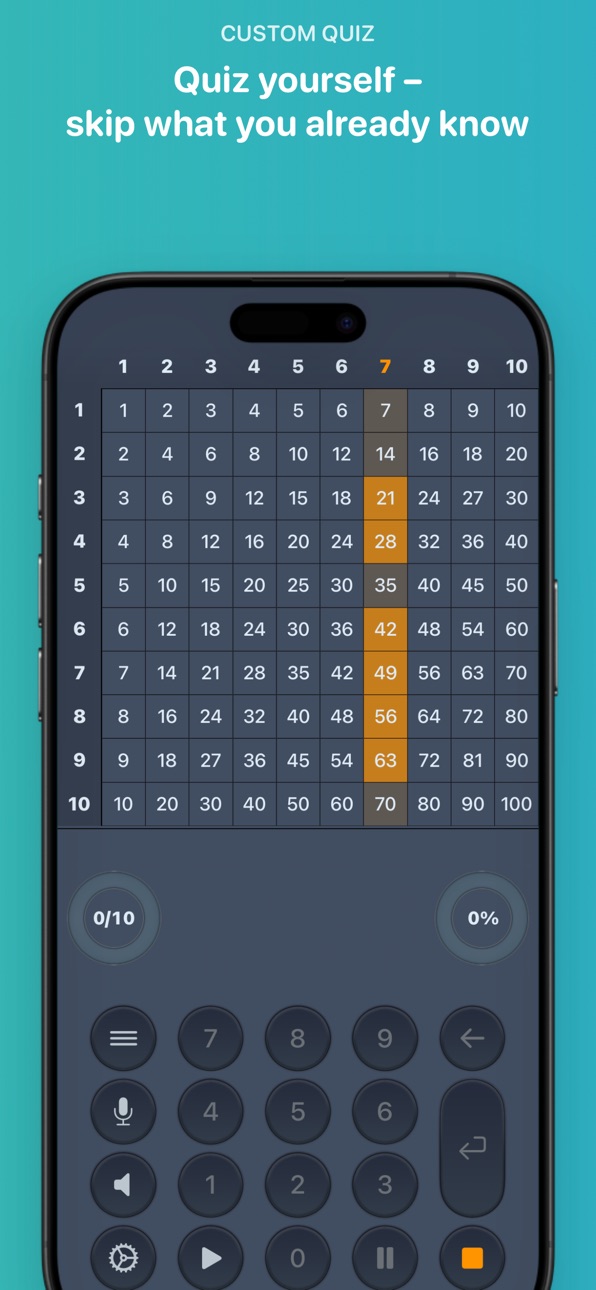
A colorful grid shows every problem at a glance. Got it right? Green. Wrong? Red. Kids instantly see where they're strong – and where there's room to grow. Square numbers get their own color, because they've earned it.
SMART RECOMMENDATIONS
After each round, the app suggests which table to practice next – based on real results. Weaker tables get priority, so practice time goes exactly where it's needed most.
STATISTICS
How fast? How accurate? Where are the gaps? Bar charts track progress across day, week, month and year. For each table: accuracy and response time at a glance.
FEEDBACK AFTER EVERY ROUND
Results, improvement since the last round, and a breakdown for each table practiced. On newer devices, Apple Intelligence makes the feedback personal and encouraging.
CHALLENGE MODE
Once enough tables are solid, it's go time: mixed questions from every table. For kids who say "I already know all of this."
——— Practice your way ———
Individual problems can be tapped in the grid to hide them. 7×8 driving you crazy? Skip it. Only practice the five trickiest ones? You got it. Questions per round: 10, 20, 30, 40, 50 – or ∞ for the truly motivated.
——— Free & fair ———
Tables 1–5 and 10 are free forever – full features, no ads, no time limits. More tables up to 12 (iPhone) or up to 20×20 (iPad) available as a one-time purchase. No subscription.
——— Privacy ———
No data leaves your device. No tracking, no analytics, no user account. Practice data stays stored locally. Period.
——— Good to know ———
• More than 10 languages for voice input and output
• Fully usable offline
• iPhone and iPad – with a larger grid up to 20×20 on iPad
• Parental gate for sensitive areas (contact, privacy)
• Appearance: Light, Dark or automatic
In-App Purchases US pricing
One-Time Purchases
Full version$2.99
Capabilities
In-App Purchases
Accessibility
ipadiphonemacrealityDevicetvoswatch
Version history 25 versions
Build 886777017v2.5.12026-06-10 22:19:03
This update includes bug fixes in the statistics display and voice control.
Build 884542975v2.52026-05-18 23:54:05
Smarter with Apple Intelligence
• After each round you now get personal hints and learning tips – matched to your result
• On devices with Apple Intelligence, the AI picks the best tips for you – right on your iPhone
• Completely offline – no data leaves your iPhone
Voice commands in audio mode
• Just say "Pause", "Continue", "Stop", "Skip" or "Don't know" – the app responds instantly
• You can even switch times tables by voice, without touching your iPhone
• Works with voice input and output active in all languages of the app
Plus: Stability improvements and bug fixes. Requires iOS 17.
Build 883499424v2.4.12026-03-22 23:26:31
Improved Feedback
• Enhanced post-round display with refined learning tips and practice suggestions
Better iPad Support
• Improved layout for a more polished experience on iPad
Quality Improvements
• Bug fixes and UI refinements
Build 882982906v2.42026-03-06 21:15:18
AI learning tips after every round
• New: Personalized error analysis detects which tasks you find tricky
• Strategy tips show you tricks like decomposition, doubling or neighbor tasks
• Works offline on your device (Apple Intelligence on iOS 26+)
Experience math strategies visually
• Dot array and number line show you how multiplication works
• Switch with a tap between text, dot array and number line
Plus: Improved localizations and bug fixes.
Build 882442469v2.32026-02-15 21:39:17
Exclude individual tasks
• New: Tap cells in the grid to skip individual tasks
• That way you only practice the ones you actually need
• Example: Select the 4 times table, but exclude 4×1, 4×2 and 4×10 – you know those already
Welcome dialog for new users
• A short welcome screen appears on first launch
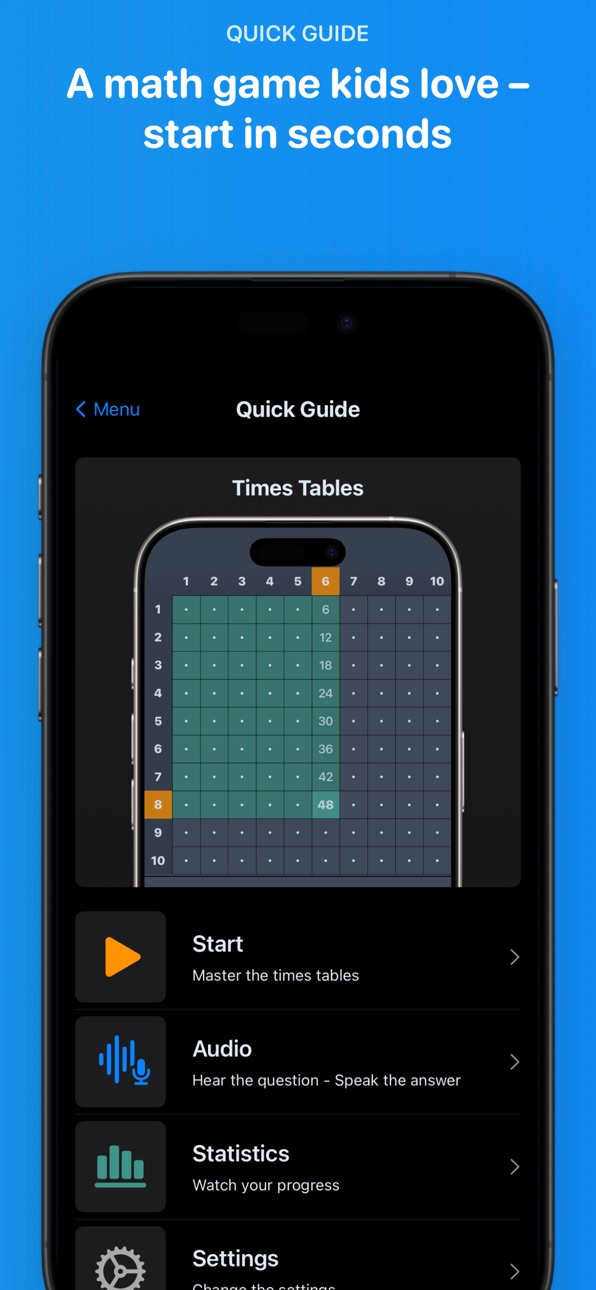
• Tap "OK" to jump straight in – or "Show Guide" opens the quick start guide
• The dialog can be re-enabled in Settings
Plus: Bug fixes for improved stability.
Build 882198270v2.2.22026-02-06 21:05:22
Learn smarter with personalized recommendations that guide you to the next perfect exercise. We’ve also improved overall stability and reliability for a smoother experience.
Build 881824922v2.2.12026-01-26 19:25:57
Even more relaxed learning with Voice Quiz!
Voice control now runs smoothly even during interruptions – perfect for practicing while multitasking.
Plus: improved speech output for even more natural learning.
New in Version 2.2.1:
• Voice Quiz now interruption-free: Siri, calls, or timers no longer interrupt your practice session – training automatically continues afterward. Perfect for hands-free learning while jogging, on the exercise bike, or tidying up!
• Speech output optimized: Minor corrections for even more natural pronunciation of certain problems.
• Minor layout refinements
Build 881643577v2.22026-01-21 04:06:11
Smart Practice Recommendations
Our new smart system suggests exactly the times table you should practice next – based on your results and proven learning science!
What's New in 2.2:
• Personalized tips after every round – so you always train what you need most
• Clear stats for each table – see exactly where you're getting stronger
• Step-by-step learning path that really works
• Extra challenge mode for math pros
• Beautiful, colorful progress charts that make you proud Master your times tables faster – and actually enjoy it!
Build 881197196v2.12026-01-07 23:00:54
Your Personal AI Math Coach is Here!
NEW in this version:
• Apple Intelligence delivers personalized feedback after every practice round
• Smart performance analysis adapts to your learning progress
• Encouraging, age-appropriate coaching in your language
IMPROVED:
• Enhanced performance and stability
• Works seamlessly across supported iOS versions (AI features available on newer devices)
PRIVACY & SECURITY:
• 100% on-device AI — your data stays private
• No external servers or cloud processing
• Zero ads, no hidden costs
Combine voice practice with intelligent feedback — master multiplication faster than ever!
Build 878657739v2.0.22025-10-07 07:32:21
We make learning the multiplication table with language even easier, faster, and more motivating – always up to date!
New in this version:
• Voice input with VoiceOver: Now speak answers seamlessly, even with the screen reader activated – for barrier-free learning on the go!
• Improved VoiceOver support: Clearer announcements, more precise labels, and fine corrections for even more intuitive access.
Build 878304746v2.0.12025-09-22 04:00:01
• Accessibility: Corrected VoiceOver labels
Build 877966033v2.02025-09-16 14:13:47
• iOS 26 support and compatibility with the latest iPhones
• Speech output controls: Clearer start/stop behaviour
• Accessibility: Corrected VoiceOver labels
• Stability: Performance improvements and bug fixes
Build 876743713v1.1.192025-08-19 05:05:36
• Support for Dutch: menus, explanations, and audio features in the new language
• Minor improvements and optimizations
Build 872812180v1.1.182025-02-26 18:56:49
• New "Infinite" mode for "Questions per round" setting
• Improved speech input stability
Build 870647921v1.1.172024-11-25 23:29:55
Bug fixes and stability improvements
Build 868561264v1.1.162024-11-10 17:39:37
• Design improvements and bug fixes
• Update of the quick start guide
Build 866024698v1.1.152024-05-17 22:46:18
Small improvements and bug fixes.
Build 863150060v1.1.142024-01-24 21:31:43
• When a wrong answer is given and voice output is active, the task will be announced with the correct solution and then it will be repeated
• Stability improvements
Build 860401645v1.1.132023-10-04 16:49:41
• Support for Swedish
• Swedish selectable as output language
• Swedish selectable as input language
Build 859476941v1.1.122023-08-30 19:27:41
Improved user-friendliness in voice selection for speech output on the iPad
Build 858559010v1.1.112023-07-18 16:46:12
• Support for Danish
• Danish selectable as output language
• Danish as input language selectable
• The app now offers permanent access to columns 1 to 5 for testing purposes. The previous 3-day trial approach has been replaced by this.
Build 854918246v1.1.102023-02-16 21:24:45
Minor design improvements and bug fixes
Build 854738059v1.1.92023-02-03 23:48:28
Select columns on small devices with a tap or swipe more easy now, thanks to the new expanded selection area below the header line.
Build 853763323v1.1.82022-12-07 19:31:58
• Voice preview when changing the speed of the speech output
• New language for voice features: Korean
• The app is now also available in Korean
Build 853083567v1.1.72022-11-10 00:44:47
New feature: Voice selection for audio output
• Select a voice for the audio output function in the app settings
• Preview any voice before selecting
Price history by region
Currency
Show
Columns
Search
Availability 1 of 1 storefronts
| Region | Language | Price | Ratings | Avg | Version |
|---|---|---|---|---|---|
| US | en-US | Free | 62 | 4.4 | 2.5.1 |
Change log 29 changes · US
✎
releaseNotes updated
This update includes bug fixes in the statistics display and voice control.
✎
description updated
Times tables practice doesn't have to be a struggle.
Kids hear a question, say the answer out loud – and see right away on the colorful grid whether they got i
✎
subtitle updated
Audio & Voice Mental Math
✎
name updated
Times Tables • Multiplication
◆
Version 2.5.1 released
This update includes bug fixes in the statistics display and voice control.
◆
Version 2.5 released
Smarter with Apple Intelligence
• After each round you now get personal hints and learning tips – matched to your result
• On devices with Apple Intelligence, the AI picks the best tips for you – right on your iPhone
• Completely offline –
◆
Version 2.4.1 released
Improved Feedback
• Enhanced post-round display with refined learning tips and practice suggestions
Better iPad Support
• Improved layout for a more polished experience on iPad
Quality Improvements
• Bug fixes and UI refinements
◆
Version 2.4 released
AI learning tips after every round
• New: Personalized error analysis detects which tasks you find tricky
• Strategy tips show you tricks like decomposition, doubling or neighbor tasks
• Works offline on your device (Apple Intelligence on i
◆
Version 2.3 released
Exclude individual tasks
• New: Tap cells in the grid to skip individual tasks
• That way you only practice the ones you actually need
• Example: Select the 4 times table, but exclude 4×1, 4×2 and 4×10 – you know those already
Welcome dial
◆
Version 2.2.2 released
Learn smarter with personalized recommendations that guide you to the next perfect exercise. We’ve also improved overall stability and reliability for a smoother experience.
◆
Version 2.2.1 released
Even more relaxed learning with Voice Quiz!
Voice control now runs smoothly even during interruptions – perfect for practicing while multitasking.
Plus: improved speech output for even more natural learning.
New in Version 2.2.1:
• Voice Q
◆
Version 2.2 released
Smart Practice Recommendations
Our new smart system suggests exactly the times table you should practice next – based on your results and proven learning science!
What's New in 2.2:
• Personalized tips after every round – so you alway
◆
Version 2.1 released
Your Personal AI Math Coach is Here!
NEW in this version:
• Apple Intelligence delivers personalized feedback after every practice round
• Smart performance analysis adapts to your learning progress
• Encouraging, age-appropriate coaching
◆
Version 2.0.2 released
We make learning the multiplication table with language even easier, faster, and more motivating – always up to date!
New in this version:
• Voice input with VoiceOver: Now speak answers seamlessly, even with the screen reader activated –
◆
Version 2.0.1 released
• Accessibility: Corrected VoiceOver labels
◆
Version 2.0 released
• iOS 26 support and compatibility with the latest iPhones
• Speech output controls: Clearer start/stop behaviour
• Accessibility: Corrected VoiceOver labels
• Stability: Performance improvements and bug fixes
◆
Version 1.1.19 released
• Support for Dutch: menus, explanations, and audio features in the new language
• Minor improvements and optimizations
◆
Version 1.1.18 released
• New "Infinite" mode for "Questions per round" setting
• Improved speech input stability
◆
Version 1.1.17 released
Bug fixes and stability improvements
◆
Version 1.1.16 released
• Design improvements and bug fixes
• Update of the quick start guide
◆
Version 1.1.15 released
Small improvements and bug fixes.
◆
Version 1.1.14 released
• When a wrong answer is given and voice output is active, the task will be announced with the correct solution and then it will be repeated
• Stability improvements
◆
Version 1.1.13 released
• Support for Swedish
• Swedish selectable as output language
• Swedish selectable as input language
◆
Version 1.1.12 released
Improved user-friendliness in voice selection for speech output on the iPad
◆
Version 1.1.11 released
• Support for Danish
• Danish selectable as output language
• Danish as input language selectable
• The app now offers permanent access to columns 1 to 5 for testing purposes. The previous 3-day trial approach has been replaced by this.
◆
Version 1.1.10 released
Minor design improvements and bug fixes
◆
Version 1.1.9 released
Select columns on small devices with a tap or swipe more easy now, thanks to the new expanded selection area below the header line.
◆
Version 1.1.8 released
• Voice preview when changing the speed of the speech output
• New language for voice features: Korean
• The app is now also available in Korean
◆
Version 1.1.7 released
New feature: Voice selection for audio output
• Select a voice for the audio output function in the app settings
• Preview any voice before selecting