Home › Education

 US
US
1 of 1 storefronts
Content in en-US
Content in en-US
Information
Preview 2 platforms
iPhone 6 images



iPad 6 images


What’s New Version 3.4
This is the biggest update to Brill yet.
Words now cycle reliably. The core scheduling system has been rebuilt from the ground up — daily, hourly, and 15-minute cycling now works correctly every time.
What's new for everyone:
- Now 37 languages — including Hindi, Arabic, Urdu, Farsi, Bengali, Tamil, Lao, Khmer, and Afrikaans, all with full
pronunciation guides and romanization for every new script
- Pronunciation for all 37 languages — phonetic guides now appear in the widget for every supported language, free for all users
- Hear any word spoken aloud — tap the speaker button in the widget to hear the word pronounced by a native voice
- Hear phrases spoken aloud — a speaker button now appears on every phrase in the list and phrases widget
- Pronunciation guides for all phrases — phonetic guides shown below every phrase in the list
- Tap the widget to open the word detail sheet — tap anywhere on the word to see its full pronunciation, audio, and tags
- Daily reminder at 1pm — opt in from Settings to get a nudge on days you haven't opened Brill yet
- Gendered articles in the widget — languages like French, Spanish, Italian, Portuguese, Dutch, and Danish now show the actual article (le, la, el, de, het…) instead of a generic gender label
- Haptic feedback on key actions
New for Pro:
- Add your own custom phrases to the phrases widget
- All languages updated to 1,500 words
Bug fixes:
- Lock screen widget no longer shows "Upgrade to Pro" in the widget gallery for pro users
- 15-minute countdown timer now appears correctly on first open
- Fixed duplicate pronunciation text in the phrases widget for Cantonese, Mandarin, and Hokkien
- Pro features (cycling, blur, word frequency) now correctly reset when a subscription lapses or you sign out
One more thing: if you go to Settings → Extras, there's something a little different hidden in there.
Description
You don’t need more study time.
You need better exposure.
Brill helps you learn languages at a glance.
New words appear directly on your Home screen, so learning happens naturally as you go about your day — no streaks, no reminders, no friction.
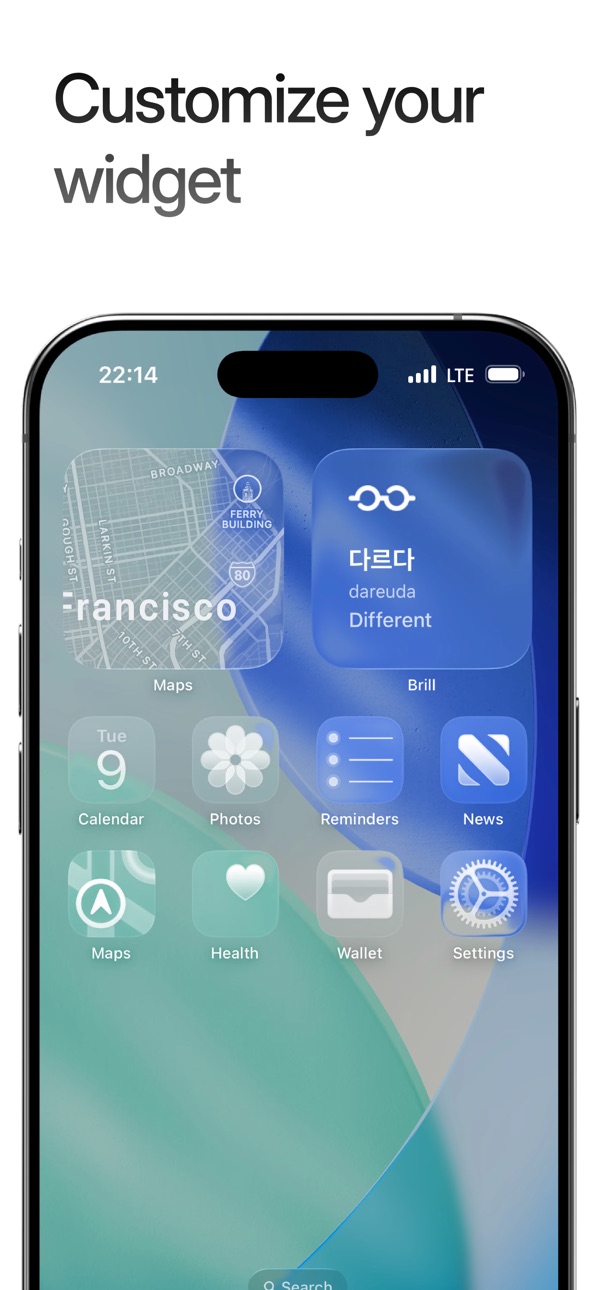
Add a beautifully minimal widget and start absorbing vocabulary without thinking about it.
WHY BRILL WORKS
• Learn without opening an app
• One word at a time, shown throughout your day
• Designed to build real habits, not guilt
SUPPORTED LANGUAGES
Choose from 28 languages and explore essential, high-frequency vocabulary — perfect for beginners and casual learners. Available in:
Japanese, Korean, Spanish, French, German, Italian, Portuguese, Chinese (Mandarin), Chinese (Cantonese), Chinese (Hokkien), Russian, Turkish, Thai, Indonesian, Vietnamese, Dutch, Swedish, Polish, Greek, Ukrainian, Romanian, Hungarian, Danish, Filipino, Malay, Hebrew, Mongolian, & Bulgarian
DESIGNED TO FIT YOUR SCREEN
• Clean, distraction-free widget
• Light, dark, and clear styles
• Home Screen and Lock Screen support
GO PRO TO CUSTOMIZE YOUR LEARNING
• Add your own words
• Filter vocabulary by topic
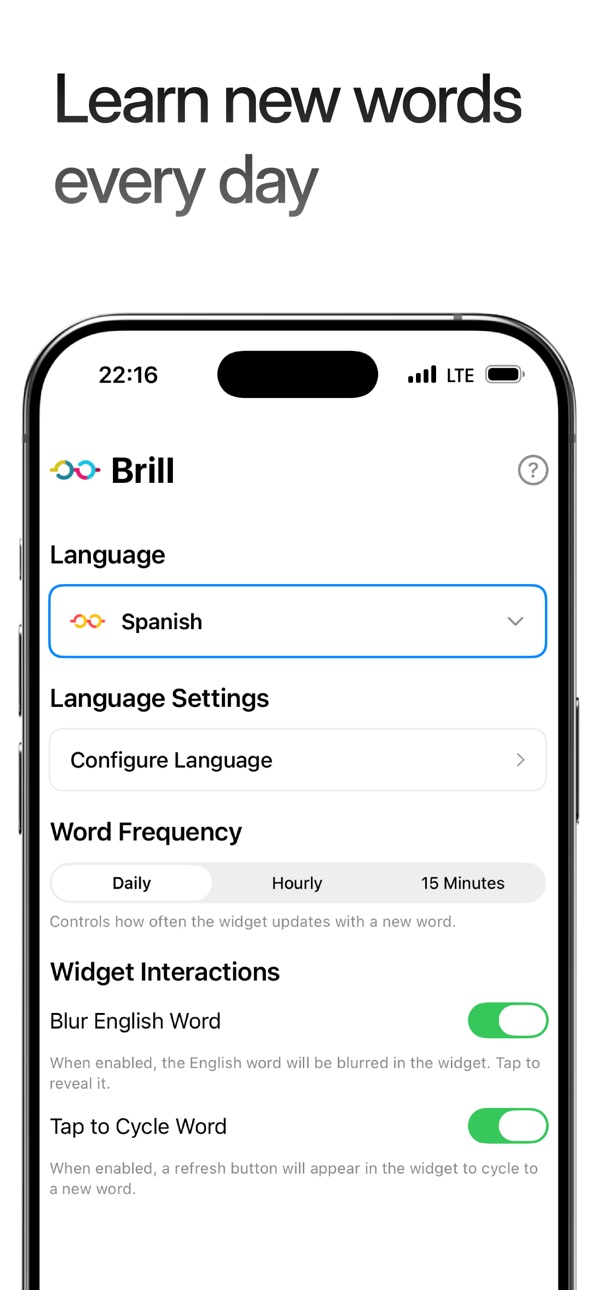
• Blur translations to strengthen memory
• Control how often words refresh
• Unlock Lock Screen widgets
No accounts. No streaks. No pressure.
Just language learning that fits into your life.
Your next language starts with one glance.
Our full Privacy Policy and Terms & Conditions are available on our website. They clearly outline the data Brill collects, how we use it, and how users can manage their information.
Privacy Policy: https://www.brillapp.com/legal/privacy-policy
Terms & Conditions: https://www.brillapp.com/legal/terms-and-conditions
In-App Purchases US pricing
Brill Pro Subscription Subscription
Brill Pro Monthly · Monthly$0.99
Brill Pro Annually · Yearly$9.99
Brill Pro Monthly · Monthly$2.99
Brill Pro Annual · Yearly 7-day free trial$24.99
Capabilities
In-App Purchases
Accessibility
ipadiphonemacrealityDevicetvoswatch
Version history 14 versions
Build 886784683v3.42026-06-10 19:46:55
This is the biggest update to Brill yet.
Words now cycle reliably. The core scheduling system has been rebuilt from the ground up — daily, hourly, and 15-minute cycling now works correctly every time.
What's new for everyone:
- Now 37 languages — including Hindi, Arabic, Urdu, Farsi, Bengali, Tamil, Lao, Khmer, and Afrikaans, all with full
pronunciation guides and romanization for every new script
- Pronunciation for all 37 languages — phonetic guides now appear in the widget for every supported language, free for all users
- Hear any word spoken aloud — tap the speaker button in the widget to hear the word pronounced by a native voice
- Hear phrases spoken aloud — a speaker button now appears on every phrase in the list and phrases widget
- Pronunciation guides for all phrases — phonetic guides shown below every phrase in the list
- Tap the widget to open the word detail sheet — tap anywhere on the word to see its full pronunciation, audio, and tags
- Daily reminder at 1pm — opt in from Settings to get a nudge on days you haven't opened Brill yet
- Gendered articles in the widget — languages like French, Spanish, Italian, Portuguese, Dutch, and Danish now show the actual article (le, la, el, de, het…) instead of a generic gender label
- Haptic feedback on key actions
New for Pro:
- Add your own custom phrases to the phrases widget
- All languages updated to 1,500 words
Bug fixes:
- Lock screen widget no longer shows "Upgrade to Pro" in the widget gallery for pro users
- 15-minute countdown timer now appears correctly on first open
- Fixed duplicate pronunciation text in the phrases widget for Cantonese, Mandarin, and Hokkien
- Pro features (cycling, blur, word frequency) now correctly reset when a subscription lapses or you sign out
One more thing: if you go to Settings → Extras, there's something a little different hidden in there.
Build 886067301v3.22026-05-25 00:08:27
This is the biggest update to Brill yet.
Words now cycle reliably. The core scheduling system has been rebuilt from the ground up — daily, hourly, and
15-minute cycling now works correctly every time.
What's new for everyone:
- Now 37 languages — including Hindi, Arabic, Urdu, Farsi, Bengali, Tamil, Lao, Khmer, and Afrikaans, all with full
pronunciation guides and romanization for every new script
- Pronunciation for all 37 languages — phonetic guides now appear in the widget for every supported language, free
for all users
- Hear any word spoken aloud — tap the speaker button in the widget to hear the word pronounced by a native voice
- Hear phrases spoken aloud — a speaker button now appears on every phrase in the list and phrases widget
- Pronunciation guides for all phrases — phonetic guides shown below every phrase in the list
- Tap the widget to open the word detail sheet — tap anywhere on the word to see its full pronunciation, audio, and
tags
- Daily reminder at 1pm — opt in from Settings to get a nudge on days you haven't opened Brill yet
- Gendered articles in the widget — languages like French, Spanish, Italian, Portuguese, Dutch, and Danish now show
the actual article (le, la, el, de, het…) instead of a generic gender label
- Haptic feedback on key actions
New for Pro:
- Add your own custom phrases to the phrases widget
- All languages updated to 1,500 words
Bug fixes:
- Lock screen widget no longer shows "Upgrade to Pro" in the widget gallery for pro users
- 15-minute countdown timer now appears correctly on first open
- Fixed duplicate pronunciation text in the phrases widget for Cantonese, Mandarin, and Hokkien
- Pro features (cycling, blur, word frequency) now correctly reset when a subscription lapses or you sign out
One more thing: if you go to Settings → Extras, there's something a little different hidden in there.
Build 886090890v3.32026-05-25 18:03:35
This is the biggest update to Brill yet.
Words now cycle reliably. The core scheduling system has been rebuilt from the ground up — daily, hourly, and 15-minute cycling now works correctly every time.
What's new for everyone:
- Now 37 languages — including Hindi, Arabic, Urdu, Farsi, Bengali, Tamil, Lao, Khmer, and Afrikaans, all with full
pronunciation guides and romanization for every new script
- Pronunciation for all 37 languages — phonetic guides now appear in the widget for every supported language, free for all users
- Hear any word spoken aloud — tap the speaker button in the widget to hear the word pronounced by a native voice
- Hear phrases spoken aloud — a speaker button now appears on every phrase in the list and phrases widget
- Pronunciation guides for all phrases — phonetic guides shown below every phrase in the list
- Tap the widget to open the word detail sheet — tap anywhere on the word to see its full pronunciation, audio, and tags
- Daily reminder at 1pm — opt in from Settings to get a nudge on days you haven't opened Brill yet
- Gendered articles in the widget — languages like French, Spanish, Italian, Portuguese, Dutch, and Danish now show the actual article (le, la, el, de, het…) instead of a generic gender label
- Haptic feedback on key actions
New for Pro:
- Add your own custom phrases to the phrases widget
- All languages updated to 1,500 words
Bug fixes:
- Lock screen widget no longer shows "Upgrade to Pro" in the widget gallery for pro users
- 15-minute countdown timer now appears correctly on first open
- Fixed duplicate pronunciation text in the phrases widget for Cantonese, Mandarin, and Hokkien
- Pro features (cycling, blur, word frequency) now correctly reset when a subscription lapses or you sign out
One more thing: if you go to Settings → Extras, there's something a little different hidden in there.
Build 886046236v3.12026-05-23 22:43:02
This is the biggest update to Brill yet.
Words now cycle reliably. The core scheduling system has been rebuilt from the ground up — daily, hourly, and 15-minute cycling now works correctly every time.
What's new for everyone:
- Hindi added — Brill now covers 29 languages, with full pronunciation and audio support
- Pronunciation for all 29 languages — phonetic guides now appear in the widget for every supported language, free for all users
- Hear any word spoken aloud — tap the speaker button in the widget to hear the word pronounced by a native voice
- Hear phrases spoken aloud — a speaker button now appears on every phrase in the list and phrases widget
- Pronunciation guides for all phrases — phonetic guides shown below every phrase in the list
- Gendered articles in the widget — languages like French, Spanish, Italian, Portuguese, Dutch, and Danish now show the actual article (le, la, el, de, het…) instead of a
generic gender label
- Haptic feedback on key actions
New for Pro:
- Add your own custom phrases to the phrases widget
- All languages updated to 1,500 words
Bug fixes:
- Lock screen widget no longer shows "Upgrade to Pro" in the widget gallery for pro users
- 15-minute countdown timer now appears correctly on first open
- Fixed duplicate pronunciation text in the phrases widget for Cantonese, Mandarin, and Hokkien
- Pro features (cycling, blur, word frequency) now correctly reset when a subscription lapses or you sign out
One more thing: if you go to Settings → Extras, there's something a little different hidden in there.
Build 886000823v3.02026-05-22 19:58:25
This is the biggest update to Brill yet.
Words now cycle reliably. The core scheduling system has been rebuilt from the ground up — daily, hourly, and 15-minute cycling now works correctly every time.
What's new for everyone:
• Pronunciation for all 28 languages — phonetic guides now appear in the widget for every supported language, free for all users
• Hear any word spoken aloud — tap the speaker button in the widget to hear the word pronounced by a native voice
• Gendered articles in the widget — languages like French, Spanish, Italian, Portuguese, Dutch, and Danish now show the actual article (le, la, el, de, het…) instead of a generic gender label
New for Pro:
• Add your own custom phrases to the phrases widget
• All languages updated to 1,500 words
Bug fixes:
• Lock screen widget no longer shows "Upgrade to Pro" in the widget gallery for pro users
• 15-minute countdown timer now appears correctly on first open
• Fixed duplicate pronunciation text in the phrases widget for Cantonese, Mandarin, and Hokkien
Build 881523330v2.32026-01-17 03:24:26
This release contains bug fixes and improvements:
- Fixes cycle of word to respect device time
- Fixes display of certain sheets across the app
- Consolidates styles across the app for a cleaner look
- Updated timing of upgrade and update sheets
- Introduces local notifications to help you install the widget
Build 881337136v2.22026-01-09 10:04:41
This release has plenty of bug fixes and improvements:
- Fixes cycle of word to respect device time
- Fixes display of certain sheets across the app
- Consolidates styles across the app for a cleaner look
Build 881204817v2.12026-01-05 23:59:59
This release is packed full of bug fixes, and improvements.
Better sync across devices
Your words and settings stay in sync more reliably.
Updated settings view
Simpler, clearer controls that are easier to customize.
Improved Japanese support
Better handling of Japanese text for a smoother learning experience. Ability to toggle how Hiragana is displayed across the widget.
Bug fixes
Fixes an issue where words wouldn’t cycle correctly in certain setups, plus general stability improvements.
Build 881145742v2.02026-01-03 00:32:05
This release is packed full of new features, bug fixes, and improvements.
Updated look and feel
Refined UI across the app for a cleaner, more polished experience.
13 new languages
Now supports Russian, Ukrainian, Thai, Vietnamese, Indonesian, Romanian, Hungarian, Greek, Polish, Bulgarian, Hebrew, Turkish, and Mongolian.
Better sync across devices
Your words and settings stay in sync more reliably.
Updated settings view
Simpler, clearer controls that are easier to customize.
Improved Japanese support
Better handling of Japanese text for a smoother learning experience.
Pronunciation toggle
Turn pronunciations on or off based on how you prefer to learn.
Phrases widget
Learn common phrases at a glance, right from your Home Screen.
Bug fixes
Fixes an issue where words wouldn’t cycle correctly in certain setups, plus general stability improvements.
Build 880931738v1.52025-12-24 12:35:08
This release is packed full of new features, bug fixes, and improvements.
New Widget Styles
Choose from light, dark, or clear designs to match your Home Screen perfectly.
Expanded Language Support
Learn from 15 languages including Japanese, Korean, Cantonese, Mandarin, Hokkien, Filipino, French, German, Italian, Malay, Portuguese, Spanish, Swedish, Danish, and Dutch.
Custom Vocabulary
Add your own words to build a learning experience that fits your goals.
Tag Filters
Browse by topics so you can focus on the vocabulary that matters to you.
Tap to Cycle Words
Move through new words instantly whenever you want more variety.
Blurred Translations
Hide the English word to improve memorization and strengthen recall.
Lock Screen Widget
See your word of the day at a glance without unlocking your phone.
Flexible Refresh Options
Choose daily or weekly word updates to match your ideal learning pace.
Bug fixes
Fixes a bug where words would not cycle as expected in certain configurations.
Build 878101208v1.42025-12-17 01:50:47
This release is packed full of new features, bug fixes, and improvements.
New Widget Styles
Choose from light, dark, or clear designs to match your Home Screen perfectly.
Expanded Language Support
Learn from 15 languages including Japanese, Korean, Cantonese, Mandarin, Hokkien, Filipino, French, German, Italian, Malay, Portuguese, Spanish, Swedish, Danish, and Dutch.
Custom Vocabulary
Add your own words to build a learning experience that fits your goals.
Tag Filters
Browse by topics so you can focus on the vocabulary that matters to you.
Tap to Cycle Words
Move through new words instantly whenever you want more variety.
Blurred Translations
Hide the English word to improve memorization and strengthen recall.
Lock Screen Widget
See your word of the day at a glance without unlocking your phone.
Flexible Refresh Options
Choose daily or weekly word updates to match your ideal learning pace.
Build 845906672v1.22021-12-12 21:00:07
Added
- Italian
- Portuguese
- Danish
- Swedish
Updated
- App styles
- Widget styles
Fixed
- Style issues with dark mode
Build 845859398v1.12021-12-11 08:27:24
Added
- Stable support for French
- Stable support for Spanish
- Stable support for German
Fixed
- Fixed an issue with checkboxes
Build 845661216v1.02021-12-09 20:58:27
Price history by region
Currency
Show
Columns
Search
Availability 1 of 1 storefronts
| Region | Language | Price | Ratings | Avg | Version |
|---|---|---|---|---|---|
| US | en-US | Free | 29 | 4.1 | 3.4 |
Change log 18 changes · US
✎
releaseNotes updated
This is the biggest update to Brill yet.
Words now cycle reliably. The core scheduling system has been rebuilt from the ground up — daily, hourly, and 15-minut
✎
description updated
You don’t need more study time.
You need better exposure.
Brill helps you learn languages at a glance.
New words appear directly on your Home screen, so learni
✎
subtitle updated
The Language Widget
✎
name updated
Brill: Language at First Sight
◆
Version 3.4 released
This is the biggest update to Brill yet.
Words now cycle reliably. The core scheduling system has been rebuilt from the ground up — daily, hourly, and 15-minute cycling now works correctly every time.
What's new for everyone:
- Now 37 l
◆
Version 3.3 released
This is the biggest update to Brill yet.
Words now cycle reliably. The core scheduling system has been rebuilt from the ground up — daily, hourly, and 15-minute cycling now works correctly every time.
What's new for everyone:
- Now 37 l
◆
Version 3.2 released
This is the biggest update to Brill yet.
Words now cycle reliably. The core scheduling system has been rebuilt from the ground up — daily, hourly, and
15-minute cycling now works correctly every time.
What's new for everyone:
- No
◆
Version 3.1 released
This is the biggest update to Brill yet.
Words now cycle reliably. The core scheduling system has been rebuilt from the ground up — daily, hourly, and 15-minute cycling now works correctly every time.
What's new for everyone:
- Hi
◆
Version 3.0 released
This is the biggest update to Brill yet.
Words now cycle reliably. The core scheduling system has been rebuilt from the ground up — daily, hourly, and 15-minute cycling now works correctly every time.
What's new for everyone:
• Pronunciat
◆
Version 2.3 released
This release contains bug fixes and improvements:
- Fixes cycle of word to respect device time
- Fixes display of certain sheets across the app
- Consolidates styles across the app for a cleaner look
- Updated timing of upgrade and update s
◆
Version 2.2 released
This release has plenty of bug fixes and improvements:
- Fixes cycle of word to respect device time
- Fixes display of certain sheets across the app
- Consolidates styles across the app for a cleaner look
◆
Version 2.1 released
This release is packed full of bug fixes, and improvements.
Better sync across devices
Your words and settings stay in sync more reliably.
Updated settings view
Simpler, clearer controls that are easier to customize.
Improved Japanese su
◆
Version 2.0 released
This release is packed full of new features, bug fixes, and improvements.
Updated look and feel
Refined UI across the app for a cleaner, more polished experience.
13 new languages
Now supports Russian, Ukrainian, Thai, Vietnamese, Indones
◆
Version 1.5 released
This release is packed full of new features, bug fixes, and improvements.
New Widget Styles
Choose from light, dark, or clear designs to match your Home Screen perfectly.
Expanded Language Support
Learn from 15 languages including Jap
◆
Version 1.4 released
This release is packed full of new features, bug fixes, and improvements.
New Widget Styles
Choose from light, dark, or clear designs to match your Home Screen perfectly.
Expanded Language Support
Learn from 15 languages including Jap
◆
Version 1.2 released
Added
- Italian
- Portuguese
- Danish
- Swedish
Updated
- App styles
- Widget styles
Fixed
- Style issues with dark mode
◆
Version 1.1 released
Added
- Stable support for French
- Stable support for Spanish
- Stable support for German
Fixed
- Fixed an issue with checkboxes
◆
Version 1.0 released