Home › Navigation

 ILNot Available
Information
Preview 1 platform
iPhone 9 images




What’s New Version 2026.1
→ New dial - Temperature
- See the current temperature with a weather-powered dial
- A colour-coded forecast arc shows today's high and low
- The dial range adapts automatically based on your local 3-day forecast
- Tap the secondary display to cycle through feels like, today's forecast, humidity, and dew point
- Thanks Mark for the great suggestion!
○ Smoother animations
- All dials now use a unified animation system with tuned spring animations
- The compass now responds instantly to direction changes
!! Bug fixes
- Fixed dial preview not updating when changing units
Description
Accurately display your GPS speed, temperature, time, distance, heading, course, altitude and barometric pressure. Easy to read dials, while keeping your location data private.
Terrene Dash is a dashboard app, which clearly and accurately displays your current speed, temperature, direction, altitude, time, and barometric pressure at a glance.
With 7 configurable dashboard pages, you can choose which dial you want on each page, and swipe left or right to quickly switch between dashboards.
Terrene Dash has light and dark modes. Its dark mode, with its black background and muted markings, helps your eyes stay adjusted to the dark, while light mode has good contrast in bright daytime conditions.
My goal is for Terrene Dash to be a handy toolbox of time, motion, environment and navigation related dials, using all the capabilities of modern iPhone devices, while ensuring your privacy is kept safe.
Dashboard dials
→ Altimeter
▫ Feet
▫ Meters
→ Tap the dial to toggle between whole and decimal numbers
→ Barometer
▫ Hectopascals (hPa)
▫ Kilopascals (kPa)
▫ Inches of mercury (in Hg)
▫ Millimeters of mercury (mm Hg)
▫ Pounds per square inch (psi)
→ Tap the dial to toggle between whole and decimal numbers. In Hg, kPa, and psi will toggle between 1 and 2 decimal numbers
→ Compass
▫ Magnetic north
▫ True north
→ Course Over Ground (COG)
▫ Your actual current direction relative to the surface of the earth.
→ Clock
▫ 12 or 24-Hour
▫ In current timezone
→ Speedometer
▫ Kilometers per hour (km/h)
▫ Miles per hour (mph)
▫ Knots (kn)
▫ Meters per second (m/s)
→ Speedometer stats
▫ Four trip meters and top speed
▫ Tap to cycle between each
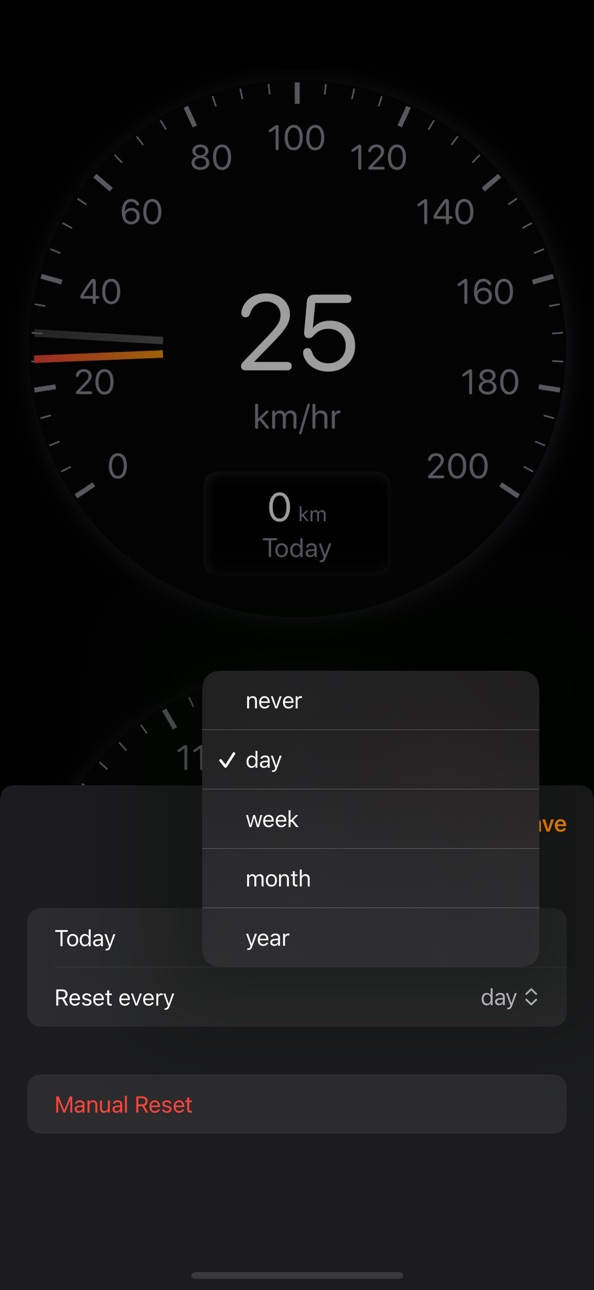
▫ Press and hold to rename, reorder, configure when each are reset or manually reset
▫ Configure them to automatically reset after midnight each day, week, month, year or never
→ Tap the dial to toggle between whole and decimal numbers
→ Temperature
▫ Powered by Apple WeatherKit
▫ A colour-coded forecast arc shows today's high and low
▫ The dial range adapts automatically based on your local 3-day forecast
▫ Tap the secondary display to cycle through feels like, today's forecast, humidity, and dew point
What's next?
More dials and improvements are on the way.
If you've a great idea for a dial or a feature you'd love to see in Terrene Dash, please email me (Simon) at hello@terrene.app.
Accessibility
ipadiphonemacrealityDevicetvoswatch
Version history 21 versions
Build 876688350v2026.12026-02-19 01:09:59
→ New dial - Temperature
- See the current temperature with a weather-powered dial
- A colour-coded forecast arc shows today's high and low
- The dial range adapts automatically based on your local 3-day forecast
- Tap the secondary display to cycle through feels like, today's forecast, humidity, and dew point
- Thanks Mark for the great suggestion!
○ Smoother animations
- All dials now use a unified animation system with tuned spring animations
- The compass now responds instantly to direction changes
!! Bug fixes
- Fixed dial preview not updating when changing units
Build 875781932v2025.32025-06-22 11:59:56
→ Customise speedometer stats
- Long press the stats area to:
- Show a list of all stats
- Name and reorder
- Configure each to reset automatically each day, week, month, year, or never
- You can still manually reset any stat
- Thanks Tracy for another great idea! Enjoy!
Build 874154655v2025.22025-04-19 20:48:21
→ New feature - More decimals!
- Tapping the middle of the speedometer, barometer, or altimeter dials toggles a decimal place
- Thanks Tracy for another great idea! Enjoy!
Build 872184726v2025.12025-02-03 22:30:03
○ UI improvements
- Changed the dial borders to a subtle drop shadow
○ Code maintenance and cleanup work
- Changed the minimum required version to iOS 17
- Fixed missing app icon in Help & Support
Build 867783674v2024.42024-07-29 00:18:47
○ Auto hide the Dial Gallery and Settings buttons
- They’ll appear when you first start the app or if you tap on the screen, and disappear a few seconds later.
○ Improved the menus
- The system status bar won’t peak through anymore
- No more weird double pop up when going to Settings then My Dashboard
!! Oops! Fixed a bug where the app got stuck in limbo land if you’re on the last dashboard and delete it. Now it’ll send you to the last visible dashboard.
Build 866053838v2024.32024-05-20 00:01:51
→ New feature - Top speed indicator
→ New feature - Speedometer defaults for your region
Build 865543806v2024.22024-04-29 00:01:05
→ New feature - 12 or 24-Hour clock setting
Build 865178216v2024.12024-04-15 00:00:57
!! Oops! Fixed the Barometer which now requires Motion & Fitness authorisation
Build 861990237v2023.32023-12-05 23:18:36
○ Updated Help & Support links
!! Oops! Fixed a bug where the Today trip meter wouldn’t reset at midnight if you hadn’t used the app in a while.
Build 858828445v2023.22023-08-01 00:00:25
→ New feature - GPS Status
• See if the device is receiving data or not
• Shows the current accuracy
• Hides itself when the accuracy is good
○ Changed how the Battery Status looks
○ Minor change to how the Trip Meter looks
Build 854363924v2023.12023-01-21 00:00:35
→ New Trip Meter
▫ Added four resettable trip meters to the Speedometer
▫ The Today trip meter automatically resets after midnight
○ Barometer
▫ Added millimeters of mercury (mm Hg)
○ Rebuilt all dials
▫ All dials draw faster and use less resources
▫ The Clock dial uses 4 times less CPU
○ Code maintenance and cleanup work
▫ Changed the minimum required version to iOS 16
Build 852173792v2022.42022-12-24 00:19:53
→ We're now Terrene Dash!
▫ Also gave the app icon a nice update.
→ Battery level indicator
▫ While the phone is not plugged in, the current charge level is displayed
▫ Thanks again Maarten for this idea! Enjoy!
○ Changes to work better at night
▫ The dark-mode dashboard background is now pure black
▫ The home indicator bar disappears after a few seconds
○ Various code maintenance and cleanup work
▫ Changed the minimum required version to iOS 15
Build 850740148v2022.32022-07-12 00:08:06
○ Improved the compass clarity for North, East, South, and West. North now has a red marker.
▫ Thanks again Maarten for your suggestions! Enjoy!
!! Oops! Fixed a bug for iPhone 8 Plus devices, where the dashboard in landscape wasn't displaying correctly.
Build 850480534v2022.22022-06-29 16:02:30
→ Course Over Ground (COG)
▫ Using the GPS, this show the direction your vehicle is moving.
○ Each dial in the dial gallery now has a description
Build 847958766v2022.12022-04-06 19:16:10
→ Landscape mode
▫ Thanks Maarten! Enjoy!
!! Oops! Fixed a bug, so the compass now continues to work while swiping between dashboards
Build 846170139v2021.62021-12-23 21:57:28
→ New Altimeter dial, configurable in feet or meters
▫ This is a three-pointer altimeter, displaying 100, 1000 and 10000 feet or meters
○ Refreshed all dials with a larger main digital display, and slimmer background dial markings
○ Optimised dial code to use less device resources
!! Oops! Fixed a bug, where it would add instead of replace a dial, when there was only one dial on that dashboard
Build 845655986v2021.52021-12-03 16:28:41
→ New and improved app icon
○ Changed the UI from a tab bar to a tool bar.
▫ This is in preparation for other tool bar buttons in future updates.
○ Optimised the compass and clock dials to decrease CPU usage.
▫ This seems to help reduce the phone going into overheat protection mode (ie. display dimming) when it's hot outside and attached to your windscreen.
○ More colour tweaks in dark mode to make sure it's using pure black for OLED displays.
!! Fixed the Clock hand positions, to show the correct time during daylight savings. Fortunately, the digital clock was showing the correct time.
Build 843885099v2021.42021-09-01 01:06:54
→ Dashboards
▫ You can configure up to 5 dashboards with 2 dials each
▫ Make the dashboard full-screen, hiding the tab and status bars
→ Dial Gallery
▫ Preview all available dials, with more on the way
▫ Choose a dial, configure it, and add it to the dashboard
▫ You can also replace existing dials too
→ Settings
▫ Re-order and remove dashboards
▫ Set a preference to always use light or dark mode
▫ Links to the Terrene homepage, help and support websites
○ Increased the dial sizes a bit more
○ Changed the dark mode dials to have a completely black background to improve clarity
Build 843666831v2021.32021-08-18 23:32:44
→ New Barometers for Kilopascals (kPa), Inches of mercury (in Hg), and Pounds per square inch (psi)
→ New Compass for true north
○ Increased the dial sizes and added more markers to improve clarity
○ Improved wording when requesting location access
!! Oops. Fixed the Speedometers for Knots and Meters per second to now have correct dial markers
Build 842944514v2021.22021-07-07 00:07:36
→ Barometer
→ Clock
Build 842822052v2021.12021-06-30 01:24:53
Price history by region
Currency
Show
Columns
Search
Availability 21 of 22 storefronts
| Region | Language | Price | Ratings | Avg | Version |
|---|---|---|---|---|---|
 US US | en-US | USD 2.99 | 2 | 5.0 | 2026.1 |
 AO AO | en-GB | USD 2.99 | 0 | — | 2026.1 |
 CI CI | fr-FR | USD 3.99 | 0 | — | 2026.1 |
 CR CR | es-MX | USD 2.99 | 0 | — | 2026.1 |
 CV CV | en-GB | USD 2.99 | 0 | — | 2026.1 |
 CZ CZ | en-GB | CZK 79 | 0 | — | 2026.1 |
 GT GT | es-MX | USD 2.99 | 0 | — | 2026.1 |
 IS IS | en-GB | USD 3.99 | 0 | — | 2026.1 |
 LA LA | en-GB | USD 2.99 | 0 | — | 2026.1 |
 LK LK | en-GB | USD 2.99 | 0 | — | 2026.1 |
 ML ML | en-GB | USD 2.99 | 0 | — | 2026.1 |
 MM MM | en-GB | USD 2.99 | 0 | — | 2026.1 |
 NP NP | en-GB | USD 3.99 | 0 | — | 2026.1 |
 PA PA | es-MX | USD 2.99 | 0 | — | 2026.1 |
 PL PL | en-GB | PLN 14.99 | 0 | — | 2026.1 |
 QA QA | en-GB | QAR 9.99 | 0 | — | 2026.1 |
 SA SA | en-GB | SAR 12.99 | 0 | — | 2026.1 |
 SN SN | en-GB | USD 3.99 | 0 | — | 2026.1 |
 SV SV | es-MX | USD 2.99 | 0 | — | 2026.1 |
 TR TR | en-GB | TRY 149.99 | 0 | — | 2026.1 |
 XK XK | en-GB | EUR 2.99 | 0 | — | 2026.1 |
Not available in: IL
Change log 25 changes · US
✎
releaseNotes updated
→ New dial - Temperature
- See the current temperature with a weather-powered dial
- A colour-coded forecast arc shows today's high and low
- The dial ran
✎
description updated
Accurately display your GPS speed, temperature, time, distance, heading, course, altitude and barometric pressure. Easy to read dials, while keeping your locati
✎
subtitle updated
GPS dials for speed & weather
✎
name updated
Terrene Dash
◆
Version 2026.1 released
→ New dial - Temperature
- See the current temperature with a weather-powered dial
- A colour-coded forecast arc shows today's high and low
- The dial range adapts automatically based on your local 3-day forecast
- Tap the secondary
◆
Version 2025.3 released
→ Customise speedometer stats
- Long press the stats area to:
- Show a list of all stats
- Name and reorder
- Configure each to reset automatically each day, week, month, year, or never
- You can still manually res
◆
Version 2025.2 released
→ New feature - More decimals!
- Tapping the middle of the speedometer, barometer, or altimeter dials toggles a decimal place
- Thanks Tracy for another great idea! Enjoy!
◆
Version 2025.1 released
○ UI improvements
- Changed the dial borders to a subtle drop shadow
○ Code maintenance and cleanup work
- Changed the minimum required version to iOS 17
- Fixed missing app icon in Help & Support
◆
Version 2024.4 released
○ Auto hide the Dial Gallery and Settings buttons
- They’ll appear when you first start the app or if you tap on the screen, and disappear a few seconds later.
○ Improved the menus
- The system status bar won’t peak through anymore
-
◆
Version 2024.3 released
→ New feature - Top speed indicator
→ New feature - Speedometer defaults for your region
◆
Version 2024.2 released
→ New feature - 12 or 24-Hour clock setting
◆
Version 2024.1 released
!! Oops! Fixed the Barometer which now requires Motion & Fitness authorisation
◆
Version 2023.3 released
○ Updated Help & Support links
!! Oops! Fixed a bug where the Today trip meter wouldn’t reset at midnight if you hadn’t used the app in a while.
◆
Version 2023.2 released
→ New feature - GPS Status
• See if the device is receiving data or not
• Shows the current accuracy
• Hides itself when the accuracy is good
○ Changed how the Battery Status looks
○ Minor change to how the Trip Meter looks
◆
Version 2023.1 released
→ New Trip Meter
▫ Added four resettable trip meters to the Speedometer
▫ The Today trip meter automatically resets after midnight
○ Barometer
▫ Added millimeters of mercury (mm Hg)
○ Rebuilt all dials
▫ All dials draw faste
◆
Version 2022.4 released
→ We're now Terrene Dash!
▫ Also gave the app icon a nice update.
→ Battery level indicator
▫ While the phone is not plugged in, the current charge level is displayed
▫ Thanks again Maarten for this idea! Enjoy!
○ Changes to wor
◆
Version 2022.3 released
○ Improved the compass clarity for North, East, South, and West. North now has a red marker.
▫ Thanks again Maarten for your suggestions! Enjoy!
!! Oops! Fixed a bug for iPhone 8 Plus devices, where the dashboard in landscape wasn't dis
◆
Version 2022.2 released
→ Course Over Ground (COG)
▫ Using the GPS, this show the direction your vehicle is moving.
○ Each dial in the dial gallery now has a description
◆
Version 2022.1 released
→ Landscape mode
▫ Thanks Maarten! Enjoy!
!! Oops! Fixed a bug, so the compass now continues to work while swiping between dashboards
◆
Version 2021.6 released
→ New Altimeter dial, configurable in feet or meters
▫ This is a three-pointer altimeter, displaying 100, 1000 and 10000 feet or meters
○ Refreshed all dials with a larger main digital display, and slimmer background dial markings
○ Opt
◆
Version 2021.5 released
→ New and improved app icon
○ Changed the UI from a tab bar to a tool bar.
▫ This is in preparation for other tool bar buttons in future updates.
○ Optimised the compass and clock dials to decrease CPU usage.
▫ This seems to help r
◆
Version 2021.4 released
→ Dashboards
▫ You can configure up to 5 dashboards with 2 dials each
▫ Make the dashboard full-screen, hiding the tab and status bars
→ Dial Gallery
▫ Preview all available dials, with more on the way
▫ Choose a dial, conf
◆
Version 2021.3 released
→ New Barometers for Kilopascals (kPa), Inches of mercury (in Hg), and Pounds per square inch (psi)
→ New Compass for true north
○ Increased the dial sizes and added more markers to improve clarity
○ Improved wording when requesting locatio
◆
Version 2021.2 released
→ Barometer
→ Clock
◆
Version 2021.1 released