Home › Photo & Video

 US
US
1 of 1 storefronts
Content in en-US
Content in en-US
Information
Preview 2 platforms
iPhone 6 images




iPad 6 images




What’s New Version 3.0.8
Fixes for stuttering in 3D view.
Description
Modelar helps you scan, review, measure, and export real-world spaces with LiDAR.
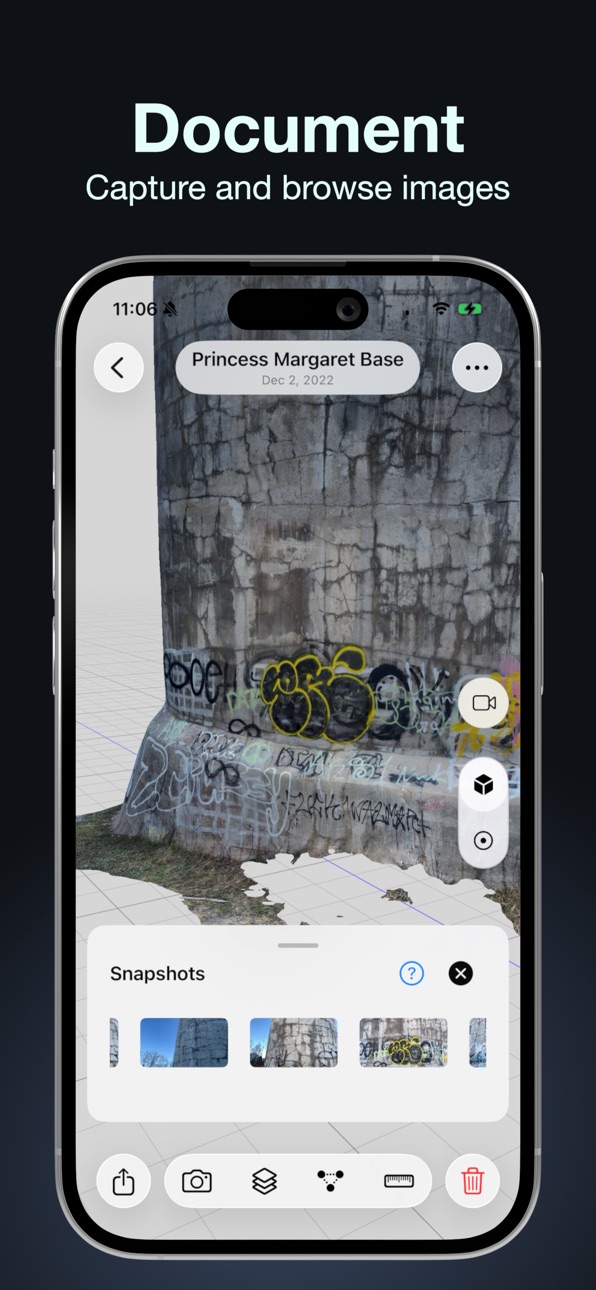
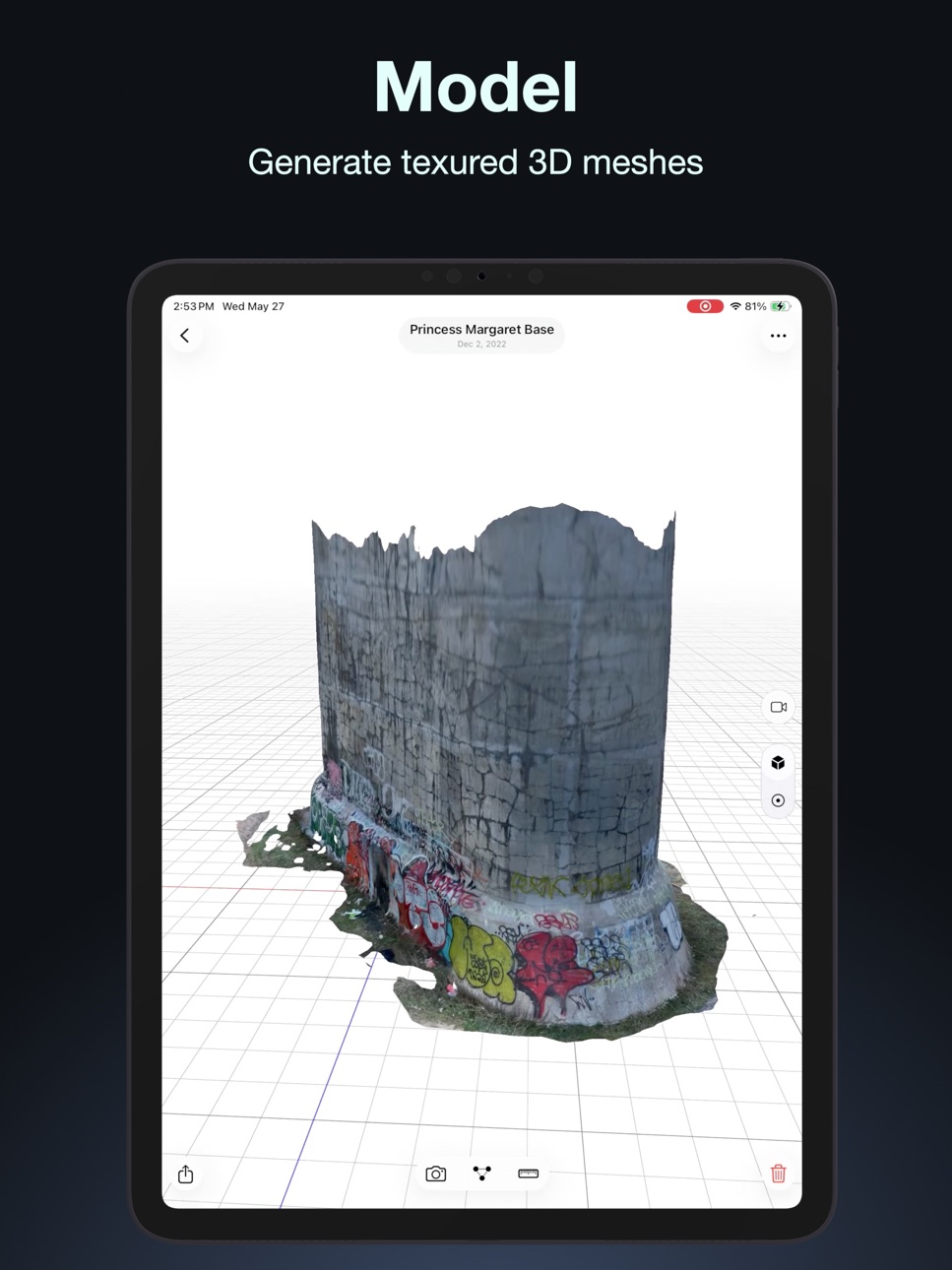
Capture 3D scans of sites, rooms, objects, and assets using point clouds, textured 3D models, images, and high-resolution position-linked snapshots. See what you’ve captured while you scan, review results directly on device, measure before leaving the site, and export useful 3D data in open formats.
Modelar is built for field documentation, inspection, site capture, and spatial data collection.
Key features:
• Capture LiDAR scans with point clouds and textured 3D models
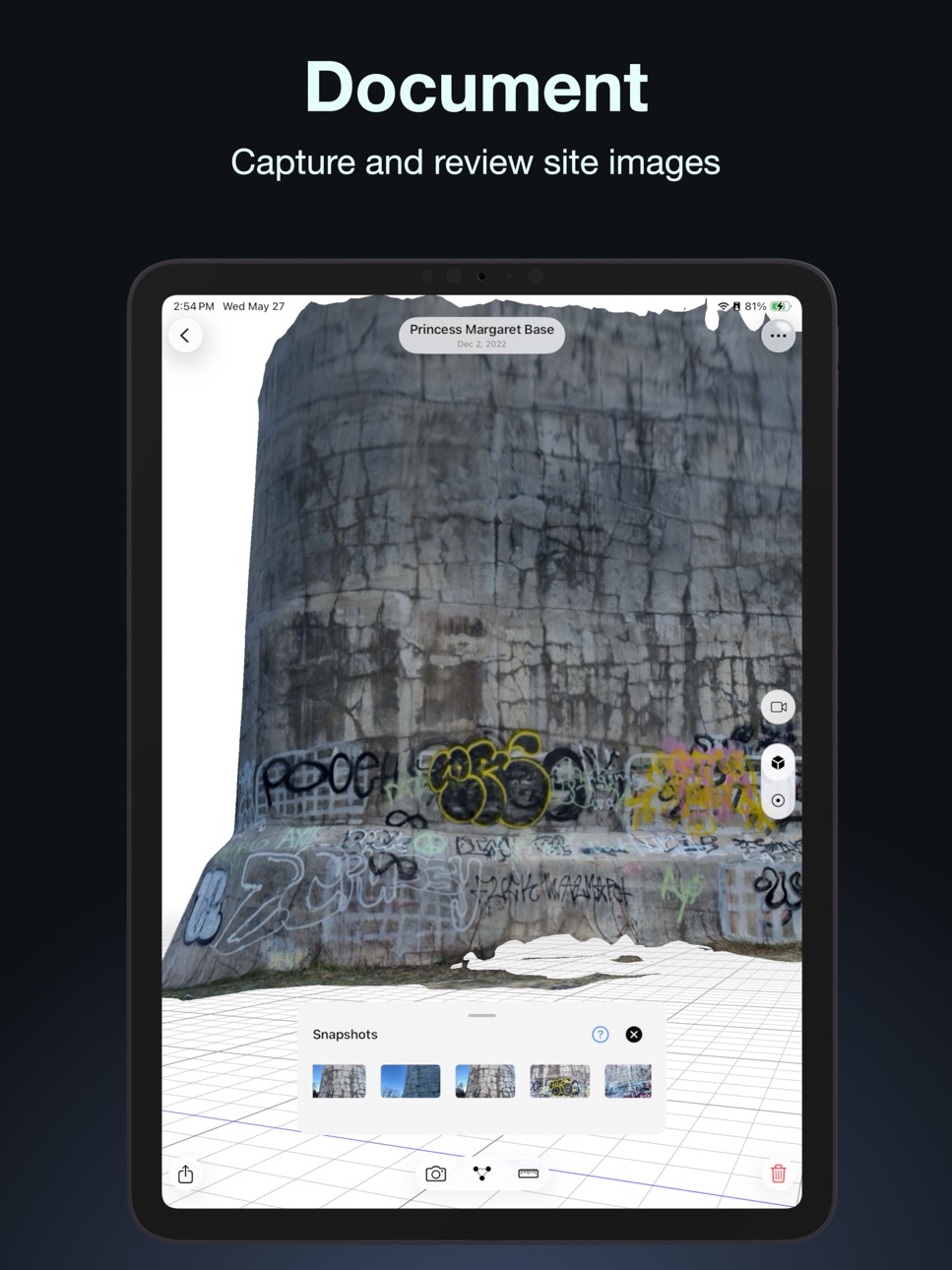
• Take 4K snapshots linked to capture position
• Browse the full image set directly on device
• View point clouds and textured models after capture
• Measure distances before leaving the site
• Export models and point clouds in common formats
Modelar requires an iPhone Pro with LiDAR or iPad Pro with LiDAR.
Mesh exports: GLB, USDZ, OBJ, STL, PLY, Sketchfab
Point cloud exports: E57, LAS, PLY, CSV, Sketchfab
https://modelar.ai
Accessibility
ipadiphonemacrealityDevicetvoswatch
Version history 25 versions
Build 887866126v3.0.82026-07-05 22:16:37
Fixes for stuttering in 3D view.
Build 887657591v3.0.72026-07-01 10:31:58
Fixes a bug that prevented access to capture library. Stability improvements.
Build 887492457v3.0.62026-06-26 22:26:48
Fixes issues preventing scan start and other bugs. Improves initial 3D view positioning.
Build 887167471v3.0.52026-06-19 14:29:07
Stability improvements and fixes for crashes on startup.
Build 886646559v3.0.42026-06-07 21:04:51
Fixes a crash when building meshes. Optimizes mesh construction and tunes reconstruction settings.
Build 886591152v3.0.32026-06-06 03:24:39
Reduces LiDAR file sizes.
Build 886479371v3.0.22026-06-03 19:26:28
Performance and stability improvements.
Build 886395738v3.0.12026-06-02 00:12:13
Performance and stability improvements.
Build 885965762v3.0.02026-05-31 21:14:47
Redesigned interface for iOS 26
Improved scan storage format, with saved measurements, GLB meshes, and automatic background upgrade for older scans
Measurement tool has been improved, with saved measurements, improved point placement, snapping to existing points or axes, drag-to-adjust support, and a zoom inset for precise positioning
High-res 4k snapshots linked to the device's position can now be captured while scanning
Performance and stability improvements, including better textured mesh exports, low-disk checks help prevent crashes, and bug fixes for scan, mesh building and export
Build 879589987v2.2.32025-11-10 16:49:19
Fixes for Scan Share screen and texture image browser.
Crash optimizations for iOS 26.
Remove legacy modelar cloud login.
Build 879183181v2.2.22025-10-24 14:33:31
Stability improvements for iOS 26
Fix for point cloud decimation slider
Build 879089030v2.2.12025-10-21 19:50:07
Fixes for model loading and refining crashes on iOS 26
Build 879004009v2.2.02025-10-18 14:56:30
Improved meshing when refining. Fixes for iOS 26.
Build 876712278v2.1.52025-07-26 00:14:02
Compass widget.
Improved orientation handling.
Fixes for scan start issues when Wifi is unavailable.
Build 869741736v2.1.42024-10-17 01:05:56
Performance and stability improvements
Improved "Slow Down" warning
Fixed recipient in "Email Modelar" email
Build 867787730v2.1.32024-07-28 22:24:50
Improved pause button placement, fixes for texturing color issues, stability improvements, improved startup times
Build 861103394v2.1.22023-10-31 16:51:39
New live scan overview window, scan speed warning, and configurable background color when scanning
3D view background color is now configurable, and the grid lines can be turned on and off
GLTF mesh export
Various stability and interface improvements
Improved handling of compass orientation when in landscape mode
Fixes for Modelar Cloud login
Build 860897153v2.1.02023-10-24 13:14:56
New live scan overview window, scan speed warning, and configurable background color when scanning
3D view background color is now configurable, and the grid lines can be turned on and off
GLTF mesh export
Various stability and interface improvements
Dropped support for iOS/iPadOS 15
Build 860939121v2.1.12023-10-24 21:37:35
New live scan overview window, scan speed warning, and configurable background color when scanning
3D view background color is now configurable, and the grid lines can be turned on and off
GLTF mesh export
Various stability and interface improvements
Dropped support for iOS/iPadOS 15
Build 857988428v2.0.32023-06-22 16:36:51
Improved compass orientation handling and rotation on export.
Fixed issues when exporting or processing older scans.
Fixed 3D positioning for point and photo annotations (Modelar Cloud).
Build 857172216v2.0.22023-05-18 16:08:31
1. There's a new scan detail view (long press on a scan in the list) that shows lat/lon for scan start
2. Scans are now automatically aligned to compass axes when exported when heading info is available
3. You can now browse texture images when viewing a scan
4. New scans load faster
5. Scans can optionally now be exported without recentering
6. Meshes can now be viewed in wireframe mode
7. The scan name + date is now used as a filename when exporting scans
8. Many performance and stability improvements
Build 856949189v2.0.12023-05-09 01:26:44
1. There's a new scan detail view (long press on a scan in the list) that shows lat/lon for scan start
2. Scans are now automatically aligned to compass axes when exported when heading info is available
3. You can now browse texture images when viewing a scan
4. New scans load faster
5. Scans can optionally now be exported without recentering
6. Meshes can now be viewed in wireframe mode
7. The scan name + date is now used as a filename when exporting scans
8. Many performance and stability improvements
Build 856592124v2.02023-05-05 17:37:44
1. There's a new scan detail view (long press on a scan in the list) that shows lat/lon for scan start
2. Scans are now automatically aligned to compass axes when exported when heading info is available
3. You can now browse texture images when viewing a scan
4. New scans load faster
5. Scans can optionally now be exported without recentering
6. Meshes can now be viewed in wireframe mode
7. The scan name + date is now used as a filename when exporting scans
8. Many performance and stability improvements
Build 855599465v1.9.32023-04-06 14:18:48
This version fixes a bug that causes the "Draft" message panel to reappear when reloading some scans.
Build 855396454v1.9.22023-03-08 17:24:46
This release fixes an issue with tracking when scanning starts.
No pricing data captured yet — comparisons appear once the app has paid storefronts or in-app purchases.
Availability 1 of 1 storefronts
| Region | Language | Price | Ratings | Avg | Version |
|---|---|---|---|---|---|
| US | en-US | Free | 112 | 4.7 | 3.0.8 |
Change log 29 changes · US
✎
releaseNotes updated
Fixes for stuttering in 3D view.
✎
description updated
Modelar helps you scan, review, measure, and export real-world spaces with LiDAR.
Capture 3D scans of sites, rooms, objects, and assets using point clouds, tex
✎
subtitle updated
Scan, Review, Measure, Export
✎
name updated
Modelar - 3D LiDAR Scanner
◆
Version 3.0.8 released
Fixes for stuttering in 3D view.
◆
Version 3.0.7 released
Fixes a bug that prevented access to capture library. Stability improvements.
◆
Version 3.0.6 released
Fixes issues preventing scan start and other bugs. Improves initial 3D view positioning.
◆
Version 3.0.5 released
Stability improvements and fixes for crashes on startup.
◆
Version 3.0.4 released
Fixes a crash when building meshes. Optimizes mesh construction and tunes reconstruction settings.
◆
Version 3.0.3 released
Reduces LiDAR file sizes.
◆
Version 3.0.2 released
Performance and stability improvements.
◆
Version 3.0.1 released
Performance and stability improvements.
◆
Version 3.0.0 released
Redesigned interface for iOS 26
Improved scan storage format, with saved measurements, GLB meshes, and automatic background upgrade for older scans
Measurement tool has been improved, with saved measurements, improved point placement, snapp
◆
Version 2.2.3 released
Fixes for Scan Share screen and texture image browser.
Crash optimizations for iOS 26.
Remove legacy modelar cloud login.
◆
Version 2.2.2 released
Stability improvements for iOS 26
Fix for point cloud decimation slider
◆
Version 2.2.1 released
Fixes for model loading and refining crashes on iOS 26
◆
Version 2.2.0 released
Improved meshing when refining. Fixes for iOS 26.
◆
Version 2.1.5 released
Compass widget.
Improved orientation handling.
Fixes for scan start issues when Wifi is unavailable.
◆
Version 2.1.4 released
Performance and stability improvements
Improved "Slow Down" warning
Fixed recipient in "Email Modelar" email
◆
Version 2.1.3 released
Improved pause button placement, fixes for texturing color issues, stability improvements, improved startup times
◆
Version 2.1.2 released
New live scan overview window, scan speed warning, and configurable background color when scanning
3D view background color is now configurable, and the grid lines can be turned on and off
GLTF mesh export
Various stability and interface im
◆
Version 2.1.1 released
New live scan overview window, scan speed warning, and configurable background color when scanning
3D view background color is now configurable, and the grid lines can be turned on and off
GLTF mesh export
Various stability and interface im
◆
Version 2.1.0 released
New live scan overview window, scan speed warning, and configurable background color when scanning
3D view background color is now configurable, and the grid lines can be turned on and off
GLTF mesh export
Various stability and interface im
◆
Version 2.0.3 released
Improved compass orientation handling and rotation on export.
Fixed issues when exporting or processing older scans.
Fixed 3D positioning for point and photo annotations (Modelar Cloud).
◆
Version 2.0.2 released
1. There's a new scan detail view (long press on a scan in the list) that shows lat/lon for scan start
2. Scans are now automatically aligned to compass axes when exported when heading info is available
3. You can now browse texture images
◆
Version 2.0.1 released
1. There's a new scan detail view (long press on a scan in the list) that shows lat/lon for scan start
2. Scans are now automatically aligned to compass axes when exported when heading info is available
3. You can now browse texture images
◆
Version 2.0 released
1. There's a new scan detail view (long press on a scan in the list) that shows lat/lon for scan start
2. Scans are now automatically aligned to compass axes when exported when heading info is available
3. You can now browse texture images
◆
Version 1.9.3 released
This version fixes a bug that causes the "Draft" message panel to reappear when reloading some scans.
◆
Version 1.9.2 released
This release fixes an issue with tracking when scanning starts.