Home › Photo & Video

 US
US
1 of 1 storefronts
Content in en-US
Content in en-US
Information
Preview 2 platforms
iPhone 2 images
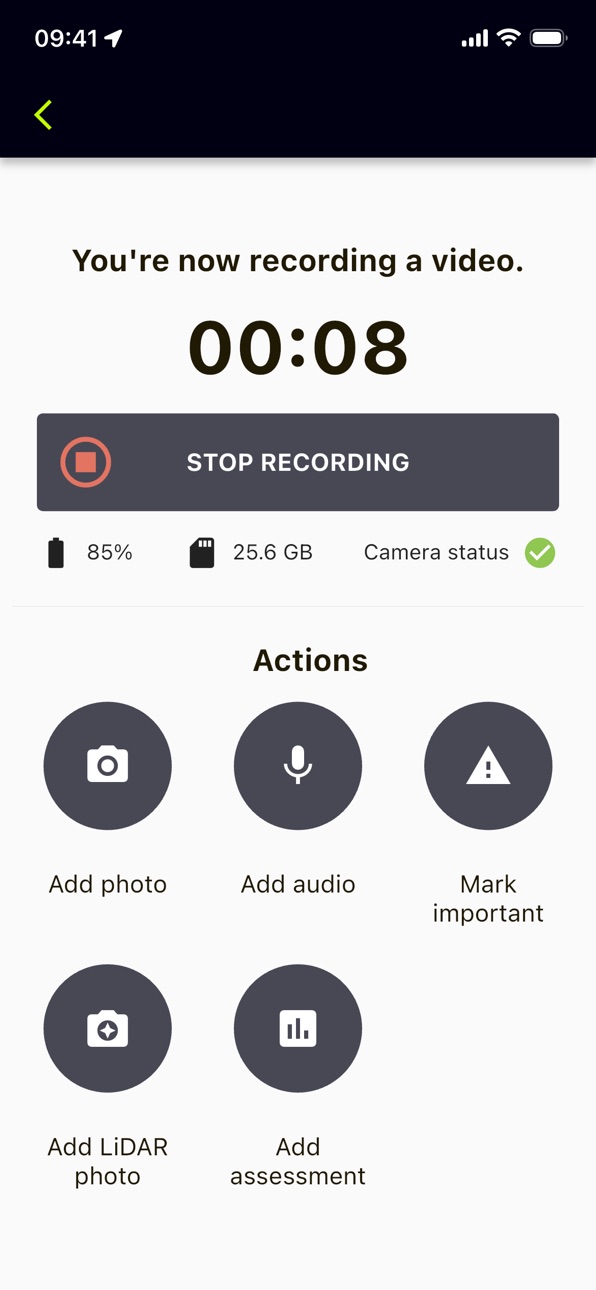

iPad 2 images


What’s New Version 2.4.3
Improvements to camera connectivity
Description
Oculo leverages the power of advanced computer vision and machine learning to improve construction productivity and make on time delivery the norm, not an exception.
Thousands of smart, highly skilled engineers are wasting hours every day on site documentation, progress tracking, and reporting which should be automated. We’re on a mission to give them back that time.
We use 360 hard-hat cameras, state-of-the-art computer vision and artificial intelligence to give a single source of truth for onsite progress - essentially a “streetview” of your construction project, which means you can carry out inspections, spot issues and make decisions faster, even when miles away from site.
Accessibility
ipadiphonemacrealityDevicetvoswatch
Version history 25 versions
Build 886821956v2.4.32026-06-12 12:55:18
Improvements to camera connectivity
Build 886160279v2.4.22026-05-27 08:29:53
- Fix camera file recognition for X2
- Better bluetooth permission handling
Build 885705684v2.4.12026-05-18 08:47:56
Capture of single 360 images for issues
Build 884994031v2.3.32026-04-29 08:35:04
Fixes various issues when uploading scans.
Build 884780524v2.3.22026-04-27 12:08:12
Connections to X2, X3, X4 and X5 cameras now use Bluetooth while recording.
Build 883801005v2.2.42026-04-16 08:42:26
Changes to camera firmware delivery
Build 882701824v2.2.32026-02-24 09:48:48
Improvements to camera connection stability.
Build 882516738v2.2.22026-02-23 09:45:54
Improvements to camera connection stability.
Build 881974724v2.1.22026-01-30 09:51:38
- Fix the battery level of cameras not being reported correctly during a scan- Pressing back on the start location selection screen now cancels the current scan rather than starting it- Fix a crash when emoji were entered into the camera WiFi passcode box- Better handle exiting the camera connection screen while connecting
Build 881255923v2.1.12026-01-22 16:11:11
Support for the Ricoh THETA X camera
Build 878168563v2.0.32025-12-18 14:05:48
The app has been redesigned for a more streamlined experience.
Build 878003564v1.38.32025-09-11 13:31:43
Bug fixes and performance enhancements
Build 877290620v1.38.12025-09-01 08:32:36
You can now submit issues directly from the app
Build 876139843v1.37.42025-07-07 08:35:07
- Fix an issue where the start location selection screen could appear twice
- Fix several crashes
Build 875881350v1.37.32025-07-02 14:35:41
- Fix an issue which could cause scans to have no start time if they are resumed
- Fix an issue which could cause floor plans to not appear correctly when doing an assessment
- Fix a possible crash when downloading camera firmware
- Many small UI/UX improvements
Build 875509007v1.37.12025-06-13 09:59:40
- Fixes for some crashes and UI issues
- A new app icon
Build 875388047v1.37.02025-06-10 08:44:28
- Support for the Insta360 X5 camera
- Improved scan upload speed
- Fixes for more common crashes
Build 874084876v1.36.02025-04-23 09:11:00
- Added a search to the category list when creating issues
- Fixes uploaded issue images being highly compressed
Build 873557858v1.35.32025-03-28 16:15:16
This release contains improvements to camera connectivity and general bug fixes.
Build 872842987v1.34.72025-02-27 14:00:04
We've been hard at work making improvements to the Oculo app: for this release our focus has been on stability with fixes to common crashes across the whole app.
Build 871646008v1.34.62025-02-25 17:01:24
We've been hard at work making improvements to the Oculo app: for this release our focus has been on stability with fixes to common crashes across the whole app.
Build 871139938v1.32.22025-01-07 08:09:49
- Camera firmware check
- UI Improvements
Build 870388765v1.31.92024-12-09 13:09:59
Support for wide-angle cameras
Build 869916649v1.30.132024-10-24 07:03:03
Stability fixes
Build 869863489v1.30.112024-10-22 12:56:27
Stability improvements
No pricing data captured yet — comparisons appear once the app has paid storefronts or in-app purchases.
Availability 1 of 1 storefronts
| Region | Language | Price | Ratings | Avg | Version |
|---|---|---|---|---|---|
| US | en-US | Free | 1 | 5.0 | 2.4.3 |
Change log 28 changes · US
✎
releaseNotes updated
Improvements to camera connectivity
✎
description updated
Oculo leverages the power of advanced computer vision and machine learning to improve construction productivity and make on time delivery the norm, not an excep
✎
name updated
Oculo
◆
Version 2.4.3 released
Improvements to camera connectivity
◆
Version 2.4.2 released
- Fix camera file recognition for X2
- Better bluetooth permission handling
◆
Version 2.4.1 released
Capture of single 360 images for issues
◆
Version 2.3.3 released
Fixes various issues when uploading scans.
◆
Version 2.3.2 released
Connections to X2, X3, X4 and X5 cameras now use Bluetooth while recording.
◆
Version 2.2.4 released
Changes to camera firmware delivery
◆
Version 2.2.3 released
Improvements to camera connection stability.
◆
Version 2.2.2 released
Improvements to camera connection stability.
◆
Version 2.1.2 released
- Fix the battery level of cameras not being reported correctly during a scan- Pressing back on the start location selection screen now cancels the current scan rather than starting it- Fix a crash when emoji were entered into the camera Wi
◆
Version 2.1.1 released
Support for the Ricoh THETA X camera
◆
Version 2.0.3 released
The app has been redesigned for a more streamlined experience.
◆
Version 1.38.3 released
Bug fixes and performance enhancements
◆
Version 1.38.1 released
You can now submit issues directly from the app
◆
Version 1.37.4 released
- Fix an issue where the start location selection screen could appear twice
- Fix several crashes
◆
Version 1.37.3 released
- Fix an issue which could cause scans to have no start time if they are resumed
- Fix an issue which could cause floor plans to not appear correctly when doing an assessment
- Fix a possible crash when downloading camera firmware
- Many sm
◆
Version 1.37.1 released
- Fixes for some crashes and UI issues
- A new app icon
◆
Version 1.37.0 released
- Support for the Insta360 X5 camera
- Improved scan upload speed
- Fixes for more common crashes
◆
Version 1.36.0 released
- Added a search to the category list when creating issues
- Fixes uploaded issue images being highly compressed
◆
Version 1.35.3 released
This release contains improvements to camera connectivity and general bug fixes.
◆
Version 1.34.7 released
We've been hard at work making improvements to the Oculo app: for this release our focus has been on stability with fixes to common crashes across the whole app.
◆
Version 1.34.6 released
We've been hard at work making improvements to the Oculo app: for this release our focus has been on stability with fixes to common crashes across the whole app.
◆
Version 1.32.2 released
- Camera firmware check
- UI Improvements
◆
Version 1.31.9 released
Support for wide-angle cameras
◆
Version 1.30.13 released
Stability fixes
◆
Version 1.30.11 released
Stability improvements