Home › Productivity

 US
US
 AEen-GB
 ALen-GB
 ATde-DE
 AUen-AU
 AZen-GB
 BAen-GB
 BEen-GB
 BGen-GB
 BHen-GB
 BMen-GB
 BYen-GB
 CAen-CA
 CHde-CH
 CYen-GB
 CZen-GB
 DEde-DE
 DKen-GB
 EEen-GB
 EGen-GB
 ESes-ES
 FIen-GB
 FRfr-FR
 GBen-GB
 GEen-GB
 GRen-GB
 HKzh-Hant-HK
 HRen-GB
 HUen-GB
 IDen-GB
 IEen-GB
 ILen-GB
 INen-GB
 IQen-GB
 ISen-GB
 ITit
ITit JOen-GB
 JPja
JPja KGen-GB
 KHen-GB
 KRko
KRko KWen-GB
 KZen-GB
 LAen-GB
 LBen-GB
 LKen-GB
 LTen-GB
 LUen-GB
 LVen-GB
 MDen-GB
 MEen-GB
 MKen-GB
 MMen-GB
 MNen-GB
 MOzh-Hant-HK
 MRen-GB
 MTen-GB
 MYen-GB
 NLnl
NLnl NOen-GB
 NPen-GB
 NZen-AU
 OMen-GB
 PHen-GB
 PLen-GB
 PTpt-PT
 QAen-GB
 ROen-GB
 RSen-GB
 SAen-GB
 SEsv
SEsv SGen-GB
 SIen-GB
 SKen-GB
 THen-GB
 TRen-GB
 TWzh-Hant-TW
 UAen-GBUSen-US
 VNen-GB
 XKen-GB
 YEen-GB
 AFNot Available
 CNNot Available
 PKNot Available
 RUNot Available
81 of 85 storefronts
Content in en-US
Content in en-US
Information
Preview 2 platforms
iPhone 8 images




iPad 10 images


What’s New Version 3.1.75
- New Streamlined Home Screen with direct access to Inventory, Scanner, other modules.
- Enhanced Inventory and Scanner to support easier tool selection and actions.
- Automatic offline support for Checkout/Check-In and Field Transfers.
Description
Automate your tool tracking and equipment inventory management. ToolWorks helps you easily keep track of thousands of tools and manage inventory across multiple locations, resulting in significant reduction in indirect operating cost. Find out more @ https://www.toolworksapp.com/
Feature Rich Tool & Equipment Management Software
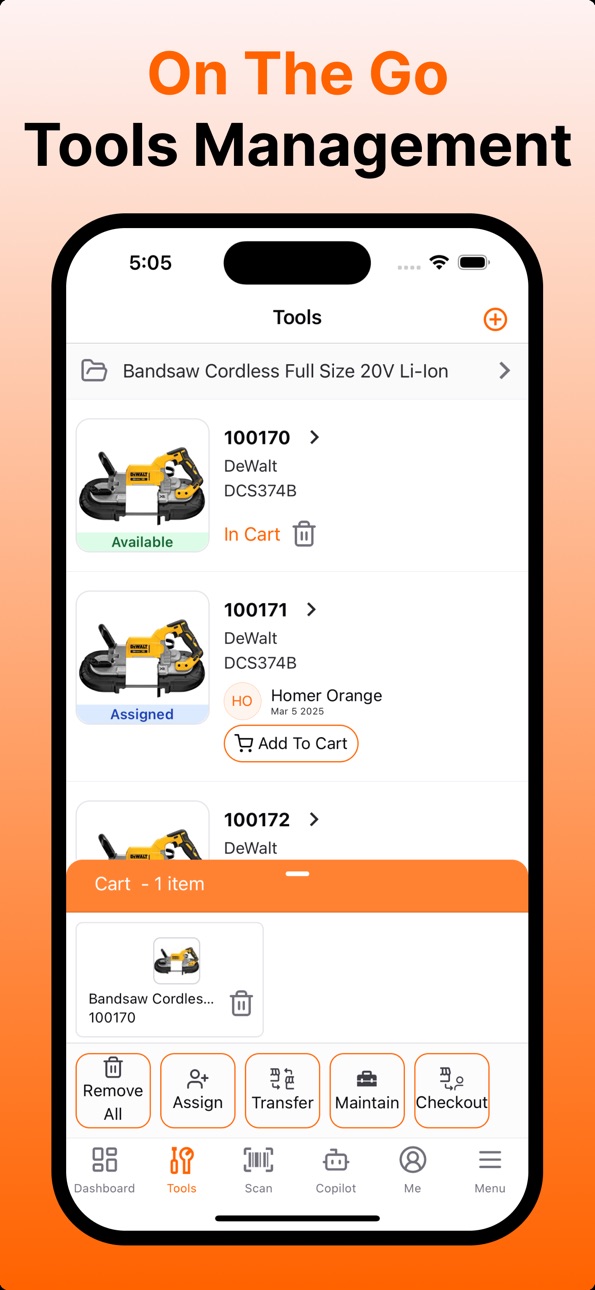
- Track Tools, Bulk Items, Consumables and Equipment
- Central Tool Catalog to keep log of tool across different job sites and tool rooms.
- Order tools from Field
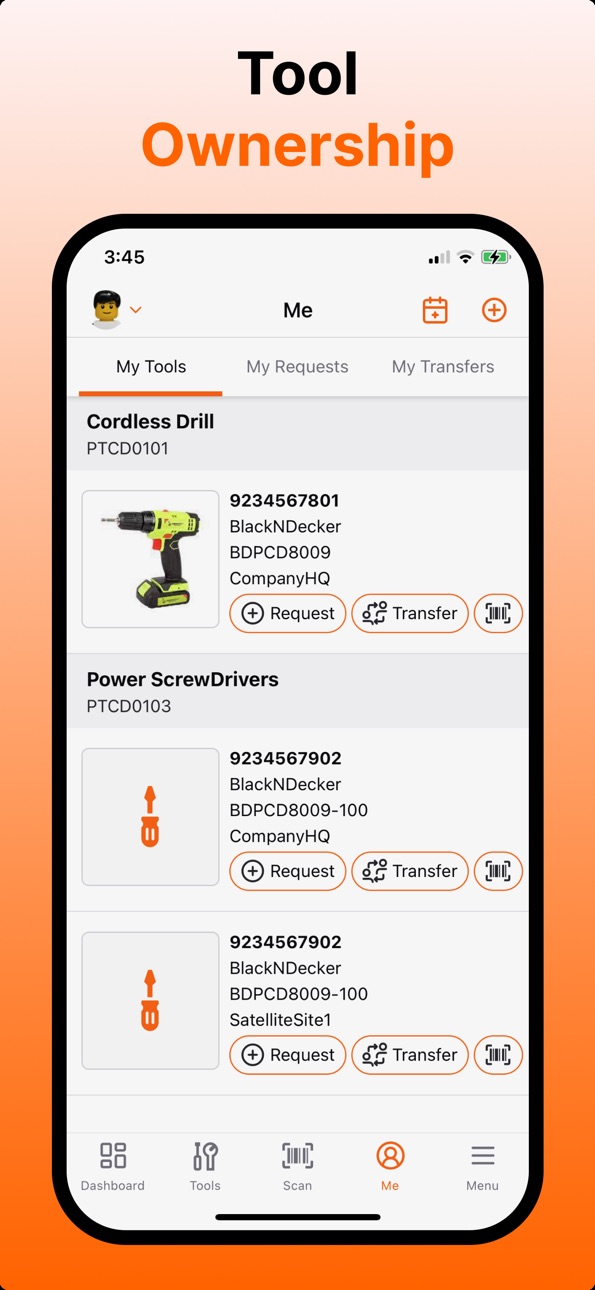
- Transfer tools to others in Field
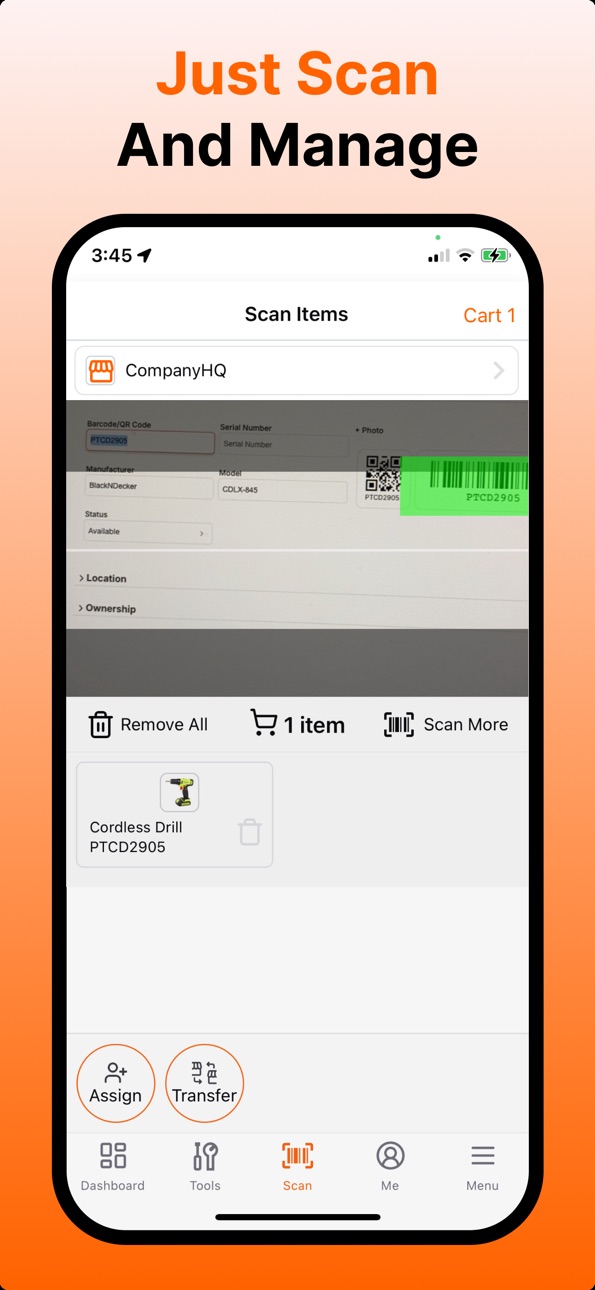
- Scan and dispatch field orders as well as walk-up ad-hoc orders
- Transfer inventory from one location to another
- Multi level hierarchical Location support
- Customize system behavior
- Reports to keep you informed
- Purchase Orders
- Equipment Maintenance
- Asset Depreciation
Why ToolWorks?
- Reduce your indirect cost by keeping accurate count of tools on hand and out in field.
- Keep your field staff in field
- No Specialized Training
- Support for Barcode and QR Codes.
- No Barcode? No Problem, track tools using simple text labels.
- Do you know where you tools are? Keep track of tool ownership and prevent tool hoarding
- Quick Field Ordering
- Easy Field Transfers
- Know exactly how many tools are on hand and in which place across you entire organization.
- Just-In-Time Tool Reordering
- Create orders ahead of time and efficiently tackle morning rush of new hires!
- Prevent unnecessary tool inventory build up by knowing exact inventory count by location and facilitating tool transfer from one location to other rather than re-ordering new tools.
- Configurable System
Accessibility
ipadiphonemacrealityDevicetvoswatch
Version history 25 versions
Build 887882781v3.1.752026-07-06 21:19:50
- New Streamlined Home Screen with direct access to Inventory, Scanner, other modules.
- Enhanced Inventory and Scanner to support easier tool selection and actions.
- Automatic offline support for Checkout/Check-In and Field Transfers.
Build 887545596v3.1.742026-06-28 17:58:18
Removes data sync requirements.
Build 887433225v3.1.732026-06-25 22:58:43
Fixes issue with syncing.
Build 887216845v3.1.722026-06-20 18:45:10
Work Anywhere
We've introduced our new offline-first architecture, allowing tool checkouts, check-ins, and field transfers to continue even when connectivity is unavailable. Changes automatically sync when you're back online.
Build 886912307v3.1.712026-06-13 19:27:28
Minor improvements and issue fixes.
Build 886048358v3.1.702026-05-24 18:42:19
Minor updates to translations, UI, ability to archive locations.
Build 885772707v3.1.692026-05-18 03:49:04
- Enhanced Checkout and Check-In: The checkout and check-in list now includes an "All Locations" option and displays tool photo.
- Check-In Location: Select location that tools are being checked into, this allows you to check-in tools checked out from a different store. System will auto transfer tools to check-in location.
- Improved Layout
Build 885555097v3.1.682026-05-12 23:19:07
Minor improvements to Checkout and Check In flows
Build 885227356v3.1.672026-05-04 18:19:33
Fixes for Settings, Self Checkout from All Stores, Maintenance, Fuel log
Build 884793716v3.1.662026-04-22 21:21:00
Responsibility Disclosure: Display custom responsibility notice to user receiving tools as part of Chain of Custody confirmation flow.
Minor fixes to UI and translations.
Build 884164781v3.1.652026-04-05 23:46:03
Streamlined Confirmed Checkout and Check-In: When assigning a tool to user or checking in a tool, user can confirm the receipt of the tool with just a click (accept or reject), without the need to provide a receipt code. This enhancement simplifies the checkout and check-in process while still ensuring that tools are accurately logged as assigned or checked in, and allows you to ensure verifiable chain of custody.
Build 883650285v3.1.642026-03-23 20:26:04
Multi-Language Support (Phase 1):
ToolWorks is now available in multiple languages! In this first phase, you can switch the language for Dashboard, Tools and My Tools. More to come soon! To change language, just head to Menu > Settings > Language.
Build 882885985v3.1.632026-02-28 16:50:15
- Tool-Kit Checkout and Check-In Auto Include Tools in Kit
- Confirmed Check-In with Receipt Code
- Assignment History (Chain of Custody)
- Receipt of Tool with Confirmation
Build 882265635v3.1.622026-02-08 19:06:30
Enhanced the User Receipt of Tool requires Confirmation Feature:
Confirmation now works for both user initiated request and for admin initiated tool assignment. In both cases, user is notified when tools are ready for delivery and provided with a 6 digit receipt code, similar to OTP. Tool Store Staff/Admin needs to input that receipt code provided by user to mark order as Completed.
Minor Fixes:
- You can now enter comma as decimal separator when logging fuel
- Camera Roll now shows all photos.
Build 882049115v3.1.612026-02-02 04:29:00
Say Goodbye to Paper Logs. DVIR is here!
We’ve added Digital Vehicle Inspection Reports (DVIR)! You can now perform daily vehicle inspections directly in the app.
- Quick Checklists: Load the specific checklist for your assigned vehicle instantly.
- Photo Evidence: Snap photos of defects or damage right inside the inspection form.
- Go Paperless: Submit your report with one tap—no more tracking down clipboards.
Build 881841384v3.1.602026-01-26 17:03:48
- Raise issues directly from the My Tools section
- Checkout Orders now show tool details and photo on the list making it easier to view what is being checked out.
- Store Transfers now show tool details and photo on the list making it easier to view what is being transferred.
- My Transfers list now displays tool details and photos directly on the list making it easier to view what is being transferred.
- Fixed issue with notification icons
- Improved Menu UI and minor other enhancements
Build 881561073v3.1.592026-01-16 23:19:39
Minor fix for Vehicles module
Build 881389951v3.1.582026-01-14 09:23:11
1. Maintenance list to show tool being maintained along with tool picture
2. Fuel log list now shows Vehicle picture
3. Store selection auto persisted for Tools and Vehicle tab
4. Improved filtering with display of filter criteria
5. Fix for editing dashboard widgets
6. Improved permission request for GPS Location
Build 881046931v3.1.562025-12-29 00:57:16
New Features:
1. External Scanner Support: You can easily use external bluetooth scanner with mobile app. Just change settings to "use external scanner". Lear more: https://www.toolworksapp.com/help/external-scanner
2. Lost Tool Recovery Compatibility: Scanner, RFID Reader and External Scanner Input now support lost tool recovery enabled QR codes and will auto extract asset tags. Learn more: https://www.toolworksapp.com/help/lost-tool-recovery
Build 880900391v3.1.552025-12-22 10:58:57
Minor Issue fixes
Build 880723814v3.1.542025-12-16 22:38:19
Minor issue fixes
Build 880651677v3.1.532025-12-14 13:28:31
1. Dashboard - Fuel Logging: You can now snap photo of receipt for logging fuel fill-ups directly from dashboard
2. Maintenance - Cost: Resolved issue with flicker when trying to add cost to a maintenance order.
3. Minor tweaks to UI
Build 879793955v3.1.522025-11-15 20:21:41
Minor Issue fixes for Vehicles, ability for Owner to override password.
Build 879630075v3.1.512025-11-10 22:58:33
Fuel Log: Easily track and manage fuel consumption with the new Fuel Log feature. Log fuel purchases, monitor mileage, and analyze fuel efficiency to optimize your fleet management.
Build 879242278v3.1.502025-10-27 17:15:54
Vehicle Management: Manage your vehicles efficiently with the new Fleet Vehicle feature. Track vehicle details, maintenance schedules, and more—all in one place.
No pricing data captured yet — comparisons appear once the app has paid storefronts or in-app purchases.
Availability 81 of 85 storefronts
| Region | Language | Price | Ratings | Avg | Version |
|---|---|---|---|---|---|
| AE | en-GB | Free | 0 | — | 3.1.75 |
| AL | en-GB | Free | 0 | — | 3.1.75 |
| AT | de-DE | Free | 0 | — | 3.1.75 |
| AU | en-AU | Free | 0 | — | 3.1.75 |
| AZ | en-GB | Free | 0 | — | 3.1.75 |
| BA | en-GB | Free | 0 | — | 3.1.75 |
| BE | en-GB | Free | 0 | — | 3.1.75 |
| BG | en-GB | Free | 0 | — | 3.1.75 |
| BH | en-GB | Free | 0 | — | 3.1.75 |
| BM | en-GB | Free | 0 | — | 3.1.75 |
| BY | en-GB | Free | 0 | — | 3.1.75 |
| CA | en-CA | Free | 0 | — | 3.1.75 |
| CH | de-CH | Free | 0 | — | 3.1.75 |
| CY | en-GB | Free | 0 | — | 3.1.75 |
| CZ | en-GB | Free | 0 | — | 3.1.75 |
| DE | de-DE | Free | 0 | — | 3.1.75 |
| DK | en-GB | Free | 0 | — | 3.1.75 |
| EE | en-GB | Free | 0 | — | 3.1.75 |
| EG | en-GB | Free | 0 | — | 3.1.75 |
| ES | es-ES | Free | 0 | — | 3.1.75 |
| FI | en-GB | Free | 0 | — | 3.1.75 |
| FR | fr-FR | Free | 0 | — | 3.1.75 |
| GB | en-GB | Free | 0 | — | 3.1.75 |
| GE | en-GB | Free | 0 | — | 3.1.75 |
| GR | en-GB | Free | 0 | — | 3.1.75 |
| HK | zh-Hant-HK | Free | 0 | — | 3.1.75 |
| HR | en-GB | Free | 0 | — | 3.1.75 |
| HU | en-GB | Free | 0 | — | 3.1.75 |
| ID | en-GB | Free | 0 | — | 3.1.75 |
| IE | en-GB | Free | 0 | — | 3.1.75 |
| IL | en-GB | Free | 0 | — | 3.1.75 |
| IN | en-GB | Free | 0 | — | 3.1.75 |
| IQ | en-GB | Free | 0 | — | 3.1.75 |
| IS | en-GB | Free | 0 | — | 3.1.75 |
| IT | it | Free | 0 | — | 3.1.75 |
| JO | en-GB | Free | 0 | — | 3.1.75 |
| JP | ja | Free | 0 | — | 3.1.75 |
| KG | en-GB | Free | 0 | — | 3.1.75 |
| KH | en-GB | Free | 0 | — | 3.1.75 |
| KR | ko | Free | 0 | — | 3.1.75 |
| KW | en-GB | Free | 0 | — | 3.1.75 |
| KZ | en-GB | Free | 0 | — | 3.1.75 |
| LA | en-GB | Free | 0 | — | 3.1.75 |
| LB | en-GB | Free | 0 | — | 3.1.75 |
| LK | en-GB | Free | 0 | — | 3.1.75 |
| LT | en-GB | Free | 0 | — | 3.1.75 |
| LU | en-GB | Free | 0 | — | 3.1.75 |
| LV | en-GB | Free | 0 | — | 3.1.75 |
| MD | en-GB | Free | 0 | — | 3.1.75 |
| ME | en-GB | Free | 0 | — | 3.1.75 |
| MK | en-GB | Free | 0 | — | 3.1.75 |
| MM | en-GB | Free | 0 | — | 3.1.75 |
| MN | en-GB | Free | 0 | — | 3.1.75 |
| MO | zh-Hant-HK | Free | 0 | — | 3.1.75 |
| MR | en-GB | Free | 0 | — | 3.1.75 |
| MT | en-GB | Free | 0 | — | 3.1.75 |
| MY | en-GB | Free | 0 | — | 3.1.75 |
| NL | nl | Free | 0 | — | 3.1.75 |
| NO | en-GB | Free | 0 | — | 3.1.75 |
| NP | en-GB | Free | 0 | — | 3.1.75 |
| NZ | en-AU | Free | 0 | — | 3.1.75 |
| OM | en-GB | Free | 0 | — | 3.1.75 |
| PH | en-GB | Free | 0 | — | 3.1.75 |
| PL | en-GB | Free | 0 | — | 3.1.75 |
| PT | pt-PT | Free | 0 | — | 3.1.75 |
| QA | en-GB | Free | 0 | — | 3.1.75 |
| RO | en-GB | Free | 0 | — | 3.1.75 |
| RS | en-GB | Free | 0 | — | 3.1.75 |
| SA | en-GB | Free | 0 | — | 3.1.75 |
| SE | sv | Free | 0 | — | 3.1.75 |
| SG | en-GB | Free | 0 | — | 3.1.75 |
| SI | en-GB | Free | 0 | — | 3.1.75 |
| SK | en-GB | Free | 0 | — | 3.1.75 |
| TH | en-GB | Free | 0 | — | 3.1.75 |
| TR | en-GB | Free | 0 | — | 3.1.75 |
| TW | zh-Hant-TW | Free | 0 | — | 3.1.75 |
| UA | en-GB | Free | 0 | — | 3.1.75 |
| US | en-US | Free | 0 | — | 3.1.75 |
| VN | en-GB | Free | 0 | — | 3.1.75 |
| XK | en-GB | Free | 0 | — | 3.1.75 |
| YE | en-GB | Free | 0 | — | 3.1.75 |
Not available in: AF, CN, PK, RU
Change log 29 changes · US
✎
releaseNotes updated
- New Streamlined Home Screen with direct access to Inventory, Scanner, other modules.
- Enhanced Inventory and Scanner to support easier tool selection and ac
✎
description updated
Automate your tool tracking and equipment inventory management. ToolWorks helps you easily keep track of thousands of tools and manage inventory across multiple
✎
subtitle updated
Track & Manage Tool Inventory
✎
name updated
ToolWorks
◆
Version 3.1.75 released
- New Streamlined Home Screen with direct access to Inventory, Scanner, other modules.
- Enhanced Inventory and Scanner to support easier tool selection and actions.
- Automatic offline support for Checkout/Check-In and Field Transfers.
◆
Version 3.1.74 released
Removes data sync requirements.
◆
Version 3.1.73 released
Fixes issue with syncing.
◆
Version 3.1.72 released
Work Anywhere
We've introduced our new offline-first architecture, allowing tool checkouts, check-ins, and field transfers to continue even when connectivity is unavailable. Changes automatically sync when you're back online.
◆
Version 3.1.71 released
Minor improvements and issue fixes.
◆
Version 3.1.70 released
Minor updates to translations, UI, ability to archive locations.
◆
Version 3.1.69 released
- Enhanced Checkout and Check-In: The checkout and check-in list now includes an "All Locations" option and displays tool photo.
- Check-In Location: Select location that tools are being checked into, this allows you to check-in tools chec
◆
Version 3.1.68 released
Minor improvements to Checkout and Check In flows
◆
Version 3.1.67 released
Fixes for Settings, Self Checkout from All Stores, Maintenance, Fuel log
◆
Version 3.1.66 released
Responsibility Disclosure: Display custom responsibility notice to user receiving tools as part of Chain of Custody confirmation flow.
Minor fixes to UI and translations.
◆
Version 3.1.65 released
Streamlined Confirmed Checkout and Check-In: When assigning a tool to user or checking in a tool, user can confirm the receipt of the tool with just a click (accept or reject), without the need to provide a receipt code. This enhancement si
◆
Version 3.1.64 released
Multi-Language Support (Phase 1):
ToolWorks is now available in multiple languages! In this first phase, you can switch the language for Dashboard, Tools and My Tools. More to come soon! To change language, just head to Menu > Settings > L
◆
Version 3.1.63 released
- Tool-Kit Checkout and Check-In Auto Include Tools in Kit
- Confirmed Check-In with Receipt Code
- Assignment History (Chain of Custody)
- Receipt of Tool with Confirmation
◆
Version 3.1.62 released
Enhanced the User Receipt of Tool requires Confirmation Feature:
Confirmation now works for both user initiated request and for admin initiated tool assignment. In both cases, user is notified when tools are ready for delivery and provided
◆
Version 3.1.61 released
Say Goodbye to Paper Logs. DVIR is here!
We’ve added Digital Vehicle Inspection Reports (DVIR)! You can now perform daily vehicle inspections directly in the app.
- Quick Checklists: Load the specific checklist for your assigned vehicle ins
◆
Version 3.1.60 released
- Raise issues directly from the My Tools section
- Checkout Orders now show tool details and photo on the list making it easier to view what is being checked out.
- Store Transfers now show tool details and photo on the list making it easi
◆
Version 3.1.59 released
Minor fix for Vehicles module
◆
Version 3.1.58 released
1. Maintenance list to show tool being maintained along with tool picture
2. Fuel log list now shows Vehicle picture
3. Store selection auto persisted for Tools and Vehicle tab
4. Improved filtering with display of filter criteria
5. Fix fo
◆
Version 3.1.56 released
New Features:
1. External Scanner Support: You can easily use external bluetooth scanner with mobile app. Just change settings to "use external scanner". Lear more: https://www.toolworksapp.com/help/external-scanner
2. Lost Tool Recovery C
◆
Version 3.1.55 released
Minor Issue fixes
◆
Version 3.1.54 released
Minor issue fixes
◆
Version 3.1.53 released
1. Dashboard - Fuel Logging: You can now snap photo of receipt for logging fuel fill-ups directly from dashboard
2. Maintenance - Cost: Resolved issue with flicker when trying to add cost to a maintenance order.
3. Minor tweaks to UI
◆
Version 3.1.52 released
Minor Issue fixes for Vehicles, ability for Owner to override password.
◆
Version 3.1.51 released
Fuel Log: Easily track and manage fuel consumption with the new Fuel Log feature. Log fuel purchases, monitor mileage, and analyze fuel efficiency to optimize your fleet management.
◆
Version 3.1.50 released
Vehicle Management: Manage your vehicles efficiently with the new Fleet Vehicle feature. Track vehicle details, maintenance schedules, and more—all in one place.