Home › Utilities

 US
US
1 of 1 storefronts
Content in en-US
Content in en-US
Information
Apple ID1550457805
Bundle IDcom.LG.PresetsforSonos
SellerSeller
Min iOS18.0
Device familiesmac, iphone, ipad
Released2021-03-02
Copyright© 2025 Laszlo Gergely
Privacy policyLink ↗
Preview 3 platforms
iPhone 9 images





iPad 2 images


Mac 1 image
What’s New Version 4.1.9
* User Interface Redesign — Enjoy a visual refresh throughout the app to feel at home on your devices and make controlling your speakers and browsing your music more intuitive
* Music Services Support — Now you can access music services in-app and in the Shortcuts app via the new ‘Play Sonos Music’ action. (YT Music is currently not supported)
* Extended Apple Music Integration — Add tracks, albums to your Apple Music playlists or favorites (in-app and via Shortcuts action), play artist stations and see additional details of albums and artists.
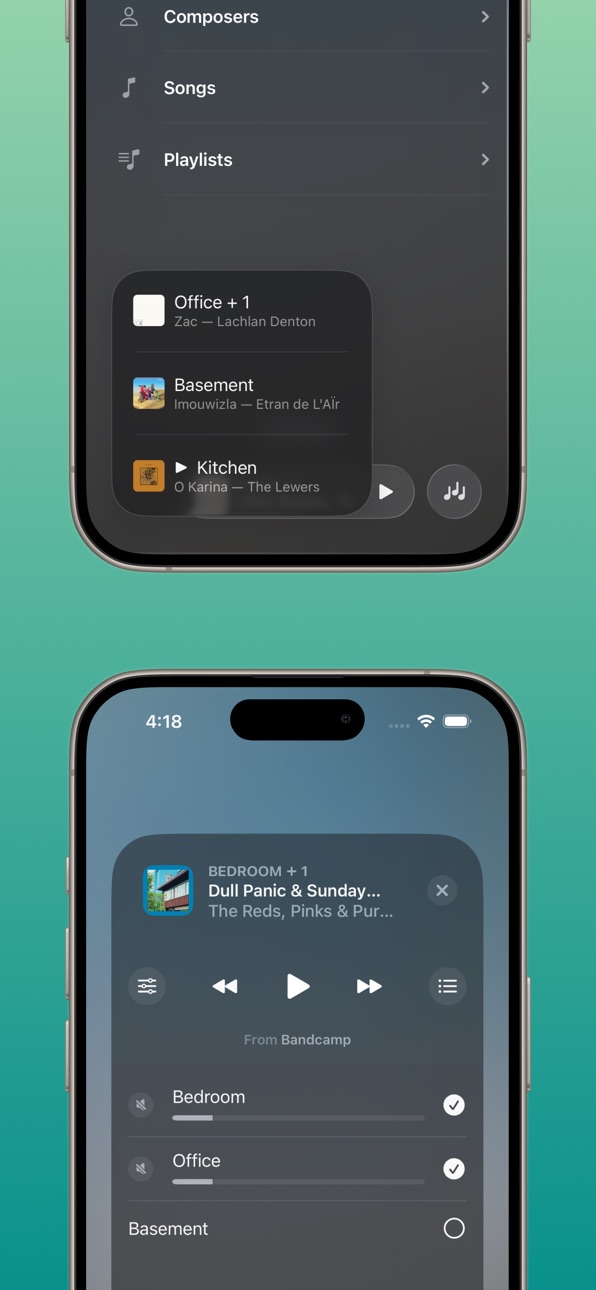
* Revamped Live Activity UI — Redesigned Live Activity for quicker access to essential tools—jump to the EQ, view the music queue and take more actions without leaving your lock-screen or home screen.
* Smarter Automations & Actions — More intuitive control and automation options so the routines you love are easier to build. Everything from triggering playback to adjusting sound settings is more logical to configure.
4.1.9:
- Live Activity Dynamic Island improvements to allow all interactions that are available via the lock screen activity
- Full Live Activity appears in StandBy mode now without causing any activity crash
- Live Activity update logic has been improved as well
4.1.8:
- Live Activity stability fixes
- Added ‘Set Surround Distance’ action
- The various 'Play' action’s ‘Set Volume’ option now uses numerical input instead of the slider
- Added option to set TV Autoplay and Ungroup On Autoplay via the Sonos Settings action
- Ungroup action now returns the ungrouped room(s)
- Fixed 'Create Alarm' action crash
- Fixed issue where the 'Open Music Service' and 'Open Sounds Settings' actions didn't work properly
- Added Find Favorite action. It will allow filtering by favorite type and music service and pass the output to the Play Favorite action.
- Fixed SiriusXM issues
- Fixed audiobook starting over instead of resuming (where supported, ie. Audible)
- Fixed audiobook playback control buttons not appearing properly
- Play Favorite action now supports selecting multiple favorites (only queue-able items will be added to the queue).
4.1.6:
- Added 'TV Dialog Audio Delay' option to the 'Sonos Settings' action and control center widget
- Fixed the 'Speak Announcement' and 'Play AudioClip' actions’ override volume logic
- Favorites and playlists order on Soro Home Screen respect sort order set
- Fixed 'Update Alarm' action, where weekday alarms didn’t get updated properly
- Added selecting Sonos Playlists as an option to the 'Play Favorite' action
4.1.5:
- Bug fixes and stability improvements
4.1.4:
- Added 'Load Only' parameter to the 'Play' action types
- Resolved timeout issues improving overall reliability of discovering speakers
- Fixed issue with the Speak Text/Play Audio Clip actions of the clip playing multiple times on already grouped speakers
- Updated the order of settings in the Sonos Settings action to make more sense based on usage patterns
4.1.3:
- Fixed issue Sonos Radio favorites disappearing
- Fixed issue when favorites didn't show up in the Play Favorite action
- Added iPad layout improvements
- Various other fixes
4.1.2: Improved search experience, grouping/ungrouping and shortcut execution times. Plus various other fixes
Description
▶ NEW: Soro is now updated with a Liquid Glass redesign, music services support** and extended Apple Music integration, both in-app and in the Shortcuts app.
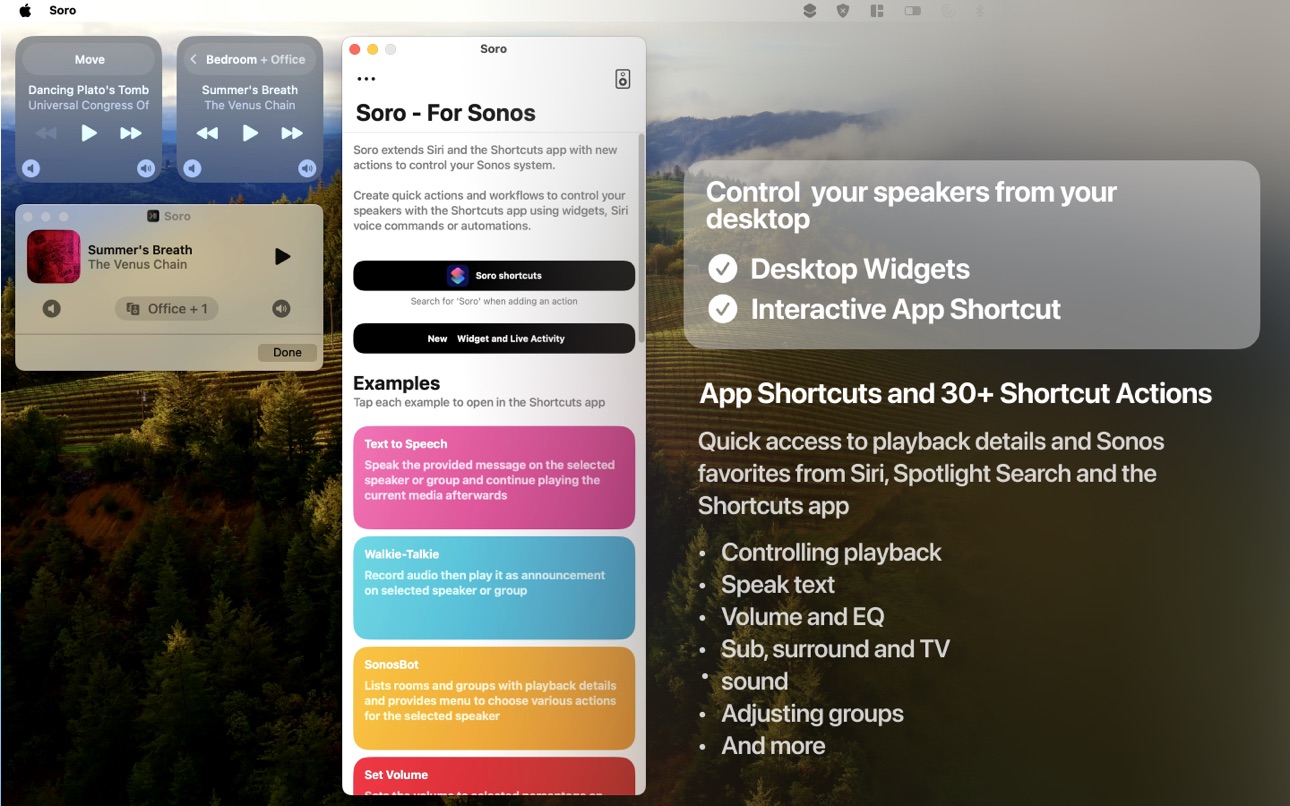
Soro provides modern, intuitive user interface to control your speakers, extends your iPhone, iPad, and Mac with Control Center and Home Screen widgets, Live Activities and 30+ powerful Shortcuts actions. Soro lets you create both quick actions or extensive workflows to control your speakers with the Shortcuts app using widgets, Siri voice commands or automations.
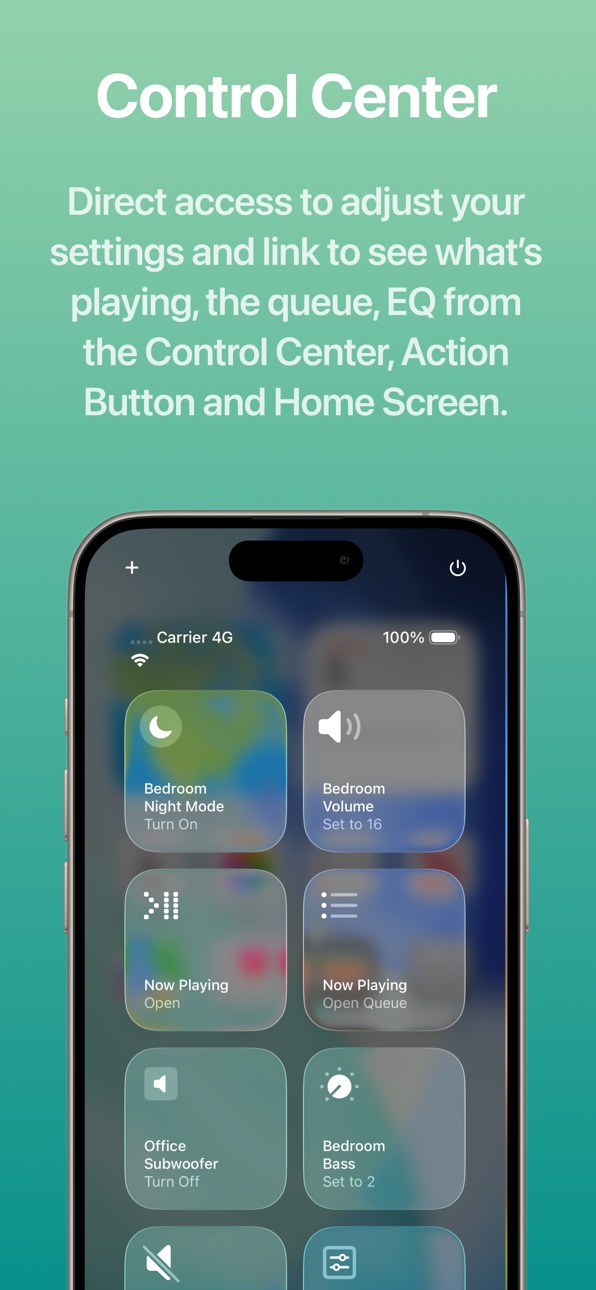
▶ Control Center
* Instantly adjust speaker settings from anywhere
* One tap to open Now Playing, Queue, and EQ views right from the Control Center
▶ Modern Interface
* Modern design that feels at home on iOS and iPadOS
▶ Browse Your Music
* Support for Music Services that you already added in the Sonos app (YT Music is not supported currently)
* Browse your Sonos Music Library
▶ Extended Apple Music Integration
* Add tracks, albums to your Apple Music playlists or favorites (in-app and via Shortcuts action)
* Play artist stations
* See additional details of albums and artists, such as related items and notes
▶ Learn About What’s Playing
* Chat-based web search to explore songs, albums, artists, and more—right from inside Soro
▶ Live Activity, Widgets & Shortcuts
* Revamped Live Activity with more controls—jump directly to EQ and queue
* Lock Screen, Home Screen & StandBy Mode widgets for instant access
* App Shortcuts for Spotlight, Siri, and the Action Button
▶ Speak Text on Your Speakers
* Send announcements or media with built-in text-to-speech
* Playback resumes automatically when the message ends
* Works across supported Sonos speakers*
▶ Shortcuts & Automations
* 30+ actions to control your speakers in the Shortcuts app
* Build quick actions or extensive automations or integrate with other third-party apps
* Examples included in the app to get you started
▶ Available Actions
Play
- Play Sonos Music
- Play Favorite
- Play Sonos Playlist
- Play Sonos Music Library
- Play Apple Music Artist Station
- Play URL
- Speak Text
- Play Audio Clip
Queue
- Get Queue
- Go To Track in Queue
- Clear Queue
- Save Queue
Input/Source
- Use TV Input
- Use Line-In
- Use Queue
Playback Control
- Control Playback: Play, pause, skip, or seek
- Select MP3 Chapte
Rooms and Groups
- Now Playing
- Group/Ungroup
- Wake Speaker
- Create Stereo Pair
- Separate Stereo Pair
- Set Direct Connect IP
Settings
- Sonos Settings: Change speaker or group settings like volume, bass/treble, loudness, speech enhancement, night mode, surround settings, subwoofer settings, trueplay, and more.
- Load Sound Preset: Apply a saved sound/EQ preset to a room or its group.
- Get Battery Status
Alarms
- Create Alarm
- Update Alarm
- Delete Alarm
App / Live Activity / Widgets
- Open Soro: Open the Soro app to a specific screen (Select, Queue, EQ, or selected Music Service), optionally targeting a room, defaults to currently playing.
- Start/Update Live Activity
- End Live Activity
- Reload Widgets
Apple Music
- Add Track to Apple Music Playlist
- Favorite Track in Apple Music
Playlist management
- Add Music to Sonos Playlist
* Speak Text supported on Sonos One, Amp, Port, Play:5 (Gen 2), Beam, One SL, Move, SYMFONISK (table lamp & bookshelf), and all newer Sonos S2 speakers.
** Currently YouTube Music is not supported
Soro is not affiliated with Sonos Inc. nor is it an official Sonos app. Sonos is trademarked by Sonos Inc.
Accessibility
ipadiphonemacrealityDevicetvoswatch
Version history 25 versions
Build 886084754v4.1.92026-05-25 18:13:30
* User Interface Redesign — Enjoy a visual refresh throughout the app to feel at home on your devices and make controlling your speakers and browsing your music more intuitive
* Music Services Support — Now you can access music services in-app and in the Shortcuts app via the new ‘Play Sonos Music’ action. (YT Music is currently not supported)
* Extended Apple Music Integration — Add tracks, albums to your Apple Music playlists or favorites (in-app and via Shortcuts action), play artist stations and see additional details of albums and artists.
* Revamped Live Activity UI — Redesigned Live Activity for quicker access to essential tools—jump to the EQ, view the music queue and take more actions without leaving your lock-screen or home screen.
* Smarter Automations & Actions — More intuitive control and automation options so the routines you love are easier to build. Everything from triggering playback to adjusting sound settings is more logical to configure.
4.1.9:
- Live Activity Dynamic Island improvements to allow all interactions that are available via the lock screen activity
- Full Live Activity appears in StandBy mode now without causing any activity crash
- Live Activity update logic has been improved as well
4.1.8:
- Live Activity stability fixes
- Added ‘Set Surround Distance’ action
- The various 'Play' action’s ‘Set Volume’ option now uses numerical input instead of the slider
- Added option to set TV Autoplay and Ungroup On Autoplay via the Sonos Settings action
- Ungroup action now returns the ungrouped room(s)
- Fixed 'Create Alarm' action crash
- Fixed issue where the 'Open Music Service' and 'Open Sounds Settings' actions didn't work properly
- Added Find Favorite action. It will allow filtering by favorite type and music service and pass the output to the Play Favorite action.
- Fixed SiriusXM issues
- Fixed audiobook starting over instead of resuming (where supported, ie. Audible)
- Fixed audiobook playback control buttons not appearing properly
- Play Favorite action now supports selecting multiple favorites (only queue-able items will be added to the queue).
4.1.6:
- Added 'TV Dialog Audio Delay' option to the 'Sonos Settings' action and control center widget
- Fixed the 'Speak Announcement' and 'Play AudioClip' actions’ override volume logic
- Favorites and playlists order on Soro Home Screen respect sort order set
- Fixed 'Update Alarm' action, where weekday alarms didn’t get updated properly
- Added selecting Sonos Playlists as an option to the 'Play Favorite' action
4.1.5:
- Bug fixes and stability improvements
4.1.4:
- Added 'Load Only' parameter to the 'Play' action types
- Resolved timeout issues improving overall reliability of discovering speakers
- Fixed issue with the Speak Text/Play Audio Clip actions of the clip playing multiple times on already grouped speakers
- Updated the order of settings in the Sonos Settings action to make more sense based on usage patterns
4.1.3:
- Fixed issue Sonos Radio favorites disappearing
- Fixed issue when favorites didn't show up in the Play Favorite action
- Added iPad layout improvements
- Various other fixes
4.1.2: Improved search experience, grouping/ungrouping and shortcut execution times. Plus various other fixes
Build 882927048v4.1.82026-03-03 00:49:15
* User Interface Redesign — Enjoy a visual refresh throughout the app to feel at home on your devices and make controlling your speakers and browsing your music more intuitive
* Music Services Support — Now you can access music services in-app and in the Shortcuts app via the new ‘Play Sonos Music’ action. (YT Music is currently not supported)
* Extended Apple Music Integration — Add tracks, albums to your Apple Music playlists or favorites (in-app and via Shortcuts action), play artist stations and see additional details of albums and artists.
* Revamped Live Activity UI — Redesigned Live Activity for quicker access to essential tools—jump to the EQ, view the music queue and take more actions without leaving your lock-screen or home screen.
* Smarter Automations & Actions — More intuitive control and automation options so the routines you love are easier to build. Everything from triggering playback to adjusting sound settings is more logical to configure.
4.1.8:
- Live Activity stability fixes
- Added ‘Set Surround Distance’ action
- The various 'Play' action’s ‘Set Volume’ option now uses numerical input instead of the slider
- Added option to set TV Autoplay and Ungroup On Autoplay via the Sonos Settings action
- Ungroup action now returns the ungrouped room(s)
- Fixed 'Create Alarm' action crash
- Fixed issue where the 'Open Music Service' and 'Open Sounds Settings' actions didn't work properly
- Added Find Favorite action. It will allow filtering by favorite type and music service and pass the output to the Play Favorite action.
- Fixed SiriusXM issues
- Fixed audiobook starting over instead of resuming (where supported, ie. Audible)
- Fixed audiobook playback control buttons not appearing properly
- Play Favorite action now supports selecting multiple favorites (only queue-able items will be added to the queue).
4.1.6:
- Added 'TV Dialog Audio Delay' option to the 'Sonos Settings' action and control center widget
- Fixed the 'Speak Announcement' and 'Play AudioClip' actions’ override volume logic
- Favorites and playlists order on Soro Home Screen respect sort order set
- Fixed 'Update Alarm' action, where weekday alarms didn’t get updated properly
- Added selecting Sonos Playlists as an option to the 'Play Favorite' action
4.1.5:
- Bug fixes and stability improvements
4.1.4:
- Added 'Load Only' parameter to the 'Play' action types
- Resolved timeout issues improving overall reliability of discovering speakers
- Fixed issue with the Speak Text/Play Audio Clip actions of the clip playing multiple times on already grouped speakers
- Updated the order of settings in the Sonos Settings action to make more sense based on usage patterns
4.1.3:
- Fixed issue Sonos Radio favorites disappearing
- Fixed issue when favorites didn't show up in the Play Favorite action
- Added iPad layout improvements
- Various other fixes
4.1.2: Improved search experience, grouping/ungrouping and shortcut execution times. Plus various other fixes
Build 882722205v4.1.72026-02-28 18:15:30
* User Interface Redesign — Enjoy a visual refresh throughout the app to feel at home on your devices and make controlling your speakers and browsing your music more intuitive
* Music Services Support — Now you can access music services in-app and in the Shortcuts app via the new ‘Play Sonos Music’ action. (YT Music is currently not supported)
* Extended Apple Music Integration — Add tracks, albums to your Apple Music playlists or favorites (in-app and via Shortcuts action), play artist stations and see additional details of albums and artists.
* Revamped Live Activity UI — Redesigned Live Activity for quicker access to essential tools—jump to the EQ, view the music queue and take more actions without leaving your lock-screen or home screen.
* Smarter Automations & Actions — More intuitive control and automation options so the routines you love are easier to build. Everything from triggering playback to adjusting sound settings is more logical to configure.
4.1.7:
- Live Activity stability fixes
- Added ‘Set Surround Distance’ action
- The various 'Play' action’s ‘Set Volume’ option now uses numerical input instead of the slider
- Added option to set TV Autoplay and Ungroup On Autoplay via the Sonos Settings action
- Ungroup action now returns the ungrouped room(s)
- Fixed 'Create Alarm' action crash
- Fixed issue where the 'Open Music Service' and 'Open Sounds Settings' actions didn't work properly
- Added Find Favorite action. It will allow filtering by favorite type and music service and pass the output to the Play Favorite action.
- Fixed SiriusXM issues
- Fixed audiobook starting over instead of resuming (where supported, ie. Audible)
- Fixed audiobook playback control buttons not appearing properly
- Play Favorite action now supports selecting multiple favorites (only queue-able items will be added to the queue).
4.1.6:
- Added 'TV Dialog Audio Delay' option to the 'Sonos Settings' action and control center widget
- Fixed the 'Speak Announcement' and 'Play AudioClip' actions’ override volume logic
- Favorites and playlists order on Soro Home Screen respect sort order set
- Fixed 'Update Alarm' action, where weekday alarms didn’t get updated properly
- Added selecting Sonos Playlists as an option to the 'Play Favorite' action
4.1.5:
- Bug fixes and stability improvements
4.1.4:
- Added 'Load Only' parameter to the 'Play' action types
- Resolved timeout issues improving overall reliability of discovering speakers
- Fixed issue with the Speak Text/Play Audio Clip actions of the clip playing multiple times on already grouped speakers
- Updated the order of settings in the Sonos Settings action to make more sense based on usage patterns
4.1.3:
- Fixed issue Sonos Radio favorites disappearing
- Fixed issue when favorites didn't show up in the Play Favorite action
- Added iPad layout improvements
- Various other fixes
4.1.2: Improved search experience, grouping/ungrouping and shortcut execution times. Plus various other fixes
Build 881165808v4.1.62026-01-03 04:45:18
* User Interface Redesign — Enjoy a visual refresh throughout the app to feel at home on your devices and make controlling your speakers and browsing your music more intuitive
* Music Services Support — Now you can access music services in-app and in the Shortcuts app via the new ‘Play Sonos Music’ action. (YT Music is currently not supported)
* Extended Apple Music Integration — Add tracks, albums to your Apple Music playlists or favorites (in-app and via Shortcuts action), play artist stations and see additional details of albums and artists.
* Revamped Live Activity UI — Redesigned Live Activity for quicker access to essential tools—jump to the EQ, view the music queue and take more actions without leaving your lock-screen or home screen.
* Smarter Automations & Actions — More intuitive control and automation options so the routines you love are easier to build. Everything from triggering playback to adjusting sound settings is more logical to configure.
4.1.6:
- Added 'TV Dialog Audio Delay' option to the 'Sonos Settings' action and control center widget
- Fixed the 'Speak Announcement' and 'Play AudioClip' actions’ override volume logic
- Favorites and playlists order on Soro Home Screen respect sort order set
- Fixed 'Update Alarm' action, where weekday alarms didn’t get updated properly
- Added selecting Sonos Playlists as an option to the 'Play Favorite' action
4.1.5:
- Bug fixes and stability improvements
4.1.4:
- Added 'Load Only' parameter to the 'Play' action types
- Resolved timeout issues improving overall reliability of discovering speakers
- Fixed issue with the Speak Text/Play Audio Clip actions of the clip playing multiple times on already grouped speakers
- Updated the order of settings in the Sonos Settings action to make more sense based on usage patterns
4.1.3:
- Fixed issue Sonos Radio favorites disappearing
- Fixed issue when favorites didn't show up in the Play Favorite action
- Added iPad layout improvements
- Various other fixes
4.1.2: Improved search experience, grouping/ungrouping and shortcut execution times. Plus various other fixes
Build 880083399v4.1.52025-11-26 03:56:49
* User Interface Redesign — Enjoy a visual refresh throughout the app to feel at home on your devices and make controlling your speakers and browsing your music more intuitive
* Music Services Support — Now you can access music services in-app and in the Shortcuts app via the new ‘Play Sonos Music’ action. (YT Music is currently not supported)
* Extended Apple Music Integration — Add tracks, albums to your Apple Music playlists or favorites (in-app and via Shortcuts action), play artist stations and see additional details of albums and artists.
* Revamped Live Activity UI — Redesigned Live Activity for quicker access to essential tools—jump to the EQ, view the music queue and take more actions without leaving your lock-screen or home screen.
* Smarter Automations & Actions — More intuitive control and automation options so the routines you love are easier to build. Everything from triggering playback to adjusting sound settings is more logical to configure.
4.1.5:
- Bug fixes and stability improvements
4.1.4:
- Added 'Load Only' parameter to the 'Play' action types
- Resolved timeout issues improving overall reliability of discovering speakers
- Fixed issue with the Speak Text/Play Audio Clip actions of the clip playing multiple times on already grouped speakers
- Updated the order of settings in the Sonos Settings action to make more sense based on usage patterns
4.1.3:
- Fixed issue Sonos Radio favorites disappearing
- Fixed issue when favorites didn't show up in the Play Favorite action
- Added iPad layout improvements
- Various other fixes
4.1.2: Improved search experience, grouping/ungrouping and shortcut execution times. Plus various other fixes
Build 879235057v4.1.42025-10-29 01:34:00
* User Interface Redesign — Enjoy a visual refresh throughout the app to feel at home on your devices and make controlling your speakers and browsing your music more intuitive
* Music Services Support — Now you can access music services in-app and in the Shortcuts app via the new ‘Play Sonos Music’ action. (YT Music is currently not supported)
* Extended Apple Music Integration — Add tracks, albums to your Apple Music playlists or favorites (in-app and via Shortcuts action), play artist stations and see additional details of albums and artists.
* Revamped Live Activity UI — Redesigned Live Activity for quicker access to essential tools—jump to the EQ, view the music queue and take more actions without leaving your lock-screen or home screen.
* Smarter Automations & Actions — More intuitive control and automation options so the routines you love are easier to build. Everything from triggering playback to adjusting sound settings is more logical to configure.
4.1.4:
- Added 'Load Only' parameter to the 'Play' action types
- Resolved timeout issues improving overall reliability of discovering speakers
- Fixed issue with the Speak Text/Play Audio Clip actions of the clip playing multiple times on already grouped speakers
- Updated the order of settings in the Sonos Settings action to make more sense based on usage patterns
4.1.3:
- Fixed issue Sonos Radio favorites disappearing
- Fixed issue when favorites didn't show up in the Play Favorite action
- Added iPad layout improvements
- Various other fixes
4.1.2: Improved search experience, grouping/ungrouping and shortcut execution times. Plus various other fixes
Build 878968978v4.1.32025-10-17 03:00:09
* User Interface Redesign — Enjoy a visual refresh throughout the app to feel at home on your devices and make controlling your speakers and browsing your music more intuitive
* Music Services Support — Now you can access music services in-app and in the Shortcuts app via the new ‘Play Sonos Music’ action. (YT Music is currently not supported)
* Extended Apple Music Integration — Add tracks, albums to your Apple Music playlists or favorites (in-app and via Shortcuts action), play artist stations and see additional details of albums and artists.
* Revamped Live Activity UI — Redesigned Live Activity for quicker access to essential tools—jump to the EQ, view the music queue and take more actions without leaving your lock-screen or home screen.
* Smarter Automations & Actions — More intuitive control and automation options so the routines you love are easier to build. Everything from triggering playback to adjusting sound settings is more logical to configure.
4.1.3:
- Fixed issue Sonos Radio favorites disappearing
- Fixed issue when favorites didn't show up in the Play Favorite action
- Added iPad layout improvements
- Various other fixes
4.1.2: Improved search experience, grouping/ungrouping and shortcut execution times. Plus various other fixes.
Build 878721458v4.1.22025-10-08 16:30:40
* User Interface Redesign — Enjoy a visual refresh throughout the app to feel at home on your devices and make controlling your speakers and browsing your music more intuitive
* Music Services Support — Now you can access music services in-app and in the Shortcuts app via the new ‘Play Sonos Music’ action. (YT Music is currently not supported)
* Extended Apple Music Integration — Add tracks, albums to your Apple Music playlists or favorites (in-app and via Shortcuts action), play artist stations and see additional details of albums and artists.
* Revamped Live Activity UI — Redesigned Live Activity for quicker access to essential tools—jump to the EQ, view the music queue and take more actions without leaving your lock-screen or home screen.
* Smarter Automations & Actions — More intuitive control and automation options so the routines you love are easier to build. Everything from triggering playback to adjusting sound settings is more logical to configure.
4.1.2: Improved search experience, grouping/ungrouping and shortcut execution times. Plus various other fixes.
Build 878474780v4.1.12025-09-28 15:25:47
* User Interface Redesign — Enjoy a visual refresh throughout the app to feel at home on your devices and make controlling your speakers and browsing your music more intuitive
* Music Services Support — Now you can access music services in-app and in the Shortcuts app via the new ‘Play Sonos Music’ action. (YT Music is currently not supported)
* Extended Apple Music Integration — Add tracks, albums to your Apple Music playlists or favorites (in-app and via Shortcuts action), play artist stations and see additional details of albums and artists.
* Revamped Live Activity UI — Redesigned Live Activity for quicker access to essential tools—jump to the EQ, view the music queue and take more actions without leaving your lock-screen or home screen.
* Smarter Automations & Actions — More intuitive control and automation options so the routines you love are easier to build. Everything from triggering playback to adjusting sound settings is more logical to configure.
* Latest 4.1.1 update added a few quick fixes.
Build 878245837v4.12025-09-23 23:28:33
* User Interface Redesign — Enjoy a visual refresh throughout the app to feel at home on your devices and make controlling your speakers and browsing your music more intuitive
* Music Services Support — Now you can access music services in-app and in the Shortcuts app via the new ‘Play Sonos Music’ action. (YT Music is currently not supported)
* Extended Apple Music Integration — Add tracks, albums to your Apple Music playlists or favorites (in-app and via Shortcuts action), play artist stations and see additional details of albums and artists.
* Revamped Live Activity UI — Redesigned Live Activity for quicker access to essential tools—jump to the EQ, view the music queue and take more actions without leaving your lock-screen or home screen.
* Smarter Automations & Actions — More intuitive control and automation options so the routines you love are easier to build. Everything from triggering playback to adjusting sound settings is more logical to configure.
Build 873497872v4.0.02025-04-19 20:58:42
▶ BROWSE YOUR MUSIC
- Browse and search the Apple Music catalog, your Apple Music library, your Bandcamp Purchases and Sonos Music Library
▶ LEARN ABOUT YOUR MUSIC
- Use chat-based web search to learn more and chat about songs, albums, artists and anything related
▶ UPDATED UI
- Updated playback screen to highlight the currently playing track's artwork
- Streamlined navigation to easily access the playback queue, control the volume of group members and browse your music
- New split-view on the iPad
Plus several changes to improve the speed and reliability.
Build 871853320v3.0.82025-01-19 18:50:46
Fixes issue with showing surround sound options in a 7.1.4 setup.
Build 871788498v3.0.72025-01-16 14:40:43
- Fix to the 'Sonos Settings' action to properly set the subwoofer level
Build 871655388v3.0.62025-01-13 19:45:24
Version 3.0.6 adds:
- Fix to issue of subwoofer state not reflected correctly in the app
Version 3.0.5 added:
- Fix to control center issue where volume and other settings may get applied to group members
Version 3.0.4 added:
- Fix to saving EQ presets
- Fix to appropriately show sound settings
Version 3.0.3 added:
- Sound presets, save a set of sound settings (EQ, home theatre, surround or sub) and apply them later within the app, via Shortcuts action or Control Center widget
- Sleep timer support
- Matching volume of speakers in the same group
- In the app, added quick glance status icons for the room/group playback settings (mute, repeat, shuffle and sleep timer status)
- Various other fixes
Version 3.0.2 added:
- Surround and subwoofer settings
- Improved grouping logic
- Control Center widget bug fixes and improvements
- Other fixes and improvements
Version 3.0.1 added important bug fixes, better handling of offline states, night mode and speech enhancement buttons in the EQ settings.
Soro 3.0 adds Control Center integration and brand new frontend to control your Sonos speakers.*
Build 871570613v3.0.52025-01-07 06:11:58
Version 3.0.5 adds:
- Fix to control center issue where volume and other settings may get applied to group members
Version 3.0.4 added:
- Fix to saving EQ presets
- Fix to appropriately show sound settings
Version 3.0.3 added:
- Sound presets, save a set of sound settings (EQ, home theatre, surround or sub) and apply them later within the app, via Shortcuts action or Control Center widget
- Sleep timer support
- Matching volume of speakers in the same group
- In the app, added quick glance status icons for the room/group playback settings (mute, repeat, shuffle and sleep timer status)
- Various other fixes
Version 3.0.2 added:
- Surround and subwoofer settings
- Improved grouping logic
- Control Center widget bug fixes and improvements
- Other fixes and improvements
Version 3.0.1 added important bug fixes, better handling of offline states, night mode and speech enhancement buttons in the EQ settings.
Soro 3.0 adds Control Center integration and brand new frontend to control your Sonos speakers.*
Build 871544692v3.0.42025-01-06 00:41:27
Version 3.0.4 adds:
- Fix to saving EQ presets
- Fix to appropriately show sound settings
Version 3.0.3 added:
- Sound presets, save a set of sound settings (EQ, home theatre, surround or sub) and apply them later within the app, via Shortcuts action or Control Center widget
- Sleep timer support
- Matching volume of speakers in the same group
- In the app, added quick glance status icons for the room/group playback settings (mute, repeat, shuffle and sleep timer status)
- Various other fixes
Version 3.0.2 added:
- Surround and subwoofer settings
- Improved grouping logic
- Control Center widget bug fixes and improvements
- Other fixes and improvements
Version 3.0.1 added important bug fixes, better handling of offline states, night mode and speech enhancement buttons in the EQ settings.
Soro 3.0 adds Control Center integration and brand new frontend to control your Sonos speakers.*
Build 870821648v3.0.32024-12-16 22:21:59
Version 3.0.3 adds:
- Sound presets, save a set of sound settings (EQ, home theatre, surround or sub) and apply them later within the app, via Shortcuts action or Control Center widget
- Sleep timer support
- Matching volume of speakers in the same group
- In the app, added quick glance status icons for the room/group playback settings (mute, repeat, shuffle and sleep timer status)
- Various other fixes
Version 3.0.2 added:
- Surround and subwoofer settings
- Improved grouping logic
- Control Center widget bug fixes and improvements
- Other fixes and improvements
Version 3.0.1 added important bug fixes, better handling of offline states, night mode and speech enhancement buttons in the EQ settings.
Soro 3.0 adds Control Center integration and brand new frontend to control your Sonos speakers.*
▶ CONTROL CENTER
- Direct access to adjust your settings
- Quick tap to see what’s playing, the queue, EQ from the Control Center, Action Button and Home Screen.
▶ MODERN FRONTEND
- Easy to use frontend that feels home on your iPhone or iPad
- Access to the queue and EQ settings
Build 870171203v3.0.22024-11-04 15:33:46
Version 3.0.2 adds:
- Surround and subwoofer settings
- Improved grouping logic
- Control Center widget bug fixes and improvements
- Other fixes and improvements
Version 3.0.1 added important bug fixes, better handling of offline states, night mode and speech enhancement buttons in the EQ settings.
Soro 3.0 adds Control Center integration and brand new frontend to control your Sonos speakers.*
▶ CONTROL CENTER
- Direct access to adjust your settings
- Quick tap to see what’s playing, the queue, EQ from the Control Center, Action Button and Home Screen.
▶ MODERN FRONTEND
- Easy to use frontend that feels home on your iPhone or iPad
- Access to the queue and EQ settings
Build 869134236v3.0.12024-09-26 03:38:27
*Soro 3.0 adds Control Center integration and brand new frontend to control your Sonos speakers.*
▶ CONTROL CENTER
- Direct access to adjust your settings
- Quick tap to see what’s playing, the queue, EQ from the Control Center, Action Button and Home Screen.
▶ MODERN FRONTEND
- Easy to use frontend that feels home on your iPhone or iPad
- Access to the queue and EQ settings
Version 3.0.1 adds important bug fixes, better handling of offline states, night mode and speech enhancement buttons in the EQ settings.
Build 868874034v3.02024-09-16 04:06:30
*Soro 3.0 adds Control Center integration and brand new frontend to control your Sonos speakers.*
▶ CONTROL CENTER
- Direct access to adjust your settings
- Quick tap to see what’s playing, the queue, EQ from the Control Center, Action Button and Home Screen.
▶ MODERN FRONTEND
- Easy to use frontend that feels home on your iPhone or iPad
- Access to the queue and EQ settings
Build 868158018v2.0.62024-08-16 00:11:12
* Soro 2.0.x adds Live Activity and Home Screen widget to control your Sonos system from the lock and home screens. *
* Version 2.0.6 adds a quick bug fix to resolve discovery issues
* New actions in 2.0.4
- Battery Status; get the charging status and charge level of portable speakers
* Further updates in 2.0.4
- Live Activity has been updated to have blur background to match iOS/iPadOS visuals
- Live Activity shows 10s backward/forward buttons for podcast episodes
- Various updates in the logic of speaker discovery and executing actions to improve reliability
*******************
* Previous updates
2.0.3: fixes a an issue when speaker list doesn't appear properly in the Live Activity
2.0.2: fixes issues with the live activity and widget not showing or showing incorrect playback details and issues with the Play Favorite action/app shortcut.
2.0.1: fixes a regression causing issues with setting the discovery IP via the correspondent action.
Build 865718858v2.0.42024-08-09 16:11:21
* Soro 2.0 adds Live Activity and Home Screen widget to control your Sonos system from the lock and home screens. *
* New actions in 2.0.4
- Battery Status; get the charging status and charge level of portable speakers
* Further updates in 2.0.4
- Live Activity has been updated to have blur background to match iOS/iPadOS visuals
- Live Activity shows 10s backward/forward buttons for podcast episodes
- Various updates in the logic of speaker discovery and executing actions to improve reliability
*******************
* Previous updates
2.0.3: fixes a an issue when speaker list doesn't appear properly in the Live Activity
2.0.2: fixes issues with the live activity and widget not showing or showing incorrect playback details and issues with the Play Favorite action/app shortcut.
2.0.1: fixes a regression causing issues with setting the discovery IP via the correspondent action.
Build 862921853v2.0.22024-01-16 04:42:20
*Soro 2.0 adds Live Activity and Home Screen widget to control your Sonos system from the lock and home screens.*
- Live Activity for the Lock Screen
- Widgets for the Home Screen and Standby Mode
- New App Shortcuts for the Action Button and Spotlight
2.0.1: fixes a regression causing issues with setting the discovery IP via the correspondent action.
2.0.2: fixes issues with the live activity and widget not showing or showing incorrect playback details and issues with the Play Favorite action/app shortcut.
Build 862929953v2.0.32024-01-16 14:19:25
*Soro 2.0 adds Live Activity and Home Screen widget to control your Sonos system from the lock and home screens.*
- Live Activity for the Lock Screen
- Widgets for the Home Screen and Standby Mode
- New App Shortcuts for the Action Button and Spotlight
2.0.3: fixes a an issue when speaker list doesn't appear properly in the Live Activity
2.0.2: fixes issues with the live activity and widget not showing or showing incorrect playback details and issues with the Play Favorite action/app shortcut.
2.0.1: fixes a regression causing issues with setting the discovery IP via the correspondent action.
Build 862842016v2.0.12024-01-11 21:54:59
*Soro 2.0 adds Live Activity and Home Screen widget to control your Sonos system from the lock and home screens.*
- Live Activity for the Lock Screen
- Widgets for the Home Screen and Standby Mode
- New App Shortcuts for the Action Button and Spotlight
Build 2.0.1 fixes a regression causing issues with setting the discovery IP via the correspondent action.
Price history by region
Currency
Show
Columns
Search
Availability 1 of 1 storefronts
| Region | Language | Price | Ratings | Avg | Version |
|---|---|---|---|---|---|
| US | en-US | USD 7.99 | 113 | 4.1 | 4.1.9 |
Change log 29 changes · US
✎
releaseNotes updated
* User Interface Redesign — Enjoy a visual refresh throughout the app to feel at home on your devices and make controlling your speakers and browsing your music
✎
description updated
▶ NEW: Soro is now updated with a Liquid Glass redesign, music services support** and extended Apple Music integration, both in-app and in the Shortcuts app.
✎
subtitle updated
Shortcuts For Your Speakers
✎
name updated
Soro - For Sonos
◆
Version 4.1.9 released
* User Interface Redesign — Enjoy a visual refresh throughout the app to feel at home on your devices and make controlling your speakers and browsing your music more intuitive
* Music Services Support — Now you can access music services in-
◆
Version 4.1.8 released
* User Interface Redesign — Enjoy a visual refresh throughout the app to feel at home on your devices and make controlling your speakers and browsing your music more intuitive
* Music Services Support — Now you can access music services in-
◆
Version 4.1.7 released
* User Interface Redesign — Enjoy a visual refresh throughout the app to feel at home on your devices and make controlling your speakers and browsing your music more intuitive
* Music Services Support — Now you can access music services in-
◆
Version 4.1.6 released
* User Interface Redesign — Enjoy a visual refresh throughout the app to feel at home on your devices and make controlling your speakers and browsing your music more intuitive
* Music Services Support — Now you can access music services in-
◆
Version 4.1.5 released
* User Interface Redesign — Enjoy a visual refresh throughout the app to feel at home on your devices and make controlling your speakers and browsing your music more intuitive
* Music Services Support — Now you can access music services in-
◆
Version 4.1.4 released
* User Interface Redesign — Enjoy a visual refresh throughout the app to feel at home on your devices and make controlling your speakers and browsing your music more intuitive
* Music Services Support — Now you can access music services in-
◆
Version 4.1.3 released
* User Interface Redesign — Enjoy a visual refresh throughout the app to feel at home on your devices and make controlling your speakers and browsing your music more intuitive
* Music Services Support — Now you can access music services in-
◆
Version 4.1.2 released
* User Interface Redesign — Enjoy a visual refresh throughout the app to feel at home on your devices and make controlling your speakers and browsing your music more intuitive
* Music Services Support — Now you can access music services in-
◆
Version 4.1.1 released
* User Interface Redesign — Enjoy a visual refresh throughout the app to feel at home on your devices and make controlling your speakers and browsing your music more intuitive
* Music Services Support — Now you can access music services in-
◆
Version 4.1 released
* User Interface Redesign — Enjoy a visual refresh throughout the app to feel at home on your devices and make controlling your speakers and browsing your music more intuitive
* Music Services Support — Now you can access music services in-
◆
Version 4.0.0 released
▶ BROWSE YOUR MUSIC
- Browse and search the Apple Music catalog, your Apple Music library, your Bandcamp Purchases and Sonos Music Library
▶ LEARN ABOUT YOUR MUSIC
- Use chat-based web search to learn more and chat about songs, albums, art
◆
Version 3.0.8 released
Fixes issue with showing surround sound options in a 7.1.4 setup.
◆
Version 3.0.7 released
- Fix to the 'Sonos Settings' action to properly set the subwoofer level
◆
Version 3.0.6 released
Version 3.0.6 adds:
- Fix to issue of subwoofer state not reflected correctly in the app
Version 3.0.5 added:
- Fix to control center issue where volume and other settings may get applied to group members
Version 3.0.4 added:
- Fix to sav
◆
Version 3.0.5 released
Version 3.0.5 adds:
- Fix to control center issue where volume and other settings may get applied to group members
Version 3.0.4 added:
- Fix to saving EQ presets
- Fix to appropriately show sound settings
Version 3.0.3 added:
- Sound pre
◆
Version 3.0.4 released
Version 3.0.4 adds:
- Fix to saving EQ presets
- Fix to appropriately show sound settings
Version 3.0.3 added:
- Sound presets, save a set of sound settings (EQ, home theatre, surround or sub) and apply them later within the app, via Short
◆
Version 3.0.3 released
Version 3.0.3 adds:
- Sound presets, save a set of sound settings (EQ, home theatre, surround or sub) and apply them later within the app, via Shortcuts action or Control Center widget
- Sleep timer support
- Matching volume of speakers in
◆
Version 3.0.2 released
Version 3.0.2 adds:
- Surround and subwoofer settings
- Improved grouping logic
- Control Center widget bug fixes and improvements
- Other fixes and improvements
Version 3.0.1 added important bug fixes, better handling of offline states, n
◆
Version 3.0.1 released
*Soro 3.0 adds Control Center integration and brand new frontend to control your Sonos speakers.*
▶ CONTROL CENTER
- Direct access to adjust your settings
- Quick tap to see what’s playing, the queue, EQ from the Control Center, Action But
◆
Version 3.0 released
*Soro 3.0 adds Control Center integration and brand new frontend to control your Sonos speakers.*
▶ CONTROL CENTER
- Direct access to adjust your settings
- Quick tap to see what’s playing, the queue, EQ from the Control Center, Action But
◆
Version 2.0.6 released
* Soro 2.0.x adds Live Activity and Home Screen widget to control your Sonos system from the lock and home screens. *
* Version 2.0.6 adds a quick bug fix to resolve discovery issues
* New actions in 2.0.4
- Battery Status; get the chargi
◆
Version 2.0.4 released
* Soro 2.0 adds Live Activity and Home Screen widget to control your Sonos system from the lock and home screens. *
* New actions in 2.0.4
- Battery Status; get the charging status and charge level of portable speakers
* Further updates i
◆
Version 2.0.3 released
*Soro 2.0 adds Live Activity and Home Screen widget to control your Sonos system from the lock and home screens.*
- Live Activity for the Lock Screen
- Widgets for the Home Screen and Standby Mode
- New App Shortcuts for the Action Button
◆
Version 2.0.2 released
*Soro 2.0 adds Live Activity and Home Screen widget to control your Sonos system from the lock and home screens.*
- Live Activity for the Lock Screen
- Widgets for the Home Screen and Standby Mode
- New App Shortcuts for the Action Button
◆
Version 2.0.1 released
*Soro 2.0 adds Live Activity and Home Screen widget to control your Sonos system from the lock and home screens.*
- Live Activity for the Lock Screen
- Widgets for the Home Screen and Standby Mode
- New App Shortcuts for the Action Button