Home › Productivity

 US
US
1 of 1 storefronts
Content in en-US
Content in en-US
Information
Preview 2 platforms
iPhone 6 images


iPad 6 images


What’s New Version 7.05.55
Fixed a bug which made device go into standby when connected, which caused disconnect and failed operation.
G12 firmware updated to 2.01.8, fixing a bug in 2.01.6 that caused connection to pre-7.05 systems to fail if a G1x was not enabled in the system layout.
Fixed a bug where the app could crash or freeze when changing screen orientation from landscape to portrait or vice versa.
Description
DaVinciGO is a user-friendly service tool for the AE1932 scissor lift. It enables service technicians to connect wireless to their AE1932 scissor lift and perform actions such as trouble shooting, viewing DTC’s, adjusting machine personalities, performing calibrations, checking signals and taking measurements in real-time, and connecting remotely to JLG service call-center.
Wireless
Connect via Bluetooth to your AE1932 scissor lift. All the data you see is live and in real-time.
System overview
DaVinciGO is a powerful troubleshooting tool. It features a system overview function, where you quickly find module or I/O related alarms or errors. You can also change settings such as date/time or language, and view module information such as serial number, software version, and more.
Measure
A powerful tool when you need to do more detailed troubleshooting, or just want to view the value on a specific input, output, or internal channel. All measured values are presented with their corresponding unit and status, or graphically in a line graph.
Adjust
DaVinciGO has a unique function for adjusting inputs, outputs, and parameters in real-time. Machine configuration and calibrations are performed using this tool. It is also possible to reset a setting to its factory default value if needed.
Operations
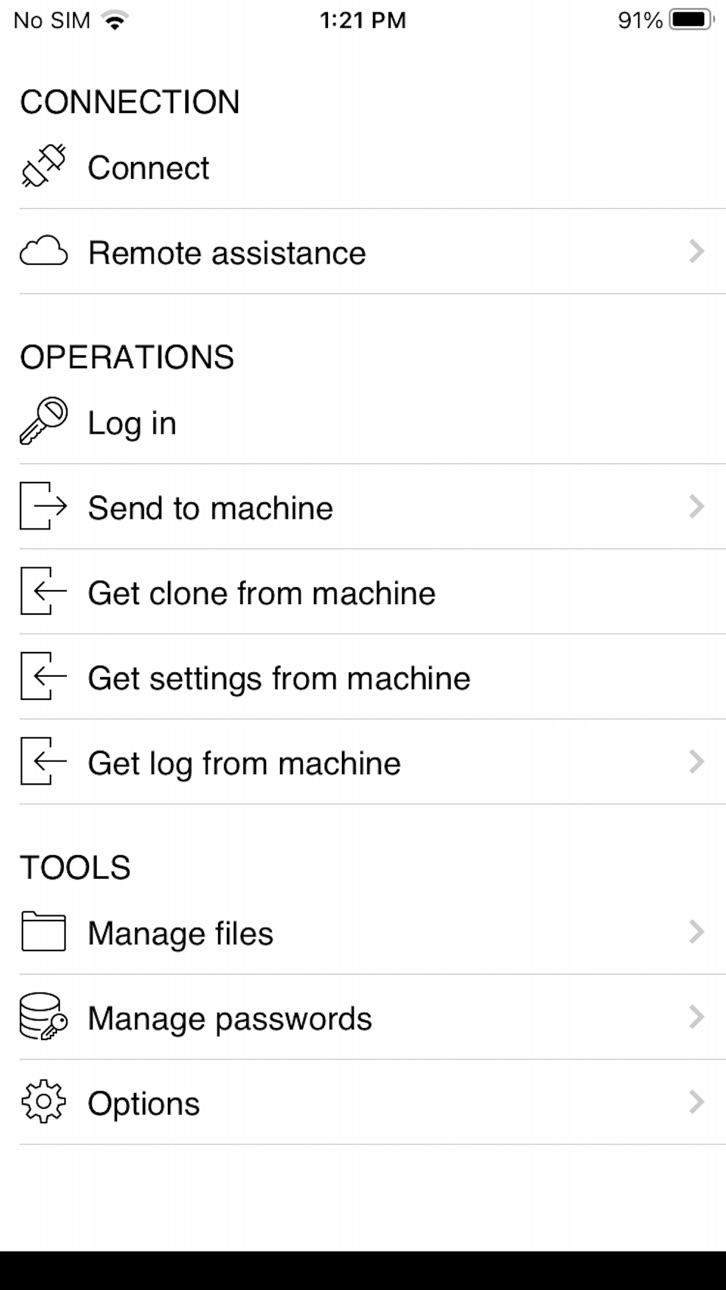
You can perform actions such as "Log in" which unlocks features based on access level. "Send to machine" or "Get from machine" features allow service technicians to send or get software updates and machine settings without the need of a computer.
Remote assistance
Use your smartphone as a "modem" to connect your machine to the Internet. This feature allows remote personnel, such as JLG service call-center technician to perform operations such as fault finding, software updates, configuration, calibration, and more, via the Internet.
Accessibility
ipadiphonemacrealityDevicetvoswatch
Version history 9 versions
Build 880734816v7.05.552026-02-05 19:30:55
Fixed a bug which made device go into standby when connected, which caused disconnect and failed operation.
G12 firmware updated to 2.01.8, fixing a bug in 2.01.6 that caused connection to pre-7.05 systems to fail if a G1x was not enabled in the system layout.
Fixed a bug where the app could crash or freeze when changing screen orientation from landscape to portrait or vice versa.
Build 879026043v7.05.472025-10-21 12:18:08
Fixed a bug which made device go into standby when connected, which caused disconnect and failed operation.
G12 firmware updated to 2.01.8, fixing a bug in 2.01.6 that caused connection to pre-7.05 systems to fail if a G1x was not enabled in the system layout.
Fixed a bug where the app could crash or freeze when changing screen orientation from landscape to portrait or vice versa.
Build 866046429v7.3.412025-10-13 18:47:26
Fixed a problem where app could not be started without an Internet connection.
Fixed problem with not being able to delete IQANconnect keys.
Left pane in portrait mode is now resizable.
Build 862397763v7.01.62023-12-28 19:13:22
Fixed problem with "No Reply" when connecting via Internet.
A few minor bug fixes.
Build 862150044v7.00.382023-12-12 20:18:15
Measurement can be saved as CSV.
Status is now visible at the bottom of the graph (as in IQANrun).
While adjusting min current, the output will be limited to the adjusted value.
Logs and measurements can be saved in xlsx (Excel) format.
Adjust view now works more like adjust in the MD4 menu system.
Now possible to change min, max and color for graph items.
Build 855231857v6.08.352023-02-28 15:31:57
General maintenance updates.
Build 854004209v6.08.312023-01-13 19:49:42
This release includes the following updates:
- Support for new WiFi permission WiFi in iOS 16.
- Updated firmware for IQAN-G12.
Build 848442699v2.02022-05-06 23:07:04
This release includes the following updates:
- Added support for the new Bluetooth gateway, IQAN-G12.
- GUI improvements.
- Remote assistance stability improved.
- Fixed a problem where files with non-ASCII characters in the file name were not shown.
Build 840107792v1.02021-02-16 18:03:59
No pricing data captured yet — comparisons appear once the app has paid storefronts or in-app purchases.
Availability 1 of 1 storefronts
| Region | Language | Price | Ratings | Avg | Version |
|---|---|---|---|---|---|
| US | en-US | Free | 4 | 3.8 | 7.05.55 |
Change log 12 changes · US
✎
releaseNotes updated
Fixed a bug which made device go into standby when connected, which caused disconnect and failed operation.
G12 firmware updated to 2.01.8, fixing a bug in 2.0
✎
description updated
DaVinciGO is a user-friendly service tool for the AE1932 scissor lift. It enables service technicians to connect wireless to their AE1932 scissor lift and perf
✎
name updated
JLG DaVinciGO
◆
Version 7.05.55 released
Fixed a bug which made device go into standby when connected, which caused disconnect and failed operation.
G12 firmware updated to 2.01.8, fixing a bug in 2.01.6 that caused connection to pre-7.05 systems to fail if a G1x was not enabled
◆
Version 7.05.47 released
Fixed a bug which made device go into standby when connected, which caused disconnect and failed operation.
G12 firmware updated to 2.01.8, fixing a bug in 2.01.6 that caused connection to pre-7.05 systems to fail if a G1x was not enabled
◆
Version 7.3.41 released
Fixed a problem where app could not be started without an Internet connection.
Fixed problem with not being able to delete IQANconnect keys.
Left pane in portrait mode is now resizable.
◆
Version 7.01.6 released
Fixed problem with "No Reply" when connecting via Internet.
A few minor bug fixes.
◆
Version 7.00.38 released
Measurement can be saved as CSV.
Status is now visible at the bottom of the graph (as in IQANrun).
While adjusting min current, the output will be limited to the adjusted value.
Logs and measurements can be saved in xlsx (Excel) format.
◆
Version 6.08.35 released
General maintenance updates.
◆
Version 6.08.31 released
This release includes the following updates:
- Support for new WiFi permission WiFi in iOS 16.
- Updated firmware for IQAN-G12.
◆
Version 2.0 released
This release includes the following updates:
- Added support for the new Bluetooth gateway, IQAN-G12.
- GUI improvements.
- Remote assistance stability improved.
- Fixed a problem where files with non-ASCII characters in the file name were
◆
Version 1.0 released