Home › Medical

 US
US
1 of 1 storefronts
Content in en-US
Content in en-US
Information
Preview 1 platform
iPhone 6 images


What’s New Version 5.7
Revised the user guide page.
Fixed an issue on the Gyro page where the port number was not being displayed.
Description
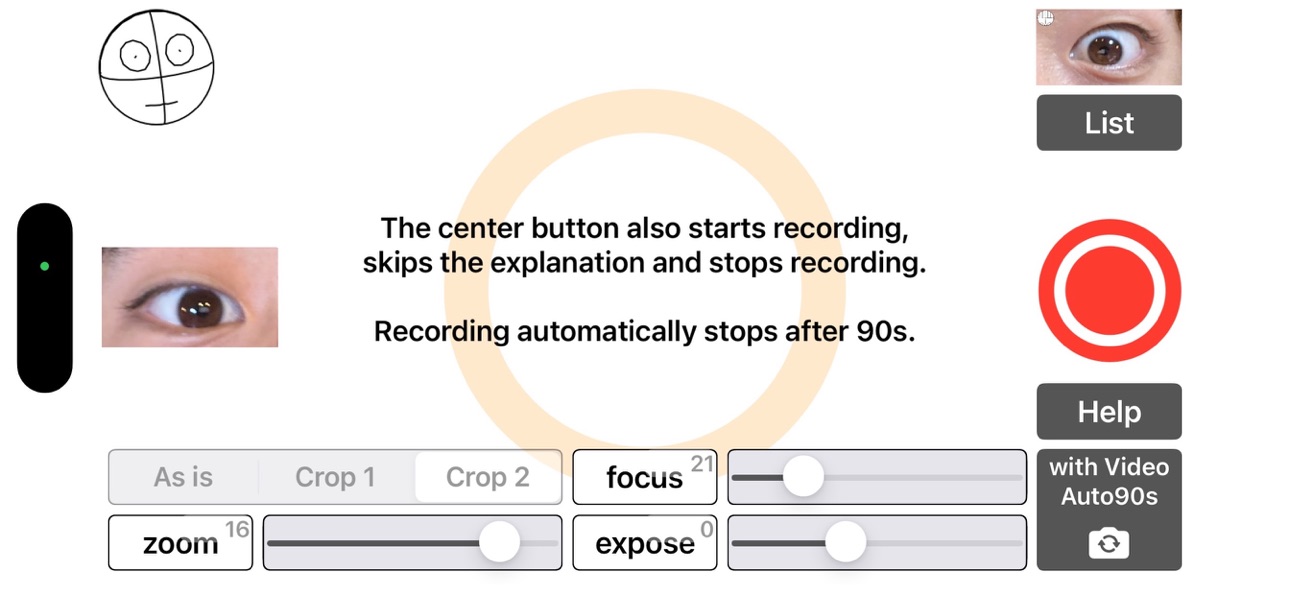
This is an app that uses the iPhone’s built-in motion sensors to overlay head position animations onto videos of nystagmus.
By using the front-facing camera, users can record their own nystagmus. In this mode, the screen itself serves as a light source.
When using the rear-facing camera, the iPhone can be fixed in front of the eye with a stabilization device, allowing for shake-free recording of eye movements.
Settings such as exposure, zoom, and LED brightness can be retained.
Videos are displayed in a list sorted by the exact date and time of recording (year, month, day, hour, minute, second). Tapping a video plays it, and swiping left deletes it. The videos are saved in an album named “iCapNYS.”
The app can also transmit iPhone gyroscope data via Wi-Fi. This feature is designed for the Windows software “CapNYS,” which records nystagmus and head position; CapNYS receives and utilizes the data.
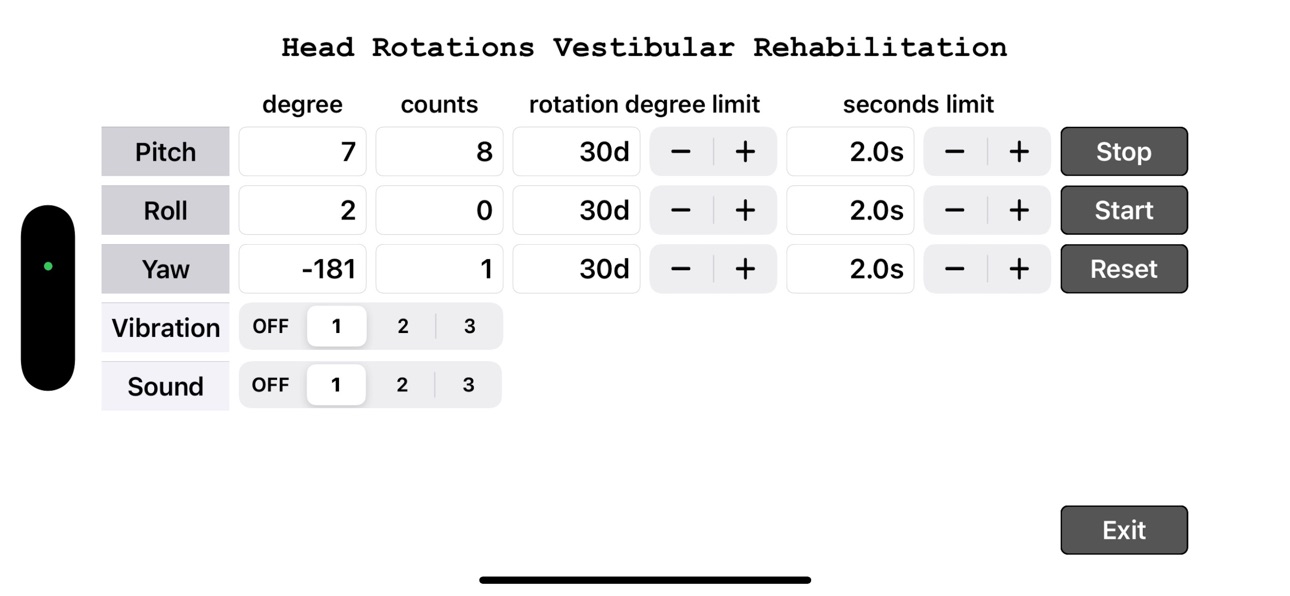
Additionally, the app monitors the iPhone’s motion (pitch, roll, yaw), and if any axis exceeds a preset threshold, it triggers a beep and vibration. This function is used during vestibular rehabilitation.
Accessibility
ipadiphonemacrealityDevicetvoswatch
Version history 25 versions
Build 875770572v5.72025-06-21 17:19:56
Revised the user guide page.
Fixed an issue on the Gyro page where the port number was not being displayed.
Build 875550625v5.62025-06-15 13:59:13
Edits to the app instruction page.
The focus distance setting has been changed to manual adjustment for both the front and back cameras.
Additionally, the focus distance and zoom value are now saved separately for the front and back cameras.
Build 875172728v5.52025-06-09 00:49:40
Removed the feature for using Wi-Fi cameras.
Removed the feature for using motion data from the Apple Watch.
Edits to the app instruction page.
Build 872432776v5.42025-05-22 14:56:41
Fixed a bug where the app would crash when attempting to start a new recording immediately after stopping the previous one.
Updated the layout of the top page.
Added a feature to record only the bottom-right quarter of the screen when using the back camera.
Added functionality to transmit motion sensor data from Apple Watch to a Windows PC via Wi-Fi.
Build 871799154v5.32025-01-22 07:42:38
The telephoto camera on the rear has been disabled, and the wide-angle camera and ultra-wide camera are now selectable. The recording start button has been made semi-transparent to make focus adjustment easier. The recording area has been adjusted to make it easier to capture the eyeballs at the center of the video: for the front camera, the right quarter from the center is captured, and for the back camera, the bottom-right quarter is captured.
Build 870864347v5.22024-12-07 12:59:12
Fixed a bug that caused a crash when moving from the "LIST" page to the "Rehabilitation" page.
Build 870807046v5.12024-12-01 08:03:03
Videos that are no longer needed due to version upgrade have been deleted. The videos used have also been converted to mp4 to reduce the app size.
Build 870786880v5.02024-11-30 16:47:11
When recording nystagmus with the front camera, buttons and other displays have been removed from the screen, making the entire screen white.
Build 870481974v4.92024-11-18 08:41:55
The bug where unnecessary buttons were displayed on the recording screen has been fixed.
Build 870043523v4.82024-10-30 09:17:52
Changed the layout of the buttons on the top page and video list page.
Build 869832549v4.72024-10-19 15:13:45
Changed all Apple Store screenshots and changed the description on the app's top page.
Build 869240015v4.62024-10-17 15:55:58
The camera change setting page has been changed to the top page, allowing recording from there, and placed a playback button for the last recorded video there. The top page now jumps to the list display page (previous top page).
Build 865741074v4.52024-08-08 15:53:28
The app checks the movement of the phone (pitch, roll, yaw) and generates a beep and vibration when there is more than a set amount of movement for each. This function is used during vertigo rehabilitation.
Build 864254448v4.32024-03-06 22:38:48
Corrected a typographical error in the description on the How to Use page and the Recording Settings page.
Build 863379920v4.22024-02-28 01:18:28
When full access to the photo library is not granted, an alert dialog is displayed when accessing photos.
Changed the top page and the HELP page.
Build 860319779v4.12023-12-21 00:45:14
Button layout was changed to improve operability.
Build 858055560v4.02023-07-04 17:43:26
Added the ability to send videos as email attachments.
Added a function to send motion sensor data via Bluetooth Low Energy.
Build 857230620v3.92023-05-22 07:22:20
Fixed a bug in displaying button titles in Japanese. Changed the title of the button, [Button] to [Exit].
Build 855698865v3.82023-03-26 07:42:08
Fixed audio and video discrepancies in the commentary video.
Build 855652703v3.72023-03-20 15:14:39
Fixed a bug that the screen goes dark when the How to Use page is displayed immediately after installation.
Fixed a bug in the alert display regarding camera usage during installation.
Build 855188848v3.52023-02-27 07:09:09
Fixed a bug that caused the screen to go dark when changing cameras.
Build 855207596v3.62023-02-27 20:52:54
Fixed a bug that caused the screen to go dark when changing the camera in the settings page right after installing the app.
Build 855135087v3.42023-02-25 13:18:58
A wifi camera for nystagmus recording manufactured by Unimec Corporation can be used.
Build 854072394v3.32022-12-26 13:14:27
An explanatory video in English has been created. You can record nystagmus while watching the explanatory video.
Build 853014875v3.22022-11-12 00:12:34
Modification of explanatory video.
Correction of default values for zoom and exposure.
No pricing data captured yet — comparisons appear once the app has paid storefronts or in-app purchases.
Availability 1 of 1 storefronts
| Region | Language | Price | Ratings | Avg | Version |
|---|---|---|---|---|---|
| US | en-US | Free | 0 | — | 5.7 |
Change log 29 changes · US
✎
releaseNotes updated
Revised the user guide page.
Fixed an issue on the Gyro page where the port number was not being displayed.
✎
description updated
This is an app that uses the iPhone’s built-in motion sensors to overlay head position animations onto videos of nystagmus.
By using the front-facing camera, us
✎
subtitle updated
眼振頭位キャプチャーアプリ
✎
name updated
iCapNYS
◆
Version 5.7 released
Revised the user guide page.
Fixed an issue on the Gyro page where the port number was not being displayed.
◆
Version 5.6 released
Edits to the app instruction page.
The focus distance setting has been changed to manual adjustment for both the front and back cameras.
Additionally, the focus distance and zoom value are now saved separately for the front and back camera
◆
Version 5.5 released
Removed the feature for using Wi-Fi cameras.
Removed the feature for using motion data from the Apple Watch.
Edits to the app instruction page.
◆
Version 5.4 released
Fixed a bug where the app would crash when attempting to start a new recording immediately after stopping the previous one.
Updated the layout of the top page.
Added a feature to record only the bottom-right quarter of the screen when using
◆
Version 5.3 released
The telephoto camera on the rear has been disabled, and the wide-angle camera and ultra-wide camera are now selectable. The recording start button has been made semi-transparent to make focus adjustment easier. The recording area has been a
◆
Version 5.2 released
Fixed a bug that caused a crash when moving from the "LIST" page to the "Rehabilitation" page.
◆
Version 5.1 released
Videos that are no longer needed due to version upgrade have been deleted. The videos used have also been converted to mp4 to reduce the app size.
◆
Version 5.0 released
When recording nystagmus with the front camera, buttons and other displays have been removed from the screen, making the entire screen white.
◆
Version 4.9 released
The bug where unnecessary buttons were displayed on the recording screen has been fixed.
◆
Version 4.8 released
Changed the layout of the buttons on the top page and video list page.
◆
Version 4.7 released
Changed all Apple Store screenshots and changed the description on the app's top page.
◆
Version 4.6 released
The camera change setting page has been changed to the top page, allowing recording from there, and placed a playback button for the last recorded video there. The top page now jumps to the list display page (previous top page).
◆
Version 4.5 released
The app checks the movement of the phone (pitch, roll, yaw) and generates a beep and vibration when there is more than a set amount of movement for each. This function is used during vertigo rehabilitation.
◆
Version 4.3 released
Corrected a typographical error in the description on the How to Use page and the Recording Settings page.
◆
Version 4.2 released
When full access to the photo library is not granted, an alert dialog is displayed when accessing photos.
Changed the top page and the HELP page.
◆
Version 4.1 released
Button layout was changed to improve operability.
◆
Version 4.0 released
Added the ability to send videos as email attachments.
Added a function to send motion sensor data via Bluetooth Low Energy.
◆
Version 3.9 released
Fixed a bug in displaying button titles in Japanese. Changed the title of the button, [Button] to [Exit].
◆
Version 3.8 released
Fixed audio and video discrepancies in the commentary video.
◆
Version 3.7 released
Fixed a bug that the screen goes dark when the How to Use page is displayed immediately after installation.
Fixed a bug in the alert display regarding camera usage during installation.
◆
Version 3.6 released
Fixed a bug that caused the screen to go dark when changing the camera in the settings page right after installing the app.
◆
Version 3.5 released
Fixed a bug that caused the screen to go dark when changing cameras.
◆
Version 3.4 released
A wifi camera for nystagmus recording manufactured by Unimec Corporation can be used.
◆
Version 3.3 released
An explanatory video in English has been created. You can record nystagmus while watching the explanatory video.
◆
Version 3.2 released
Modification of explanatory video.
Correction of default values for zoom and exposure.