Home › Health & Fitness

 US
US
1 of 1 storefronts
Content in en-US
Content in en-US
Information
Apple ID1533333253
Bundle IDcom.johnmallonee.Custom-Intervals
SellerSeller
Min iOS16.0
Min macOS13.0
Device familieswatch, iphone, ipad
Released2020-11-16
Copyright© 2026 John Mallonee
Privacy policyLink ↗
Preview 3 platforms
iPhone 10 images




iPad 10 images


Apple Watch 4 images


What’s New Version 2.6
Paid Version
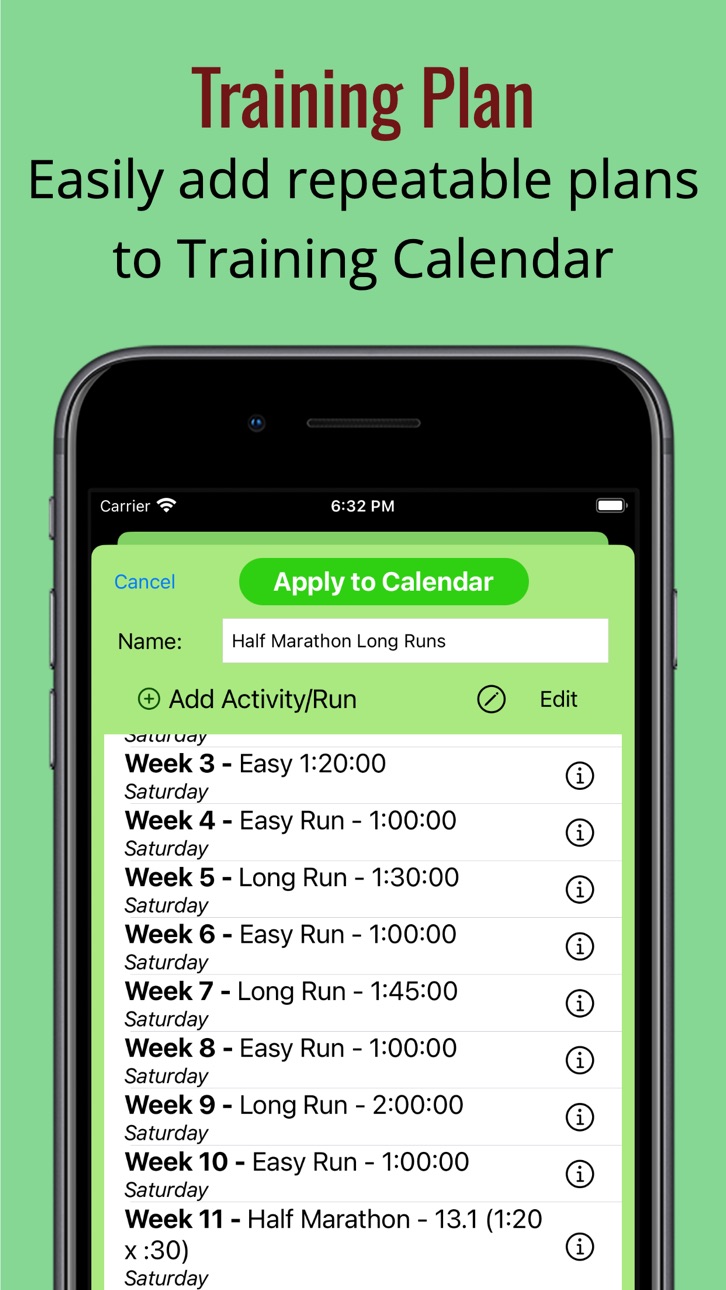
1. Training Plans - Create repeatable training plans (set of short runs, interval runs, long runs, and more by day of week) and reuse them on your Training Calendar. Add the activities/runs you want to include on a plan once, and you can apply the plan to your calendar over and over without having to manually add each planned run/activity.
Free Version
1. Training Calendar - When the Training Calendar is displayed in default order, the table automatically scrolls to the activity/run closest to the current date. Sorting the Training Calendar by any column will automatically scroll to the top.
Description
This is a flexible custom interval timer and training scheduler with historical analysis, and you are the only one who has access to your data! As a runner, I’ve had challenges finding a running timer that can manage my more involved interval combinations. Custom Running Intervals allows you to build variable activities with repeatable blocks of intervals. Intervals can be by time or by distance with 3 intensities - walk, steady, and fast. You can repeat your intervals a specific or indefinite number of times, for a defined amount of time, or for a given distance. With an inexpensive upgrade, you can create as many combinations of repeatable sets in the variations you choose, build a training plan on a calendar, see results of past runs, and export results to other apps. Also, your data is only available to you - even I can’t see it. Your data will only exist on your phone, or in your own iCloud storage if you choose. If you save your data to iCloud (by default), you can view the results on any other iPhone or iPad that shares the same iCloud account.
Features:
1. Configurable intervals - distance (miles, kilometers), time (hours, minutes, seconds).
2. Configurable repeat blocks of intervals - # of times (or until stopped), distance, time.
3. Clone activities (use an existing activity - repeats and intervals - as a basis to create a similar activity).
4. Apple Watch monitoring and control and heart rate (iPhone app must be started).
5. Configurable settings.
6. Audio cues by voice, tone, or both (in Settings).
7. Pause, Resume, or Stop an activity, Skip repeat blocks.
8. View current elapsed time, distance, interval progress, overall pace.
9. End an in-progress repeat block (and proceed to the next).
10. Results by interval and repeat block, as well as default distance unit (each mile or kilometer).
11. Results (including steps, time, distance, and pace) available immediately after run.
12. Map view to verify GPS location prior to starting run.
13. Map view of running route in results including markers by mile/kilometer and pauses.
14. Helpful on-screen guide when creating first activity and configuring.
15. Activities and results stored in iCloud for synchronization across devices and data loss prevention.
Apple Watch
If you have an Apple Watch, you can also start, pause, and stop an activity in progress from the watch. NOTE: the Apple Watch app (included with your iPhone download) communicates with the iPhone app, so the app must be started on both the watch and phone to use the watch app.
Apple Watch Features:
1. View existing activity configurations.
2. Start an activity (if iPhone app is started).
3. Pause, Resume, or Stop an activity.
4. View current elapsed time, distance, interval progress, overall pace.
5. End an in-progress repeat block (and proceed to the next).
Available Full Features (In App Purchase)
1. Configure an activity with multiple repeat blocks for more complex intervals (standard version allows one repeat block)
2. Add planned training runs on a Training Calendar for a selected custom interval (free version allows up to 5).
3. View and filter a graph of your pace over time for activities (free version allows up to 5 past runs).
4. View the results of your runs on the Training Calendar including a map of the route. weather conditions, elevation, pace, and heart rate.
5. Create repeatable training plans to easily add planned runs to the Training Calendar.
6. Sort your past results by date, total time of run, distance, and pack.
7. Export your results (current or history) in GPX format for importing to other trackers.
8. Fix GPS for anomalies.
9. Import results in GPX format from any tracker app.
10. Track miles run on your pairs of shoes.
11. Manually enter results for a run if you forget to track.
12. Manually edit the time and distance for a run.
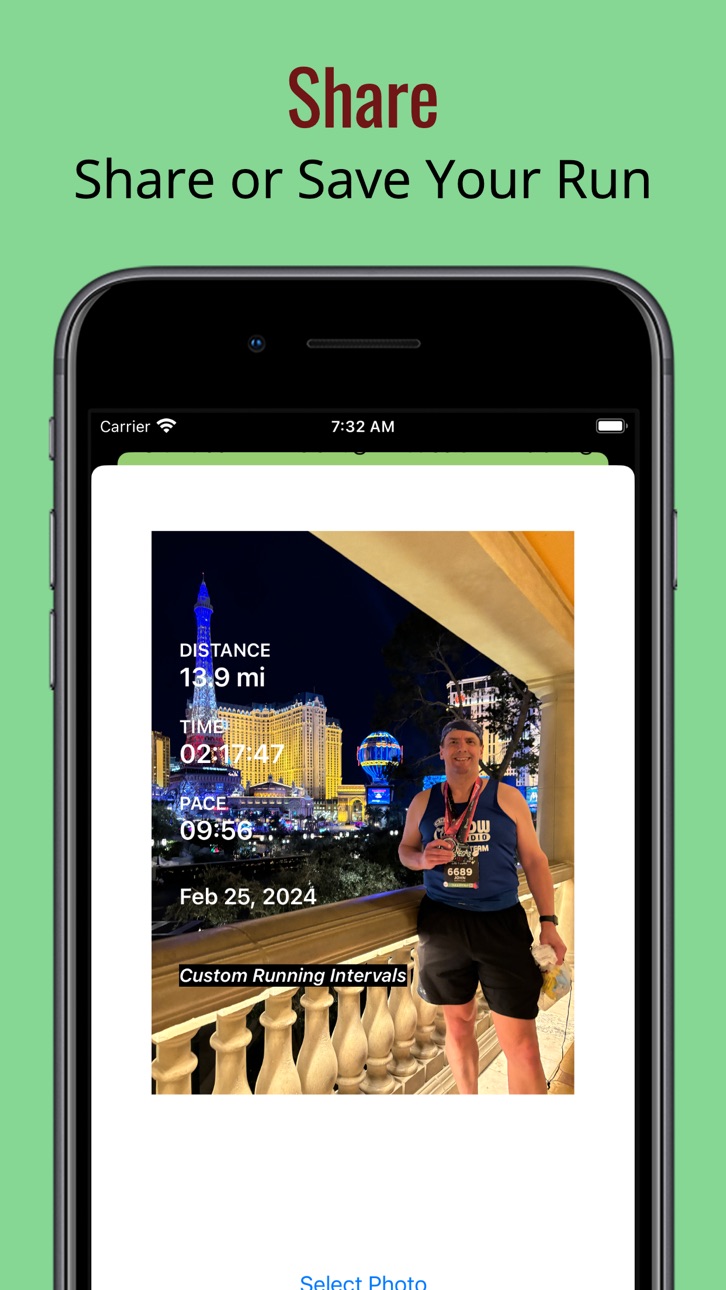
13. Share a run with photo to social media and other apps.
14. Track a run on a cruise ship.
In-App Purchases US pricing
One-Time Purchases
Full Capabilities$0.99
Capabilities
In-App Purchases
Accessibility
ipadiphonemacrealityDevicetvoswatch
Version history 14 versions
Build 886961047v2.62026-06-16 19:50:14
Paid Version
1. Training Plans - Create repeatable training plans (set of short runs, interval runs, long runs, and more by day of week) and reuse them on your Training Calendar. Add the activities/runs you want to include on a plan once, and you can apply the plan to your calendar over and over without having to manually add each planned run/activity.
Free Version
1. Training Calendar - When the Training Calendar is displayed in default order, the table automatically scrolls to the activity/run closest to the current date. Sorting the Training Calendar by any column will automatically scroll to the top.
Build 877745033v2.5.12026-03-17 17:24:25
Premium Version
1. Share your run to social media or save it to other apps with one of your photos as a background including the distance, time, pace, and date.
2. Track a run on a cruise ship (or somewhere GPS doesn't work) or convert a previous run to use motion instead of GPS. Distance will be approximated based on past runs of same intensity. Alternatively, count laps on a cruise ship to determine running distance where you know the # of laps in a. mile or kilometer.
Build 877285900v2.52025-08-16 08:51:12
1. Ability to add Notes to a run/activity. Click pencil next to Pace on results screen. Results page and Training Calendar show Notes.
2. Ability to exclude selected runs from the Stats graph. Click pencil next to Pace on results screen and toggle Exclude filter on Stats screen.
3. Training Calendar now shows where each activity ranks with your other activities of the same distance (in one mile/kilometer increments).
4. Training Calendar all-time/yearly/monthly groupings now shows Pace along with number of miles/kilometers and runs.
Build 864667893v2.4.12024-04-12 01:46:19
1. Prevent loss of steps when using Fix GPS option or when importing GPX file (if GPX created with steps from this app).
2. Bug fix to correct heart rate chart showing distances incorrectly when importing run from GPX file.
3. Apple Watch now shows when connected phone acquires a GPS location prior to starting a run.
Build 861748075v2.42024-02-05 10:47:41
Free Version
1. Heart rate tracking from watch
2. New initial watch view
3. Streamlined watch experience
4. Simple wrist taps (haptics) on watch for interval changes
5. Steps measured per interval and repeat block
6. Pace by distance improved in some instances
7. Improved formatting of Results screen for smaller phones
8. Bug fix - weather determination always from current location
9. Bug fix - pace by distance for intervals over 1 mile/kilometer
Full Capabilities
1. Heart rate chart
Build 859274304v2.32023-10-12 23:34:11
Free Version:
1. Points on map results by mile/kilometer
2. Ability to vary length of GPS segments (in Settings)
3. Hours can now be entered in Repeats by time
4. Pauses are now recognized correctly
5. Miscellaneous bug fixes including some crashes
Full Features (In App Purchase)
1. Pace and Elevation graphs for Results
2. Fix GPS feature for GPS anomalies
3. Manual entry of run results
4. Ability to manually edit any run results
Build 851863033v2.22022-12-03 15:23:31
Now you can change your run intervals while you’re running, view weather conditions from your runs, and get additional yearly or monthly statistics in your training calendar. Details are below.
Basic Version
1. Current temperature and humidity is captured at the start and end of each run via Apple Weather
2. Temperature and humidity can be added to past runs from past weather records (with limitations) by opening the run from the Training Calendar
Full Capabilities (In App Purchase)
1. Runs can be grouped by year or month in the Training Calendar including summarized distance and run counts
2. Interval lengths (time or distance) can be temporarily changed within the middle of a run
Build 846684812v2.12022-05-15 18:50:34
Version 2.1 adds some new features to the app that are available with the Full Capabilities in app purchase (99 cents, one time charge).
1. Shoes - manage your shoes and track the mileage by run so you know when to replace them. A shoe icon will also show for a run in the Training Calendar view if a running shoe has been connected with a run.
2. Import - import runs from this or other apps stored as GPX files (standard format). You will be able to pick the activity type (run configuration with intervals and repeats) so you can see detailed distance and time breakdowns by interval. You will also be able to see a map of your imported run.
3. Export - when you finish your run, you will be prompted to save a GPX file with your run details in a location of your choice for safe keeping and import into other run trackers.
4. The map view of a run can be shared to the app running on another device for the same iCloud user by exporting a GPX file from one device and them imported into the app on another device.
For both the Full Capabilities version and free version:
1. The Training Calendar view will now show icons for whether a run has a corresponding map view. Map views are available on the device used during a run.
Build 843768619v2.02021-08-30 12:00:44
Version 2.0 of Custom Running Intervals has a cleaner design as well as some additional features.
1. There is now a Stats feature that shows a chart of your pace over your past runs with built-in filters for distance and activity type (limited to 5 runs for the free version). There are also statistics for the current month, year, and all time.
2. The Training Calendar has a filter to view all activities or just those for a specific activity type. The Training Calendar also now allows 5 future runs in the free version.
3. Additional audio cues have been added in Settings if you want to get updates on your distance, time, and pace.
4. An audio cue is also now available in Settings if you want to know when a new repeat block starts.
5. The results will now detect temporary GPS disruptions that could sporadically show a momentary incorrect location and mis-represent distance and pace.
6. The Apple Watch display will now show hours in the elapsed time (previously only showed minutes and seconds).
7. The # of times remaining in a repeat block on the Apple Watch has been corrected to show the correct number.
Build 839879179v1.52021-01-19 23:56:03
Free version:
1. Progress for current repeat block now shows on the Apple Watch app
2. List of activities loads more quickly on the Apple Watch app
Full Capabilities (In App Purchase):
1. Training Calendar view of all runs for all interval activities (open from calendar icon on main/Activities screen)
2. Ability to sort history view by date, total time for run, distance run, pace
3. Add future runs on the Training Calendar for a given interval activity type
4. See future runs and past runs on a single Training Calendar
5. Planned run for today’s date shows at the top of the Activities (home) screen for easy start
6. Planned run for today’s date shows at the top of the Activities list on the Apple Watch for easy start
7. Option to save iCloud space for running results saved in versions 1.3 and earlier
Build 839768484v1.42020-12-23 06:45:54
This version corrects recent phone app crashes that were occurring due to the way running route GPS coordinates on the Results screen were synchronizing to iCloud.
Also as a result of this change, the phone app will now use a decreased amount of storage in iCloud.
For details on how the app synchronizes with iCloud, see the Custom Running Intervals page at the Support URL.
Build 839602718v1.32020-12-16 21:16:18
This version resolves occasional app issues and prepares for a premium feature price decrease.
1. Connectivity between the phone app and watch app was disrupted sometimes causing time, distance, and pace to “freeze”, and the issue is corrected in this update.
2. The watch app now indicates when it is refreshing current time, distance, and pace stats from the phone app
3. In app purchase messages reflect a pricing change
4. Occasional phone app crashes were occurring when data was synchronizing to iCloud in the background
Build 839415012v1.22020-12-02 15:53:33
This version corrects some unexpected behavior that could occur for some or all users:
1. Some maps shown in the results view and exported to other apps showed incorrect routes where points on the route were out of order
2. Some runs on the Apple Watch would "freeze" and not continue to show progress in elapsed time and distance
3. When completing an activity with voice audio, "Activity Complete" would repeat a second time
Build 837947861v1.12020-11-16 23:14:11
Price history by region
Currency
Show
Columns
Search
Availability 1 of 1 storefronts
| Region | Language | Price | Ratings | Avg | Version |
|---|---|---|---|---|---|
| US | en-US | Free | 1 | 2.0 | 2.6 |
Change log 18 changes · US
✎
releaseNotes updated
Paid Version
1. Training Plans - Create repeatable training plans (set of short runs, interval runs, long runs, and more by day of week) and reuse them on your
✎
description updated
This is a flexible custom interval timer and training scheduler with historical analysis, and you are the only one who has access to your data! As a runner, I’v
✎
subtitle updated
Flexible repeats and intervals
✎
name updated
Custom Running Intervals
◆
Version 2.6 released
Paid Version
1. Training Plans - Create repeatable training plans (set of short runs, interval runs, long runs, and more by day of week) and reuse them on your Training Calendar. Add the activities/runs you want to include on a plan once,
◆
Version 2.5.1 released
Premium Version
1. Share your run to social media or save it to other apps with one of your photos as a background including the distance, time, pace, and date.
2. Track a run on a cruise ship (or somewhere GPS doesn't work) or convert a pr
◆
Version 2.5 released
1. Ability to add Notes to a run/activity. Click pencil next to Pace on results screen. Results page and Training Calendar show Notes.
2. Ability to exclude selected runs from the Stats graph. Click pencil next to Pace on results screen
◆
Version 2.4.1 released
1. Prevent loss of steps when using Fix GPS option or when importing GPX file (if GPX created with steps from this app).
2. Bug fix to correct heart rate chart showing distances incorrectly when importing run from GPX file.
3. Apple Watch n
◆
Version 2.4 released
Free Version
1. Heart rate tracking from watch
2. New initial watch view
3. Streamlined watch experience
4. Simple wrist taps (haptics) on watch for interval changes
5. Steps measured per interval and repeat block
6. Pace by distance impro
◆
Version 2.3 released
Free Version:
1. Points on map results by mile/kilometer
2. Ability to vary length of GPS segments (in Settings)
3. Hours can now be entered in Repeats by time
4. Pauses are now recognized correctly
5. Miscellaneous bug fixes including some
◆
Version 2.2 released
Now you can change your run intervals while you’re running, view weather conditions from your runs, and get additional yearly or monthly statistics in your training calendar. Details are below.
Basic Version
1. Current temperature and hum
◆
Version 2.1 released
Version 2.1 adds some new features to the app that are available with the Full Capabilities in app purchase (99 cents, one time charge).
1. Shoes - manage your shoes and track the mileage by run so you know when to replace them. A shoe ico
◆
Version 2.0 released
Version 2.0 of Custom Running Intervals has a cleaner design as well as some additional features.
1. There is now a Stats feature that shows a chart of your pace over your past runs with built-in filters for distance and activity type (limi
◆
Version 1.5 released
Free version:
1. Progress for current repeat block now shows on the Apple Watch app
2. List of activities loads more quickly on the Apple Watch app
Full Capabilities (In App Purchase):
1. Training Calendar view of all runs for all interval
◆
Version 1.4 released
This version corrects recent phone app crashes that were occurring due to the way running route GPS coordinates on the Results screen were synchronizing to iCloud.
Also as a result of this change, the phone app will now use a decreased amou
◆
Version 1.3 released
This version resolves occasional app issues and prepares for a premium feature price decrease.
1. Connectivity between the phone app and watch app was disrupted sometimes causing time, distance, and pace to “freeze”, and the issue is correc
◆
Version 1.2 released
This version corrects some unexpected behavior that could occur for some or all users:
1. Some maps shown in the results view and exported to other apps showed incorrect routes where points on the route were out of order
2. Some runs on the
◆
Version 1.1 released