Home › Graphics & Design

 US
US
1 of 1 storefronts
Content in en-US
Content in en-US
Information
Preview 2 platforms
iPhone 1 image

iPad 2 images
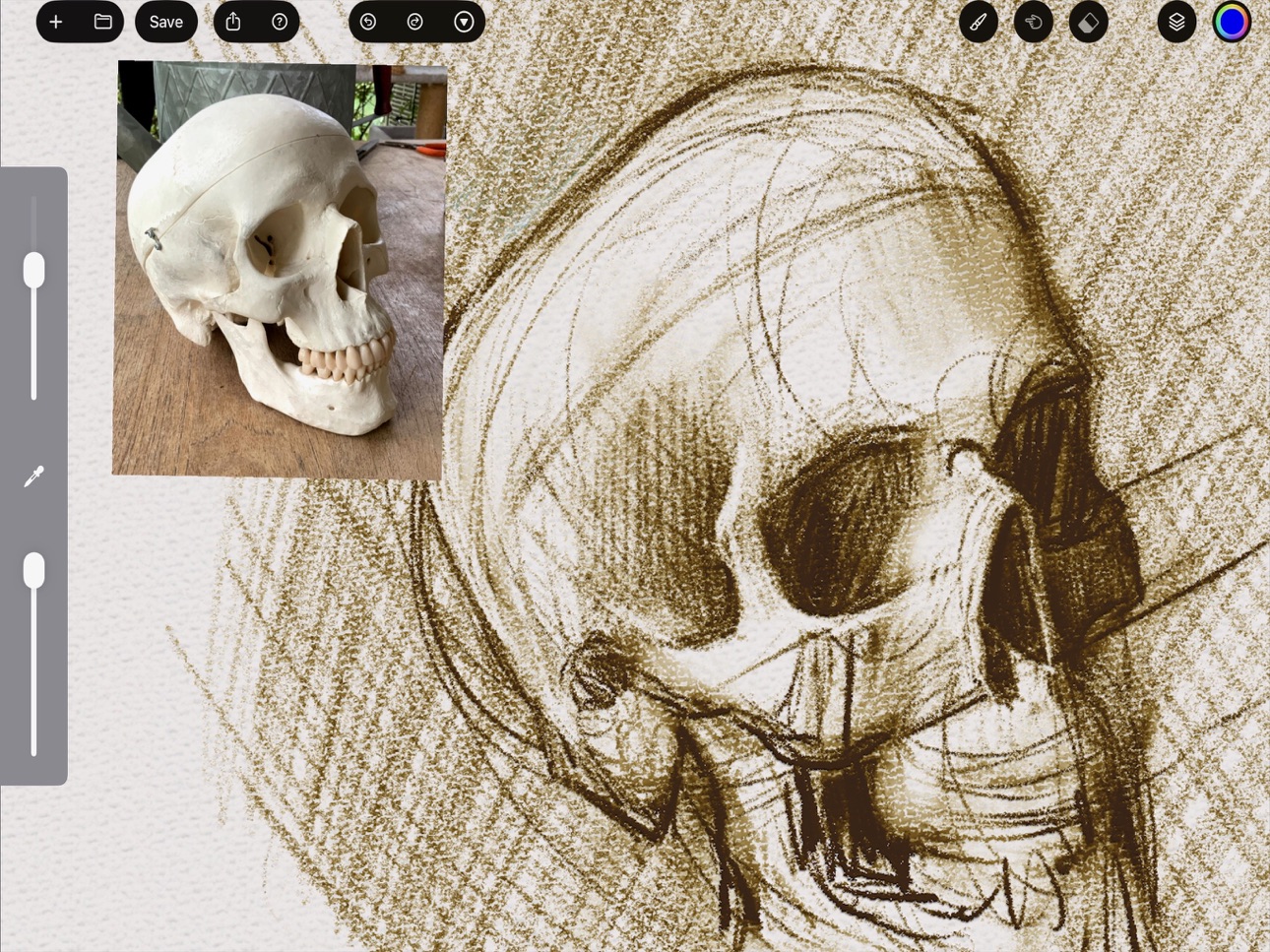

What’s New Version 4.0.5
- added additional canvas textures
- added preference option to disable brush cursor
- updated slider style to more modern thumbless look
Description
FocalPaint's unique brush engine simulates thick paint and real pigment mixing with accurate physics models.
Features:
- Realistic color blending behaves like real paint!
- Real canvas texture and paint thickness
- Transparent Ink simulation
- Open Source GPU shader code library for reference and customization
- Write your own custom brush with Metal GPU or Javascript code
- Write your own custom layer modes with Metal GPU code
- Apple Pencil Pro support with hover
- 16 channel "spectral" color model (256 bits per pixel)
- Wide color gamut (P3)
Please note: Apple A12 GPU or newer is required
Terms of Use:
https://www.focalpaint.com/p/terms-of-use.html
Privacy Policy:
https://www.focalpaint.com/p/privacy.html
Special Thanks to:
Scott Allen Burns
Troy James Sobotka & Friends
colour-science.org python library
MyPaint painting software team
Anna Timm (@anti-art)
Accessibility
ipadiphonemacrealityDevicetvoswatch
Version history 25 versions
Build 884439858v4.0.52026-04-13 18:07:32
- added additional canvas textures
- added preference option to disable brush cursor
- updated slider style to more modern thumbless look
Build 881201935v4.0.42026-02-16 17:35:40
- per-layer custom shader code editor (make your own special FX or custom layer modes)
- brush updates and fixes
- removes donation links (removes in-app purchases)
Build 876931030v3.82025-08-04 07:51:18
Set a maximum canvas size of 25 megapixels, to avoid problems with excessive memory usage.
Build 876365190v3.72025-07-14 16:33:10
Now you can adjust the size of tool windows; color wheel, palette mixer, and color editor. Just click the gear icon and slide the UI Scale slider to your personal preference
Build 871163198v3.52024-12-16 07:22:19
Fixes bugs:
- bristle count too high caused a crash
- metalFX upscaling had a rendering artifact
Build 870994240v3.42024-12-09 10:49:33
- Even more realistic brushes with variations on each bristle
- New default oil brush
- Bug fixes for saving modified brushes
Build 870158215v3.32024-11-03 07:27:41
At last pinch/zoom/pan work as you might expect!
Build 869187957v3.22024-09-22 18:10:34
- dedicated smudge brush mode to complement normal and eraser modes
- fixes for brush lists odd behaviors
Build 868841855v3.12024-09-09 09:06:05
Eraser Mode can use and remember a different brush than Painting Mode
Apple Pencil Pro Squeeze support
Palette Mixer panel can be color picked with a finger now while mid-stroke
Brush Updates
Fixes to the Travel Distant input
Avoid crashing when picking color outside the canvas
Build 867957590v3.0.32024-08-03 19:20:44
- Improve window resizing when rotating device or split view
- Fixes a problem with zoom getting stuck
Build 867393686v3.0.12024-07-11 02:58:19
- Makes brush cursor turn into a regular cursor over other UI elements
- Fixes a default brush
- Disabled MetalFX Upscaling by default for better performance
Build 867395658v3.0.22024-07-11 05:53:09
- fixes brush preview cursor (don't use multiply mode)
Build 867367933v3.0.02024-07-10 08:37:35
- Brush Cursor / Preview
- This previews the brush shape and orientation, including barrel roll!
- Makes using an external monitor more pleasant
- Fixes for various display issues, Display Zoom, etc
- Brush Updates
Build 865866322v2.7.02024-05-12 13:06:45
New Brush Input! Barrel Rotation (Roll Angle), for Apple Pencil Pro on iOS 17.5 or newer!
Build 865181178v2.6.62024-04-14 14:55:00
- Fixes an issue drawing near edges of the canvas
- Make sliders easier to use
- Fix a background texture/canvas loading issue
- Import Photo as Layer now scales and rotates the image to fit the canvas
Build 864167451v2.6.32024-03-03 21:23:06
- Maintenance updates for supporting new iOS versions
- Fixed default brush eraser
Build 863391300v2.6.22024-02-18 13:12:00
Update smudge paint algorithm for thickness
Update brushes
Add optional tip / contribution links to in-app purchases, so you can support FocalPaint if you enjoy it
Build 863240165v2.4.02024-01-29 02:15:26
- fixes an issue where smudge erases at the beginning of strokes
- new color picker UI based on color history
- brush editor fix for special characters in brush name
- brush updates, new custom brush to shift color/value
Build 862253137v2.3.42023-12-16 16:09:50
- fix an incorrect calculation for Direction Changed brush input
- updated brushes
Build 862228502v2.3.02023-12-15 16:25:18
- New color picker square model (similar to HSV Square)
- Adjust colors mid-stroke for smooth gradients and faster workflow
- Revamped canvas rendering for larger canvas support and better performance
- Updated brushes
Build 860152284v2.2.12023-09-24 12:26:21
Fixes an issue with iOS 17 and non-m1/m2 iPads. MetalFX is not supported on these devices but was enabled automatically. Alternatively to updating, one can disable MetalFX in FocalPaint preferences
Build 859455189v2.2.02023-08-27 21:51:19
- Background improvement, don't apply bump map to background image, which makes it look strange and lumpy
- Reduce specular highlights more, avoid more halo artifacts
Build 859350035v2.1.22023-08-23 10:11:57
Small fix to avoid halo artifact
Build 858864303v2.1.12023-08-01 10:04:45
"Eugene Green" Edition
-New default Dirty Brush
-Eraser mode improvements (can adjust eraser setting when toggled on)
-Brush Updates / improvements
-Green Default Color ;-)
Build 856956428v2.1.02023-05-09 12:47:04
- Fixes a serious issue that would cause extra storage space to be used for temporary files. When you launch this version it will clean up up any extra data and keep the storage usage much lower.
Price history by region
Currency
Show
Columns
Search
Availability 1 of 1 storefronts
| Region | Language | Price | Ratings | Avg | Version |
|---|---|---|---|---|---|
| US | en-US | USD 4.99 | 13 | 4.2 | 4.0.5 |
Change log 29 changes · US
✎
releaseNotes updated
- added additional canvas textures
- added preference option to disable brush cursor
- updated slider style to more modern thumbless look
✎
description updated
FocalPaint's unique brush engine simulates thick paint and real pigment mixing with accurate physics models.
Features:
- Realistic color blending behaves like
✎
subtitle updated
mark-making machine
✎
name updated
FocalPaint
◆
Version 4.0.5 released
- added additional canvas textures
- added preference option to disable brush cursor
- updated slider style to more modern thumbless look
◆
Version 4.0.4 released
- per-layer custom shader code editor (make your own special FX or custom layer modes)
- brush updates and fixes
- removes donation links (removes in-app purchases)
◆
Version 3.8 released
Set a maximum canvas size of 25 megapixels, to avoid problems with excessive memory usage.
◆
Version 3.7 released
Now you can adjust the size of tool windows; color wheel, palette mixer, and color editor. Just click the gear icon and slide the UI Scale slider to your personal preference
◆
Version 3.5 released
Fixes bugs:
- bristle count too high caused a crash
- metalFX upscaling had a rendering artifact
◆
Version 3.4 released
- Even more realistic brushes with variations on each bristle
- New default oil brush
- Bug fixes for saving modified brushes
◆
Version 3.3 released
At last pinch/zoom/pan work as you might expect!
◆
Version 3.2 released
- dedicated smudge brush mode to complement normal and eraser modes
- fixes for brush lists odd behaviors
◆
Version 3.1 released
Eraser Mode can use and remember a different brush than Painting Mode
Apple Pencil Pro Squeeze support
Palette Mixer panel can be color picked with a finger now while mid-stroke
Brush Updates
Fixes to the Travel Distant input
Avoid crashing
◆
Version 3.0.3 released
- Improve window resizing when rotating device or split view
- Fixes a problem with zoom getting stuck
◆
Version 3.0.2 released
- fixes brush preview cursor (don't use multiply mode)
◆
Version 3.0.1 released
- Makes brush cursor turn into a regular cursor over other UI elements
- Fixes a default brush
- Disabled MetalFX Upscaling by default for better performance
◆
Version 3.0.0 released
- Brush Cursor / Preview
- This previews the brush shape and orientation, including barrel roll!
- Makes using an external monitor more pleasant
- Fixes for various display issues, Display Zoom, etc
- Brush Updates
◆
Version 2.7.0 released
New Brush Input! Barrel Rotation (Roll Angle), for Apple Pencil Pro on iOS 17.5 or newer!
◆
Version 2.6.6 released
- Fixes an issue drawing near edges of the canvas
- Make sliders easier to use
- Fix a background texture/canvas loading issue
- Import Photo as Layer now scales and rotates the image to fit the canvas
◆
Version 2.6.3 released
- Maintenance updates for supporting new iOS versions
- Fixed default brush eraser
◆
Version 2.6.2 released
Update smudge paint algorithm for thickness
Update brushes
Add optional tip / contribution links to in-app purchases, so you can support FocalPaint if you enjoy it
◆
Version 2.4.0 released
- fixes an issue where smudge erases at the beginning of strokes
- new color picker UI based on color history
- brush editor fix for special characters in brush name
- brush updates, new custom brush to shift color/value
◆
Version 2.3.4 released
- fix an incorrect calculation for Direction Changed brush input
- updated brushes
◆
Version 2.3.0 released
- New color picker square model (similar to HSV Square)
- Adjust colors mid-stroke for smooth gradients and faster workflow
- Revamped canvas rendering for larger canvas support and better performance
- Updated brushes
◆
Version 2.2.1 released
Fixes an issue with iOS 17 and non-m1/m2 iPads. MetalFX is not supported on these devices but was enabled automatically. Alternatively to updating, one can disable MetalFX in FocalPaint preferences
◆
Version 2.2.0 released
- Background improvement, don't apply bump map to background image, which makes it look strange and lumpy
- Reduce specular highlights more, avoid more halo artifacts
◆
Version 2.1.2 released
Small fix to avoid halo artifact
◆
Version 2.1.1 released
"Eugene Green" Edition
-New default Dirty Brush
-Eraser mode improvements (can adjust eraser setting when toggled on)
-Brush Updates / improvements
-Green Default Color ;-)
◆
Version 2.1.0 released
- Fixes a serious issue that would cause extra storage space to be used for temporary files. When you launch this version it will clean up up any extra data and keep the storage usage much lower.