Home › Sports

 US
US
1 of 1 storefronts
Content in en-US
Content in en-US
Information
Preview 1 platform
iPhone 8 images


What’s New Version 7.4
- Improved user interface
Description
The SPEEDUP Cricket app offers the following features :
- SPEEDUP Radar : turn your smartphone/tablet into a speed radar
- SPEEDUP Live : share your speed measurements in real-time with other players
- SPEEDUP Analytics : record and analyze your sessions
- SPEEDUP Motion Tracker : perform bowling motion analysis by combining information from two devices
***** SPEEDUP Radar *****
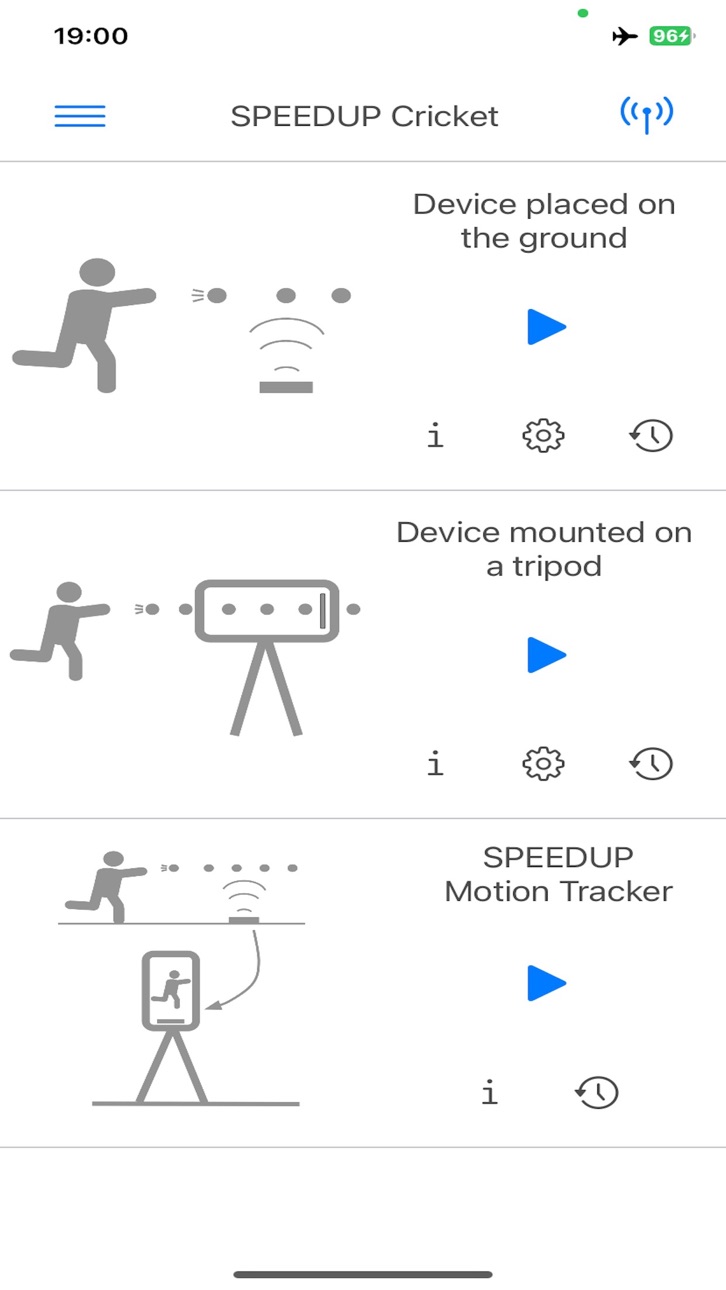
The SPEEDUP Cricket app offers three ways to measure the speed of a ball :
1. On-the-ground : the smartphone/tablet is placed on the ground.
2. Tripod : the smartphone/tablet is fixed on a tripod
***** SPEEDUP Live *****
The SPEEDUP Live technology may be used to broadcast your speed measurements in real time to multiple devices (TV, laptop, tablet, smartphone, etc.). After throwing the ball, the speed appears instantaneously on the SPEEDUP Cricket Live web interface as well as the SPEEDUP Live dashboard located within the SPEEDUP Cricket app. Only users who have received your SPEEDUP Live code are entitled to watch your speed. A link to your SPEEDUP Live code may be found within the SPEEDUP Cricket app.
Feel free to use the SPEEDUP Live technology in order to create/join communities of players who are interested in sharing their speed measurements. For instance, the members of a cricket team may use the SPEEDUP Live technology in order to set up a speed challenge.
Link to the SPEEDUP Cricket Live web interface : https://speedup-cricket.web.app/
***** SPEEDUP Analytics *****
With SPEEDUP Analytics, you have a permanent access to your last 100 speed measurements. For each speed measurement, the following information is provided :
- Date of measurement
- The speed of the ball relative to the ground
- An image showing the trajectory of the ball
- 3D and 2D views of the ball trajectory
In the 'My Speedup' section of the SPEEDUP Live web interface, the trajectories of the balls may also be visualized in three dimensions. Besides its fun aspect, a 3D visualization may also bring valuable information about the quality of your throw.
***** SPEEDUP Motion Tracker *****
SPEEDUP Motion Tracker allows for bowling motion analysis by combining information from two devices while the bowler is throwing the ball. One device is used for generating a 3D trajectory of the ball from which the speed and the throw angle will be extracted. The second device is used for taking a video of the bowler while throwing the ball. Bowling motion analysis is performed by estimating the bowler's body pose.
In-App Purchases US pricing
Premium offers Subscription
1 month Premium · Monthly$3.99
6 months Premium · 6 months$19.99
1 year Premium · Yearly$29.99
Capabilities
In-App Purchases
Accessibility
ipadiphonemacrealityDevicetvoswatch
Version history 25 versions
Build 880833631v7.42025-12-19 21:11:06
- Improved user interface
Build 880624404v7.32025-12-13 03:23:35
- Improved the user interface (in-app purchase section)
Build 880512197v7.22025-12-11 17:56:35
- Improved user interface
- Added premium offers
Build 880002020v7.12025-12-04 13:35:56
- Introduced SPEEDUP Motion Tracker
- Fixed a few display bugs
- Improved speed measurement accuracy
Build 863720973v6.62024-02-13 16:48:43
- Fixed a bug in SPEED Groups which could adversely affect user experience and convenience
Build 863686469v6.52024-02-11 09:55:42
- Added the possibility for users to delete old speed readings by pressing the blue "reset" button located on the bottom left-hand corner of the speed measurement interface
- Added a "big" display in the middle of the speed measurement interface (useful for players who are using screen mirroring in order to display speed measurements on a TV/computer)
- Fixed a bug related to user account management : users without a photo in their profile may have experienced an app crash while taking part in a discussion within a SPEEDUP group
- Account deletion : all the data generated by users in SPEEDUP groups (discussions, posts, drawings, video, voice messages, etc.) will be removed after account deletion
Build 863395104v6.42024-02-05 08:32:54
- Fixed a major bug in SPEEDUP Groups (drawing function) which caused the app to crash
- Minor UI improvements
Build 863323887v6.22024-02-02 05:02:27
- Added new functionalities to SPEEDUP Groups :
* Reply to a particular message within a discussion thread or while commenting a post
* Edit, delete and copy messages
* Send a message containing your SPEEDUP Live code
* Fill in emotional cues using emojis
Build 863361330v6.32024-02-02 19:12:13
- Fixed a major bug in SPEEDUP Groups ("reply to message" function) that led the app to crash
- Minor UI improvements
Build 863063614v6.12024-01-21 19:56:27
- Fixed a bug in the login process: the case of a user not having a username was not supported
- Possibility now for the user to change their photo and username
- Reduced the number of announcements appearing in the interfaces dedicated to discussions and posting comments
Build 862947866v6.02024-01-17 19:22:19
- Added SPEEDUP Groups, a free photo, video, audio and speed sharing service. People can upload photos, videos, drawings, or voice messages to our service and share them with their followers or with a selected group of friends. They can also view, comment and like posts shared by their friends on SPEEDUP Groups.
- Fixed minor bugs in the user interface
Build 859944958v5.12023-09-16 16:11:15
- Fixed a minor issue in the user interface related to the sizes of the banner ads
Build 859803159v5.02023-09-10 17:06:28
- Improved the robustness and accuracy of the speed measurement algorithm
- Improved the UI for a better user experience
Build 856587256v4.92023-04-22 17:11:10
- User interface : wrong icon was displayed on the authentication UI
- App Store : added app previews
- Added support for push notification
Build 842202559v4.72023-04-21 23:10:13
- Brand new user interface based on the camera app model
- Added more ways to measure the speed of a cricket ball : the smartphone/tablet may not only be placed on the ground, but also held in hand or fixed on a tripod.
- 2D and 3D representations of the ball trajectory have been introduced in order for the users to analyze their pitches.
- Added a map of SPEEDUP hot spots, i.e., places around your current location where SPEEDUP app users gather to take part in a speed challenge and/or practice together.
- The user interface has been designed so that speed measurement sessions may be shared with a large audience through mobile streaming (on platforms like twitch, Facebook, YouTube, etc.), screen mirroring, bluetooth speaker pairing, and speed broadcasting on the SPEEDUP Live web interface.
Build 840991664v4.12021-03-21 11:50:51
- Fixed a bug that could cause the application to crash after pressing the "back" button at the end of a speed measurement session.
Build 840888245v4.02021-03-18 01:05:58
- Fixed a few issues related to memory management
- Added push notifications
- Solved a major backend issue which prevented the users from subscribing to the pro version
Build 840606733v3.62021-02-24 16:26:48
- Added a photo gallery containing the pictures produced after each speed measurement. A typical image displays a representation of the ball's trajectory as well as an information about the speed of the ball.
- Added a message emphasizing the need for the phone to be kept static during a speed measurement session.
- Improved memory management in order to minimise memory leakages.
Build 840482296v3.52021-02-14 19:57:16
- Added an alert for the app to know whether the user is located on the field or off the field. If located off the field (at home, for instance), the app will be configured so that the user can have a taste of SPEEDUP before he can go on the field.
Build 840214292v3.42021-01-27 19:32:39
- Added user authentication using passwords, and popular federated identity providers like Google and Facebook.
- Reduced the number of ads displayed inside the app after a purchase
Build 839993037v3.32021-01-12 12:26:05
- Corrected minor bugs related to the processing of in-app-purchase transactions
Build 839930916v3.22021-01-07 04:35:46
- Alert "Good to know" was not displayed after the user had purchased a subscription. It is now always displayed.
Build 839831739v3.12020-12-30 01:03:12
- Added distance/speed information using the United States customary units of length/speed
- Maximum speed in the free version is now 50 km/h (31 mph)
Build 839809040v3.02020-12-28 16:29:45
- Significant improvement in the ball detection algorithm in environments with slow/fast illumination changes (typically, weather alternating between "sunny" and "cloudy")
- Ball's colour selection is no longer required
- Added an alert informing the user about the need for bright light conditions in order for SPEEDUP to perform in an optimal manner
- Added a registration screen
Build 839765803v2.42020-12-22 20:32:19
- Improved battery life by reducing unnecessary background activity including motion detection using accelerometers data
- Improved ball detection by optimising the camera parameters
Price history by region
Currency
Show
Columns
Search
Availability 1 of 1 storefronts
| Region | Language | Price | Ratings | Avg | Version |
|---|---|---|---|---|---|
| US | en-US | Free | 1 | 4.0 | 7.4 |
Change log 29 changes · US
✎
releaseNotes updated
- Improved user interface
✎
description updated
The SPEEDUP Cricket app offers the following features :
- SPEEDUP Radar : turn your smartphone/tablet into a speed radar
- SPEEDUP Live : share your speed meas
✎
subtitle updated
Speed radar & Bowling analysis
✎
name updated
SPEEDUP Cricket
◆
Version 7.4 released
- Improved user interface
◆
Version 7.3 released
- Improved the user interface (in-app purchase section)
◆
Version 7.2 released
- Improved user interface
- Added premium offers
◆
Version 7.1 released
- Introduced SPEEDUP Motion Tracker
- Fixed a few display bugs
- Improved speed measurement accuracy
◆
Version 6.6 released
- Fixed a bug in SPEED Groups which could adversely affect user experience and convenience
◆
Version 6.5 released
- Added the possibility for users to delete old speed readings by pressing the blue "reset" button located on the bottom left-hand corner of the speed measurement interface
- Added a "big" display in the middle of the speed measurement inte
◆
Version 6.4 released
- Fixed a major bug in SPEEDUP Groups (drawing function) which caused the app to crash
- Minor UI improvements
◆
Version 6.3 released
- Fixed a major bug in SPEEDUP Groups ("reply to message" function) that led the app to crash
- Minor UI improvements
◆
Version 6.2 released
- Added new functionalities to SPEEDUP Groups :
* Reply to a particular message within a discussion thread or while commenting a post
* Edit, delete and copy messages
* Send a message containing your SPEEDUP Live code
* Fill in emo
◆
Version 6.1 released
- Fixed a bug in the login process: the case of a user not having a username was not supported
- Possibility now for the user to change their photo and username
- Reduced the number of announcements appearing in the interfaces dedicated to
◆
Version 6.0 released
- Added SPEEDUP Groups, a free photo, video, audio and speed sharing service. People can upload photos, videos, drawings, or voice messages to our service and share them with their followers or with a selected group of friends. They can als
◆
Version 5.1 released
- Fixed a minor issue in the user interface related to the sizes of the banner ads
◆
Version 5.0 released
- Improved the robustness and accuracy of the speed measurement algorithm
- Improved the UI for a better user experience
◆
Version 4.9 released
- User interface : wrong icon was displayed on the authentication UI
- App Store : added app previews
- Added support for push notification
◆
Version 4.7 released
- Brand new user interface based on the camera app model
- Added more ways to measure the speed of a cricket ball : the smartphone/tablet may not only be placed on the ground, but also held in hand or fixed on a tripod.
- 2D and 3D represen
◆
Version 4.1 released
- Fixed a bug that could cause the application to crash after pressing the "back" button at the end of a speed measurement session.
◆
Version 4.0 released
- Fixed a few issues related to memory management
- Added push notifications
- Solved a major backend issue which prevented the users from subscribing to the pro version
◆
Version 3.6 released
- Added a photo gallery containing the pictures produced after each speed measurement. A typical image displays a representation of the ball's trajectory as well as an information about the speed of the ball.
- Added a message emphasizing t
◆
Version 3.5 released
- Added an alert for the app to know whether the user is located on the field or off the field. If located off the field (at home, for instance), the app will be configured so that the user can have a taste of SPEEDUP before he can go on th
◆
Version 3.4 released
- Added user authentication using passwords, and popular federated identity providers like Google and Facebook.
- Reduced the number of ads displayed inside the app after a purchase
◆
Version 3.3 released
- Corrected minor bugs related to the processing of in-app-purchase transactions
◆
Version 3.2 released
- Alert "Good to know" was not displayed after the user had purchased a subscription. It is now always displayed.
◆
Version 3.1 released
- Added distance/speed information using the United States customary units of length/speed
- Maximum speed in the free version is now 50 km/h (31 mph)
◆
Version 3.0 released
- Significant improvement in the ball detection algorithm in environments with slow/fast illumination changes (typically, weather alternating between "sunny" and "cloudy")
- Ball's colour selection is no longer required
- Added an alert inf
◆
Version 2.4 released
- Improved battery life by reducing unnecessary background activity including motion detection using accelerometers data
- Improved ball detection by optimising the camera parameters