Home › Simulation

 US
US
USen-US AUen-AU
 RUru
RUru SEsv
SEsv CHde-CH
 BEen-GB
 NOen-GB
 DKen-GB
 NZen-AU
 ATde-DE
 HUen-GB
 ITit
ITit KRko
KRko THen-GB
 PHen-GB
 EEen-GB
 GRen-GB
 MYen-GB
 SGen-GB
 EGen-GB
 ISen-GB
 KEen-GB
 MXes-MX
 ROen-GB
 UAen-GB
 ALen-GB
 CDen-GB
 CGen-GB
 DOes-MX
 DZen-GB
 FJen-GB
 FMen-GB
 GAfr-FR
 GHen-GB
 HNes-MX
 JMen-GB
 JOen-GB
 MAen-GB
 MDen-GB
 MGen-GB
 MKen-GB
 MOzh-Hant-HK
 MRen-GB
 MTen-GB
 NGen-GB
 NIes-MX
 OMen-GB
 PGen-GB
 PTpt-PT
 RSen-GB
 SBen-GB
 SIen-GB
 SVes-MX
 TOen-GB
 TTen-GB
 VCen-GB
 VUen-GB
57 of 57 storefronts
Content in en-US
Content in en-US
Information
Preview 2 platforms
iPhone 4 images



iPad 4 images


What’s New Version 2.01
2.01
- New App Clip for trying out a simplified version of SmoothTrack with yaw axis tracking!
- Fixed QuickViews not persisting between app launches
- Fixed eye tracking settings not persisting between app launches
- Fixed AirPods Pro mode to work whether or not tracking was set to on. Added a button to show the AirPods Pro mode capability.
2.0 was a HUGE update of SmoothTrack:
* Brand new and improved UI, rewritten from the ground up to be 93% less ugly!
* Added eye tracking capabilities for nudging the view when glancing around! Activate eye tracking by tapping the eye button, and set up eye tracking sensitivity in the settings.
* You can now easily create camera offsets with camera control gestures: panning with one, two, or three fingers on the screen.
* Easily save, choose, and delete offset quick views right on the main screen.
I really hope you enjoy SmoothTrack! If you do, you can support it by leaving an App Store review and by spreading the word to your sim communities!
Join us on Discord https://discord.gg/smkbp6p and let me know if you have any feedback or run into any issues. Thanks!
Description
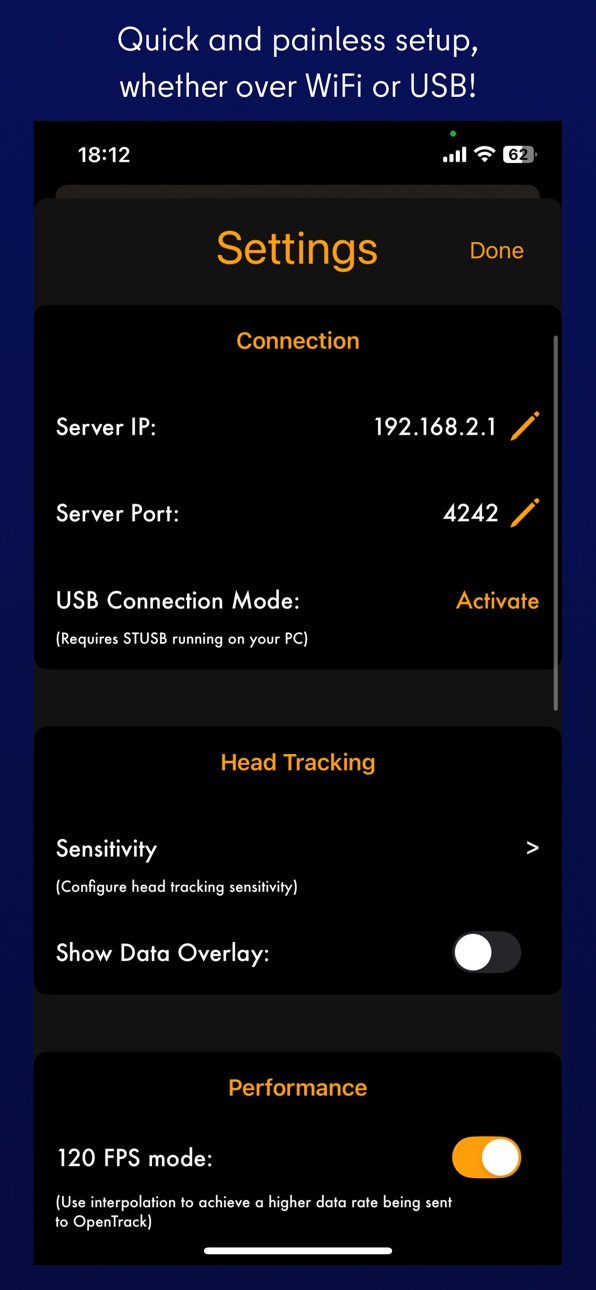
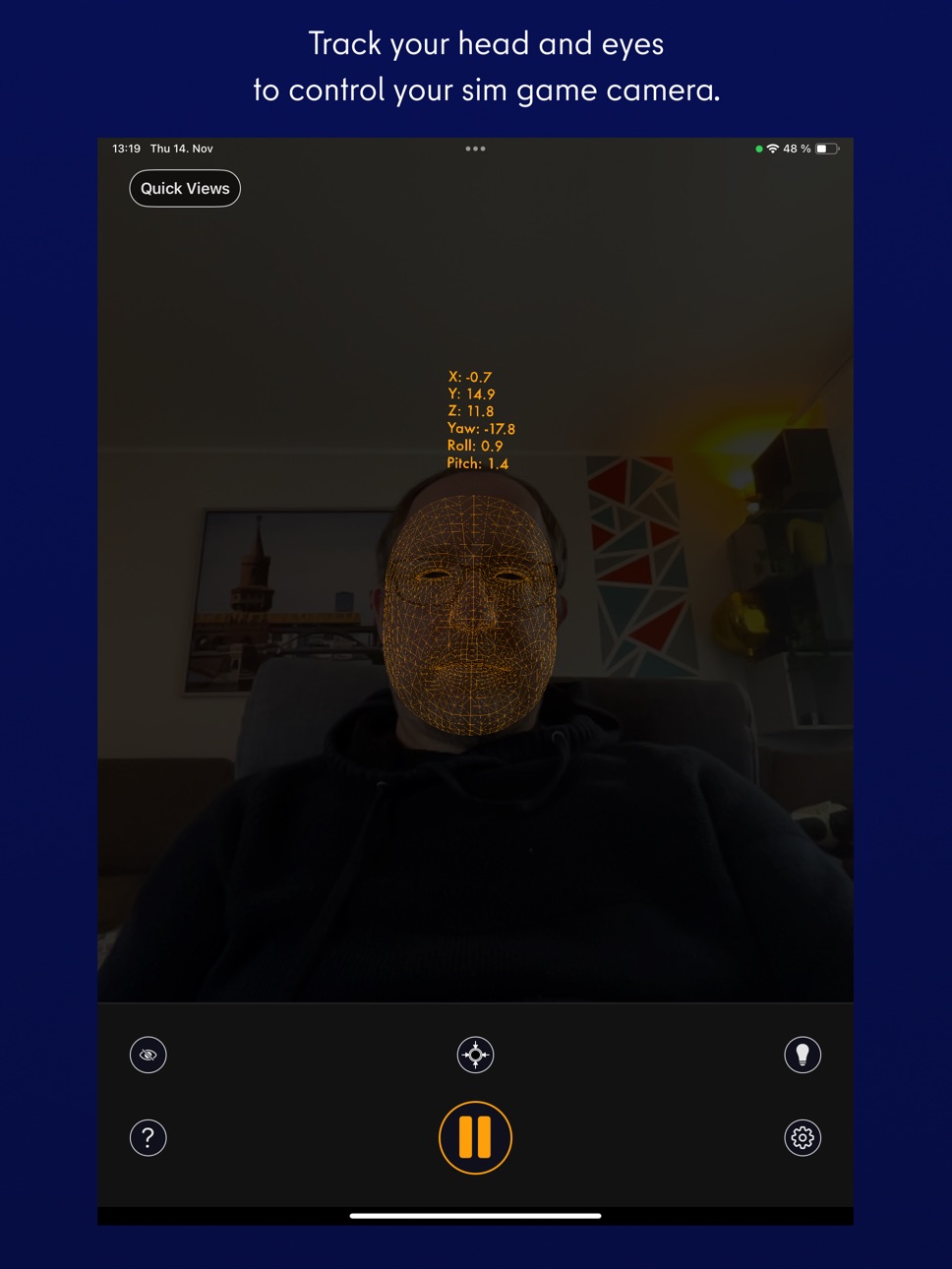
SmoothTrack 2.0 uses the head and eye tracking AR capabilities of your phone to provide the simplest and best head tracker for 6 degrees-of-freedom head movements in your sim games.
-----
"The best new controller on the market." - Charlie Hall, Polygon
Customer reviews:
"SmoothTrack just works. Less than 5 minutes to install, setup and fly. Love not being tethered to my desk! 5 stars!!"
"This worked perfectly and way better than expected! Totally enhanced my experience with MFS 2020!"
---
It's a near magical experience to seamlessly slightly move your head and have your game perspective immediately play along (the movements in the game are exaggerated so that you only have to make slight movements of your head to control the camera). Additionally, since version 2, your eyes are also optionally tracked and will nudge the camera based on where you're glancing on screen!
- Simply lean forward to get a closer look at your Flight Simulator cockpit!
- Look a bit up to see the overhead panel of your A320!
- Simply shift your head a bit to the right to see the direction of the space station you're approaching in Elite: Dangerous!
- Look a bit left before a hard left turn in Euro Truck Simulator 2!
No headset or extra equipment of any kind is required! Simply set up your device so that it can see your face. Using simple camera gestures, you can shift your perspective in-game. Also, if you want, you can store views (say, a copilot angle, or a cockpit closeup) as Quick Views for easy access later.
Your head movements are slightly exaggerated which enables you to look out of a cockpit side window with just a slight movement of your head to the left.
Any game that supports the FreeTrack or TrackIR protocol will work with this, including:
- Microsoft Flight Simulator
- Microsoft FSX
- DCS World
- Elite: Dangerous
- IL2: Sturmovik
- Euro Truck Simulator 2
- Kerbal Space Program
- ...and many, many others!
Email and Discord support is provided if there are any issues (or if you have any ideas for new features!).
Accessibility
ipadiphonemacrealityDevicetvoswatch
Version history 13 versions
Build 871501983v2.012025-10-25 20:22:53
2.01
- New App Clip for trying out a simplified version of SmoothTrack with yaw axis tracking!
- Fixed QuickViews not persisting between app launches
- Fixed eye tracking settings not persisting between app launches
- Fixed AirPods Pro mode to work whether or not tracking was set to on. Added a button to show the AirPods Pro mode capability.
2.0 was a HUGE update of SmoothTrack:
* Brand new and improved UI, rewritten from the ground up to be 93% less ugly!
* Added eye tracking capabilities for nudging the view when glancing around! Activate eye tracking by tapping the eye button, and set up eye tracking sensitivity in the settings.
* You can now easily create camera offsets with camera control gestures: panning with one, two, or three fingers on the screen.
* Easily save, choose, and delete offset quick views right on the main screen.
I really hope you enjoy SmoothTrack! If you do, you can support it by leaving an App Store review and by spreading the word to your sim communities!
Join us on Discord https://discord.gg/smkbp6p and let me know if you have any feedback or run into any issues. Thanks!
Build 870374228v2.02024-11-15 18:55:09
Here's what's new in this HUGE update of SmoothTrack:
* Brand new and improved UI, rewritten from the ground up to be 93% less ugly!
* Added eye tracking capabilities for nudging the view when glancing around! Activate eye tracking by tapping the eye button, and set up eye tracking sensitivity in the settings.
* You can now easily create camera offsets with camera control gestures: panning with one, two, or three fingers on the screen.
* Easily save, choose, and delete offset quick views right on the main screen.
I really hope you enjoy SmoothTrack! If you do, you can support it by leaving an App Store review and by spreading the word to your sim communities!
Join us on Discord https://discord.gg/smkbp6p and let me know if you have any feedback or run into any issues. Thanks!
Build 866255865v1.102024-05-28 20:59:46
FIXED: Restored AirPods Pro functionality missing in previous version.
Build 863210743v1.092024-01-27 17:42:39
v1.09: Bug fix for an issue in which data would still be sent to OpenTrack during the calibration phase, causing a "drift" to occur during this phase.
v1.08: TWO MAJOR NEW FEATURES:
- New "120 FPS" mode which utilizes a higher scanning rate as well as some math magic to increase the tracking speed especially noticeable for those of you with higher frame rates in your games.
- New "AirPods Pro" mode which will utilize AirPods Pro 3DOF head *direction* data (note: direction, not position). You can optionally combine this with the face tracking for 6DOF. Using this mode has a few potential advantages:
- If you're on iPad, unlike AR tracking, AirPods Pro tracking will continue working even if SmoothTrack is used as a sidebar app!
- You can have head direction correctly tracking in completely dark environments
- You can leave face tracking entirely off if you want to save battery
- For some scenarios (especially slower devices), AirPods data should be more precise and lower latency!
Build 862683119v1.082024-01-05 17:22:16
TWO MAJOR NEW FEATURES IN THIS VERSION:
- New "120 FPS" mode which utilizes a higher scanning rate as well as some math magic to increase the tracking speed especially noticeable for those of you with higher frame rates in your games.
- New "AirPods Pro" mode which will utilize AirPods Pro 3DOF head *direction* data (note: direction, not position). You can optionally combine this with the face tracking for 6DOF. Using this mode has a few potential advantages:
- If you're on iPad, unlike AR tracking, AirPods Pro tracking will continue working even if SmoothTrack is used as a sidebar app!
- You can have head direction correctly tracking in completely dark environments
- You can leave face tracking entirely off if you want to save battery
- For some scenarios (especially slower devices), AirPods data should be more precise and lower latency!
Build 855995466v1.072023-04-05 06:05:08
Provides a fix for iPhone 8 devices, improves performance slightly for all devices.
Updated Privacy Policy URL.
Build 845148052v1.062022-11-29 06:39:41
* Much improved the angle calibration with fancy 3D math - even if the phone is a bit off to the side, your view will now be centered!
* Added a bright mode to improve face tracking in darker environments like your mom's basement.
* Added quick views that can be stored and retrieved with a tap or, if activated with a quick hand gesture! Holding up the number of fingers of the number of the quick view will then activate the quick view.
Build 840870519v1.052021-03-14 21:20:47
USB connection mode - lower your latency by directly connecting to your PC via USB. No more network headaches!
Build 837928236v1.042020-10-05 21:09:38
Thanks as always for all the kind words of excitement! Please keep spreading the word about SmoothTrack.
WHAT'S NEW:
- Improved UI, easier than ever to use!
- Each degree of freedom can now be set within SmoothTrack to have its own sensitivity (or you can entirely disable axes if you want by setting its sensitivity to 0)
- Added a numbers display of which values are being sent to OpenTrack
- For Infinite Flight players, added a simple Infinite Flight detection button which will immediately connect to Infinite Flight's new gorgeously smooth head tracking support!
Build 837804604v1.032020-09-18 06:21:33
As always, huge thanks for all the feedback and excitement!
WHAT'S NEW
- More fine-tune controls for the offset
- Restore brightness to the phone when leaving the app in dark mode
- Better instructions
- Added direct link to the SmoothTrack web site
Build 837570274v1.022020-09-01 17:32:30
First of all ---> Huge thanks to everyone for all the excitement! Please get the word out about this app to all your friends and gaming communities! :)
MAJOR IMPROVEMENTS
- The app now supports ALL iOS 13 devices, regardless of whether they have TrueDepth cameras or not!
- The app now supports 2 DOF head tracking for the mobile flight sim Infinite Flight!
- New Depth offset slider for PC games!
- Better Instructions Section with more troubleshooting
- For devices with TrueDepth cameras, tapping the camera will toggle a mask in front of your face.
- New lightbulb button which will let you turn the screen dark during play to save battery
BUG FIXES
- Fixed setting port as 0 initially
- Fixed error messages sometimes coming repeatedly
- Don't allow ports 0 & less or 65535 & greater
- Layout fix for landscape on larger phones
- Crash fix for connection error situations
- Some color fixes for dark/non-dark mode
- Better error messages
Build 837489209v1.012020-08-25 00:06:12
Fixed a crash bug as well as a network bug, made the UDP connection more stable.
Build 837472457v1.02020-08-24 01:15:47
Price history by region
Currency
Show
Columns
Search
Availability 57 of 57 storefronts
| Region | Language | Price | Ratings | Avg | Version |
|---|---|---|---|---|---|
| US | en-US | USD 14.99 | 249 | 4.7 | 2.01 |
| AU | en-AU | AUD 22.99 | 34 | 4.5 | 2.01 |
| RU | ru | RUB 1290 | 11 | 4.0 | 2.01 |
| SE | sv | SEK 199 | 10 | 5.0 | 2.01 |
| CH | de-CH | CHF 14 | 9 | 5.0 | 2.01 |
| BE | en-GB | EUR 17.99 | 6 | 4.2 | 2.01 |
| NO | en-GB | NOK 199 | 6 | 4.8 | 2.01 |
| DK | en-GB | DKK 129 | 5 | 4.8 | 2.01 |
| NZ | en-AU | NZD 29.99 | 5 | 4.0 | 2.01 |
| AT | de-DE | EUR 17.99 | 4 | 5.0 | 2.01 |
| HU | en-GB | HUF 6990 | 4 | 4.0 | 2.01 |
| IT | it | EUR 17.99 | 4 | 5.0 | 2.01 |
| KR | ko | KRW 25000 | 4 | 4.0 | 2.01 |
| TH | en-GB | THB 499 | 4 | 5.0 | 2.01 |
| PH | en-GB | PHP 999 | 3 | 5.0 | 2.01 |
| EE | en-GB | EUR 17.99 | 2 | 5.0 | 2.01 |
| GR | en-GB | EUR 17.99 | 2 | 5.0 | 2.01 |
| MY | en-GB | MYR 69.9 | 2 | 5.0 | 2.01 |
| SG | en-GB | SGD 19.98 | 2 | 4.5 | 2.01 |
| EG | en-GB | EGP 799.99 | 1 | 5.0 | 2.01 |
| IS | en-GB | USD 17.99 | 1 | 4.0 | 2.01 |
| KE | en-GB | USD 17.99 | 1 | 5.0 | 2.01 |
| MX | es-MX | MXN 299 | 1 | 5.0 | 2.01 |
| RO | en-GB | RON 79.99 | 1 | 5.0 | 2.01 |
| UA | en-GB | USD 17.99 | 1 | 5.0 | 2.01 |
| AL | en-GB | USD 17.99 | 0 | — | 2.01 |
| CD | en-GB | USD 14.99 | 0 | — | 2.01 |
| CG | en-GB | USD 14.99 | 0 | — | 2.01 |
| DO | es-MX | USD 14.99 | 0 | — | 2.01 |
| DZ | en-GB | USD 14.99 | 0 | — | 2.01 |
| FJ | en-GB | USD 14.99 | 0 | — | 2.01 |
| FM | en-GB | USD 14.99 | 0 | — | 2.01 |
| GA | fr-FR | USD 14.99 | 0 | — | 2.01 |
| GH | en-GB | USD 17.99 | 0 | — | 2.01 |
| HN | es-MX | USD 14.99 | 0 | — | 2.01 |
| JM | en-GB | USD 14.99 | 0 | — | 2.01 |
| JO | en-GB | USD 14.99 | 0 | — | 2.01 |
| MA | en-GB | USD 14.99 | 0 | — | 2.01 |
| MD | en-GB | USD 17.99 | 0 | — | 2.01 |
| MG | en-GB | USD 14.99 | 0 | — | 2.01 |
| MK | en-GB | USD 14.99 | 0 | — | 2.01 |
| MO | zh-Hant-HK | USD 14.99 | 0 | — | 2.01 |
| MR | en-GB | USD 14.99 | 0 | — | 2.01 |
| MT | en-GB | EUR 17.99 | 0 | — | 2.01 |
| NG | en-GB | NGN 24900 | 0 | — | 2.01 |
| NI | es-MX | USD 14.99 | 0 | — | 2.01 |
| OM | en-GB | USD 14.99 | 0 | — | 2.01 |
| PG | en-GB | USD 14.99 | 0 | — | 2.01 |
| PT | pt-PT | EUR 17.99 | 0 | — | 2.01 |
| RS | en-GB | EUR 17.99 | 0 | — | 2.01 |
| SB | en-GB | USD 14.99 | 0 | — | 2.01 |
| SI | en-GB | EUR 17.99 | 0 | — | 2.01 |
| SV | es-MX | USD 14.99 | 0 | — | 2.01 |
| TO | en-GB | USD 14.99 | 0 | — | 2.01 |
| TT | en-GB | USD 14.99 | 0 | — | 2.01 |
| VC | en-GB | USD 14.99 | 0 | — | 2.01 |
| VU | en-GB | USD 14.99 | 0 | — | 2.01 |
Change log 17 changes · US
✎
releaseNotes updated
2.01
- New App Clip for trying out a simplified version of SmoothTrack with yaw axis tracking!
- Fixed QuickViews not persisting between app launches
- Fixed e
✎
description updated
SmoothTrack 2.0 uses the head and eye tracking AR capabilities of your phone to provide the simplest and best head tracker for 6 degrees-of-freedom head movemen
✎
subtitle updated
Head tracking for sim games
✎
name updated
SmoothTrack: Head Tracker
◆
Version 2.01 released
2.01
- New App Clip for trying out a simplified version of SmoothTrack with yaw axis tracking!
- Fixed QuickViews not persisting between app launches
- Fixed eye tracking settings not persisting between app launches
- Fixed AirPods Pro mod
◆
Version 2.0 released
Here's what's new in this HUGE update of SmoothTrack:
* Brand new and improved UI, rewritten from the ground up to be 93% less ugly!
* Added eye tracking capabilities for nudging the view when glancing around! Activate eye tracking by ta
◆
Version 1.10 released
FIXED: Restored AirPods Pro functionality missing in previous version.
◆
Version 1.09 released
v1.09: Bug fix for an issue in which data would still be sent to OpenTrack during the calibration phase, causing a "drift" to occur during this phase.
v1.08: TWO MAJOR NEW FEATURES:
- New "120 FPS" mode which utilizes a higher scanning r
◆
Version 1.08 released
TWO MAJOR NEW FEATURES IN THIS VERSION:
- New "120 FPS" mode which utilizes a higher scanning rate as well as some math magic to increase the tracking speed especially noticeable for those of you with higher frame rates in your games.
- N
◆
Version 1.07 released
Provides a fix for iPhone 8 devices, improves performance slightly for all devices.
Updated Privacy Policy URL.
◆
Version 1.06 released
* Much improved the angle calibration with fancy 3D math - even if the phone is a bit off to the side, your view will now be centered!
* Added a bright mode to improve face tracking in darker environments like your mom's basement.
* Added q
◆
Version 1.05 released
USB connection mode - lower your latency by directly connecting to your PC via USB. No more network headaches!
◆
Version 1.04 released
Thanks as always for all the kind words of excitement! Please keep spreading the word about SmoothTrack.
WHAT'S NEW:
- Improved UI, easier than ever to use!
- Each degree of freedom can now be set within SmoothTrack to have its own sensi
◆
Version 1.03 released
As always, huge thanks for all the feedback and excitement!
WHAT'S NEW
- More fine-tune controls for the offset
- Restore brightness to the phone when leaving the app in dark mode
- Better instructions
- Added direct link to the SmoothTrac
◆
Version 1.02 released
First of all ---> Huge thanks to everyone for all the excitement! Please get the word out about this app to all your friends and gaming communities! :)
MAJOR IMPROVEMENTS
- The app now supports ALL iOS 13 devices, regardless of whether th
◆
Version 1.01 released
Fixed a crash bug as well as a network bug, made the UDP connection more stable.
◆
Version 1.0 released