Home › Photo & Video

 US
US
1 of 1 storefronts
Content in en-US
Content in en-US
Information
Preview 1 platform
iPhone 5 images




What’s New Version 3.4
This update contains improvements on app compatibility with recent iOS releases. Also included are some minor bug fixes and improvements with imaging.
Description
Uncrop your photos so that they fit Instagram™ and other social networks.
◎ Uncrop to square, and more
Choose from a few aspect ratio presets: Square, 4:5, 9:16 and 3:2 landscape.
You can also add aesthetic uniform borders on all sides.
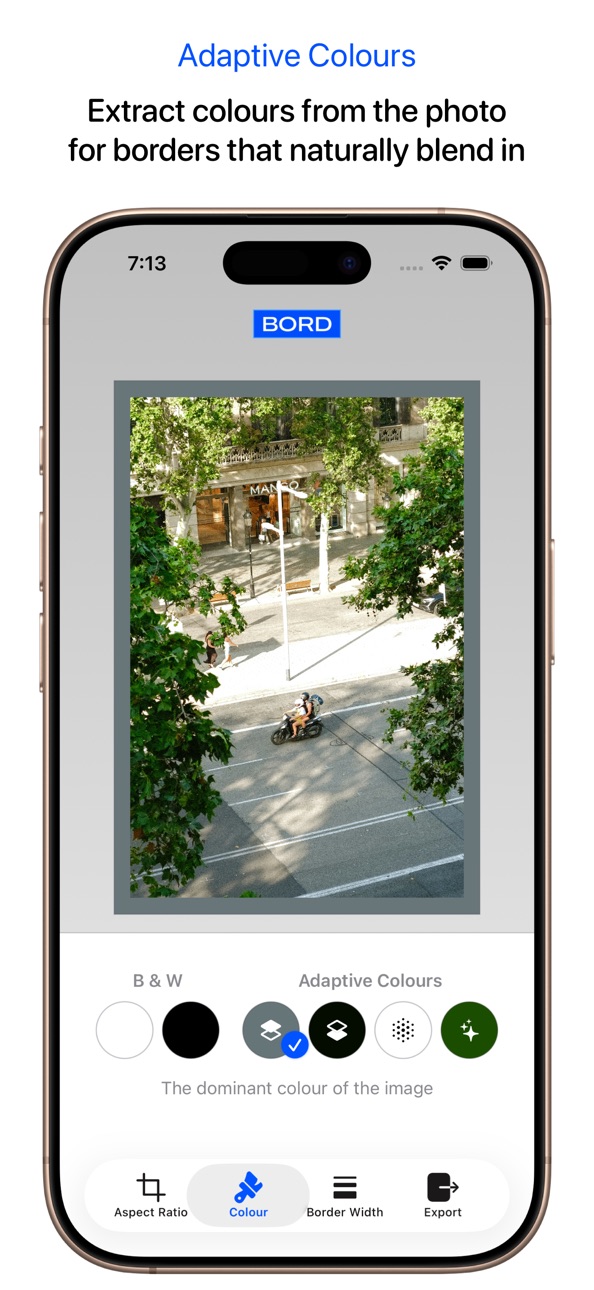
◎ Adaptive colours
Colour the borders with elements extracted from the photo. This adds to the photo's expression and helps blur the boundary between your photo and the auxilliary borders.
◎ HDR support
Preserve full High/Extended Dynamic Range for your photos.
Adaptive HDR specs make sure your photos look good on both SDR and HDR displays. We also took care so that the borders don't look overly bright on HDR displays.
◎ Shortcuts: batch processing your way
With Shortcuts support, you can build a workflow that batch process hundreds of photos in a breeze.
Capabilities
In-App Purchases
Accessibility
ipadiphonemacrealityDevicetvoswatch
Version history 12 versions
Build 885391874v3.42026-05-07 21:19:55
This update contains improvements on app compatibility with recent iOS releases. Also included are some minor bug fixes and improvements with imaging.
Build 878200750v3.32025-09-18 08:29:58
Version 3.3 adds support for Liquid Glass UI and app icon on iOS 26.
Previously —
◎ More presets
Choose from new aspect ratio options including 3:4 and 2:3 portrait.
◎ HDR support
Add borders to HDR photos, and the dynamic range is faithfully preserved.
We also made sure the borders don't look overly bright. With Adaptive HDR specs, your photos look great on both SDR and HDR displays.
◎ Simplified pricing
Remove ads with a single one-time purchase, or unlock Power Pack for professional batch-processing tools.
Your existing subscriptions are honoured, but we encourage you to checkout our new lifetime purchase options.
For long-time BORD users, there’s an option to upgrade to lifetime membership.
◎ Improved app core
We re-wrote basically the entire app to adopt the latest technologies of iOS:
- A more functional, responsive, and sensible layout built in SwiftUI
- App Intents improves your experience in Shortcuts and with Siri
- Adaptive HDR produces photos in HDR-capable photos that look good on both HDR and SDR displays
- Your photos are saved as HEIF-10 by default, as long as the source is in a similar bit range
- The output image now has EXIF info stripped to better protect your privacy
Build 876338245v3.22025-07-14 11:35:35
We fixed some issues following the app's 3.0 update. Also included:
- More aspect ratio options including 3:4 and 2:3 portrait
- The output image now has EXIF info strippe
- For long-time BORD users, there’s an option to upgrade to lifetime membership
Previously — Version 3.0 brings a few major updates to the app:
◎ HDR support
Add borders to HDR photos, and the dynamic range is faithfully preserved.
We also made sure the borders don't look overly bright. With Adaptive HDR specs, your photos look great on both SDR and HDR displays.
◎ Simplified pricing
Remove ads with a single one-time purchase, or unlock Power Pack for professional batch-processing tools.
Your existing subscriptions are honoured, but we encourage you to checkout our new lifetime purchase options.
◎ Improved app core
We re-wrote basically the entire app to adopt the latest technologies of iOS:
- A more functional, responsive, and sensible layout built in SwiftUI
- App Intents improves your experience in Shortcuts and with Siri
- Adaptive HDR produces photos in HDR-capable photos that look good on both HDR and SDR displays
- Your photos are saved as HEIF-10 by default, as long as the source is in a similar bit range.
Build 876296894v3.12025-07-11 14:34:11
We fixed some issues following the app's 3.0 update. Also included:
- More aspect ratio options including 3:4 and 2:3 portrait
- The output image now has EXIF info strippe
- For long-time BORD users, there’s an option to upgrade to lifetime membership
Previously — Version 3.0 brings a few major updates to the app:
◎ HDR support
Add borders to HDR photos, and the dynamic range is faithfully preserved.
We also made sure the borders don't look overly bright. With Adaptive HDR specs, your photos look great on both SDR and HDR displays.
◎ Simplified pricing
Remove ads with a single one-time purchase, or unlock Power Pack for professional batch-processing tools.
Your existing subscriptions are honoured, but we encourage you to checkout our new lifetime purchase options.
◎ Improved app core
We re-wrote basically the entire app to adopt the latest technologies of iOS:
- A more functional, responsive, and sensible layout built in SwiftUI
- App Intents improves your experience in Shortcuts and with Siri
- Adaptive HDR produces photos in HDR-capable photos that look good on both HDR and SDR displays
- Your photos are saved as HEIF-10 by default, as long as the source is in a similar bit range.
Build 876158688v3.02025-07-10 16:12:01
Version 3.0 brings a few major updates to the app:
◎ HDR support
Add borders to HDR photos, and the dynamic range is faithfully preserved.
We also made sure the borders don't look overly bright. With Adaptive HDR specs, your photos look great on both SDR and HDR displays.
◎ Simplified pricing
Remove ads with a single one-time purchase, or unlock Power Pack for professional batch-processing tools.
Your existing subscriptions are honoured, but we encourage you to checkout our new lifetime purchase options.
◎ Improved app core
We re-wrote basically the entire app to adopt the latest technologies of iOS:
- A more functional, responsive, and sensible layout built in SwiftUI
- App Intents improves your experience in Shortcuts and with Siri
- Adaptive HDR produces photos in HDR-capable photos that look good on both HDR and SDR displays
- Your photos are saved as HEIF-10 by default, as long as the source is in a similar bit range.
Build 852077169v2.32022-09-08 09:13:36
We have made some updates so that the app stays compatible with what's coming your way.
Build 847060714v2.22022-02-08 16:17:24
Version 2.2 fixed an issue where new users of BORD might not be able to save photos to Photo Library.
Build 846502772v2.12022-01-19 16:29:38
This version adds Shortcuts App support! You can now integrate BORD into your workflow, and process a batch of photos all in one go.
Build 846155185v2.0.12021-12-23 20:24:50
This version fixed some localization issue with subscription items.
Build 844099245v2.02021-12-21 02:24:31
“Grammable” is now called BORD, and it adds beautiful borders as it always has.
BORD shares the Pro Membership system with our sister photography apps, HRZN and FRMD. Purchase in any of the apps unlocks everything in all of them—it's really that simple.
Build 839604593v1.22020-12-12 00:53:03
Added compatibility for iPhone 12 and 12 Pro devices.
Build 837304807v1.02020-09-18 17:01:08
No pricing data captured yet — comparisons appear once the app has paid storefronts or in-app purchases.
Availability 1 of 1 storefronts
| Region | Language | Price | Ratings | Avg | Version |
|---|---|---|---|---|---|
| US | en-US | Free | 2 | 5.0 | 3.4 |
Change log 16 changes · US
✎
releaseNotes updated
This update contains improvements on app compatibility with recent iOS releases. Also included are some minor bug fixes and improvements with imaging.
✎
description updated
Uncrop your photos so that they fit Instagram™ and other social networks.
◎ Uncrop to square, and more
Choose from a few aspect ratio presets: Square, 4:5, 9:
✎
subtitle updated
Square photos in HDR
✎
name updated
Uncrop Photos - BORD
◆
Version 3.4 released
This update contains improvements on app compatibility with recent iOS releases. Also included are some minor bug fixes and improvements with imaging.
◆
Version 3.3 released
Version 3.3 adds support for Liquid Glass UI and app icon on iOS 26.
Previously —
◎ More presets
Choose from new aspect ratio options including 3:4 and 2:3 portrait.
◎ HDR support
Add borders to HDR photos, and the dynamic range is fa
◆
Version 3.2 released
We fixed some issues following the app's 3.0 update. Also included:
- More aspect ratio options including 3:4 and 2:3 portrait
- The output image now has EXIF info strippe
- For long-time BORD users, there’s an option to upgrade to lifetim
◆
Version 3.1 released
We fixed some issues following the app's 3.0 update. Also included:
- More aspect ratio options including 3:4 and 2:3 portrait
- The output image now has EXIF info strippe
- For long-time BORD users, there’s an option to upgrade to lifetim
◆
Version 3.0 released
Version 3.0 brings a few major updates to the app:
◎ HDR support
Add borders to HDR photos, and the dynamic range is faithfully preserved.
We also made sure the borders don't look overly bright. With Adaptive HDR specs, your photos look
◆
Version 2.3 released
We have made some updates so that the app stays compatible with what's coming your way.
◆
Version 2.2 released
Version 2.2 fixed an issue where new users of BORD might not be able to save photos to Photo Library.
◆
Version 2.1 released
This version adds Shortcuts App support! You can now integrate BORD into your workflow, and process a batch of photos all in one go.
◆
Version 2.0.1 released
This version fixed some localization issue with subscription items.
◆
Version 2.0 released
“Grammable” is now called BORD, and it adds beautiful borders as it always has.
BORD shares the Pro Membership system with our sister photography apps, HRZN and FRMD. Purchase in any of the apps unlocks everything in all of them—it's reall
◆
Version 1.2 released
Added compatibility for iPhone 12 and 12 Pro devices.
◆
Version 1.0 released