Home › Productivity

Under My Roof Home Inventory +
Organize & Manage your House
 US
US
1 of 1 storefronts
Content in en-US
Content in en-US
Information
Preview 3 platforms

iPhone 10 images




iPad 10 images




Mac 10 images






What’s New Version 1.13.1
• Added a new Organize By option for Capital Expenditure Reports for additional organizational options.
• Fixed a bug with Contact Entries not always sorting correctly.
• Fixed a bug where item totals and counts in a Sub-Category or Sub-Location in the Item List may be off if an Item List filter is applied.
• Fixed a bug where sharing, saving, or printing a Floor Plan image with custom measurements shown in the view produces an empty image.
Description
An App Store Editors’ Choice, Under My Roof® is the go-to app for organizing your home.
All the details and important records you need to manage and maintain your home and belongings—both daily and for years to come—are neatly organized and always available across your devices. Save time, money, and stress while gaining peace of mind.
• NEVER MISS ROUTINE MAINTENANCE OR RUN OUT OF ESSENTIAL HOUSEHOLD SUPPLIES AGAIN
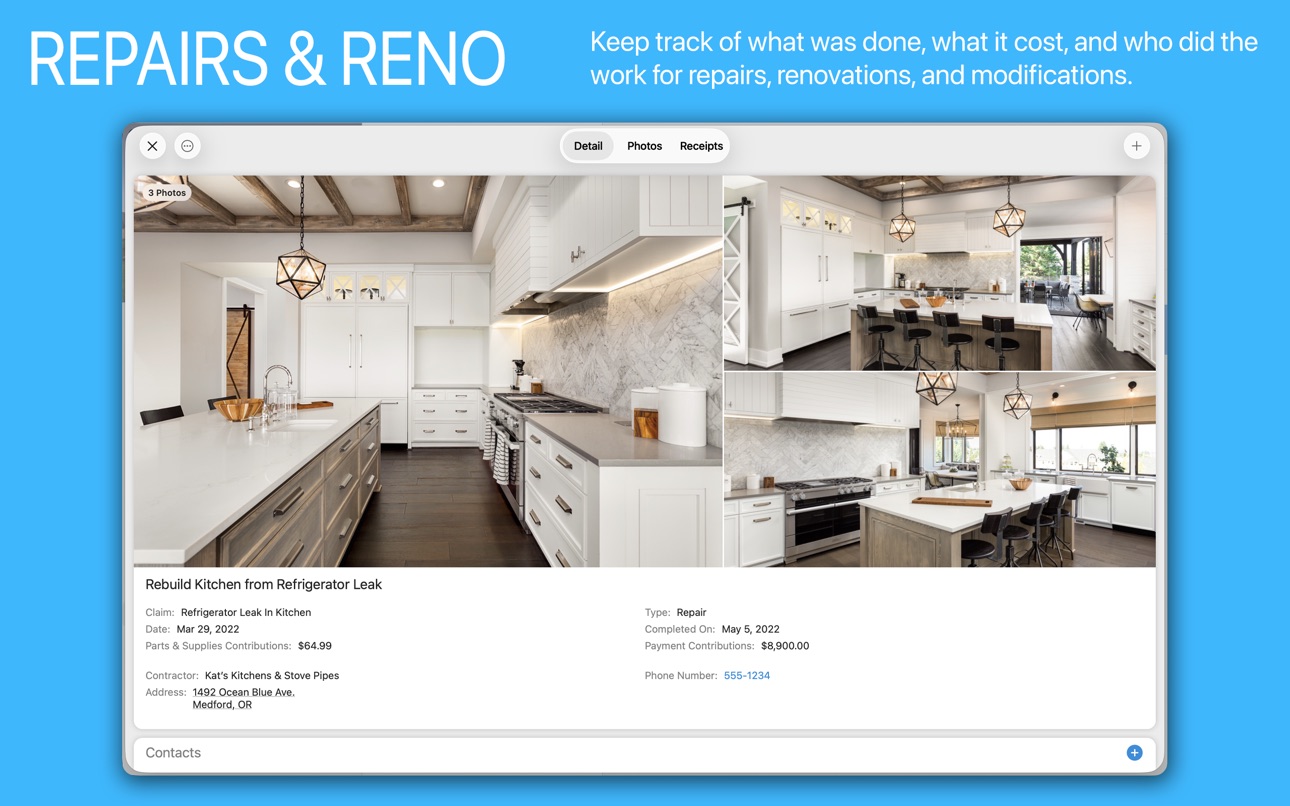
• TRACK MAINTENANCE, REPAIRS, & RENOVATIONS
• NO MORE SEARCHING THROUGH FILES, DRAWERS, OR WEBSITES FOR SCATTERED INFORMATION
• LOCATE ITEMS IMMEDIATELY, EVEN THOSE STORED IN A BOX IN THE ATTIC
• HELPS WITH MOVING, ESTATE PLANNING, INSURANCE COVERAGE, COLLECTIBLES, AND MORE!
Available for iPhone, iPad, & Mac with iCloud syncing using your own private iCloud Account. No risky web backend, no third-party accounts—your data stays yours.
Under My Roof is the next generation of our award-winning Mac app, Home Inventory, trusted since 2005.
FAST & EASY DATA ENTRY
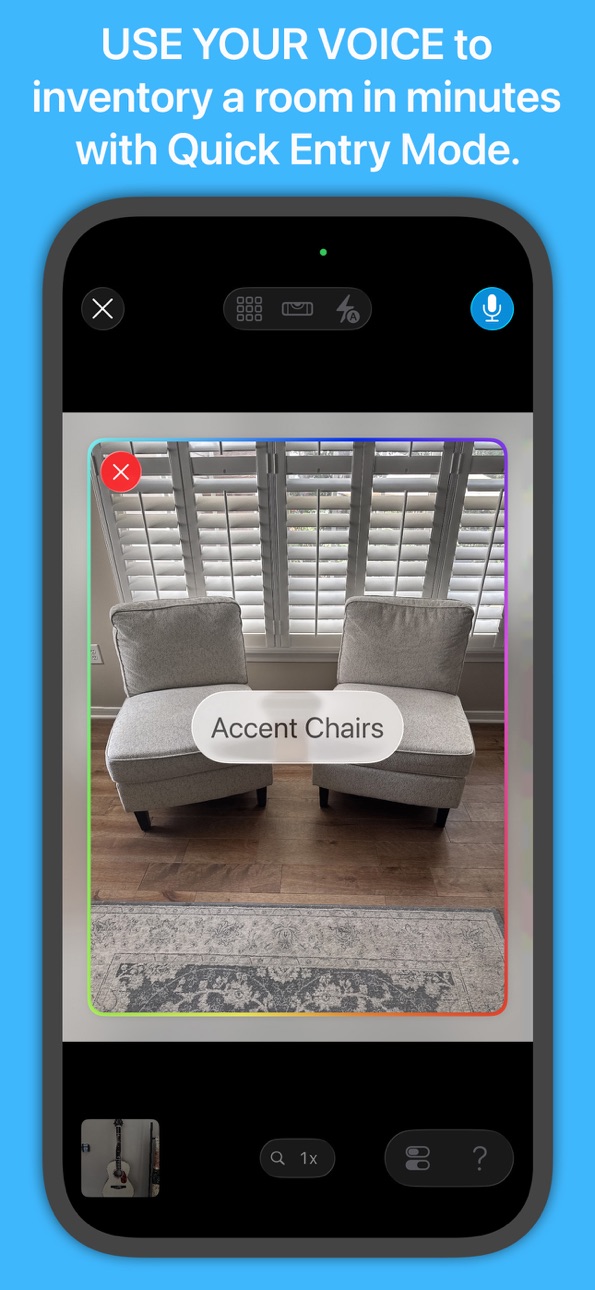
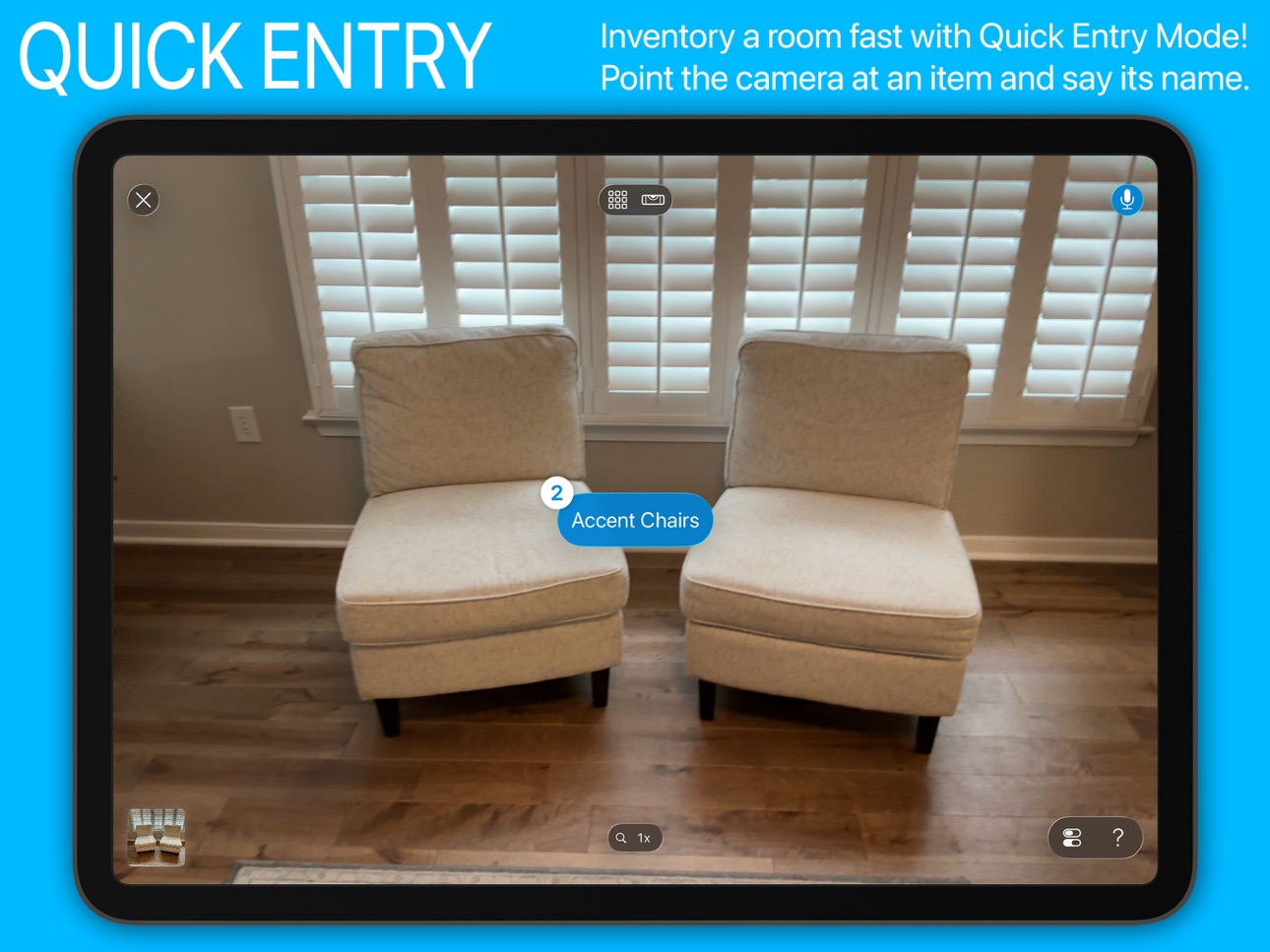
• Use voice-activated Quick Entry Mode to capture an entire room in minutes including photos
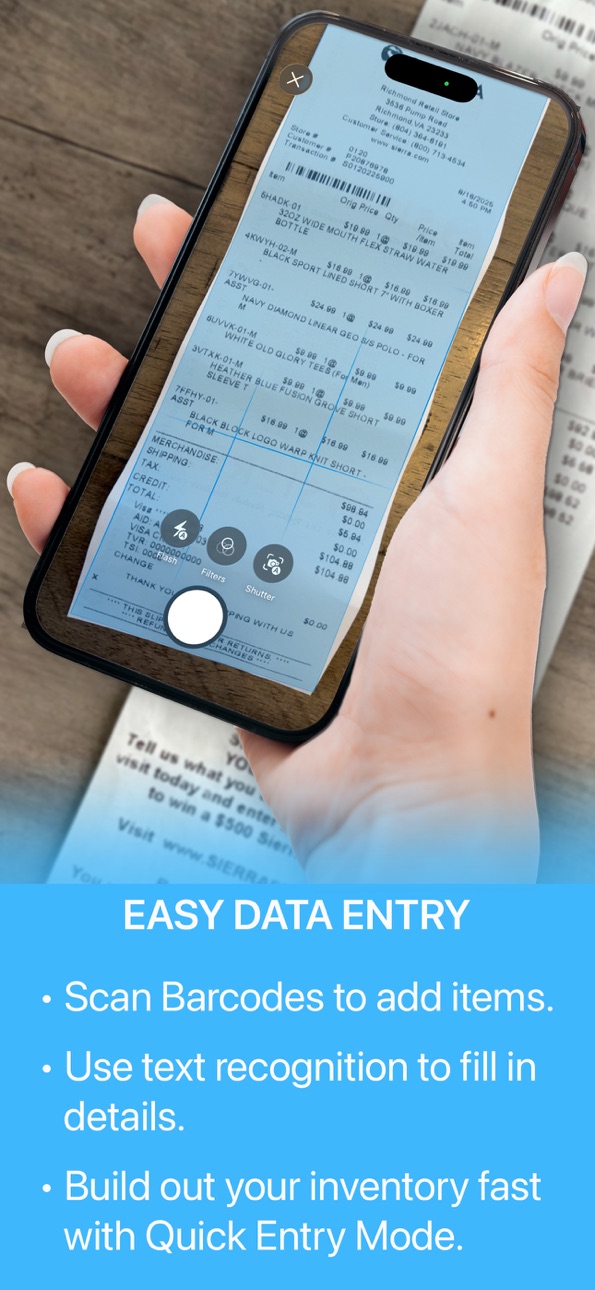
• Support for barcode scanning, text capture, document scanning, & 3D room scan
GET RID OF PAPER CLUTTER
• Store photos, receipts, warranties, manuals, notes, and documents in one place
KEEP IMPORTANT DETAILS HANDY
• Make, model, serial number, purchase price/date, value, square footage, paint colors, property assessments, and much more
TRACK RENOVATIONS & MODIFICATIONS
• Monitor costs, added value, parts & supplies, receipts, and before/after photos
STAY ON TOP OF MAINTENANCE & REPAIRS
• Schedule maintenance tasks with notifications
• Keep a history with completion dates, costs, parts & supplies, receipts, and photos
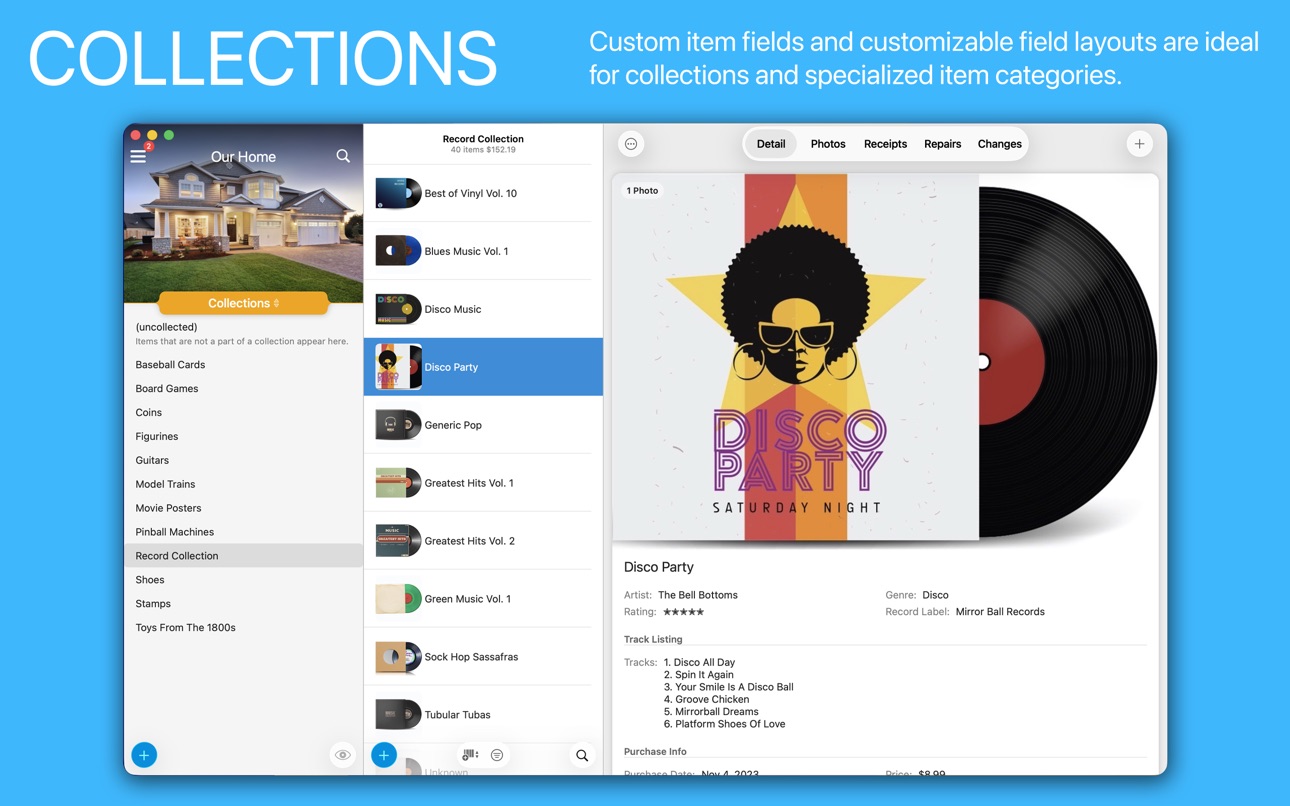
MANAGE COLLECTIBLES
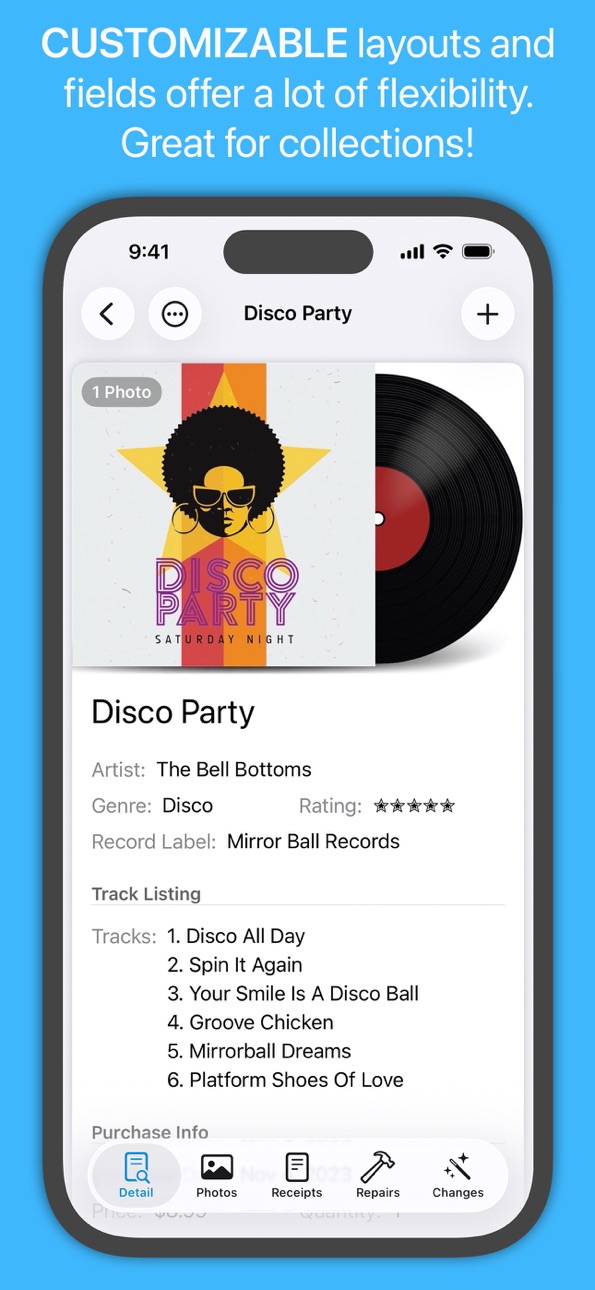
• Flexible enough for any type of collection
• Multiple valuation options
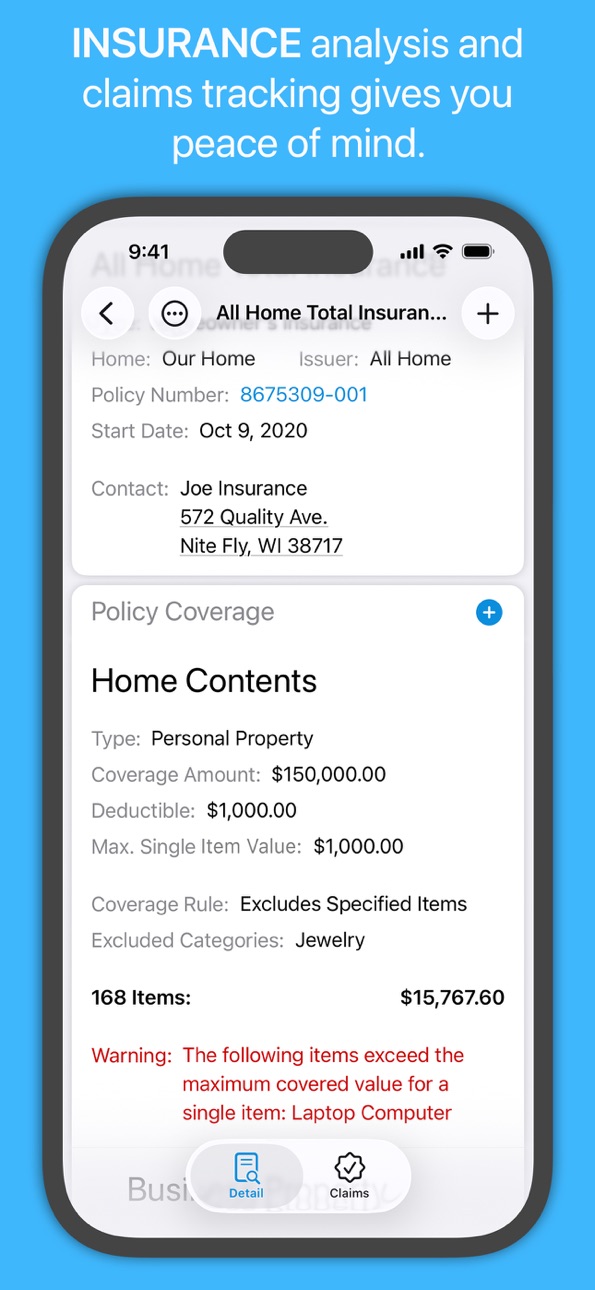
PROPERTY INSURANCE COVERAGE & CLAIMS TRACKING
• Know if you are adequately insured with coverage analysis
• Handles complex coverage limits found in most policies
• An inventory of your belongings helps for a fair and timely settlement
• Track the details of the claims process - damages, expenses, contacts, & more
TRACK DISPOSED ITEMS
• Donated, recycled, sold, trashed, gifted, and more
HOUSEHOLD SUPPLIES USAGE
• Low supply alerts
DATA PRIVACY, & PROTECTION
• Your data is stored on your device and if sync is enabled in your personal iCloud account
• Share your inventory for viewing or editing
• Optional password protection and Touch ID
MANAGE YOUR MOVE
• Track box locations, sizes, weights, and contents
BARCODES & QRCODES
• Automatically add an item by scanning a UPC/EAN/ISBN barcode
• Scan your own custom barcodes for asset tracking
• Search your inventory by barcode
CUSTOMIZATION
• Unlimited custom fields, locations, categories, collections, color-coded tags, conditions, heirs, reports, & moving boxes
• Customizable field layouts by category
MULTI CURRENCY SUPPORT
• Automatic conversion plus original currency tracking
OTHER HIGHLIGHTS
• Supports unlimited homes and concurrent users
• Assign heirs for Estate Planning
• CSV import & export
• Dependable customer support
UPGRADE FROM HOME INVENTORY
• Easily import your Home Inventory database into Under My Roof
• See our FAQ for details: https://binaryformations.com/support/under-my-roof-faq/
PRICING
• FREE to download with a 10 item-limit to make sure it's a fit for you
• Subscriptions remove the limit and include a 1-week free trial
• Supports Family Sharing & covers all your Macs, iPads, & iPhones
• Cancel anytime—your inventory remains viewable
CUSTOMER SUPPORT
Questions or feedback? Contact us at support@binaryformations.com.
Your input is always welcome and helps us continue to improve Under My Roof.
Under My Roof® is a registered trademark of Binary Formations, LLC.
In-App Purchases US pricing
Subscriptions Subscription
Yearly Subscription · Yearly 7-day free trial$34.99
Monthly Subscription · Monthly 7-day free trial$4.99
Capabilities
In-App Purchases
Accessibility
ipadiphonemacrealityDevicetvoswatch
Version history 25 versions
Build 887600980v1.13.12026-07-08 21:20:46
• Added a new Organize By option for Capital Expenditure Reports for additional organizational options.
• Fixed a bug with Contact Entries not always sorting correctly.
• Fixed a bug where item totals and counts in a Sub-Category or Sub-Location in the Item List may be off if an Item List filter is applied.
• Fixed a bug where sharing, saving, or printing a Floor Plan image with custom measurements shown in the view produces an empty image.
Build 883072050v1.132026-03-09 19:48:21
• You can now store instructions for performing a Maintenance Task in the task's Instructions section.
• Under My Roof can read you the instructions for a maintenance task and you can navigate those instructions with voice commands. Requires iOS/iPadOS 26 or macOS 26. Supports English, Spanish, French, and German only at this time.
• You can now add File Attachments to Maintenance Tasks.
• Support for tracking Payments for Policies, similar to Renewing Warranties.
• Payments due for policies are included in the Payment Schedule view.
• You can now add Photos & Receipts to Parts & Supplies entries that are not supply usage or an existing inventory item. Supplies and inventory items have their own photos and receipts, so it isn't necessary in those cases.
• A thumbnail image is displayed to the left of each entry in the Parts & Supplies section, if it has an associated photos.
• A new Priced Per Unit field for Parts & Supplies entries let you specify if the Price field represents the price of a single component (value of Yes) or for the entire quantity specified (value of No). NOTE: This only applies to entries that do not reference supply usage or an existing inventory item.
• Tapping or clicking on a Parts & Supplies entry now brings the entry up in its own Detail View instead of immediately editing the entry.
• You can now add Attachments to Supply entries.
• Contact entries have been extended with Company, Title, and Notes fields.
• Added an Invoice Number field for Payment entries.
• Inactive policies appear at the bottom of the Policies List.
• Fixed a bug where deleted sub-locations will still show up in the Item List when browsing the parent location if the deleted sub-locations have not been permanently deleted and are available to be restored.
• Fixed an issue when exporting binary data where data related to multiple items, locations, or collections that shared the same name would end up in the same folder.
Build 881437211v1.12.12026-01-15 20:04:00
• You can now duplicate a report by tapping and holding (all platforms) or right clicking (Mac) on the report in the Reports List and selecting Duplicate.
• Added the option to include a receipt when creating a new Repair or Change entry.
• Fixed a bug where setting the quantity to 1 while adding a new supply location would reset it to 0.
• Fixed a bug where container items were not included in the Location field when exporting to CSV.
Build 878495706v1.122025-12-18 16:56:43
• Support for renewable warranties with a new Warranty Term Length called Renewing. Payment entries combined with the warranty's renewal terms are used to determine if the warranty is active or expired.
• Renewing warranties have an Add Payment button next to the Issuer in the Warranty List for quick access to adding a new payment without having to go to the Payments section.
• New Payment Schedule view, available through the Options Menu, shows you a consolidated list of payments due for renewing warranties, organized by due date.
• The Payments sub-section has been moved from a subsection under Details for Changes, Policies, Repairs, and Warranties to its own section. This leads to less clutter in the Details section.
• Payments now have a Receipts section.
• The Payments section now includes a total.
• New Copy All feature for copying Attachments, Maintenance Tasks, Notes, and Warranties. Supports copying to multiple destinations at once.
• You can also copy a single Attachment, Maintenance Task, Note, or Warranty by tapping and holding (all OSes) or right clicking (macOS) on it and selecting Copy To. Also supports copying to multiple destinations at once.
• When deleting a Maintenance Task you are now given the option to delete its associated Repairs entries as well.
• You can now move a repair or change entry by tapping and holding (all OSes) or right clicking (macOS) on the entry and selecting Move To.
• You can now edit the Type of an existing Repair/Maintenance entry if the entry is not associated with a Maintenance Task.
• New Move All feature lets you move the Parts & Supplies entries from one Repair or Change entry to another.
• You can also move a single Parts & Supplies entry by tapping and holding (all OSes) or right clicking (macOS) on it and selecting Move To.
• Improved Moving Box Packing Interface with more item navigation options and the ability to select/deselect all items with a single button press.
• Improved user interface for picking an inventory item as a Parts & Supplies component for Repair and Change entries. NOTE: Items can only be added as a Parts & Supply components for repairs/changes associated with a location or home.
• You can now move supplies to another home by tapping and holding (all OSes) or right clicking (macOS) on a supply in the Supply List and selecting the Move to Home option. You will be prompted to select the quantity of the supply on hand you wish to move.
• New Report Types for Change History, Maintenance History, and Repair History. There are Detail and List versions of each type. The List variants include the completion status in the list. You can also filter the included entries by completion status and association (home, location, item, or collection). In the case of Repair History you can also choose to include entries associated with a warranty or insurance claim.
• New Filter By option for Item List Filter Rules called Multiple Associations. With this option, you can select multiple categories, collections, conditions, heirs, locations, and/or tags for a single filter rule. You can choose one of four conditions where an item matches the rule: It is associated with everything in the list, it is it is associated with at least one thing in the list, it is not associated with anything in the list, or it is not associated with everything in the list.
• Fixed a bug where duplicating an Item with completed Maintenance Tasks with occurrences of Only Once or As Needed would result in those tasks as showing completed on the duplicated item.
• Fixed a bug with sort order of sub-locations and collections that appear in the Item List.
• Fixed a bug that could result in a hang or crash when exporting binary data for items with very long names.
Build 878295621v1.11.22025-09-24 03:14:44
• Updated for the new Liquid Glass user interface and iOS/iPadOS 26.
• A completely redesigned Quick Entry Mode where you can use your voice to add new items to your inventory (requires iOS 26/iPadOS 26).
• For items with a quantity greater than 1, you can say the quantity keyword right after the item name in Quick Entry Mode to specify the amount. Supports English, Spanish, French, and German only at this time.
• For iPhones and iPads running iOS/iPadOS 26 with Apple Intelligence enabled, Quick Entry Mode can automatically categorize the items you add. This feature is English-only for now.
• Not only can you add items by scanning their UPC and EAN barcodes using your device's camera in the revamped Quick Entry Mode, but you can speak any UPC, EAN, or ISBN number out loud and Under My Roof will look it up online and add it to your inventory.
• We now show the supply location in Supply Availability Reports even for supplies with a single location.
Build 876076452v1.112025-09-15 02:30:20
• Updated for the new Liquid Glass user interface and iOS/iPadOS 26.
• A completely redesigned Quick Entry Mode where you can use you voice to add new items to your inventory.
• For items with a quantity greater than 1, you can say the quantity keyword right after the item name in Quick Entry Mode to specify the amount. Supports English, Spanish, French, and German only at this time.
• For iPhones and iPads running iOS/iPadOS 26 with Apple Intelligence enabled, Quick Entry Mode can automatically categorize the items you add. This feature is English-only for now.
• Not only can you add items by scanning their UPC and EAN barcodes using your device's camera in the revamped Quick Entry Mode, but you can speak any UPC, EAN, or ISBN number out loud and Under My Roof will look it up online and add it to your inventory.
• We now show the supply location in Supply Availability Reports even for supplies with a single location.
Build 878112776v1.11.12025-09-15 22:30:29
• Updated for the new Liquid Glass user interface and iOS/iPadOS 26.
• A completely redesigned Quick Entry Mode where you can use your voice to add new items to your inventory (requires iOS 26/iPadOS 26).
• For items with a quantity greater than 1, you can say the quantity keyword right after the item name in Quick Entry Mode to specify the amount. Supports English, Spanish, French, and German only at this time.
• For iPhones and iPads running iOS/iPadOS 26 with Apple Intelligence enabled, Quick Entry Mode can automatically categorize the items you add. This feature is English-only for now.
• Not only can you add items by scanning their UPC and EAN barcodes using your device's camera in the revamped Quick Entry Mode, but you can speak any UPC, EAN, or ISBN number out loud and Under My Roof will look it up online and add it to your inventory.
• We now show the supply location in Supply Availability Reports even for supplies with a single location.
Build 874715219v1.10.12025-06-17 18:25:23
Improved performance when downloading an existing inventory already synced to iCloud after being installed on a new device.
Build 872826638v1.102025-04-14 15:59:45
• New Maintenance Schedule report type that can be used to create Maintenance Schedule Reports that can be organized by Due Date or Association.
• Option to include Maintenance Task Notes in Maintenance Schedule reports.
• New Warranty Status report type gives you an overview of the warranty status of everything in your inventory.
• Photo labels are now shown in the Photos section of reports.
• The label now appears for the main photo in reports.
• Disposed Item reports can now be organized by Disposed Type.
• Disposed Item List reports now include the sold price and date beneath each item disposed as Sold.
• New report option for Disposed Item reports to include an end of report summary.
• You can now view and edit Maintenance Task details straight from the Maintenance Schedule.
• You can now add images copied to the clipboard to the Photos section at the top of the Data Entry Panel when adding a new item.
• Disposed Items, Policies, Reports, Supplies, and Tags can now be set as the Default Navigation List in the Settings/Preferences Panel.
• Fixed a crash when printing or saving a single item report when the name of the item is longer than the allowed maximum filename length.
• Fixed a crash that could occur when trying to recognize the text in a PDF receipt to seed fields in a Data Entry Panel.
Build 871840114v1.9.22025-02-25 17:26:56
Fixed a bug that could result in a crash when checking off a Maintenance Task under certain rare conditions.
Build 870462195v1.9.12024-12-04 16:04:55
• Support for dark and tinted icons in iOS/iPadOS 18.
• Fixed a bug where maintenance task validation occurs twice during startup. This doesn't affect functionality, but led to duplicate messages in the log.
• Fixed a bug with maintenance tasks remaining active for locations and collections that have been deleted but still can be restored.
• Fixed a selection bug with the collection list when a collection is deleted.
Build 868536848v1.92024-10-29 16:01:42
Filters! Reports! And More! It's a customer feature request extravaganza!
FEATURES
• You can now create Item List Filters based on the value of an item field.
• You can now create Item List Filters based on currency type.
• You can now create Item List Filters based on warranty status.
• You can now create Item List Filters based on specific Categories, Conditions, Collections, Heirs, Locations, and Tags.
• Support for ad hoc Item List Filters.
• Item List Filters can now be applied to reports.
• You can now choose any currency or numeric item field to be used for totals & breakdowns in Item List, Item Detail, and Item Summary reports.
• You can now add footers to reports with page numbers, as well as include the date, report title, or home.
• Moving Box List reports now include all boxes in the summary, even if they are empty.
• Moving Box List reports include the total volume and total weight of all of the boxes.
• Improvements to the handling of nested moving boxes in Moving Box List reports.
• Container items are now included as locations in Item List, Item Detail, and Item Summary reports organized by Location or Location and Collection.
• The home name and address is now included on the title page for all non-policy related reports.
• New option for Item Detail and Disposed Item Detail reports to begin each item on a new page.
• New report option to include empty sections in reports. For example, an Item Detail report organized by Location will include a section for each location, even those without any items, if this option is enabled.
• New Contacts section in the Home Detail View for maintaining a list of frequently used contractors, such as plumbers, HVAC, and so on.
• Repairs, Changes, and Claims now support multiple contact entries.
• When adding a new contact to a Repair, Change, or Claim, you can select from the list of contacts for the home so you don't have to re-enter the information. Of course you can add completely new contacts as well.
• You can now include a Contacts subsection in reports that include Homes, Repairs, Changes, and Claims.
• Deleting a location no longer permanently removes the location by default.
• Deleting a collection no longer permanently removes the collection by default.
• Tap or click the eye icon at the bottom of the Location List or Collection List to show and hide deleted locations/collections. Tap and hold or right click on a deleted location or collection to restore it to the home or permanently remove it from your inventory.
• Added a Policy Number field for Warranties.
• The original task Due Date is now show for overdue maintenance tasks in the Upcoming Maintenance panel.
FIXES
• Fixed a bug where maintenance task notifications and badges are not shown.
• Fixed a bug with displaying the wrong Display Options default information when removing a preset as the default for a collection that is also the inventory default.
• Fixed a bug where the Supply List search filter was ignored when browsing the Supply List by a specific Supply Category.
• Fixed a bug in the Home & Locations Detail Report where sub-locations were not included if the parent location did not have any data matching the report requirements.
• Fixed a bug where the date a report is generated is not included if a date range is set for the report.
Build 867386721v1.8.32024-07-31 23:03:52
• We're introducing our first localization of Under My Roof by adding support for French. We are still a small company with limited resources, so the User Guide and tutorial videos will still be English-only for the time being. A massive thank you goes to Pascal Anquetin for the French translation!
• Fixed an issue with the description for the (unspecified) condition.
• Fixed a bug with Only Once Maintenance Tasks appearing with a due date indicating an overdue warning even though the task is shown as completed.
• Fixed a bug where choosing a Tag color with an extended color range can result in a color that is radically different than what was chosen.
• Fixed a bug with editing the quantity of a supply purchase.
• Fixed a bug with the quantity not being taken into account for the price of manual supply usage/disposal entries.
Build 867226633v1.8.22024-07-05 02:16:48
• Additional refinements to a bug fix that can result in a crash on startup with larger databases on some devices.
• More flexible Item List sorting options let you sort the item list by almost any item field, including custom fields.
• You can also add a secondary sort field for sorting the Item List.
• More flexible Item List display options let you choose which item fields appear as the title and subtitle for items in the Item List. You can choose from almost any item field, including custom fields.
• A new Item List display option lets you choose whether or not items that are a part of a collection are grouped together in the Item list.
• Create presets for sorting and displaying the Item List.
• You can now have separate default Item List sorting and display options for Moving Boxes and Disposed Items, in addition to an inventory-wide default.
• You can now set default Item List sort and display options for specific Categories, Collections, Conditions, Heirs, Locations, Moving Boxes, and Tags.
• Fixed a bug in the Report Options Panel where the Category and Location filter lists were not sorted properly.
• Fixed a bug where Supplies as a Parts & Supplies entry of a Repair or Change entry would always be added to the total cost, even after editing the component entry and setting Add to Cost to No.
• Fixed a bug where a Change or Repair entry would not always be immediately reflected on-screen after changes to the Price, Quantity, or Add to Cost fields of an existing Parts & Supplies entry.
• Fixed a bug where the Add From Room Scan option would show up in the Photos View for devices that do not have a LiDAR enabled camera.
Build 867146983v1.8.12024-07-03 04:51:42
• Fixed a bug that can result in a crash on startup with larger databases on some devices.
• More flexible Item List sorting options let you sort the item list by almost any item field, including custom fields.
• You can also add a secondary sort field for sorting the Item List.
• More flexible Item List display options let you choose which item fields appear as the title and subtitle for items in the Item List. You can choose from almost any item field, including custom fields.
• A new Item List display option lets you choose whether or not items that are a part of a collection are grouped together in the Item list.
• Create presets for sorting and displaying the Item List.
• You can now have separate default Item List sorting and display options for Moving Boxes and Disposed Items, in addition to an inventory-wide default.
• You can now set default Item List sort and display options for specific Categories, Collections, Conditions, Heirs, Locations, Moving Boxes, and Tags.
• Fixed a bug in the Report Options Panel where the Category and Location filter lists were not sorted properly.
• Fixed a bug where Supplies as a Parts & Supplies entry of a Repair or Change entry would always be added to the total cost, even after editing the component entry and setting Add to Cost to No.
• Fixed a bug where a Change or Repair entry would not always be immediately reflected on-screen after changes to the Price, Quantity, or Add to Cost fields of an existing Parts & Supplies entry.
• Fixed a bug where the Add From Room Scan option would show up in the Photos View for devices that do not have a LiDAR enabled camera.
Build 865841373v1.82024-07-01 16:09:13
• More flexible Item List sorting options let you sort the item list by almost any item field, including custom fields.
• You can also add a secondary sort field for sorting the Item List.
• More flexible Item List display options let you choose which item fields appear as the title and subtitle for items in the Item List. You can choose from almost any item field, including custom fields.
• A new Item List display option lets you choose whether or not items that are a part of a collection are grouped together in the Item list.
• Create presets for sorting and displaying the Item List.
• You can now have separate default Item List sorting and display options for Moving Boxes and Disposed Items, in addition to an inventory-wide default.
• You can now set default Item List sort and display options for specific Categories, Collections, Conditions, Heirs, Locations, Moving Boxes, and Tags.
• Fixed a bug in the Report Options Panel where the Category and Location filter lists were not sorted properly.
• Fixed a bug where Supplies as a Parts & Supplies entry of a Repair or Change entry would always be added to the total cost, even after editing the component entry and setting Add to Cost to No.
• Fixed a bug where a Change or Repair entry would not always be immediately reflected on-screen after changes to the Price, Quantity, or Add to Cost fields of an existing Parts & Supplies entry.
• Fixed a bug where the Add From Room Scan option would show up in the Photos View for devices that do not have a LiDAR enabled camera.
Build 863926131v1.72024-03-25 14:40:39
• New Add From Receipt feature that streamlines data entry. Tap and hold the Add Item button at the bottom of the Item List and select Add From Receipt to use the built-in camera to scan a receipt. The New Item Panel is then shown with the scanned receipt attached and the Purchased From and Purchase Date fields seeded with values recognized from the receipt.
• When adding a new item where a receipt has been added inside the New Item Panel or creating a new item from a receipt in the Inbox, you can use the Select Receipt Text button to select text from the receipt and use it to set the value of the field. This is available for most text fields, date fields, and currency fields.
• The Select Receipt Text feature is also available when editing an existing item that already has a receipt.
• If you add a receipt inside the New Item Panel or use the Inbox to add a new item from a receipt, Under My Roof will try to automatically seed the Purchased From and Purchase Date fields from text it finds in the receipt.
• You can now add receipts from the Inbox from inside the New Item Panel.
• You can also add photos from the Inbox from inside the New Item Panel.
• Under My Roof now prompts you on whether or not to delete the Inbox entries used when creating a new item from the Inbox or adding a photo, receipt, or attachment from the Inbox.
• Fixed an issue where the default field values in the New Item Panel may not be set as expected when adding a new item to a container item.
• Fixed a bug in Reports where the main photo of an item needs to start on the next page can overlay the information for the item that follows it.
• Fixed a bug where only the first photo would be imported for a location when importing a .hi3 file.
Build 863129127v1.6.32024-01-31 16:12:12
Fixed an animation glitch when transitioning between two and three pane mode on the iPad. Also contains the enhances and fixes from version 1.6.2:
• When disposing of an Item with a quantity greater than one, you can now choose the quantity to be disposed. This option is not available if you are disposing of multiple items at once via multi-select.
• The Supply Category in New Supply Entry Panel is automatically seeded with the category the Supply List is being filtered by, if any, when adding a new supply.
• When a filter is applied to the Item List, the item count and value now applies the same filter when determining the count and value contributions from any sub-locations and sub-categories.
• Negative amounts are allowed in Payment entries so refunds can be recorded.
• Changing the default currency for a home will update all currency-related fields for items, supplies, and other data in the home by converting the existing values to the new currency type based on the current exchange rate. The original amounts and currency codes are maintained (and shown when there is a difference from the home's default currency) for historical purposes and for future conversions.
• Currency field values are automatically converted to the new default currency when moving items to another home with a different default currency. The original amounts and currency codes are maintained (and shown when there is a difference from the home's default currency) for historical purposes and for future conversions.
• Currency field values for items and supplies in a moving box are automatically converted to the new default currency when the box is moved to another home with a different default currency. The original amounts and currency codes are maintained (and shown when there is a difference from the home's default currency) for historical purposes and for future conversions.
• Fixed an issue where the iPad version could crash in the background or when going from Slide Over to Full Screen.
• Fixed a typo in the confirmation panel shown when checking off a maintenance task and the quantity of supplies on hand is lower than the amount required for the task.
• Fixed a bug where items in a container item would appear in the category, collection, condition, tag, or heir section of a report that applies to the container item, but not the items within the container.
Build 862816655v1.6.22024-01-23 16:43:57
• When disposing of an Item with a quantity greater than one, you can now choose the quantity to be disposed. This option is not available if you are disposing of multiple items at once via multi-select.
• The Supply Category in New Supply Entry Panel is automatically seeded with the category the Supply List is being filtered by, if any, when adding a new supply.
• When a filter is applied to the Item List, the item count and value now applies the same filter when determining the count and value contributions from any sub-locations and sub-categories.
• Negative amounts are allowed in Payment entries so refunds can be recorded.
• Changing the default currency for a home will update all currency-related fields for items, supplies, and other data in the home by converting the existing values to the new currency type based on the current exchange rate. The original amounts and currency codes are maintained (and shown when there is a difference from the home's default currency) for historical purposes and for future conversions.
• Currency field values are automatically converted to the new default currency when moving items to another home with a different default currency. The original amounts and currency codes are maintained (and shown when there is a difference from the home's default currency) for historical purposes and for future conversions.
• Currency field values for items and supplies in a moving box are automatically converted to the new default currency when the box is moved to another home with a different default currency. The original amounts and currency codes are maintained (and shown when there is a difference from the home's default currency) for historical purposes and for future conversions.
• Fixed an issue where the iPad version could crash in the background or when going from Slide Over to Full Screen.
• Fixed a typo in the confirmation panel shown when checking off a maintenance task and the quantity of supplies on hand is lower than the amount required for the task.
• Fixed a bug where items in a container item would appear in the category, collection, condition, tag, or heir section of a report that applies to the container item, but not the items within the container.
Build 862024367v1.6.12023-12-07 01:47:31
This update fixes an issue with incorrectly calculating the area of non-rectangular rooms in 3D room scans. 3D room scans exhibiting this behavior will need to be rescanned. Rest assured that the development team (Kevin) feels much shame. This update also includes all of the wonderful new features and fixes introduced in version 1.6:
• Create 3D scans of the locations in your home, using a LiDAR-capable iPhone Pro (12 Pro and later) or iPad Pro (Spring 2020 and later models). Just tap the + button in the Photos section of a Location's Detail View and select From Room Scan.
• You can view and interact with the scans on any device. Tap any part of the room or the objects in it to get dimensions. Note: These measurements are estimates only and you should be sure to use a real tape measure when exact measurements are needed.
• Use the Virtual Tape Measure feature to take virtual measurements within a scanned room. Note: The measurements are only estimates.
• Supplies now have their own categories. Tap or click the folder icon in the upper right corner of the Supplies List to manage supply categories.
• You can now filter the Supply List by supply category.
• Supply entries can now have multiple locations.
• You can now distribute quantities from a supply purchase across the different supply locations.
• New Usage section shows you the usage history of a supply.
• Add supply usage entries for additional usage tracking outside of the Parts & Components section for Repairs and Changes entries and Maintenance Task supplies.
• Add supply usage entries for supplies that were disposed of (thrown away, lost, expired, etc).
• You can now add all of the supplies needed for a maintenance task through a single panel.
• Configure which locations are pulled from for maintenance task supplies.
• Edit the supplies used when checking off a maintenance tasks instead of having to edit the created maintenance history record.
• You can now add items as Parts & Supplies entries for Repair/Maintenance and Change/Modification entries for homes and locations. This is intended for things like replacing a furnace.
• Tap and hold (iPhone/iPad) or right click (Mac) on a Parts & Supplies entry to view the associated item or supply, if any.
• The total contribution from Payments to the cost of a Repair/Maintenance or Change/Modification is now shown along with the contribution from Parts & Supplies.
• Supply Availability Summary reports include location information for supplies that are stored in multiple locations.
• Supply Availability Summary reports can be organized by supply category.
• Supply Usage Summary reports now include a breakdown of disposed supplies by disposal method.
• Keep track of Payments for Policies.
• Keep track of Payments for Warranties.
• Added two new disposal types: Damaged and Expired.
• The Sq. Feet/Area (sq m) field for homes and locations has been renamed to just Area, regardless of the device's region settings.
• You can now change the units used for the Area field in a home. This value is reflected in all locations within the home as well.
• Added a toggle to the Inbox View to show Inbox Entries at a larger size.
• Item List and Item Detail reports can now be filtered by Moving Box.
• Added a Filter Items option to Moving Box Item List and Moving Box Item Detail reports with the ability to select specific boxes that appear in the report.
• Fixed an issue where you aren't prompted to add low supplies to Reminders in iOS/iPadOS 17 and macOS 14.
• Fixed a bug that resulted in periodically repeating prompts to add a low supply to Reminders if you selected Cancel on the prompt.
• Fixed a bug that resulted in the Repairs View filter being hidden when there are no entries to show.
Build 859038848v1.62023-12-04 17:02:26
• Create 3D scans of the locations in your home, using a LiDAR-capable iPhone Pro (12 Pro and later) or iPad Pro (Spring 2020 and later models). Just tap the + button in the Photos section of a Location's Detail View and select From Room Scan.
• You can view and interact with the scans on any device. Tap any part of the room or the objects in it to get dimensions. Note: These measurements are estimates only and you should be sure to use a real tape measure when exact measurements are needed.
• Use the Virtual Tape Measure feature to take virtual measurements within a scanned room. Note: The measurements are only estimates.
• Supplies now have their own categories. Tap or click the folder icon in the upper right corner of the Supplies List to manage supply categories.
• You can now filter the Supply List by supply category.
• Supply entries can now have multiple locations.
• You can now distribute quantities from a supply purchase across the different supply locations.
• New Usage section shows you the usage history of a supply.
• Add supply usage entries for additional usage tracking outside of the Parts & Components section for Repairs and Changes entries and Maintenance Task supplies.
• Add supply usage entries for supplies that were disposed of (thrown away, lost, expired, etc).
• You can now add all of the supplies needed for a maintenance task through a single panel.
• Configure which locations are pulled from for maintenance task supplies.
• Edit the supplies used when checking off a maintenance tasks instead of having to edit the created maintenance history record.
• You can now add items as Parts & Supplies entries for Repair/Maintenance and Change/Modification entries for homes and locations. This is intended for things like replacing a furnace.
• Tap and hold (iPhone/iPad) or right click (Mac) on a Parts & Supplies entry to view the associated item or supply, if any.
• The total contribution from Payments to the cost of a Repair/Maintenance or Change/Modification is now shown along with the contribution from Parts & Supplies.
• Supply Availability Summary reports include location information for supplies that are stored in multiple locations.
• Supply Availability Summary reports can be organized by supply category.
• Supply Usage Summary reports now include a breakdown of disposed supplies by disposal method.
• Keep track of Payments for Policies.
• Keep track of Payments for Warranties.
• Added two new disposal types: Damaged and Expired.
• The Sq. Feet/Area (sq m) field for homes and locations has been renamed to just Area, regardless of the device's region settings.
• You can now change the units used for the Area field in a home. This value is reflected in all locations within the home as well.
• Added a toggle to the Inbox View to show Inbox Entries at a larger size.
• Item List and Item Detail reports can now be filtered by Moving Box.
• Added a Filter Items option to Moving Box Item List and Moving Box Item Detail reports with the ability to select specific boxes that appear in the report.
• Fixed an issue where you aren't prompted to add low supplies to Reminders in iOS/iPadOS 17 and macOS 14.
• Fixed a bug that resulted in periodically repeating prompts to add a low supply to Reminders if you selected Cancel on the prompt.
• Fixed a bug that resulted in the Repairs View filter being hidden when there are no entries to show.
Build 857117060v1.5.12023-08-01 15:17:46
• You can now filter Repair and Maintenance entries in the Repairs section.
• Improved the alignment of dates and made better use of space in the Repairs List, Changes List, Claims List, Claims Expenses List, and Supply Purchases List.
• New sort option for the Disposed Items List to sort disposed items by Disposed Method.
• You can now create filters based on the Disposed Method.
• The Disposed Items List can now have a different active Filter than used for the Item Lists showing non-disposed items.
• Support for inventory passwords greater than 31 characters in length.
• The currently selected Item Detail Sub-view, such as Photos, Receipts, Repairs, or Changes, is maintained when moving from one item to another in the Item List. This behavior is also implemented for the Navigation List when switching between different Collections, Heirs, Locations, Policies, or Supplies. (iPad Only)
• Fixed an issue where a crash could result from applying a Filter to the Item List that only returned a few results.
• Fixed an issue with editing a Search Result from a different home than the currently active home.
• Fixed an issue with prices from item barcode lookups where ',' is used as the decimal separator in the device's settings.
• Fixed a bug where an item that was explicitly included as part of a policy's coverage was still included after the item was marked as disposed.
• Enhancement to the sync engine to automatically handle an unexpected database merge issue without user intervention.
• Various improvements to Under My Roof's built-in troubleshooting utilities, including the ability to export all log files at once. These tools were designed with privacy in mind and cannot be run remotely by us, nor do they send any information back to us.
Build 855214488v1.52023-04-05 14:19:42
• You can now add items to another item. So as not to overwhelm the Location List with every item in your inventory, you must first tap and hold (iPhone/iPad) or right click (Mac) on the item in the Item List and select "Can contain other items" to make the item a container. The item will now appear in the Location List and it will also be a valid choice in many places where you can choose a location.
• You can now expand and collapse sub-locations when navigating the Location List.
• You can now expand and collapse sub-categories when navigating the Category List.
• The Moving Boxes List now shows moving boxes hierarchically and supports collapsing and expanding boxes that are stored in other boxes.
• Moving Boxes that are sub-locations of a non-moving box location (and any boxes packed inside of those boxes) now appear in the Location List.
• New Unpacking Panel for Moving Boxes.
• Select All/Deselect All button in the Moving Box Move Panel.
• Add a new Moving Box by scanning its barcode. The new box's Barcode field will automatically be set to the scanned barcode.
• Enabling the new Scanned Barcode As Box Name setting will automatically set the name of a Moving Box added using Barcode Scanning to that of the scanned barcode.
• The auto-generated Moving Box Name/Number assigned when a new moving box is added will still increment if you add additional text to the name.
• Supplies with their Location set to a Moving Box will now be moved with the box when it is moved to a new home.
• Searching for a Moving Box by scanning its barcode will search the Name field of each box in addition to the Barcode field for an exact match.
• Improved Packing Interface for packing items into Moving Boxes.
• The Moving Box Prefix portion for the auto-generated Moving Box name can now be set to no value in Settings, allowing for auto-generated box names with no prefix.
• The number of digits of the Next Moving Box Number value in Settings indicates the minimum number of digits displayed when auto-generating Moving Box names.
• You can now add a photo directly when adding a new Moving Box instead of having to go to its Photos section after the box was added.
• Maintenance Task Supply entries are updated appropriately when moving an Item to another Home.
• Sub-Locations and Moving Boxes that appear in the Item List now include a photo (if available).
• Add a new component to the Parts & Supplies list for a Repair or Change by scanning its barcode. This option is accessible from the + button in the top right of a Repair View or Change View.
• You now right click on a sub-location, sub-category, or collection in the Item List to view or edit it directly.
• New Moving Box Item Detail report type for creating reports with the full detail os each item packed in each moving box.
• New Moving Box Item List report type for producing a compact list of items packed in each moving box.
• Added a new Moving Box List report type that generates a simple list of all of your Moving Boxes, including the dimensions, weight, and value of the items packed in each box. The totals include the total number of boxes, number of boxes packed inside of other boxes, the weight, and the number of items packed and their value.
• The dimensions and weight for Moving Boxes are now included on section title pages when generating a report.
• Item-based reports organized by Location will now include a breakdown by Moving Box in the report's summary.
• Fixed a crash that can occur while navigating in Split View mode or in Stage Manager on the iPad.
• Fixed a crash that can occur when using Search in Split View mode of in Stage Manager on the iPad.
• Fixed an issue with the bottom toolbars drawing incorrectly in some cases when navigating in or exiting Split View mode or resizing in Stage Manager on the iPad.
• Fixed an issue with not including the items in a Moving Box that is in a sub-location in the totals that appear in above the Item List when browsing the parent location.
Build 854991754v1.4.32023-02-24 18:37:15
• Updated barcode lookups to handle changes in how information is provided by our product information service providers.
• Fixed a problem where the currency unit would not show up correctly until after an item was added when adding an item via barcode scanning with a price in a different currency unit from the currency type associated with the home.
• Under My Roof now parses the → character separating nested Locations and Categories when importing CSV data.
• Fixed a typo in the search results prompt.
Build 854761623v1.4.22023-02-08 19:50:12
Fixed an issue with the Options Menu button not always being visible on the iPad in portrait mode in iPadOS 16.1 and later. This update also includes all of the enhancements and fixes in version 1.4.1:
• Improved camera focusing when attempting to scan a barcode using an iPhone 11 Pro, iPhone 12 Pro, or iPad Pro with a rear triple-camera setup.
• Added an additional product lookup service. This will increase the likelihood of being able to find product information when adding a new item via a barcode lookup.
• Product information lookups from 12-digit UPC-A barcodes are now performed with both the 13-digit EAN variant and the original 12-digit code to increase the likelihood of finding a match.
• The Serial Number field is now also considered when searching your existing inventory from a barcode scan.
• Scanning barcodes with the built-in camera no longer interrupts background audio playback.
• Maintenance tasks now include the home when shown in the Maintenance Schedule for an inventory that includes multiple homes.
• Added a new scheduling type for Maintenance Tasks called At Interval After Completion. This type schedules the next occurrence of a task based on the date it was completed or skipped. This differs from tasks that are scheduled At Regular Intervals, where the next occurrence is based on the due date of the task.
• You can now edit the Scheduled field for existing Maintenance Tasks.
• The Scheduled field is now displayed in the Detail View for a Maintenance Task.
• Binary data export operations will now continue when encountering minor errors instead of stopping the entire export.
Price history by region
Currency
Show
Columns
Search
Availability 1 of 1 storefronts
| Region | Language | Price | Ratings | Avg | Version |
|---|---|---|---|---|---|
| US | en-US | Free | 489 | 4.7 | 1.13.1 |
Change log 29 changes · US
✎
releaseNotes updated
• Added a new Organize By option for Capital Expenditure Reports for additional organizational options.
• Fixed a bug with Contact Entries not always sorting c
✎
description updated
An App Store Editors’ Choice, Under My Roof® is the go-to app for organizing your home.
All the details and important records you need to manage and maintain yo
✎
subtitle updated
Organize & Manage your House
✎
name updated
Under My Roof Home Inventory +
◆
Version 1.13.1 released
• Added a new Organize By option for Capital Expenditure Reports for additional organizational options.
• Fixed a bug with Contact Entries not always sorting correctly.
• Fixed a bug where item totals and counts in a Sub-Category or Sub-L
◆
Version 1.13 released
• You can now store instructions for performing a Maintenance Task in the task's Instructions section.
• Under My Roof can read you the instructions for a maintenance task and you can navigate those instructions with voice commands. Requir
◆
Version 1.12.1 released
• You can now duplicate a report by tapping and holding (all platforms) or right clicking (Mac) on the report in the Reports List and selecting Duplicate.
• Added the option to include a receipt when creating a new Repair or Change entry.
◆
Version 1.12 released
• Support for renewable warranties with a new Warranty Term Length called Renewing. Payment entries combined with the warranty's renewal terms are used to determine if the warranty is active or expired.
• Renewing warranties have an Add Pa
◆
Version 1.11.2 released
• Updated for the new Liquid Glass user interface and iOS/iPadOS 26.
• A completely redesigned Quick Entry Mode where you can use your voice to add new items to your inventory (requires iOS 26/iPadOS 26).
• For items with a quantity grea
◆
Version 1.11.1 released
• Updated for the new Liquid Glass user interface and iOS/iPadOS 26.
• A completely redesigned Quick Entry Mode where you can use your voice to add new items to your inventory (requires iOS 26/iPadOS 26).
• For items with a quantity grea
◆
Version 1.11 released
• Updated for the new Liquid Glass user interface and iOS/iPadOS 26.
• A completely redesigned Quick Entry Mode where you can use you voice to add new items to your inventory.
• For items with a quantity greater than 1, you can say the qu
◆
Version 1.10.1 released
Improved performance when downloading an existing inventory already synced to iCloud after being installed on a new device.
◆
Version 1.10 released
• New Maintenance Schedule report type that can be used to create Maintenance Schedule Reports that can be organized by Due Date or Association.
• Option to include Maintenance Task Notes in Maintenance Schedule reports.
• New Warranty Stat
◆
Version 1.9.2 released
Fixed a bug that could result in a crash when checking off a Maintenance Task under certain rare conditions.
◆
Version 1.9.1 released
• Support for dark and tinted icons in iOS/iPadOS 18.
• Fixed a bug where maintenance task validation occurs twice during startup. This doesn't affect functionality, but led to duplicate messages in the log.
• Fixed a bug with maintenance
◆
Version 1.9 released
Filters! Reports! And More! It's a customer feature request extravaganza!
FEATURES
• You can now create Item List Filters based on the value of an item field.
• You can now create Item List Filters based on currency type.
• You can now cre
◆
Version 1.8.3 released
• We're introducing our first localization of Under My Roof by adding support for French. We are still a small company with limited resources, so the User Guide and tutorial videos will still be English-only for the time being. A massive th
◆
Version 1.8.2 released
• Additional refinements to a bug fix that can result in a crash on startup with larger databases on some devices.
• More flexible Item List sorting options let you sort the item list by almost any item field, including custom fields.
• Y
◆
Version 1.8.1 released
• Fixed a bug that can result in a crash on startup with larger databases on some devices.
• More flexible Item List sorting options let you sort the item list by almost any item field, including custom fields.
• You can also add a second
◆
Version 1.8 released
• More flexible Item List sorting options let you sort the item list by almost any item field, including custom fields.
• You can also add a secondary sort field for sorting the Item List.
• More flexible Item List display options let you
◆
Version 1.7 released
• New Add From Receipt feature that streamlines data entry. Tap and hold the Add Item button at the bottom of the Item List and select Add From Receipt to use the built-in camera to scan a receipt. The New Item Panel is then shown with the
◆
Version 1.6.3 released
Fixed an animation glitch when transitioning between two and three pane mode on the iPad. Also contains the enhances and fixes from version 1.6.2:
• When disposing of an Item with a quantity greater than one, you can now choose the quantit
◆
Version 1.6.2 released
• When disposing of an Item with a quantity greater than one, you can now choose the quantity to be disposed. This option is not available if you are disposing of multiple items at once via multi-select.
• The Supply Category in New Supply
◆
Version 1.6.1 released
This update fixes an issue with incorrectly calculating the area of non-rectangular rooms in 3D room scans. 3D room scans exhibiting this behavior will need to be rescanned. Rest assured that the development team (Kevin) feels much shame. T
◆
Version 1.6 released
• Create 3D scans of the locations in your home, using a LiDAR-capable iPhone Pro (12 Pro and later) or iPad Pro (Spring 2020 and later models). Just tap the + button in the Photos section of a Location's Detail View and select From Room Sc
◆
Version 1.5.1 released
• You can now filter Repair and Maintenance entries in the Repairs section.
• Improved the alignment of dates and made better use of space in the Repairs List, Changes List, Claims List, Claims Expenses List, and Supply Purchases List.
•
◆
Version 1.5 released
• You can now add items to another item. So as not to overwhelm the Location List with every item in your inventory, you must first tap and hold (iPhone/iPad) or right click (Mac) on the item in the Item List and select "Can contain other i
◆
Version 1.4.3 released
• Updated barcode lookups to handle changes in how information is provided by our product information service providers.
• Fixed a problem where the currency unit would not show up correctly until after an item was added when adding an ite
◆
Version 1.4.2 released
Fixed an issue with the Options Menu button not always being visible on the iPad in portrait mode in iPadOS 16.1 and later. This update also includes all of the enhancements and fixes in version 1.4.1:
• Improved camera focusing when attem