Home › Utilities

 US
US
1 of 1 storefronts
Content in en-US
Content in en-US
Information
Preview 2 platforms
iPhone 9 images



iPad 8 images


What’s New Version 6.7.4
- I have changed the settings related to advertising.
Description
Easily organize fighting game information on your device!
Make full use of the app's functions and aim to become a higher level player!
It has the flexibility to support a wide range of fighting games,
and you can organize various information with simple touch operations.
[+] App features
- Centrally manage information for multiple fighting games
You can record and organize information for multiple games.
And easily manage commands, images, videos, site URLs, etc. "just with this app"!
- Command input by touch operation
You can enter commands as if you were pressing a button during a game.
And set the button abbreviations yourself, so it can meet all your needs!
Equipped with "Prepared button" function that can be used immediately.
- Record and manage combos
You can record key points with memos and movies as well as combo recipes
consisting of multiple commands.
And use video and memo, so it can be used in a variety of ways.
- Skip movie frames
You can analyze occurrence frames and stiffness frames in local movie.
Detailed analysis such as the occurrence frame and stiffness can be done in the video!
- Record character measures and neutrals
You can record detailed strategies and notes and check them immediately.
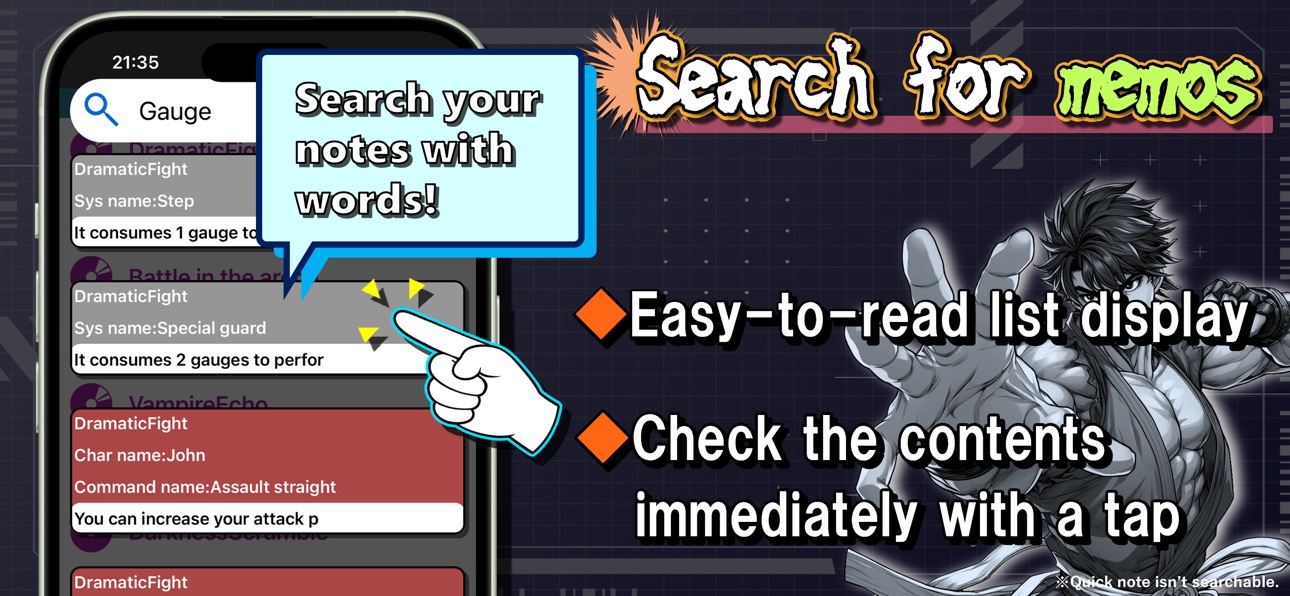
- Search for memos
Easy-to-see list display You can browse instantly with a tap.
When you search for a word, a list of memos containing that word will be displayed.
- Export / Import
Game, Character, System and Combo data can be shared.
You can use it in a variety of ways by outputting the export string to share information
with friends who play the same game or as a backup.
[+] Notes & Disclaimer
When upgrading from ver2.1.1 or earlier to ver3.0 or later, the data format will be changed internally.
If you start the app and exit the app before the game list screen is displayed, data may be lost.
Please don't terminate the application in the middle while the application is running with the version upgrade.
The local movie frame skip function affects the frame rate of the video data.
Also, the movie shooting function in the app may not support 60fps recording.
We can't compensate for any financial or physical damage caused by using this app.
Also, please don't overload this app.
[+] Background image credit
OKUMONO
https://sozaino.site/
[+] Contacts
If you notice anything when using this app, or if you have any requests for additional functions, please contact.
Twitter: https://twitter.com/Ayasata_info
Mail: inquiry3493@gmail.com
Accessibility
ipadiphonemacrealityDevicetvoswatch
Version history 25 versions
Build 886855247v6.7.42026-06-12 14:47:23
- I have changed the settings related to advertising.
Build 886411045v6.7.32026-06-02 17:57:58
- Fixed some incorrect multilingual processing.
Build 885594472v6.7.22026-05-13 16:24:48
- Changed the URL of the Japanese developer website.
Build 885532510v6.7.12026-05-11 19:55:43
- Changed the marketing URL for the App Store.
Build 884020946v6.72026-04-01 19:05:45
- Added a feature to display the contents of memos within created items at the bottom of the cell.
- The display/hide setting for the above feature can now be toggled for each item type in "Options > Display memo at the bottom of cell".
- It is now possible to copy commands with arrow indicators for system commands, character commands, combos, and commands within combos during combo editing (the copy button that appears when you swipe the cell to the left).
- It is now possible to copy a memo recorded within created item from the cell's copy button.
- Added content to the help section in Options.
- Adjusted the design, position, and size of some UI elements.
- Fixed some bugs.
Build 883826690v6.62026-03-27 18:34:39
- The app icon has been changed.
- Added the "Simple Reflex Checker" function. This can be used to practice simple defensive maneuvers.
- The "Simple Reflex Checker" function can now be turned on or off in Options.
- Some specifications related to videos have been changed.
Build 881767921v6.5.12026-01-23 23:22:13
- Correction of AppStore information
Build 880586022v6.52025-12-13 00:51:29
- Added "QuickNote" function (You can take notes and quickly check current issues. You can switch the display/hide option).
- You can display the contents of QuickNote as a widget (useful when you want to check something quickly on the home screen).
- Changed the design of the switch that appears when editing a system, and determines whether to display the system's commands when editing a character's combo.
- Added "①", "②", "③", "④", "⑤", "⑥" to prepared buttons (can be used to specify the range of button presses, etc.).
- Added a "Quick add with a tap" switch to the prepared button (when it's off, tapping the prepared button once will display the explanation, and you can tap it again to add it to the command, but when it's on, tapping the prepared button once will immediately add it to the command).
- Added and changed help content (new section "Combo Input Tips" added).
- The scrollable area of the cells for creating items has been adjusted to allow for more up and down movement.
- Changed the design of windows for entering names, renames, and button abbreviations for created items.
- Changed the design of the arrow animation on the combo editing screen.
- Changed some UI designs and background colors.
Build 879543855v6.4.32025-11-06 20:12:54
- Compatible with iOS 15 and later.
- Fixed some code.
Build 877896965v6.4.22025-09-10 06:04:54
- The design and width of part of the bottom UI in memo has been changed to make it easier to tap.
- The Copy button in memo has been removed (the Share button has the same functionality, so please use that instead).
- The images for the Confirm and Cancel buttons in the app have been revised.
- Improved handling of caret button operations.
- Corrected screenshots.
Build 876766839v6.4.12025-07-28 21:57:12
- Fixed some code.
Build 876439055v6.42025-07-16 14:45:56
- Compatible with iOS14 and later.
- Change app icon.
- Partial changes to UI position and design.
- In the app's memo, the caret (input cursor) will now be positioned at the beginning of the top line of the scroll position when you start editing.
- Improved internal processing of memo operation buttons "Copy", "Cut", and "Paste".
- We've added simple page operation buttons and input fields to memo, allowing you to view memo by page.
- Fixed a bug that could cause the app to crash when scrolling the list after deleting a creation item.
- Changed cell behavior after deleting a creation item.
- You can now optionally set the number of lines to display for the title of specific creation item in the list, up to a maximum of three.
This setting can be made for items that tend to have long names, such as combo names, neutral, and character measure names.
- Added an item to introduce the app we have developed on option.
We develop apps in a variety of genres, so please check them out!
- Changed the title display on the app list screen in Japanese localization.
Build 873003371v6.32025-03-06 08:40:02
- Fixed an issue where the movie screen position would be different from normal if a video wasn't completely closed by swiping up or down.
- Image scrolling has inertia.
- Some improvements have been made to the processing of memo.
- Fixed an issue where the button that can switch the display format was hidden when closing a game's memo.
- Change the "Website" icon.
- In "System", the notation in the "Command" cell was changed when a command is set.
- Changed the notation in the "Character > Command" cell.
- The "Character > Combo" cell will now display the number of recorded commands.
- Fixed an issue where it was sometimes not possible to copy the name of a recorded command on a "Combo" editing screen.
- Fixed a bug where the line breaks in recorded command names weren't positioned correctly on the "Combo" viewing screen.
- Fixed screenshots.
Build 869965839v6.2.12024-10-29 01:58:35
- When entering a command, if you tap the input, that part will blink, and you can delete or insert that part.
- While editing a combo, you can tap an already entered command to load it into the input field.
- Help content has been changed.
*In the previous update to ver6.2,
'the number of button abbreviations was changed from 8 to 14',
but this was not listed in the version information.
Build 869927856v6.22024-10-24 14:35:54
- Adjustments to UI size.
- Fixed an issue where The button that views 'Prepared button' window would appear under certain conditions when setting Button abbreviations.
- Fixed a bug where the app could crash when you swiped a cell to the left and tapped the copy button that appeared while editing a combo.
- Changed the specification to return the scroll position of the combo selection list and combo input list to the top when starting combo editing.
- Changed the specification to allow duplicate characters in button abbreviations.
- Fixed a bug where the abbreviation setting remained even if the cancel button was pressed after setting the button abbreviation.
- Changing the image of 'Plus button' in Prepared buttons.
- Added two new buttons to Prepared buttons.
- Changed Help's content.
- Other minor specification changes.
Build 867675627v6.1.42024-07-23 10:03:51
- Fixed an issue where repeat playback of a local video would stop midway under certain conditions.
Build 867645940v6.1.32024-07-22 07:01:00
- Fixed minor bugs.
Build 866563038v6.1.22024-06-09 21:09:15
- Fixed an issue where the entire memo display area would become black (white in dark mode) depending on the conditions when editing a memo.
- Changed the position of the memo title.
Build 866204627v6.1.12024-05-25 10:56:14
- Fixed some code.
Build 866038898v6.12024-05-18 22:04:36
- Added a function that allows you to select whether to sort the displayed items first when searching for created items (please check the help for details).
- Some images in the app have been corrected.
- Fix app icon.
- Changed some UI colors and designs.
- Fixed an issue where the search bar remained when the search bar (for created items) was displayed and the item was tapped to move through the hierarchy.
- Fixed an issue where the keyboard would close when invalid characters were entered when setting a button abbreviation.
- Fixed an issue where item cells may not be displayed after adding a video.
- Fixed an issue where the site name would be blank if the website name could not be obtained when adding a site.
Build 865481446v6.0.42024-04-25 16:51:59
- Fixed app icon.
Build 864675179v6.0.32024-03-25 14:31:51
- Changed the specification to display a pop-up prompting you to set button abbreviations when you try to edit a command or combo when the button abbreviation has not been set.
Build 863729217v6.0.22024-02-13 13:39:39
- Fixed some images
Build 863409538v6.0.12024-02-05 18:46:55
- Fixed the bug related to the behavior after long-pressing Prepared button cell swap.
Build 863005895v6.02024-02-04 17:16:14
- The specification has been changed to basically hide the home bar while the app is running.
- Unify the color of arrows on combo input cells to white
- The background color of images displayed at the top of "A System" and "A Character" is unified to black.
- Added a function to hide image and memo displayed at the top of "A System" and "A Character"
- Added a function that allows you to switch the display format of "A game", "A system", and "A character" items to "thumbnail display"
- Added the function to scroll to the position of the created item when creating an item.
- Added a function that allows you to change the font size of commands by pinching in/out on the combo viewing screen.
- Added a function to show/hide the command name by double-tapping on the combo viewing screen.
- When editing a combo, a popup will be displayed when you press the cancel button after making changes.
- Fixed a bug where moving the seek bar while a local video was paused would cause it to play.
- Fixed a bug where the screen position of local videos was incorrect.
- Added a function to display the number of frames skipped for local videos after skipping.
- Introduced a contact form.
- Other design modifications.
- Other minor bugs fixed.
No pricing data captured yet — comparisons appear once the app has paid storefronts or in-app purchases.
Availability 1 of 1 storefronts
| Region | Language | Price | Ratings | Avg | Version |
|---|---|---|---|---|---|
| US | en-US | Free | 4 | 4.8 | 6.7.4 |
Change log 29 changes · US
✎
releaseNotes updated
- I have changed the settings related to advertising.
✎
description updated
Easily organize fighting game information on your device!
Make full use of the app's functions and aim to become a higher level player!
It has the flexibility
✎
subtitle updated
Easily organize game info
✎
name updated
FightNote - App to win
◆
Version 6.7.4 released
- I have changed the settings related to advertising.
◆
Version 6.7.3 released
- Fixed some incorrect multilingual processing.
◆
Version 6.7.2 released
- Changed the URL of the Japanese developer website.
◆
Version 6.7.1 released
- Changed the marketing URL for the App Store.
◆
Version 6.7 released
- Added a feature to display the contents of memos within created items at the bottom of the cell.
- The display/hide setting for the above feature can now be toggled for each item type in "Options > Display memo at the bottom of cell".
- I
◆
Version 6.6 released
- The app icon has been changed.
- Added the "Simple Reflex Checker" function. This can be used to practice simple defensive maneuvers.
- The "Simple Reflex Checker" function can now be turned on or off in Options.
- Some specifications rel
◆
Version 6.5.1 released
- Correction of AppStore information
◆
Version 6.5 released
- Added "QuickNote" function (You can take notes and quickly check current issues. You can switch the display/hide option).
- You can display the contents of QuickNote as a widget (useful when you want to check something quickly on the home
◆
Version 6.4.3 released
- Compatible with iOS 15 and later.
- Fixed some code.
◆
Version 6.4.2 released
- The design and width of part of the bottom UI in memo has been changed to make it easier to tap.
- The Copy button in memo has been removed (the Share button has the same functionality, so please use that instead).
- The images for the Co
◆
Version 6.4.1 released
- Fixed some code.
◆
Version 6.4 released
- Compatible with iOS14 and later.
- Change app icon.
- Partial changes to UI position and design.
- In the app's memo, the caret (input cursor) will now be positioned at the beginning of the top line of the scroll position when you sta
◆
Version 6.3 released
- Fixed an issue where the movie screen position would be different from normal if a video wasn't completely closed by swiping up or down.
- Image scrolling has inertia.
- Some improvements have been made to the processing of memo.
- Fixed
◆
Version 6.2.1 released
- When entering a command, if you tap the input, that part will blink, and you can delete or insert that part.
- While editing a combo, you can tap an already entered command to load it into the input field.
- Help content has been changed.
◆
Version 6.2 released
- Adjustments to UI size.
- Fixed an issue where The button that views 'Prepared button' window would appear under certain conditions when setting Button abbreviations.
- Fixed a bug where the app could crash when you swiped a cell to the l
◆
Version 6.1.4 released
- Fixed an issue where repeat playback of a local video would stop midway under certain conditions.
◆
Version 6.1.3 released
- Fixed minor bugs.
◆
Version 6.1.2 released
- Fixed an issue where the entire memo display area would become black (white in dark mode) depending on the conditions when editing a memo.
- Changed the position of the memo title.
◆
Version 6.1.1 released
- Fixed some code.
◆
Version 6.1 released
- Added a function that allows you to select whether to sort the displayed items first when searching for created items (please check the help for details).
- Some images in the app have been corrected.
- Fix app icon.
- Changed some UI col
◆
Version 6.0.4 released
- Fixed app icon.
◆
Version 6.0.3 released
- Changed the specification to display a pop-up prompting you to set button abbreviations when you try to edit a command or combo when the button abbreviation has not been set.
◆
Version 6.0.2 released
- Fixed some images
◆
Version 6.0.1 released
- Fixed the bug related to the behavior after long-pressing Prepared button cell swap.
◆
Version 6.0 released
- The specification has been changed to basically hide the home bar while the app is running.
- Unify the color of arrows on combo input cells to white
- The background color of images displayed at the top of "A System" and "A Character" is