Home › Produktivität

 DE
DE
DEde-DE GBen-GB
 ALen-GB
 BAen-GB
 BEen-GB
 CHde-CH
 CYen-GB
 CZen-GB
 DKen-GB
 ESes-ES
 FIen-GB
 FRfr-FR
 GRen-GB
 HRen-GB
 HUen-GB
 IEen-GB
 ISen-GB
 ITit
ITit LTen-GB
 MEen-GB
 NLnl
NLnl NOen-GB
 PTpt-PT
 ROen-GB
 RSen-GB
 RUru
RUru SEsv
SEsv SKen-GB
 TRen-GB
 UAen-GB
 XKen-GB
 AGNot Available
 AINot Available
 AMNot Available
 AONot Available
 ARNot Available
 AUNot Available
 AZNot Available
 BBNot Available
 BFNot Available
 BHNot Available
 BJNot Available
 BMNot Available
 BNNot Available
 BONot Available
 BRNot Available
 BSNot Available
 BTNot Available
 BWNot Available
 BZNot Available
 CDNot Available
 CGNot Available
 CINot Available
 CLNot Available
 CMNot Available
 CNNot Available
 CONot Available
 CRNot Available
 CVNot Available
 DMNot Available
 DONot Available
 DZNot Available
 ECNot Available
 FJNot Available
 GANot Available
 GDNot Available
 GENot Available
 GHNot Available
 GMNot Available
 GTNot Available
 GWNot Available
 GYNot Available
 HKNot Available
 HNNot Available
 ILNot Available
 INNot Available
 JMNot Available
 JONot Available
 JPNot Available
 KENot Available
 KHNot Available
 KNNot Available
 KRNot Available
 KYNot Available
 KZNot Available
 LANot Available
 LBNot Available
 LCNot Available
 LRNot Available
 LYNot Available
 MANot Available
 MGNot Available
 MLNot Available
 MMNot Available
 MNNot Available
 MONot Available
 MRNot Available
 MSNot Available
 MUNot Available
 MVNot Available
 MWNot Available
 MXNot Available
 MYNot Available
 MZNot Available
 NANot Available
 NENot Available
 NGNot Available
 NINot Available
 NZNot Available
 OMNot Available
 PANot Available
 PENot Available
 PHNot Available
 PKNot Available
 PYNot Available
 RWNot Available
 SANot Available
 SCNot Available
 SGNot Available
 SLNot Available
 SNNot Available
 SRNot Available
 STNot Available
 SVNot Available
 SZNot Available
 TCNot Available
 TDNot Available
 TNNot Available
 TTNot Available
 TWNot Available
 TZNot Available
 UGNot Available
 UYNot Available
 VCNot Available
 VENot Available
 VGNot Available
 VNNot Available
 VUNot Available
 YENot Available
 ZANot Available
 ZMNot Available
 ZWNot Available
31 of 142 storefronts
Content in en-US
Content in en-US
Information
Apple ID1520426298
Bundle IDjp.co.sharp.bs.smartoffice.synappxgomobile.eu
SellerAnbieter
Min iOS13.0
Min macOS11.0
Device familiesiphone, ipod
Released2020-12-14
Copyright© 2019 SHARP CORPORATION
Privacy policyLink ↗
Preview 1 platform
iPhone 5 images



What’s New Version 3.10.10
Improved UX
Description
Synappx Cloud Print is designed to meet the needs of small and medium-sized enterprises for hassle-free, flexible and cost-effective print management. As a true cloud-based solution, it provides secure printing and print accounting 'as a service', so it requires no investment in on-premises infrastructure. Quite simply, it works where you do – whether it is in the office or at home.
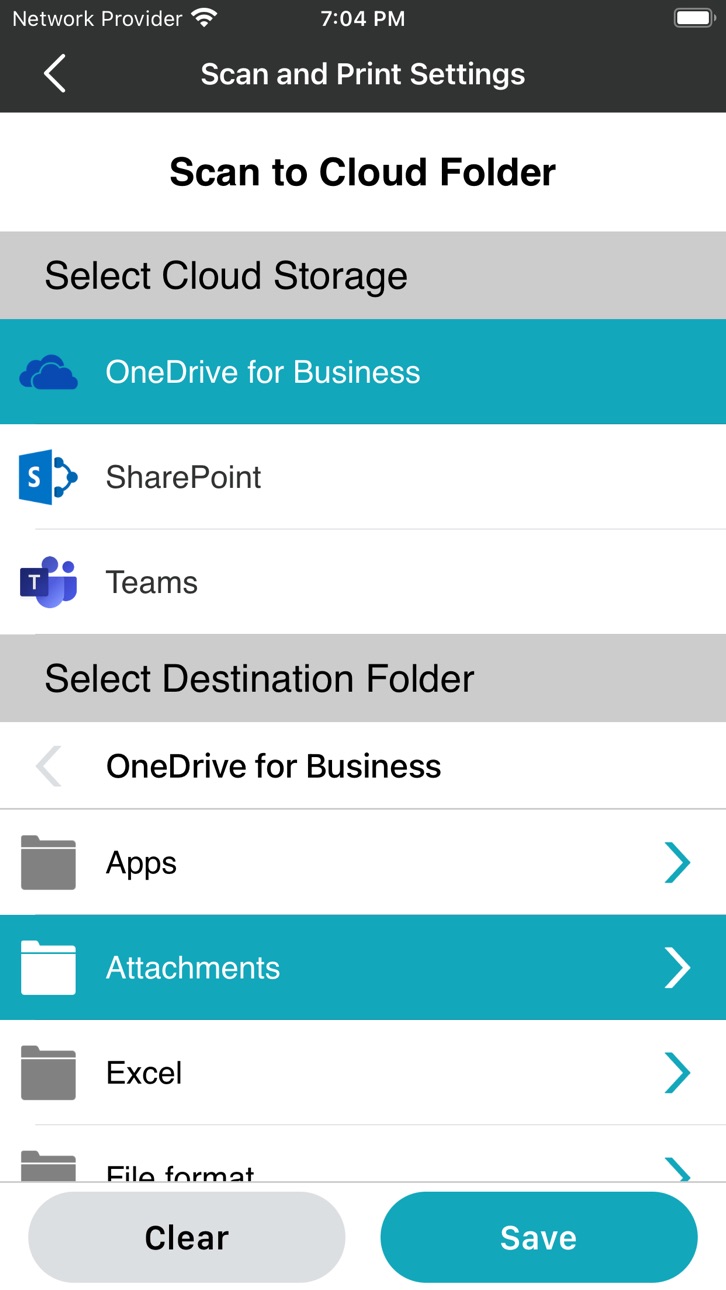
The Synappx mobile app connects you to all of your cloud storage services* making printing documents or scanning files easy, just using your mobile device.
*Synappx mobile supports Microsoft Teams, SharePoint, OneDrive, Dropbox, Box and local device storage.
Accessibility
ipadiphonemacrealityDevicetvoswatch
Version history 20 versions
Build 880265801v3.10.102025-12-03 11:14:24
Improved UX
Build 876757669v3.10.02025-07-30 11:10:58
- Bug fixes
Build 873325676v3.9.02025-03-19 10:36:19
- Option to show or hide your private calendar events
- Bug fixes
Build 871055702v3.7.202024-12-12 15:47:43
IoT hub and Notification hub update supported.
Build 867893623v3.7.102024-11-13 08:36:52
- This version features updated branding.
Build 867242141v3.72024-07-31 03:59:31
Bug fixes and enhancements.
Build 860022060v3.62024-05-20 07:01:12
- Leave meeting support
- Remote trackpad improvement (text entry)
- Bug fixes.
Build 858748740v3.52023-08-08 06:07:31
Bug fixes.
Build 857051793v3.4.102023-05-15 17:57:51
Synappx Go now enables you to join meetings by scanning the QR code on the display! After scanning, your scheduled meeting will automatically start the appropriate web conferencing service and will connect you to in-room audio and video.
Bug fixes and usability enhancements.
Build 856799461v3.4.02023-05-11 16:31:43
Synappx Go now enables you to join meetings by scanning the QR code on the display! After scanning, your scheduled meeting will automatically start the appropriate web conferencing service and will connect you to in-room audio and video.
Bug fixes and usability enhancements.
Build 852777285v3.3.02022-11-09 06:30:54
Collaboration Hub: Das neue Trackpad vereinfacht die Steuerung von verwendeten Dateien und Dokumenten.
Fehlersuche: Verbesserte Protokollierung, Fehlerbehebungen und verbesserte Benutzerfreundlichkeit.
Build 849844344v3.2.02022-06-07 06:47:22
Collaboration Hub: Improved meeting main screen navigation MEET, FILES, and CONTROL tabs.
Collaboration Hub: One tap to start.
Scheduled meetings – No need to select a meeting, the meeting will auto-start.
Ad Hoc meetings - Tap the NFC tag, and the Meet Now screen displays.
Bug fixes and usability enhancements.
Build 847105226v3.1.202022-02-16 06:06:47
Improved stability
Build 846993673v3.1.102022-02-08 08:41:01
Bug Fix
Build 845950912v3.12021-12-15 09:01:44
Bug Fix and v3.1
Build 845021006v3.02021-11-01 13:45:52
V3.0 and Bug Fix
Build 843307109v2.7.02021-07-29 04:54:54
Bug Fix
Build 842185446v2.6.02021-05-13 15:27:51
bug fix
Build 840650607v2.5.02021-03-05 06:08:19
Bug Fix
Build 836583465v2.2.02020-12-15 07:50:39
No pricing data captured yet — comparisons appear once the app has paid storefronts or in-app purchases.
Availability 31 of 142 storefronts
| Region | Language | Price | Ratings | Avg | Version |
|---|---|---|---|---|---|
| DE | de-DE | Free | 2 | 5.0 | 3.10.10 |
| GB | en-GB | Free | 2 | 5.0 | 3.10.10 |
| AL | en-GB | Free | 0 | — | 3.10.10 |
| BA | en-GB | Free | 0 | — | 3.10.10 |
| BE | en-GB | Free | 0 | — | 3.10.10 |
| CH | de-CH | Free | 0 | — | 3.10.10 |
| CY | en-GB | Free | 0 | — | 3.10.10 |
| CZ | en-GB | Free | 0 | — | 3.10.10 |
| DK | en-GB | Free | 0 | — | 3.10.10 |
| ES | es-ES | Free | 0 | — | 3.10.10 |
| FI | en-GB | Free | 0 | — | 3.10.10 |
| FR | fr-FR | Free | 0 | — | 3.10.10 |
| GR | en-GB | Free | 0 | — | 3.10.10 |
| HR | en-GB | Free | 0 | — | 3.10.10 |
| HU | en-GB | Free | 0 | — | 3.10.10 |
| IE | en-GB | Free | 0 | — | 3.10.10 |
| IS | en-GB | Free | 0 | — | 3.10.10 |
| IT | it | Free | 0 | — | 3.10.10 |
| LT | en-GB | Free | 0 | — | 3.10.10 |
| ME | en-GB | Free | 0 | — | 3.10.10 |
| NL | nl | Free | 0 | — | 3.10.10 |
| NO | en-GB | Free | 0 | — | 3.10.10 |
| PT | pt-PT | Free | 0 | — | 3.10.10 |
| RO | en-GB | Free | 0 | — | 3.10.10 |
| RS | en-GB | Free | 0 | — | 3.10.10 |
| RU | ru | Free | 0 | — | 3.10.10 |
| SE | sv | Free | 0 | — | 3.10.10 |
| SK | en-GB | Free | 0 | — | 3.10.10 |
| TR | en-GB | Free | 0 | — | 3.10.10 |
| UA | en-GB | Free | 0 | — | 3.10.10 |
| XK | en-GB | Free | 0 | — | 3.10.10 |
Not available in: AG, AI, AM, AO, AR, AU, AZ, BB, BF, BH, BJ, BM, BN, BO, BR, BS, BT, BW, BZ, CD, CG, CI, CL, CM, CN, CO, CR, CV, DM, DO, DZ, EC, FJ, GA, GD, GE, GH, GM, GT, GW, GY, HK, HN, IL, IN, JM, JO, JP, KE, KH, KN, KR, KY, KZ, LA, LB, LC, LR, LY, MA, MG, ML, MM, MN, MO, MR, MS, MU, MV, MW, MX, MY, MZ, NA, NE, NG, NI, NZ, OM, PA, PE, PH, PK, PY, RW, SA, SC, SG, SL, SN, SR, ST, SV, SZ, TC, TD, TN, TT, TW, TZ, UG, UY, VC, VE, VG, VN, VU, YE, ZA, ZM, ZW
Change log 23 changes · DE
✎
releaseNotes updated
Improved UX
✎
description updated
Synappx Cloud Print is designed to meet the needs of small and medium-sized enterprises for hassle-free, flexible and cost-effective print management. As a true
✎
name updated
Synappx
◆
Version 3.10.10 released
Improved UX
◆
Version 3.10.0 released
- Bug fixes
◆
Version 3.9.0 released
- Option to show or hide your private calendar events
- Bug fixes
◆
Version 3.7.20 released
IoT hub and Notification hub update supported.
◆
Version 3.7.10 released
- This version features updated branding.
◆
Version 3.7 released
Bug fixes and enhancements.
◆
Version 3.6 released
- Leave meeting support
- Remote trackpad improvement (text entry)
- Bug fixes.
◆
Version 3.5 released
Bug fixes.
◆
Version 3.4.10 released
Synappx Go now enables you to join meetings by scanning the QR code on the display! After scanning, your scheduled meeting will automatically start the appropriate web conferencing service and will connect you to in-room audio and video.
Bu
◆
Version 3.4.0 released
Synappx Go now enables you to join meetings by scanning the QR code on the display! After scanning, your scheduled meeting will automatically start the appropriate web conferencing service and will connect you to in-room audio and video.
B
◆
Version 3.3.0 released
Collaboration Hub: Das neue Trackpad vereinfacht die Steuerung von verwendeten Dateien und Dokumenten.
Fehlersuche: Verbesserte Protokollierung, Fehlerbehebungen und verbesserte Benutzerfreundlichkeit.
◆
Version 3.2.0 released
Collaboration Hub: Improved meeting main screen navigation MEET, FILES, and CONTROL tabs.
Collaboration Hub: One tap to start.
Scheduled meetings – No need to select a meeting, the meeting will auto-start.
Ad Hoc meetings - Tap the
◆
Version 3.1.20 released
Improved stability
◆
Version 3.1.10 released
Bug Fix
◆
Version 3.1 released
Bug Fix and v3.1
◆
Version 3.0 released
V3.0 and Bug Fix
◆
Version 2.7.0 released
Bug Fix
◆
Version 2.6.0 released
bug fix
◆
Version 2.5.0 released
Bug Fix
◆
Version 2.2.0 released