Home › Medical

 US
US
1 of 1 storefronts
Content in en-US
Content in en-US
Information
Apple ID1515961231
Bundle IDcom.careaware.capmgmt.ios
SellerSeller
Min iOS17.4
Min macOS14.4
Device familiesiphone
Released2020-06-05
Copyright© Cerner Corporation
Privacy policyLink ↗
Preview 1 platform
iPhone 3 images


What’s New Version 1.6.1
This release addresses environment connectivity and routing issues while improving overall app stability.
Description
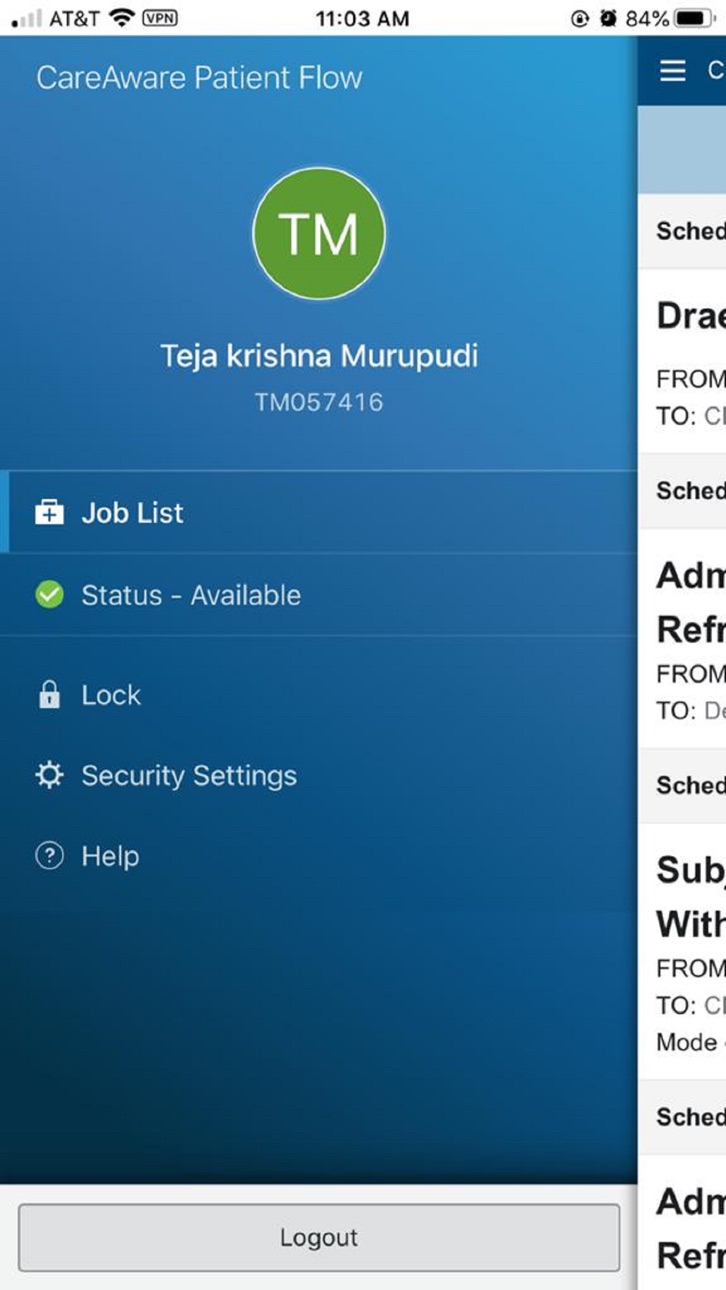
Capacity Management: EVS (Environmental Services) and Transport solution supports fast, easy and smart workflows for the EVS and Transport processes in CareAware Patient Flow. This solution provides the EVS or Transport worker the ability to manage their job queue, which results in a more efficient Transport process and optimizes Bed turnover.
• Automated job assignments are pushed to a Team member based on their zone assignments.
• Efficient Management of job assignments, including the ability to: Accept, Reject, Delay, Start, and Complete job assignments.
• Efficient Management of a Team Member's status: On Break, On Lunch, Unavailable, and Available.
• Notifications Management, including the ability to have the device chime/vibrate when a modification is made to an assigned job, a new job is assigned, or an existing job is unassigned. Notification type is dependent on device capability.
• The CareAware Patient Flow mobile design has been enhanced to enable the ability to view job details in context of the List page when the job is selected.
• Notification reminders will occur every 5 minutes, up to an 2 hours, until the mobile app is unlocked.
• The 5 minute notification reminder will be reset to 0 with each job change.
• If a job is Assigned and Accepted to a Personnel and then that Personnel updates their Availability Status to 'Unavailable', 'Break, or 'Lunch', the system will Undo Start the job and Unaccept the job.
• If a job is Assigned and Accepted by multiple Personnel and then one or many Personnel update their Availability Status to 'Unavailable', 'Break, or 'Lunch', the system will unassign the job from those Personnel that changed their Availability Status, but the job will stay Started and will remain Accepted for the Personnel that did not change their Availability status from 'Available'.
• The ability to Cancel a job from the mobile application now exists. This capability is permission based.
Accessibility
ipadiphonemacrealityDevicetvoswatch
Version history 7 versions
Build 886584218v1.6.12026-06-08 13:49:52
This release addresses environment connectivity and routing issues while improving overall app stability.
Build 882158735v1.6.02026-06-02 13:35:50
• Lantern (Flashlight) Remains On During Scanning:
The device flashlight now automatically remains on when engaging the camera for patient armband (PPID) scanning in Transport workflows. This enhancement greatly improves scanning reliability in low-light environments.
• Configurable Suppression of Scanned Barcode Pop-Ups:
Administrators can now configure whether the details of scanned barcodes (such as FIN and prefixes) are displayed on-screen during the scanning process, further strengthening compliance and security.
• No Auto-Sensing of Barcodes on Patient Armbands:
The camera will no longer automatically sense and select barcodes when multiple barcodes are present on a patient’s armband. This change supports more accurate selection and scanning of the correct barcode, reducing the risk of accidental selection.
Build 866412143v1.5.02024-06-12 13:43:54
CareAware Patient Flow now supports iOS 16.4 or newer.
• Transport PPID (Positive Patient ID) Scanning is now supported using Barcode scanning, invoked using the camera on an iOS device.
• On successful scan of wristband barcode, the Patient Identifier scanned will be compared against the Transport milestone job details.
• If the Patient Identifier matches the Transport Job details, the Transport job will be automatically started
• If the Patient identifier does not match the Transport Job details, the user will be alerted and the Transport job cannot be started until the mismatch is corrected
• If a wristband barcode cannot be scanned, a user may override the scan after the initial scan attempt
Build 844425335v1.3.02021-10-06 11:36:23
CareAware Patient Flow now supports iOS 13.4 or newer.
Build 840836107v1.2.02021-03-17 14:57:26
• Now requires iOS 14.3 or newer.
Build 837558846v1.1.02020-11-04 19:25:30
• Enabled Single Sign On (SSO).
• Notifications now refresh the app and updates the job assignment details in the app.
Build 836196978v1.0.02020-06-05 22:10:58
No pricing data captured yet — comparisons appear once the app has paid storefronts or in-app purchases.
Availability 1 of 1 storefronts
| Region | Language | Price | Ratings | Avg | Version |
|---|---|---|---|---|---|
| US | en-US | Free | 1 | 1.0 | 1.6.1 |
Change log 10 changes · US
✎
releaseNotes updated
This release addresses environment connectivity and routing issues while improving overall app stability.
✎
description updated
Capacity Management: EVS (Environmental Services) and Transport solution supports fast, easy and smart workflows for the EVS and Transport processes in CareAwar
✎
name updated
CareAware Patient Flow
◆
Version 1.6.1 released
This release addresses environment connectivity and routing issues while improving overall app stability.
◆
Version 1.6.0 released
• Lantern (Flashlight) Remains On During Scanning:
The device flashlight now automatically remains on when engaging the camera for patient armband (PPID) scanning in Transport workflows. This enhancement greatly improves scanning reliabilit
◆
Version 1.5.0 released
CareAware Patient Flow now supports iOS 16.4 or newer.
• Transport PPID (Positive Patient ID) Scanning is now supported using Barcode scanning, invoked using the camera on an iOS device.
• On successful scan of wristband barcode, the Pa
◆
Version 1.3.0 released
CareAware Patient Flow now supports iOS 13.4 or newer.
◆
Version 1.2.0 released
• Now requires iOS 14.3 or newer.
◆
Version 1.1.0 released
• Enabled Single Sign On (SSO).
• Notifications now refresh the app and updates the job assignment details in the app.
◆
Version 1.0.0 released