Home › Utilities

 US
US
1 of 1 storefronts
Content in en-US
Content in en-US
Information
Preview 2 platforms
iPhone 5 images


iPad 4 images


What’s New Version 5.7.0
Errors that caused the app to crash have been fixed.
Do you have feedback or questions? Feel free to email me at:
fruaglResolution@gmail.com
Description
Revolutionize Your Letter Correspondence
Efficiency at the Push of a Button:
Writing letters is easier than ever with the Letter Manager. Launch the app on your iPhone, iPad, or M1 Mac, tap "New Letter," and start writing immediately – without worrying about formatting. Our app automatically adheres to DIN standards and saves your personalized letter template.
Attachments Made Easy:
Add PDF documents or images directly in the app to your letter to have all relevant information in one place.
Customize Freely:
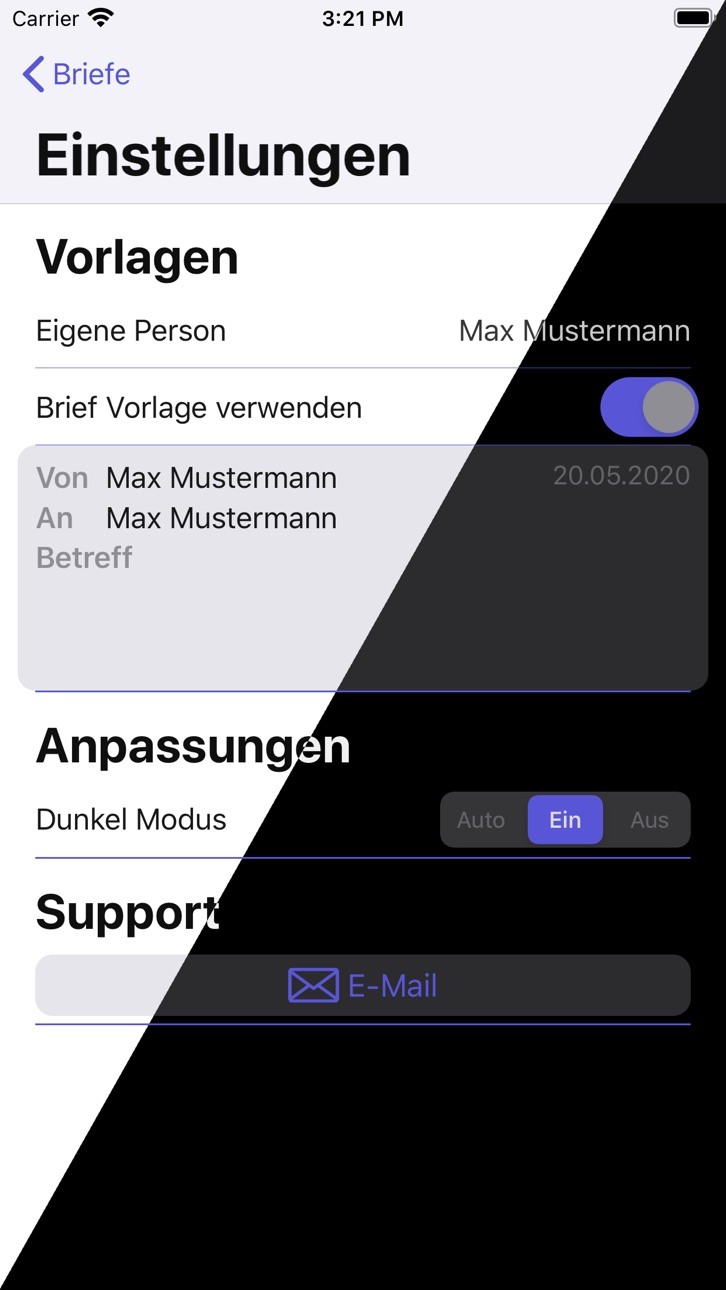
Use the flexibility of the DIN standard to personalize your letter. Save your sender details, signature, logo, letterhead, and preferred font. The text can be customized with various highlights such as bold or italic.
Versatile Dispatch:
Export your letters as PDF and send them via email attachment or print them directly from the app. Sending mail merges? No problem! Create a contact group and select it as the recipient. Coming soon: Send letters directly through the Letter Manager.
Redefining Organization:
Digitize your written affairs. Scan letters with your camera and save them in a desired folder. Thanks to intelligent text analysis, every word is captured and can be found using keyword search.
Accessibility:
The Letter Manager is accessible to all users.
*Please note: To use all features fully, iOS 13 or newer is required. Some features are part of the full version, which can be shared within a family group.
Capabilities
In-App Purchases
Accessibility
ipadiphonemacrealityDevicetvoswatch
Version history 25 versions
Build 871757821v5.7.02025-02-13 22:32:04
Errors that caused the app to crash have been fixed.
Do you have feedback or questions? Feel free to email me at:
fruaglResolution@gmail.com
Build 870789749v5.5.82024-12-16 07:46:10
You can now print your envelopes directly!
Simply select the recipient, desired paper size, and optionally the sender, to generate a PDF that can be sent to your printer.
Available paper sizes include: DIN lang, A4, B5, C4, C5, C6, US Letter
This new feature can be accessed directly from the overview page.
Additionally, we’ve fixed issues related to incorrectly displayed text attributes.
If you have any feedback or questions, feel free to send me an email:
frugalResolution@gmail.com
Build 863631733v5.5.62024-02-12 08:05:52
The PDF preview now automatically scales so that the entire first page is visible.
Build 863059789v5.5.52024-01-29 11:47:05
The completed letter is automatically scaled in PDF view and is therefore easier to review.
Build 862630690v5.5.42024-01-14 13:12:24
Enhanced Page Adjustments for Multi-Page Letters
In this version, the page dimensions have been improved, making the writing of longer, multi-page letters even more comfortable:
• Automatic space adjustment for multi-page letters: As soon as a second letter page is added, the app automatically adjusts the available space on the first page. This ensures better distribution of text and a visually more appealing design of the letter.
• Optimized text dimensions on the second page: The text dimensions on the second page have been finely tuned to ensure a consistent and professional presentation of the letter content across all pages.
Build 862359534v5.5.32024-01-02 20:26:30
Enhanced Page Adjustments for Multi-Page Letters
In this version, the page dimensions have been improved, making the writing of longer, multi-page letters even more comfortable:
• Automatic space adjustment for multi-page letters: As soon as a second letter page is added, the app automatically adjusts the available space on the first page. This ensures better distribution of text and a visually more appealing design of the letter.
• Optimized text dimensions on the second page: The text dimensions on the second page have been finely tuned to ensure a consistent and professional presentation of the letter content across all pages.
Build 862081672v5.5.22023-12-20 12:50:09
Enhanced Page Adjustments for Multi-Page Letters
In this version, the page dimensions have been improved, making the writing of longer, multi-page letters even more comfortable:
• Automatic space adjustment for multi-page letters: As soon as a second letter page is added, the app automatically adjusts the available space on the first page. This ensures better distribution of text and a visually more appealing design of the letter.
• Optimized text dimensions on the second page: The text dimensions on the second page have been finely tuned to ensure a consistent and professional presentation of the letter content across all pages.
Build 846211425v5.2.02023-03-12 23:02:33
Texttemplates for infoblock with examples.
Bug fixes:
• Postcode / City swap
• Loading indicator still there after aborting Documentpicker
• Name of Scan always the same
• User sender data gets assigned to template when the template letter is recreated
Build 845450162v5.0.02021-12-06 13:18:33
Bug fix:
• Design
• Reopen created letter
• Filename with multiline subject
Build 844257273v4.8.62021-10-12 10:05:47
• Changing letter preferences will change only the specific entry
• QRCode: Letter ID editable
• Resolved error: Letter won't open
Build 843420237v4.8.02021-09-14 16:41:41
* Split the page text equally when creating the PDF, if the text is cut off.
* Signature size
* Typing attributes from preferences when importing contacts
* Date picker format in settings
* Signature with image for lower than iOS 14.0
Bug fix:
* Double tapping for strikethrough
* Cursor hopping when editing a text field the first time
Did you know?
Many lines can be swiped lift (like delete) to restore default value.
Build 843398247v4.6.62021-08-03 17:29:06
* Split the page text equally when creating the PDF, if the text is cut off.
* Signature size
* Typing attributes from preferences when importing contacts
* Date picker format in settings
* Signature with image for lower than iOS 14.0
Bug fix:
* Double tapping for strikethrough
* Cursor hopping when editing a text field the first time
Did you know?
Many lines can be swiped lift (like delete) to restore default value.
Build 842946327v4.6.52021-08-02 14:38:48
* Split the page text equally when creating the PDF, if the text is cut off.
* Signature size
* Typing attributes from preferences when importing contacts
* Date picker format in settings
* Signature with image for lower than iOS 14.0
Bug fix:
* Double tapping for strikethrough
* Cursor hopping when editing a text field the first time
Did you know?
Many lines can be swiped lift (like delete) to restore default value.
Build 842733219v4.5.82021-06-28 19:31:13
• Import letter from the files system or choose a image from your gallery
• Change your typing text size in the settings
Fixed bugs:
• Beginning text attributes
• Delete signing will recover to default
Build 842657844v4.5.32021-06-15 10:21:33
• Import notes from SnipeNotes
• Compact Letter View
• Bug fixes
Build 842437801v4.5.02021-06-14 21:22:50
Import notes from SnipeNotes
Compact Letter View
Build 842349133v4.4.82021-05-25 10:16:50
HAPPY BIRTHDAY! Letter Manager is 1 year old now!
Thanks to all users and supporters!!
New Features:
• Address book Setting: use intern addressbook as before, or directly select your contacts
• Active typing attributes visible
• Lock Letters: Finish the editing of a letter and get to the PDF
Fehlerbehebung:
• Sales screen
Build 842256796v4.4.42021-05-20 00:15:19
HAPPY BIRTHDAY! Letter Manager is 1 year old now!
Thanks to all users and supporters!!
New Features:
• Choose your Custom Fonts
• Optional QR Code
• Addressbook Setting: Choose now if you want to use - like now - the intern addressbook, or if you want to select contacts directly from your contacts. Changes will apply in the next update.
Bug fixes:
• Standard Textattributes of location
Build 842056368v4.3.52021-05-10 15:07:52
* Dateformat selection
* Restore device orientation after drawing signature
* Fixed error when sending letters per mail attachment
Build 839212475v4.2.02021-05-01 17:12:57
The Letter Manager in a new shape!
New design and extra features!
• Texthighlighting: Bold, Italics, Underline, Strikethrough, Font, Size, Color, Insert Picture in text
• Improved search algorithm
• DIN consent
• Edit sender's and recipient's text, import formatted contacts
• Additional text fields, like infoblock and footer
• Image or pdf letter background
• New signature drawing
• Show date on/off
• Show page numbering on/off
• Corrected left margin of subject
• Duplicate letters
* Support for new Catalyst Macs M1
* and much more...
You are missing something? Tell us!
Build 838491733v3.6.02020-11-09 11:48:21
• Search all your letters with filter: sender, receiver or subject
• En- or disable sender details in the window
• En- or disable page numbering
• Choose your own signature from photo library or take a snapshot with your camera
• Signature moved between signing and sender’s name and is adapted to text size
• OR draw your own Signature with adjustable line width
• Full support of all orientations everywhere in the app. Disable landscape mode in settings if you want to stay in portrait mode.
••• and much more •••
Build 838351072v3.5.02020-11-02 15:07:05
• PDFs or pictures as attachment
• Live layout adjustments
• Logo positioning left, center, right
• One more line between signing text and sender name to have the possibility to sign by hand
• Mac Support -> Download Letter Manager on your MacBook!
Thanks to the users with suggestions! Implemented with pleasure.
Build 838132266v3.4.02020-10-10 08:33:45
• A short introduction is introducing the main functions of Letter Manager
• New Settings and a direct link to the website of frugalResolution
• Help to Letter Manager to get well-known and show that your letter is created by this app
• Errors fixed
Build 837832631v3.3.02020-09-29 21:00:30
• The page progress is now shown while writing. Please keep writing on the next page, if the progressbar turns red.
• Relocate the letter in your folders.
• Select a font for each part of the letter.
• Create as much pages as you want.
• iOS14 AppClip
Build 837576493v3.1.52020-09-16 15:44:34
• The page progress is now shown while writing. Please keep writing on the next page, if the progressbar turns red.
• Relocate the letter in your folders.
• Select a font for each part of the letter.
• Create as much pages as you want.
Corrected error that an existing signature is shown too big.
No pricing data captured yet — comparisons appear once the app has paid storefronts or in-app purchases.
Availability 1 of 1 storefronts
| Region | Language | Price | Ratings | Avg | Version |
|---|---|---|---|---|---|
| US | en-US | Free | 19 | 4.6 | 5.7.0 |
Change log 29 changes · US
✎
releaseNotes updated
Errors that caused the app to crash have been fixed.
Do you have feedback or questions? Feel free to email me at:
fruaglResolution@gmail.com
✎
description updated
Revolutionize Your Letter Correspondence
Efficiency at the Push of a Button:
Writing letters is easier than ever with the Letter Manager. Launch the app on you
✎
subtitle updated
Scan post, write letters
✎
name updated
Letter Manager
◆
Version 5.7.0 released
Errors that caused the app to crash have been fixed.
Do you have feedback or questions? Feel free to email me at:
fruaglResolution@gmail.com
◆
Version 5.5.8 released
You can now print your envelopes directly!
Simply select the recipient, desired paper size, and optionally the sender, to generate a PDF that can be sent to your printer.
Available paper sizes include: DIN lang, A4, B5, C4, C5, C6, US Let
◆
Version 5.5.6 released
The PDF preview now automatically scales so that the entire first page is visible.
◆
Version 5.5.5 released
The completed letter is automatically scaled in PDF view and is therefore easier to review.
◆
Version 5.5.4 released
Enhanced Page Adjustments for Multi-Page Letters
In this version, the page dimensions have been improved, making the writing of longer, multi-page letters even more comfortable:
• Automatic space adjustment for multi-page letters: As soon
◆
Version 5.5.3 released
Enhanced Page Adjustments for Multi-Page Letters
In this version, the page dimensions have been improved, making the writing of longer, multi-page letters even more comfortable:
• Automatic space adjustment for multi-page letters: As soon
◆
Version 5.5.2 released
Enhanced Page Adjustments for Multi-Page Letters
In this version, the page dimensions have been improved, making the writing of longer, multi-page letters even more comfortable:
• Automatic space adjustment for multi-page letters: As soon
◆
Version 5.2.0 released
Texttemplates for infoblock with examples.
Bug fixes:
• Postcode / City swap
• Loading indicator still there after aborting Documentpicker
• Name of Scan always the same
• User sender data gets assigned to template when the template letter
◆
Version 5.0.0 released
Bug fix:
• Design
• Reopen created letter
• Filename with multiline subject
◆
Version 4.8.6 released
• Changing letter preferences will change only the specific entry
• QRCode: Letter ID editable
• Resolved error: Letter won't open
◆
Version 4.8.0 released
* Split the page text equally when creating the PDF, if the text is cut off.
* Signature size
* Typing attributes from preferences when importing contacts
* Date picker format in settings
* Signature with image for lower than iOS 14.0
Bug
◆
Version 4.6.6 released
* Split the page text equally when creating the PDF, if the text is cut off.
* Signature size
* Typing attributes from preferences when importing contacts
* Date picker format in settings
* Signature with image for lower than iOS 14.0
Bug
◆
Version 4.6.5 released
* Split the page text equally when creating the PDF, if the text is cut off.
* Signature size
* Typing attributes from preferences when importing contacts
* Date picker format in settings
* Signature with image for lower than iOS 14.0
Bug
◆
Version 4.5.8 released
• Import letter from the files system or choose a image from your gallery
• Change your typing text size in the settings
Fixed bugs:
• Beginning text attributes
• Delete signing will recover to default
◆
Version 4.5.3 released
• Import notes from SnipeNotes
• Compact Letter View
• Bug fixes
◆
Version 4.5.0 released
Import notes from SnipeNotes
Compact Letter View
◆
Version 4.4.8 released
HAPPY BIRTHDAY! Letter Manager is 1 year old now!
Thanks to all users and supporters!!
New Features:
• Address book Setting: use intern addressbook as before, or directly select your contacts
• Active typing attributes visible
• Lock Lett
◆
Version 4.4.4 released
HAPPY BIRTHDAY! Letter Manager is 1 year old now!
Thanks to all users and supporters!!
New Features:
• Choose your Custom Fonts
• Optional QR Code
• Addressbook Setting: Choose now if you want to use - like now - the intern addressbook, or
◆
Version 4.3.5 released
* Dateformat selection
* Restore device orientation after drawing signature
* Fixed error when sending letters per mail attachment
◆
Version 4.2.0 released
The Letter Manager in a new shape!
New design and extra features!
• Texthighlighting: Bold, Italics, Underline, Strikethrough, Font, Size, Color, Insert Picture in text
• Improved search algorithm
• DIN consent
• Edit sender's and recipien
◆
Version 3.6.0 released
• Search all your letters with filter: sender, receiver or subject
• En- or disable sender details in the window
• En- or disable page numbering
• Choose your own signature from photo library or take a snapshot with your camera
• Signature
◆
Version 3.5.0 released
• PDFs or pictures as attachment
• Live layout adjustments
• Logo positioning left, center, right
• One more line between signing text and sender name to have the possibility to sign by hand
• Mac Support -> Download Letter Manager on your
◆
Version 3.4.0 released
• A short introduction is introducing the main functions of Letter Manager
• New Settings and a direct link to the website of frugalResolution
• Help to Letter Manager to get well-known and show that your letter is created by this app
• Err
◆
Version 3.3.0 released
• The page progress is now shown while writing. Please keep writing on the next page, if the progressbar turns red.
• Relocate the letter in your folders.
• Select a font for each part of the letter.
• Create as much pages as you want.
• iO
◆
Version 3.1.5 released
• The page progress is now shown while writing. Please keep writing on the next page, if the progressbar turns red.
• Relocate the letter in your folders.
• Select a font for each part of the letter.
• Create as much pages as you want.
Cor