Home › Photo & Video

Photo Compress , Resize & Crop
Image Compressor & Cropper
 US
US
 BRpt-BRUSen-US
 GHen-GB
 NGen-GB
 AGen-GB
 AIen-GB
 AOen-GB
 BBen-GB
 BFen-GB
 BJen-GB
 BOes-MX
 BSen-GB
 BWen-GB
 BZen-GB
 CDen-GB
 CGen-GB
 CIfr-FR
 CMfr-FR
 COes-MX
 CRes-MX
 CVen-GB
 DMen-GB
 DOes-MX
 DZen-GB
 ECes-MX
 GAfr-FR
 GDen-GB
 GMen-GB
 GTes-MX
 GWen-GB
 GYen-GB
 HNes-MX
 JMen-GB
 KEen-GB
 KNen-GB
 KYen-GB
 LCen-GB
 LYen-GB
 MAen-GB
 MGen-GB
 MLen-GB
 MSen-GB
 MUen-GB
 MXes-MX
 MZen-GB
 NAen-GB
 NEen-GB
 NIes-MX
 PAes-MX
 PEes-MX
 PYes-MX
 RWen-GB
 SCen-GB
 SNen-GB
 SRen-GB
 STen-GB
 SVes-MX
 SZen-GB
 TCen-GB
 TDen-GB
 TNen-GB
 TTen-GB
 TZen-GB
 UYen-GB
 VCen-GB
 VEes-MX
 VGen-GB
 ZWen-GB
68 of 68 storefronts
Content in en-US
Content in en-US
Information
Preview 2 platforms
iPhone 5 images



iPad 5 images


What’s New Version 1.8
Solve Minor Bug Fix.
Performance Improvement.
Description
Photo Compress & Resize helps you quickly reduce your picture size or resolution. Optimize your images with a perfect balance in quality and file size. Photo Compress & Resize is also a super easy to use application to crop and rotate your photos.
Photo Compress & Resize uses smart lossy compression techniques to reduce the file size of your photos.
Use the crop functionality to remove unwanted portions of the image and choose between the many aspect ratio available to better adjust your photo.
Image compressior basic features of this Photo Compress & Resize app :-
* Small app size
* Simple UI
* Powerful Compression Mode
* Batch Image Compressor
* Very good quality of the compressed photos and optional compress quality
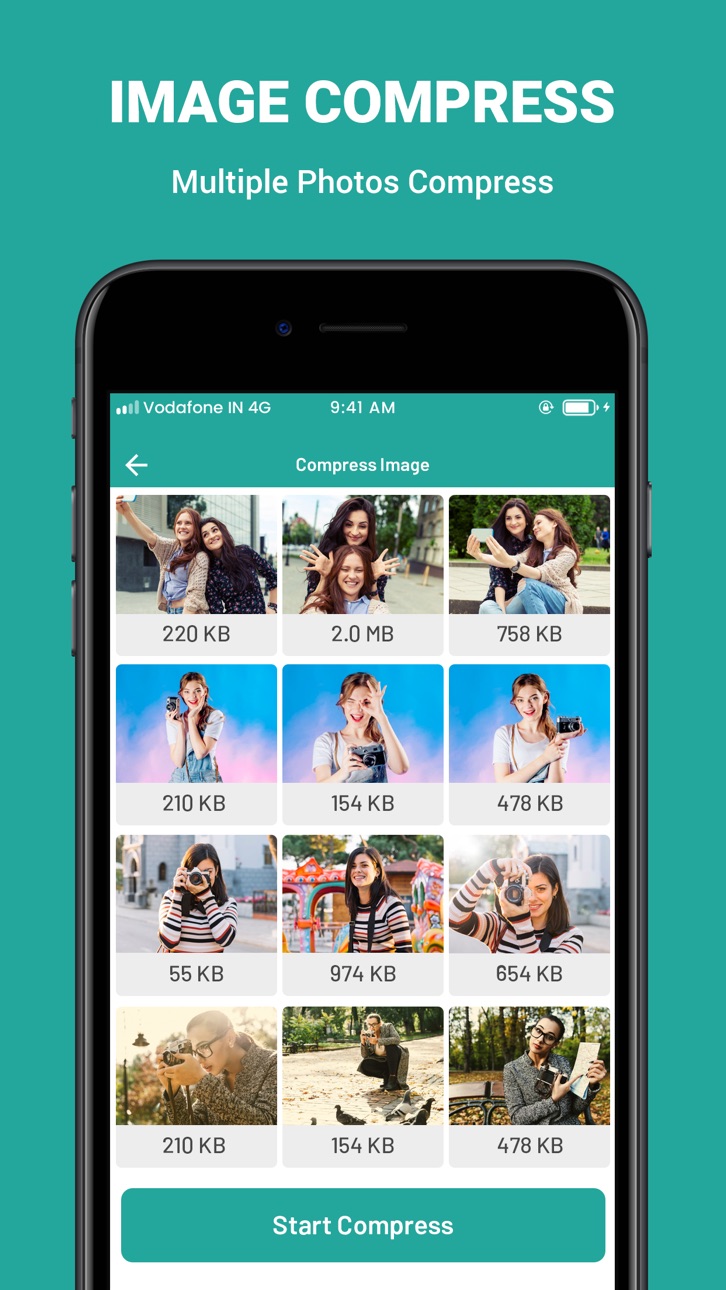
* Multiple Photo Compressor at one time
* Direct Share
* Maintain Resolution
* 90% Compression Result
* resize or crop any image
* Rotate the photo by 90° either clockwise and then crop the photo
* Use finger to zoom/move, rotate the crop area on the photo
* Share photos with your friends via social networks.
How Image Compress Works:
1) select multiple images
2) press start compress button
3) preview screen display all image with total size of image before and after compress process.
4) tap on image to see it's old size and compressed size
5) download or share image direct from app.
How Image Resizer works:
1) select the picture
2) enter the resolution (width x height)
3) press start resize button
4) the selected picture is reduced and displayed
5) download or share image direct from app
How Image Crop works:
1) select image2) press start crop
3) adjust image and press done to crop image
4) the selected picture is crop and displayed
5) download or share image direct from app
share the app with your friends and family member if you like it.
In-App Purchases US pricing
One-Time Purchases
Resize Unlimited Images$6.99
Crop Unlimited Images$6.99
Compress Unlimited Images$9.99
Unlock All Features$17.99
Capabilities
In-App Purchases
Accessibility
ipadiphonemacrealityDevicetvoswatch
Version history 9 versions
Build 865729392v1.82024-05-07 08:11:35
Solve Minor Bug Fix.
Performance Improvement.
Build 864113532v1.72024-02-29 20:21:21
Performance Improvement.
Build 860828713v1.62023-10-20 19:58:02
Solve Minor Bug Fix.
Build 854182536v1.52023-01-09 15:41:48
Performance Improvement.
Build 840776737v1.42021-03-08 14:27:49
Performance Improvement.
Build 836736819v1.32020-07-07 21:23:14
Solve Text Color Issue While phone Is In Dark Mode.
Build 836048454v1.22020-05-21 19:18:37
Performance Improvement.
Build 835970333v1.12020-05-19 17:43:11
Solve Minor Bug.
Performance Improvement.
Build 835901384v1.02020-05-13 23:53:31
Price history by region
Currency
Show
Columns
Search
Availability 68 of 68 storefronts
| Region | Language | Price | Ratings | Avg | Version |
|---|---|---|---|---|---|
| BR | pt-BR | Free | 2 | 1.0 | 1.8 |
| US | en-US | Free | 2 | 3.0 | 1.8 |
| GH | en-GB | Free | 1 | 1.0 | 1.8 |
| NG | en-GB | Free | 1 | 1.0 | 1.8 |
| AG | en-GB | Free | 0 | — | 1.8 |
| AI | en-GB | Free | 0 | — | 1.8 |
| AO | en-GB | Free | 0 | — | 1.8 |
| BB | en-GB | Free | 0 | — | 1.8 |
| BF | en-GB | Free | 0 | — | 1.8 |
| BJ | en-GB | Free | 0 | — | 1.8 |
| BO | es-MX | Free | 0 | — | 1.8 |
| BS | en-GB | Free | 0 | — | 1.8 |
| BW | en-GB | Free | 0 | — | 1.8 |
| BZ | en-GB | Free | 0 | — | 1.8 |
| CD | en-GB | Free | 0 | — | 1.8 |
| CG | en-GB | Free | 0 | — | 1.8 |
| CI | fr-FR | Free | 0 | — | 1.8 |
| CM | fr-FR | Free | 0 | — | 1.8 |
| CO | es-MX | Free | 0 | — | 1.8 |
| CR | es-MX | Free | 0 | — | 1.8 |
| CV | en-GB | Free | 0 | — | 1.8 |
| DM | en-GB | Free | 0 | — | 1.8 |
| DO | es-MX | Free | 0 | — | 1.8 |
| DZ | en-GB | Free | 0 | — | 1.8 |
| EC | es-MX | Free | 0 | — | 1.8 |
| GA | fr-FR | Free | 0 | — | 1.8 |
| GD | en-GB | Free | 0 | — | 1.8 |
| GM | en-GB | Free | 0 | — | 1.8 |
| GT | es-MX | Free | 0 | — | 1.8 |
| GW | en-GB | Free | 0 | — | 1.8 |
| GY | en-GB | Free | 0 | — | 1.8 |
| HN | es-MX | Free | 0 | — | 1.8 |
| JM | en-GB | Free | 0 | — | 1.8 |
| KE | en-GB | Free | 0 | — | 1.8 |
| KN | en-GB | Free | 0 | — | 1.8 |
| KY | en-GB | Free | 0 | — | 1.8 |
| LC | en-GB | Free | 0 | — | 1.8 |
| LY | en-GB | Free | 0 | — | 1.8 |
| MA | en-GB | Free | 0 | — | 1.8 |
| MG | en-GB | Free | 0 | — | 1.8 |
| ML | en-GB | Free | 0 | — | 1.8 |
| MS | en-GB | Free | 0 | — | 1.8 |
| MU | en-GB | Free | 0 | — | 1.8 |
| MX | es-MX | Free | 0 | — | 1.8 |
| MZ | en-GB | Free | 0 | — | 1.8 |
| NA | en-GB | Free | 0 | — | 1.8 |
| NE | en-GB | Free | 0 | — | 1.8 |
| NI | es-MX | Free | 0 | — | 1.8 |
| PA | es-MX | Free | 0 | — | 1.8 |
| PE | es-MX | Free | 0 | — | 1.8 |
| PY | es-MX | Free | 0 | — | 1.8 |
| RW | en-GB | Free | 0 | — | 1.8 |
| SC | en-GB | Free | 0 | — | 1.8 |
| SN | en-GB | Free | 0 | — | 1.8 |
| SR | en-GB | Free | 0 | — | 1.8 |
| ST | en-GB | Free | 0 | — | 1.8 |
| SV | es-MX | Free | 0 | — | 1.8 |
| SZ | en-GB | Free | 0 | — | 1.8 |
| TC | en-GB | Free | 0 | — | 1.8 |
| TD | en-GB | Free | 0 | — | 1.8 |
| TN | en-GB | Free | 0 | — | 1.8 |
| TT | en-GB | Free | 0 | — | 1.8 |
| TZ | en-GB | Free | 0 | — | 1.8 |
| UY | en-GB | Free | 0 | — | 1.8 |
| VC | en-GB | Free | 0 | — | 1.8 |
| VE | es-MX | Free | 0 | — | 1.8 |
| VG | en-GB | Free | 0 | — | 1.8 |
| ZW | en-GB | Free | 0 | — | 1.8 |
Change log 13 changes · US
✎
releaseNotes updated
Solve Minor Bug Fix.
Performance Improvement.
✎
description updated
Photo Compress & Resize helps you quickly reduce your picture size or resolution. Optimize your images with a perfect balance in quality and file size. Photo Co
✎
subtitle updated
Image Compressor & Cropper
✎
name updated
Photo Compress , Resize & Crop
◆
Version 1.8 released
Solve Minor Bug Fix.
Performance Improvement.
◆
Version 1.7 released
Performance Improvement.
◆
Version 1.6 released
Solve Minor Bug Fix.
◆
Version 1.5 released
Performance Improvement.
◆
Version 1.4 released
Performance Improvement.
◆
Version 1.3 released
Solve Text Color Issue While phone Is In Dark Mode.
◆
Version 1.2 released
Performance Improvement.
◆
Version 1.1 released
Solve Minor Bug.
Performance Improvement.
◆
Version 1.0 released