Home › Utilities

 US
US
1 of 1 storefronts
Content in en-US
Content in en-US
Information
Preview 1 platform
iPhone 8 images




What’s New Version 1.17
Bug fix when reconnecting WiFi
Description
Mobile app for lüft made by SunRADON, the company trusted every day by Radon and Indoor-Air-Quality professionals worldwide to monitor homes, schools, workplaces, and health care facilities.
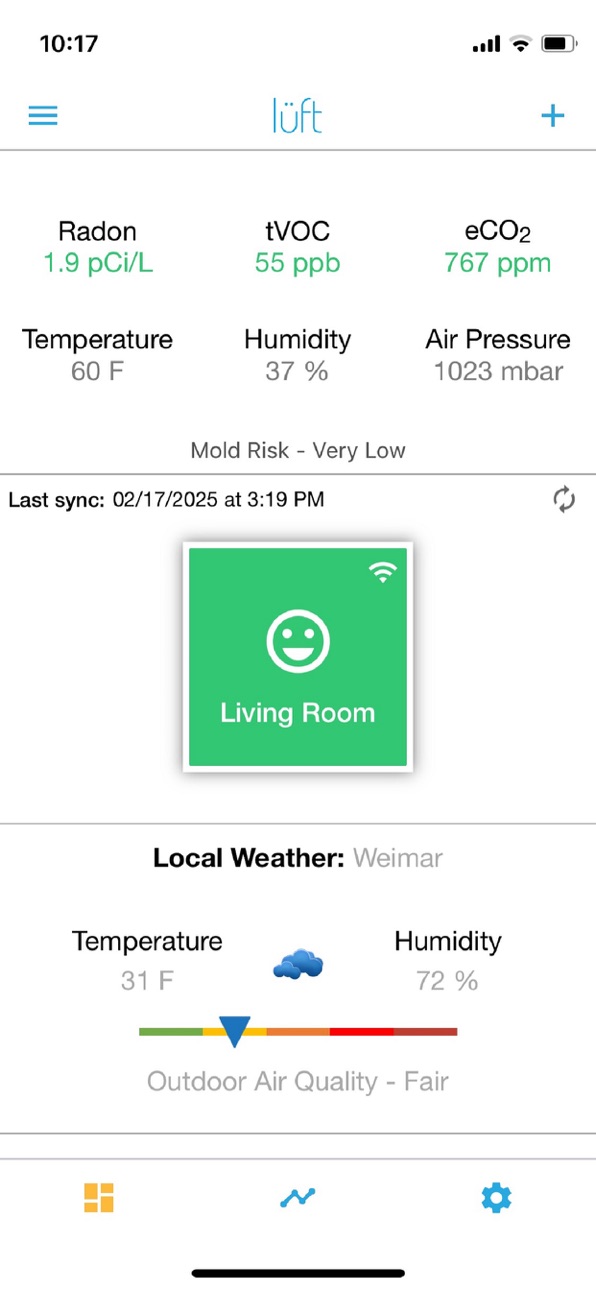
Because clean air matters, the lüft mobile app provides you easy access to monitor your Indoor-Air-Quality from anywhere and anytime. A dashboard view gives you access to (6) IAQ sensor readings at once. Traffic light color coding of the sensor readings quickly visualizes elevated or even dangerous readings. The app also provides Indoor Mold Risk and Outdoor Air Quality Risk Indicators for a complete analysis of the air surrounding you.
Because Air-Quality and Radon levels fluctuate based on your home’s ventilation, airflow, and weather conditions the built-in trend charts let you drill down and review short- and long-term fluctuations from a single day to a year. Setup up custom alerts and notifications when thresholds are reached to take actions to improve the air you breathe.
The lüft Mobile app advanced features also allows you to program the integrated Nightlight function to suit the comfort of your home, synchronize temperature with other lüft™ or HVAC, securely share data with Indoor-Air-Quality professional of your choice, and setup to receive daily, weekly, or monthly air-quality summary reports. It further allows to download trend data for even more in-depth analysis when needed.
Setup as easy as 1-2-3: download app, plug in device, and follow the on-screen instructions.
Accessibility
ipadiphonemacrealityDevicetvoswatch
Version history 17 versions
Build 874746910v1.172025-05-23 02:11:59
Bug fix when reconnecting WiFi
Build 872569004v1.162025-02-18 17:23:46
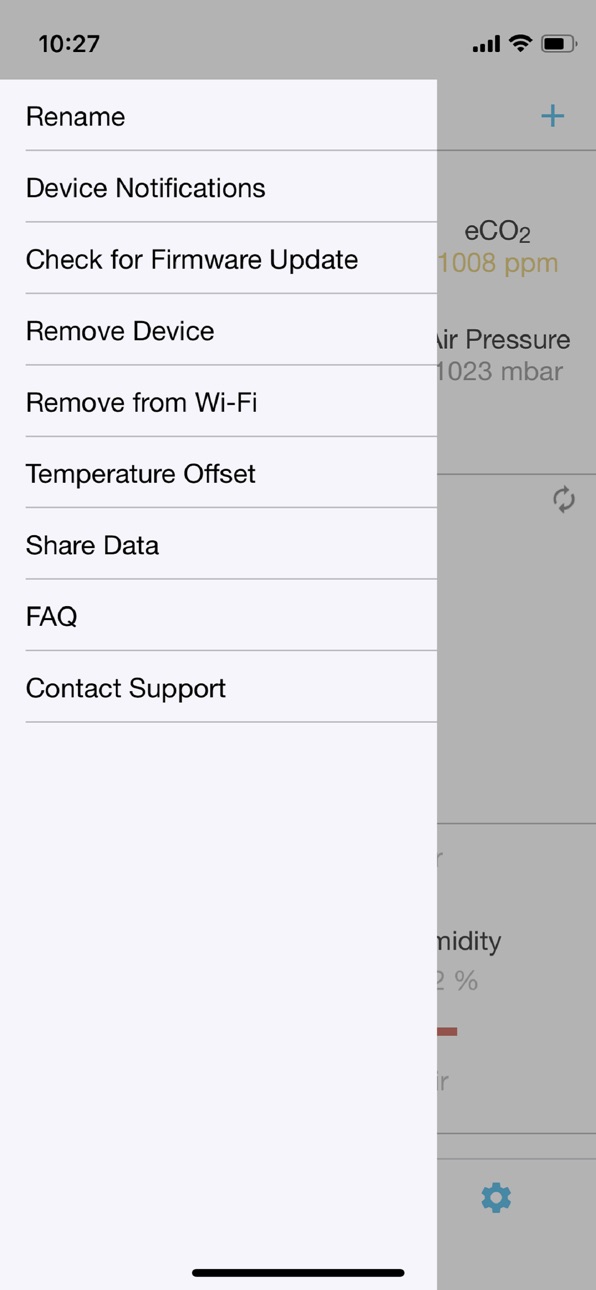
Updated Device Menu UI
Updated FAQ Links
Improved Firmware updates
Improved multiple phone synchronization
Build 867826187v1.152024-07-30 13:36:01
- Ability to disable individual sensor alerts and warnings
- Optional manual data synchronization mode for users of 10 or more devices
- Improved setup guide for new users and when adding devices
Build 854144181v1.142022-12-29 17:22:38
- Added “Get More Help!” screens to aid setup and configuration
- Added Information pop-up screens when pressing sensor values in dashboard
- Improved Error handling and messages
- Improved UI to standardize appearance of buttons
- Bug fix regarding unnecessary time sync requests
- Bug fix app color theme handling
Build 848811013v1.132022-05-04 22:44:58
New: iPhone 13 compatibility
New: Added Outdoor Air Quality Index
New: Added Mold Risk Indicator
New: Ability to download Trend Chart data
New: Frequency of alerts/notification e-mails are now configurable
New: Allow to "Contact Support" via Helpdesk ticket
Improvement: General UI standards including selection boxes
Improvement: Immediate Data visibility when new device is added
Build 844714810v1.122021-10-15 16:10:25
Improved setup
Build 843673393v1.112021-08-19 17:58:44
Bug fix - Troubleshoot log export enabled
Bug fix - MAC address extensions
Bug fix - Bluetooth error message handling
Update - Firmware update url location
Build 840750286v1.102021-03-04 21:46:56
Bug fix: Password reset restrict when logged in with Social Media ID
Bug fix: Added international time zone format for synchronization (EU)
Bug fix: fixed potential app crash when switching charts to 12 months
Bug fix: Improved chart duration selection button layout
Build 839732592v1.92020-12-19 20:16:59
New: Added Trend Chart Auto-Scaling Option and higher Data Density
Bug fix: Limit allowed, special password characters during account creation
Bug fix: "Apply to All" setting now warns that Bluetooth devices are excluded
Build 838018944v1.82020-10-09 10:48:07
- Improvements to Bluetooth backup function
- Improved exception handling and user messaging
- Corrected "warning" to "alert" levels in alert threshold settings
- Apple ID sign-in fix
Build 837547034v1.72020-08-28 15:42:17
Release of Mobile App for Lüft Indoor-Air-Quality Monitor
- Account and Device Setup
- Device Connectivity via Bluetooth and WiFi
- Sensor Dashboard and Trendcharts
- Customized Sensor Settings, Notifications, and Nightlight
- Updates: Altitude Pressure Correction Bug fixed
Build 837450616v1.62020-08-21 11:28:20
Release of Mobile App for Lüft Indoor-Air-Quality Monitor
- Account and Device Setup
- Device Connectivity via Bluetooth and WiFi
- Sensor Dashboard and Trendcharts
- Customized Sensor Settings, Notifications, and Nightlight
- Updates: Fix for Push Notifications
Build 837189902v1.42020-08-02 21:03:16
Release of Mobile App for Lüft Indoor-Air-Quality Monitor
- Account and Device Setup
- Device Connectivity via Bluetooth and WiFi
- Sensor Dashboard and Trendcharts
- Customized Sensor Settings, Notifications, and Nightlight
- Updates: Improved Support for older iPhone's and OS
Build 836930398v1.32020-07-21 15:15:01
Release of Mobile App for Lüft Indoor-Air-Quality Monitor
- Account and Device Setup
- Device Connectivity via Bluetooth and WiFi
- Sensor Dashboard and Trendcharts
- Customized Sensor Settings, Notifications, and Nightlight
- Updates: Improved Connectivity and Synchronization
Build 836884771v1.22020-07-17 14:50:31
Release of Mobile App for Lüft Indoor-Air-Quality Monitor
- Account and Device Setup
- Device Connectivity via Bluetooth and WiFi
- Sensor Dashboard and Trendcharts
- Customized Sensor Settings, Notifications, and Nightlight
- Updates: Improved Connectivity and Synchronization
Build 836846961v1.12020-07-15 14:23:30
Release of Mobile App for Lüft Indoor-Air-Quality Monitor
- Account and Device Setup
- Device Connectivity via Bluetooth and WiFi
- Sensor Dashboard and Trendcharts
- Customized Sensor Settings, Notifications, and Nightlight
- Updates: Improved Connectivity and Synchronization
Build 835861408v1.02020-07-03 20:40:01
No pricing data captured yet — comparisons appear once the app has paid storefronts or in-app purchases.
Availability 1 of 1 storefronts
| Region | Language | Price | Ratings | Avg | Version |
|---|---|---|---|---|---|
| US | en-US | Free | 11 | 2.2 | 1.17 |
Change log 21 changes · US
✎
releaseNotes updated
Bug fix when reconnecting WiFi
✎
description updated
Mobile app for lüft made by SunRADON, the company trusted every day by Radon and Indoor-Air-Quality professionals worldwide to monitor homes, schools, workplace
✎
subtitle updated
Mobile App for lüft Monitors
✎
name updated
lüft - SunRADON
◆
Version 1.17 released
Bug fix when reconnecting WiFi
◆
Version 1.16 released
Updated Device Menu UI
Updated FAQ Links
Improved Firmware updates
Improved multiple phone synchronization
◆
Version 1.15 released
- Ability to disable individual sensor alerts and warnings
- Optional manual data synchronization mode for users of 10 or more devices
- Improved setup guide for new users and when adding devices
◆
Version 1.14 released
- Added “Get More Help!” screens to aid setup and configuration
- Added Information pop-up screens when pressing sensor values in dashboard
- Improved Error handling and messages
- Improved UI to standardize appearance of buttons
- Bug
◆
Version 1.13 released
New: iPhone 13 compatibility
New: Added Outdoor Air Quality Index
New: Added Mold Risk Indicator
New: Ability to download Trend Chart data
New: Frequency of alerts/notification e-mails are now configurable
New: Allow to "Contact Support" vi
◆
Version 1.12 released
Improved setup
◆
Version 1.11 released
Bug fix - Troubleshoot log export enabled
Bug fix - MAC address extensions
Bug fix - Bluetooth error message handling
Update - Firmware update url location
◆
Version 1.10 released
Bug fix: Password reset restrict when logged in with Social Media ID
Bug fix: Added international time zone format for synchronization (EU)
Bug fix: fixed potential app crash when switching charts to 12 months
Bug fix: Improved chart dur
◆
Version 1.9 released
New: Added Trend Chart Auto-Scaling Option and higher Data Density
Bug fix: Limit allowed, special password characters during account creation
Bug fix: "Apply to All" setting now warns that Bluetooth devices are excluded
◆
Version 1.8 released
- Improvements to Bluetooth backup function
- Improved exception handling and user messaging
- Corrected "warning" to "alert" levels in alert threshold settings
- Apple ID sign-in fix
◆
Version 1.7 released
Release of Mobile App for Lüft Indoor-Air-Quality Monitor
- Account and Device Setup
- Device Connectivity via Bluetooth and WiFi
- Sensor Dashboard and Trendcharts
- Customized Sensor Settings, Notifications, and Nightlight
- Updates:
◆
Version 1.6 released
Release of Mobile App for Lüft Indoor-Air-Quality Monitor
- Account and Device Setup
- Device Connectivity via Bluetooth and WiFi
- Sensor Dashboard and Trendcharts
- Customized Sensor Settings, Notifications, and Nightlight
- Updates:
◆
Version 1.4 released
Release of Mobile App for Lüft Indoor-Air-Quality Monitor
- Account and Device Setup
- Device Connectivity via Bluetooth and WiFi
- Sensor Dashboard and Trendcharts
- Customized Sensor Settings, Notifications, and Nightlight
- Updates:
◆
Version 1.3 released
Release of Mobile App for Lüft Indoor-Air-Quality Monitor
- Account and Device Setup
- Device Connectivity via Bluetooth and WiFi
- Sensor Dashboard and Trendcharts
- Customized Sensor Settings, Notifications, and Nightlight
- Updates:
◆
Version 1.2 released
Release of Mobile App for Lüft Indoor-Air-Quality Monitor
- Account and Device Setup
- Device Connectivity via Bluetooth and WiFi
- Sensor Dashboard and Trendcharts
- Customized Sensor Settings, Notifications, and Nightlight
- Updates:
◆
Version 1.1 released
Release of Mobile App for Lüft Indoor-Air-Quality Monitor
- Account and Device Setup
- Device Connectivity via Bluetooth and WiFi
- Sensor Dashboard and Trendcharts
- Customized Sensor Settings, Notifications, and Nightlight
- Updates:
◆
Version 1.0 released