Home › Business

 US
US
USen-US AGen-GB
 AIen-GB
 AOen-GB
 ARes-MX
 ATde-DE
 AUen-AU
 BBen-GB
 BEen-GB
 BFen-GB
 BGen-GB
 BJen-GB
 BOes-MX
 BRpt-BR
 BSen-GB
 BWen-GB
 BZen-GB
 CAen-CA
 CHde-CH
 CIfr-FR
 CLes-MX
 CMfr-FR
 COes-MX
 CRes-MX
 CVen-GB
 CZen-GB
 DEde-DE
 DKen-GB
 DMen-GB
 DOes-MX
 DZen-GB
 ECes-MX
 EEen-GB
 ESes-ES
 FIen-GB
 FRfr-FR
 GAfr-FR
 GBen-GB
 GDen-GB
 GHen-GB
 GMen-GB
 GRen-GB
 GTes-MX
 GYen-GB
 HNes-MX
 HRen-GB
 HUen-GB
 IEen-GB
 ISen-GB
 ITit
ITit JMen-GB
 KEen-GB
 KNen-GB
 KYen-GB
 LCen-GB
 LRen-GB
 LUen-GB
 LVen-GB
 MAen-GB
 MGen-GB
 MLen-GB
 MSen-GB
 MUen-GB
 MWen-GB
 MXes-MX
 MZen-GB
 NAen-GB
 NEen-GB
 NGen-GB
 NIes-MX
 NLnl
NLnl NOen-GB
 PAes-MX
 PEes-MX
 PLen-GB
 PTpt-PT
 PYes-MX
 ROen-GB
 RWen-GB
 SCen-GB
 SEsv
SEsv SIen-GB
 SKen-GB
 SLen-GB
 SNen-GB
 SRen-GB
 STen-GB
 SVes-MX
 SZen-GB
 TCen-GB
 TNen-GB
 TTen-GB
 TZen-GB
 UGen-GB
 UYen-GB
 VCen-GB
 VEes-MX
 VGen-GB
 ZMen-GB
 ZWen-GB
100 of 100 storefronts
Content in en-US
Content in en-US
Information
Preview 2 platforms
iPhone 4 images



iPad 4 images


What’s New Version 3.37.0
Internal improvements.
Description
Our facilities, in the palm of your hand! With this app, you can:
Check-in to our facility with quick, easy, contactless check-in
Book your favorite equipment, classes, and facilities from anywhere, any time
View class wait times and schedules
View favorite and completed classes/activities
Share classes with your friends via email, text or social media
Stay up-to-date with facility news and notifications
This app offers fitness challenges which users can join and integrates with Apple’s HealthKit to collect user's calories burned, distance walked/ran and steps climbed.
Everything you need all in one easy-to-use app. Download now!
Accessibility
ipadiphonemacrealityDevicetvoswatch
Version history 25 versions
Build 887993491v3.37.02026-07-10 20:05:34
Internal improvements.
Build 887434751v3.36.02026-06-25 22:55:29
1. UX/UI improvements.
2. Bug fixes.
Build 886761989v3.35.02026-06-10 14:15:56
1. UX/UI improvements.
2. Bug fixes.
Build 885017964v3.34.12026-04-28 21:08:48
UX/UI improvements.
Build 884568627v3.34.02026-04-22 00:32:15
UX/UI improvements.
Build 883530762v3.33.02026-03-19 18:35:18
1. UX/UI improvements.
2. Bug fixes.
Build 881947774v3.32.02026-01-29 05:54:30
1. UX/UI improvements.
2. Bug fixes.
Build 881408028v3.31.02026-01-13 15:12:41
1. For an organization that has configured multiple reservation groups in the ACTIVENet AUI, the Facilities tab displays the reservation groups. You can tap a reservation group and follow the same Quick Reserve workflow as in the CUI to complete the reservation.
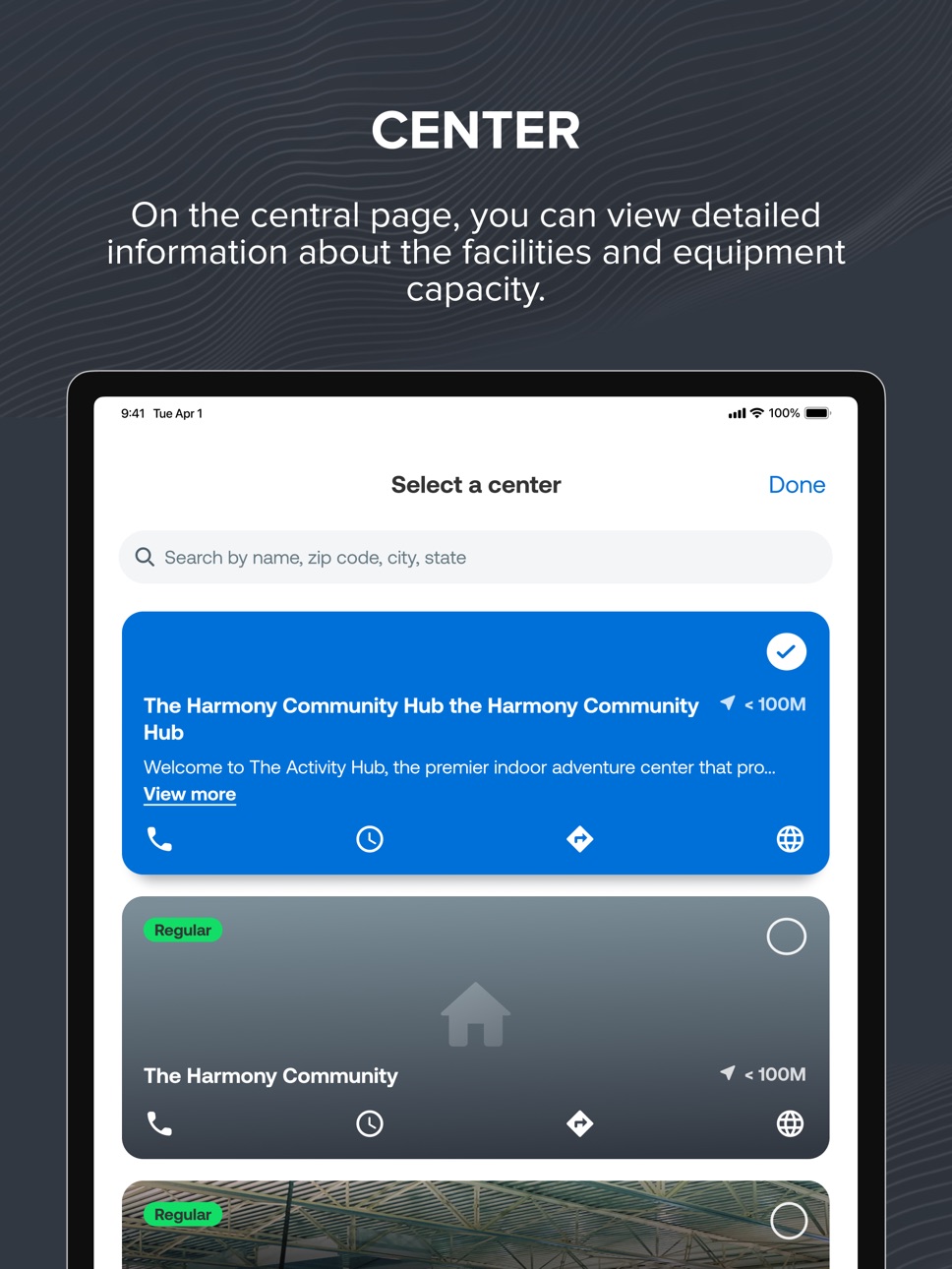
2. The app now displays the full description configured for the centers on the center detail page and the Select a center page.
3. UX/UI improvements.
4. Bug fixes.
Build 880664270v3.30.02025-12-17 07:40:14
1. UX/UI improvements.
2. Bug fixes.
Build 880021785v3.29.02025-11-24 05:02:26
1. You can now collapse filters on the activity search page for a cleaner view.
2. UX/UI improvements.
3. Bug fixes.
Build 879252449v3.28.02025-10-27 23:47:03
1. The system’s username display setting now also applies to the Chat module of the app.
2. UX/UI improvements.
3. Bug fixes.
Build 877985108v3.26.02025-09-10 20:37:47
1. In the Chat module, instructors are now displayed with an "Instructor" badge.
2. The display of operating hours for facilities has been improved.
3. UX/UI improvements.
Build 877015180v3.25.02025-08-06 17:01:56
UI/UX improvements.
Build 875900602v3.24.02025-06-26 12:02:04
1. You can now set the “Unit of distance” setting to km or mi. All distances in the app are then displayed in the specified unit.
2. The display of the Site and Center filters now follows the ACTIVENet AUI configuration settings.
3. UI/UX improvements.
Build 874735769v3.23.02025-05-13 12:05:54
1. UI/UX improvements
2. Bug fixes
Build 873599079v3.22.02025-03-28 22:50:20
1. For organizations with the online calendar enabled, the app now displays a Calendar tab by default.
2. You can share the session registration referral program to Facebook, X, Email or SMS.
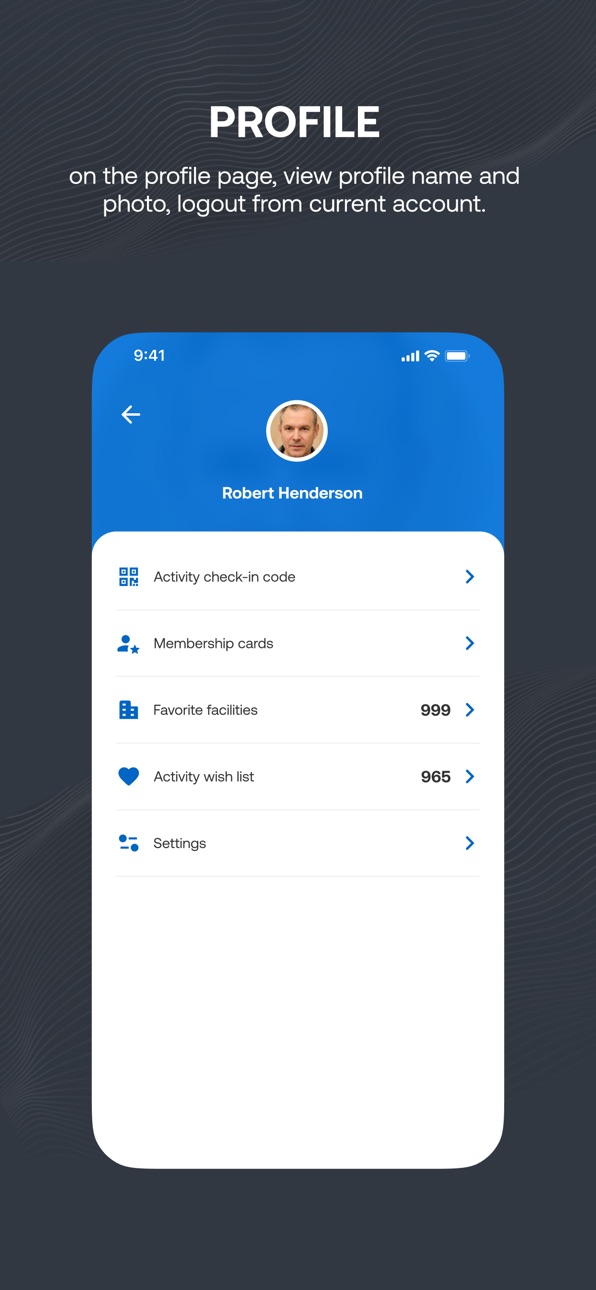
3. After login, you are now prompted to select a preferred center or Skip For Now. You can switch to another center on the profile page.
Build 872621675v3.21.12025-02-19 22:30:14
1. On the login page, if the organization has enabled and configured the SSO feature, then you can select to log into this app by tapping the Login with SSO button and then on the organization’s login page, entering your username and password.
2. UX improvements.
3. Bug fixes.
Build 872434242v3.21.02025-02-13 11:14:19
1. On the login page, if the organization has enabled and configured the SSO feature, then you can select to log into this app by tapping the Login with SSO button and then on the organization’s login page, entering your username and password.
2. UX improvements.
3. Bug fixes.
Build 871053388v3.20.02024-12-11 15:01:54
1. On the activity, facility or equipment detail page, you can tap the Share icon to share the activity, facility or equipment link on social media channels.
2. After you complete a challenge, a congratulatory notification is now displayed.
3. You can check out multiple registration transactions in the shopping cart.
4. UX improvements.
5. Bug fixes.
Build 870096777v3.19.02024-10-31 10:31:30
1. On your profile page, you can tap the My Transactions menu item to view your transactions.
2. A group owner can name or rename their chat group by tapping the group name field and then entering a name.
3. Bug fixes.
Build 869143427v3.18.02024-09-23 05:53:45
1. Under the Messages icon > Chats tab, activity instructors can send private messages to the participant(s) of their activities and staff users. Consumers can participate in a private chat or a chat group if they are invited.
2. You can now tap the homepage > Schedules dropdown and select one or multiple family members to filter the schedules.
3. UX/UI improvements.
4. Bug fixes.
Build 868193124v3.17.02024-08-14 10:11:21
1. If you agree to share your location, then a popup asks if you want to switch to the nearest center and the Select a center page displays centers based on the distance between you and the center.
2. You can delete a notification by tapping the delete icon on the detailed notification page or in the notification list, swiping a notification to the left and then tapping the delete icon.
3. UX/UI enhancements.
4. Bug fixes.
Build 866318542v3.16.02024-05-30 05:51:11
1. You can tap a completed challenge > celebration page > new View leaderboard link to view the challenge ranking list.
2. If you agree to share your location with ACTIVE Captivate, then this app automatically switches to the nearest center.
3. Bug fixes.
Build 865461893v3.15.02024-04-25 06:26:36
1. The Membership Cards page now displays cards for active and renewable memberships and displays additional membership details including pass number, Uses, Valid thru, Renew button and View all membership cards link.
2. On the Challenge details page, tapping the View leaderboard link flips the Challenge details page to display a list of the top ten challenge participants .
3. You can now search for chats by activity name or customer name under the Chats tab.
4. UI improvements.
Build 864744182v3.14.02024-03-27 15:17:13
Instructors and consumers participating in the same activity can now chat with each other by tapping the Messages icon > Chats tab.
No pricing data captured yet — comparisons appear once the app has paid storefronts or in-app purchases.
Availability 100 of 100 storefronts
| Region | Language | Price | Ratings | Avg | Version |
|---|---|---|---|---|---|
| US | en-US | Free | 5 | 5.0 | 3.37.0 |
| AG | en-GB | Free | 0 | — | 3.37.0 |
| AI | en-GB | Free | 0 | — | 3.37.0 |
| AO | en-GB | Free | 0 | — | 3.37.0 |
| AR | es-MX | Free | 0 | — | 3.37.0 |
| AT | de-DE | Free | 0 | — | 3.37.0 |
| AU | en-AU | Free | 0 | — | 3.37.0 |
| BB | en-GB | Free | 0 | — | 3.37.0 |
| BE | en-GB | Free | 0 | — | 3.37.0 |
| BF | en-GB | Free | 0 | — | 3.37.0 |
| BG | en-GB | Free | 0 | — | 3.37.0 |
| BJ | en-GB | Free | 0 | — | 3.37.0 |
| BO | es-MX | Free | 0 | — | 3.37.0 |
| BR | pt-BR | Free | 0 | — | 3.37.0 |
| BS | en-GB | Free | 0 | — | 3.37.0 |
| BW | en-GB | Free | 0 | — | 3.37.0 |
| BZ | en-GB | Free | 0 | — | 3.37.0 |
| CA | en-CA | Free | 0 | — | 3.37.0 |
| CH | de-CH | Free | 0 | — | 3.37.0 |
| CI | fr-FR | Free | 0 | — | 3.37.0 |
| CL | es-MX | Free | 0 | — | 3.37.0 |
| CM | fr-FR | Free | 0 | — | 3.37.0 |
| CO | es-MX | Free | 0 | — | 3.37.0 |
| CR | es-MX | Free | 0 | — | 3.37.0 |
| CV | en-GB | Free | 0 | — | 3.37.0 |
| CZ | en-GB | Free | 0 | — | 3.37.0 |
| DE | de-DE | Free | 0 | — | 3.37.0 |
| DK | en-GB | Free | 0 | — | 3.37.0 |
| DM | en-GB | Free | 0 | — | 3.37.0 |
| DO | es-MX | Free | 0 | — | 3.37.0 |
| DZ | en-GB | Free | 0 | — | 3.37.0 |
| EC | es-MX | Free | 0 | — | 3.37.0 |
| EE | en-GB | Free | 0 | — | 3.37.0 |
| ES | es-ES | Free | 0 | — | 3.37.0 |
| FI | en-GB | Free | 0 | — | 3.37.0 |
| FR | fr-FR | Free | 0 | — | 3.37.0 |
| GA | fr-FR | Free | 0 | — | 3.37.0 |
| GB | en-GB | Free | 0 | — | 3.37.0 |
| GD | en-GB | Free | 0 | — | 3.37.0 |
| GH | en-GB | Free | 0 | — | 3.37.0 |
| GM | en-GB | Free | 0 | — | 3.37.0 |
| GR | en-GB | Free | 0 | — | 3.37.0 |
| GT | es-MX | Free | 0 | — | 3.37.0 |
| GY | en-GB | Free | 0 | — | 3.37.0 |
| HN | es-MX | Free | 0 | — | 3.37.0 |
| HR | en-GB | Free | 0 | — | 3.37.0 |
| HU | en-GB | Free | 0 | — | 3.37.0 |
| IE | en-GB | Free | 0 | — | 3.37.0 |
| IS | en-GB | Free | 0 | — | 3.37.0 |
| IT | it | Free | 0 | — | 3.37.0 |
| JM | en-GB | Free | 0 | — | 3.37.0 |
| KE | en-GB | Free | 0 | — | 3.37.0 |
| KN | en-GB | Free | 0 | — | 3.37.0 |
| KY | en-GB | Free | 0 | — | 3.37.0 |
| LC | en-GB | Free | 0 | — | 3.37.0 |
| LR | en-GB | Free | 0 | — | 3.37.0 |
| LU | en-GB | Free | 0 | — | 3.37.0 |
| LV | en-GB | Free | 0 | — | 3.37.0 |
| MA | en-GB | Free | 0 | — | 3.37.0 |
| MG | en-GB | Free | 0 | — | 3.37.0 |
| ML | en-GB | Free | 0 | — | 3.37.0 |
| MS | en-GB | Free | 0 | — | 3.37.0 |
| MU | en-GB | Free | 0 | — | 3.37.0 |
| MW | en-GB | Free | 0 | — | 3.37.0 |
| MX | es-MX | Free | 0 | — | 3.37.0 |
| MZ | en-GB | Free | 0 | — | 3.37.0 |
| NA | en-GB | Free | 0 | — | 3.37.0 |
| NE | en-GB | Free | 0 | — | 3.37.0 |
| NG | en-GB | Free | 0 | — | 3.37.0 |
| NI | es-MX | Free | 0 | — | 3.37.0 |
| NL | nl | Free | 0 | — | 3.37.0 |
| NO | en-GB | Free | 0 | — | 3.37.0 |
| PA | es-MX | Free | 0 | — | 3.37.0 |
| PE | es-MX | Free | 0 | — | 3.37.0 |
| PL | en-GB | Free | 0 | — | 3.37.0 |
| PT | pt-PT | Free | 0 | — | 3.37.0 |
| PY | es-MX | Free | 0 | — | 3.37.0 |
| RO | en-GB | Free | 0 | — | 3.37.0 |
| RW | en-GB | Free | 0 | — | 3.37.0 |
| SC | en-GB | Free | 0 | — | 3.37.0 |
| SE | sv | Free | 0 | — | 3.37.0 |
| SI | en-GB | Free | 0 | — | 3.37.0 |
| SK | en-GB | Free | 0 | — | 3.37.0 |
| SL | en-GB | Free | 0 | — | 3.37.0 |
| SN | en-GB | Free | 0 | — | 3.37.0 |
| SR | en-GB | Free | 0 | — | 3.37.0 |
| ST | en-GB | Free | 0 | — | 3.37.0 |
| SV | es-MX | Free | 0 | — | 3.37.0 |
| SZ | en-GB | Free | 0 | — | 3.37.0 |
| TC | en-GB | Free | 0 | — | 3.37.0 |
| TN | en-GB | Free | 0 | — | 3.37.0 |
| TT | en-GB | Free | 0 | — | 3.37.0 |
| TZ | en-GB | Free | 0 | — | 3.37.0 |
| UG | en-GB | Free | 0 | — | 3.37.0 |
| UY | en-GB | Free | 0 | — | 3.37.0 |
| VC | en-GB | Free | 0 | — | 3.37.0 |
| VE | es-MX | Free | 0 | — | 3.37.0 |
| VG | en-GB | Free | 0 | — | 3.37.0 |
| ZM | en-GB | Free | 0 | — | 3.37.0 |
| ZW | en-GB | Free | 0 | — | 3.37.0 |
Change log 28 changes · US
✎
releaseNotes updated
Internal improvements.
✎
description updated
Our facilities, in the palm of your hand! With this app, you can:
Check-in to our facility with quick, easy, contactless check-in
Book your favorite equi
✎
name updated
ACTIVENet Captivate
◆
Version 3.37.0 released
Internal improvements.
◆
Version 3.36.0 released
1. UX/UI improvements.
2. Bug fixes.
◆
Version 3.35.0 released
1. UX/UI improvements.
2. Bug fixes.
◆
Version 3.34.1 released
UX/UI improvements.
◆
Version 3.34.0 released
UX/UI improvements.
◆
Version 3.33.0 released
1. UX/UI improvements.
2. Bug fixes.
◆
Version 3.32.0 released
1. UX/UI improvements.
2. Bug fixes.
◆
Version 3.31.0 released
1. For an organization that has configured multiple reservation groups in the ACTIVENet AUI, the Facilities tab displays the reservation groups. You can tap a reservation group and follow the same Quick Reserve workflow as in the CUI to com
◆
Version 3.30.0 released
1. UX/UI improvements.
2. Bug fixes.
◆
Version 3.29.0 released
1. You can now collapse filters on the activity search page for a cleaner view.
2. UX/UI improvements.
3. Bug fixes.
◆
Version 3.28.0 released
1. The system’s username display setting now also applies to the Chat module of the app.
2. UX/UI improvements.
3. Bug fixes.
◆
Version 3.26.0 released
1. In the Chat module, instructors are now displayed with an "Instructor" badge.
2. The display of operating hours for facilities has been improved.
3. UX/UI improvements.
◆
Version 3.25.0 released
UI/UX improvements.
◆
Version 3.24.0 released
1. You can now set the “Unit of distance” setting to km or mi. All distances in the app are then displayed in the specified unit.
2. The display of the Site and Center filters now follows the ACTIVENet AUI configuration settings.
3. UI/UX i
◆
Version 3.23.0 released
1. UI/UX improvements
2. Bug fixes
◆
Version 3.22.0 released
1. For organizations with the online calendar enabled, the app now displays a Calendar tab by default.
2. You can share the session registration referral program to Facebook, X, Email or SMS.
3. After login, you are now prompted to select a
◆
Version 3.21.1 released
1. On the login page, if the organization has enabled and configured the SSO feature, then you can select to log into this app by tapping the Login with SSO button and then on the organization’s login page, entering your username and passwo
◆
Version 3.21.0 released
1. On the login page, if the organization has enabled and configured the SSO feature, then you can select to log into this app by tapping the Login with SSO button and then on the organization’s login page, entering your username and passwo
◆
Version 3.20.0 released
1. On the activity, facility or equipment detail page, you can tap the Share icon to share the activity, facility or equipment link on social media channels.
2. After you complete a challenge, a congratulatory notification is now displayed.
◆
Version 3.19.0 released
1. On your profile page, you can tap the My Transactions menu item to view your transactions.
2. A group owner can name or rename their chat group by tapping the group name field and then entering a name.
3. Bug fixes.
◆
Version 3.18.0 released
1. Under the Messages icon > Chats tab, activity instructors can send private messages to the participant(s) of their activities and staff users. Consumers can participate in a private chat or a chat group if they are invited.
2. You can no
◆
Version 3.17.0 released
1. If you agree to share your location, then a popup asks if you want to switch to the nearest center and the Select a center page displays centers based on the distance between you and the center.
2. You can delete a notification by tappin
◆
Version 3.16.0 released
1. You can tap a completed challenge > celebration page > new View leaderboard link to view the challenge ranking list.
2. If you agree to share your location with ACTIVE Captivate, then this app automatically switches to the nearest center
◆
Version 3.15.0 released
1. The Membership Cards page now displays cards for active and renewable memberships and displays additional membership details including pass number, Uses, Valid thru, Renew button and View all membership cards link.
2. On the Challenge d
◆
Version 3.14.0 released
Instructors and consumers participating in the same activity can now chat with each other by tapping the Messages icon > Chats tab.