Home › Lifestyle

 US
US
1 of 1 storefronts
Content in en-US
Content in en-US
Information
Preview 3 platforms
iPhone 8 images


iPad 6 images


Apple Watch 3 images

What’s New Version 5.11.2
•Behind the scenes improvements to power future features
Description
The HomePro Mobile app puts your smarthome system in your pocket with easy access to your entire home from inside a single app. (Features vary based on your configuration, but any and all of the benefits below can be added to your system, contact your HomePro rep for details)
With the HomePro app you can:
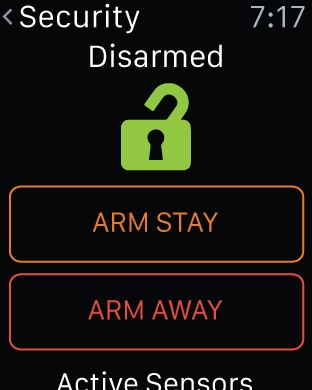
-Remotely arm and disarm your security system
-Answer your video doorbell from anywhere, and view recorded clips from your phone
-Live stream indoor and outdoor cameras to your mobile device and speak to pets and children using Live Talk
-Access and view disarm photos captured by your touchscreen panel camera so you’ll know when people get home
-Peek in on your panel camera instantly or capture photos the next time the camera detects motion
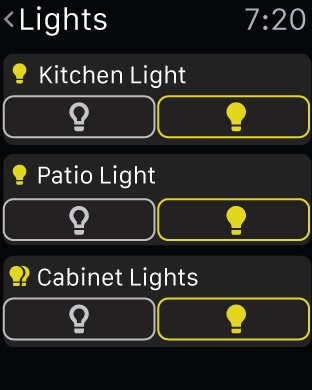
-Remotely access and control your smart lighting to save energy and give the appearance that you’re home even when you’re not
-remotely unlock doors for a friend or neighbor stopping by while you’re not home, and remotely lock it again when they leave
-Create new codes for anyone who should access your home so you never have to make copies of your keys, and remotely manage your codes so you can prevent unwanted access after code abuse.
-Automatically adjust the thermostat when you leave home using geoservices, saving energy and making your arrival more comfortable by automatically resuming your schedule as you return
-Get alerts when you leave a door, window, medicine cabinet, or garage door open, and remotely close garage doors so you don’t have to turn around and go back to close it manually.
-Receive in app notifications or text messages when a smoke detector, flood detector, carbon monoxide detector, or security sensor is tripped
-Create unlimited customizable smart scenes to easily control multiple actions with a single touch, like “Leaving” which locks your doors, turns off all your lights and appliances, adjusts the temperature, closes your garage and arms your security system, keeping your home secure and energy efficient while you are gone.
-View a snapshot of your day with easy timelines that keep you aware of what’s happened in your home even though you missed it earlier
-Trigger an emergency panic right from the app if suspicious characters attempt an attack
Accessibility
ipadiphonemacrealityDevicetvoswatch
Version history 20 versions
Build 877969905v5.11.22025-09-17 00:37:19
•Behind the scenes improvements to power future features
Build 874403927v5.10.42025-08-06 12:27:47
•Behind the scenes improvements to power future features
Build 873434209v5.9.32025-03-21 20:01:48
•Behind the scenes improvements to power future features
Build 870954412v5.9.22025-03-18 18:34:15
•Behind the scenes improvements to power future features
Build 866115046v5.4.02024-05-30 13:58:42
• Behind the scenes improvements to power future features.
Build 864845185v5.3.12024-04-02 12:36:43
• Behind the scenes improvements to power future features.
Build 863457467v5.2.62024-02-08 16:53:54
• Behind the scenes improvements to power future features.
Build 862188889v5.2.22023-12-14 14:37:00
• Behind the scenes improvements to power future features.
Build 861599267v5.2.12023-11-29 19:19:27
• Behind the scenes improvements to power future features
Build 861285636v5.1.32023-11-17 00:48:53
• Behind the scenes improvements to power future features
Build 858497275v5.0.12023-08-02 00:26:31
• Behind the scenes improvements to power future features
Build 857065262v4.21.272023-05-23 16:10:12
• Behind the scenes improvements to power future features
Build 855419732v4.21.242023-03-10 18:42:02
• Behind the scenes improvements to power future features
Build 853953438v4.21.212022-12-22 23:12:20
• Behind the scenes improvements to power future features
Build 853154047v4.21.182022-11-08 22:57:27
iOS App 4.21.15
Save
You’re currently using Apple Watch Series 3 screenshots for your latest watch build. Adding screenshots for the newest devices can help you accurately represent your app’s user experience on the App Store. Add Screenshots
Version Information
The product page for this app version will be published on the App Store with the assets and metadata below.
English (U.S.)
?
iOS Previews and Screenshots
Adding screenshots for the newest devices can help you accurately represent your app's user experience on the App Store. Keep in mind that we'll use these screenshots for all iOS device sizes and localizations. Screenshots are only required for iOS apps.
View All Sizes in Media Manager
iPhone
6.7" Display
(Optional)
iPhone
6.5" Display
(Required)
iPhone
5.5" Display
(Required)
iPad Pro (6th Gen)
12.9" Display
(Required)
iPad Pro (2nd Gen)
12.9" Display
(Required)
Using 6.5" Display
App Screenshot
App Screenshot
App Screenshot
App Screenshot
App Screenshot
App Screenshot
App Screenshot
App Screenshot
App Screenshot
Promotional Text
Edit
170
Description
The HomePro Mobile app puts your smarthome system in your pocket with easy access to your entire home from inside a single app. (Features vary based on your configuration, but any and all of the benefits below can be added to your system, contact your HomePro rep for details)
With the HomePro app you can:
-Remotely arm and disarm your security system
-Answer your video doorbell from anywhere, and view recorded clips from your phone
-Live stream indoor and outdoor cameras to your mobile device and speak to pets and children using Live Talk
-Access and view disarm photos captured by your touchscreen panel camera so you’ll know when people get home
-Peek in on your panel camera instantly or capture photos the next time the camera detects motion
-Remotely access and control your smart lighting to save energy and give the appearance that you’re home even when you’re not
-remotely unlock doors for a friend or neighbor stopping by while you’re not home, and remotely lock it again when they leave
-Create new codes for anyone who should access your home so you never have to make copies of your keys, and remotely manage your codes so you can prevent unwanted access after code abuse.
-Automatically adjust the thermostat when you leave home using geoservices, saving energy and making your arrival more comfortable by automatically resuming your schedule as you return
-Get alerts when you leave a door, window, medicine cabinet, or garage door open, and remotely close garage doors so you don’t have to turn around and go back to close it manually.
-Receive in app notifications or text messages when a smoke detector, flood detector, carbon monoxide detector, or security sensor is tripped
-Create unlimited customizable smart scenes to easily control multiple actions with a single touch, like “Leaving” which locks your doors, turns off all your lights and appliances, adjusts the temperature, closes your garage and arms your security system, keeping your home secure and energy efficient while you are gone.
-View a snapshot of your day with easy timelines that keep you aware of what’s happened in your home even though you missed it earlier
-Trigger an emergency panic right from the app if suspicious characters attempt an attack
1,736
What's New in This Version
• Behind the scenes improvements to power future features
Build 852686535v4.21.152022-10-14 15:33:58
• Behind the scenes improvements to power future features
Build 850375234v4.21.132022-06-28 13:43:50
• Behind the scenes improvements to power future features
Build 839306404v4.21.82022-03-21 19:08:13
• Behind the scenes improvements to power future features
Build 839268986v4.162020-11-20 16:10:53
• Doorbell Call Screen Enhancements - Access additional actions from the Doorbell call screen. Now you can arm your system as well as control lights, garage, and access control doors — all without leaving an active doorbell call.
• Home Screen Quick Actions - Users with a doorbell camera can now set up a Home Screen Quick Action via the App Settings menu, to start a doorbell call from the app launcher icon.
• Control Lights with Siri Shortcuts - Under App Settings, you can now set up a voice shortcut to control your lights and light groups via Siri.
Build 835043238v4.11.22020-04-21 14:25:29
No pricing data captured yet — comparisons appear once the app has paid storefronts or in-app purchases.
Availability 1 of 1 storefronts
| Region | Language | Price | Ratings | Avg | Version |
|---|---|---|---|---|---|
| US | en-US | Free | 205 | 2.7 | 5.11.2 |
Change log 23 changes · US
✎
releaseNotes updated
•Behind the scenes improvements to power future features
✎
description updated
The HomePro Mobile app puts your smarthome system in your pocket with easy access to your entire home from inside a single app. (Features vary based on your con
✎
name updated
HomePro Security
◆
Version 5.11.2 released
•Behind the scenes improvements to power future features
◆
Version 5.10.4 released
•Behind the scenes improvements to power future features
◆
Version 5.9.3 released
•Behind the scenes improvements to power future features
◆
Version 5.9.2 released
•Behind the scenes improvements to power future features
◆
Version 5.4.0 released
• Behind the scenes improvements to power future features.
◆
Version 5.3.1 released
• Behind the scenes improvements to power future features.
◆
Version 5.2.6 released
• Behind the scenes improvements to power future features.
◆
Version 5.2.2 released
• Behind the scenes improvements to power future features.
◆
Version 5.2.1 released
• Behind the scenes improvements to power future features
◆
Version 5.1.3 released
• Behind the scenes improvements to power future features
◆
Version 5.0.1 released
• Behind the scenes improvements to power future features
◆
Version 4.21.27 released
• Behind the scenes improvements to power future features
◆
Version 4.21.24 released
• Behind the scenes improvements to power future features
◆
Version 4.21.21 released
• Behind the scenes improvements to power future features
◆
Version 4.21.18 released
iOS App 4.21.15
Save
You’re currently using Apple Watch Series 3 screenshots for your latest watch build. Adding screenshots for the newest devices can help you accurately represent your app’s user experience on the App Store. Add Scree
◆
Version 4.21.15 released
• Behind the scenes improvements to power future features
◆
Version 4.21.13 released
• Behind the scenes improvements to power future features
◆
Version 4.21.8 released
• Behind the scenes improvements to power future features
◆
Version 4.16 released
• Doorbell Call Screen Enhancements - Access additional actions from the Doorbell call screen. Now you can arm your system as well as control lights, garage, and access control doors — all without leaving an active doorbell call.
• Home Sc
◆
Version 4.11.2 released