Home › Education

 US
US
1 of 1 storefronts
Content in en-US
Content in en-US
Information
Preview 3 platforms
iPhone 9 images


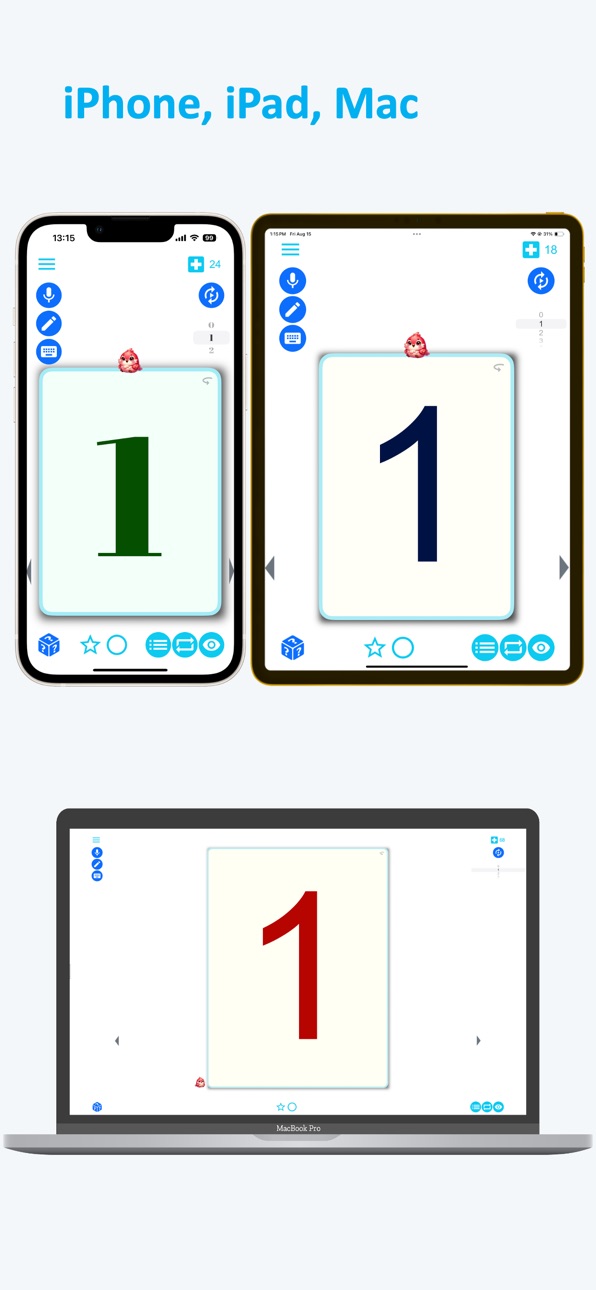
iPad 9 images


Mac 8 images


What’s New Version 2.91
New Features
• Added a joystick control for smoother and more intuitive navigation.
• Added an expand button for quicker access to learning tools.
• Added hint support in Popup Quiz mode.
• Added Choice Popup Quiz mode.
• Added Listening Popup Quiz mode.
Bug Fixes
• General improvements and stability enhancements.
Description
Learn Norwegian effortlessly with visual association techniques. From alphabets to daily conversations, Emme Norwegian makes language learning enjoyable!
Emme Norwegian is your personal language tutor right in the palm of your hand. With visual association techniques, learning Norwegian becomes easy and fun. Whether you’re mastering your native language, learning Norwegian as a second language, or just starting your language journey, Emme Norwegian will guide you every step of the way.
# Emme Norwegian’s Unique Learning Method
• Visual Association Learning: Connect vivid images with words to enhance memory and retention.
• Diverse Learning Content: Structured learning paths from alphabets, numbers, words, sentences, to everyday conversations.
• Gamified Learning Experience: Stay motivated with scoring systems and fun challenges.
• Pronunciation Practice: Listen to native Norwegian speakers and practice accurate pronunciation.
• Writing Practice: Practice handwriting and dictation with AI recognition.
• Customized Learning Pace: Learn at your own speed, conveniently anytime and anywhere.
# What You Can Learn
• Letters and Numbers: Fundamental Norwegian skills from the basics.
• Essential Vocabulary: Easily remember words through visual aids.
• Practical Conversations: Expressions immediately usable in daily life, such as travel, shopping, and greetings.
• Encyclopedia: Cultural background knowledge through integrated Wikipedia content.
# Focused Language
This version of the app focuses exclusively on Norwegian learning.
# Fun Learning Experience
• Cute Characters: Enjoy learning alongside delightful characters.
• Intuitive Interface: Easy-to-use and user-friendly design.
• Various Input Methods: Engage through microphone, pen, keyboard, and more.
• Sense of Achievement: Rewards and a sense of accomplishment as you progress.
# Why Choose Emme Norwegian?
• Effective Learning Methodology: Enhance long-term memory through visual association.
• Fun Learning Experience: Forget boring memorization—learn Norwegian while having fun.
• Learn Anywhere: Efficient learning, even on-the-go or during short breaks.
• Suitable for All Ages: Ideal for anyone from kids to adults wanting to learn Norwegian.
# Start for Free!
Emme Norwegian provides daily free learning points and basic features. Unlock unlimited learning points and additional content through premium in-app purchases.
Begin your journey into the world of Norwegian with Emme Norwegian today. Experience how enjoyable language learning can truly be!
In-App Purchases US pricing
Subscription for unlimited study and test game Subscription
Monthly pass · Monthly$6.99
Annual pass · Yearly$49.99
One-Time Purchases
Lifetime pass$159.00
Capabilities
In-App Purchases
Accessibility
ipadiphonemacrealityDevicetvoswatch
Version history 25 versions
Build 885383754v2.912026-05-14 20:51:09
New Features
• Added a joystick control for smoother and more intuitive navigation.
• Added an expand button for quicker access to learning tools.
• Added hint support in Popup Quiz mode.
• Added Choice Popup Quiz mode.
• Added Listening Popup Quiz mode.
Bug Fixes
• General improvements and stability enhancements.
Build 880169963v2.852025-12-17 07:02:46
New Features
• Faster app launch for a smoother start.
• Added a shuffle option to Auto Play for learning content.
• Refreshed app icon on Mac for a cleaner look.
• Updated UI with a modern glass-like texture.
• Enhanced UX tailored to age-specific ratings.
• App now adapts to the device’s system text size for improved accessibility.
• Updated Popup Quiz UI.
• Added subtle motion effects to learning content for a more engaging experience.
Bug Fixes
• General improvements and stability enhancements
Build 876270618v2.782025-07-12 05:24:23
New Features:
• Popup Cards now appear with a long press.
Bug Fixes:
• Resolved various issues to improve app stability and performance.
Build 872817609v2.762025-02-26 20:57:04
New Features:
• Classmates Tina, Sophy, Rola, Cuti, and Hank.
• Added a “Turtle Speed” button for slow sentence reading.
• Sign-in UX update
Bug Fixes:
• Resolved various issues to improve app stability and performance.
• In app purchase validation bug fix update.
Build 871789743v2.732025-01-16 08:14:28
Enhanced Popup Quiz:
• Added new settings for better customization.
• Introduced “Fill the Text” mode for dictation quizzes.
• Added “Number Name Quiz” for enhanced learning.
New Features:
• Email progress reports directly from the app.
• Added a fun Random Dice feature for interactive learning.
• Vocabulary cards now include a built-in dictionary for quick reference.
Bug Fixes:
• Resolved various issues to improve app stability and performance.
Build 865368176v2.262024-04-24 19:31:45
1. Introduce a feature to create lists for favorite topics, completed modules, and recently studied subjects.
2. Implement a feature to select specific study lists for a more tailored learning experience.
3. Add a feature to shuffle study materials, providing a varied learning experience.
4. Conduct bug fixes and performance improvements to enhance user experience.
Build 862059633v2.182023-12-08 22:30:51
Bug fixes and performance improvements update.
Build 861549483v2.172023-11-17 06:15:32
Sentence quiz and Sentence structure quiz have been added, along with bug fixes and performance improvements.
Build 857557986v2.132023-06-03 19:11:04
Color customization, visibility control, bug fixes and performance improvement update.
Build 856224762v2.092023-04-09 16:56:55
Alert UI, bug fixes and performance improvements.
Build 854288195v2.032023-01-09 10:59:48
UI 2.03 update.
Build 850439572v2.012022-11-29 18:57:14
UI update
Build 847967881v5.872022-03-31 14:35:58
UI and optimization update.
Build 847392667v5.842022-02-26 23:58:11
UI and optimization update.
Build 846545065v5.602022-01-11 23:46:39
Translation page is updated.
Build 845944336v5.502021-12-15 19:54:29
Translation is added.
Build 843151278v4.952021-07-18 12:05:32
This update includes fixes and improvements.
Build 842442924v4.902021-06-02 23:06:36
Handwriting is improved
Build 841948294v4.752021-04-28 17:57:13
UI update
Build 841353832v4.702021-04-14 15:43:30
Fonts are added.
UI is updated.
Build 840885516v4.502021-03-14 17:38:07
Font customizing is added
Build 840476896v4.022021-02-13 19:57:00
Speaking recognition is added.
Handwriting recognition is added.
Build 839537592v3.62020-12-07 23:15:11
Vocabulary notification is added.
Build 837976354v3.42020-09-27 15:31:36
UI/UX upgrade
Build 837884080v3.22020-09-24 00:13:36
Improved UX
Price history by region
Currency
Show
Columns
Search
Availability 1 of 1 storefronts
| Region | Language | Price | Ratings | Avg | Version |
|---|---|---|---|---|---|
| US | en-US | Free | 1 | 5.0 | 2.91 |
Change log 29 changes · US
✎
releaseNotes updated
New Features
• Added a joystick control for smoother and more intuitive navigation.
• Added an expand button for quicker access to learning tools.
• Added hint
✎
description updated
Learn Norwegian effortlessly with visual association techniques. From alphabets to daily conversations, Emme Norwegian makes language learning enjoyable!
Emme
✎
subtitle updated
Norwegian tutor in your hand
✎
name updated
Emme Norwegian
◆
Version 2.91 released
New Features
• Added a joystick control for smoother and more intuitive navigation.
• Added an expand button for quicker access to learning tools.
• Added hint support in Popup Quiz mode.
• Added Choice Popup Quiz mode.
• Added Listening Po
◆
Version 2.85 released
New Features
• Faster app launch for a smoother start.
• Added a shuffle option to Auto Play for learning content.
• Refreshed app icon on Mac for a cleaner look.
• Updated UI with a modern glass-like texture.
• Enhanced UX tailored to age-
◆
Version 2.78 released
New Features:
• Popup Cards now appear with a long press.
Bug Fixes:
• Resolved various issues to improve app stability and performance.
◆
Version 2.76 released
New Features:
• Classmates Tina, Sophy, Rola, Cuti, and Hank.
• Added a “Turtle Speed” button for slow sentence reading.
• Sign-in UX update
Bug Fixes:
• Resolved various issues to improve app stability and performance.
• In app purchase va
◆
Version 2.73 released
Enhanced Popup Quiz:
• Added new settings for better customization.
• Introduced “Fill the Text” mode for dictation quizzes.
• Added “Number Name Quiz” for enhanced learning.
New Features:
• Email progress reports directly from the app.
• A
◆
Version 2.26 released
1. Introduce a feature to create lists for favorite topics, completed modules, and recently studied subjects.
2. Implement a feature to select specific study lists for a more tailored learning experience.
3. Add a feature to shuffle study
◆
Version 2.18 released
Bug fixes and performance improvements update.
◆
Version 2.17 released
Sentence quiz and Sentence structure quiz have been added, along with bug fixes and performance improvements.
◆
Version 2.13 released
Color customization, visibility control, bug fixes and performance improvement update.
◆
Version 2.09 released
Alert UI, bug fixes and performance improvements.
◆
Version 2.03 released
UI 2.03 update.
◆
Version 2.01 released
UI update
◆
Version 5.87 released
UI and optimization update.
◆
Version 5.84 released
UI and optimization update.
◆
Version 5.60 released
Translation page is updated.
◆
Version 5.50 released
Translation is added.
◆
Version 4.95 released
This update includes fixes and improvements.
◆
Version 4.90 released
Handwriting is improved
◆
Version 4.75 released
UI update
◆
Version 4.70 released
Fonts are added.
UI is updated.
◆
Version 4.50 released
Font customizing is added
◆
Version 4.02 released
Speaking recognition is added.
Handwriting recognition is added.
◆
Version 3.6 released
Vocabulary notification is added.
◆
Version 3.4 released
UI/UX upgrade
◆
Version 3.2 released
Improved UX