Home › Music

 US
US
1 of 1 storefronts
Content in en-US
Content in en-US
Information
Preview 2 platforms
iPhone 9 images


iPad 6 images


What’s New Version 1.96
The product (AudioUnit AUv3) was updated for support of latest Apple technologies and frameworks (architecture: arm64).
Minimal iOS target is still 12.0. It also should work on the Vision Pro (compatibility mode).
Description
Remarks: This is an Audio Unit, but you have to open the distribution app ones at least to install the included IR file library.
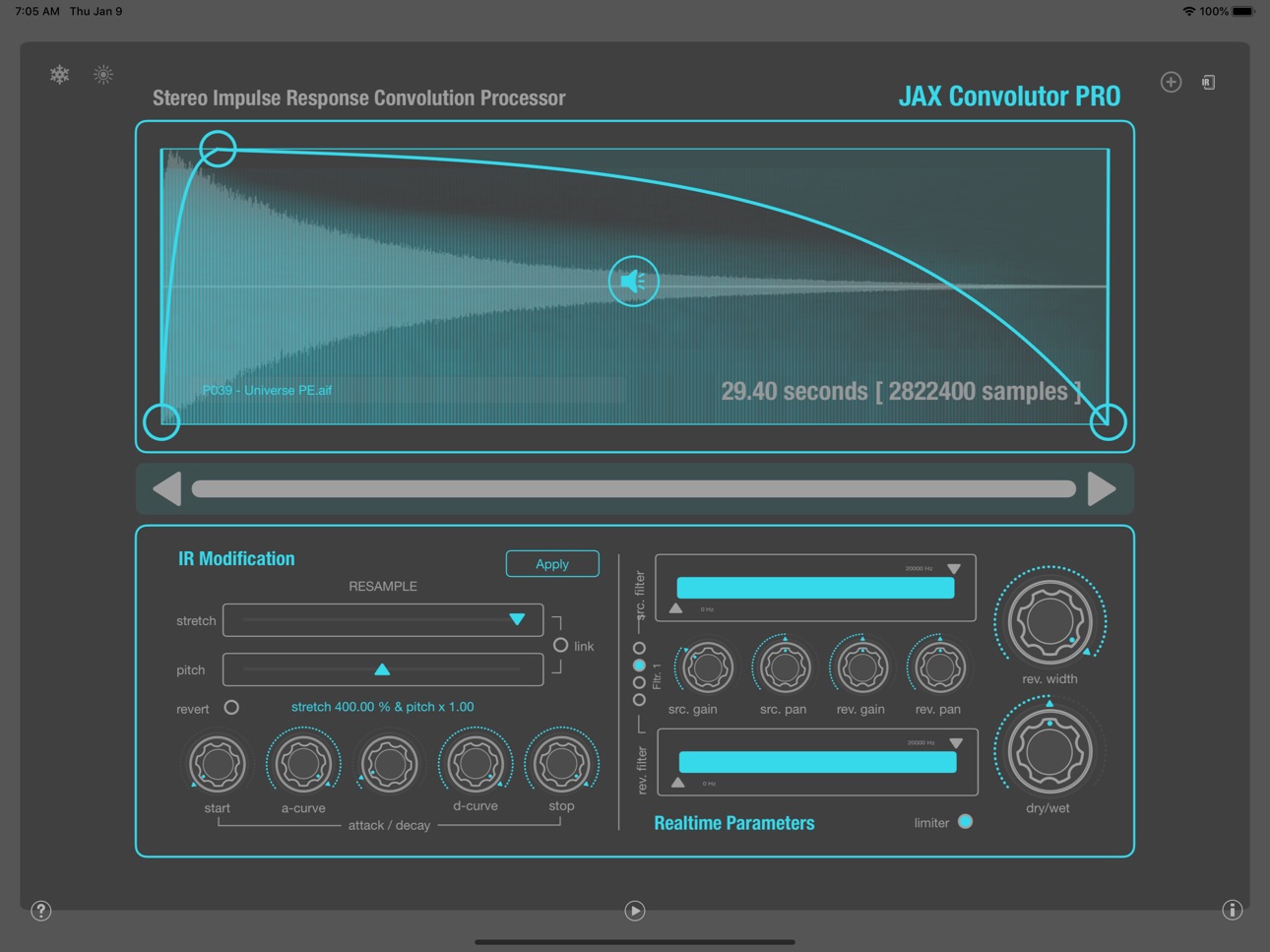
Convolution is a highly complex signal processing approach, that needs some certain computation power. The recorded impulse response of a real world environment is used to render a reverberation effect onto any audio material, so that it sounds like the source was played in that original room or at that location. Some further adjustments and manipulations can be applied to refine these results.
Now this all may sound somewhat naive at first listen but the entire calculation is extremely complex math, so that the very first processors and computers were able to perform this in realtime rather around the end of the last millennium.
Basically, the impulse responses and the audio stream are completely analyzed with FFT algorithms and then the entire analysis data will be cross-modulated into the realtime audio stream by performing a repeated highly performance intensive re-synthesis and accumulation processing for each analysis block of the impulse response.
Therefore it is a crucial performance factor that you use JAX Convolutor with larger processing buffer sizes (1024) samples. Shorter buffers may raise the CPU hit exorbitantly for several reasons.
The manual is embedded into the main app.
Accessibility
ipadiphonemacrealityDevicetvoswatch
Version history 3 versions
Build 864150795v1.962024-03-03 09:59:05
The product (AudioUnit AUv3) was updated for support of latest Apple technologies and frameworks (architecture: arm64).
Minimal iOS target is still 12.0. It also should work on the Vision Pro (compatibility mode).
Build 834340156v1.952020-01-14 17:49:42
Maintenance update version 1.9
- There was a fairly gritty sound caused by a wrong optimization. This has been fixed.
- A new global option can switch between different render modi, which affects performance. The UI has got new controls for this.
LQ is a low quality rendering mode, especially for performance reasons. But also the sound is slightly different (muddier) with that.
HQ is the better (not the best possible yet) rendering quality. It uses clearly more CPU cycles.
PASS will completely bypass the convolution engine for testing and temporary suspending purposes. It is useful to free the CPU from overload instantly.
- There is an inbuilt reverberation detection algorithm now, which auto-suspends the engine if very quiet (inaudible) levels occur.
It does not make any sense to continuously convolute milliards of samples that are inaudible. Most audio units actually have such issues.
- The preset loading and parameter recall with IR load should now work as expected.
Please note, that this is a quite difficult thing, because Audio Units are limited in doing allocations and file operations while operation.
It is also complicated because AU parameters do not support raw data or strings but merely floating point values.
- An offline rendering bug was corrected. Many users reported problems with rendering 'offline'.
This problem was specific to some host applications, doing offline rendering in a questionable way.
Maintenance update version 1.95
- We have changed the Dry/Wet scheme. The reverberated signal can now be completely isolated from the input signal.
Previous versions had a max. 50/50% percent "Mix" of the input and its convolution result. So if you want to recreate the 100% dry/wet of the previous versions,
please set the dry/wet parameter to 50% now.
Complete isolation (100% now) enables to cut out the input signal completely (this is thought for supporting send busses).
- We got advices that some (long) user loaded IR files will produce very quiet results of reverberation.
The problem here is most likely, that these files are not properly normalized. Convolutors expect normalized levels.
This effect of reduced loudness will accumulate, if very long IRs are not normalized, because the larger the convolution tail is,
the more pre-calculated internal loudness reduction must be applied for a correctly leveled convolution result.
You may correct loudness with the reverb gain parameter up to a certain amount manually.
- Better use quality produced IRs or preprocess such files prior importing. Such IRs will most probably be files, where the dynamic and the stereo field has been optimized.
IRs with low dynamics tend to become quiet and weak. You also may become creative, if you feed some sort of stereo noise with rich frequency content into JAX Convolutor PRO.
Some IRs, optimized for certain commercial convolution engines may not be automatically optimal for JAX Convolutor without editing or some preparation.
- Note: JAX Convolutor PRO will NOT normalize IRs on import, nor will they normalize cut parts of an IR when editing,
even if the display always displays normalized waveforms for better visual control.
- JAX Convolutor PRO expects IR files with the sample rate of the current processing sample rate.
These will not be stretched on import but you always have the possibility to stretch them with the IR stretch parameter manually.
Some last words to BUGS: Bugs are everywhere and in-avoidable. Please support your developers actively by switching on
sending automated anonymous crash reports to the apple servers. This is secure and no personal data is transmitted.
Such reports are essential for identifying device specific problems and mistakes inside the code.
And it will enable the developers to fix them in a short period of time, as you may expect.
Build 834270333v1.92020-01-10 17:30:07
Price history by region
Currency
Show
Columns
Search
Availability 1 of 1 storefronts
| Region | Language | Price | Ratings | Avg | Version |
|---|---|---|---|---|---|
| US | en-US | USD 9.99 | 5 | 4.6 | 1.96 |
Change log 7 changes · US
✎
releaseNotes updated
The product (AudioUnit AUv3) was updated for support of latest Apple technologies and frameworks (architecture: arm64).
Minimal iOS target is still 12.0. It als
✎
description updated
Remarks: This is an Audio Unit, but you have to open the distribution app ones at least to install the included IR file library.
Convolution is a highly comple
✎
subtitle updated
Adv. Stereo Convolution Reverb
✎
name updated
JAX Convolutor PRO (AU)
◆
Version 1.96 released
The product (AudioUnit AUv3) was updated for support of latest Apple technologies and frameworks (architecture: arm64).
Minimal iOS target is still 12.0. It also should work on the Vision Pro (compatibility mode).
◆
Version 1.95 released
Maintenance update version 1.9
- There was a fairly gritty sound caused by a wrong optimization. This has been fixed.
- A new global option can switch between different render modi, which affects performance. The UI has got new controls f
◆
Version 1.9 released