Home › Productivity

 US
US
1 of 1 storefronts
Content in en-US
Content in en-US
Information
Preview 2 platforms
iPhone 4 images


iPad 4 images


What’s New Version 1.1
Full ARRI ALEXA 35 Xtreme Support
The ARRI Camera Companion App is now fully compatible with the new ARRI ALEXA 35 Xtreme. Activate 'Camera is ALEXA 35 Xtreme' in project settings if you use an ALEXA 35 Xtreme.
New Features and Improvements:
- New ARRICORE codec available in recording resolution tile
- New recording resolutions available in recording resolution tile
- Sensor Overdrive can be activated from the FPS tile
- FPS tile shows the available frame rate range based on your current recording settings
- Support for new user buttons
- Bug fixes and improvements
As always, we value your feedback. Please get in touch with companionapp@arri.de if you would like to share any feedback, feature requests or require support.
Description
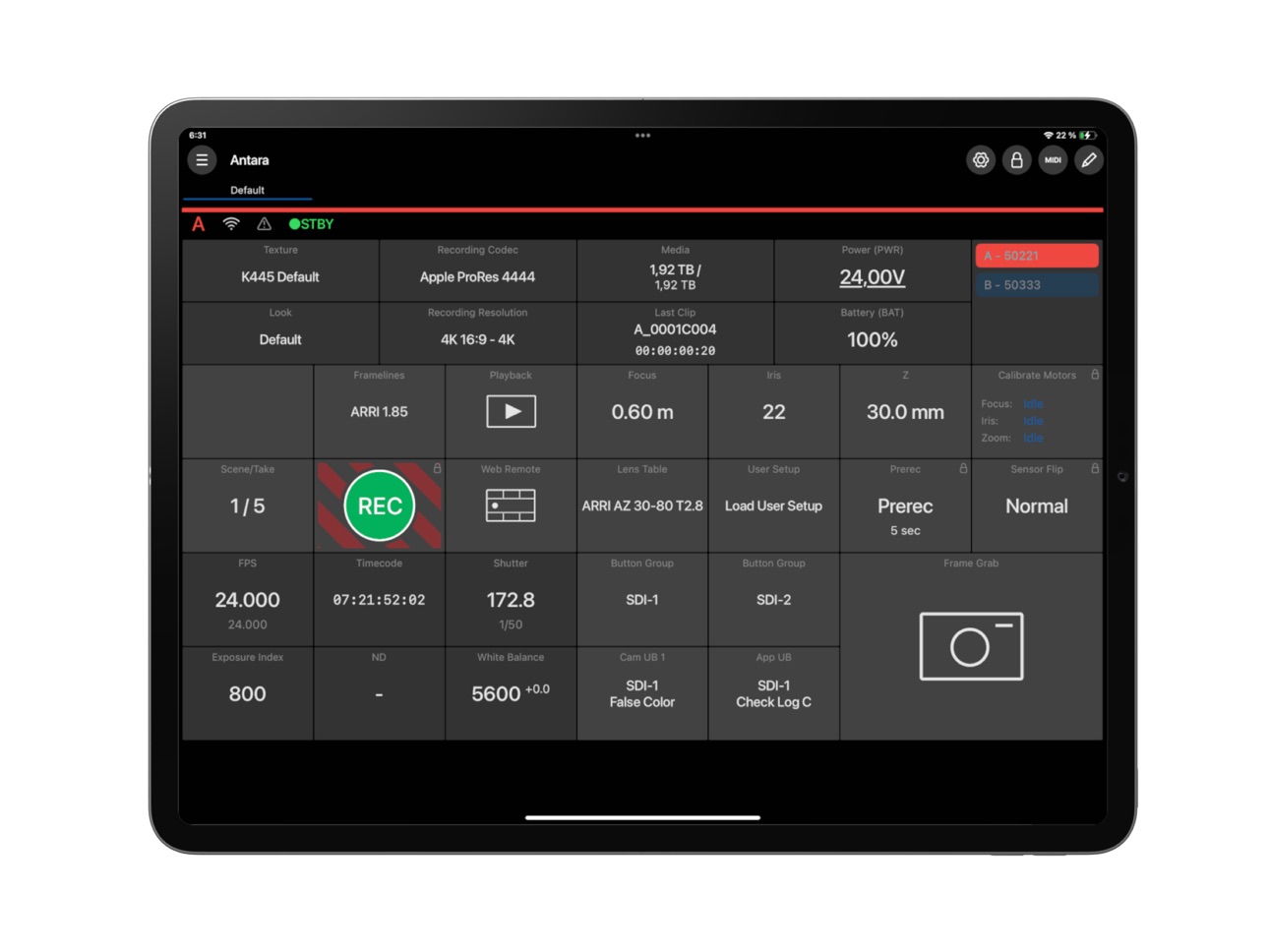
The ARRI Camera Companion for iPhone, iPad, and Mac with Apple Silicon enables you to configure your own personalized interface for remote control of one or multiple ALEXA 35, ALEXA Mini LF, ALEXA Mini, AMIRA, and ALEXA 265 cameras.
Camera Companion is available as a Standard subscription that provides comprehensive control of camera functions or a Premium subscription that adds features such as MIDI support via physical control devices. The free Demo version offers basic camera control, camera menu access, and access to free Standard and Premium trial periods that let you familiarize yourself with the app before deciding which subscription is right for you.
Control multiple cameras simultaneously
In the Demo version you can control just one camera, while the Standard subscription lets you control one or two cameras at the same time, and with a Premium subscription the number of cameras is unlimited.
Camera status overview
The Demo version includes all commonly required status displays: timecode, codec, recording resolution, look file, ARRI Texture (ALEXA 35), lens data, frame lines, remaining media, last clip, power, battery, focus, iris, zoom, and active camera, while the Standard subscription also lets you change these settings. With the Premium subscription you additionally get CDL control and video parameter control (ALEXA Mini and AMIRA).
Basic camera control
In the Demo version of Camera Companion, you can control basic camera functions such as starting and stopping recording, as well as setting the exposure index, white balance value, and ND filter in use.
Full camera control
Almost all camera control parameters are accessible in the Standard subscription. In addition to the basic controls available in the Demo, they comprise playback, frame rate, shutter angle, prerecording, sensor flip, Web Remote, and frame grab. In the Premium subscription you also get sensor sync shift value and simple FIZ control with cforce lens motors.
Camera menu access
Camera Companion incorporates the well-established and familiar ARRI Web Remote, a browser-based tool that duplicates the camera menu interface. This ensures complete access not only to every camera function via the app, but every menu parameter as well. It is available in the Demo version and both subscriptions.
Customizable app layout
Once you’ve activated either a Standard or Premium subscription, you can simply drag and drop control tiles into a custom layout that suits your way of working, giving you fingertip control of whichever parameters you need.
Infinite customizable user buttons
With a Standard or Premium subscription, unlimited app user buttons can be freely assigned to literally any camera function you want and then dragged and dropped into your personalized layout.
Multiple tabs for cameras or layouts
You can organize and simplify your interface into several easily navigable tabs with a Premium subscription. You might want to create different tabs for different cameras or shooting situations, or assign a tab to playback control.
MIDI support
Perhaps especially useful to DITs, the Premium subscription enables MIDI support for tactile control via physical input devices. Vintage Casio keytar, anyone?
In-App Purchases US pricing
ARRI Camera Companion App - Premium Subscriptions Subscription
Premium · Monthly 7-day free trial$39.00
Premium · Yearly 7-day free trial$399.00
Standard · Monthly 7-day free trial$4.99
Standard · Yearly 7-day free trial$49.00
Capabilities
In-App Purchases
Accessibility
ipadiphonemacrealityDevicetvoswatch
Version history 6 versions
Build 877017239v1.12025-08-11 06:19:01
Full ARRI ALEXA 35 Xtreme Support
The ARRI Camera Companion App is now fully compatible with the new ARRI ALEXA 35 Xtreme. Activate 'Camera is ALEXA 35 Xtreme' in project settings if you use an ALEXA 35 Xtreme.
New Features and Improvements:
- New ARRICORE codec available in recording resolution tile
- New recording resolutions available in recording resolution tile
- Sensor Overdrive can be activated from the FPS tile
- FPS tile shows the available frame rate range based on your current recording settings
- Support for new user buttons
- Bug fixes and improvements
As always, we value your feedback. Please get in touch with companionapp@arri.de if you would like to share any feedback, feature requests or require support.
Build 875070912v1.0.42025-05-26 09:49:21
Bug fixes and performance improvements:
- The subscription status will now correctly be retained when no internet connection is available, also in Router-based network environments
Build 874522140v1.0.32025-05-06 06:44:23
Bug fixes and performance improvements:
- The subscription status will now correctly be retained when no internet connection is available, also in Router-based network environments
Build 874206928v1.0.22025-04-23 07:06:55
Bug fixes and performance improvements:
- The subscription status will now correctly be retained when no internet connection is available
Build 873938346v1.0.12025-04-11 00:53:33
Bug fixes and performance improvements
Build 834033023v1.02025-04-10 09:05:54
Price history by region
Currency
Show
Columns
Search
Availability 1 of 1 storefronts
| Region | Language | Price | Ratings | Avg | Version |
|---|---|---|---|---|---|
| US | en-US | Free | 3 | 3.0 | 1.1 |
Change log 10 changes · US
✎
releaseNotes updated
Full ARRI ALEXA 35 Xtreme Support
The ARRI Camera Companion App is now fully compatible with the new ARRI ALEXA 35 Xtreme. Activate 'Camera is ALEXA 35 Xtreme
✎
description updated
The ARRI Camera Companion for iPhone, iPad, and Mac with Apple Silicon enables you to configure your own personalized interface for remote control of one or mul
✎
subtitle updated
Configurable control interface
✎
name updated
ARRI Camera Companion
◆
Version 1.1 released
Full ARRI ALEXA 35 Xtreme Support
The ARRI Camera Companion App is now fully compatible with the new ARRI ALEXA 35 Xtreme. Activate 'Camera is ALEXA 35 Xtreme' in project settings if you use an ALEXA 35 Xtreme.
New Features and Improvem
◆
Version 1.0.4 released
Bug fixes and performance improvements:
- The subscription status will now correctly be retained when no internet connection is available, also in Router-based network environments
◆
Version 1.0.3 released
Bug fixes and performance improvements:
- The subscription status will now correctly be retained when no internet connection is available, also in Router-based network environments
◆
Version 1.0.2 released
Bug fixes and performance improvements:
- The subscription status will now correctly be retained when no internet connection is available
◆
Version 1.0.1 released
Bug fixes and performance improvements
◆
Version 1.0 released