Home › Education

 US
US
1 of 1 storefronts
Content in en-US
Content in en-US
Information
Preview 2 platforms
iPhone 8 images


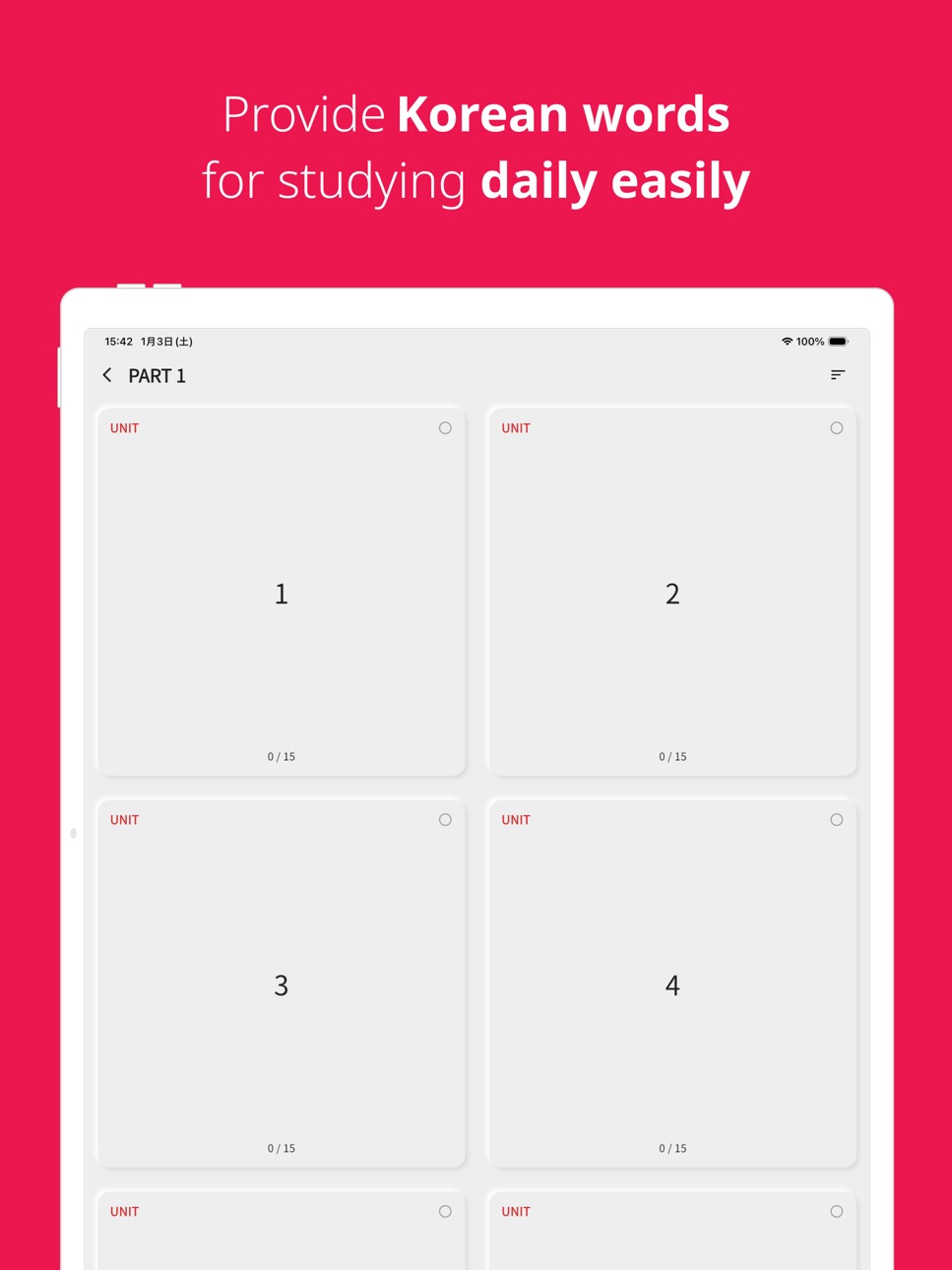
iPad 8 images



What’s New Version 6.17.1
- Made auto-advance behavior and the answer info layout consistent on the answer panel.
- Fixed example-based quizzes so the speaker reads the example sentence instead of the word.
- Polished example pronunciation to sound like a single, natural utterance and resolved partial cut-offs in playback.
- Fixed a crash when entering the unit screen via an unintended route.
- Mitigated an iOS crash where a network-status callback reached a torn-down engine when the app moved to the background.
- Hardened against rare crashes in speech recognition, pronunciation, ads, and drag interactions.
Description
Korean vocabulary app, TOPIK Words (Korean words study app)
Features
- Provides a daily memorization of enough Korean vocabulary to memorize.
- Tests allow you to review the Korean vocabulary you memorized that day.
- Audio pronunciation of Korean vocabulary.
- Example sentences using vocabulary.
- Review functions for parts, units, and the entire Korean language.
- Favorites: Press the star button to add words you're having trouble memorizing to your favorites.
- Copy function: Press and hold a word in the vocabulary list to copy it. You can search for the copied word online for deeper study.
- Setting/resetting learning progress: Press and hold a part or unit to set or reset learning progress.
- Various test functions: Provides tests for filling in the blanks in example sentences, matching the meaning by looking at the word, matching the meaning by looking at the word, and matching the pronunciation by looking at the word.
- Word search function.
- Dark theme support.
- iPad support.
TOPIK words provides Korean vocabulary.
TOPIK words provide Korean vocabulary divided to memorize per day, so everyone can study easily.
In addition, you can check the TOPIK Korean vocabulary studied that day through the review feature.
Have you just started to learn Korean? Don't you know how to read Korean yet?
Do not worry. TOPIK words will support Korean voice, so you can learn how to read.
You can study Korean vocabulary by listening and watching, even if you do not have any prior knowledge of Korean.
It is important to study words every day! You can review the studied Korean vocabulary by part, unit, or whole words.
Words that you incorrect in the review feature are shown more often. The more you use the app, the more customized the vocabulary is for you.
All words are installed with the app when you download the app. So you can study Korean vocabulary anytime and anywhere.
Let's study Korean TOPIK vocabulary via TOPIK words.
[Subscription] Ad removal
-Remove ads from the app at a cup of coffee price each month ($4.00 /month).
-Subscription is managed through your iTunes account.
-Payment for the next use within 24 hours of the end of the subscription period. In other words, if you do not turn off the auto-renewal function at least 23 hours before the end of the subscription service, the subscription will be automatically renewed.
-Please refer to https://dev-yakuza.github.io/privacy/en/ for the privacy policy and terms of use.
Let's study Korean TOPIK vocabulary via TOPIK words.
- Terms of Use (EULA): https://www.apple.com/legal/internet-services/itunes/dev/stdeula/
In-App Purchases US pricing
[Subscription] Ad removal Subscription
Remove Ads & Show all examples · Monthly$4.00
Capabilities
In-App Purchases
Accessibility
ipadiphonemacrealityDevicetvoswatch
Version history 25 versions
Build 887624660v6.17.12026-07-01 04:24:06
- Made auto-advance behavior and the answer info layout consistent on the answer panel.
- Fixed example-based quizzes so the speaker reads the example sentence instead of the word.
- Polished example pronunciation to sound like a single, natural utterance and resolved partial cut-offs in playback.
- Fixed a crash when entering the unit screen via an unintended route.
- Mitigated an iOS crash where a network-status callback reached a torn-down engine when the app moved to the background.
- Hardened against rare crashes in speech recognition, pronunciation, ads, and drag interactions.
Build 886941059v6.17.02026-06-14 20:40:52
- Made auto-advance behavior and the answer info layout consistent on the answer panel.
- Fixed example-based quizzes so the speaker reads the example sentence instead of the word.
- Polished example pronunciation to sound like a single, natural utterance and resolved partial cut-offs in playback.
- Fixed a crash when entering the unit screen via an unintended route.
- Mitigated an iOS crash where a network-status callback reached a torn-down engine when the app moved to the background.
- Hardened against rare crashes in speech recognition, pronunciation, ads, and drag interactions.
Build 886382786v6.16.02026-06-02 16:12:22
- Auto-advance now has three modes: off, always, or correct answers only.
- Auto-play voice on entering listening review quizzes; disabled on the read-aloud example review quiz.
- Fixed part list progress not updating immediately after applying a sync download.
- Fixed an iOS regression where pronunciation playback stopped external music.
- Fine-tuned the iPad header safe-area offset.
Build 886070328v6.15.02026-05-25 00:15:57
- Added per-quiz-type descriptions and display options to the review screen.
- Improved the review result screen to let you view kanji details of the correct word directly.
- Added an option to hide the pronunciation under the speaker in listening quiz types.
- Improved the auto-sync conflict notice message to be easier to understand.
- Improved the voice filter to make more voices available on iOS.
- Fixed an issue on iOS where audio could cut off during auto-repeat playback.
- Fixed an issue where ads containing speech blocked the app's voice.
- Fixed an issue where auto-sync did not work on app cold start.
- Fixed an Android crash that occurred with certain special characters.
- Fixed an issue where the back button overlapped with system controls in iPad multitasking.
- Fixed a compatibility issue on devices with 16 KB page size (e.g., Galaxy S26).
- Improved app stability.
Build 885624888v6.14.02026-05-13 21:29:55
- Added a feature to automatically sync learning data with Google Drive.
- Added an auto-sync status indicator to the top of the learning screen.
- Added a dialog to prevent data loss when auto-syncing on a new device.
- Added a Google sign-in button and sign-in status display to the settings screen.
- Added a quiz type to the review screen that asks you to arrange the example meaning from the example sentence.
- Added a quiz type to the review screen that asks you to arrange the example meaning after listening to the example sentence.
- Added select all/deselect all controls to the quiz type selection modal.
- Improved the "listen and guess the word" panel to show a pronunciation label.
- Improved all voice-supported apps to display the voice settings option.
- Improved word editing to preserve the sort order when returning from edit.
- Improved app stability.
Build 885032877v6.13.02026-04-29 16:16:52
- Added a unified option to toggle word detail display items all at once.
- Added long-press on an example to copy it to the clipboard.
- Added a custom notification time so you can choose when to receive reminders.
- Added a quiz type to the review screen that asks you to match the meaning after listening to the word.
- Added a progress bar that shows your learning progress on the review screen.
- Improved the review screen to show part/unit information on the question number.
- Added an option to sort bookmarked words first.
- Added last-studied unit indicator and auto-scroll to the bookmark unit view.
- Added bookmark category icons and category assignment to search results.
- Added dakuten/handakuten kana learning data.
- Improved app stability.
Build 884698638v6.12.02026-04-20 14:37:19
- Added the ability to view bookmarked/my category words in a grouped view.
- Added pronunciation display on the review quiz answer panel.
- Improved the review quiz question panel to display pronunciations.
- Added pronunciation option for choices in the arrange quiz type.
- Added an option to hide meanings in the fill-in-the-blank quiz.
- Improved app stability.
Build 883869909v6.11.32026-03-29 01:17:27
- Fixed the display method of the favorites icon on the review screen.
- Make the app stabilization.
- Apply the words that users modified.
Build 883824266v6.11.22026-03-27 19:12:21
- Fixed the display method of the favorites icon.
- Make the app stabilization.
- Apply the words that users modified.
Build 883781601v6.11.12026-03-26 13:24:04
- Changed how the bookmark and category screen is opened.
- Tap the bookmark icon to add to bookmarks.
- Long press the bookmark icon to open the category screen.
- Make the app stabilization.
- Apply the words that users modified.
Build 883705947v6.11.02026-03-24 21:01:47
- Fixed an issue where changing the quiz type was not immediately reflected on the review screen.
- Added My Categories feature to Bookmarks.
- Make the app stabilization.
- Apply the words that users modified.
Build 883392175v6.10.02026-03-16 02:06:18
- Improved to allow reviewing with all quiz types.
- Improved the Word Matching quiz.
- Added color feedback for correct parts when reading examples aloud.
- Example meaning is now always displayed in the Example Blank Fill quiz.
- Make the app stabilization.
- Apply the words that users modified.
Build 883198130v6.9.52026-03-10 18:39:47
- Fixed an issue where example sentence edits were not applied.
- Fixed an issue where kanji and furigana in example sentences were pronounced twice.
- Added an option to review all words.
- Added word order settings to the word list screen.
- Added word pronunciation and example pronunciation display settings to the word list screen.
- Fixed tilde being pronounced as "tilde" during text-to-speech.
- Added an option in settings to automatically advance to the next question after answering a review quiz.
- Added a new quiz type: read example sentences aloud.
- Make the app stabilization.
- Apply the words that users modified.
Build 882803455v6.9.42026-02-26 14:38:43
- Stabilize the app words data creation/loading and data sync.
- Make the app stabilization.
- Apply the words that users modified.
Build 882777874v6.9.32026-02-25 19:21:32
- Stabilize the app words data creation/loading and data sync.
- Make the app stabilization.
- Apply the words that users modified.
Build 882659247v6.9.22026-02-21 21:07:26
- Improved sync stability.
- Make the app stabilization.
- Apply the words that users modified.
Build 882592954v6.9.12026-02-19 17:09:22
- Improved the sentence arrangement quiz based on example meanings.
- Make the app stabilization.
- Apply the words that users modified.
Build 882508999v6.9.02026-02-16 19:53:23
- Added read example aloud quiz type.
- Added quiz type to match word from audio.
- Added quiz type to arrange sentence from audio.
- Added quiz type to match word pronunciation from example sentence.
- Added quiz type to guess word meaning from example sentence.
- Added match word pairs quiz type.
- Make the app stabilization.
- Apply the words that users modified.
Build 882046856v6.8.132026-02-02 04:35:38
- Fix loading data.
- Make the app stabilization.
- Apply the words that users modified.
Build 881974772v6.8.122026-01-29 21:23:48
- Add the word arrangement quiz.
- Fix the app review dialog shown twice.
- Fix sync not working bug.
- Make the app stabilization.
- Apply the words that users modified.
Build 881671977v6.8.112026-01-21 04:13:44
- Make the app stabilization.
- Apply the words that users modified.
Build 881623755v6.8.102026-01-19 23:03:29
- Make the app stabilization.
- Apply the words that users modified.
Build 881584388v6.8.92026-01-17 06:58:26
- Reduce the font size of the pronunciation in the example based on user feedback.
- Make the app stabilization.
- Apply the words that users modified.
Build 881398476v6.8.82026-01-12 13:37:34
- Make the app stabilization.
- Apply the words that users modified.
Build 881343257v6.8.72026-01-09 17:29:09
- Fix synchronization would not work properly.
- Make the app stabilization.
- Apply the words that users modified.
Price history by region
Currency
Show
Columns
Search
Availability 1 of 1 storefronts
| Region | Language | Price | Ratings | Avg | Version |
|---|---|---|---|---|---|
| US | en-US | Free | 90 | 4.8 | 6.17.1 |
Change log 29 changes · US
✎
releaseNotes updated
- Made auto-advance behavior and the answer info layout consistent on the answer panel.
- Fixed example-based quizzes so the speaker reads the example sentence
✎
description updated
Korean vocabulary app, TOPIK Words (Korean words study app)
Features
- Provides a daily memorization of enough Korean vocabulary to memorize.
- Tests allow you
✎
subtitle updated
Let's study Korean vocabulary!
✎
name updated
Korean vocabulary, TOPIK words
◆
Version 6.17.1 released
- Made auto-advance behavior and the answer info layout consistent on the answer panel.
- Fixed example-based quizzes so the speaker reads the example sentence instead of the word.
- Polished example pronunciation to sound like a single, na
◆
Version 6.17.0 released
- Made auto-advance behavior and the answer info layout consistent on the answer panel.
- Fixed example-based quizzes so the speaker reads the example sentence instead of the word.
- Polished example pronunciation to sound like a single, na
◆
Version 6.16.0 released
- Auto-advance now has three modes: off, always, or correct answers only.
- Auto-play voice on entering listening review quizzes; disabled on the read-aloud example review quiz.
- Fixed part list progress not updating immediately after appl
◆
Version 6.15.0 released
- Added per-quiz-type descriptions and display options to the review screen.
- Improved the review result screen to let you view kanji details of the correct word directly.
- Added an option to hide the pronunciation under the speaker in li
◆
Version 6.14.0 released
- Added a feature to automatically sync learning data with Google Drive.
- Added an auto-sync status indicator to the top of the learning screen.
- Added a dialog to prevent data loss when auto-syncing on a new device.
- Added a Google sign
◆
Version 6.13.0 released
- Added a unified option to toggle word detail display items all at once.
- Added long-press on an example to copy it to the clipboard.
- Added a custom notification time so you can choose when to receive reminders.
- Added a quiz type to t
◆
Version 6.12.0 released
- Added the ability to view bookmarked/my category words in a grouped view.
- Added pronunciation display on the review quiz answer panel.
- Improved the review quiz question panel to display pronunciations.
- Added pronunciation option for
◆
Version 6.11.3 released
- Fixed the display method of the favorites icon on the review screen.
- Make the app stabilization.
- Apply the words that users modified.
◆
Version 6.11.2 released
- Fixed the display method of the favorites icon.
- Make the app stabilization.
- Apply the words that users modified.
◆
Version 6.11.1 released
- Changed how the bookmark and category screen is opened.
- Tap the bookmark icon to add to bookmarks.
- Long press the bookmark icon to open the category screen.
- Make the app stabilization.
- Apply the words that users modified.
◆
Version 6.11.0 released
- Fixed an issue where changing the quiz type was not immediately reflected on the review screen.
- Added My Categories feature to Bookmarks.
- Make the app stabilization.
- Apply the words that users modified.
◆
Version 6.10.0 released
- Improved to allow reviewing with all quiz types.
- Improved the Word Matching quiz.
- Added color feedback for correct parts when reading examples aloud.
- Example meaning is now always displayed in the Example Blank Fill quiz.
- Make the
◆
Version 6.9.5 released
- Fixed an issue where example sentence edits were not applied.
- Fixed an issue where kanji and furigana in example sentences were pronounced twice.
- Added an option to review all words.
- Added word order settings to the word list screen
◆
Version 6.9.4 released
- Stabilize the app words data creation/loading and data sync.
- Make the app stabilization.
- Apply the words that users modified.
◆
Version 6.9.3 released
- Stabilize the app words data creation/loading and data sync.
- Make the app stabilization.
- Apply the words that users modified.
◆
Version 6.9.2 released
- Improved sync stability.
- Make the app stabilization.
- Apply the words that users modified.
◆
Version 6.9.1 released
- Improved the sentence arrangement quiz based on example meanings.
- Make the app stabilization.
- Apply the words that users modified.
◆
Version 6.9.0 released
- Added read example aloud quiz type.
- Added quiz type to match word from audio.
- Added quiz type to arrange sentence from audio.
- Added quiz type to match word pronunciation from example sentence.
- Added quiz type to guess word meaning
◆
Version 6.8.13 released
- Fix loading data.
- Make the app stabilization.
- Apply the words that users modified.
◆
Version 6.8.12 released
- Add the word arrangement quiz.
- Fix the app review dialog shown twice.
- Fix sync not working bug.
- Make the app stabilization.
- Apply the words that users modified.
◆
Version 6.8.11 released
- Make the app stabilization.
- Apply the words that users modified.
◆
Version 6.8.10 released
- Make the app stabilization.
- Apply the words that users modified.
◆
Version 6.8.9 released
- Reduce the font size of the pronunciation in the example based on user feedback.
- Make the app stabilization.
- Apply the words that users modified.
◆
Version 6.8.8 released
- Make the app stabilization.
- Apply the words that users modified.
◆
Version 6.8.7 released
- Fix synchronization would not work properly.
- Make the app stabilization.
- Apply the words that users modified.