Home › Lifestyle

 US
US
1 of 1 storefronts
Content in en-US
Content in en-US
Information
Preview 2 platforms
iPhone 5 images


iPad 5 images


What’s New Version 0.23.4
Minor improvements
Description
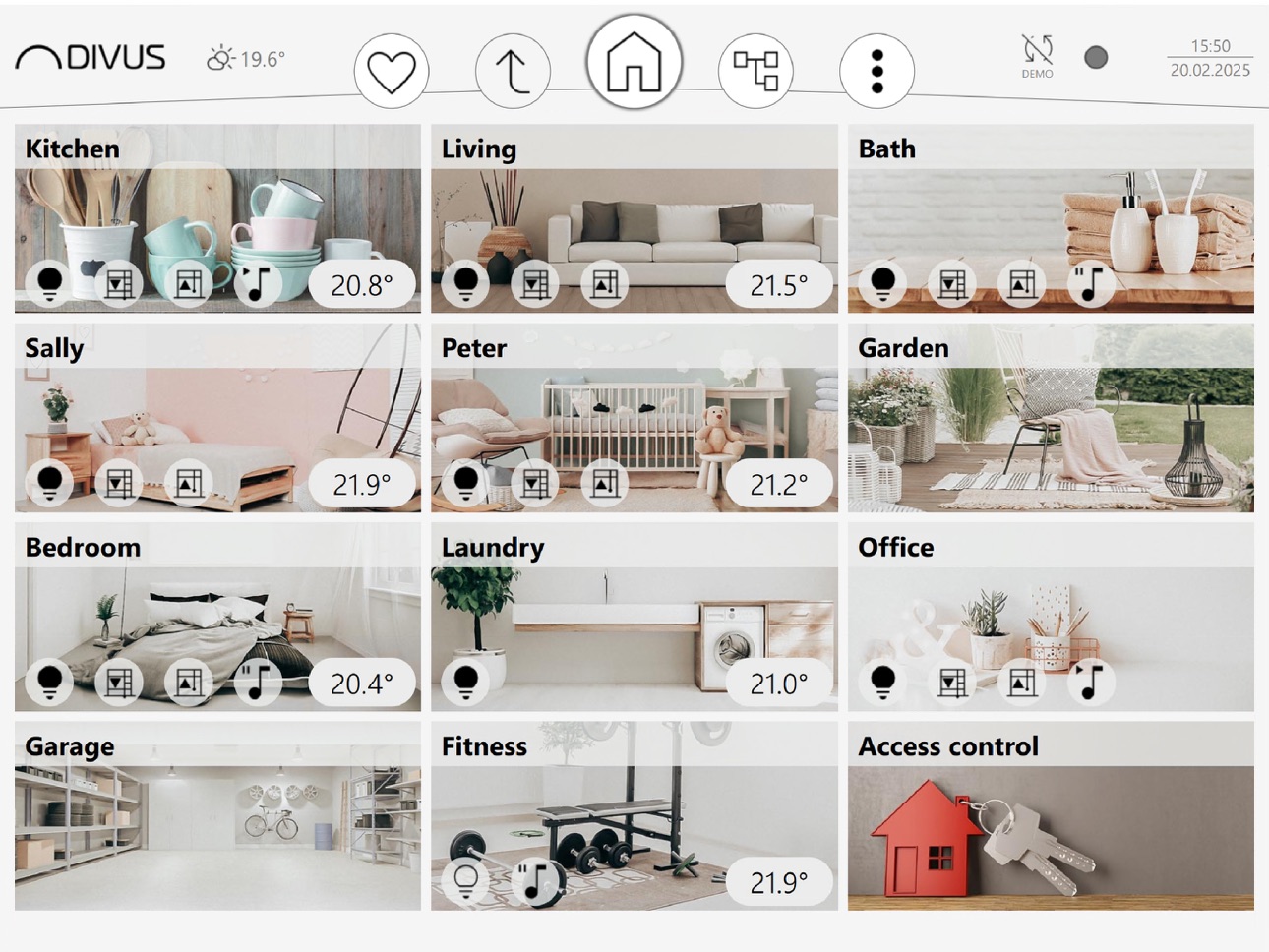
The visualization user interface DIVUS VISION convinces with its simplicity in the implementation by the system integrator and control by the customer. Lights, shading, temperature, music, alarms can be controlled and controlled via the panel. In addition, smart devices can be integrated into the visualization.
With DIVUS VISION you can control your building with just a tap.
Enjoy the added convenience, increased safety and energy savings you can achieve with DIVUS VISION.
Accessibility
ipadiphonemacrealityDevicetvoswatch
Version history 25 versions
Build 886660781v0.23.42026-06-11 06:24:11
Minor improvements
Build 885952447v0.23.32026-05-28 09:27:59
Generic tree view navigation improvements
Improved scrolling behavior in tree view: vertical/horizontal scrolling is now enabled only if required
Improved click behavior of rooms inside tree view: clicking on a already selected room toggles the arrow-button (expand/collapse)
Improved settings menu layout for very small screens
Improved element music layout to center PLAY-PREV-NEXT-buttons correctly
Improved compatibility with combined touch systems as for example Windows based systems (DIVUS SUPERIO)
Fixed wrong window status inversion parameter description for element thermostat
Fixed source and target selection in forwarding-rules in ETS MODE
Fixed plugin schedules panorama cannot be opened from within the tree view
Fixed empty room when switching to SINGLE ROOM MODE
Fixed OPEN / CLOSE description is not inverted correctly in the element shutter percent UI when inverting the percent value
Fixed language changes are not applied to all labels in the tree view immediately
Fixed loads cannot be deleted/edited in the energy plugin
Fixed wrong byte length for datapoint date/time of plugin date/time synchronization in ETS
Fixed tree view shows first room expanded on HOME page on startup
Fixed custom range offset not applied correctly in element dimmer
Fixed administrator PIN not accepted for sending offline changes to the paired device in certain situations
Minor fixes and improvements
Build 881938875v0.23.22026-01-29 07:20:12
Minor fixings & improvements
Build 880370887v0.23.02026-01-12 08:41:37
- Custom pictures for element room/level
- Enhanced element thermostat dew point options
- New option to display a datapoint value as temperature value in element room/level
- 2 Element function values can now be compared in rules
- New optional offset value for element function values comparison in rules
- The value of an elements function can now be assigned to another elements function in rules
- Customizable slider colour in element custom slider
- Customizable slider range in element dimmer
- Customizable arrow buttons and percent value in shutter and venetian blinds elements
- Enhanced configuration in FREE MODE by automatically assigning a new created datapoint to the according element function
- Removed empty space necessity in ETS import
- Default KNX driver in ETS import settings
- Minor improvements and fixes
Build 875867846v0.22.22025-06-26 07:51:41
- Favorites button with single click action instead of toggle behaviour
- DPT16 text values of custom slider enabled for usage in sequences/logics/schedules
- Element's lock status not shown correctly when the element is locked while the element's room is not shown, fixed
- Local connection does not always use correct lookup protocol, fixed
- Incoming status feedback for percentage values in element RGB, Dimmer, and Tunable white does not update the according controls, fixed
- Saving a sequence takes a long time, fixed
- QR code scan not possible directly after granting camera access,fixed
- Minor fixes and improvements
Build 873555185v0.22.12025-03-27 07:38:44
- For "Up one level" navigation into previous room its scroll position is kept memorized
- Element thermostat's operation mode on/off writes only value "1" on bus, fixed
- ALL-button from within schedule editor closes the elements detail view when exiting, fixed
- Schedule editor ALL-button not working when the SCHEDULERS PANORAMA PLUGIN is disabled, fixed
- Unlinked setpoint function for certain element thermostat configurations, fixed
- Element thermostat's setpoint not working in HEATING ONLY and COOLING ONLY mode, fixed
Build 872582565v0.22.02025-03-17 08:31:15
New concept of levels/rooms and tree view based navigation
New AC Element
New datapoint (Virtual driver)
New Energy management plugin
Function to copy or move elements into selected room
Increased total element limit to max. 500
Many minor improvements and bug fixes
Build 867979870v0.20.72024-09-04 13:51:03
New App icon design
New App splash screen design
Fixed CLOUD connection does not detect connection loss to the product when the network connection of the product is broken (disabled/cable disconnected)
Fixed App crash when opening App from PUSH notification
Fixed status bar text color has not enough contrast on opened preferences menu background color in dark theme
Improved compacter database
Fixed missing PIN confirmation on downloading offline changes in FREE MODE
Forward value from datapoint to datapoint
Using item for compare/set value on rules
New option in rules to execute rule THEN/ELSE action only when the rule result changes (true to false or false to true)
New user permission to completely hide a whole room
Minor improvements and fixes
Build 867020489v0.19.712024-07-02 12:13:16
- Fixed connection timeout when moving App into background and then immediately bringing the App again in foreground
- Minor improvements
Build 866208994v0.19.692024-06-03 08:20:09
- New icon set
- New switch button face for DIVUS CTP04
- New device driver for interaction with DIVUS devices onboard capabilities (CTP04)
- Default user selection
- Icon selection for elements Rgb, Dimmer and Tunable White
- Alternating status icon "On/Off" in header of elements On/Off, Dimmer, Rgb, Tunable White, Music for the corresponding status "On/Off"
- Logical rules can now be added in sequences action list to trigger the according logical rule re-calculation
- Vision-API for communication with DIVUS Apps/products
- New monochrome theme with customizable main color
- Relative dimming option in element Dimmer, RGB, Tunable white
- Improved notification smtp authentication modes to support "No", "PLAIN" and "LOGIN" authentication in smtp protocol
- New mute/unmute option in element Music
- New source selection option in element Music
- New option to visualize text in element Custom slider
- Increased slider tick step from 2 to 5 for better usability and smoother design in all elements with percentage slider controls
- Unification of all label and value fonts
- RGB color picker design improvement: consistent slider path thickness and consistent slider button size
- RGB color picker usability improvement: inner circle bigger size, increase distance between color ring and sliders left/right
- Improved abort process in loading screen: buttons are hidden and according status text is shown until the process is completed
- Magnifying value indicator on all sliders
- Fixed time schedule validity period (from/to) is not considered for showing the prompt to discard changes when aborting time schedule editing
- Fixed time scheduling is not working if the validity range is set from one year to the consecutive one and current date is located in the consecutive year
- Fixed not possible to enter hostname instead of IP address for pairing in device property menu
- Fixed SMTP server configuration does not show username input field when selecting no authentication
- Fixed wording for "On/Off" type "Doorlock" to "Locked/Unlocked" instead of "Close/Open"
- Fixed Selected device name in the preference menu main page is not updated when changing the name of the already selected device
- Fixed element Tunable White leads to application freeze if the range for the color temperature slider is minor than 10
- Fixed default device is reset, when creating a new device
- Minor fixes and improvements
Build 860918562v0.18.322023-10-25 08:31:33
- New design for element thermostat/thermostat logic
- New demos (company, doctor, restaurant, school)
- Design related local App preferences are not memorized in demo mode and restored when leaving demo mode
- Color style selection for room pictures
- Automatically reconnect to the selected device after connection timeout
- Stoppable sequences now stoppable also from other sequences, time schedules and rules
- PIN protected element command button with "released" and "pressed" action doesn't send any command when entering the PIN on demand due to security reasons, the button can be used as usual after successful PIN authentication
- Fixed slow reaction to connection loss during the App is in the Foreground
- Fixed no title shown in the presence simulation element on the plugins page
- Fixed wrong arrow-icons in element venetian blinds detail view
- Fixed tumblers for numeric ranges with negative numbers are not ordered correctly
- Minor fixes and improvements
Build 860700347v0.18.302023-10-17 12:35:50
- New design for element thermostat/thermostat logic
- New demos (company, doctor, restaurant, school)
- Design related local App preferences are not memorized in demo mode and restored when leaving demo mode
- Color style selection for room pictures
- Automatically reconnect to the selected device after connection timeout
- Stoppable sequences now stoppable also from other sequences, time schedules and rules
- PIN protected element command button with "released" and "pressed" action doesn't send any command when entering the PIN on demand due to security reasons, the button can be used as usual after successful PIN authentication
- Fixed slow reaction to connection loss during the App is in the Foreground
- Fixed no title shown in the presence simulation element on the plugins page
- Fixed wrong arrow-icons in element venetian blinds detail view
- Fixed tumblers for numeric ranges with negative numbers are not ordered correctly
- Minor fixes and improvements
Build 859997306v0.18.292023-10-16 06:44:36
- New design for element thermostat/thermostat logic
- New demos (company, doctor, restaurant, school)
- Design related local App preferences are not memorized in demo mode and restored when leaving demo mode
- Color style selection for room pictures
- Automatically reconnect to the selected device after connection timeout
- Stoppable sequences now stoppable also from other sequences, time schedules and rules
- PIN protected element command button with "released" and "pressed" action doesn't send any command when entering the PIN on demand due to security reasons, the button can be used as usual after successful PIN authentication
- Fixed slow reaction to connection loss during the App is in the Foreground
- Fixed no title shown in the presence simulation element on the plugins page
- Fixed wrong arrow-icons in element venetian blinds detail view
- Fixed tumblers for numeric ranges with negative numbers are not ordered correctly
- Minor fixes and improvements
Build 855594161v0.17.232023-03-20 06:15:46
Fixed not working sharing of log files on iOS16
Build 854505859v0.17.222023-01-20 17:59:26
- In-App KNX IQ system update
- Push notifications
- Improved pairing with QR code scan and CLOUD based pairing process
- Fixed KNX IQ network scan issue on iOS14+
- Various minor fixes and improvements
Build 853736470v0.17.212023-01-16 11:59:54
- In-App KNX IQ system update
- Push notifications
- Improved pairing with QR code scan and CLOUD based pairing process
- Fixed KNX IQ network scan issue on iOS14+
- Various minor fixes and improvements
Build 849641896v0.16.252022-06-16 06:18:58
- New SLIM design
- New additional room pictures
- Improved pairing with new QR code scan support
- Updated demo with SLIM design and FREE/ETS mode
- New dedicated icons for element RGB, tunable white, dimmer
- Minor improvements and bugfixes
Build 845792783v0.15.142021-12-13 09:57:32
- New elements tunable white, thermostat logic, forced guidance, placeholder
- Optimized element RGB(W)
- E-mail notifications
- Optimized schedule editor layout
- Type/icon selection for all blind elements
- Support for virtual KNX group addresses (16-32/x/y)
- Minor improvements and bugfixes
Build 843003067v0.14.102021-07-21 08:00:52
- Performance improvement for generic data handling, on start-up of the DIVUS VISION App and on loading of the graphical content of the project in the DIVUS VISION App
- Improved drag&drop of elements/rooms
- For Element "shutter up/down", "shutter percent" and "venetian blinds" the icon can now be chosen from a predefined list
- The range for the slider for the setpoint in the element "thermostat" can now can be configured
- New preference page "limits" to show current number of different objects already created and the according limits by type
- Numerous minor bugfixes and improvements
Build 840587772v0.13.52021-02-23 08:48:23
Improved CLOUD connection
Build 840521655v0.13.42021-02-19 17:33:59
- New languages Greek and Spanish
- New operation mode "ON-OFF" for element "thermostat"
- "Terminal" import
- Minor improvements
Build 838332590v0.12.102020-10-23 19:45:45
Minor improvements
Build 838126151v0.12.92020-10-21 06:47:48
* Sequence buttons
* Single room option
* New user based PIN authentication concept
* Support for 3 byte RGB datapoint type
* Support for 1 bit operation mode switch in element thermostat
* Flexible elements/room limitation
* minor improvements
Build 836079473v0.11.22020-05-28 07:00:54
* Dark theme
* New Element raffstore
* New room background pictures
* Plain color background possible now for rooms
* Support for KNXIQ presence simulation
* Support for KNXIQ time synchronization
* Support for KNXIQ astronomical clock
* Copy KNXIQ backup files (*.kiq) from other Apps
* Share KNXIQ backup files (*.kiq) to other Apps
* Copy ETS-Import files (*.esf) from other Apps
* Share ETS-Import files (*.esf) to other Apps
* Minor bugfix and improvements
Build 835164588v0.10.32020-03-20 09:44:09
* Support for colored rectangle instead of room picture in element room
* Support for new Lock-functionality
* minor improvements
No pricing data captured yet — comparisons appear once the app has paid storefronts or in-app purchases.
Availability 1 of 1 storefronts
| Region | Language | Price | Ratings | Avg | Version |
|---|---|---|---|---|---|
| US | en-US | Free | 0 | — | 0.23.4 |
Change log 28 changes · US
✎
releaseNotes updated
Minor improvements
✎
description updated
The visualization user interface DIVUS VISION convinces with its simplicity in the implementation by the system integrator and control by the customer. Lights,
✎
name updated
DIVUS VISION
◆
Version 0.23.4 released
Minor improvements
◆
Version 0.23.3 released
Generic tree view navigation improvements
Improved scrolling behavior in tree view: vertical/horizontal scrolling is now enabled only if required
Improved click behavior of rooms inside tree view: clicking on a already selected room toggles
◆
Version 0.23.2 released
Minor fixings & improvements
◆
Version 0.23.0 released
- Custom pictures for element room/level
- Enhanced element thermostat dew point options
- New option to display a datapoint value as temperature value in element room/level
- 2 Element function values can now be compared in rules
- New opt
◆
Version 0.22.2 released
- Favorites button with single click action instead of toggle behaviour
- DPT16 text values of custom slider enabled for usage in sequences/logics/schedules
- Element's lock status not shown correctly when the element is locked while the el
◆
Version 0.22.1 released
- For "Up one level" navigation into previous room its scroll position is kept memorized
- Element thermostat's operation mode on/off writes only value "1" on bus, fixed
- ALL-button from within schedule editor closes the elements detail vi
◆
Version 0.22.0 released
New concept of levels/rooms and tree view based navigation
New AC Element
New datapoint (Virtual driver)
New Energy management plugin
Function to copy or move elements into selected room
Increased total element limit to max. 500
Many minor
◆
Version 0.20.7 released
New App icon design
New App splash screen design
Fixed CLOUD connection does not detect connection loss to the product when the network connection of the product is broken (disabled/cable disconnected)
Fixed App crash when opening App from
◆
Version 0.19.71 released
- Fixed connection timeout when moving App into background and then immediately bringing the App again in foreground
- Minor improvements
◆
Version 0.19.69 released
- New icon set
- New switch button face for DIVUS CTP04
- New device driver for interaction with DIVUS devices onboard capabilities (CTP04)
- Default user selection
- Icon selection for elements Rgb, Dimmer and Tunable White
- Alternating s
◆
Version 0.18.32 released
- New design for element thermostat/thermostat logic
- New demos (company, doctor, restaurant, school)
- Design related local App preferences are not memorized in demo mode and restored when leaving demo mode
- Color style selection for roo
◆
Version 0.18.30 released
- New design for element thermostat/thermostat logic
- New demos (company, doctor, restaurant, school)
- Design related local App preferences are not memorized in demo mode and restored when leaving demo mode
- Color style selection for roo
◆
Version 0.18.29 released
- New design for element thermostat/thermostat logic
- New demos (company, doctor, restaurant, school)
- Design related local App preferences are not memorized in demo mode and restored when leaving demo mode
- Color style selection for roo
◆
Version 0.17.23 released
Fixed not working sharing of log files on iOS16
◆
Version 0.17.22 released
- In-App KNX IQ system update
- Push notifications
- Improved pairing with QR code scan and CLOUD based pairing process
- Fixed KNX IQ network scan issue on iOS14+
- Various minor fixes and improvements
◆
Version 0.17.21 released
- In-App KNX IQ system update
- Push notifications
- Improved pairing with QR code scan and CLOUD based pairing process
- Fixed KNX IQ network scan issue on iOS14+
- Various minor fixes and improvements
◆
Version 0.16.25 released
- New SLIM design
- New additional room pictures
- Improved pairing with new QR code scan support
- Updated demo with SLIM design and FREE/ETS mode
- New dedicated icons for element RGB, tunable white, dimmer
- Minor improvements and bugfix
◆
Version 0.15.14 released
- New elements tunable white, thermostat logic, forced guidance, placeholder
- Optimized element RGB(W)
- E-mail notifications
- Optimized schedule editor layout
- Type/icon selection for all blind elements
- Support for virtual KNX group a
◆
Version 0.14.10 released
- Performance improvement for generic data handling, on start-up of the DIVUS VISION App and on loading of the graphical content of the project in the DIVUS VISION App
- Improved drag&drop of elements/rooms
- For Element "shutter up/down",
◆
Version 0.13.5 released
Improved CLOUD connection
◆
Version 0.13.4 released
- New languages Greek and Spanish
- New operation mode "ON-OFF" for element "thermostat"
- "Terminal" import
- Minor improvements
◆
Version 0.12.10 released
Minor improvements
◆
Version 0.12.9 released
* Sequence buttons
* Single room option
* New user based PIN authentication concept
* Support for 3 byte RGB datapoint type
* Support for 1 bit operation mode switch in element thermostat
* Flexible elements/room limitation
* minor improvem
◆
Version 0.11.2 released
* Dark theme
* New Element raffstore
* New room background pictures
* Plain color background possible now for rooms
* Support for KNXIQ presence simulation
* Support for KNXIQ time synchronization
* Support for KNXIQ astronomical clock
* Co
◆
Version 0.10.3 released
* Support for colored rectangle instead of room picture in element room
* Support for new Lock-functionality
* minor improvements