Home › Business

 US
US
1 of 1 storefronts
Content in en-US
Content in en-US
Information
Preview 2 platforms
iPhone 10 images


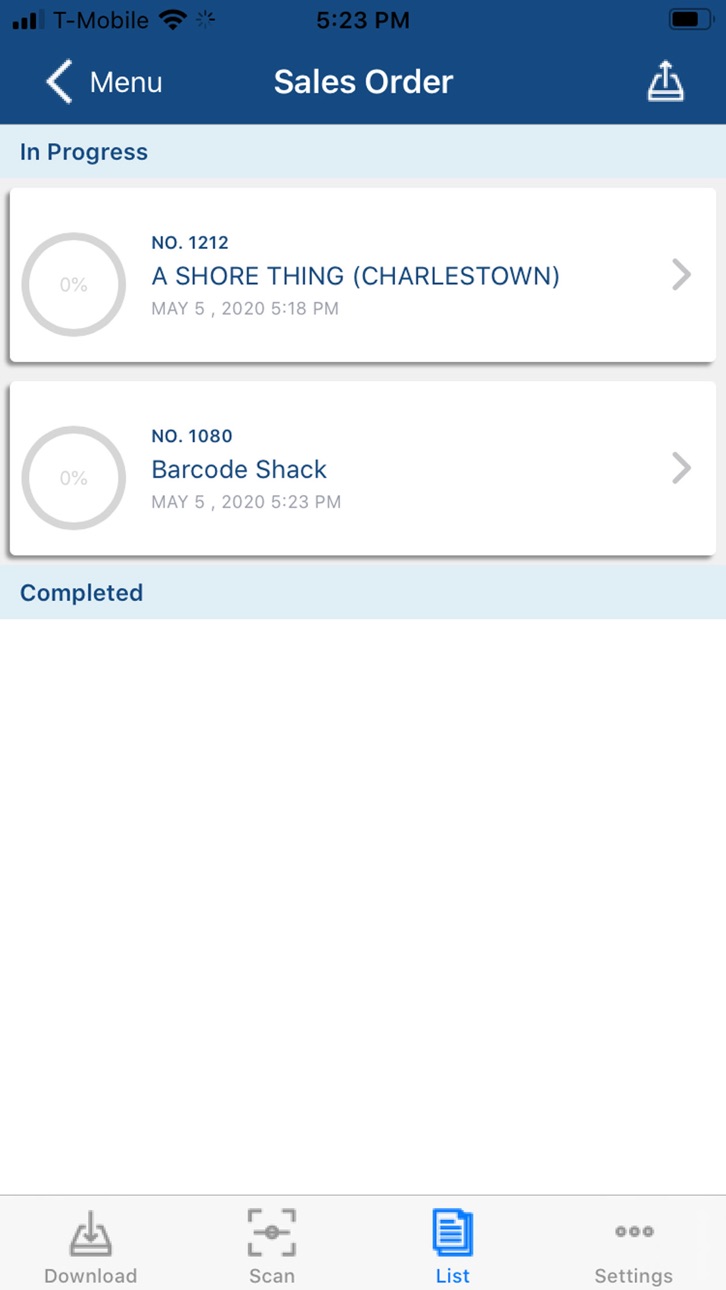


iPad 6 images


What’s New Version 4.0.9.117
- Bug fixes and performance improvements
Description
Order Time Warehouse takes the functionality of the Warehouse tab within the platform and puts it in the palm of your hand. Receive inventory, pick from Sales Orders and more. Simply login with your credentials and start scanning barcodes with your phone's built-in camera.
Utilize Order Time Inventory, which has inventory control and order management features beyond just calculating your inventory in QuickBooks. You’ll be able to better forecast sales, maintain sufficient stock levels, and make the most of your business. Order Time makes it simple to manage your inventory and connect to the marketplaces you want to sell on, from one central hub with tons of seamless features.
Order Time is a full Order Management System (OMS). It automates and streamlines order processing for your business. Import orders manually or via accounting and eCommerce integrations. One hub to run it all: Control Sales Orders, Work Orders, Purchase Orders and more via Order Time inventory.
From light Manufacturing to Wholesale to eCommerce, Order Time provides powerful control over orders, customers, and inventory. Access one easy-to-use cloud-based inventory control system from any device, anywhere in the world.
Accessibility
ipadiphonemacrealityDevicetvoswatch
Version history 25 versions
Build 886490833v4.0.9.1172026-06-03 20:49:49
- Bug fixes and performance improvements
Build 886397878v4.0.6.1172026-06-02 01:49:19
- Bug fixes and performance improvements
Build 882429261v3.0.82026-02-23 16:07:07
- bug fixes and performance improvements
Build 877635970v3.0.72025-08-29 21:19:24
- Bug fixes and performance improvements
Build 873137252v2.9.922025-03-12 14:50:50
- bug fixes and performance improvements
Build 869467910v2.9.12024-10-04 18:16:51
- Time Entries tracking feature for Work Orders
- Enhanced user interface for Count feature
- Bug fixes and performance improvements for Ship Docs
Build 868110469v2.8.82024-08-14 08:30:44
- Transfers: Introducing the Transfers feature, now available. Easily manage and track inventory transfers between different locations within your organization.
- Resolved an issue where Sales Orders weren't working correctly involving negative inventory.
- Various interface improvements to enhance the overall user experience
- Bug fixes for Work Orders
- Bug fixes for Sales Orders
- General bug fixes
- General performance improvements
Build 866000853v2.8.12024-05-17 14:16:33
- Bug fixes and performance improvements
Build 863952858v2.7.22024-04-26 18:27:47
- Bug fixes and performance improvements
Build 862025170v2.7.12023-12-07 00:04:32
- Bug fixes and performance improvements
Build 861913782v2.6.72023-12-04 07:08:57
- Bug fixes and performance improvements
Build 861864121v2.6.62023-11-30 02:18:50
- Bug fixes and performance improvements
Build 861748507v2.6.52023-11-27 16:15:09
- If allocations were made for the line items on a Sales Order, the inventory for picking will be limited to the allocated amount.
- Items in the Scan View are now ordered alphanumerically based on the Scan First preference
- Fixed an issue where the back arrow did not work after navigating to User Settings or User Preferences from within a module
Build 861482760v2.6.12023-11-20 04:33:13
- If allocations were made for the line items on a Sales Order, the inventory for picking will be limited to the allocated amount.
Build 860592019v2.6.02023-10-12 03:59:04
- Enhanced user experience: If there are no active documents on the scan screen, users will now be automatically redirected to the download screen.
- The scan screen's UI elements now adjust automatically to fit the size of the device in use. This resolves the issue of UI elements being cut off on smaller devices.
- Resolved a functionality issue, Auto Scroll now works correctly for Ship Docs when the preference is enabled.
- Fixed an issue so that the "Deny Receiving More Than Ordered" preference now functions accurately.
- Enhanced search capabilities: Users can now search using the "All" option in the Find Feature, allowing for item inventory searches by any of its associated barcodes.
Build 860045910v2.5.82023-09-20 15:51:19
- Resolved a display issue where the bin move upload status text was misaligned and couldn't be dismissed.
- Addressed a problem where the activity indicator obscured the error message displayed for incorrect download credentials.
- Fixed a bug affecting the internal camera scanning functionality for the Find Feature.
Build 859211440v2.5.52023-08-16 22:20:50
- Fixed an issue where you wouldn’t receive the proper error message when you go to the scan screen and there are no active docs downloaded.
- Added a new user preference that you can set to have items automatically scroll to the next item after you have fully picked them. By default it is set to false.
- Fixed an issue where on large orders, the items in the Ship Docs were not matching up to the items in the related Sales Orders.
- Added and optimized the new Back button’s functionality.
- Fixed an error that occurred when using Ordered or All as the setting for picking Sales Orders.
- Fixed an issue where there was a delay when loading new items while scrolling through a long Count list.
- Fixed an issue where the download list should not be showing documents that have already been downloaded by the user.
Build 857865702v2.5.02023-06-19 16:39:35
- Fixed an issue that caused inventory to incorrectly go negative in the Sales Order
- Adjusted the Sales Order process to correctly handle inventory even when negative inventory settings are enabled.
- Resolved an issue in the Sales Order system where available inventory was not being found.
- Updated the Bin Move feature to allow item transfers between unavailable bins.
- Modified the Sales Order system to display all shipping document numbers generated during an upload.
- Rectified an error that resulted in unnecessary deduction of entire inventory in some instances.
- Made a change so that if a Sales Order does not allow partial shipping, you must choose the entire order before creating a Ship Doc.
- Addressed a bug that produced an error when trying to pick identical items from separate orders individually.
- Enhanced the Ship Doc system to allow for packaging and item identification using only the LSN (Lot / Serial Number).
- Conducted general improvements to the user interface and resolved various bugs for a smoother user experience.
Build 857266385v2.4.22023-05-22 22:40:23
- Added Face Recognition
- Fixed 'Deny Greater than ordered' issue.
- Added support to prevent partial shipment
Build 856999026v2.4.02023-05-10 20:21:29
- Cleaned up user interface
- Added Find feature
- Added support for barcodes with different units of measurement conversion rates
Build 849745366v1.21.8.732022-06-03 12:44:08
Fixed the issue where UPC could not be scanned into Bin Move.
Build 848169623v1.21.7.722022-04-07 12:25:22
Fixed an issue when doing a Bin move, it would not recognize the quantity in the LSN.
Build 848033135v1.21.6.702022-04-04 18:28:45
Fixed an issue when doing a Bin move, it would not recognize the LSN.
Build 847376851v1.21.5.702022-03-01 16:34:26
1. Fixed error when scanning UPC into Ship Doc Package when manual is off.
2. Prevent Duplicate error when Picking Sales Order with large orders.
Build 846852892v1.21.4.702022-01-26 14:45:46
- preference for UPC to exclude dashes.
No pricing data captured yet — comparisons appear once the app has paid storefronts or in-app purchases.
Availability 1 of 1 storefronts
| Region | Language | Price | Ratings | Avg | Version |
|---|---|---|---|---|---|
| US | en-US | Free | 1 | 5.0 | 4.0.9.117 |
Change log 29 changes · US
✎
releaseNotes updated
- Bug fixes and performance improvements
✎
description updated
Order Time Warehouse takes the functionality of the Warehouse tab within the platform and puts it in the palm of your hand. Receive inventory, pick from Sales O
✎
subtitle updated
Warehouse Tools for Order Time
✎
name updated
Order Time WH
◆
Version 4.0.9.117 released
- Bug fixes and performance improvements
◆
Version 4.0.6.117 released
- Bug fixes and performance improvements
◆
Version 3.0.8 released
- bug fixes and performance improvements
◆
Version 3.0.7 released
- Bug fixes and performance improvements
◆
Version 2.9.92 released
- bug fixes and performance improvements
◆
Version 2.9.1 released
- Time Entries tracking feature for Work Orders
- Enhanced user interface for Count feature
- Bug fixes and performance improvements for Ship Docs
◆
Version 2.8.8 released
- Transfers: Introducing the Transfers feature, now available. Easily manage and track inventory transfers between different locations within your organization.
- Resolved an issue where Sales Orders weren't working correctly involving nega
◆
Version 2.8.1 released
- Bug fixes and performance improvements
◆
Version 2.7.2 released
- Bug fixes and performance improvements
◆
Version 2.7.1 released
- Bug fixes and performance improvements
◆
Version 2.6.7 released
- Bug fixes and performance improvements
◆
Version 2.6.6 released
- Bug fixes and performance improvements
◆
Version 2.6.5 released
- If allocations were made for the line items on a Sales Order, the inventory for picking will be limited to the allocated amount.
- Items in the Scan View are now ordered alphanumerically based on the Scan First preference
- Fixed an issue
◆
Version 2.6.1 released
- If allocations were made for the line items on a Sales Order, the inventory for picking will be limited to the allocated amount.
◆
Version 2.6.0 released
- Enhanced user experience: If there are no active documents on the scan screen, users will now be automatically redirected to the download screen.
- The scan screen's UI elements now adjust automatically to fit the size of the device in us
◆
Version 2.5.8 released
- Resolved a display issue where the bin move upload status text was misaligned and couldn't be dismissed.
- Addressed a problem where the activity indicator obscured the error message displayed for incorrect download credentials.
- Fixed a
◆
Version 2.5.5 released
- Fixed an issue where you wouldn’t receive the proper error message when you go to the scan screen and there are no active docs downloaded.
- Added a new user preference that you can set to have items automatically scroll to the next item
◆
Version 2.5.0 released
- Fixed an issue that caused inventory to incorrectly go negative in the Sales Order
- Adjusted the Sales Order process to correctly handle inventory even when negative inventory settings are enabled.
- Resolved an issue in the Sales Order
◆
Version 2.4.2 released
- Added Face Recognition
- Fixed 'Deny Greater than ordered' issue.
- Added support to prevent partial shipment
◆
Version 2.4.0 released
- Cleaned up user interface
- Added Find feature
- Added support for barcodes with different units of measurement conversion rates
◆
Version 1.21.8.73 released
Fixed the issue where UPC could not be scanned into Bin Move.
◆
Version 1.21.7.72 released
Fixed an issue when doing a Bin move, it would not recognize the quantity in the LSN.
◆
Version 1.21.6.70 released
Fixed an issue when doing a Bin move, it would not recognize the LSN.
◆
Version 1.21.5.70 released
1. Fixed error when scanning UPC into Ship Doc Package when manual is off.
2. Prevent Duplicate error when Picking Sales Order with large orders.
◆
Version 1.21.4.70 released
- preference for UPC to exclude dashes.