Home › Business

 US
US
1 of 1 storefronts
Content in en-US
Content in en-US
Information
Preview 3 platforms
iPhone 9 images






iPad 2 images

Apple Watch 8 images


What’s New Version 2.11.37
Stability improvements and bug fixes.
Description
Are you spending countless hours transcribing meetings, interviews or lectures
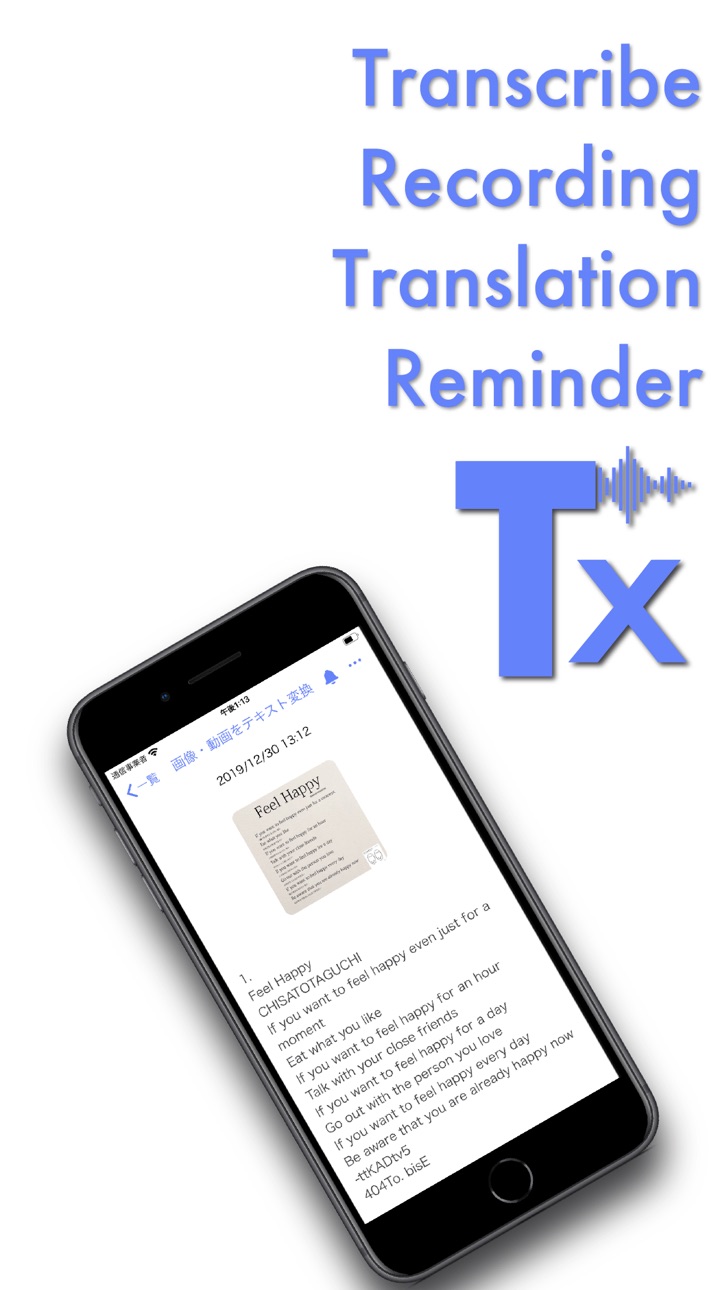
Texter is an AI transcription app that turns audio, images and video into editable text with a single tap. From meeting minutes and interview notes to subtitles and SRT files, you can handle your entire workflow in one place.
Key new features
・Ask Your Note (AI Chat)
Just ask your transcribed note a question and get the answer instantly. Try "What were the decisions?" or "Summarize what John said" instead of scrolling back through the whole transcript.
・Picture in Picture transcription
Switch to a small floating window and transcription keeps running while you use other apps. Read a document, watch another video, whatever you need to do, your words still become text.
・Speaker Identification
Automatically splits multi person conversations by speaker, so it is instantly clear who said what in a meeting or interview.
・Silence cut
Automatically detects and removes silent sections in audio and video. Perfect for meetings and lectures with long pauses. Choose from three presets Low, Standard and High and preview the result in real time.
・Synced subtitles on video import
Generate subtitles with timestamps when you import a video. Subtitles stay in sync as you play, which makes reviewing and editing much easier for lectures, interviews and recorded meetings.
Why people choose Texter
・Ask Your Note: ask AI questions about any transcript and get just the answer you need
・Picture in Picture: keep recording and transcribing in a small window while using other apps
・Speaker Identification: automatically separates multi person conversations by speaker
・Highly accurate transcription with the latest AI and on device technology
・Extract audio from video, auto create subtitles and edit by sentence with time jump
・Summarize and translate transcripts to turn them into clean meeting minutes (20 summary templates available)
・Real time translation using DeepL and Google, both online and offline
・Turn images, photos, PDFs and screenshots into text with multi page PDF support
・Real time transcription that can also support people with hearing difficulties
Use cases
・Meetings
Import recordings, review subtitles and the sentence list, then share only the important parts. When it's over, just ask your note what was decided.
・Online meetings
Turn on Picture in Picture and keep transcribing while you check documents or use other apps in the main window.
・Interviews and journalism
Speaker Identification splits the conversation automatically, and sentence based editing dramatically cuts down editing time. Easily organize interviews with Q&A templates.
・Classes and lectures
Pull out key points from lecture videos and make searchable, summarized notes. Missed something? Just ask your note.
・Creators
Convert video to text, edit subtitles and export clips for social media, all in one app.
・Export
Export transcripts as PDF or SRT subtitle files and use them directly in documents or video editing.
Texter Premium
・Unlimited use of Ask Your Note (AI Chat)
・Unlimited access to 20 summary templates
・Remove limits on real time transcription (including Picture in Picture) and image text recognition
・Increase maximum length for imported audio
・Remove ads for a smoother experience
Notes
・Some advanced features work even better on newer iOS devices and OS versions.
・Transcription and subtitle accuracy depends on recording quality, such as noise level and clarity of speech. You can always edit the text later.
We will keep improving Texter based on your feedback. Please give it a try.
Terms of Use
https://sites.google.com/view/texter-voice-to-text/terms-of-service
Personal Information Protection Policy
https://sites.google.com/view/texter-voice-to-text/privacy-policy#h.p_xa805c26EeZ5
In-App Purchases US pricing
Unlimited text recognition in images Subscription
Unlimited Image Recognition. · Monthly 7-day free trial$12.99
Premium 6months · 6 months$24.99
Premium 1year · Yearly$59.99
Long-time audio recognition. · Monthly$27.99
Unlimited Image Recognition · Monthly$9.99
Long-time audio recognition. · Monthly$55.99
One-Time Purchases
Real Time Cloud Translation+$7.99
Real-time high performance+5hr$11.99
+Import Audio(AWS Transcribe)$11.99
Capabilities
In-App Purchases
Accessibility
ipadiphonemacrealityDevicetvoswatch
Version history 25 versions
Build 888035945v2.11.372026-07-10 03:09:52
Stability improvements and bug fixes.
Build 887893632v2.11.352026-07-06 14:20:42
Bug fixes.
- When a translation language pack is corrupted or not downloaded, the app now guides you to reinstall it (Settings > General > Translation)
Build 887848140v2.11.342026-07-05 19:42:13
Improved usability.
- The initial button in AI Chat is now easier to tap
- You can now start recording directly from an empty recording list
Build 887778346v2.11.332026-07-04 01:31:18
Improved video notes and subtitles.
- The video now stays pinned at the top while subtitles are highlighted during playback, so you can follow the subtitles while watching
- Fixed an issue where playback controls could disappear in full-screen video
- Improved an issue where live translation subtitles could occasionally fail to appear
Build 887671519v2.11.322026-07-01 17:26:14
Stability and performance improvements.
- Minor improvements and bug fixes
Build 887546765v2.11.312026-06-28 17:45:46
Stability and performance improvements.
- Minor improvements and bug fixes
Build 887379116v2.11.302026-06-24 13:42:05
Stability improvements.
- Improved behavior when live translation encounters repeated errors
- Other minor improvements and bug fixes
Build 887176998v2.11.292026-06-19 08:01:22
Stability improvements.
- Improved behavior when live translation encounters repeated errors
- Other minor improvements and bug fixes
Build 886947960v2.11.282026-06-14 17:33:55
Stability improvements.
- Improved behavior when live translation encounters repeated errors
- Other minor improvements and bug fixes
Build 886867730v2.11.272026-06-12 09:30:18
Bug fixes and improvements.
- Fixed an issue where some users could receive unnecessary reminder notifications
- Other stability improvements
Build 886783411v2.11.262026-06-10 14:44:54
Improved file import and notifications.
- Added an alert when importing unsupported file formats
- Added a notification when your imported file finishes transcribing
- Improved error feedback during voice recognition
- Other stability improvements
Build 886708571v2.11.252026-06-09 13:34:47
Added multilingual engine and improved real-time translation.
- Added multilingual engine for mixed Japanese/English/Chinese/Korean conversations
- Fixed an issue where English subtitles (real-time translation) could fail to appear
- Improved cursor usability when editing text
- Fixed crashes on iOS 26
- Accessibility improvements
Build 886346212v2.11.242026-06-01 01:25:54
Added multilingual engine and crash fixes.
- Added multilingual engine for mixed Japanese/English/Chinese/Korean conversations
- Improved cursor usability when editing text
- Fixed crashes on iOS 26
- Accessibility improvements
Build 886223959v2.11.232026-05-28 14:26:51
Added multilingual engine and crash fixes.
- Added multilingual engine for mixed Japanese/English/Chinese/Korean conversations
- Improved cursor usability when editing text
- Fixed crashes on iOS 26
- Accessibility improvements
Build 886063007v2.11.222026-05-24 18:07:45
Fixed transcription quality during file import.
- Fixed text being dropped during file import
- Improved speech recognition stability
Build 885964028v2.11.212026-05-21 15:56:57
Significantly improved speech recognition stability.
- Fixed recording stopping on connection drops (auto-reconnect)
- Improved connection stability during live translation
- Better retry handling for speech recognition errors
Build 885918067v2.11.202026-05-20 15:29:12
Stability improvements and bug fixes.
- Improved app crash stability
- Fixed upload issue when sharing files
- AI chat improvements
Build 885767095v2.11.182026-05-18 01:20:48
Performance optimizations and bug fixes.
Build 885794936v2.11.192026-05-18 12:51:16
Performance optimizations and bug fixes.
Build 885742712v2.11.172026-05-16 07:34:30
Performance optimizations and bug fixes.
Build 885698220v2.11.162026-05-15 06:20:24
Performance optimizations and bug fixes.
Build 885652219v2.11.152026-05-14 05:55:12
Transcription stability improvements
- Long audio file uploads now continue reliably in the background
- Reduced crash risk during transcription processing
Other
- Minor bug fixes and stability improvements
Build 885505220v2.11.142026-05-11 15:02:59
Performance Optimization
- Improved overall app responsiveness
- Optimized memory usage
Bug Fixes
- Various bug fixes
- Stability improvements
Build 885415517v2.11.132026-05-10 17:38:58
Improved File Transcription Accuracy
- Fixed an issue where unrelated phrases (e.g., "Thanks for watching", "Good night") could appear in transcriptions from imported audio files
- Suppressed hallucinations during silent or repetitive segments for more faithful transcriptions
Stability Improvements
- Various bug fixes
Build 885404371v2.11.122026-05-08 06:23:18
Performance Optimization
- Improved overall app responsiveness
- Optimized memory usage
Bug Fixes
- Various bug fixes
- Stability improvements
Price history by region
Currency
Show
Columns
Search
Availability 1 of 1 storefronts
| Region | Language | Price | Ratings | Avg | Version |
|---|---|---|---|---|---|
| US | en-US | Free | 119 | 4.1 | 2.11.37 |
Change log 29 changes · US
✎
releaseNotes updated
Stability improvements and bug fixes.
✎
description updated
Are you spending countless hours transcribing meetings, interviews or lectures
Texter is an AI transcription app that turns audio, images and video into editab
✎
subtitle updated
AI Notetaker & Transcription
✎
name updated
Texter: Audio & Video to Text
◆
Version 2.11.37 released
Stability improvements and bug fixes.
◆
Version 2.11.35 released
Bug fixes.
- When a translation language pack is corrupted or not downloaded, the app now guides you to reinstall it (Settings > General > Translation)
◆
Version 2.11.34 released
Improved usability.
- The initial button in AI Chat is now easier to tap
- You can now start recording directly from an empty recording list
◆
Version 2.11.33 released
Improved video notes and subtitles.
- The video now stays pinned at the top while subtitles are highlighted during playback, so you can follow the subtitles while watching
- Fixed an issue where playback controls could disappear in full-sc
◆
Version 2.11.32 released
Stability and performance improvements.
- Minor improvements and bug fixes
◆
Version 2.11.31 released
Stability and performance improvements.
- Minor improvements and bug fixes
◆
Version 2.11.30 released
Stability improvements.
- Improved behavior when live translation encounters repeated errors
- Other minor improvements and bug fixes
◆
Version 2.11.29 released
Stability improvements.
- Improved behavior when live translation encounters repeated errors
- Other minor improvements and bug fixes
◆
Version 2.11.28 released
Stability improvements.
- Improved behavior when live translation encounters repeated errors
- Other minor improvements and bug fixes
◆
Version 2.11.27 released
Bug fixes and improvements.
- Fixed an issue where some users could receive unnecessary reminder notifications
- Other stability improvements
◆
Version 2.11.26 released
Improved file import and notifications.
- Added an alert when importing unsupported file formats
- Added a notification when your imported file finishes transcribing
- Improved error feedback during voice recognition
- Other stability impr
◆
Version 2.11.25 released
Added multilingual engine and improved real-time translation.
- Added multilingual engine for mixed Japanese/English/Chinese/Korean conversations
- Fixed an issue where English subtitles (real-time translation) could fail to appear
- Impro
◆
Version 2.11.24 released
Added multilingual engine and crash fixes.
- Added multilingual engine for mixed Japanese/English/Chinese/Korean conversations
- Improved cursor usability when editing text
- Fixed crashes on iOS 26
- Accessibility improvements
◆
Version 2.11.23 released
Added multilingual engine and crash fixes.
- Added multilingual engine for mixed Japanese/English/Chinese/Korean conversations
- Improved cursor usability when editing text
- Fixed crashes on iOS 26
- Accessibility improvements
◆
Version 2.11.22 released
Fixed transcription quality during file import.
- Fixed text being dropped during file import
- Improved speech recognition stability
◆
Version 2.11.21 released
Significantly improved speech recognition stability.
- Fixed recording stopping on connection drops (auto-reconnect)
- Improved connection stability during live translation
- Better retry handling for speech recognition errors
◆
Version 2.11.20 released
Stability improvements and bug fixes.
- Improved app crash stability
- Fixed upload issue when sharing files
- AI chat improvements
◆
Version 2.11.19 released
Performance optimizations and bug fixes.
◆
Version 2.11.18 released
Performance optimizations and bug fixes.
◆
Version 2.11.17 released
Performance optimizations and bug fixes.
◆
Version 2.11.16 released
Performance optimizations and bug fixes.
◆
Version 2.11.15 released
Transcription stability improvements
- Long audio file uploads now continue reliably in the background
- Reduced crash risk during transcription processing
Other
- Minor bug fixes and stability improvements
◆
Version 2.11.14 released
Performance Optimization
- Improved overall app responsiveness
- Optimized memory usage
Bug Fixes
- Various bug fixes
- Stability improvements
◆
Version 2.11.13 released
Improved File Transcription Accuracy
- Fixed an issue where unrelated phrases (e.g., "Thanks for watching", "Good night") could appear in transcriptions from imported audio files
- Suppressed hallucinations during silent or repetitive segme
◆
Version 2.11.12 released
Performance Optimization
- Improved overall app responsiveness
- Optimized memory usage
Bug Fixes
- Various bug fixes
- Stability improvements