Home › Business

Information
Apple ID1482135006
Bundle IDcom.nextcrew
SellerSeller
Min iOS14.0
Min macOS11.0
Device familiesiphone, ipod
Released2020-03-03
Copyright© 2020 NextCrew Corp
Privacy policyLink ↗
Preview 1 platform
iPhone 6 images



What’s New Version 4.33
1. Fixed bugs and improved performance.
Description
Download the NextCrew app to stay connected with your staffing agency on the go. With our intuitive and easy to work with the mobile app, you can easily apply for jobs, manage your profile and even communicate with the staffing coordinators.
Market Your Profile
Maintain your profile, keep your information accurate and stand-out in the crowd.
Find Jobs That Suit You
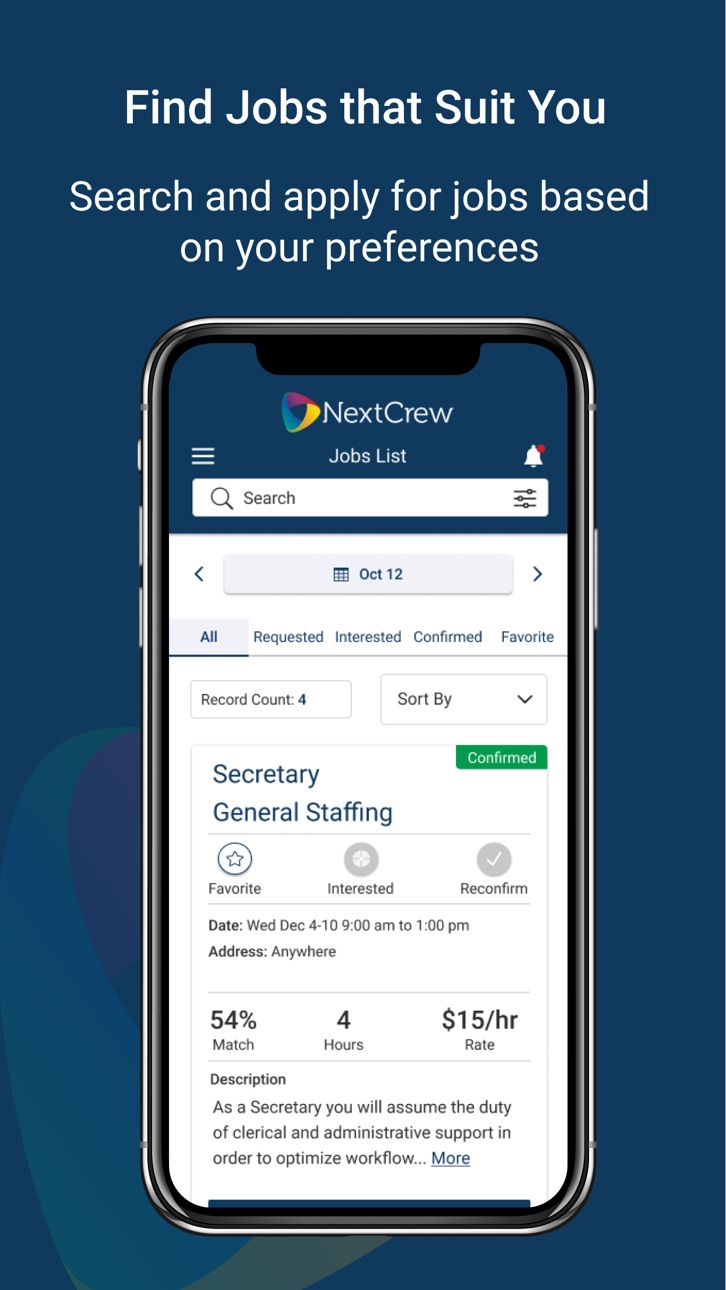
Best matching job are automatically available to you based on your location, schedule, skills and other preferences. You can review job details and apply with a click or even save them as your favorites. Once a job is confirmed will notify you with all the required details. We will even send you a reminder before the job starts. You can also get direction to your work location or download to your calendar.
Get Organized
Manage your availability in real-time and view jobs in a user-friendly calendar format. If your preferred view is a calendar, you will enjoy the experience working with our simple but powerful calendar view.
Paperless Timesheets
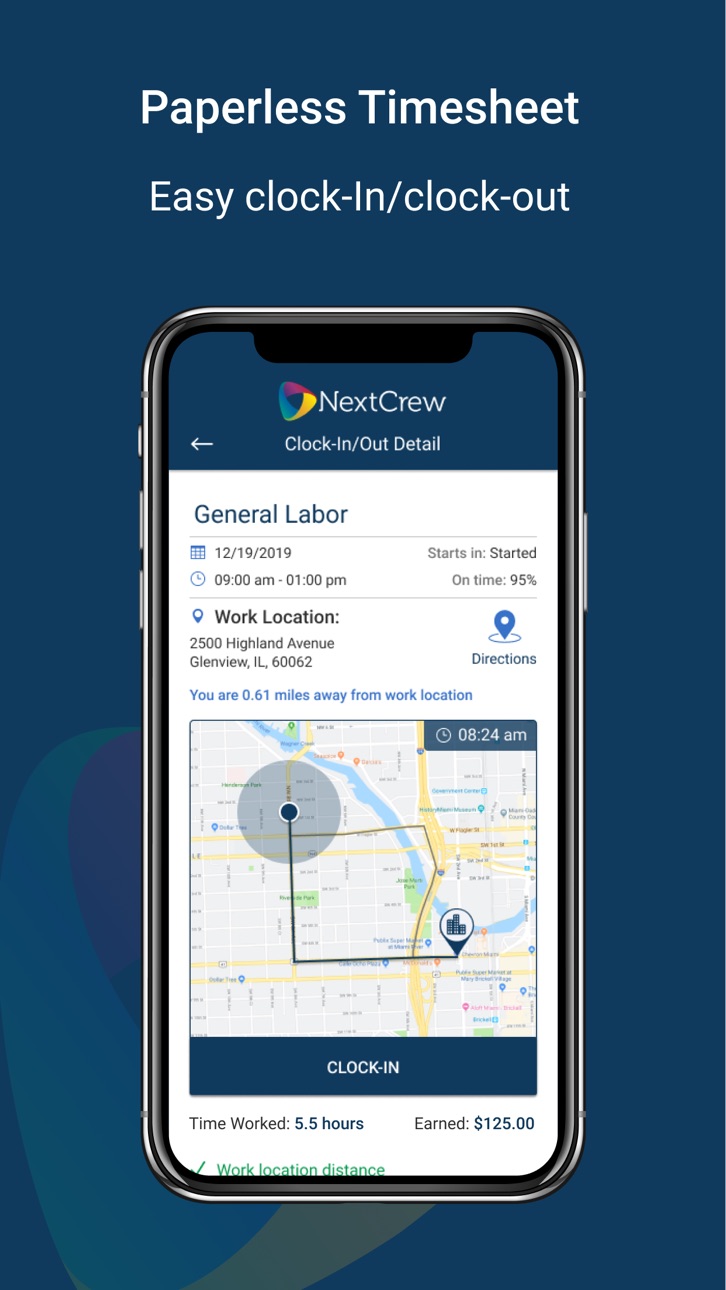
Our powerful location-based functionality allows you to easily clock-in and out and updates your on-site status in real-time for your staffing coordinator, eliminating any need for manual paper-work, phone call or texting. You can also submit expense receipts or other images required by your staffing agency with your timesheet.
Simple Real-Time Messaging
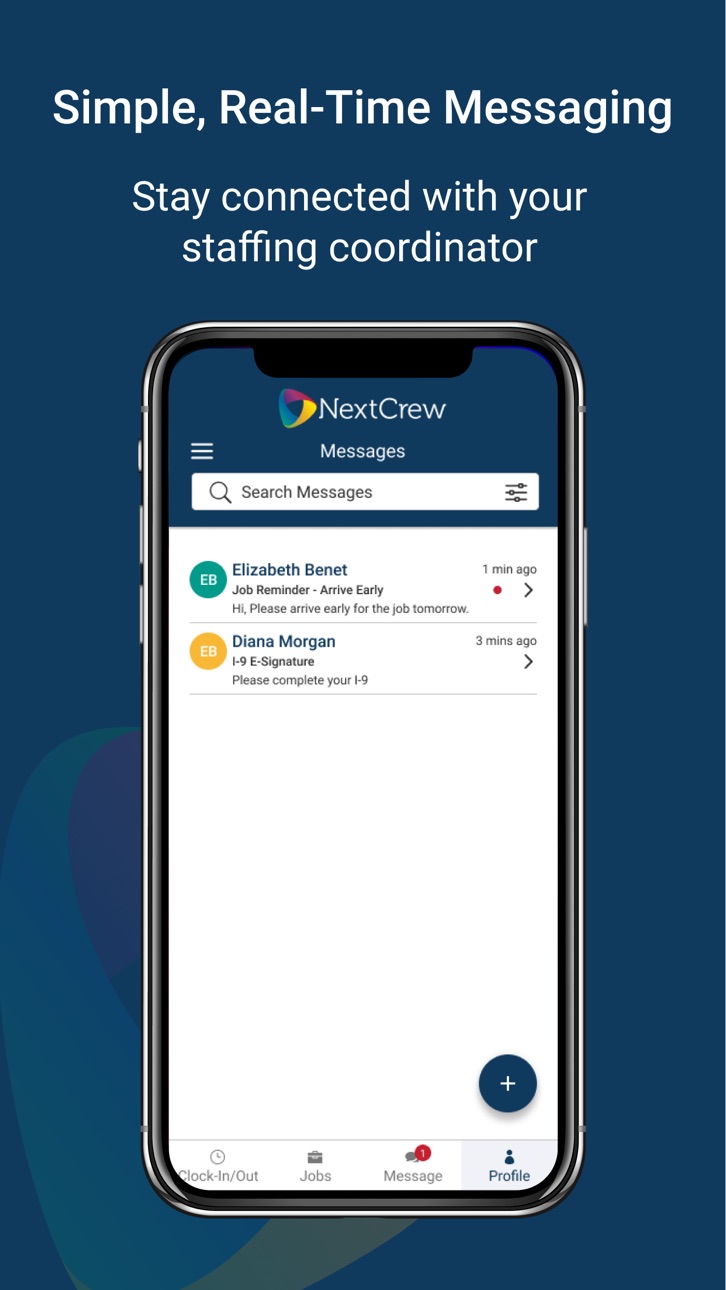
Stay connected with your staffing coordinator with ease. You can also attach a document or other images as a part of your communication.
About Us
NextCrew is a software-as-a-service technology to modernize and digitally transform on-demand staffing processes.
For companies who manage the on-demand workforce, NextCrew stands at the forefront of innovative process management tools built to simplify every aspect of scheduling and communication.
Support & Feedback
We are actively working on new features and improvements to bring you a better experience. Click on Send App Feedback in Settings to send us your feedback or email us at support@nextcrew.com.
Accessibility
ipadiphonemacrealityDevicetvoswatch
Version history 25 versions
Build 887639495v4.332026-06-30 23:25:28
1. Fixed bugs and improved performance.
Build 886471991v4.322026-06-04 18:03:51
1. Added Job Context to Job Messages.
2. Change the way the language works.
3. Enhanced supervisor check-in functionality on the mobile.
4. Fixed some bugs and improved performance.
Build 885816030v4.312026-05-18 21:49:37
1. Added Job Context to Job Messages.
2. Change the way the language works.
3. Enhanced supervisor check-in functionality on the mobile.
4. Fixed some bugs and improved performance.
Build 884600125v4.302026-04-16 22:14:27
1. Used Latitude and Longitude to calculate distance.
2. Fixed some bugs and improved performance.
Build 883583789v4.292026-03-20 19:59:06
1. Used Latitude and Longitude to calculate distance.
2. Fixed some bugs and improved performance.
Build 883088810v4.282026-03-06 23:18:16
1. Added Gender and Pronoun fields
2. resolved some issues and improved performance.
Build 882120526v4.272026-02-03 20:53:38
1. Added ability to manage languages.
2. Added the ability to manage a user's social media accounts.
3. Fixed some issues and improved performance.
Build 882002189v4.262026-01-30 20:59:23
1. Added ability to manage languages.
2. Added the ability to manage a user's social media accounts.
3. Fixed some issues and improved performance.
Build 880180687v4.252025-11-29 20:02:43
1. Fixed some issues and improved performance.
Build 879211726v4.242025-10-25 21:21:31
1. Added Italian language
2. Updated the Reset Password flow for crew members
3. Fixed some issues and improved performance
Build 878452245v4.232025-09-28 02:23:31
1. Changed behaviour in Bank Account Screen
2. Added App Update Functionality
3. Fixed some issues
Build 877679031v4.222025-08-30 11:25:43
1. App Impersonation
2. Fixed issues and improve performance
Build 877255029v4.212025-08-14 21:19:15
1. Allow users to complete tasks
2. Display tasks icon globally
3. fixed some issues and improve performance
Build 877096637v4.202025-08-11 09:13:16
1. Allow users to complete tasks
2. Display tasks icon globally
3. fixed some issues and improve performance
Build 876075786v4.192025-07-02 18:37:18
1. Login as truncated text
2. show tasks list and task details screen using push notification and deep link
3. Added password expiration policy handling
4. Emojis are not appearing on 'Message Detail' screen.
5. Enhance deep link functionality
6. Fixed issue Crew Unable to Upload Certificates In-App
7. Fixed issue Certificate/License Dropdown Showing Incorrect Data When Switching Accounts in NextCrew Mobile
Build 875382444v4.182025-06-06 20:14:13
1. New Tasks functionality.
Build 874250851v4.172025-04-24 09:19:02
1. Mask Bank Information.
Fixed:- Some skills are not appearing on the 'New Screen' after selecting the client
Build 873964161v4.162025-04-14 04:13:37
1. 'Filter' and 'Sort by' watermark appears in black instead of grey on the Supervisor Clock-In/Out screen.
2. Hide Carrier Name dropdown on the Contact Info
.
3. Make phone number clickable on the supervisor Clock-In/Out screen
.
4. Skills are not appearing on 'New Job' screen if user select the client.
Build 873149695v4.152025-03-11 20:05:42
1. Supervisor Check-In/Out Screen.
2. Fixed document is not appearing on Timesheet screen when user add expense with Attachment.
3. Fixed staff is able to perform multiple clock-in/out even if 'No More Than One Clock-In Per Day Per Job' permission is enables from admin side.
4. Fixed user is able to add more than 10 digits in Phone field on 'Contact Information' screen.
Build 872695248v4.142025-02-21 22:01:37
Fixed mobile deep link issue
Build 872197837v4.132025-02-04 06:21:11
1. Allow login expiration according to company configuration.
2. Hide DECLINE button in job detail if already declined or there is no existing offer.
3. Issue with signing supervisor timesheet flow.
4. fixed clock in and clock out issue
Build 872159778v4.122025-02-01 19:22:54
1. Allow login expiration according to company configuration.
2. Hide DECLINE button in job detail if already declined or there is no existing offer.
3. Issue with signing supervisor timesheet flow.
Build 865739800v4.112025-01-13 14:04:36
Clocking in to take a picture does not default to selfie mode.
Forgot password on Mobile App not presenting company option
Direction/Work Location is not appearing for French & Spanish language on 'Job Detail' screen.
Add Language translator on message details
Logo does not change when switching companies
Map not showing correctly when we change the language
NavigationBar Appearance issue
Build 864821483v4.102024-04-01 04:53:12
Bug Fixes and Performance Improvement
Build 864408605v4.92024-03-14 04:39:51
Bug Fixes and Performance Improvement
No pricing data captured yet — comparisons appear once the app has paid storefronts or in-app purchases.
Availability 8 of 8 storefronts
| Region | Language | Price | Ratings | Avg | Version |
|---|---|---|---|---|---|
 US US | en-US | Free | 58 | 2.7 | 4.33 |
 GH GH | en-GB | Free | 0 | — | 4.33 |
 KE KE | en-GB | Free | 0 | — | 4.33 |
 NG NG | en-GB | Free | 0 | — | 4.33 |
 TZ TZ | en-GB | Free | 0 | — | 4.33 |
 UG UG | en-GB | Free | 0 | — | 4.33 |
 ZM ZM | en-GB | Free | 0 | — | 4.33 |
 ZW ZW | en-GB | Free | 0 | — | 4.33 |
Change log 28 changes · US
✎
releaseNotes updated
1. Fixed bugs and improved performance.
✎
description updated
Download the NextCrew app to stay connected with your staffing agency on the go. With our intuitive and easy to work with the mobile app, you can easily apply f
✎
name updated
NextCrew Mobile
◆
Version 4.33 released
1. Fixed bugs and improved performance.
◆
Version 4.32 released
1. Added Job Context to Job Messages.
2. Change the way the language works.
3. Enhanced supervisor check-in functionality on the mobile.
4. Fixed some bugs and improved performance.
◆
Version 4.31 released
1. Added Job Context to Job Messages.
2. Change the way the language works.
3. Enhanced supervisor check-in functionality on the mobile.
4. Fixed some bugs and improved performance.
◆
Version 4.30 released
1. Used Latitude and Longitude to calculate distance.
2. Fixed some bugs and improved performance.
◆
Version 4.29 released
1. Used Latitude and Longitude to calculate distance.
2. Fixed some bugs and improved performance.
◆
Version 4.28 released
1. Added Gender and Pronoun fields
2. resolved some issues and improved performance.
◆
Version 4.27 released
1. Added ability to manage languages.
2. Added the ability to manage a user's social media accounts.
3. Fixed some issues and improved performance.
◆
Version 4.26 released
1. Added ability to manage languages.
2. Added the ability to manage a user's social media accounts.
3. Fixed some issues and improved performance.
◆
Version 4.25 released
1. Fixed some issues and improved performance.
◆
Version 4.24 released
1. Added Italian language
2. Updated the Reset Password flow for crew members
3. Fixed some issues and improved performance
◆
Version 4.23 released
1. Changed behaviour in Bank Account Screen
2. Added App Update Functionality
3. Fixed some issues
◆
Version 4.22 released
1. App Impersonation
2. Fixed issues and improve performance
◆
Version 4.21 released
1. Allow users to complete tasks
2. Display tasks icon globally
3. fixed some issues and improve performance
◆
Version 4.20 released
1. Allow users to complete tasks
2. Display tasks icon globally
3. fixed some issues and improve performance
◆
Version 4.19 released
1. Login as truncated text
2. show tasks list and task details screen using push notification and deep link
3. Added password expiration policy handling
4. Emojis are not appearing on 'Message Detail' screen.
5. Enhance deep link function
◆
Version 4.18 released
1. New Tasks functionality.
◆
Version 4.17 released
1. Mask Bank Information.
Fixed:- Some skills are not appearing on the 'New Screen' after selecting the client
◆
Version 4.16 released
1. 'Filter' and 'Sort by' watermark appears in black instead of grey on the Supervisor Clock-In/Out screen.
2. Hide Carrier Name dropdown on the Contact Info
.
3. Make phone number clickable on the supervisor Clock-In/Out screen
.
4. Skill
◆
Version 4.15 released
1. Supervisor Check-In/Out Screen.
2. Fixed document is not appearing on Timesheet screen when user add expense with Attachment.
3. Fixed staff is able to perform multiple clock-in/out even if 'No More Than One Clock-In Per Day Per Job' pe
◆
Version 4.14 released
Fixed mobile deep link issue
◆
Version 4.13 released
1. Allow login expiration according to company configuration.
2. Hide DECLINE button in job detail if already declined or there is no existing offer.
3. Issue with signing supervisor timesheet flow.
4. fixed clock in and clock out issue
◆
Version 4.12 released
1. Allow login expiration according to company configuration.
2. Hide DECLINE button in job detail if already declined or there is no existing offer.
3. Issue with signing supervisor timesheet flow.
◆
Version 4.11 released
Clocking in to take a picture does not default to selfie mode.
Forgot password on Mobile App not presenting company option
Direction/Work Location is not appearing for French & Spanish language on 'Job Detail' screen.
Add Language tr
◆
Version 4.10 released
Bug Fixes and Performance Improvement
◆
Version 4.9 released
Bug Fixes and Performance Improvement