Home › Music

 US
US
1 of 1 storefronts
Content in en-US
Content in en-US
Information
Preview 2 platforms
iPhone 7 images


iPad 7 images



What’s New Version 3.8.3
This update includes improvements and is recommended for all Cubasis users. For the full list of changes in Cubasis 3.8.3, visit: https://steinberg.net/cubasisforum
Some of the new features are only available in optional in-app purchases.
Cubasis 3.8 turns your iPhone and iPad into a powerful mobile studio. Plug in your guitar or bass for legendary amp tones and presets, stay in tune with the new tuner, and enjoy smoother sessions with improved audio routing. Work your way with portrait mode, external display support, and full iOS 26 integration. Plus, get exclusive Cubasis plug-ins when you own our new Verve and Etude piano apps.
Cubasis Bass Amp
Make your bass tracks shine with our Bass Amp Suite, featuring iconic amps, EQ, compression, and effects like Chorus, Phaser, Flanger, Envelope Filter, Octaver, and more. Includes a wide range of pro presets for any genre.
Cubasis Amp Rack
Give your guitar tracks character and tone with legendary amp models and versatile effects. From vintage warmth to modern edge, Amp Rack makes dialing in your perfect sound easy, with genre-ready presets for quick results.
Cubasis Tuner
Stay perfectly in tune with the all-new Cubasis Tuner. Sleek design, intuitive controls, and lightning-fast response ensure accurate tuning without breaking your creative flow.
Smarter Sound, Portrait Mode & iOS 26 Ready
Cubasis 3.8 adds audio input/output selection for full routing control. Enjoy portrait mode, windowing, and external display support for flexible workflows. Fully compatible with iOS 26.
Verve and Etude Plug-in Versions
Our new Verve and Etude piano apps deliver world-class sounds for scoring, classical, jazz, and pop. Use them standalone or in any AU-compatible DAW. Own Cubasis and Verve or Etude? Get an extra Cubasis plug-in version free.
Improved MIDI Support
Cubasis 3.8 now imports and exports Tempo and Signature track data in MIDI files for better timing and structure across apps. Additional refinements make MIDI workflows smoother than ever.
More Features and Improvements
Beyond new features, Cubasis 3.8 delivers refinements like improved Tempo and Signature tracks, enhanced usability, and greater stability.
If you enjoy Cubasis, please support us by rating the app in the App Store!
Description
*** Please note that a supported hardware device is required to unlock the feature set of Cubasis LE (unless unlocked Cubasis LE runs in demo mode). Please visit https://new.steinberg.net/cubasis/le/#83335 for more details. ***
Cubasis LE is the compact version of Steinberg’s mobile multitouch sequencer, providing the same look and feel of its bigger brother Cubasis. Specially designed for quick and easy operation, Cubasis LE makes recording, editing and mixing a breeze, no matter where you are, right there on your iPhone or iPad.
• Cubasis LE 3 for iPhone and iPad
Capture your musical ideas when inspiration strikes. Cubasis offers excellent usability, ease of use and lightning fast operation for you to perform, record and mix your music quickly and efficiently – no matter if you're using an iPhone or iPad.
• Keyboard and MicroSonic virtual instrument
Create perfect tracks, beats and melodies from scratch on the integrated keyboard and load great-sounding MicroSonic instruments, based on the acclaimed HALion Sonic workstation and Allen Morgan drum kits.
• Hook up your external gear
Use your external devices to record your guitar, vocals and more in professional quality. Connect your keyboard hardware including MIDI over Bluetooth LE support.
• Audio and MIDI editor
Relish the ease of use and intuitive workflows when creating or mastering your audio and MIDI tracks in the editors. Straightforward usability and handy tools ensure you get tasks done at the speed of light.
• Full-screen mixer and pro-grade effects
Create perfect sounding mixes thanks to a full-blown mixer, which easily extends to full-screen, and make tracks instantly sound great with pro-grade effects that come with ready-to-use effect presets.
• In-app purchases for Cubasis LE
Easily extend Cubasis LE with great in-app purchases. Get all the features of Cubasis 3 in Cubasis LE, extend the app with excellent pro-grade plug-ins from Waves, add the world's most iconic drum machines and much more.
• Free Cubasis LE 2 in-app purchase transfer
Have you already purchased instruments or effects plug-ins via Cubasis LE 2 in-app purchases? Once you've installed Cubasis LE 3, simply transfer your previous plug-in in-app purchases from Cubasis LE 2 – free of charge.
NEW IN CUBASIS LE 3
• Universal app support: Run Cubasis on the iPhone and iPad
• Cubasis for iPhone: Create great music in the palm of your hand
• Full-screen mixer: Easily extend the size of the mixer and more
• Free Cubasis LE 2 IAP transfer: Freely transfer previous plug-in in-app purchases to Cubasis LE 3
• 960 PPQN MIDI resolution: Precise audio and MIDI event editing at the highest level
• FX rearrangement: Quickly rearrange plug-ins and change their pre/post fader position
• New effects presets: Make tracks sound great with these ready-to-use presets
• Undo with history list: Quickly jump back to earlier versions of your song
• Redesigned instruments and effects: Modern styling with more precise operation
• Audio, and MIDI editors revisited: File editing is much more effective
• Revised MediaBay: Your all-new control center for file and project management
• UI scale presets for iPhone and iPad: Quickly change the size and arrangement of Cubasis
• Overdub and looper recording modes: Choose the best mode for your recordings
HIGHLIGHTS
• Up to 4 audio and 4 MIDI tracks
• 2 assignable physical inputs and stereo output
• 32-bit floating point audio engine
• Audio I/O resolution of 16-bit/44.1 + 48 kHz
• MicroSonic with 25 instrument sounds based on HALion Sonic and Allen Morgan drum kits
• Mixer with 5 effect processors
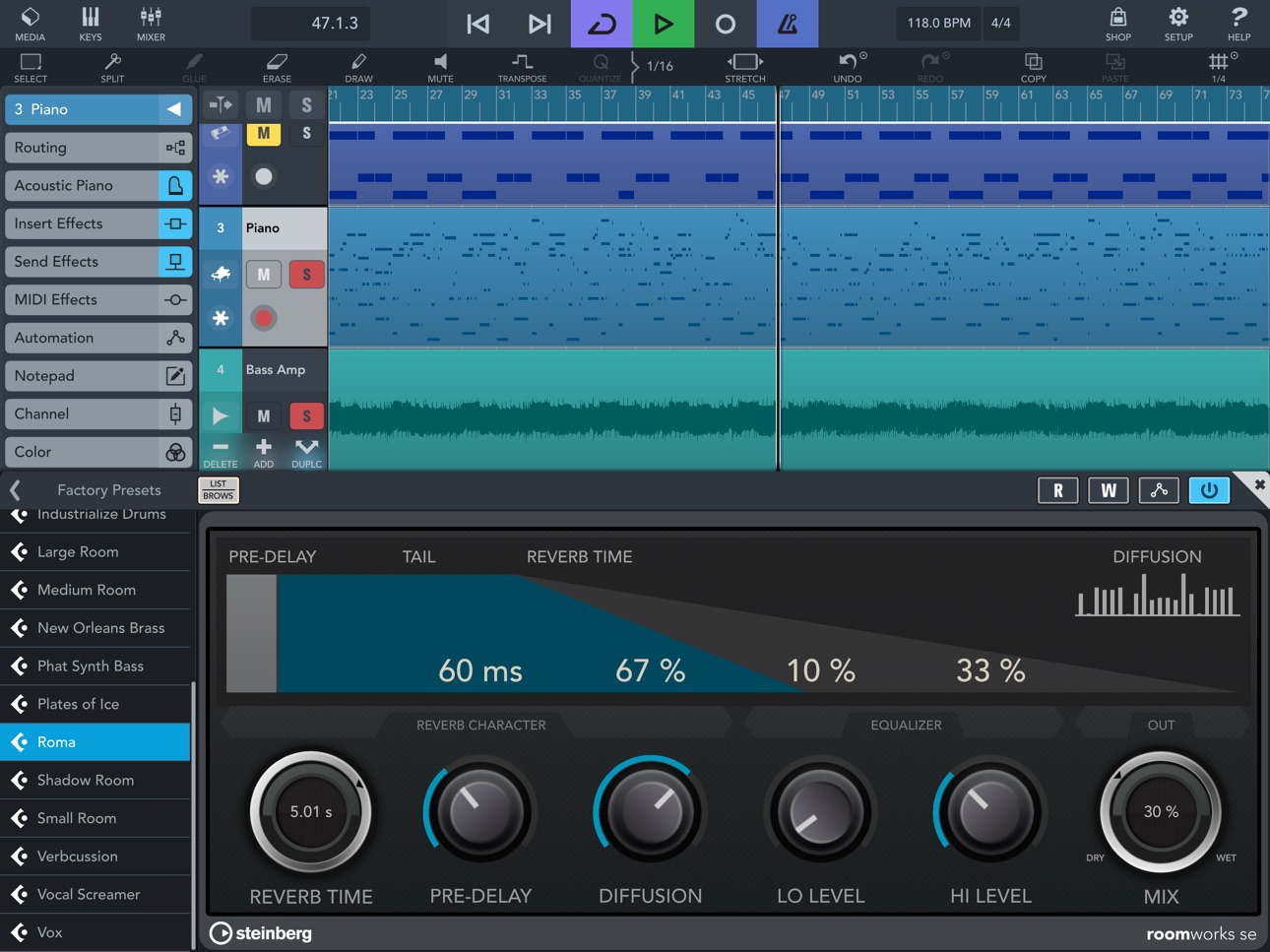
• Super-versatile RoomWorks SE reverb effect with intuitive graphical display
• Virtual keyboard with note repeat control
• Sample Editor and MIDI Editor
• Unlock all the features of the full Cubasis version via in-app purchase
Technical support
http://www.steinberg.net/cubasisforum
If you like Cubasis, please support us by rating this app in the App Store! Thank you!
In-App Purchases US pricing
One-Time Purchases
Micrologue ARP Arpeggiator$4.99
Waves Tune Real-Time$4.99
Classic Machines$6.99
FX Pack 1: Reverbs & Delays$6.99
FX Pack 2: Vintage FX$6.99
Neo FM$13.99
Waves Plug-in Bundle$19.99
HALion Sonic Selection$19.99
Cubasis 3 Full Feature Set$29.99
Cubasis 3 Full Feature Set$49.99
Capabilities
In-App Purchases
Accessibility
ipadiphonemacrealityDevicetvoswatch
Version history 25 versions
Build 881822228v3.8.32026-02-23 07:39:26
This update includes improvements and is recommended for all Cubasis users. For the full list of changes in Cubasis 3.8.3, visit: https://steinberg.net/cubasisforum
Some of the new features are only available in optional in-app purchases.
Cubasis 3.8 turns your iPhone and iPad into a powerful mobile studio. Plug in your guitar or bass for legendary amp tones and presets, stay in tune with the new tuner, and enjoy smoother sessions with improved audio routing. Work your way with portrait mode, external display support, and full iOS 26 integration. Plus, get exclusive Cubasis plug-ins when you own our new Verve and Etude piano apps.
Cubasis Bass Amp
Make your bass tracks shine with our Bass Amp Suite, featuring iconic amps, EQ, compression, and effects like Chorus, Phaser, Flanger, Envelope Filter, Octaver, and more. Includes a wide range of pro presets for any genre.
Cubasis Amp Rack
Give your guitar tracks character and tone with legendary amp models and versatile effects. From vintage warmth to modern edge, Amp Rack makes dialing in your perfect sound easy, with genre-ready presets for quick results.
Cubasis Tuner
Stay perfectly in tune with the all-new Cubasis Tuner. Sleek design, intuitive controls, and lightning-fast response ensure accurate tuning without breaking your creative flow.
Smarter Sound, Portrait Mode & iOS 26 Ready
Cubasis 3.8 adds audio input/output selection for full routing control. Enjoy portrait mode, windowing, and external display support for flexible workflows. Fully compatible with iOS 26.
Verve and Etude Plug-in Versions
Our new Verve and Etude piano apps deliver world-class sounds for scoring, classical, jazz, and pop. Use them standalone or in any AU-compatible DAW. Own Cubasis and Verve or Etude? Get an extra Cubasis plug-in version free.
Improved MIDI Support
Cubasis 3.8 now imports and exports Tempo and Signature track data in MIDI files for better timing and structure across apps. Additional refinements make MIDI workflows smoother than ever.
More Features and Improvements
Beyond new features, Cubasis 3.8 delivers refinements like improved Tempo and Signature tracks, enhanced usability, and greater stability.
If you enjoy Cubasis, please support us by rating the app in the App Store!
Build 881363668v3.8.22026-01-19 07:42:23
This update includes improvements and is recommended for all Cubasis users. For the full list of changes in Cubasis 3.8.2, visit: https://steinberg.net/cubasisforum
Some of the new features are only available in optional in-app purchases.
Cubasis 3.8 turns your iPhone and iPad into a powerful mobile studio. Plug in your guitar or bass for legendary amp tones and presets, stay in tune with the new tuner, and enjoy smoother sessions with improved audio routing. Work your way with portrait mode, external display support, and full iOS 26 integration. Plus, get exclusive Cubasis plug-ins when you own our new Verve and Etude piano apps.
Cubasis Bass Amp
Make your bass tracks shine with our Bass Amp Suite, featuring iconic amps, EQ, compression, and effects like Chorus, Phaser, Flanger, Envelope Filter, Octaver, and more. Includes a wide range of pro presets for any genre.
Cubasis Amp Rack
Give your guitar tracks character and tone with legendary amp models and versatile effects. From vintage warmth to modern edge, Amp Rack makes dialing in your perfect sound easy, with genre-ready presets for quick results.
Cubasis Tuner
Stay perfectly in tune with the all-new Cubasis Tuner. Sleek design, intuitive controls, and lightning-fast response ensure accurate tuning without breaking your creative flow.
Smarter Sound, Portrait Mode & iOS 26 Ready
Cubasis 3.8 adds audio input/output selection for full routing control. Enjoy portrait mode, windowing, and external display support for flexible workflows. Fully compatible with iOS 26.
Verve and Etude Plug-in Versions
Our new Verve and Etude piano apps deliver world-class sounds for scoring, classical, jazz, and pop. Use them standalone or in any AU-compatible DAW. Own Cubasis and Verve or Etude? Get an extra Cubasis plug-in version free.
Improved MIDI Support
Cubasis 3.8 now imports and exports Tempo and Signature track data in MIDI files for better timing and structure across apps. Additional refinements make MIDI workflows smoother than ever.
More Features and Improvements
Beyond new features, Cubasis 3.8 delivers refinements like improved Tempo and Signature tracks, enhanced usability, and greater stability.
If you enjoy Cubasis, please support us by rating the app in the App Store!
Build 880857262v3.8.12025-12-23 16:03:53
This update includes improvements and is recommended for all Cubasis users. For the full list of changes in Cubasis 3.8.1, visit: https://steinberg.net/cubasisforum
Some of the new features are only available in optional in-app purchases.
Cubasis 3.8 turns your iPhone and iPad into a powerful mobile studio. Plug in your guitar or bass for legendary amp tones and presets, stay in tune with the new tuner, and enjoy smoother sessions with improved audio routing. Work your way with portrait mode, external display support, and full iOS 26 integration. Plus, get exclusive Cubasis plug-ins when you own our new Verve and Etude piano apps.
Cubasis Bass Amp
Make your bass tracks shine with our Bass Amp Suite, featuring iconic amps, EQ, compression, and effects like Chorus, Phaser, Flanger, Envelope Filter, Octaver, and more. Includes a wide range of pro presets for any genre.
Cubasis Amp Rack
Give your guitar tracks character and tone with legendary amp models and versatile effects. From vintage warmth to modern edge, Amp Rack makes dialing in your perfect sound easy, with genre-ready presets for quick results.
Cubasis Tuner
Stay perfectly in tune with the all-new Cubasis Tuner. Sleek design, intuitive controls, and lightning-fast response ensure accurate tuning without breaking your creative flow.
Smarter Sound, Portrait Mode & iOS 26 Ready
Cubasis 3.8 adds audio input/output selection for full routing control. Enjoy portrait mode, windowing, and external display support for flexible workflows. Fully compatible with iOS 26.
Verve and Etude Plug-in Versions
Our new Verve and Etude piano apps deliver world-class sounds for scoring, classical, jazz, and pop. Use them standalone or in any AU-compatible DAW. Own Cubasis and Verve or Etude? Get an extra Cubasis plug-in version free.
Improved MIDI Support
Cubasis 3.8 now imports and exports Tempo and Signature track data in MIDI files for better timing and structure across apps. Additional refinements make MIDI workflows smoother than ever.
More Features and Improvements
Beyond new features, Cubasis 3.8 delivers refinements like improved Tempo and Signature tracks, enhanced usability, and greater stability.
If you enjoy Cubasis, please support us by rating the app in the App Store!
Build 875639397v3.82025-12-17 04:59:11
What's New in Cubasis LE 3.8
Some of the new features are only available in optional in-app purchases.
Cubasis Bass Amp
So you've laid down a great bass track – now it deserves to sound its absolute best. That’s where our Bass Amp Suite shines, featuring an arsenal of the most sought-after, great-sounding iconic bass amps, paired with a wide range of EQ, compression, and dedicated bass effects like Chorus, Phaser, Flanger, Envelope Filter, Octaver, and many more. Of course, we’ve included a huge selection of pro-sounding presets for all kinds of genres – whether as a starting point or for that final polish, the choice is yours.
Cubasis Amp Rack
Your guitar track demands more than just volume – it craves character, tone, and impact. Cubasis Amp Rack delivers a rich collection of legendary amp models, paired with a versatile suite of guitar-focused effects. Whether you're chasing vintage warmth or modern edge, Amp Rack will get you there with ease, making it simple to dial in your perfect sound. And with a wide range of genre-ready presets, you’re set to quickly shape your tone– or fine-tune it to perfection.
Cubasis Tuner
Before you bring your next musical idea to life, ensure your tuning is spot on with the all-new Cubasis Tuner. Discover one of the most beautifully designed tuner plug-ins, blending sleek visuals with intuitive controls and lightning-fast response. With both simple and advanced interface modes, it enables fast tuning with pinpoint accuracy. Stay perfectly in tune and keep your creative momentum going, without any distractions.
Smarter Sound, Portrait Mode, Bigger Screens & iOS 26 Ready
Cubasis 3.8 introduces audio input and output device selection alongside Bluetooth audio recording, giving you full control over your routing and mobile capture setup. Enjoy greater workflow flexibility with portrait mode and windowing support, plus full support for external displays to expand your creative space. With full iOS 26 compatibility, Cubasis is ready for whatever you create next.
* Using Bluetooth audio may introduce system-related latency.
Additional Verve and Etude Cubasis Plug-in Versions
Verve and Etude, our brand new piano apps for iOS and iPadOS, deliver world-class piano sounds – ideal for scoring, classical, jazz, pop-oriented pieces and more. Use them standalone on your iPhone or iPad, or seamlessly integrate them into any AU-compatible DAW. Plus, if you own both Cubasis and Verve or Etude, you’ll get an additional Cubasis plug-in version of the instrument at no extra cost for enhanced integration and peak performance.
Improved MIDI File Support
Cubasis 3.8 now supports import and export of Tempo and Signature track data in MIDI files, making it easier to preserve timing and structure across apps and devices. These enhancements improve compatibility and streamline your workflow when arranging and sharing projects. Additional refinements also make working with MIDI files smoother and more flexible than ever.
More Features and Improvements
Features alone don’t make a great app – usability and reliability do. Alongside its exciting new features, Cubasis 3.8 delivers thoughtful refinements such as significant Tempo and Signature track improvements, addressing user feedback for a smoother, more enjoyable experience… and much more. Renowned for its usability, Cubasis now offers even greater performance and long-term stability. For the full list of fixes and enhancements, please visit: steinberg.net/cubasisforum.
If you like Cubasis, please support us by rating this app in the App Store!
Build 875326430v3.7.82025-06-06 07:40:38
What’s New in Cubasis LE 3.7.8
This supplemental update includes improvements and is recommended for all Cubasis users.
For the complete list of improvements, issues and solution please visit us at www.steinberg.net/cubasisforum.
If you like Cubasis LE, please support us by rating this app!
Build 874567082v3.7.62025-05-21 23:32:17
What’s New in Cubasis LE 3.7.6
This supplemental update includes improvements and is recommended for all Cubasis users.
For the complete list of improvements, issues and solution please visit us at www.steinberg.net/cubasisforum.
If you like Cubasis LE, please support us by rating this app!
Build 872349134v3.7.52025-04-01 04:10:42
What's New in Cubasis LE 3.7.5
Cubasis, our multi-award-wining mobile DAW, helps you to turn your ideas into polished tracks with ease whenever inspiration strikes. Whether you're sketching out beats, recording vocals, mixing, or mastering, our powerful Cubasis app supports you at every step. Seamless workflow, pro-level features, and studio-quality sound — all in the palm of your hand. Now you can enjoy the freedom to expand your creative reach with DAWproject format support, allowing you to seamlessly exchange projects back and forth between Cubasis, Cubase and other compatible DAWs. Keep up with your creativity, anytime, anywhere with Cubasis LE for iPhone and iPad.
Some of the new features are only available in optional in-app purchases.
• From Studio to the Road and back: Smooth Cubasis and Cubase Project Exchange
Seamlessly transfer your projects between Cubasis on iPhone and iPad and Cubase 14 on Mac or Windows, ensuring a smooth workflow wherever you are. Whether you're laying down ideas on the go or refining tracks in the studio, this integration allows you to effortlessly move between devices. It makes music production more flexible and efficient than ever. Stay inspired, stay creative — Cubasis and Cubase go wherever your music takes you.
• Seamless Project Transfers Between Cubasis, Bitwig Studio & Presonus Studio One
Thanks to Cubasis now supporting DAWproject format, you can effortlessly transfer your projects between Cubasis on iOS and iPadOS and Bitwig Studio or PreSonus' Studio One on Mac or Windows. This seamless compatibility ensures a smooth, efficient workflow, letting you capture ideas wherever inspiration strikes and refine them in your preferred DAW — on desktop or mobile, without limitations and back.
• Improvements
Stay in the creative flow with Cubasis for iOS and iPadOS. Cubasis 3.7.5 seamlessly blends powerful new features and enhancements with an intuitive user experience, delivering top-tier performance and long-term stability. From capturing your first idea to crafting studio-quality tracks, Cubasis supports you every step of the way. For a detailed list of updates, fixes, and solutions, visit steinberg.net/cubasisforum.
*For more information on project exchange, see the chapter "DAWproject" in the Cubasis help.
If you like Cubasis LE, please support us by rating this app in the App Store! Thank you!
Build 871965774v3.7.12025-01-29 07:20:59
What’s New in Cubasis LE 3.7.1
This supplemental update includes improvements and is recommended for all Cubasis LE users. For the complete list of improvements, issues and solution please visit us at www.steinberg.net/cubasisforum.
If you like Cubasis LE, please support us by rating this app in the App Store! Thank you!
What's New in Cubasis LE 3.7
Capture your ideas and turn them into exceptional sounding tracks with Cubasis, our award-winning mobile DAW app for iOS and iPadOS. Create in 3/4, 7/8, 15/16 or whatever time signature matches your inspiration. Go even further and easily add multiple tempo and time signature changes or ramps in just a few steps. Celebrate Yamaha's Synth 50th Anniversary with 384 additional legendary DX7 patches in the free FM Classics IAP update. Or, as the owner of the brand new Iconica Sketch for iOS app, create inspiring orchestral masterpieces on the go with the free additional Cubasis plug-in version. Go create wherever you are – with Cubasis on your iPad and iPhone.
Some of the new features are only available in optional in-app purchases.
• Tempo and signature track support
Take your music creation with Cubasis to the next level, now featuring tempo and signature track support. Easily adjust tempo and time signatures on the fly to match your creative vision. Effortlessly create tracks with unique time signatures, explore new rhythmic patterns, and craft dynamic music that keeps listeners hooked. Unleash your creativity and make every beat count with tempo and signature track support.
• Iconica Sketch for iPhone and iPad, plus additional Cubasis plug-in version
Iconica Sketch, our brand-new iOS/iPadOS app, includes a comprehensive orchestra with 34 different instruments and 140 articulations. Paired with brillant audio quality and magical simplicity, it allows you to create musical masterpieces on the move, on your iPhone and iPad, as well as with every AU-compatible DAW. Plus, as the owner of Cubasis and Iconica Sketch for iPhone and iPad, you get a free additional Cubasis plug-in version of the instrument for improved integration and maximum performance.
• Free FM Classics (IAP) voice ROM update
Cubasis' FM Classics IAP comes with all the classic DX7 and TX81Z factory sounds, which match the originals as close as it’s possible to get. To celebrate Yamaha’s Synth 50th Anniversary, you can enjoy the free DX7 voice ROM 101∼106 update, which adds 384 keyboard, plucked and tuned percussion, wind instrument, sustain, sound effect and synthesizer patches, bringing the golden sound of the 1980s back to life.
• Improvements
Cubasis assures you always stay focused on your creativity. Cubasis 3.7 matches powerful features and improvements with unmatched usability, ensuring maximum performance and enduring stability, supporting you by helping you to capture your ideas and polish them into amazing sounding tracks. For the complete list of improvements, issues and solutions please visit us at http://steinberg.net/cubasisforum.
Build 867109924v3.72024-12-17 06:52:53
What's New in Cubasis LE 3.7
Capture your ideas and turn them into exceptional sounding tracks with Cubasis, our award-winning mobile DAW app for iOS and iPadOS. Create in 3/4, 7/8, 15/16 or whatever time signature matches your inspiration. Go even further and easily add multiple tempo and time signature changes or ramps in just a few steps. Celebrate Yamaha's Synth 50th Anniversary with 384 additional legendary DX7 patches in the free FM Classics IAP update. Or, as the owner of the brand new Iconica Sketch for iOS app, create inspiring orchestral masterpieces on the go with the free additional Cubasis plug-in version. Go create wherever you are – with Cubasis on your iPad and iPhone.
Some of the new features are only available in optional in-app purchases.
• Tempo and signature track support
Take your music creation with Cubasis to the next level, now featuring tempo and signature track support. Easily adjust tempo and time signatures on the fly to match your creative vision. Effortlessly create tracks with unique time signatures, explore new rhythmic patterns, and craft dynamic music that keeps listeners hooked. Unleash your creativity and make every beat count with tempo and signature track support.
• Iconica Sketch for iPhone and iPad, plus additional Cubasis plug-in version
Iconica Sketch, our brand-new iOS/iPadOS app, includes a comprehensive orchestra with 34 different instruments and 140 articulations. Paired with brillant audio quality and magical simplicity, it allows you to create musical masterpieces on the move, on your iPhone and iPad, as well as with every AU-compatible DAW. Plus, as the owner of Cubasis and Iconica Sketch for iPhone and iPad, you get a free additional Cubasis plug-in version of the instrument for improved integration and maximum performance.
• Free FM Classics (IAP) voice ROM update
Cubasis' FM Classics IAP comes with all the classic DX7 and TX81Z factory sounds, which match the originals as close as it’s possible to get. To celebrate Yamaha’s Synth 50th Anniversary, you can enjoy the free DX7 voice ROM 101∼106 update, which adds 384 keyboard, plucked and tuned percussion, wind instrument, sustain, sound effect and synthesizer patches, bringing the golden sound of the 1980s back to life.
• Improvements
Cubasis assures you always stay focused on your creativity. Cubasis 3.7 matches powerful features and improvements with unmatched usability, ensuring maximum performance and enduring stability, supporting you by helping you to capture your ideas and polish them into amazing sounding tracks. For the complete list of improvements, issues and solutions please visit us at http://steinberg.net/cubasisforum.
If you like Cubasis LE, please support us by rating this app in the App Store!
Build 866947124v3.6.72024-06-25 13:32:06
What's New in Cubasis LE 3.6.7
This supplemental update includes improvements and is recommended for all Cubasis LE users. For the complete list of improvements, issues and solutions please visit us at http://steinberg.net/cubasisforum. If you like Cubasis LE, please support us by rating it in the App Store!
What's New in Cubasis LE 3.6.5
Get inspired to create great music faster and more intuitively with Cubasis LE, thanks to exciting new features and workflow improvements.
• Audio Glue
Select several events and combine them in a single audio track, via a simple tap.
• Copy and paste revisited
Easily create event copies by a simple tap, hold and move your finger to the right.
• Smoother level metering with peak hold support
Enjoy smoother level meters, which make mixing more pleasing and accurate.
• Improvements
Capture your ideas with ease, using one of the most stable mobile DAWs.
For the complete list of improvements and solutions, please visit us at www.steinberg.net/cubasisforum.
What's New in Full Feature Set IAP
• Convert files to mono
Quickly convert stereo tracks to mono in the audio editor and mixdown popup.
• Search your instruments, effects, and presets
Simply type to search across all your plug-ins and presets, incl. Audio Unit support.
• Mixdown to MP3 and AIFF
Easily create and share MP3 and AIFF versions of your tracks.
If you like Cubasis LE, please support us by rating this app in the App Store! Thank you!
Build 866237983v3.6.62024-05-29 06:25:14
What's New in Cubasis LE 3.6.6
This supplemental update includes improvements and is recommended for all Cubasis LE users. For the complete list of improvements, issues and solutions please visit us at http://steinberg.net/cubasisforum. If you like Cubasis LE, please support us by rating it in the App Store!
What's New in Cubasis LE 3.6.5
Get inspired to create great music faster and more intuitively with Cubasis LE, thanks to exciting new features and workflow improvements.
• Audio Glue
Select several events and combine them in a single audio track, via a simple tap.
• Copy and paste revisited
Easily create event copies by a simple tap, hold and move your finger to the right.
• Smoother level metering with peak hold support
Enjoy smoother level meters, which make mixing more pleasing and accurate.
• Improvements
Capture your ideas with ease, using one of the most stable mobile DAWs.
For the complete list of improvements and solutions, please visit us at www.steinberg.net/cubasisforum.
What's New in Full Feature Set IAP
• Convert files to mono
Quickly convert stereo tracks to mono in the audio editor and mixdown popup.
• Search your instruments, effects, and presets
Simply type to search across all your plug-ins and presets, incl. Audio Unit support.
• Mixdown to MP3 and AIFF
Easily create and share MP3 and AIFF versions of your tracks.
If you like Cubasis LE, please support us by rating this app in the App Store! Thank you!
Build 863856053v3.6.52024-05-15 05:05:02
What's New in Cubasis LE 3.6.5
Get inspired to create great music faster and more intuitively with Cubasis LE, thanks to exciting new features and workflow improvements.
• Audio Glue
Select several events and combine them in a single audio track, via a simple tap.
• Copy and paste revisited
Easily create event copies by a simple tap, hold and move your finger to the right.
• Smoother level metering with peak hold support
Enjoy smoother level meters, which make mixing more pleasing and accurate.
• Improvements
Capture your ideas with ease, using one of the most stable mobile DAWs.
For the complete list of improvements and solutions, please visit us at www.steinberg.net/cubasisforum.
What's New in Full Feature Set IAP
• Convert files to mono
Quickly convert stereo tracks to mono in the audio editor and mixdown popup.
• Search your instruments, effects, and presets
Simply type to search across all your plug-ins and presets, incl. Audio Unit support.
• Mixdown to MP3 and AIFF
Easily create and share MP3 and AIFF versions of your tracks.
If you like Cubasis LE, please support us by rating this app in the App Store! Thank you!
Build 862431415v3.6.12023-12-23 14:03:09
What's New in Cubasis LE 3.6.1
This supplemental update includes improvements and is recommended for all Cubasis users.
For more info please visit us at http://steinberg.net/cubasisforum.
What's New in Cubasis LE 3.6
Cubasis, our award-winning mobile DAW, lets you capture every moment of your inspiration on the go. Cubasis 3.6 adds four exciting, unique instruments, which are powered by Steinberg's HALion and will take your compositions to a whole new level. Let your creativity flow while playing the beautiful LoFi Piano, create epic tracks with our all-new HALion Sonic Selection music workstation, explore FM synthesis in depth with our outstanding FM Lab-based Neo FM and FM Classics instruments. Never miss a creative moment with Cubasis LE for iPad and iPhone.
LoFi Piano (FREE)
Enjoy this outstanding instrument, which features uniquely beautiful LoFi piano sounds, which are perfect for musicians, producers and beatmakers. Based on an upright acoustic piano, recorded with carefully selected vintage gear, LoFi Piano provides you with a gritty blend of contemporary and vintage piano sounds, with the option to instantly tweak them to your taste via six simple effects.
• Beautifully tape-saturated piano for Cubasis
• Six lofi-inspired effects for tunes with a dusty ambience
• Free with Cubasis 3.6
HALion Sonic Selection (Cubasis IAP)
Create professional-sounding tracks on the go with HALion Sonic Selection, the ultimate music creation workstation for Cubasis. Be ready when inspiration strikes and choose your perfect sound from a cutting-edge XXL library of 1100+ world-class, pro-grade instruments, suitable for any genre. Instantly tweak your instruments sounds to perfection, via eight fast and easy-to-use controls.
• Your music creation workstation for Cubasis
• Cutting edge library of 1100+ instruments for any genre
• Eight controls for quick and easy sound editing
Neo FM (Cubasis IAP)
Be inspired by playing this superb library of next-generation FM synthesis sounds, covering earth-shattering basses, crystal-clear leads, atmospheric pads, arpeggiated pulsating sounds, and much more. Neo FM is based on Steinberg's acclaimed FM Lab instrument and includes 300+ cutting-edge presets, each with eight intuitive controls to quickly and easily tweak your sounds.
• A next-generation FM synth for Cubasis
• 300+ cutting-edge presets for modern music creation
• Eight controls for quick and easy sound editing
FM Classics (Cubasis IAP)
Dive straight into the 1980s and celebrate 40 years of the ‘king of FM’ - the mighty Yamaha DX7. This fantastic sounding instrument comes with all the classic DX7 and TX81Z factory sounds - matching the originals as closely as you can get. FM synthesis changed the sound of popular music forever back in the early eighties, and it has thankfully returned to today’s pop music. Enjoy playing these all-time greatest FM tones, paired with a lovely DX-like user interface which has easy-to-use editing options.
• Classic FM synth for Cubasis
• 250+ ultimate DX7 and TX81Z factory sounds
• Eight controls for quick and easy sound editing
Improvements
Cubasis lets you focus on instantly creating great tracks. Cubasis LE 3.6 brings many improvements, pairing rock solid stability with the highest performance standards, to let you capture your ideas with ease. Do you prefer a darker environment, to make sure you are not distracted while being creative? The stunning new dark keyboard mode is just for you! Have you fallen in love with a great sound? Simply tap the star icon next to the preset name, making sure you will find it again, quickly and easily. Are 24 ins/outs not enough for your creativity? Check out the beta 64 ins/outs addition. And there's so much more. Whenever you are ready to create, Cubasis is ready too. For the complete list of improvements and solutions, please visit us at www.steinberg.net/cubasisforum.
If you like Cubasis LE, please support us by rating this app in the App Store! Thank you!
Build 855489264v3.62023-12-18 06:06:48
What's New in Cubasis LE 3.6
Cubasis, our award-winning mobile DAW, lets you capture every moment of your inspiration on the go. Cubasis 3.6 adds four exciting, unique instruments, which are powered by Steinberg's HALion and will take your compositions to a whole new level. Let your creativity flow while playing the beautiful LoFi Piano, create epic tracks with our all-new HALion Sonic Selection music workstation, explore FM synthesis in depth with our outstanding FM Lab-based Neo FM and FM Classics instruments. Never miss a creative moment with Cubasis LE for iPad and iPhone.
LoFi Piano (FREE)
Enjoy this outstanding instrument, which features uniquely beautiful LoFi piano sounds, which are perfect for musicians, producers and beatmakers. Based on an upright acoustic piano, recorded with carefully selected vintage gear, LoFi Piano provides you with a gritty blend of contemporary and vintage piano sounds, with the option to instantly tweak them to your taste via six simple effects.
• Beautifully tape-saturated piano for Cubasis
• Six lofi-inspired effects for tunes with a dusty ambience
• Free with Cubasis 3.6
HALion Sonic Selection (Cubasis IAP)
Create professional-sounding tracks on the go with HALion Sonic Selection, the ultimate music creation workstation for Cubasis. Be ready when inspiration strikes and choose your perfect sound from a cutting-edge XXL library of 1100+ world-class, pro-grade instruments, suitable for any genre. Instantly tweak your instruments sounds to perfection, via eight fast and easy-to-use controls.
• Your music creation workstation for Cubasis
• Cutting edge library of 1100+ instruments for any genre
• Eight controls for quick and easy sound editing
Neo FM (Cubasis IAP)
Be inspired by playing this superb library of next-generation FM synthesis sounds, covering earth-shattering basses, crystal-clear leads, atmospheric pads, arpeggiated pulsating sounds, and much more. Neo FM is based on Steinberg's acclaimed FM Lab instrument and includes 300+ cutting-edge presets, each with eight intuitive controls to quickly and easily tweak your sounds.
• A next-generation FM synth for Cubasis
• 300+ cutting-edge presets for modern music creation
• Eight controls for quick and easy sound editing
FM Classics (Cubasis IAP)
Dive straight into the 1980s and celebrate 40 years of the ‘king of FM’ - the mighty Yamaha DX7. This fantastic sounding instrument comes with all the classic DX7 and TX81Z factory sounds - matching the originals as closely as you can get. FM synthesis changed the sound of popular music forever back in the early eighties, and it has thankfully returned to today’s pop music. Enjoy playing these all-time greatest FM tones, paired with a lovely DX-like user interface which has easy-to-use editing options.
• Classic FM synth for Cubasis
• 250+ ultimate DX7 and TX81Z factory sounds
• Eight controls for quick and easy sound editing
Improvements
Cubasis lets you focus on instantly creating great tracks. Cubasis LE 3.6 brings many improvements, pairing rock solid stability with the highest performance standards, to let you capture your ideas with ease. Do you prefer a darker environment, to make sure you are not distracted while being creative? The stunning new dark keyboard mode is just for you! Have you fallen in love with a great sound? Simply tap the star icon next to the preset name, making sure you will find it again, quickly and easily. Are 24 ins/outs not enough for your creativity? Check out the beta 64 ins/outs addition. And there's so much more. Whenever you are ready to create, Cubasis is ready too. For the complete list of improvements and solutions, please visit us at www.steinberg.net/cubasisforum.
If you like Cubasis LE, please support us by rating this app in the App Store! Thank you!
Build 854566727v3.5.12023-02-07 06:07:11
This supplemental update includes improvements and is recommended for all Cubasis LE users.
For the complete list of new features, improvements, issues and solutions in Cubasis LE 3.5.1, please visit us at www.steinberg.net/cubasisforum.
If you like Cubasis LE, please support us by rating this app in the App Store! Thank you!
Build 850441734v3.52022-12-15 06:40:11
What’s new in Cubasis LE 3.5
Over the past decade, Cubasis has become established as one of the most complete, popular and intuitive DAWs for mobile devices. Celebrate its 10th anniversary with us as Cubasis 3.5 continues this success story. Whenever you are ready to create, Cubase 3.5 is there to help when inspiration strikes and make your ideas become reality - on your iPad or iPhone. Come on, let's celebrate...
For the complete list of new features, improvements, issues and solutions in Cubasis LE 3.5, please visit us at www.steinberg.net/cubasisforum.
If you like Cubasis LE, please support us by rating this app in the App Store! Thank you!
Build 848344709v3.4.32022-04-18 06:52:48
What's New in Cubasis LE 3.4.3
This supplemental update includes improvements and is recommended for all Cubasis users.
For the complete list of improvements, issues and solution please visit us at www.steinberg.net/cubasisforum.
If you like Cubasis LE, please support us by rating this app on the App Store!
Build 847869955v3.4.22022-04-14 06:08:47
What's New in Cubasis LE 3.4.2
This supplemental update includes improvements and is recommended for all Cubasis users.
For the complete list of improvements, issues and solution please visit us at www.steinberg.net/cubasisforum.
If you like Cubasis LE, please support us by rating this app on the App Store!
Build 847161909v3.4.12022-02-22 18:19:44
What's New in Cubasis LE 3.4.1
This supplemental update includes improvements and is recommended for all Cubasis users.
For the complete list of improvements, issues and solution please visit us at www.steinberg.net/cubasisforum.
If you like Cubasis LE, please support us by rating this app on the App Store!
What's New in Cubasis LE 3.4
・MIDI Recording Workflow Improvements
Ready to capture your latest idea? Cubasis LE 3.4 adds many features to make life easier for you. A long tap on the locator range lets you instantly place the locators in a new position to quickly start your recording. Use the Chord Buttons to instantly create great-sounding chord sequences at your finger tips, while recording melodies in one go. That's what makes Cubasis LE one of a kind when it comes to usability. It’s made by musicians for musicians.
・State Save / Total Recall Improvements
Polishing musical ideas to professional-sounding songs is often a matter of multiple sessions. Cubasis LE 3.4 makes sure you will find the project in the exact same state as when you left the app last time. The editors remember the zoom level and position for each audio and MIDI event, allowing you to instantly continue with your edits. The same goes for the arranger, the mixer channel width, the setup choices you've made and more. Do you prefer being creative instead of wasting time? So do we. That’s why we’ve got you covered with Cubasis LE 3.4, to help you keep polishing your songs to perfection from right where you left off.
・75+ Improvements
While there are many DAW apps available on the market, there is only one Cubasis app that pairs powerful features with unmatched usability. And it offers so much more. Cubasis LE 3.4 adds more than 75 improvements, ensuring the highest performance and rock-solid stability to help you capture your ideas and polish them into professional-sounding songs. Trust us, you will love the latest version of the multi-award winning Cubasis LE 3! For the complete list of improvements, issues and solutions, please visit us at www.steinberg.net/cubasisforum.
What's New in the Cubasis LE Full Feature Set In-App Purchase
・Ableton Link Support
Make Cubasis LE on multiple iPad and iPhone devices play in time together. Jam with others who run Link-enabled apps on their devices. Sync Cubasis LE with multiple applications on the same device… and much more. The sky’s the limit. No matter if you are using iOS, desktop or hardware: Ableton Link support in Cubasis LE makes staying synchronised with other Link-enabled apps easy and effortless. Simply enable Link and join the party.
If you like Cubasis LE, please support us by rating it in the App Store!
Build 846570210v3.42022-02-04 06:36:54
What's New in Cubasis LE 3.4
・MIDI Recording Workflow Improvements
Ready to capture your latest idea? Cubasis LE 3.4 adds many features to make life easier for you. A long tap on the locator range lets you instantly place the locators in a new position to quickly start your recording. Use the Chord Buttons to instantly create great-sounding chord sequences at your finger tips, while recording melodies in one go. That's what makes Cubasis LE one of a kind when it comes to usability. It’s made by musicians for musicians.
・State Save / Total Recall Improvements
Polishing musical ideas to professional-sounding songs is often a matter of multiple sessions. Cubasis LE 3.4 makes sure you will find the project in the exact same state as when you left the app last time. The editors remember the zoom level and position for each audio and MIDI event, allowing you to instantly continue with your edits. The same goes for the arranger, the mixer channel width, the setup choices you've made and more. Do you prefer being creative instead of wasting time? So do we. That’s why we’ve got you covered with Cubasis LE 3.4, to help you keep polishing your songs to perfection from right where you left off.
・75+ Improvements
While there are many DAW apps available on the market, there is only one Cubasis app that pairs powerful features with unmatched usability. And it offers so much more. Cubasis LE 3.4 adds more than 75 improvements, ensuring the highest performance and rock-solid stability to help you capture your ideas and polish them into professional-sounding songs. Trust us, you will love the latest version of the multi-award winning Cubasis LE 3! For the complete list of improvements, issues and solutions, please visit us at www.steinberg.net/cubasisforum.
What's New in the Cubasis LE Full Feature Set In-App Purchase
・Ableton Link Support
Make Cubasis LE on multiple iPad, iPhone and Android devices play in time together. Jam with others who run Link-enabled apps on their devices. Sync Cubasis LE with multiple applications on the same device… and much more. The sky’s the limit. No matter if you are using iOS, Android, desktop or hardware: Ableton Link support in Cubasis LE makes staying synchronised with other Link-enabled apps easy and effortless. Simply enable Link and join the party.
If you like Cubasis LE, please support us by rating it in the App Store!
Build 843172738v3.3.32021-11-24 08:14:12
What's New in Cubasis LE 3.3.3
Cubasis LE 3.3.3 adds support for Apple's latest iPad mini 6 (2021) and includes several iOS 15 and iPadOS 15-related improvements and fixes. This update is recommended for all Cubasis LE 3 users.
More information can be found at steinberg.net/cubasisforum.
If you like Cubasis LE, please support us by rating it in the App Store!
Build 842276161v3.3.12021-06-02 06:36:03
This supplemental update includes several improvements and fixes and is recommended for all Cubasis users. More information can be found at steinberg.net/cubasisforum.
Please support us by rating this app on the App Store if you like it!
What’s New in Cubasis LE 3.3
・MIDI Learn, Mackie Control (MCU) and HUI protocol support
Easily control Cubasis remotely, via your external controller. Enable MIDI Learn and simply move a knob or fader on your controller to assign it to a selected parameter. What's more, you can load existing presets for your controller or save your own. And if your controller supports the Mackie Control (MCU) or HUI protocols, you're covered right away too. Yes, it's that easy.
・Extended MIDI routing
Make use of extended MIDI routing options to create inspiring tracks in a snap. Modulate vocals to make them sound robotic, using the new extended MIDI routing options alongside our Waves Tune RT IAP or a third-party vocoder iOS app, manipulated via an existing MIDI track. Explore even more creative possibilities via advanced MIDI track-to-track routing options.
・Improvements
Music always comes first and we don't want anything to get in your way. We want to keep your creativity and enthusiasm flowing as smoothly as possible. Cubasis 3.3 includes many improvements which deliver the best possible performance with the utmost stability. For the complete list of improvements, issues and solutions, please visit us at www.steinberg.net/cubasisforum.
New features in Cubasis full feature set IAP
・Audio Unit Instrument Multi Out support
Cubasis is designed to let you focus on creating music. Audio Unit Multi Output support lets you quickly assign the single instrument sounds of a drum kit to individual outputs, or allows you to route individual instruments to discrete channels. Of course, when using these features you can expect unparalleled usability. This really sets our award-winning Cubasis app apart from the crowd.
・Sidechain support
Use a few simple taps to create that classic, warm pumping sound we all love when listening to many genres of music — be it hip hop, pop, heavy techno… you name it. But there is so much more to it. Create punchy kicks, make vocals stand out in the mix or separate frequencies from each other. It’s super simple to set up and yet so powerful.
Please support us by rating this app on the App Store if you like it!
Build 840295438v3.32021-05-04 05:03:41
What’s New in Cubasis LE 3.3
・MIDI Learn, Mackie Control (MCU) and HUI protocol support
Easily control Cubasis remotely, via your external controller. Enable MIDI Learn and simply move a knob or fader on your controller to assign it to a selected parameter. What's more, you can load existing presets for your controller or save your own. And if your controller supports the Mackie Control (MCU) or HUI protocols, you're covered right away too. Yes, it's that easy.
・Extended MIDI routing
Make use of extended MIDI routing options to create inspiring tracks in a snap. Modulate vocals to make them sound robotic, using the new extended MIDI routing options alongside our Waves Tune RT IAP or a third-party vocoder iOS app, manipulated via an existing MIDI track. Explore even more creative possibilities via advanced MIDI track-to-track routing options.
・Improvements
Music always comes first and we don't want anything to get in your way. We want to keep your creativity and enthusiasm flowing as smoothly as possible. Cubasis 3.3 includes many improvements which deliver the best possible performance with the utmost stability. For the complete list of improvements, issues and solutions, please visit us at www.steinberg.net/cubasisforum.
New features in Cubasis full feature set IAP
・Audio Unit Instrument Multi Out support
Cubasis is designed to let you focus on creating music. Audio Unit Multi Output support lets you quickly assign the single instrument sounds of a drum kit to individual outputs, or allows you to route individual instruments to discrete channels. Of course, when using these features you can expect unparalleled usability. This really sets our award-winning Cubasis app apart from the crowd.
・Sidechain support
Use a few simple taps to create that classic, warm pumping sound we all love when listening to many genres of music — be it hip hop, pop, heavy techno… you name it. But there is so much more to it. Create punchy kicks, make vocals stand out in the mix or separate frequencies from each other. It’s super simple to set up and yet so powerful.
Please support us by rating this app on the App Store if you like it!
Build 840000546v3.2.12021-01-19 10:22:04
This supplemental update includes several improvements and fixes and is recommended for all Cubasis users.
More information can be found at steinberg.net/cubasisforum.
Please support us by rating this app on the App Store if you like it!
What's New in Cubasis 3.2
・Keyboard shortcut and mouse support
Cubasis is known for incomparable usability when it comes to touch operation. But it doesn't stop there. Prefer using a keyboard alongside your device instead? Perfect! Speed up your workflow with simple keyboard shortcuts to record, play, navigate, edit and more, creating great tracks at lightning speed. Cubase shortcuts and mouse support are included.
・Waves Tune Real-Time IAP
Your ultimate real-time pitch correction tool for vocals. A dream tool that helps vocalists stay in tune while singing, feel confident, and focus on the emotion of their performance. Waves Tune Real-Time provides smooth, natural-sounding vocal pitch correction, instantly and automatically. And it’s exclusively available through Cubasis in-app purchase on iOS.
・Waves H-Delay now included in Waves Plug-in Bundle IAP
From classic old school PCM42-style effects like filtering, flanging and phasing, to slap-back echo, ping-pong delay and tempo-sync with modulation, H-Delay delivers the goods. Controlled by a super-intuitive interface that lets you get straight down to business, it is exclusively available in the Waves Plug-in Bundle IAP, including a free update for existing users!
・Multicore-rendering and improved performance
Create your music without limits. Cubasis gives you the freedom to use many more instruments and effects plug-ins simultaneously than ever before. Multicore rendering support exploits the potential of newer devices to their utmost. What does this all mean for you? Simply focus on your song, and let Cubasis do the rest.
・45+ improvements
Cubasis LE is always at your side, providing you with the best possible user experience, the highest performance and rock-solid stability when capturing your inspiration. As well as all the great new features, Cubasis LE 3.2 provides many more user-requested improvements and fixes throughout the application. For the complete list of improvements, issues and solutions, please visit us at www.steinberg.net/cubasisleforum.
Important Note:
When using Audio Unit plug-ins with Cubasis 3.2, we strongly recommend that you update your iPhone and iPad devices to iOS/iPadOS 14.2, which resolves several Audio Unit-related problems.
If you like Cubasis LE, please support us by rating this app on the App Store!
Build 837909045v3.22020-12-21 06:14:40
・Keyboard shortcut and mouse support
Cubasis is known for incomparable usability when it comes to touch operation. But it doesn't stop there. Prefer using a keyboard alongside your device instead? Perfect! Speed up your workflow with simple keyboard shortcuts to record, play, navigate, edit and more, creating great tracks at lightning speed. Cubase shortcuts and mouse support are included.
・Waves Tune Real-Time IAP
Your ultimate real-time pitch correction tool for vocals. A dream tool that helps vocalists stay in tune while singing, feel confident, and focus on the emotion of their performance. Waves Tune Real-Time provides smooth, natural-sounding vocal pitch correction, instantly and automatically. And it’s exclusively available through Cubasis in-app purchase on iOS.
・Waves H-Delay now included in Waves Plug-in Bundle IAP
From classic old school PCM42-style effects like filtering, flanging and phasing, to slap-back echo, ping-pong delay and tempo-sync with modulation, H-Delay delivers the goods. Controlled by a super-intuitive interface that lets you get straight down to business, it is exclusively available in the Waves Plug-in Bundle IAP, including a free update for existing users!
・Multicore-rendering and improved performance
Create your music without limits. Cubasis gives you the freedom to use many more instruments and effects plug-ins simultaneously than ever before. Multicore rendering support exploits the potential of newer devices to their utmost. What does this all mean for you? Simply focus on your song, and let Cubasis do the rest.
・45+ improvements
Cubasis LE is always at your side, providing you with the best possible user experience, the highest performance and rock-solid stability when capturing your inspiration. As well as all the great new features, Cubasis LE 3.2 provides many more user-requested improvements and fixes throughout the application. For the complete list of improvements, issues and solutions, please visit us at www.steinberg.net/cubasisleforum.
Important Note:
When using Audio Unit plug-ins with Cubasis 3.2, we strongly recommend that you update your iPhone and iPad devices to iOS/iPadOS 14.2, which resolves several Audio Unit-related problems.
If you like Cubasis LE, please support us by rating this app on the App Store!
Price history by region
Currency
Show
Columns
Search
Availability 1 of 1 storefronts
| Region | Language | Price | Ratings | Avg | Version |
|---|---|---|---|---|---|
| US | en-US | Free | 717 | 4.5 | 3.8.3 |
Change log 29 changes · US
✎
releaseNotes updated
This update includes improvements and is recommended for all Cubasis users. For the full list of changes in Cubasis 3.8.3, visit: https://steinberg.net/cubasisf
✎
description updated
*** Please note that a supported hardware device is required to unlock the feature set of Cubasis LE (unless unlocked Cubasis LE runs in demo mode). Please visi
✎
subtitle updated
Mobile Music Creation System
✎
name updated
Cubasis LE 3
◆
Version 3.8.3 released
This update includes improvements and is recommended for all Cubasis users. For the full list of changes in Cubasis 3.8.3, visit: https://steinberg.net/cubasisforum
Some of the new features are only available in optional in-app purchases.
◆
Version 3.8.2 released
This update includes improvements and is recommended for all Cubasis users. For the full list of changes in Cubasis 3.8.2, visit: https://steinberg.net/cubasisforum
Some of the new features are only available in optional in-app purchases.
◆
Version 3.8.1 released
This update includes improvements and is recommended for all Cubasis users. For the full list of changes in Cubasis 3.8.1, visit: https://steinberg.net/cubasisforum
Some of the new features are only available in optional in-app purchases.
◆
Version 3.8 released
What's New in Cubasis LE 3.8
Some of the new features are only available in optional in-app purchases.
Cubasis Bass Amp
So you've laid down a great bass track – now it deserves to sound its absolute best. That’s where our Bass Amp Suite sh
◆
Version 3.7.8 released
What’s New in Cubasis LE 3.7.8
This supplemental update includes improvements and is recommended for all Cubasis users.
For the complete list of improvements, issues and solution please visit us at www.steinberg.net/cubasisforum.
If you li
◆
Version 3.7.6 released
What’s New in Cubasis LE 3.7.6
This supplemental update includes improvements and is recommended for all Cubasis users.
For the complete list of improvements, issues and solution please visit us at www.steinberg.net/cubasisforum.
If you li
◆
Version 3.7.5 released
What's New in Cubasis LE 3.7.5
Cubasis, our multi-award-wining mobile DAW, helps you to turn your ideas into polished tracks with ease whenever inspiration strikes. Whether you're sketching out beats, recording vocals, mixing, or mastering,
◆
Version 3.7.1 released
What’s New in Cubasis LE 3.7.1
This supplemental update includes improvements and is recommended for all Cubasis LE users. For the complete list of improvements, issues and solution please visit us at www.steinberg.net/cubasisforum.
If yo
◆
Version 3.7 released
What's New in Cubasis LE 3.7
Capture your ideas and turn them into exceptional sounding tracks with Cubasis, our award-winning mobile DAW app for iOS and iPadOS. Create in 3/4, 7/8, 15/16 or whatever time signature matches your inspiration.
◆
Version 3.6.7 released
What's New in Cubasis LE 3.6.7
This supplemental update includes improvements and is recommended for all Cubasis LE users. For the complete list of improvements, issues and solutions please visit us at http://steinberg.net/cubasisforum. If
◆
Version 3.6.6 released
What's New in Cubasis LE 3.6.6
This supplemental update includes improvements and is recommended for all Cubasis LE users. For the complete list of improvements, issues and solutions please visit us at http://steinberg.net/cubasisforum. If
◆
Version 3.6.5 released
What's New in Cubasis LE 3.6.5
Get inspired to create great music faster and more intuitively with Cubasis LE, thanks to exciting new features and workflow improvements.
• Audio Glue
Select several events and combine them in a single audi
◆
Version 3.6.1 released
What's New in Cubasis LE 3.6.1
This supplemental update includes improvements and is recommended for all Cubasis users.
For more info please visit us at http://steinberg.net/cubasisforum.
What's New in Cubasis LE 3.6
Cubasis, our award-win
◆
Version 3.6 released
What's New in Cubasis LE 3.6
Cubasis, our award-winning mobile DAW, lets you capture every moment of your inspiration on the go. Cubasis 3.6 adds four exciting, unique instruments, which are powered by Steinberg's HALion and will take your
◆
Version 3.5.1 released
This supplemental update includes improvements and is recommended for all Cubasis LE users.
For the complete list of new features, improvements, issues and solutions in Cubasis LE 3.5.1, please visit us at www.steinberg.net/cubasisforum.
◆
Version 3.5 released
What’s new in Cubasis LE 3.5
Over the past decade, Cubasis has become established as one of the most complete, popular and intuitive DAWs for mobile devices. Celebrate its 10th anniversary with us as Cubasis 3.5 continues this success st
◆
Version 3.4.3 released
What's New in Cubasis LE 3.4.3
This supplemental update includes improvements and is recommended for all Cubasis users.
For the complete list of improvements, issues and solution please visit us at www.steinberg.net/cubasisforum.
If you li
◆
Version 3.4.2 released
What's New in Cubasis LE 3.4.2
This supplemental update includes improvements and is recommended for all Cubasis users.
For the complete list of improvements, issues and solution please visit us at www.steinberg.net/cubasisforum.
If you li
◆
Version 3.4.1 released
What's New in Cubasis LE 3.4.1
This supplemental update includes improvements and is recommended for all Cubasis users.
For the complete list of improvements, issues and solution please visit us at www.steinberg.net/cubasisforum.
If you li
◆
Version 3.4 released
What's New in Cubasis LE 3.4
・MIDI Recording Workflow Improvements
Ready to capture your latest idea? Cubasis LE 3.4 adds many features to make life easier for you. A long tap on the locator range lets you instantly place the locators in a
◆
Version 3.3.3 released
What's New in Cubasis LE 3.3.3
Cubasis LE 3.3.3 adds support for Apple's latest iPad mini 6 (2021) and includes several iOS 15 and iPadOS 15-related improvements and fixes. This update is recommended for all Cubasis LE 3 users.
More inf
◆
Version 3.3.1 released
This supplemental update includes several improvements and fixes and is recommended for all Cubasis users. More information can be found at steinberg.net/cubasisforum.
Please support us by rating this app on the App Store if you like it!
W
◆
Version 3.3 released
What’s New in Cubasis LE 3.3
・MIDI Learn, Mackie Control (MCU) and HUI protocol support
Easily control Cubasis remotely, via your external controller. Enable MIDI Learn and simply move a knob or fader on your controller to assign it to a
◆
Version 3.2.1 released
This supplemental update includes several improvements and fixes and is recommended for all Cubasis users.
More information can be found at steinberg.net/cubasisforum.
Please support us by rating this app on the App Store if you like it!
◆
Version 3.2 released
・Keyboard shortcut and mouse support
Cubasis is known for incomparable usability when it comes to touch operation. But it doesn't stop there. Prefer using a keyboard alongside your device instead? Perfect! Speed up your workflow with simple