Home › Business

 US
US
USen-US AGNot Available
 AINot Available
 AONot Available
 ARNot Available
 BBNot Available
 BFNot Available
 BJNot Available
 BONot Available
 BRNot Available
 BSNot Available
 BWNot Available
 BZNot Available
 CDNot Available
 CGNot Available
 CINot Available
 CLNot Available
 CMNot Available
 CONot Available
 CRNot Available
 CVNot Available
 DMNot Available
 DONot Available
 DZNot Available
 ECNot Available
 GANot Available
 GDNot Available
 GHNot Available
 GMNot Available
 GTNot Available
 GWNot Available
 GYNot Available
 HNNot Available
 JMNot Available
 KENot Available
 KNNot Available
 KYNot Available
 LCNot Available
 LYNot Available
 MANot Available
 MGNot Available
 MLNot Available
 MSNot Available
 MUNot Available
 MWNot Available
 MXNot Available
 MZNot Available
 NANot Available
 NENot Available
 NGNot Available
 NINot Available
 PANot Available
 PENot Available
 PYNot Available
 SCNot Available
 SLNot Available
 SNNot Available
 SRNot Available
 STNot Available
 SVNot Available
 SZNot Available
 TCNot Available
 TDNot Available
 TNNot Available
 TTNot Available
 TZNot Available
 UGNot Available
 UYNot Available
 VCNot Available
 VENot Available
 VGNot Available
 ZMNot Available
 ZWNot Available
1 of 73 storefronts
Content in en-US
Content in en-US
Information
Preview 2 platforms
iPhone 4 images


iPad 2 images


What’s New Version 1.4.8
Revised weather selection options for clients using this feature.
Description
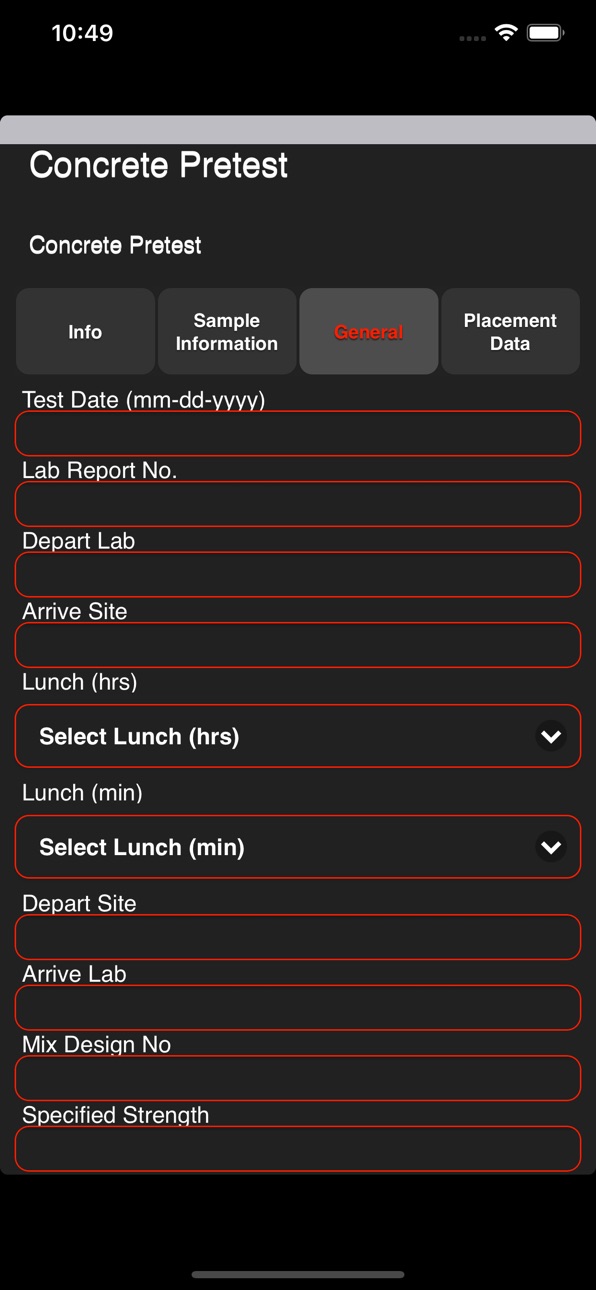
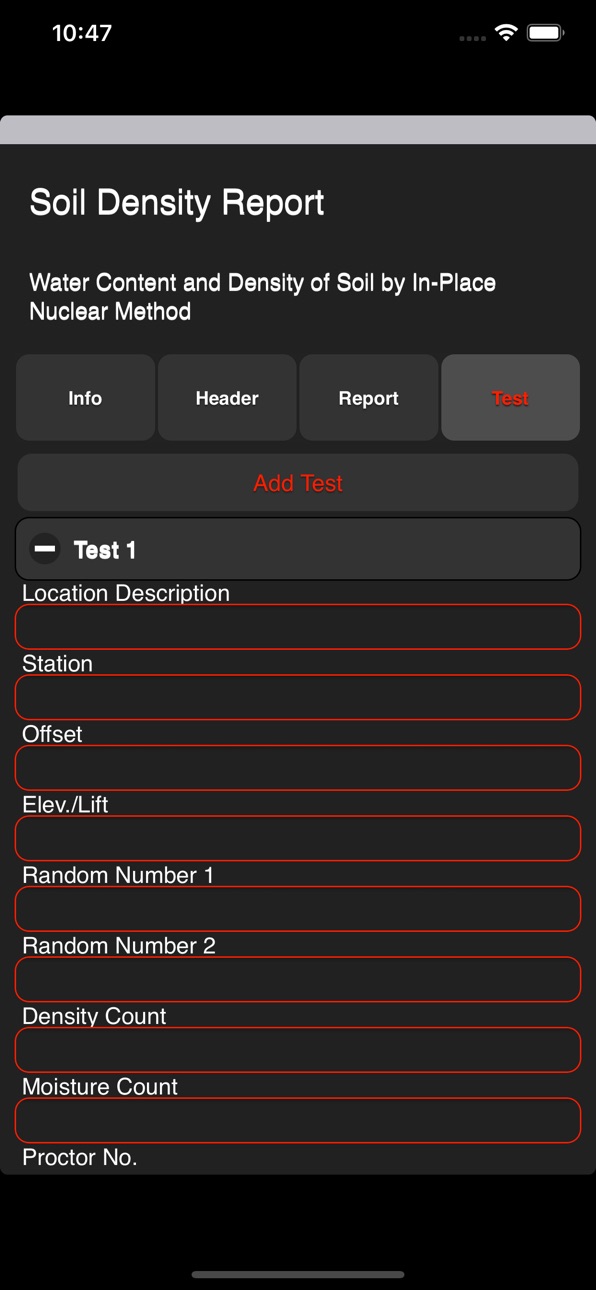
Field-IT™ is a "Field Management System" Application that is designed to permit real-time mobile data collection through the use of electronic checklists, faster and more consistent materials test reporting and construction reporting. The off-line features include most activities normally required in the field at a construction site. The off-line feature-capability appears seamlessly to the user in the zone of non-connectivity. Once connectivity is established, the data collected is automatically uploaded and synced into the system.
Key Features:
Inspections & Field Reporting using Mobile Application
Store and View Documents in Device
Fully Integrated with Manage-IT™ Modules
Auto-Synchronization when connectivity is established
Laboratory Information Management System (LIMS)
Standardized Reporting of Quality Records
Accessibility
ipadiphonemacrealityDevicetvoswatch
Version history 25 versions
Build 839338315v1.4.82020-11-24 23:33:11
Revised weather selection options for clients using this feature.
Build 839306086v1.4.72020-11-21 17:53:47
Fix for some users with older devices to prevent an issue with the display when switching tabs.
Build 838900022v1.4.62020-11-12 14:30:47
Add functionality to restrict users to submitting one report per work order.
Build 838502712v1.4.52020-11-06 14:01:16
Fixed bug which was not letting users see results.
Added new reports for the users.
Build 838460994v1.4.42020-11-02 13:39:03
Added autoselect for flexural strength testing
Multiple report format refinements
Build 838097703v1.4.32020-10-06 21:47:38
Corrected issue with single dispatch picking the wrong drilled pier type.
Build 837758416v1.4.12020-09-12 22:29:57
Added new report bypass method to prevent unauthorized changing of bypass setting
Added previous moisture/density standard count entries for Asphalt density test reports
Build 837656329v1.4.02020-09-05 20:40:53
Fixed display issues with soil density test reports
Fixed display issues with asphalt density test reports
Build 837624211v1.3.82020-09-03 13:37:47
Fixed bug in drilled pier reinforcing steel reporting
Build 837564703v1.3.72020-08-29 20:50:24
Added additional report formats for structural steel and fireproofing inspections
Build 837544178v1.3.62020-08-28 09:44:05
*Added support for delaying work order delivery until approved.
Build 837417825v1.3.42020-08-19 15:57:17
*Bug fix for some users who experienced errors loading checklists
Build 837355370v1.3.32020-08-16 10:47:31
* Simplified time entry
* Add dropdowns for general locations
* Direct bypass user report selection, go from work order to report with one tap
Build 836982498v1.3.12020-07-24 04:23:03
Added material use category and backend updates for added report features
Build 835976888v1.3.02020-06-04 12:39:23
Minor bug fix to the sync process to prevent reports from showing errors after a successful sync.
Build 835940803v1.2.72020-05-13 16:47:16
*Added support for minimum and maximum unit weight specification in the concrete testing report
Build 835657451v1.2.42020-05-07 08:21:28
*Update: Improved GUI response and added support to prevent database conflicts after an app update.
Build 835348302v1.2.32020-04-01 03:25:40
**This update resolves an issue with large image attachments not uploading.
Build 835164951v1.2.22020-03-19 17:33:34
*Added verification of images as they are attached.
*Added tab for entering non-default specimen ages.
Build 835013630v1.2.12020-03-07 09:23:45
NOTE: This update makes changes to key database table structures. It is recommended that all users sync their existing reports before updating the application.
*Added routine for detecting errors in attached report images
*Changed work order date format to MM/DD/YYYY for inspection checklists
*Resolved issue with inspection checklist that caused some users to get an undefined error when upgrading the app
Build 834916119v1.2.02020-02-29 10:48:04
Corrected issue where the signature entered before entering client/contractor information.
Build 834864816v1.1.92020-02-27 20:31:59
Corrected problem with the signature pad's, pen and background-color that caused signatures to not show on final reports.
Build 834816981v1.1.82020-02-21 23:14:37
Added remove work order button
Customized time in and out entry method
Build 834711200v1.1.72020-02-14 00:23:27
New reports added
Revised report preview
User experience upgrades
Build 834594985v1.1.62020-02-08 00:31:37
Added preview option for testing reports
Moved signature panel to its own tab
Changed Yes/No/NA to Compliant/Non-Compliant/NA
No pricing data captured yet — comparisons appear once the app has paid storefronts or in-app purchases.
Availability 1 of 73 storefronts
| Region | Language | Price | Ratings | Avg | Version |
|---|---|---|---|---|---|
| US | en-US | Free | 3 | 3.7 | 1.4.8 |
Not available in: AG, AI, AO, AR, BB, BF, BJ, BO, BR, BS, BW, BZ, CD, CG, CI, CL, CM, CO, CR, CV, DM, DO, DZ, EC, GA, GD, GH, GM, GT, GW, GY, HN, JM, KE, KN, KY, LC, LY, MA, MG, ML, MS, MU, MW, MX, MZ, NA, NE, NG, NI, PA, PE, PY, SC, SL, SN, SR, ST, SV, SZ, TC, TD, TN, TT, TZ, UG, UY, VC, VE, VG, ZM, ZW
Change log 29 changes · US
✎
releaseNotes updated
Revised weather selection options for clients using this feature.
✎
description updated
Field-IT™ is a "Field Management System" Application that is designed to permit real-time mobile data collection through the use of electronic checklists, fast
✎
subtitle updated
"Field Management System"
✎
name updated
Field-IT
◆
Version 1.4.8 released
Revised weather selection options for clients using this feature.
◆
Version 1.4.7 released
Fix for some users with older devices to prevent an issue with the display when switching tabs.
◆
Version 1.4.6 released
Add functionality to restrict users to submitting one report per work order.
◆
Version 1.4.5 released
Fixed bug which was not letting users see results.
Added new reports for the users.
◆
Version 1.4.4 released
Added autoselect for flexural strength testing
Multiple report format refinements
◆
Version 1.4.3 released
Corrected issue with single dispatch picking the wrong drilled pier type.
◆
Version 1.4.1 released
Added new report bypass method to prevent unauthorized changing of bypass setting
Added previous moisture/density standard count entries for Asphalt density test reports
◆
Version 1.4.0 released
Fixed display issues with soil density test reports
Fixed display issues with asphalt density test reports
◆
Version 1.3.8 released
Fixed bug in drilled pier reinforcing steel reporting
◆
Version 1.3.7 released
Added additional report formats for structural steel and fireproofing inspections
◆
Version 1.3.6 released
*Added support for delaying work order delivery until approved.
◆
Version 1.3.4 released
*Bug fix for some users who experienced errors loading checklists
◆
Version 1.3.3 released
* Simplified time entry
* Add dropdowns for general locations
* Direct bypass user report selection, go from work order to report with one tap
◆
Version 1.3.1 released
Added material use category and backend updates for added report features
◆
Version 1.3.0 released
Minor bug fix to the sync process to prevent reports from showing errors after a successful sync.
◆
Version 1.2.7 released
*Added support for minimum and maximum unit weight specification in the concrete testing report
◆
Version 1.2.4 released
*Update: Improved GUI response and added support to prevent database conflicts after an app update.
◆
Version 1.2.3 released
**This update resolves an issue with large image attachments not uploading.
◆
Version 1.2.2 released
*Added verification of images as they are attached.
*Added tab for entering non-default specimen ages.
◆
Version 1.2.1 released
NOTE: This update makes changes to key database table structures. It is recommended that all users sync their existing reports before updating the application.
*Added routine for detecting errors in attached report images
*Changed work orde
◆
Version 1.2.0 released
Corrected issue where the signature entered before entering client/contractor information.
◆
Version 1.1.9 released
Corrected problem with the signature pad's, pen and background-color that caused signatures to not show on final reports.
◆
Version 1.1.8 released
Added remove work order button
Customized time in and out entry method
◆
Version 1.1.7 released
New reports added
Revised report preview
User experience upgrades
◆
Version 1.1.6 released
Added preview option for testing reports
Moved signature panel to its own tab
Changed Yes/No/NA to Compliant/Non-Compliant/NA