Home › Lifestyle

 US
US
1 of 1 storefronts
Content in en-US
Content in en-US
Information
Preview 3 platforms
iPhone 10 images



iPad 4 images


Apple Watch 9 images


What’s New Version 4.2
• Modernized visuals under iOS 26. Liquid Glass look added to some of the elements.
• Added inline widget style. This allows for setting the widget above the clock on the Lock Screen.
• Slightly revised dark mode app icon.
- Fix for the incorrectly filled watch face complication gauge.
Description
Solar Watch lets you monitor your SolarEdge power production right on the watch face of your Apple Watch, on the Home Screen Widget and the Lock Screen Widget on your iOS devices, and using Siri. You can create Siri shortcuts and then say for example: "Hey Siri, what's the current power" - and hear the response.
To access Siri Shortcuts, tap the app menu in the top/right, then tap on "Siri Shortcuts".
Every watch complication type is supported, with special attention given to complications that use gauges.
During daytime, the complications are displaying current power production, and total daily energy produced. Gauges are color-coded, and show the percentage of current power vs. the maximum.
During night time, the complication gauges act as a timer that counts down how much time roughly there is until sunrise.
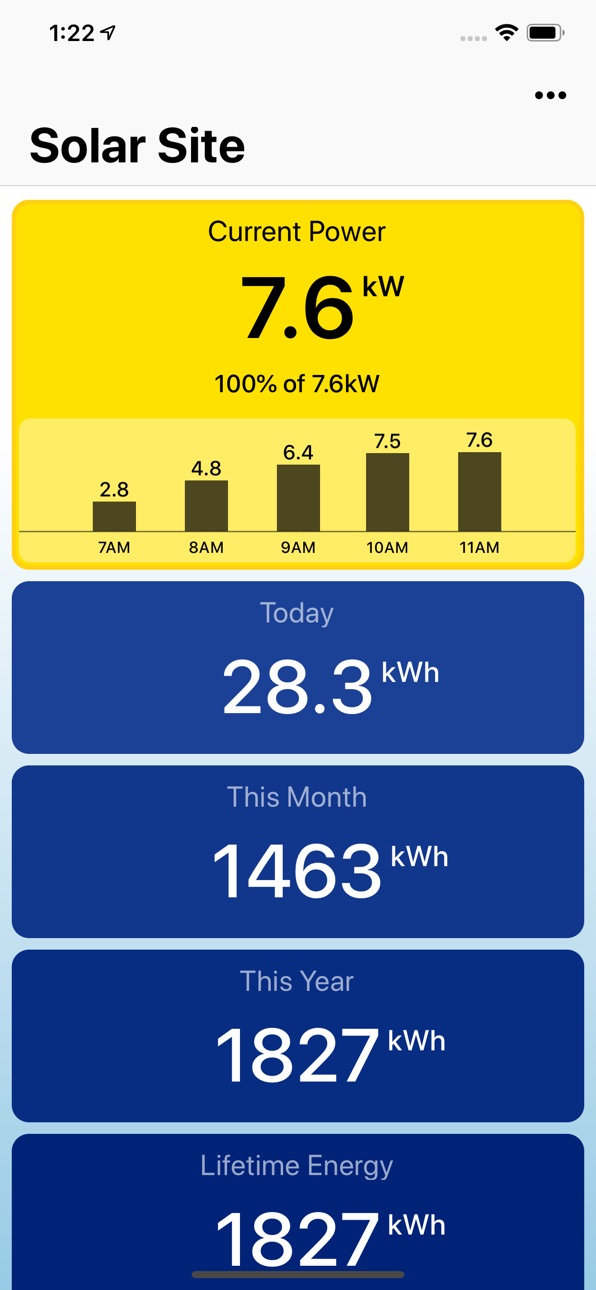
Watch app has a scrollable view with various stats, including daily, monthly and yearly total power, as well as environmental benefits and calculated revenue.
Current power, daily and monthly production is also displayed in the iOS widgets, both on the Home Screen and on the Lock Screen..
Based on the robust and proven codebase that powers Thermo Watch and Watch Cam apps, enjoyed by tens of thousands of users. The app is extremely quick and efficient, with near-instant launch time, and seamless background updates.
While the app's minimalist looks betray the simplicity of its operation, what they don't show is the amount of planning, design, development and refinement that went into it, ensuring it becomes something that is enjoyable to use and experience.
The goal was to make a product that would not look out of place next to one of the apps bundled with the Apple Watch.
Please Note: SolarEdge admin console access is needed to generate the API key that is used to sign into the app.
Solar Watch does not collect any of your data. Your API Key and any app activity - all of it flows exclusively between your devices and SolarEdge. Author of Solar Watch does not access any of it, at any point.
Solar Watch is not affiliated with SolarEdge, but it is created with their approval.
Accessibility
ipadiphonemacrealityDevicetvoswatch
Version history 16 versions
Build 884829569v4.22026-04-24 19:35:13
• Modernized visuals under iOS 26. Liquid Glass look added to some of the elements.
• Added inline widget style. This allows for setting the widget above the clock on the Lock Screen.
• Slightly revised dark mode app icon.
- Fix for the incorrectly filled watch face complication gauge.
Build 881731419v4.02026-01-22 23:39:45
• Modernized visuals under iOS 26. Liquid Glass look added to some of the elements.
• Added inline widget style. This allows for setting the widget above the clock on the Lock Screen.
- Fix for the instructional video not showing up.
Build 876841082v3.12025-07-30 16:43:59
- Fix for the problem where the Daily Energy would reset to zero before the midnight. Thanks to Tom for finding a viable solution for this!
Build 854579731v3.02023-01-26 00:10:03
* Lock Screen Widgets.
* Home Screen Widgets.
* Full screen support for Apple Watch Ultra.
Build 845296059v2.12021-11-22 05:01:05
* Full screen support for the Series 7 Watch.
* New and nicer looking X-Large watch face complication.
* Text scaling is implemented to allow displaying of very large numbers in the Watch app.
* Watch app can now be authorized manually by choosing an option from the iOS app's menu. This can be used if the automatic authorization fails.
* Fix for the occasional "You have made too many requests too quickly." error.
Previous updates:
* Siri Shortcuts can now be used to check on the status of your solar power production. Assign a phrase like "What's the current power" and see and hear response from Siri. To access shortcuts, tap the app menu in the top/right, then tap on "Siri Shortcuts".
* For more ambitious shortcut users, there is also a "Full Data Set to Output" action that will output all the data values as a set of Magic Variables, that can be used in the subsequent actions in the shortcuts workflow.
Build 836507724v2.02020-06-24 20:51:37
* Siri Shortcuts can now be used to check on the status of your solar power production. Assign a phrase like "What's the current power" and see and hear response from Siri. To access shortcuts, tap the app menu in the top/right, then tap on "Siri Shortcuts".
* For more ambitious shortcut users, there is also a "Full Data Set to Output" action that will output all the data values as a set of Magic Variables, that can be used in the subsequent actions in the shortcuts workflow.
* Fix for the measurement units being cut off with large numbers in the watch app.
Build 836207975v1.9.42020-05-31 04:09:55
- Fix for the "unsupported url" problem that would show up for users in UK who set their iPhone to 12h time format. Thanks to Jon for reporting this problem!
Build 835882008v1.9.32020-05-30 15:40:21
- Fix for the numbers larger than 10 being cut off on the infograph circular complication. Thanks to Chase for reporting this problem!
Build 835626547v1.9.22020-04-28 21:26:10
- Fix for the dark mode text color in the iOS widget.
Build 834596378v1.9.12020-02-05 15:10:16
- Fix for the login screen Done button not enabling on the iPad. Thanks to Andrew for reporting this problem!
Build 833695520v1.92019-11-21 19:41:30
- Maximum power production is now determined by comparing the maximum solar cell power and the inverter power output. Smaller of the two values is used as the maximum power production value. Previously the app assumed that the inverter power output is always the limiting factor.
- Small tweaks on the Login page to make the API Key text field more prominent, and text color rendered correctly under iOS13 Dark mode.
Build 833136622v1.82019-10-12 20:04:58
- Dark Mode support for the iOS app and the Widget under iOS13.
- Fix for the problem that would prevent the Environmental benefits data showing in the iOS app for some users. Thanks to David for reporting this problem!
Build 832505189v1.72019-08-26 22:39:41
- Fix for the incorrect maximum power calculation that affected some users was not applied to the watch app in the previous update. Now that's corrected.
Build 832170992v1.62019-08-23 17:34:24
- Fix for the incorrect maximum power calculation that affected some users. Thanks to Tony and Andrew for reporting this problem!
- Fix for a potential issue with complications on future watchOS versions.
Build 831798003v1.52019-07-03 19:43:09
- Mini chart with 5 hour power generation history added to the iOS app.
- Better looking header in the iOS app.
- Better looking scrolling animation in the watch app.
Build 831362247v1.02019-06-18 21:55:51
Price history by region
Currency
Show
Columns
Search
Availability 1 of 1 storefronts
| Region | Language | Price | Ratings | Avg | Version |
|---|---|---|---|---|---|
| US | en-US | USD 2.99 | 9 | 5.0 | 4.2 |
Change log 20 changes · US
✎
releaseNotes updated
• Modernized visuals under iOS 26. Liquid Glass look added to some of the elements.
• Added inline widget style. This allows for setting the widget above the cl
✎
description updated
Solar Watch lets you monitor your SolarEdge power production right on the watch face of your Apple Watch, on the Home Screen Widget and the Lock Screen Widget o
✎
subtitle updated
SolarEdge Status on Your Watch
✎
name updated
Solar Watch for SolarEdge
◆
Version 4.2 released
• Modernized visuals under iOS 26. Liquid Glass look added to some of the elements.
• Added inline widget style. This allows for setting the widget above the clock on the Lock Screen.
• Slightly revised dark mode app icon.
- Fix for the inc
◆
Version 4.0 released
• Modernized visuals under iOS 26. Liquid Glass look added to some of the elements.
• Added inline widget style. This allows for setting the widget above the clock on the Lock Screen.
- Fix for the instructional video not showing up.
◆
Version 3.1 released
- Fix for the problem where the Daily Energy would reset to zero before the midnight. Thanks to Tom for finding a viable solution for this!
◆
Version 3.0 released
* Lock Screen Widgets.
* Home Screen Widgets.
* Full screen support for Apple Watch Ultra.
◆
Version 2.1 released
* Full screen support for the Series 7 Watch.
* New and nicer looking X-Large watch face complication.
* Text scaling is implemented to allow displaying of very large numbers in the Watch app.
* Watch app can now be authorized manually by c
◆
Version 2.0 released
* Siri Shortcuts can now be used to check on the status of your solar power production. Assign a phrase like "What's the current power" and see and hear response from Siri. To access shortcuts, tap the app menu in the top/right, then tap on
◆
Version 1.9.4 released
- Fix for the "unsupported url" problem that would show up for users in UK who set their iPhone to 12h time format. Thanks to Jon for reporting this problem!
◆
Version 1.9.3 released
- Fix for the numbers larger than 10 being cut off on the infograph circular complication. Thanks to Chase for reporting this problem!
◆
Version 1.9.2 released
- Fix for the dark mode text color in the iOS widget.
◆
Version 1.9.1 released
- Fix for the login screen Done button not enabling on the iPad. Thanks to Andrew for reporting this problem!
◆
Version 1.9 released
- Maximum power production is now determined by comparing the maximum solar cell power and the inverter power output. Smaller of the two values is used as the maximum power production value. Previously the app assumed that the inverter powe
◆
Version 1.8 released
- Dark Mode support for the iOS app and the Widget under iOS13.
- Fix for the problem that would prevent the Environmental benefits data showing in the iOS app for some users. Thanks to David for reporting this problem!
◆
Version 1.7 released
- Fix for the incorrect maximum power calculation that affected some users was not applied to the watch app in the previous update. Now that's corrected.
◆
Version 1.6 released
- Fix for the incorrect maximum power calculation that affected some users. Thanks to Tony and Andrew for reporting this problem!
- Fix for a potential issue with complications on future watchOS versions.
◆
Version 1.5 released
- Mini chart with 5 hour power generation history added to the iOS app.
- Better looking header in the iOS app.
- Better looking scrolling animation in the watch app.
◆
Version 1.0 released