Home › Education

Taculator 84 Graphing Calc
Graphing Calculator for TI-84
 US
US
1 of 1 storefronts
Content in en-US
Content in en-US
Information
Apple ID1457737367
Bundle IDcom.ticulator.calc
SellerSeller
Min iOS13.0
Device familiesmac, iphone, ipad, ipod
Released2019-05-08
Copyright© 2019-2026 Taculator
Privacy policyLink ↗
Preview 3 platforms
iPhone 9 images


iPad 7 images


Mac 5 images


What’s New Version 1.5.1
Dark Mode for the Display
- Switch the calculator screen between Light and Dark mode.
- History, math editor, and every submenu (Math, Stat, List, Distr, Catalog, Tutorial …) adapt. Toggle it in the Mode menu under LIGHT / DARK.
Brighter Plot Colors in Dark Mode
- Function curves, plots and value-table entries automatically lift to clearly readable tones on dark backgrounds. Your saved colors stay unchanged in Light mode.
Refreshed Catalog & Tutorial
- The Catalog menu and Tutorial & Help have been redesigned in modern iOS Settings style — rounded cards, colored icon tiles, and larger tap targets.
More Theme Options
- The onboarding now offers a wide selection of polished themes (Classic, Graphite, Silver, Gold, Rose, Coral, Mint, Iris, Plum, Space …), fine-tunable via the color picker.
Other improvements
• Color picker saves your choice instantly
• Several Mac stability fixes (graph pinch-zoom crash, more)
• Better contrast for values under the graph
• Side menu with modern colored icons
• Numerous layout and performance polishes
Previous Versions:
• sin²(x), cos²(x), tan²(x) now correctly compute the squared value
• Heart curve and similar plots render fully symmetric
• "Rate this app" popup shows at most once per day
• Seconds symbol (") accessible via ALPHA+[+]
• Share graphs with equations displayed right on the image
• Instantly share equations with results (e.g. "2+2 = 4")
Description
Intended for use with TI-84 Plus.
TACULATOR 84 GRAPHING CALCULATOR
• Your graphing calculator for high school and college students.
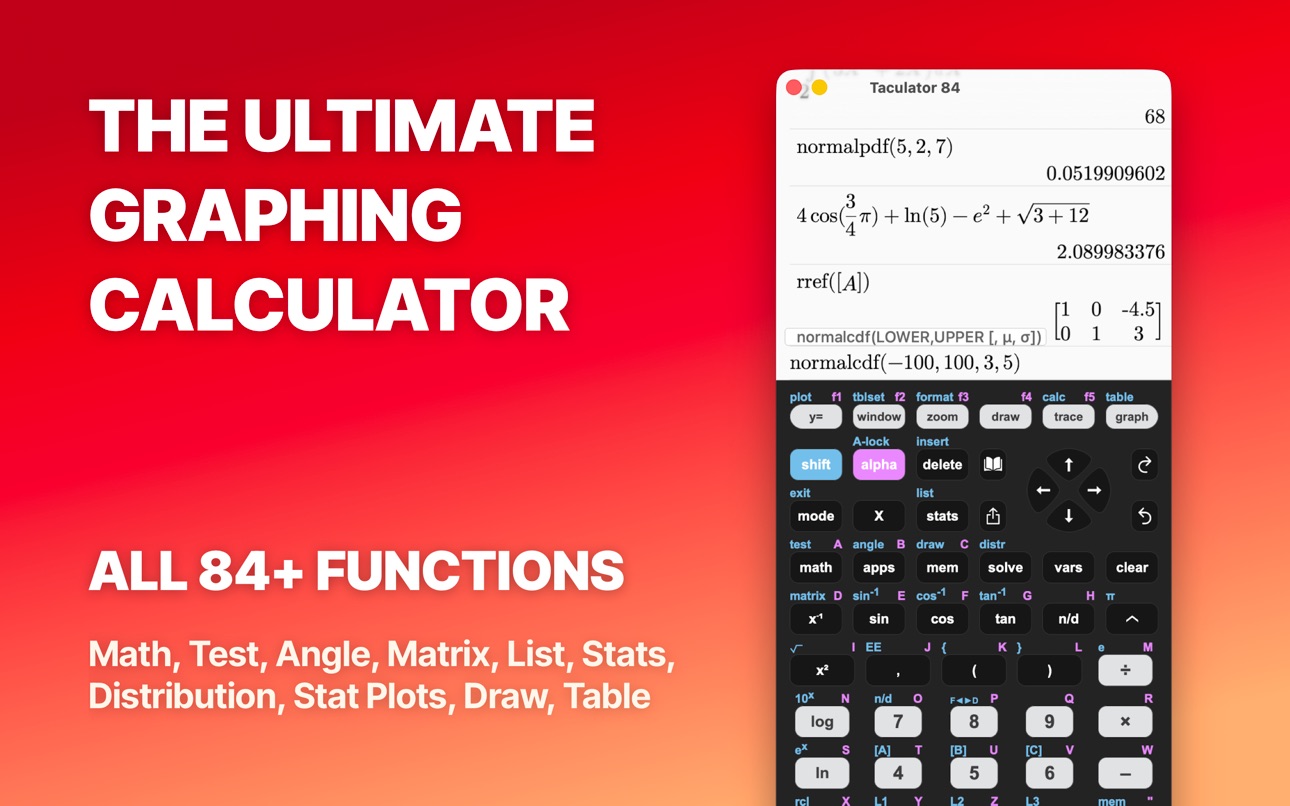
• Includes all the commands and functions for advanced math, list, statistics, distribution, stat plots, etc.
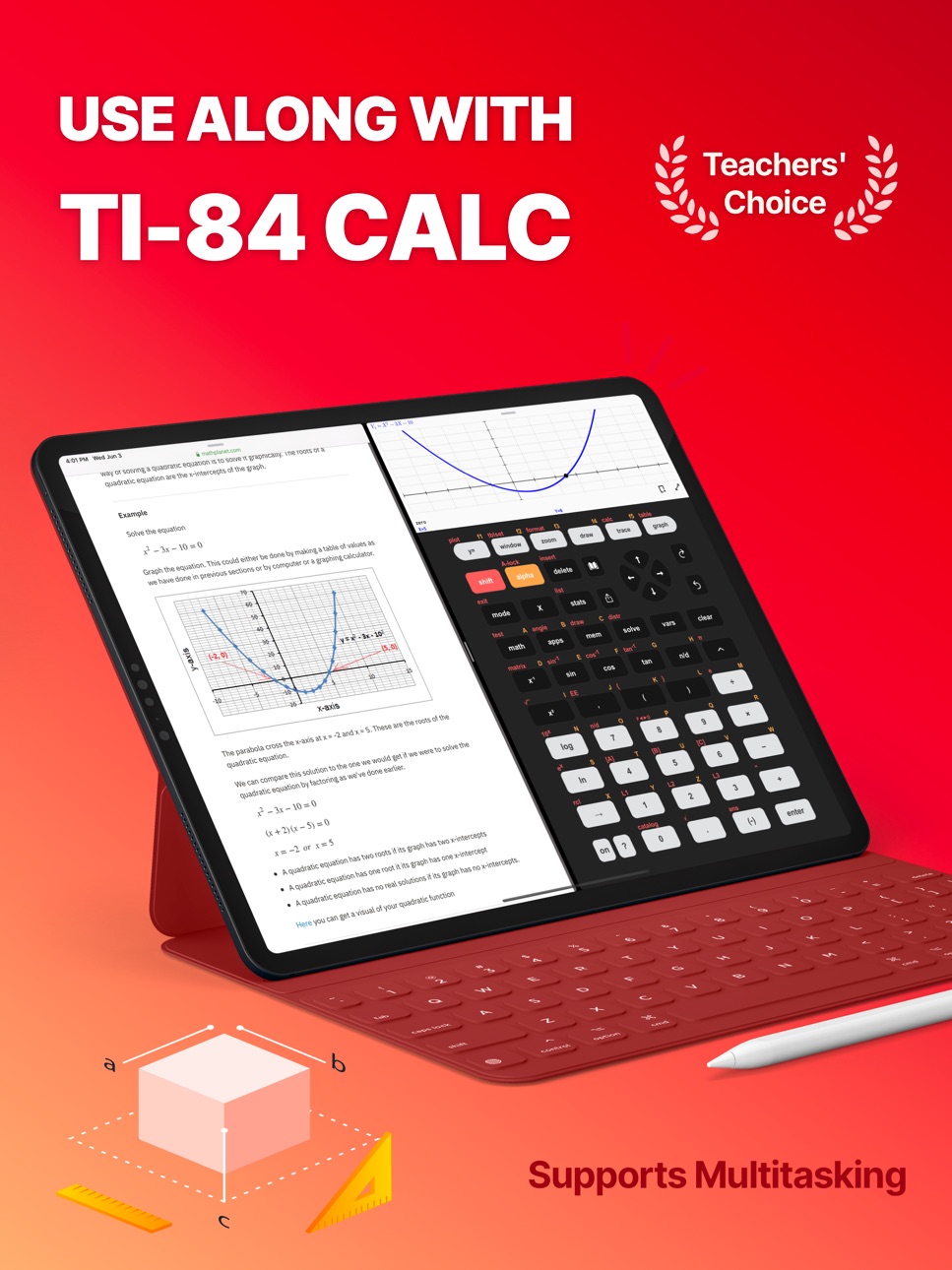
• Use the arrow keys or your fingers to navigate inside the app.
• Covers everything you need: Pre-Algebra, Algebra 1 & 2, Pre-Calculus, Calculus, Statistics...
IT'S EVEN BETTER THAN AN ACTUAL CALCULATOR
• Taculator is 100X faster as it uses the huge calculation power of your iPhone/iPad, while handheld calculators are often slow.
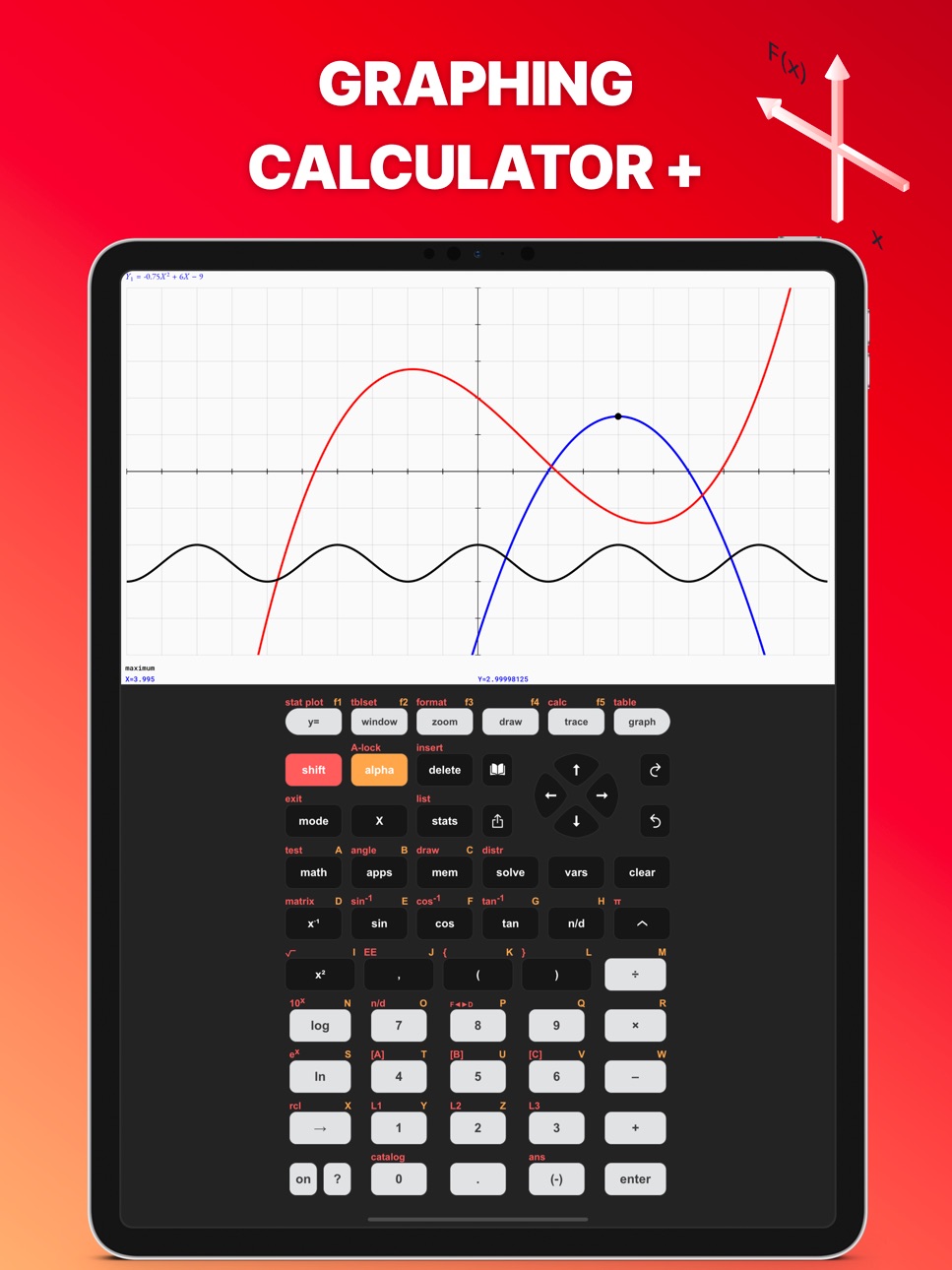
• High-resolution graphing window: Make sharp and beautiful graphs.
• Your new calculator weighs nothing and is always ready on your phone.
• Share your calculations with friends as a text message or email.
◉ Math Functions
• Scientific calculator with all basic arithmetic and advanced functions.
• Ability to scroll through history and copy previous calculations.
• Complex numbers support
• Probability functions like nPr, nCr, factorial, random numbers.
• Enter fractions easily.
• Convert angles and use DMS format.
◉ Graphing Functions
• Graph every function you want and trace for X- and Y-values
• Calculate intersection, zero, minimum, maximum, integral, and derivative.
• Switch between full-screen graphs and normal mode.
• Zoom in and out with your fingers and adjust the window settings.
• Graph statistical plots like histogram, box plot, scatter plot, xy-line plot
• Draw vertical, horizontal, tangent, circle.
◉ Matrix Calculator
• Store matrices and reuse them using shortcuts like [A], [B], [C],...
• Do matrix arithmetic operations: Scalar multiplication, addition & subtraction, multiplication, power of a matrix.
• Calculate transpose, determinant, dimension, inverse matrix, row echelon form, reduced row echelon form, identity matrix, cumulated sum.
◉ List, Statistics, and Distribution
• Use the stat list editor to enter your list values.
• Perform 1- and 2-Variable statistics.
• Use lists to calculate min, max, mean, median, sum, product, standard deviation, variance.
• Find best-fit regressions: LinReg (ax+b), LinReg (a+bx), QuadReg, CubicReg, QuartReg, LnReg, ExpReg, PwrReg, Logistic, SinReg.
• Perform statistical tests: Z-Test, T-Test, 2-SampleZTest, 2-SampleTTest, 1-PropZTest, 2-PropZTest, ZInterval, TInterval, 2-SampleZInterval, 2-SampleTInterval, 1PropZInterval.
• Calculate various distributions: Normalpdf/cdf, invT, Tpdf/cdf, χ2pdf/cdf, Fpdf/cdf, Poissonpdf/cdf, Binompdf/cdf, Geometpdf/cdf.
◉ Command Catalog & Syntax Help
• Get help with all commands with our integrated Catalog & Help section.
• It provides you with syntax help, examples, and possible error messages.
• Enter a command and the app will show you the right syntax next to the cursor.
SUPPORT
Contact us at contact@taculator.com
---
For extended features such as more advanced calculations and functions, get the Taculator Pro membership.
Auto-Renewable Subscription Terms:
You can choose from three subscription options:
• A monthly subscription;
• A yearly subscription;
• A lifetime subscription which is paid for by a one-off upfront payment.
• Payment will be charged to iTunes Account at confirmation of purchase;
• Subscription automatically renews unless auto-renew is turned off at least 24-hours before the end of the current period;
• Account will be charged for renewal within 24-hours prior to the end of the current period, and identify the cost of the renewal;
• Subscriptions may be managed by the user and auto-renewal may be turned off by going to the user's Account Settings after purchase;
Terms of Service:
https://www.taculator.com/terms-of-service.html
Privacy Policy:
https://www.taculator.com/privacy-policy.html
Capabilities
In-App Purchases
Accessibility
ipadiphonemacrealityDevicetvoswatch
Version history 25 versions
Build 885029147v1.5.12026-05-25 10:46:36
Dark Mode for the Display
- Switch the calculator screen between Light and Dark mode.
- History, math editor, and every submenu (Math, Stat, List, Distr, Catalog, Tutorial …) adapt. Toggle it in the Mode menu under LIGHT / DARK.
Brighter Plot Colors in Dark Mode
- Function curves, plots and value-table entries automatically lift to clearly readable tones on dark backgrounds. Your saved colors stay unchanged in Light mode.
Refreshed Catalog & Tutorial
- The Catalog menu and Tutorial & Help have been redesigned in modern iOS Settings style — rounded cards, colored icon tiles, and larger tap targets.
More Theme Options
- The onboarding now offers a wide selection of polished themes (Classic, Graphite, Silver, Gold, Rose, Coral, Mint, Iris, Plum, Space …), fine-tunable via the color picker.
Other improvements
• Color picker saves your choice instantly
• Several Mac stability fixes (graph pinch-zoom crash, more)
• Better contrast for values under the graph
• Side menu with modern colored icons
• Numerous layout and performance polishes
Previous Versions:
• sin²(x), cos²(x), tan²(x) now correctly compute the squared value
• Heart curve and similar plots render fully symmetric
• "Rate this app" popup shows at most once per day
• Seconds symbol (") accessible via ALPHA+[+]
• Share graphs with equations displayed right on the image
• Instantly share equations with results (e.g. "2+2 = 4")
Build 884926042v1.4.52026-04-27 14:45:58
Math & Graphing Fixes
• sin²(x), cos²(x), tan²(x) now correctly compute the squared value
• Graphs like f(x)=x^(2/3)±√(2-x²) (heart curve) now plot fully symmetric instead of just the right half
• Right-arrow now reliably exits an exponent
Quality of Life
• "Rate this app" popup now shows at most once per day
• Extreme Window settings now show a clear warning instead of slowing down the app
Improved Angle Input
• Seconds symbol (") now accessible via ALPHA+[+] key
• DMS functions easier to find in Angle menu
Plus various stability fixes and minor improvements.
Previous Versions:
Enhanced GRAPH Sharing
• Share your graphs with equations displayed right on the image (from GRAPH menu)
• Statistical plots now show your list data alongside the graph
Improved Sharing Features (SHARE button)
• Instantly share equations with results (e.g., "2+2 = 4")
• Included LaTeX math syntax to use equations in other apps
Build 869022622v1.4.02025-10-30 07:40:27
Enhanced GRAPH Sharing
• Share your graphs with equations displayed right on the image (from GRAPH menu)
• Statistical plots now show your list data alongside the graph
Improved Sharing Features (SHARE button)
• Instantly share equations with results (e.g., "2+2 = 4")
• Included LaTeX math syntax to use equations in other apps
Performance & Stability
• Removed deprecated services for better reliability
• Bug fixes and under-the-hood improvements
Build 865630931v1.3.32024-05-02 08:49:04
+ Bug fixes and improvements.
Build 860449828v1.3.22024-04-08 16:23:21
+ Bug fixes and improvements.
Build 858788779v1.3.12023-07-28 17:56:13
+ Added 1000s separator
+ Added Seconds “ to ANGLE menu
+ Performance improvements
+ Fixed a divide logic issue
+ Bug fixes
Build 857359543v1.3.02023-05-26 15:29:51
+ Added 1000s separator
+ Added Seconds “ to ANGLE menu
+ Performance improvements
+ Fixed a divide logic issue
+ Bug fixes
Build 857152869v1.2.172023-05-18 05:34:43
+ Added 1000s separator
+ Added Seconds “ to ANGLE menu
+ Performance improvements
+ Fixed a divide logic issue
+ Bug fixes
Build 856884604v1.2.162023-05-09 14:57:29
+ Performance improvements
+ Fixed a divide logic issue
+ Added 1000s separator
+ Bug fixes
Build 843556012v1.2.152023-05-03 09:28:16
+ Performance improvements
+ Fixed a divide logic issue
+ Added 1000s separator
+ Bug fixes
Build 840980142v1.2.142021-03-21 17:34:27
Biggest Taculator update in 2021!
+ New side menu that helps you with quick access links. Open it by swiping from left to right in the calculate menu.
+ Redesigned Y= menu. Now you can give the graphs your favorite colors.
+ Support to graph piecewise functions.
New Taculator commands available!
+ Med-Med
+ randNorm
+ randBin
+ Matrix-List
+ List-Matrix
+ DrawInv
+ 2-PropZ-Interval
+ Chi²-Test
+ Chi²GOF-Test
+ LinRegT-Test
+ LinRegT-Interval
+ ANOVA
Previous improvements:
+ Tracing functions is now more accurate.
+ While tracing you can enter an x-value and Taculator will show the y-value. Press the TRACE button and enter any value.
+ Use the nDeriv and fnInt commands in the Y= menu to graph the derivative or integral function.
+ You can now graph families of functions by using the following syntax: {1,2,3}X.
Build 839773915v1.2.132020-12-22 22:25:32
Biggest Taculator update in 2020!
+ New side menu that helps you with quick access links. Open it by swiping from left to right in the calculate menu.
+ Redesigned Y= menu. Now you can give the graphs your favorite colors.
+ Support to graph piecewise functions.
New Taculator commands available!
+ Med-Med
+ randNorm
+ randBin
+ Matrix-List
+ List-Matrix
+ DrawInv
+ 2-PropZ-Interval
+ Chi²-Test
+ Chi²GOF-Test
+ LinRegT-Test
+ LinRegT-Interval
+ ANOVA
Previous improvements:
+ Tracing functions is now more accurate.
+ While tracing you can enter an x-value and Taculator will show the y-value. Press the TRACE button and enter any value.
+ Use the nDeriv and fnInt commands in the Y= menu to graph the derivative or integral function.
+ You can now graph families of functions by using the following syntax: {1,2,3}X.
Build 839613815v1.2.122020-12-11 19:08:07
Biggest Taculator update in 2020!
+ New side menu that helps you with quick access links. Open it by swiping from left to right in the calculate menu.
+ Redesigned Y= menu. Now you can give the graphs your favorite colors.
+ Support to graph piecewise functions.
New Taculator commands available!
+ Med-Med
+ randNorm
+ randBin
+ Matrix-List
+ List-Matrix
+ DrawInv
+ 2-PropZ-Interval
+ Chi²-Test
+ Chi²GOF-Test
+ LinRegT-Test
+ LinRegT-Interval
+ ANOVA
Previous improvements:
+ Tracing functions is now more accurate.
+ While tracing you can enter an x-value and Taculator will show the y-value. Press the TRACE button and enter any value.
+ Use the nDeriv and fnInt commands in the Y= menu to graph the derivative or integral function.
+ You can now graph families of functions by using the following syntax: {1,2,3}X.
Build 839501869v1.2.112020-12-10 01:00:57
Biggest Taculator update in 2020!
+ New side menu that helps you with quick access links. Open it by swiping from left to right in the calculate menu.
+ Redesigned Y= menu. Now you can give the graphs your favorite colors.
+ Support to graph piecewise functions.
New Taculator commands available!
+ Med-Med
+ randNorm
+ randBin
+ Matrix-List
+ List-Matrix
+ DrawInv
+ 2-PropZ-Interval
+ Chi²-Test
+ Chi²GOF-Test
+ LinRegT-Test
+ LinRegT-Interval
+ ANOVA
Previous improvements:
+ Tracing functions is now more accurate.
+ While tracing you can enter an x-value and Taculator will show the y-value. Press the TRACE button and enter any value.
+ Use the nDeriv and fnInt commands in the Y= menu to graph the derivative or integral function.
+ You can now graph families of functions by using the following syntax: {1,2,3}X.
Build 839312955v1.2.102020-11-30 15:25:53
New Taculator commands available!
+ 2-PropZ-Interval
+ Chi²-Test
+ Chi²GOF-Test
+ LinRegT-Test
+ LinRegT-Interval
+ ANOVA
We fixed some bugs and improved a lot of functions:
+ Tracing functions is now more accurate.
+ While tracing you can enter an x-value and Taculator will show the y-value. Press the TRACE button and enter any value.
+ A black graphing screen due to a wrong window setting of too small values for Xscl and Yscl has been fixed.
+ Use the nDeriv and fnInt commands in the Y= menu to graph the derivative or integral function.
+ You can now graph families of functions by using the following syntax: {1,2,3}X.
+ Many more bugs have been fixed.
Build 838094655v1.2.92020-11-06 21:04:53
Taculator is now even more powerful!
We fixed some bugs and improved a lot of functions:
+ Tracing functions is now more accurate.
+ While tracing you can enter an x-value and Taculator will show the y-value. Press the TRACE button and enter any value.
+ A black graphing screen due to a wrong window setting of too small values for Xscl and Yscl has been fixed.
+ Use the nDeriv and fnInt commands in the Y= menu to graph the derivative or integral function.
+ You can now graph families of functions by using the following syntax: {1,2,3}X.
+ Many more bugs have been fixed.
Build 837731686v1.2.82020-09-23 18:54:35
Several bugs have been fixed:
+ 1-Var Stats didn't work if FreqList has decimal numbers.
+ Ans and ^ (exponent symbol) didn't work correctly.
+ Intersection between two functions is now more accurate.
+ Other smaller bugs fixed.
Previous update:
+ Taculator now supports different history tabs for your calculations. To add a new history tab, scroll down on the home menu, and click on the "+" icon. This creates a new history tab. This feature is great if you work on different math problems at the same time or want to save your recent calculations but start with a fresh screen.
+ Press and hold any button to access the second function behind it. For example, if you want to use sin-1 you can press "shift" -> "sin" or now just press and hold on "sin" until you see that shift commands are highlighted.
+ With this update you export your graph window as an image or PDF and share it with your friends or save it for yourself. Press the "graph" button and you will see a new little icon on the right. You can also save or share a full-screen graph.
+ iPad users are now able to enjoy Taculator in landscape mode and use multitasking with split-screen. This enables you to use your calculator together with another app.
Furthermore, here's the detailed list of new calculator commands.
+ Draw circles with specified radius and x- and y-value.
+ Seconds " button now available. Press the Shift button and "+" button to use it.
+ New Angle commands to convert coordinates from Polar to Cartesian coordinates and vice versa: R►Pr(, R►Pθ(, P►Rx(, P►Ry(
+ New Matrix commands: Fill( (fill a list or matrix with numbers) and randM (generate a random number matrix).
+ A ton of new statistical tests: 2-SampZTest, 2-SampTTest, 1-PropZTest, 2-PropZTest, 2-SampZInt, 2-SampTInt, 1-PropZInt.
+ New regressions added to STATS menu: LnReg, PwrReg, Logistic, SinReg.
+ geometpdf and geometcdf added to the Distribution menu.
Build 837587080v1.2.72020-09-04 01:10:27
Several bugs have been fixed:
+ 1-Var Stats didn't work if FreqList has decimal numbers.
+ Ans and ^ (exponent symbol) didn't work correctly.
+ Intersection between two functions is now more accurate.
+ Other smaller bugs fixed.
Previous update:
+ Taculator now supports different history tabs for your calculations. To add a new history tab, scroll down on the home menu, and click on the "+" icon. This creates a new history tab. This feature is great if you work on different math problems at the same time or want to save your recent calculations but start with a fresh screen.
+ Press and hold any button to access the second function behind it. For example, if you want to use sin-1 you can press "shift" -> "sin" or now just press and hold on "sin" until you see that shift commands are highlighted.
+ With this update you export your graph window as an image or PDF and share it with your friends or save it for yourself. Press the "graph" button and you will see a new little icon on the right. You can also save or share a full-screen graph.
+ iPad users are now able to enjoy Taculator in landscape mode and use multitasking with split-screen. This enables you to use your calculator together with another app.
Furthermore, here's the detailed list of new calculator commands.
+ Draw circles with specified radius and x- and y-value.
+ Seconds " button now available. Press the Shift button and "+" button to use it.
+ New Angle commands to convert coordinates from Polar to Cartesian coordinates and vice versa: R►Pr(, R►Pθ(, P►Rx(, P►Ry(
+ New Matrix commands: Fill( (fill a list or matrix with numbers) and randM (generate a random number matrix).
+ A ton of new statistical tests: 2-SampZTest, 2-SampTTest, 1-PropZTest, 2-PropZTest, 2-SampZInt, 2-SampTInt, 1-PropZInt.
+ New regressions added to STATS menu: LnReg, PwrReg, Logistic, SinReg.
+ geometpdf and geometcdf added to the Distribution menu.
Build 837055008v1.2.62020-08-06 21:09:10
Several bugs have been fixed:
+ 1-Var Stats didn't work if FreqList has decimal numbers.
+ Ans and ^ (exponent symbol) didn't work correctly.
+ Intersection between two functions is now more accurate.
+ Other smaller bugs fixed.
Previous update:
+ Taculator now supports different history tabs for your calculations. To add a new history tab, scroll down on the home menu, and click on the "+" icon. This creates a new history tab. This feature is great if you work on different math problems at the same time or want to save your recent calculations but start with a fresh screen.
+ Press and hold any button to access the second function behind it. For example, if you want to use sin-1 you can press "shift" -> "sin" or now just press and hold on "sin" until you see that shift commands are highlighted.
+ With this update you export your graph window as an image or PDF and share it with your friends or save it for yourself. Press the "graph" button and you will see a new little icon on the right. You can also save or share a full-screen graph.
+ iPad users are now able to enjoy Taculator in landscape mode and use multitasking with split-screen. This enables you to use your calculator together with another app.
Furthermore, here's the detailed list of new calculator commands.
+ Draw circles with specified radius and x- and y-value.
+ Seconds " button now available. Press the Shift button and "+" button to use it.
+ New Angle commands to convert coordinates from Polar to Cartesian coordinates and vice versa: R►Pr(, R►Pθ(, P►Rx(, P►Ry(
+ New Matrix commands: Fill( (fill a list or matrix with numbers) and randM (generate a random number matrix).
+ A ton of new statistical tests: 2-SampZTest, 2-SampTTest, 1-PropZTest, 2-PropZTest, 2-SampZInt, 2-SampTInt, 1-PropZInt.
+ New regressions added to STATS menu: LnReg, PwrReg, Logistic, SinReg.
+ geometpdf and geometcdf added to the Distribution menu.
Build 836943647v1.2.52020-07-22 00:24:50
Several bugs have been fixed:
+ 1-Var Stats didn't work if FreqList has decimal numbers.
+ Ans and ^ (exponent symbol) didn't work correctly.
+ Intersection between two functions is now more accurate.
+ Other smaller bugs fixed.
Previous update:
+ Taculator now supports different history tabs for your calculations. To add a new history tab, scroll down on the home menu, and click on the "+" icon. This creates a new history tab. This feature is great if you work on different math problems at the same time or want to save your recent calculations but start with a fresh screen.
+ Press and hold any button to access the second function behind it. For example, if you want to use sin-1 you can press "shift" -> "sin" or now just press and hold on "sin" until you see that shift commands are highlighted.
+ With this update you export your graph window as an image or PDF and share it with your friends or save it for yourself. Press the "graph" button and you will see a new little icon on the right. You can also save or share a full-screen graph.
+ iPad users are now able to enjoy Taculator in landscape mode and use multitasking with split-screen. This enables you to use your calculator together with another app.
Furthermore, here's the detailed list of new calculator commands.
+ Draw circles with specified radius and x- and y-value.
+ Seconds " button now available. Press the Shift button and "+" button to use it.
+ New Angle commands to convert coordinates from Polar to Cartesian coordinates and vice versa: R►Pr(, R►Pθ(, P►Rx(, P►Ry(
+ New Matrix commands: Fill( (fill a list or matrix with numbers) and randM (generate a random number matrix).
+ A ton of new statistical tests: 2-SampZTest, 2-SampTTest, 1-PropZTest, 2-PropZTest, 2-SampZInt, 2-SampTInt, 1-PropZInt.
+ New regressions added to STATS menu: LnReg, PwrReg, Logistic, SinReg.
+ geometpdf and geometcdf added to the Distribution menu.
Build 836706627v1.2.42020-07-15 22:14:26
Several bugs have been fixed:
+ 1-Var Stats didn't work if FreqList has decimal numbers.
+ Ans and ^ (exponent symbol) didn't work correctly.
+ Intersection between two functions is now more accurate.
+ Other smaller bugs fixed.
Previous update:
+ Taculator now supports different history tabs for your calculations. To add a new history tab, scroll down on the home menu and click on the "+" icon. This creates a new history tab. This feature is great if you work on different math problems at the same time or want to save your recent calculations but start with a fresh screen.
+ Tab and hold any button to access the second function behind it. For example, if you want to use sin-1 you can press "shift" -> "sin" or now just press and hold on "sin" until you see that shift commands are highlighted.
+ With this update you export your graph window as an image or PDF and share it with your friends or save it for yourself. Press the "graph" button and you will see a new little icon on the right. You can also save or share a full-screen graph.
+ iPad users are now able to enjoy Taculator in landscape mode and use multitasking with split-screen. This enables you to use your calculator together with another app.
Furthermore, here's the detailed list of new calculator commands.
+ Draw circles with specified radius and x- and y-value.
+ Seconds " button now available. Press the Shift button and "+" button to use it.
+ New Angle commands to convert coordinates from Polar to Cartesian coordinates and vice versa: R►Pr(, R►Pθ(, P►Rx(, P►Ry(
+ New Matrix commands: Fill( (fill a list or matrix with numbers) and randM (generate a random number matrix).
+ A ton of new statistical tests: 2-SampZTest, 2-SampTTest, 1-PropZTest, 2-PropZTest, 2-SampZInt, 2-SampTInt, 1-PropZInt.
+ New regressions added to STATS menu: LnReg, PwrReg, Logistic, SinReg.
+ geometpdf and geometcdf added to the Distribution menu.
Build 836204776v1.2.32020-06-05 02:33:31
Enjoy a lot of new functions and commands with this big update.
+ Taculator now supports different history tabs for your calculations. To add a new history tab, scroll down on the home menu and click on the "+" icon. This creates a new history tab. This feature is great if you work on different math problems at the same time or want to save your recent calculations but start with a fresh screen.
+ Tab and hold any button to access the second function behind it. For example, if you want to use sin-1 you can press "shift" -> "sin" or now just press and hold on "sin" until you see that shift commands are highlighted.
+ With this update you export your graph window as an image or PDF and share it with your friends or save it for yourself. Press the "graph" button and you will see a new little icon on the right. You can also save or share a full-screen graph.
+ iPad users are now able to enjoy Taculator in landscape mode and use multitasking with split-screen. This enables you to use your calculator together with another app.
Furthermore, here's the detailed list of new calculator commands.
+ Draw circles with specified radius and x- and y-value.
+ Seconds " button now available. Press the Shift button and "+" button to use it.
+ New Angle commands to convert coordinates from Polar to Cartesian coordinates and vice versa: R►Pr(, R►Pθ(, P►Rx(, P►Ry(
+ New Matrix commands: Fill( (fill a list or matrix with numbers) and randM (generate a random number matrix).
+ A ton of new statistical tests: 2-SampZTest, 2-SampTTest, 1-PropZTest, 2-PropZTest, 2-SampZInt, 2-SampTInt, 1-PropZInt.
+ New regressions added to STATS menu: LnReg, PwrReg, Logistic, SinReg.
+ geometpdf and geometcdf added to the Distribution menu.
Build 835646055v1.2.22020-04-23 18:17:25
Enjoy a lot of new functions and commands with this big update.
+ Taculator now supports different history tabs for your calculations. To add a new history tab, scroll down on the home menu and click on the "+" icon. This creates a new history tab. This feature is great if you work on different math problems at the same time or want to save your recent calculations but start with a fresh screen.
+ Tab and hold any button to access the second function behind it. For example, if you want to use sin-1 you can press "shift" -> "sin" or now just press and hold on "sin" until you see that shift commands are highlighted.
+ With this update you export your graph window as an image or PDF and share it with your friends or save it for yourself. Press the "graph" button and you will see a new little icon on the right. You can also save or share a full-screen graph.
+ iPad users are now able to enjoy Taculator in landscape mode and use multitasking with split-screen. This enables you to use your calculator together with another app.
Furthermore, here's the detailed list of new calculator commands.
+ Draw circles with specified radius and x- and y-value.
+ Seconds " button now available. Press the Shift button and "+" button to use it.
+ New Angle commands to convert coordinates from Polar to Cartesian coordinates and vice versa: R►Pr(, R►Pθ(, P►Rx(, P►Ry(
+ New Matrix commands: Fill( (fill a list or matrix with numbers) and randM (generate a random number matrix).
+ A ton of new statistical tests: 2-SampZTest, 2-SampTTest, 1-PropZTest, 2-PropZTest, 2-SampZInt, 2-SampTInt, 1-PropZInt.
+ New regressions added to STATS menu: LnReg, PwrReg, Logistic, SinReg.
+ geometpdf and geometcdf added to the Distribution menu.
Build 835597778v1.2.12020-04-18 15:51:52
Enjoy a lot of new functions and commands with this big update.
+ Taculator now supports different history tabs for your calculations. To add a new history tab, scroll down on the home menu and click on the "+" icon. This creates a new history tab. This feature is great if you work on different math problems at the same time or want to save your recent calculations but start with a fresh screen.
+ Tab and hold any button to access the second function behind it. For example, if you want to use sin-1 you can press "shift" -> "sin" or now just press and hold on "sin" until you see that shift commands are highlighted.
+ With this update you export your graph window as an image or PDF and share it with your friends or save it for yourself. Press the "graph" button and you will see a new little icon on the right. You can also save or share a full-screen graph.
+ iPad users are now able to enjoy Taculator in landscape mode and use multitasking with split-screen. This enables you to use your calculator together with another app.
Furthermore, here's the detailed list of new calculator commands.
+ Draw circles with specified radius and x- and y-value.
+ Seconds " button now available. Press the Shift button and "+" button to use it.
+ New Angle commands to convert coordinates from Polar to Cartesian coordinates and vice versa: R►Pr(, R►Pθ(, P►Rx(, P►Ry(
+ New Matrix commands: Fill( (fill a list or matrix with numbers) and randM (generate a random number matrix).
+ A ton of new statistical tests: 2-SampZTest, 2-SampTTest, 1-PropZTest, 2-PropZTest, 2-SampZInt, 2-SampTInt, 1-PropZInt.
+ New regressions added to STATS menu: LnReg, PwrReg, Logistic, SinReg.
+ geometpdf and geometcdf added to the Distribution menu.
Build 835307931v1.2.02020-04-10 20:39:37
Enjoy a lot of new functions and commands with this big update.
+ Taculator now supports different history tabs for your calculations. To add a new history tab, scroll down on the home menu and click on the "+" icon. This creates a new history tab. This feature is great if you work on different math problems at the same time or want to save your recent calculations but start with a fresh screen.
+ Tab and hold any button to access the second function behind it. For example, if you want to use sin-1 you can press "shift" -> "sin" or now just press and hold on "sin" until you see that shift commands are highlighted.
+ With this update you export your graph window as an image or PDF and share it with your friends or save it for yourself. Press the "graph" button and you will see a new little icon on the right. You can also save or share a full-screen graph.
+ iPad users are now able to enjoy Taculator in landscape mode and use multitasking with split-screen. This enables you to use your calculator together with another app.
Furthermore, here's the detailed list of new calculator commands.
+ Draw circles with specified radius and x- and y-value.
+ Seconds " button now available. Press the Shift button and "+" button to use it.
+ New Angle commands to convert coordinates from Polar to Cartesian coordinates and vice versa: R►Pr(, R►Pθ(, P►Rx(, P►Ry(
+ New Matrix commands: Fill( (fill a list or matrix with numbers) and randM (generate a random number matrix).
+ A ton of new statistical tests: 2-SampZTest, 2-SampTTest, 1-PropZTest, 2-PropZTest, 2-SampZInt, 2-SampTInt, 1-PropZInt.
+ New regressions added to STATS menu: LnReg, PwrReg, Logistic, SinReg.
+ geometpdf and geometcdf added to the Distribution menu.
No pricing data captured yet — comparisons appear once the app has paid storefronts or in-app purchases.
Availability 1 of 1 storefronts
| Region | Language | Price | Ratings | Avg | Version |
|---|---|---|---|---|---|
| US | en-US | Free | 7.5k | 4.5 | 1.5.1 |
Change log 29 changes · US
✎
releaseNotes updated
Dark Mode for the Display
- Switch the calculator screen between Light and Dark mode.
- History, math editor, and every submenu (Math, Stat, List, Distr, Catal
✎
description updated
Intended for use with TI-84 Plus.
TACULATOR 84 GRAPHING CALCULATOR
• Your graphing calculator for high school and college students.
• Includes all the commands
✎
subtitle updated
Graphing Calculator for TI-84
✎
name updated
Taculator 84 Graphing Calc
◆
Version 1.5.1 released
Dark Mode for the Display
- Switch the calculator screen between Light and Dark mode.
- History, math editor, and every submenu (Math, Stat, List, Distr, Catalog, Tutorial …) adapt. Toggle it in the Mode menu under LIGHT / DARK.
Brighter
◆
Version 1.4.5 released
Math & Graphing Fixes
• sin²(x), cos²(x), tan²(x) now correctly compute the squared value
• Graphs like f(x)=x^(2/3)±√(2-x²) (heart curve) now plot fully symmetric instead of just the right half
• Right-arrow now reliably exits an exponent
◆
Version 1.4.0 released
Enhanced GRAPH Sharing
• Share your graphs with equations displayed right on the image (from GRAPH menu)
• Statistical plots now show your list data alongside the graph
Improved Sharing Features (SHARE button)
• Instantly share equations w
◆
Version 1.3.3 released
+ Bug fixes and improvements.
◆
Version 1.3.2 released
+ Bug fixes and improvements.
◆
Version 1.3.1 released
+ Added 1000s separator
+ Added Seconds “ to ANGLE menu
+ Performance improvements
+ Fixed a divide logic issue
+ Bug fixes
◆
Version 1.3.0 released
+ Added 1000s separator
+ Added Seconds “ to ANGLE menu
+ Performance improvements
+ Fixed a divide logic issue
+ Bug fixes
◆
Version 1.2.17 released
+ Added 1000s separator
+ Added Seconds “ to ANGLE menu
+ Performance improvements
+ Fixed a divide logic issue
+ Bug fixes
◆
Version 1.2.16 released
+ Performance improvements
+ Fixed a divide logic issue
+ Added 1000s separator
+ Bug fixes
◆
Version 1.2.15 released
+ Performance improvements
+ Fixed a divide logic issue
+ Added 1000s separator
+ Bug fixes
◆
Version 1.2.14 released
Biggest Taculator update in 2021!
+ New side menu that helps you with quick access links. Open it by swiping from left to right in the calculate menu.
+ Redesigned Y= menu. Now you can give the graphs your favorite colors.
+ Support to grap
◆
Version 1.2.13 released
Biggest Taculator update in 2020!
+ New side menu that helps you with quick access links. Open it by swiping from left to right in the calculate menu.
+ Redesigned Y= menu. Now you can give the graphs your favorite colors.
+ Support to grap
◆
Version 1.2.12 released
Biggest Taculator update in 2020!
+ New side menu that helps you with quick access links. Open it by swiping from left to right in the calculate menu.
+ Redesigned Y= menu. Now you can give the graphs your favorite colors.
+ Support to grap
◆
Version 1.2.11 released
Biggest Taculator update in 2020!
+ New side menu that helps you with quick access links. Open it by swiping from left to right in the calculate menu.
+ Redesigned Y= menu. Now you can give the graphs your favorite colors.
+ Support to grap
◆
Version 1.2.10 released
New Taculator commands available!
+ 2-PropZ-Interval
+ Chi²-Test
+ Chi²GOF-Test
+ LinRegT-Test
+ LinRegT-Interval
+ ANOVA
We fixed some bugs and improved a lot of functions:
+ Tracing functions is now more accurate.
+ While tracing you can
◆
Version 1.2.9 released
Taculator is now even more powerful!
We fixed some bugs and improved a lot of functions:
+ Tracing functions is now more accurate.
+ While tracing you can enter an x-value and Taculator will show the y-value. Press the TRACE button and ente
◆
Version 1.2.8 released
Several bugs have been fixed:
+ 1-Var Stats didn't work if FreqList has decimal numbers.
+ Ans and ^ (exponent symbol) didn't work correctly.
+ Intersection between two functions is now more accurate.
+ Other smaller bugs fixed.
Previous
◆
Version 1.2.7 released
Several bugs have been fixed:
+ 1-Var Stats didn't work if FreqList has decimal numbers.
+ Ans and ^ (exponent symbol) didn't work correctly.
+ Intersection between two functions is now more accurate.
+ Other smaller bugs fixed.
Previous
◆
Version 1.2.6 released
Several bugs have been fixed:
+ 1-Var Stats didn't work if FreqList has decimal numbers.
+ Ans and ^ (exponent symbol) didn't work correctly.
+ Intersection between two functions is now more accurate.
+ Other smaller bugs fixed.
Previous
◆
Version 1.2.5 released
Several bugs have been fixed:
+ 1-Var Stats didn't work if FreqList has decimal numbers.
+ Ans and ^ (exponent symbol) didn't work correctly.
+ Intersection between two functions is now more accurate.
+ Other smaller bugs fixed.
Previous
◆
Version 1.2.4 released
Several bugs have been fixed:
+ 1-Var Stats didn't work if FreqList has decimal numbers.
+ Ans and ^ (exponent symbol) didn't work correctly.
+ Intersection between two functions is now more accurate.
+ Other smaller bugs fixed.
Previous
◆
Version 1.2.3 released
Enjoy a lot of new functions and commands with this big update.
+ Taculator now supports different history tabs for your calculations. To add a new history tab, scroll down on the home menu and click on the "+" icon. This creates a new his
◆
Version 1.2.2 released
Enjoy a lot of new functions and commands with this big update.
+ Taculator now supports different history tabs for your calculations. To add a new history tab, scroll down on the home menu and click on the "+" icon. This creates a new his
◆
Version 1.2.1 released
Enjoy a lot of new functions and commands with this big update.
+ Taculator now supports different history tabs for your calculations. To add a new history tab, scroll down on the home menu and click on the "+" icon. This creates a new his
◆
Version 1.2.0 released
Enjoy a lot of new functions and commands with this big update.
+ Taculator now supports different history tabs for your calculations. To add a new history tab, scroll down on the home menu and click on the "+" icon. This creates a new his