Home › Lifestyle

 US
US
USen-US CAen-CA
 DEde-DE
 AEen-GB
 ATde-DE
 AUen-AU
 ESes-ES
 FRfr-FR
 GBen-GB
 LUen-GB
 NLnl
NLnl ALen-GB
 BAen-GB
 BEen-GB
 BGen-GB
 BHen-GB
 BYen-GB
 CHde-CH
 CYen-GB
 CZen-GB
 DKen-GB
 EEen-GB
 FIen-GB
 GRen-GB
 HRen-GB
 HUen-GB
 IEen-GB
 ILen-GB
 ITit
ITit JOen-GB
 KWen-GB
 LTen-GB
 LVen-GB
 MDen-GB
 MEen-GB
 MKen-GB
 MTen-GB
 NOen-GB
 NZen-AU
 OMen-GB
 PLen-GB
 PTpt-PT
 QAen-GB
 ROen-GB
 RSen-GB
 RUru
RUru SAen-GB
 SEsv
SEsv SIen-GB
 SKen-GB
 TRen-GB
 UAen-GB
 XKen-GB
53 of 53 storefronts
Content in en-US
Content in en-US
Information
Preview 2 platforms
iPhone 9 images
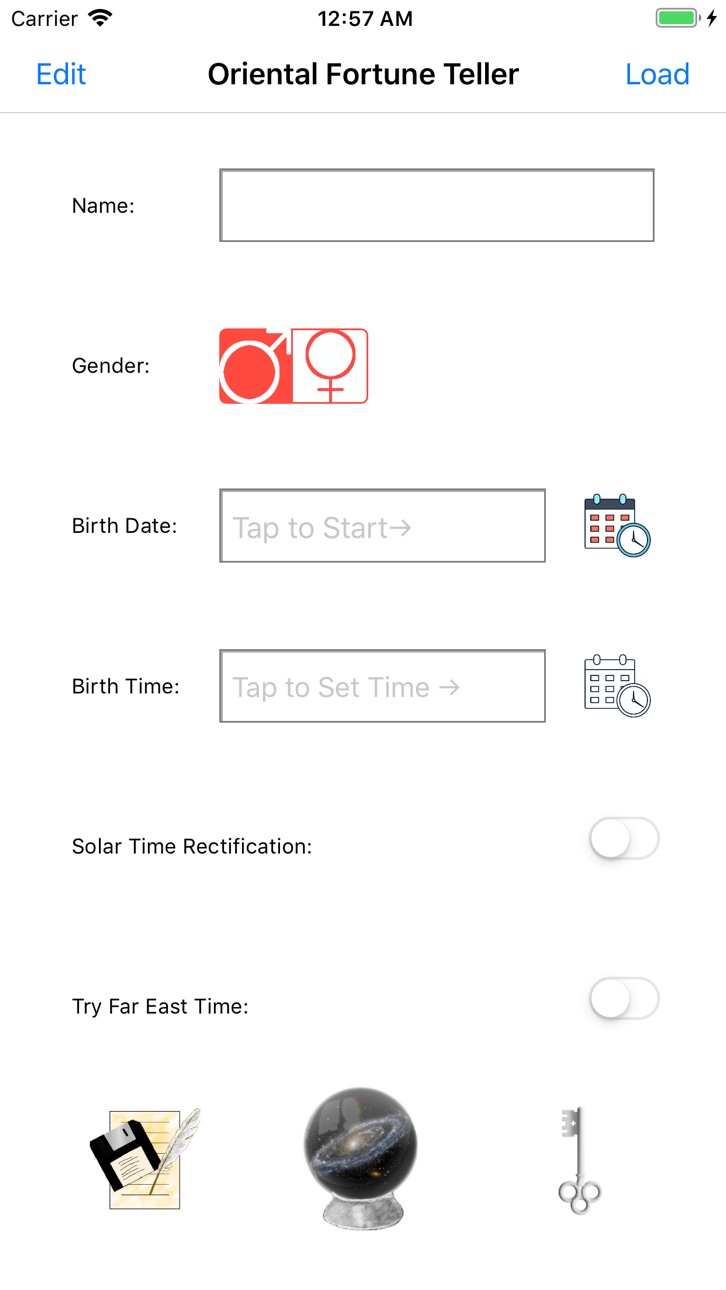


iPad 5 images


What’s New Version 1.3.4
*Fixed a bug that changes the day pillar before 00:00 the next day.
*Changed the algorithm of applying the timezone to make it align with the convention.
*Minor time picker improvement.
*Minor keyboard input improvement.
Description
How to use this App:
For beginners, just input your birthday and birth time and then tap the "wheel" to get your natal Four-pillar chart. And then, tap the "Expand" button to unfold the hidden symbols.
Chart Reading: In the Expanded Chart View, you could tap the "Interpret" button to open the interpretation view and read the meaning for each of the symbols.
Progression and Transit: In the Expanded Chart View, if you would like to have some prediction reading, just tap "Now" or choose a decade to start with.
Progression Chart: In the Progression Chart View, you could choose a decade and then select one of the ten years to see your full progression and transit chart.
What is Progression: This term is the same as the one in western astrology(astrology for short). It is said that the concept came from Bible, "a day for a year"(Ezekiel 4:4-6.). There are several kinds of progressions, Primary progression, Solar Arc progression and Tertiary progression(Lunar Progression). The Primary progression applies the one day for a year principle, which means that the planets of the thirtieth day of your birth could be used to project what will happen at your 30.
In Four-pillar chart, we use a month for a decade ratio to project your progressions. In Chinese calendar, a year is divided into 24 parts, 12 atmospheres and 12 festivals. And 12 festivals are the starting points of 12 months. Plus, charts are divided into Yang persons and Yin persons. Yang chart progresses clock-wisely and Yin chart progresses counter clock-wisely. This factor depends on the gender and birth year.
So what is transit: Transit is simple. In astrology, you could choose a time and check the planets placements. Usually you will check a transit to natal chart comparison to predict what will happen or study what happened for a past transit.
In Four-pillar, we use natal chart, progression and transit all together to make predictions. But it is not the purpose of this app because I never did any studies or statistics. You need to learn from your past or from other people to help you make predictions, just like any other astrology app does.
About the Four-Pillar reading Practice:
The art was derived from ancient astrology which is very familiar be today's western astrology. In Tang Dynasty, the chart was composed of 3 pillars but sometimes the masters had to work along with an astrological chart. In Song Dynasty, a numerology and an I-Ching master Xu Zi Ping invented the four-pillar chart and dropped the astrological chart completely.
And this art had been thriving and being practised for nearly one thousand years in the ancient China. Some are still practising the Four-pillar or Bazi(eight character symbols) reading today. And Hong Kong is the place where the art is still thriving along with Fengshui.
Custom Timezone option: For those who cast a person's chart outside of his/her place of birth. Most of the time you don't need it, unless the person was born in another timezone and near the edge of that month. Born in different month within the same day could be completely different for your characteristic and other analysis.
Solar Time rectification option: A school of the four-pillar fortune tellers suggest that we should take the Sun position into account because the time in each longitude is different across the same timezone. Equation of time is also calculated.
About this App:
We saw that although there are many Four-pillar apps on the App Store. But we could not find one that is by any means translated into English or modernised. We started this project from scratch and we tried hard to look for a counter part of the symbols in English and in the western world. Later we translated or re-wroted some of the ancient interpretation text into English so that everyone can enjoy the art. And I employ as many astrology terms as possible so that you Google it if you are not familiar with the term.
In-App Purchases US pricing
One-Time Purchases
Premium Package$9.99
Capabilities
In-App Purchases
Accessibility
ipadiphonemacrealityDevicetvoswatch
Version history 13 versions
Build 871681005v1.3.42025-01-13 12:23:36
*Fixed a bug that changes the day pillar before 00:00 the next day.
*Changed the algorithm of applying the timezone to make it align with the convention.
*Minor time picker improvement.
*Minor keyboard input improvement.
Build 871352272v1.3.32024-12-29 13:16:33
Fixed a bug that crashed the app when you try to open the map
UI improvements
Build 844371026v1.3.22021-10-11 02:55:19
*Fixed a bug that user could not remove saved charts.
*Fixed a bug that the user charts temporarily disappear after user tries to delete a chart and is not logged in to iCloud.
*Minor UI improvemenets
Build 837455821v1.3.12020-08-23 13:47:40
*Google Admob SDK Update for compliance.
*Minor UI improvements.
Build 836614898v1.3.02020-06-29 15:05:44
1. Traditional drawing art in lauch screen.
2. Supports split window mode on iPad(multitasking)
3. Supports Dark Mode with the new Dark Mode color scheme.
4. Fixed a couple of crush problems.
Build 832740962v1.2.62019-09-12 19:29:26
Attempts to fix a crash problem.
Build 832326902v1.2.52019-08-12 12:53:04
1. Tutorial improvement.
2. modified interpretation menu view wording.
Build 832004496v1.2.42019-07-25 13:55:50
1. Tutorial improvement.
2. UI Improvement.
3. Fixed a clickable area problem.
4. Default Chart language changed to English.
Build 831903617v1.2.32019-07-05 20:02:36
Added a quick tutorial.
Build 831725788v1.2.22019-06-28 14:23:42
Minor UI bug fix.
Build 831674020v1.2.12019-06-15 00:58:04
*Fixed cut interpretation
*Fixed editable knowledge view
Build 831602881v1.22019-06-11 15:58:10
*Fixing the Home UI stretching and squeezing problem.
Build 829995044v1.12019-06-08 21:08:11
Price history by region
Currency
Show
Columns
Search
Availability 53 of 53 storefronts
| Region | Language | Price | Ratings | Avg | Version |
|---|---|---|---|---|---|
| US | en-US | Free | 28 | 4.7 | 1.3.4 |
| CA | en-CA | Free | 3 | 3.3 | 1.3.4 |
| DE | de-DE | Free | 2 | 5.0 | 1.3.4 |
| AE | en-GB | Free | 1 | 4.0 | 1.3.4 |
| AT | de-DE | Free | 1 | 5.0 | 1.3.4 |
| AU | en-AU | Free | 1 | 5.0 | 1.3.4 |
| ES | es-ES | Free | 1 | 5.0 | 1.3.4 |
| FR | fr-FR | Free | 1 | 5.0 | 1.3.4 |
| GB | en-GB | Free | 1 | 1.0 | 1.3.4 |
| LU | en-GB | Free | 1 | 5.0 | 1.3.4 |
| NL | nl | Free | 1 | 5.0 | 1.3.4 |
| AL | en-GB | Free | 0 | — | 1.3.4 |
| BA | en-GB | Free | 0 | — | 1.3.4 |
| BE | en-GB | Free | 0 | — | 1.3.4 |
| BG | en-GB | Free | 0 | — | 1.3.4 |
| BH | en-GB | Free | 0 | — | 1.3.4 |
| BY | en-GB | Free | 0 | — | 1.3.4 |
| CH | de-CH | Free | 0 | — | 1.3.4 |
| CY | en-GB | Free | 0 | — | 1.3.4 |
| CZ | en-GB | Free | 0 | — | 1.3.4 |
| DK | en-GB | Free | 0 | — | 1.3.4 |
| EE | en-GB | Free | 0 | — | 1.3.4 |
| FI | en-GB | Free | 0 | — | 1.3.4 |
| GR | en-GB | Free | 0 | — | 1.3.4 |
| HR | en-GB | Free | 0 | — | 1.3.4 |
| HU | en-GB | Free | 0 | — | 1.3.4 |
| IE | en-GB | Free | 0 | — | 1.3.4 |
| IL | en-GB | Free | 0 | — | 1.3.4 |
| IT | it | Free | 0 | — | 1.3.4 |
| JO | en-GB | Free | 0 | — | 1.3.4 |
| KW | en-GB | Free | 0 | — | 1.3.4 |
| LT | en-GB | Free | 0 | — | 1.3.4 |
| LV | en-GB | Free | 0 | — | 1.3.4 |
| MD | en-GB | Free | 0 | — | 1.3.4 |
| ME | en-GB | Free | 0 | — | 1.3.4 |
| MK | en-GB | Free | 0 | — | 1.3.4 |
| MT | en-GB | Free | 0 | — | 1.3.4 |
| NO | en-GB | Free | 0 | — | 1.3.4 |
| NZ | en-AU | Free | 0 | — | 1.3.4 |
| OM | en-GB | Free | 0 | — | 1.3.4 |
| PL | en-GB | Free | 0 | — | 1.3.4 |
| PT | pt-PT | Free | 0 | — | 1.3.4 |
| QA | en-GB | Free | 0 | — | 1.3.4 |
| RO | en-GB | Free | 0 | — | 1.3.4 |
| RS | en-GB | Free | 0 | — | 1.3.4 |
| RU | ru | Free | 0 | — | 1.3.4 |
| SA | en-GB | Free | 0 | — | 1.3.4 |
| SE | sv | Free | 0 | — | 1.3.4 |
| SI | en-GB | Free | 0 | — | 1.3.4 |
| SK | en-GB | Free | 0 | — | 1.3.4 |
| TR | en-GB | Free | 0 | — | 1.3.4 |
| UA | en-GB | Free | 0 | — | 1.3.4 |
| XK | en-GB | Free | 0 | — | 1.3.4 |
Change log 17 changes · US
✎
releaseNotes updated
*Fixed a bug that changes the day pillar before 00:00 the next day.
*Changed the algorithm of applying the timezone to make it align with the convention.
*Minor
✎
description updated
How to use this App:
For beginners, just input your birthday and birth time and then tap the "wheel" to get your natal Four-pillar chart. And then, tap the "Exp
✎
subtitle updated
Ancient Wisdom, Modernised
✎
name updated
Oriental FortuneTeller
◆
Version 1.3.4 released
*Fixed a bug that changes the day pillar before 00:00 the next day.
*Changed the algorithm of applying the timezone to make it align with the convention.
*Minor time picker improvement.
*Minor keyboard input improvement.
◆
Version 1.3.3 released
Fixed a bug that crashed the app when you try to open the map
UI improvements
◆
Version 1.3.2 released
*Fixed a bug that user could not remove saved charts.
*Fixed a bug that the user charts temporarily disappear after user tries to delete a chart and is not logged in to iCloud.
*Minor UI improvemenets
◆
Version 1.3.1 released
*Google Admob SDK Update for compliance.
*Minor UI improvements.
◆
Version 1.3.0 released
1. Traditional drawing art in lauch screen.
2. Supports split window mode on iPad(multitasking)
3. Supports Dark Mode with the new Dark Mode color scheme.
4. Fixed a couple of crush problems.
◆
Version 1.2.6 released
Attempts to fix a crash problem.
◆
Version 1.2.5 released
1. Tutorial improvement.
2. modified interpretation menu view wording.
◆
Version 1.2.4 released
1. Tutorial improvement.
2. UI Improvement.
3. Fixed a clickable area problem.
4. Default Chart language changed to English.
◆
Version 1.2.3 released
Added a quick tutorial.
◆
Version 1.2.2 released
Minor UI bug fix.
◆
Version 1.2.1 released
*Fixed cut interpretation
*Fixed editable knowledge view
◆
Version 1.2 released
*Fixing the Home UI stretching and squeezing problem.
◆
Version 1.1 released