Home › Education

7 of 7 storefronts
Content in en-US
Content in en-US
Information
Preview 3 platforms
iPhone 8 images




iPad 3 images


Mac 4 images


What’s New Version 3.6.1
Thanks for using NCalc! This update includes performance improvements, stability enhancements, bug fixes, UI refinements, and compatibility updates for the latest iOS versions to ensure a smoother, more reliable experience.
Description
NCalc — Powerful Scientific Calculator, Graphing, and Converter
NCalc combines a natural-display scientific calculator, advanced math tools, a full graphing module (as 83/84 calculator), a large formula library, and a comprehensive unit and currency converter—designed for students, engineers, and anyone who loves math.
◉ Main Calculator Features
- Natural display: Enter expressions exactly as in textbooks—fractions, roots, exponents, and more—see results as written on paper.
- Keyboard layout: Matches popular models for familiarity and speed: 115 ES Plus, 991 ES Plus, 300 ES Plus, and 991 EX.
- Symbolic and numeric modes: Perform exact fraction calculation or evaluate numerically when needed.
- Arbitrary precision integers: Work with very large integers without losing accuracy.
- Output types: Choose from fraction, mixed fraction, decimal, repeating decimal, degrees/minutes/seconds, and polar coordinates.
- Angle units: Degree, radian, and gradian (grade).
- Decimal formatter: Display numbers in normal, engineering, engineering SI, scientific, or fixed formats.
- Calculation history: Review and reuse past calculations with ease.
- Copy and paste support for fast data entry and sharing.
◉ Algebra, Calculus, and Core Math
- Algebra calculation: Expansion, factorization, simplification, and more.
- Calculus calculator: Derivatives, integrals, and limits of expressions.
- Complex number calculation: Arithmetic, polar/rectangular conversion, exponential, logarithm, powers, roots, and full trigonometric functions.
◉ Equations and Inequalities
- Equation solver: Solve general equations, plus dedicated solvers for quadratic, cubic, and quartic equations.
- System of equations solver: Solve systems with 2, 3, or 4 variables.
- Inequality solvers: Quadratic, cubic, and quartic inequalities with interval-based solutions.
◉ Matrices and Vectors
- Operations: Addition, subtraction, multiplication for matrices and vectors.
- Advanced tools: Determinant, inverse, transpose, rank, eigenvalues, and eigenvectors.
◉ Statistics and Distributions
- Statistical calculation: Descriptive stats and regression calculation (including a regression plotter).
- Distribution calculation: Normal distribution, binomial distribution, Poisson distribution, t-distribution, chi-square distribution, and F-distribution.
◉ Number Bases and Formats
- Base N calculation: Effortlessly switch between binary, octal, decimal, and hexadecimal, with arithmetic in each base.
◉ Tables, Variables, and Custom Functions
- Table Generator: Generate value tables based on any expression and range.
- Calculator variables: Store values and reuse them across calculations.
- User-defined functions: Create your own functions to streamline repetitive work.
- Built-in constants: A rich set of mathematical and physical constants.
◉ Formulas
- Extensive formula collection: Math and Physics formulas, clearly categorized—ideal for secondary school, high school, and university students.
◉ Unit Converter
- Currency Converter
- 1000+ unit conversions
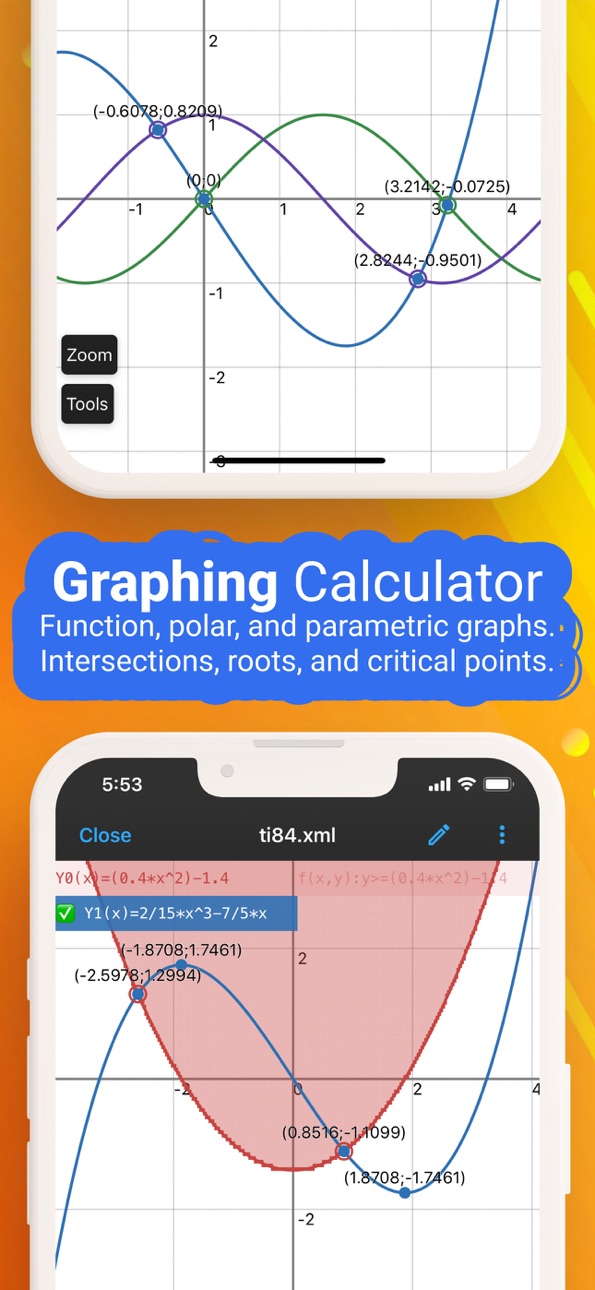
◉ Graphing as 83, 84 calculator
- Cartesian functions, implicit plots, polar, and parametric.
- Tracing, roots, intersections, extrema, derivative, and integral evaluations on graphs.
◉ Auto-renewing subscription
You may purchase an auto-renewing subscription through an In-App Purchase.
• Auto-renewable subscription
• Your subscription will be charged to your AppStore account at confirmation of purchase and will automatically renew (at the duration selected) unless auto-renew is turned off at least 24 hours before the end of the current period.
• Current subscription may not be cancelled during the active subscription period; however, you can manage your subscription and/or turn off auto-renewal by visiting your AppStore Account Settings after purchase
• Privacy policy and terms of use: https://ncalc-app.web.app/terms-of-services.html
In-App Purchases US pricing
Calculator Premium Subscription
Calculator month subscription · Monthly$1.99
Calculator yearly subscription · Yearly$3.99
One-Time Purchases
Calculator Premium$5.99
Calculator Pro$5.99
Capabilities
In-App Purchases
Accessibility
ipadiphonemacrealityDevicetvoswatch
Version history 25 versions
Build 887332180v3.6.12026-06-25 15:30:11
Thanks for using NCalc! This update includes performance improvements, stability enhancements, bug fixes, UI refinements, and compatibility updates for the latest iOS versions to ensure a smoother, more reliable experience.
Build 884920011v3.5.82026-05-05 05:29:57
Thanks for using NCalc! This update includes performance improvements, stability enhancements, bug fixes, UI refinements, and compatibility updates for the latest iOS versions to ensure a smoother, more reliable experience.
Build 884636424v3.5.72026-04-19 04:02:08
Thanks for using NCalc! This update includes performance improvements, stability enhancements, bug fixes, UI refinements, and compatibility updates for the latest iOS versions to ensure a smoother, more reliable experience.
Build 882238608v3.5.62026-02-10 10:38:18
What's new in this version:
- Math OCR now supports drawing for easier input.
- Option to hide the button in the calculator display.
- Bug fixes and performance improvements for a smoother experience.
Thanks for using NCalc!
Build 882151848v3.5.52026-02-06 12:18:52
What's new in this version:
- Math OCR now supports drawing for easier input.
- Option to hide the button in the calculator display.
- Bug fixes and performance improvements for a smoother experience.
Thanks for using NCalc!
Build 881874243v3.5.42026-01-28 14:40:30
This updates introduces a new Math OCR feature that allows you to input expressions into the calculator using your camera. Simply point your camera at a handwritten or printed mathematical expression, and NCalc will recognize and convert it into a digital format for easy calculation. This feature enhances usability and provides a more convenient way to perform calculations on the go.
Build 881596311v3.5.22026-01-20 08:40:59
This updates introduces a new Math OCR feature that allows you to input expressions into the calculator using your camera. Simply point your camera at a handwritten or printed mathematical expression, and NCalc will recognize and convert it into a digital format for easy calculation. This feature enhances usability and provides a more convenient way to perform calculations on the go.
Build 881467247v3.5.12026-01-16 17:41:57
This updates introduces a new Math OCR feature that allows you to input expressions into the calculator using your camera. Simply point your camera at a handwritten or printed mathematical expression, and NCalc will recognize and convert it into a digital format for easy calculation. This feature enhances usability and provides a more convenient way to perform calculations on the go.
Build 879694795v3.5.02025-11-14 14:30:32
Thanks for using NCalc! This update includes performance improvements, stability enhancements, bug fixes, UI refinements, and compatibility updates for the latest iOS versions to ensure a smoother, more reliable experience.
Build 879603110v3.4.92025-11-10 18:33:58
Thanks for using NCalc! This update includes performance improvements, stability enhancements, bug fixes, UI refinements, and compatibility updates for the latest iOS versions to ensure a smoother, more reliable experience.
Build 872611959v3.4.82025-11-06 11:11:27
Thanks for using NCalc! This update includes performance improvements, stability enhancements, bug fixes, UI refinements, and compatibility updates for the latest iOS versions to ensure a smoother, more reliable experience.
Build 870530997v2.2.22024-11-20 06:37:47
Fix limit menu, improved one-side limit calculation.
Build 870398249v2.2.12024-11-13 21:57:10
Programming graphics result
Build 868058474v1.2.02024-11-08 10:54:07
Math community
Build 867348181v1.9.92024-07-09 20:33:03
- Bug fixes
Build 866978668v1.9.82024-06-25 19:45:30
- Lim+ and Lim-
- Graphing: derivative of Erf and Erfc
- Graphing: graph of limit and numeric derivative
- Improved equation solver
- Support more hardware keyboard layouts
- Fix cannot save graph image to gallery
- Bug fixes and performance improved
Build 862960803v1.9.72024-03-25 12:04:31
- New option: Ignore all infix operators at the end of the input
- New option: Enable instant result for expression that contains integral
- Improved equation solver
- Improved graphing
- Bug fixes and performance improved.
Build 862655619v1.9.62024-01-05 18:27:48
- Rationalize denominator, display Sqrt(2)/2 instead of 1/Sqrt(2)
- Base-N: support implicit multiplication
- Allow to customize the exponential separator: a*10^b or aEb
- Improved SCI format: remove trailing zeros
- Instant result is disabled when input has integral function
Build 861883762v1.9.52023-12-01 01:55:06
Bug fixes
Build 861063917v1.9.42023-10-29 19:55:32
- Support iOS 17
- Fixed keymap binding issue on iPad
- Allow to change app icon in app settings
- Fixed font problem
Build 860975674v1.9.32023-10-26 08:14:56
- Inlined Ans value
- Improved equation solver
- Additional SCI format for big numbers
- Improved graphing
Build 859573500v1.9.22023-09-11 16:16:48
- Graph: Improved defined integral graph
- BASE-N: Support converting fractional decimal to other bases
- BASE-N: Supported hardware keyboard
- Unit converter: Allow to search unit
- Display Ans and PreAns value
- History: Save graph history, allow to edit unit conversion history
- Performance improved
Build 855814771v1.8.22023-05-18 17:01:19
- Improved equation solver.
- Improved programming feature.
- Improved expression details.
- Improved plaintext export.
- Display numeric result for symbolic polar form.
- Entering x(t);y(t) parsed as parametric function.
Build 853996561v1.8.12023-03-08 16:12:44
Bug fixes and performance improved.
Build 852438001v1.8.02022-09-28 07:17:42
Bug fixes and performance improved.
Price history by region
Currency
Show
Columns
Search
Availability 7 of 7 storefronts
| Region | Language | Price | Ratings | Avg | Version |
|---|---|---|---|---|---|
 US US | en-US | Free | 12.2k | 4.7 | 3.6.1 |
 CR CR | es-MX | Free | 1.5k | 4.8 | 3.6.1 |
 HK HK | zh-Hant-HK | Free | 699 | 4.8 | 3.6.1 |
 PA PA | es-MX | Free | 410 | 4.8 | 3.6.1 |
 BG BG | en-GB | Free | 44 | 5.0 | 3.6.1 |
 MV MV | en-GB | Free | 30 | 4.4 | 3.6.1 |
 MT MT | en-GB | Free | 21 | 4.7 | 3.6.1 |
Change log 29 changes · US
✎
releaseNotes updated
Thanks for using NCalc! This update includes performance improvements, stability enhancements, bug fixes, UI refinements, and compatibility updates for the late
✎
description updated
NCalc — Powerful Scientific Calculator, Graphing, and Converter
NCalc combines a natural-display scientific calculator, advanced math tools, a full graphing
✎
subtitle updated
NCalc & CalcES Calculator 115
✎
name updated
Scientific Calculator Plus 991
◆
Version 3.6.1 released
Thanks for using NCalc! This update includes performance improvements, stability enhancements, bug fixes, UI refinements, and compatibility updates for the latest iOS versions to ensure a smoother, more reliable experience.
◆
Version 3.5.8 released
Thanks for using NCalc! This update includes performance improvements, stability enhancements, bug fixes, UI refinements, and compatibility updates for the latest iOS versions to ensure a smoother, more reliable experience.
◆
Version 3.5.7 released
Thanks for using NCalc! This update includes performance improvements, stability enhancements, bug fixes, UI refinements, and compatibility updates for the latest iOS versions to ensure a smoother, more reliable experience.
◆
Version 3.5.6 released
What's new in this version:
- Math OCR now supports drawing for easier input.
- Option to hide the button in the calculator display.
- Bug fixes and performance improvements for a smoother experience.
Thanks for using NCalc!
◆
Version 3.5.5 released
What's new in this version:
- Math OCR now supports drawing for easier input.
- Option to hide the button in the calculator display.
- Bug fixes and performance improvements for a smoother experience.
Thanks for using NCalc!
◆
Version 3.5.4 released
This updates introduces a new Math OCR feature that allows you to input expressions into the calculator using your camera. Simply point your camera at a handwritten or printed mathematical expression, and NCalc will recognize and convert it
◆
Version 3.5.2 released
This updates introduces a new Math OCR feature that allows you to input expressions into the calculator using your camera. Simply point your camera at a handwritten or printed mathematical expression, and NCalc will recognize and convert it
◆
Version 3.5.1 released
This updates introduces a new Math OCR feature that allows you to input expressions into the calculator using your camera. Simply point your camera at a handwritten or printed mathematical expression, and NCalc will recognize and convert it
◆
Version 3.5.0 released
Thanks for using NCalc! This update includes performance improvements, stability enhancements, bug fixes, UI refinements, and compatibility updates for the latest iOS versions to ensure a smoother, more reliable experience.
◆
Version 3.4.9 released
Thanks for using NCalc! This update includes performance improvements, stability enhancements, bug fixes, UI refinements, and compatibility updates for the latest iOS versions to ensure a smoother, more reliable experience.
◆
Version 3.4.8 released
Thanks for using NCalc! This update includes performance improvements, stability enhancements, bug fixes, UI refinements, and compatibility updates for the latest iOS versions to ensure a smoother, more reliable experience.
◆
Version 2.2.2 released
Fix limit menu, improved one-side limit calculation.
◆
Version 2.2.1 released
Programming graphics result
◆
Version 1.2.0 released
Math community
◆
Version 1.9.9 released
- Bug fixes
◆
Version 1.9.8 released
- Lim+ and Lim-
- Graphing: derivative of Erf and Erfc
- Graphing: graph of limit and numeric derivative
- Improved equation solver
- Support more hardware keyboard layouts
- Fix cannot save graph image to gallery
- Bug fixes and performanc
◆
Version 1.9.7 released
- New option: Ignore all infix operators at the end of the input
- New option: Enable instant result for expression that contains integral
- Improved equation solver
- Improved graphing
- Bug fixes and performance improved.
◆
Version 1.9.6 released
- Rationalize denominator, display Sqrt(2)/2 instead of 1/Sqrt(2)
- Base-N: support implicit multiplication
- Allow to customize the exponential separator: a*10^b or aEb
- Improved SCI format: remove trailing zeros
- Instant result is disab
◆
Version 1.9.5 released
Bug fixes
◆
Version 1.9.4 released
- Support iOS 17
- Fixed keymap binding issue on iPad
- Allow to change app icon in app settings
- Fixed font problem
◆
Version 1.9.3 released
- Inlined Ans value
- Improved equation solver
- Additional SCI format for big numbers
- Improved graphing
◆
Version 1.9.2 released
- Graph: Improved defined integral graph
- BASE-N: Support converting fractional decimal to other bases
- BASE-N: Supported hardware keyboard
- Unit converter: Allow to search unit
- Display Ans and PreAns value
- History: Save graph histor
◆
Version 1.8.2 released
- Improved equation solver.
- Improved programming feature.
- Improved expression details.
- Improved plaintext export.
- Display numeric result for symbolic polar form.
- Entering x(t);y(t) parsed as parametric function.
◆
Version 1.8.1 released
Bug fixes and performance improved.
◆
Version 1.8.0 released
Bug fixes and performance improved.