Home › Finance

 US
US
1 of 1 storefronts
Content in en-US
Content in en-US
Information
Preview 2 platforms
iPhone 10 images





iPad 10 images


What’s New Version 7.6
- Recurring payments, EMI tracking, and instalment management
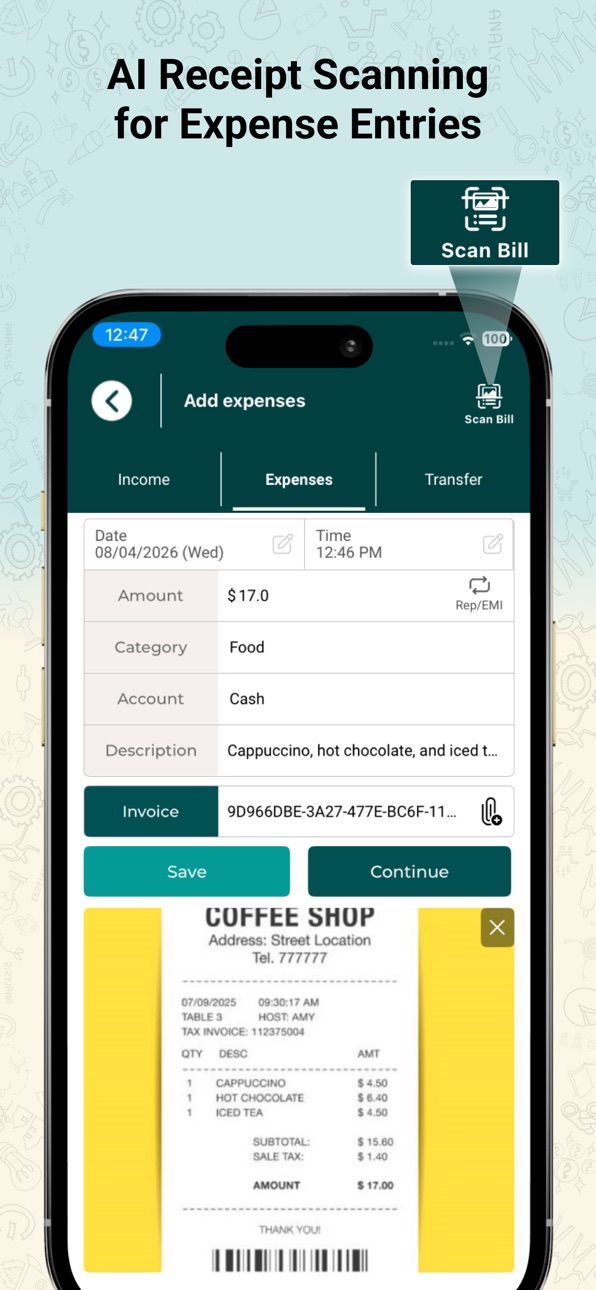
- AI Scan: Snap your bills or receipts and let our AI automatically fill in expense details.
- Built-in Calculator: Quickly calculate expenses without leaving the app.
- Improved privacy options and controls
- Optimised performance and stability across the app
Description
Wallet: Daily Expense Tracker is a budget tracking app designed to simplify your finances. Use it as your income and expense tracker app to record daily transactions, manage recurring EMIs, and stay organized with secure auto backup. A smart finance manager and day-to-day budget planner to help you stay in control of your money.
Key Features of Our Expense and Budget Manager App:
1. Expense Tracker & Income Tracker
• Categorize expenses between groceries, transport, and other miscellaneous costs.
• Quickly and easily record your daily income and spending.
• Schedule repeat EMIs and expenses with ease. Set daily, weekly, monthly, or yearly reminders to stay ahead of upcoming payments.
2. Budget Planner & Money Manager
• Monitor your spending with visual budget progress bars that show the percentage used for each income and expense category.
• Understand your expenses and stay within your budget with clear insights.
• Compare your spending with last month to quickly track progress and improve your budgeting habits.
3. Secure Cloud backup & sync
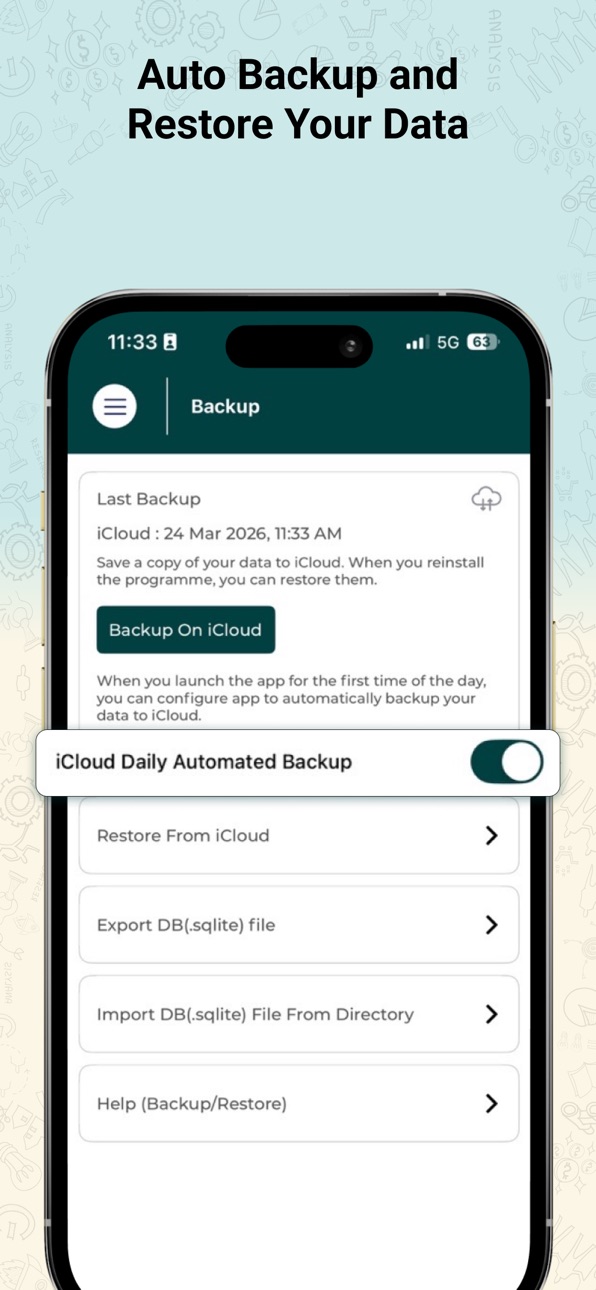
• With Auto Backup, your data is safely backed up every day, no hassle, no manual steps needed!
• Share your data between different iOS devices without any effort through this money-saving app.
• Secure cloud backups keep your financial data protected and easy to restore.
4. Smart AI Receipt Scanner
• Take a photo of any receipt, bill, or invoice.
• Attach a photo or PDF of any receipt, bill, or invoice from your device.
• Our AI automatically detects vendors, amounts, and categories to fill in details for you.
• Tracking expenses is faster with fewer errors and more accuracy.
5. Built-in Calculator
• Access a full-featured calculator directly from the screen where you enter expenses.
• Maintain your workflow and track your spending without switching between multiple apps.
6. Custom Categories
• You can add, modify, and order categories according to your personal expenses.
• Supports default categories and user-defined categories.
• Use attractive icons from the icon library and customize categories for easy recognition.
7. Account & Wallet Management
• Add multiple accounts based on your needs; credit cards, PayPal, bank accounts, cash, and more.
• Customize each account with unique icons for quick identification.
• Track money across accounts with quick switching and clear balance view.
8. Reports & analytics
• Analyse spending patterns with visual charts and expense summaries.
• Export reports in PDF or CSV to share and save records conveniently.
• Visualize your account summary with easy-to-read graphs.
9. Secure Money Manager App
• PIN lock & biometric security.
• 100% data privacy.
• Local storage with encrypted backup.
10. Custom filters & search
• Use filters to navigate certain transactions by date, category, or amount.
• Use smart search to instantly find your expense, income, or transfer records.
11. Additional Features
• Multi-currency support
• Daily reminders for expenses & bills
• Offline expense tracking
• Smart filters & search
• Multiple themes
Why Choose Wallet: Daily Expense Tracker?
• Best expense tracker for daily use.
• Easy money manager for personal finance.
• Smart budget planner & savings tracker.
• Simple and powerful finance app.
Download Wallet: Daily Expense Tracker and take control of your finances today.
Install the app from the App Store.
Sign up using email, Facebook, or Apple login.
Set budgets, organize accounts, & start tracking your income and expenses instantly.
Stay Connected
Website: https://sstechstudio.com/wallet/
Follow us for more updates
Facebook: https://www.facebook.com/walletincomeexpensetracker
LinkedIn: https://www.linkedin.com/showcase/wallet-income-expense-tracker/
In-App Purchases US pricing
Single Expense Subscription Subscription
Yearly Pro Access · Yearly 14-day free trial$9.99
Monthly Pro Access · Monthly 7-day free trial$0.99
One-Time Purchases
Lifetime Unlimited Access$49.99
Capabilities
In-App Purchases
Accessibility
ipadiphonemacrealityDevicetvoswatch
Version history 25 versions
Build 887034136v7.62026-06-18 03:59:40
- Recurring payments, EMI tracking, and instalment management
- AI Scan: Snap your bills or receipts and let our AI automatically fill in expense details.
- Built-in Calculator: Quickly calculate expenses without leaving the app.
- Improved privacy options and controls
- Optimised performance and stability across the app
Build 886145919v7.52026-05-26 18:48:14
- Recurring payments, EMI tracking, and instalment management
- AI Scan: Snap your bills or receipts and let our AI automatically fill in expense details.
- Built-in Calculator: Quickly calculate expenses without leaving the app.
- Improved privacy options and controls
- Optimised performance and stability across the app
Build 884840657v7.42026-05-04 18:20:03
- Recurring payments, EMI tracking, and instalment management
- AI Scan: Snap your bills or receipts and let our AI automatically fill in expense details.
- Built-in Calculator: Quickly calculate expenses without leaving the app.
- Improved privacy options and controls
- Optimised performance and stability across the app
Build 883245182v7.32026-04-14 09:59:32
- Auto backup with data restore support
- AI Scan: AI receipt scanning for expense entries
- Built-in Calculator: Quickly calculate expenses without leaving the app.
- Improved backup to securely save your money, expenses and income with better restore support.
- Optimised performance and stability across the app
Build 882187707v7.22026-02-05 17:50:49
Performance improvements and minor fixes
Build 881316047v7.12026-01-13 00:09:45
Improved backup flow, accurate Account Report filters (All Time & Year-wise), better chart data, smoother search sorting, and UI improvements.
Build 880067587v7.02025-12-10 21:47:27
- Enhanced subscription screen with dynamic banner text support
- Limited scan count available for free users
- Updated trial benefits:
• 7-day free trial for the Monthly plan
• 15-day free trial for the Yearly plan
Build 879580231v6.92025-11-18 13:03:14
This update brings new features and improved performance for a smoother experience:
• AI Scan: Automatically extract expense details from bills and receipts using AI.
• Calculator: Quickly calculate expenses right inside the app.
• UI Enhancements: A refreshed and cleaner interface for improved usability.
• Bug Fixes: Minor issues have been resolved to enhance stability and performance.
Enjoy a smarter and more refined app experience!
Build 878265349v6.82025-10-09 17:02:47
• New and improved Account Report UI
• Minor UI enhancements and bug fixes
Build 877969092v6.72025-09-09 21:32:21
- Enhanced Account creation with account icons
- Export facility added for Stats section
- Minor bug fixes and improvements
Build 877093144v6.62025-08-26 09:24:25
-Category icons refreshed for a modern look
-Introduced a new category icon set
-Added “All Time” reporting option in Accounts (in addition to yearly view)
-Fixed minor issues and improved overall stability
Build 876638541v6.52025-07-23 20:16:55
- Minor bug fixing and UI Improvements
Build 876509384v6.42025-07-22 09:31:48
- Auto Backup feature for seamless, hassle-free backups.
- Enhanced Side Panel design with a modern and attractive look and feel.
Build 875285839v6.32025-06-04 13:04:04
Minor bug fixes and FaceID feature included
Build 874524579v6.22025-05-07 03:17:39
- Improved pie chart performance and responsiveness
- Minor bug fixes and improvements
Build 874185460v6.12025-04-21 22:35:05
-Minor bug fixes and improvements
Build 874048793v6.02025-04-16 08:38:45
-Minor bug fixes and improvements
Build 874016860v5.92025-04-15 01:32:53
- Improved Account configuration and able to modify current balance
- Enhanced design of Passcode screen
Build 873754802v5.82025-04-03 14:32:04
Minor bug fixes and improvements
Build 873724004v5.72025-04-02 16:34:33
Users can create and manage their own custom accounts.
Build 873472994v5.62025-03-27 16:19:05
- Added an option to set the opening balance for accounts.
- Introduced an Archive/Unarchive feature for accounts.
- Added a download option for PDF reports.
- When a user logs in, the guest user's data will be transferred to the logged-in account.
Build 872644452v5.52025-03-05 10:38:18
• Enhanced Transaction Entry Screen for a smoother and more efficient experience.
• Minor bug fixes and performance improvements to ensure better stability and reliability.
Build 872095746v5.42025-02-19 14:34:19
1. Light & Dark Mode: Users can now switch between light and dark themes for a personalised experience.
2. Enhanced Budget Management UI: A refined and more intuitive design for better budgeting.
3. Account Reports Update: Transfer entries are now included in the "Account Reports" section for a complete financial overview.
Build 872070647v5.32025-01-28 21:03:40
Engaging onboarding experience to guide users seamlessly.
Simplified and user-friendly sign-up and authentication process.
Revamped dashboard for an intuitive and visually appealing interface.
Advanced pie chart analytics for deeper insights and better data visualisation.
Build 871282845v5.22025-01-17 08:09:28
• Initial Balance Support: You can now add an initial balance to your accounts for easier tracking.
• Social Media Login: Seamless login options added, including Sign in with Apple and Facebook Login.
• Updated Menu Drawer: Enjoy a refreshed menu drawer design for a smoother navigation experience.
• New Color Theme: A vibrant new color theme has been introduced to enhance the app's look and feel.
• Bug Fixes & Performance Enhancements: We've resolved minor bugs and made improvements for a faster, more reliable experience.
Price history by region
Currency
Show
Columns
Search
Availability 1 of 1 storefronts
| Region | Language | Price | Ratings | Avg | Version |
|---|---|---|---|---|---|
| US | en-US | Free | 10 | 4.2 | 7.6 |
Change log 29 changes · US
✎
releaseNotes updated
- Recurring payments, EMI tracking, and instalment management
- AI Scan: Snap your bills or receipts and let our AI automatically fill in expense details.
- Bui
✎
description updated
Wallet: Daily Expense Tracker is a budget tracking app designed to simplify your finances. Use it as your income and expense tracker app to record daily transac
✎
subtitle updated
Budget & Expense Tracker
✎
name updated
Wallet: Smart Money Manager
◆
Version 7.6 released
- Recurring payments, EMI tracking, and instalment management
- AI Scan: Snap your bills or receipts and let our AI automatically fill in expense details.
- Built-in Calculator: Quickly calculate expenses without leaving the app.
- Improved
◆
Version 7.5 released
- Recurring payments, EMI tracking, and instalment management
- AI Scan: Snap your bills or receipts and let our AI automatically fill in expense details.
- Built-in Calculator: Quickly calculate expenses without leaving the app.
- Improved
◆
Version 7.4 released
- Recurring payments, EMI tracking, and instalment management
- AI Scan: Snap your bills or receipts and let our AI automatically fill in expense details.
- Built-in Calculator: Quickly calculate expenses without leaving the app.
- Improved
◆
Version 7.3 released
- Auto backup with data restore support
- AI Scan: AI receipt scanning for expense entries
- Built-in Calculator: Quickly calculate expenses without leaving the app.
- Improved backup to securely save your money, expenses and income with be
◆
Version 7.2 released
Performance improvements and minor fixes
◆
Version 7.1 released
Improved backup flow, accurate Account Report filters (All Time & Year-wise), better chart data, smoother search sorting, and UI improvements.
◆
Version 7.0 released
- Enhanced subscription screen with dynamic banner text support
- Limited scan count available for free users
- Updated trial benefits:
• 7-day free trial for the Monthly plan
• 15-day free trial for the Yearly plan
◆
Version 6.9 released
This update brings new features and improved performance for a smoother experience:
• AI Scan: Automatically extract expense details from bills and receipts using AI.
• Calculator: Quickly calculate expenses right inside the app.
• UI Enhan
◆
Version 6.8 released
• New and improved Account Report UI
• Minor UI enhancements and bug fixes
◆
Version 6.7 released
- Enhanced Account creation with account icons
- Export facility added for Stats section
- Minor bug fixes and improvements
◆
Version 6.6 released
-Category icons refreshed for a modern look
-Introduced a new category icon set
-Added “All Time” reporting option in Accounts (in addition to yearly view)
-Fixed minor issues and improved overall stability
◆
Version 6.5 released
- Minor bug fixing and UI Improvements
◆
Version 6.4 released
- Auto Backup feature for seamless, hassle-free backups.
- Enhanced Side Panel design with a modern and attractive look and feel.
◆
Version 6.3 released
Minor bug fixes and FaceID feature included
◆
Version 6.2 released
- Improved pie chart performance and responsiveness
- Minor bug fixes and improvements
◆
Version 6.1 released
-Minor bug fixes and improvements
◆
Version 6.0 released
-Minor bug fixes and improvements
◆
Version 5.9 released
- Improved Account configuration and able to modify current balance
- Enhanced design of Passcode screen
◆
Version 5.8 released
Minor bug fixes and improvements
◆
Version 5.7 released
Users can create and manage their own custom accounts.
◆
Version 5.6 released
- Added an option to set the opening balance for accounts.
- Introduced an Archive/Unarchive feature for accounts.
- Added a download option for PDF reports.
- When a user logs in, the guest user's data will be transferred to the logged-in
◆
Version 5.5 released
• Enhanced Transaction Entry Screen for a smoother and more efficient experience.
• Minor bug fixes and performance improvements to ensure better stability and reliability.
◆
Version 5.4 released
1. Light & Dark Mode: Users can now switch between light and dark themes for a personalised experience.
2. Enhanced Budget Management UI: A refined and more intuitive design for better budgeting.
3. Account Reports Update: Transfer entries
◆
Version 5.3 released
Engaging onboarding experience to guide users seamlessly.
Simplified and user-friendly sign-up and authentication process.
Revamped dashboard for an intuitive and visually appealing interface.
Advanced pie chart analytics for deeper insight
◆
Version 5.2 released
• Initial Balance Support: You can now add an initial balance to your accounts for easier tracking.
• Social Media Login: Seamless login options added, including Sign in with Apple and Facebook Login.
• Updated Menu Drawer: Enjoy a refres