Home › Business

 US
US
USen-US ALNot Available
 ATNot Available
 AUNot Available
 BANot Available
 BENot Available
 BGNot Available
 BYNot Available
 CANot Available
 CHNot Available
 CZNot Available
 DKNot Available
 EENot Available
 ESNot Available
 FINot Available
 FRNot Available
 GBNot Available
 GRNot Available
 HRNot Available
 HUNot Available
 IENot Available
 ISNot Available
 ITNot Available
 LTNot Available
 LUNot Available
 LVNot Available
 MKNot Available
 NLNot Available
 NONot Available
 NZNot Available
 PLNot Available
 PTNot Available
 RONot Available
 RSNot Available
 RUNot Available
 SENot Available
 SINot Available
 SKNot Available
 UANot Available
1 of 39 storefronts
Content in en-US
Content in en-US
Information
Preview 2 platforms
iPhone 2 images


iPad 2 images

What’s New Version 5.2.16
Maintenance release 5.2.16.92.
Fix nontaxable fees may be recorded as taxable.
Add the ability to connect to a relay endpoint.
Fix client matter not able to be selected in Check Requests.
Description
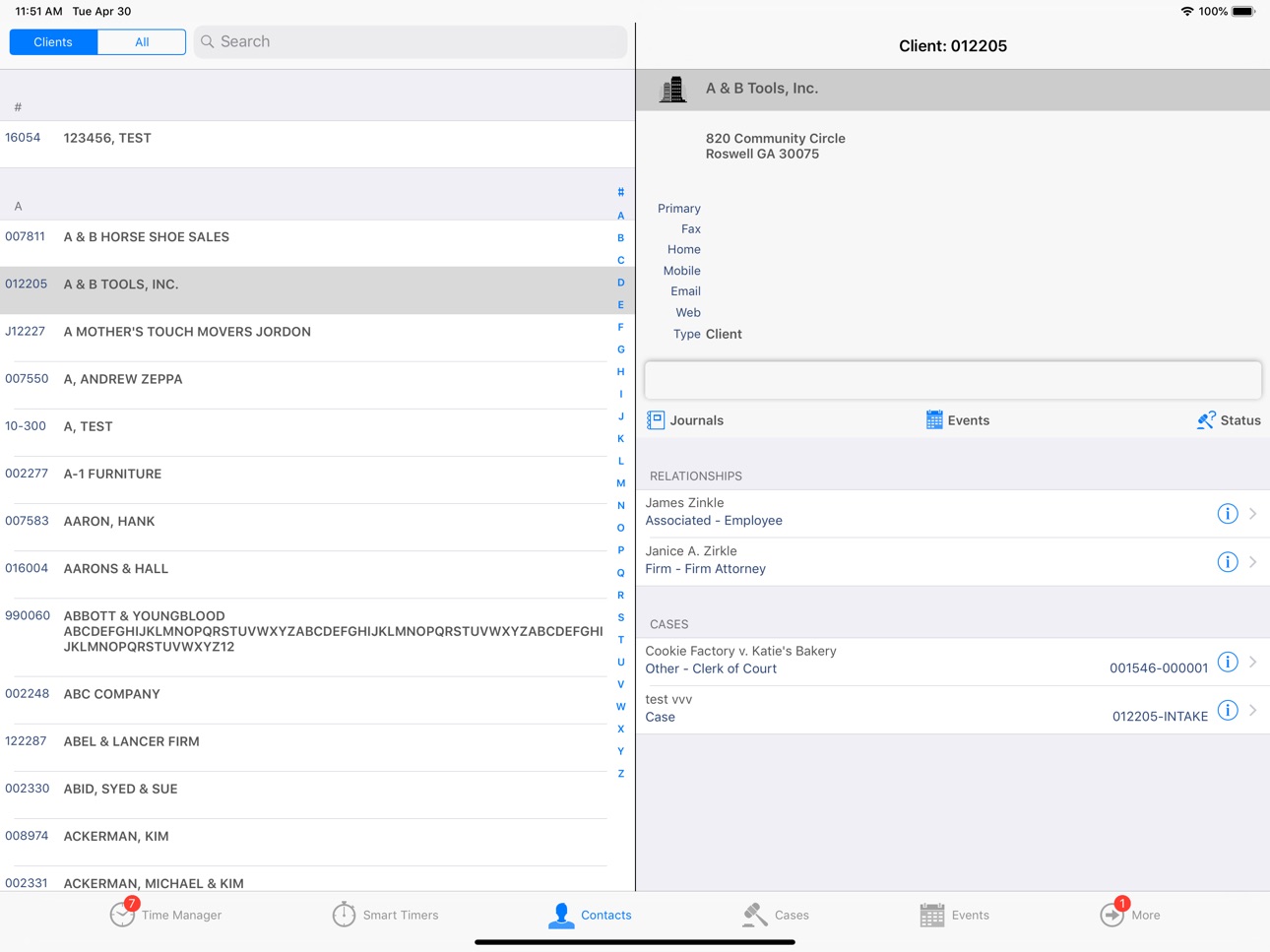
iOrion® is a complete financial management mobile application that allows legal professionals to access data from their Orion software using any recent-model iOS® device. iOrion provides a simpler, more efficient mobile timekeeping solution as well as access to critical information about clients, related contacts and cases. Emails and phone calls can be initiated from the legal professionals’ Client or favorite Matter when viewing a related contact. As with Orion’s desktop application, when the legal professional completes those activities, iOrion will automatically track the time and create a related fee. iOrion allows legal professionals to better manage their cases, keep more accurate account of their billable time and expenses, and stay on top of the firm’s bottom line.
Highlights include:
Time Management – iOS versions of Orion’s “Time Entry”, “Smart Timers” and “Time Manager”
Contact Management – All Contact related information is easily accessible including relationships to other Contacts and Matters, initiate phone calls/emails from within iOrion or even display driving directions
Matter Management – Organize information by Matter which allows for quick access to financial information while on-the-goEvent Management – Quickly create and edit Tasks/Appointments and “To-Do” lists while automatically recording and billing for your time
Payment Calendar – Real time access to payment information including multiple views and sorting capabilities
Expense Reimbursement – Mobile submission of reimbursement requests, along with ability to scan receipts or other documents
Requirements:
iOrion for iOS is available for use in conjunction with Orion’s Financial Management software solution.
Accessibility
ipadiphonemacrealityDevicetvoswatch
Version history 25 versions
Build 864205681v5.2.162024-03-05 00:23:45
Maintenance release 5.2.16.92.
Fix nontaxable fees may be recorded as taxable.
Add the ability to connect to a relay endpoint.
Fix client matter not able to be selected in Check Requests.
Build 861204468v5.2.152023-11-03 06:01:12
Maintenance release 5.2.15.88.
Fix an issue where the app would continuously flash a busy wheel, preventing further use of the app.
Fix an issue that may make the login profiles not be shown. Note that for existing users their profile may need to be re-saved by selecting the profile, clicking "Edit Profile" and then "Save". This is only necessary one time and only for the users who have been experiencing this problem.
Build 860793262v5.2.142023-10-19 14:45:22
Maintenance release 5.2.14.87.
Fixed an issue where the app would continuously flash a busy wheel, preventing further use of the app.
Fixed a crash when logging out of the app.
Build 860650300v5.2.132023-10-14 09:14:48
Maintenance release 5.2.13.86.
Fix some user reports that the login profiles were blank.
Build 860596968v5.2.122023-10-12 07:33:42
Maintenance release 5.2.12.84.
Fix some user reports that the login profiles were blank.
Build 860591495v5.2.112023-10-11 21:20:00
Maintenance release 5.2.11.83.
Fix some user reports that the login profiles were blank.
Build 860428000v5.2.102023-10-06 22:34:49
Maintenance release 5.2.10.82.
Sync SmartTimer round up time to the nearest tenth feature with the desktop.
Enhance app security.
Build 854514639v5.2.92023-01-20 23:39:17
Maintenance release 5.2.9.77.
Fixed the Timers tab badge not displaying on initial load.
Fixed a UI issues when rotating the iPhone after navigating to the Time Statistics or Payment charts.
Fixed other issues reported by analytics.
Build 853301606v5.2.82022-11-12 15:26:45
Maintenance release 5.2.8.75.
Fixed the client-matter code not populating when creating a new event.
Fixed the matter name not updating properly in Check Requests.
Allow a login profile (if there is more than one) to be marked as default whether or not biometric authentication is used.
Login profiles are now stored in the secure enclave of the device.
Fix multiple UI issues in SmartTimers.
Implement "AND" filtering in all search controls.
Fixed some multiline controls not sizing properly.
Build 846763525v5.2.72022-01-21 18:38:54
Maintenance release 5.2.7.65.
Fixed information showing in the Time Manager tab when permissions should have disallowed viewing.
Build 845715119v5.2.62021-12-02 23:26:29
Maintenance release 5.2.6.64.
Fix unexpected keyboard behavior when editing Smart Timer notes.
Build 845641229v5.2.52021-12-01 11:47:25
Maintenance release 5.2.5.63.
Worked on Smart Timers resetting time for a few users.
Fixed some crashes reported by automated reporting.
Build 845218297v5.2.42021-11-09 22:02:16
Maintenance release 5.2.4.62.
iOS 15 UI updates.
Build 844339934v5.2.32021-09-28 04:14:49
Maintenance release 5.2.3.56.
Fixed user reported crashes.
Build 843812035v5.2.22021-09-08 08:10:13
Maintenance Release 5.2.2.55.
When adding an Event from the Matters view the Client-Matter is now pre-populated.
Fixed the Contacts list having duplicates when toggling the selector before loading was complete.
Fixed a search bar visibility issue in the Matter view.
Build 843341972v5.2.12021-07-29 21:49:26
Maintenance release 5.2.1.50.
Fixed the cell overlay issue in Fee Entry.
Build 841167038v5.2.02021-04-01 17:12:51
iOrion 5.2 is here!
Build 840235686v5.1.92021-01-28 22:22:17
Maintenance release 5.1.9.46.
Fix issue when selecting a date range from the calendar.
Build 839867698v5.1.82020-12-31 22:23:23
Maintenance release 5.1.8.44
Fix issues occurring in Matters and Matter Lookup.
Build 839711621v5.1.72020-12-18 20:09:54
Maintenance release 5.1.7.43.
The Matter and Matter lookup UI has been unified to provide a more uniform workflow.
Build 838909976v5.1.62020-11-11 18:30:47
Maintenance release 5.1.6.41.
Fixed an issue that occurred when importing a profile from a QR code.
Build 838356245v5.1.52020-10-24 17:03:13
Maintenance release 5.1.5.40.
Fixed text not displaying correctly in some controls when bold font is used system wide.
Add option to filter by Project attorney in Payment Calendar.
Build 838117590v5.1.42020-10-08 04:30:11
Maintenance release 5.1.4.35
Fix crash when selecting a date range in Time Manager calendar.
Update for iOS 14 changes.
Build 833440444v5.1.32020-08-18 19:15:33
Maintenance release 5.1.3.
Add Check Requests.
Nicknames can now be changed from the Matters tab.
Build 831052770v5.1.22019-05-01 17:58:11
Maintenance release 5.1.2.
The way to modify a nickname has changed. This is now handled by swiping the desired cell and choosing the appropriate action.
No pricing data captured yet — comparisons appear once the app has paid storefronts or in-app purchases.
Availability 1 of 39 storefronts
| Region | Language | Price | Ratings | Avg | Version |
|---|---|---|---|---|---|
| US | en-US | Free | 2 | 3.0 | 5.2.16 |
Not available in: AL, AT, AU, BA, BE, BG, BY, CA, CH, CZ, DK, EE, ES, FI, FR, GB, GR, HR, HU, IE, IS, IT, LT, LU, LV, MK, NL, NO, NZ, PL, PT, RO, RS, RU, SE, SI, SK, UA
Change log 28 changes · US
✎
releaseNotes updated
Maintenance release 5.2.16.92.
Fix nontaxable fees may be recorded as taxable.
Add the ability to connect to a relay endpoint.
Fix client matter not able to be
✎
description updated
iOrion® is a complete financial management mobile application that allows legal professionals to access data from their Orion software using any recent-model iO
✎
name updated
iOrion 5.2
◆
Version 5.2.16 released
Maintenance release 5.2.16.92.
Fix nontaxable fees may be recorded as taxable.
Add the ability to connect to a relay endpoint.
Fix client matter not able to be selected in Check Requests.
◆
Version 5.2.15 released
Maintenance release 5.2.15.88.
Fix an issue where the app would continuously flash a busy wheel, preventing further use of the app.
Fix an issue that may make the login profiles not be shown. Note that for existing users their profile may n
◆
Version 5.2.14 released
Maintenance release 5.2.14.87.
Fixed an issue where the app would continuously flash a busy wheel, preventing further use of the app.
Fixed a crash when logging out of the app.
◆
Version 5.2.13 released
Maintenance release 5.2.13.86.
Fix some user reports that the login profiles were blank.
◆
Version 5.2.12 released
Maintenance release 5.2.12.84.
Fix some user reports that the login profiles were blank.
◆
Version 5.2.11 released
Maintenance release 5.2.11.83.
Fix some user reports that the login profiles were blank.
◆
Version 5.2.10 released
Maintenance release 5.2.10.82.
Sync SmartTimer round up time to the nearest tenth feature with the desktop.
Enhance app security.
◆
Version 5.2.9 released
Maintenance release 5.2.9.77.
Fixed the Timers tab badge not displaying on initial load.
Fixed a UI issues when rotating the iPhone after navigating to the Time Statistics or Payment charts.
Fixed other issues reported by analytics.
◆
Version 5.2.8 released
Maintenance release 5.2.8.75.
Fixed the client-matter code not populating when creating a new event.
Fixed the matter name not updating properly in Check Requests.
Allow a login profile (if there is more than one) to be marked as default
◆
Version 5.2.7 released
Maintenance release 5.2.7.65.
Fixed information showing in the Time Manager tab when permissions should have disallowed viewing.
◆
Version 5.2.6 released
Maintenance release 5.2.6.64.
Fix unexpected keyboard behavior when editing Smart Timer notes.
◆
Version 5.2.5 released
Maintenance release 5.2.5.63.
Worked on Smart Timers resetting time for a few users.
Fixed some crashes reported by automated reporting.
◆
Version 5.2.4 released
Maintenance release 5.2.4.62.
iOS 15 UI updates.
◆
Version 5.2.3 released
Maintenance release 5.2.3.56.
Fixed user reported crashes.
◆
Version 5.2.2 released
Maintenance Release 5.2.2.55.
When adding an Event from the Matters view the Client-Matter is now pre-populated.
Fixed the Contacts list having duplicates when toggling the selector before loading was complete.
Fixed a search bar visibil
◆
Version 5.2.1 released
Maintenance release 5.2.1.50.
Fixed the cell overlay issue in Fee Entry.
◆
Version 5.2.0 released
iOrion 5.2 is here!
◆
Version 5.1.9 released
Maintenance release 5.1.9.46.
Fix issue when selecting a date range from the calendar.
◆
Version 5.1.8 released
Maintenance release 5.1.8.44
Fix issues occurring in Matters and Matter Lookup.
◆
Version 5.1.7 released
Maintenance release 5.1.7.43.
The Matter and Matter lookup UI has been unified to provide a more uniform workflow.
◆
Version 5.1.6 released
Maintenance release 5.1.6.41.
Fixed an issue that occurred when importing a profile from a QR code.
◆
Version 5.1.5 released
Maintenance release 5.1.5.40.
Fixed text not displaying correctly in some controls when bold font is used system wide.
Add option to filter by Project attorney in Payment Calendar.
◆
Version 5.1.4 released
Maintenance release 5.1.4.35
Fix crash when selecting a date range in Time Manager calendar.
Update for iOS 14 changes.
◆
Version 5.1.3 released
Maintenance release 5.1.3.
Add Check Requests.
Nicknames can now be changed from the Matters tab.
◆
Version 5.1.2 released
Maintenance release 5.1.2.
The way to modify a nickname has changed. This is now handled by swiping the desired cell and choosing the appropriate action.