Home › Lifestyle

 US
US
1 of 1 storefronts
Content in en-US
Content in en-US
Information
Preview 3 platforms
iPhone 9 images


iPad 8 images


Apple Vision Pro 5 images




What’s New Version 20.4.3
Removed auto identify on unreachable accessories
Description
Homerise leverages HomeKit to provide intuitive and expressive ways to control your smart home.
IMMERSIVE EXPERIENCE
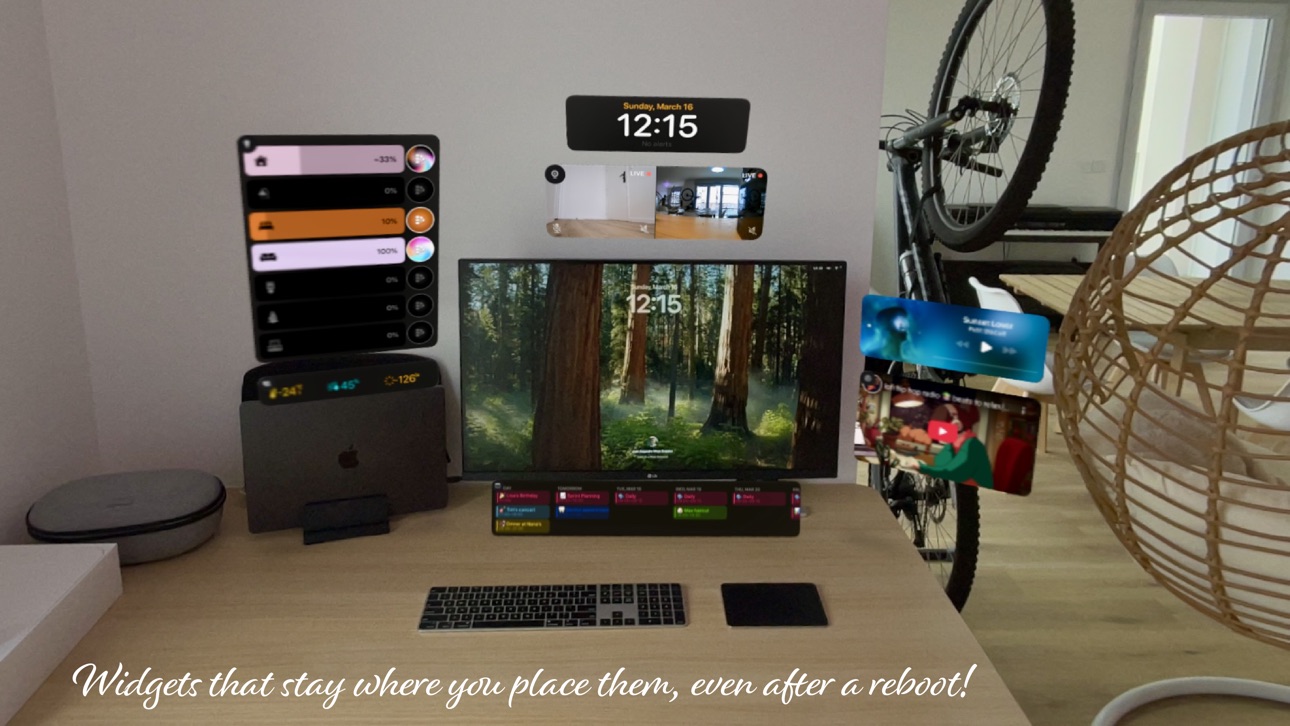
Bring your smart home to life on Vision Pro with the new Immersive Experience!
Spatial Widgets
- Persistent Placement : Widgets stay exactly where you place them, even after a reboot.
- Wall Snapping: Widgets feel like they’re truly part of your space.
- Wall Occlusion & Proximity Activation: Widgets automatically hide or minimize to keep your field of view clear.
Wrist Control
- Seamless control: Lift your left wrist and control your smart home, just like in your favourite Sci-Fi!
- Room Awareness: Walk into another room and the controls adapt automatically.
DASHBOARD
An overview of your entire home and fine control over your accessories! Build your ideal dashboard with a wide variety of customizable widgets.
FLOOR PLAN
Add markers and widgets to the floor plan of your home and easily interact with your devices. Choose which markers and widgets are shown according to the zoom level, this way you can seamlessly go from controlling a single device, room by room, up to your entire home.
AR REMOTE
Place markers in Augmented Reality in your actual living space and then interact with them just by pointing with your phone like a remote control. Magical!
Here you can tap and swipe, but also tilt your phone to control your accessories. Naturally, you can also customize the actions behind each gesture.
PRESETS
Create templates of your favorite configurations and reuse them easily throughout the app in markers and scenes. With lighting presets you can easily create a colorful palette from a picture and set a lighting ambiance with just a tap :)
Homerise main goal is to enhance the way you interact with your smart home.
Privacy policy: https://www.homerise.app/privacy-policy
Terms of use: https://www.homerise.app/terms
Capabilities
In-App Purchases
Accessibility
ipadiphonemacrealityDevicetvoswatch
Version history 25 versions
Build 886183743v20.4.32026-05-27 19:10:08
Removed auto identify on unreachable accessories
Build 886076867v20.4.22026-05-26 18:26:10
Fix unreachable accessories: auto identify on launch
Build 885497970v20.4.12026-05-12 19:21:21
Fix refresh values on launch
Build 885182759v20.42026-05-04 12:18:37
Artwork and Poster layouts for Music Widget
Build 883970904v20.32026-04-01 20:27:38
Calendar Widget with vertical layout
Lights Widget displays On/Off only lights as buttons
Build 883297334v20.22026-03-13 13:40:04
Added Support for Heater/Coolers (Thermostats)
Build 883197958v20.12026-03-11 07:37:00
Automatically show remaining duration on toggles that have this information (ex. water valves, washing machines)
Build 882686322v20.02026-02-24 07:15:01
Widgets neutral style
A white sober style for buttons, sliders and sensor information on widgets to let your wallpaper shine.
Vision Pro windows
Use Homerise widgets as windows in Shared Space!
Build 879427149v19.12025-11-08 10:04:13
Widget styles: Clear Glass, Tinted Glass, Frosted Glass, Flat
Build 878304148v19.0.22025-09-21 20:48:19
Performance improvements + scenes fix
Build 878295154v19.0.12025-09-20 20:28:49
Fix for scenes widget
Build 878211828v19.02025-09-19 15:19:06
Liquid Glass!
Let your dashboard shine with the new clear Liquid Glass widgets (*requires iOS26)
Build 877280168v18.2.32025-08-15 18:41:45
Fix dashboard layout
Build 877140340v18.2.22025-08-12 19:45:06
Fix scenes not loading
Build 876456899v18.2.12025-07-17 19:00:04
Fixed Saving dashboard layout choice
Build 876303088v18.22025-07-11 17:47:05
Dashboard Wallpapers!
Decorate your dashboard with a beautiful gradient or use your own pictures
Build 875633157v18.12025-06-17 15:51:27
Simplified navigation and faster loading!
Build 874876873v18.02025-05-19 11:42:16
Orbital Control (Vision Pro only)
Build 873882734v17.12025-04-20 14:09:21
Time Widget Redesigned
Personalize the time widget with stunning fonts and your favorite picture. It was time for a fresh new look!
Build 873280265v17.02025-03-31 14:51:50
Bring your smart home to life on Vision Pro with the new Immersive Experience!
Spatial Widgets
- Persistent Placement : Widgets stay exactly where you place them, even after a reboot.
- Wall Snapping: Widgets feel like they’re truly part of your space.
- Wall Occlusion & Proximity Activation: Widgets automatically hide or minimize to keep your field of view clear.
Wrist Control
- Seamless control: Lift your left wrist and control your smart home, just like in your favourite Sci-Fi!
- Room Awareness: Walk into another room and the controls adapt automatically.
Build 873184692v16.5.22025-03-13 21:39:43
New Premium simple and clear:
3 widgets per feature for free, Unlimited Widgets with Premium
Build 872945827v16.5.12025-03-04 20:07:51
Fixed bug: scenes not saving
Build 872913039v16.52025-03-02 21:48:12
Web Widget
Seamlessly display your favorite web content on your dashboard!
Build 872142866v16.42025-01-31 15:28:00
Widgets are now available on Floor Plan!
Music Widget now supports multiple AirPlay speakers
New Batteries Widget
Build 871838372v16.3.12025-01-21 19:16:46
Music Widget improvement: Select the audio output
No pricing data captured yet — comparisons appear once the app has paid storefronts or in-app purchases.
Availability 1 of 1 storefronts
| Region | Language | Price | Ratings | Avg | Version |
|---|---|---|---|---|---|
| US | en-US | Free | 5 | 4.6 | 20.4.3 |
Change log 29 changes · US
✎
releaseNotes updated
Removed auto identify on unreachable accessories
✎
description updated
Homerise leverages HomeKit to provide intuitive and expressive ways to control your smart home.
IMMERSIVE EXPERIENCE
Bring your smart home to life on Vision P
✎
subtitle updated
Bring your smart home to life!
✎
name updated
Homerise
◆
Version 20.4.3 released
Removed auto identify on unreachable accessories
◆
Version 20.4.2 released
Fix unreachable accessories: auto identify on launch
◆
Version 20.4.1 released
Fix refresh values on launch
◆
Version 20.4 released
Artwork and Poster layouts for Music Widget
◆
Version 20.3 released
Calendar Widget with vertical layout
Lights Widget displays On/Off only lights as buttons
◆
Version 20.2 released
Added Support for Heater/Coolers (Thermostats)
◆
Version 20.1 released
Automatically show remaining duration on toggles that have this information (ex. water valves, washing machines)
◆
Version 20.0 released
Widgets neutral style
A white sober style for buttons, sliders and sensor information on widgets to let your wallpaper shine.
Vision Pro windows
Use Homerise widgets as windows in Shared Space!
◆
Version 19.1 released
Widget styles: Clear Glass, Tinted Glass, Frosted Glass, Flat
◆
Version 19.0.2 released
Performance improvements + scenes fix
◆
Version 19.0.1 released
Fix for scenes widget
◆
Version 19.0 released
Liquid Glass!
Let your dashboard shine with the new clear Liquid Glass widgets (*requires iOS26)
◆
Version 18.2.3 released
Fix dashboard layout
◆
Version 18.2.2 released
Fix scenes not loading
◆
Version 18.2.1 released
Fixed Saving dashboard layout choice
◆
Version 18.2 released
Dashboard Wallpapers!
Decorate your dashboard with a beautiful gradient or use your own pictures
◆
Version 18.1 released
Simplified navigation and faster loading!
◆
Version 18.0 released
Orbital Control (Vision Pro only)
◆
Version 17.1 released
Time Widget Redesigned
Personalize the time widget with stunning fonts and your favorite picture. It was time for a fresh new look!
◆
Version 17.0 released
Bring your smart home to life on Vision Pro with the new Immersive Experience!
Spatial Widgets
- Persistent Placement : Widgets stay exactly where you place them, even after a reboot.
- Wall Snapping: Widgets feel like they’re truly part o
◆
Version 16.5.2 released
New Premium simple and clear:
3 widgets per feature for free, Unlimited Widgets with Premium
◆
Version 16.5.1 released
Fixed bug: scenes not saving
◆
Version 16.5 released
Web Widget
Seamlessly display your favorite web content on your dashboard!
◆
Version 16.4 released
Widgets are now available on Floor Plan!
Music Widget now supports multiple AirPlay speakers
New Batteries Widget
◆
Version 16.3.1 released
Music Widget improvement: Select the audio output