Home › Business

 US
US
1 of 1 storefronts
Content in en-US
Content in en-US
Information
Preview 2 platforms
iPhone 8 images


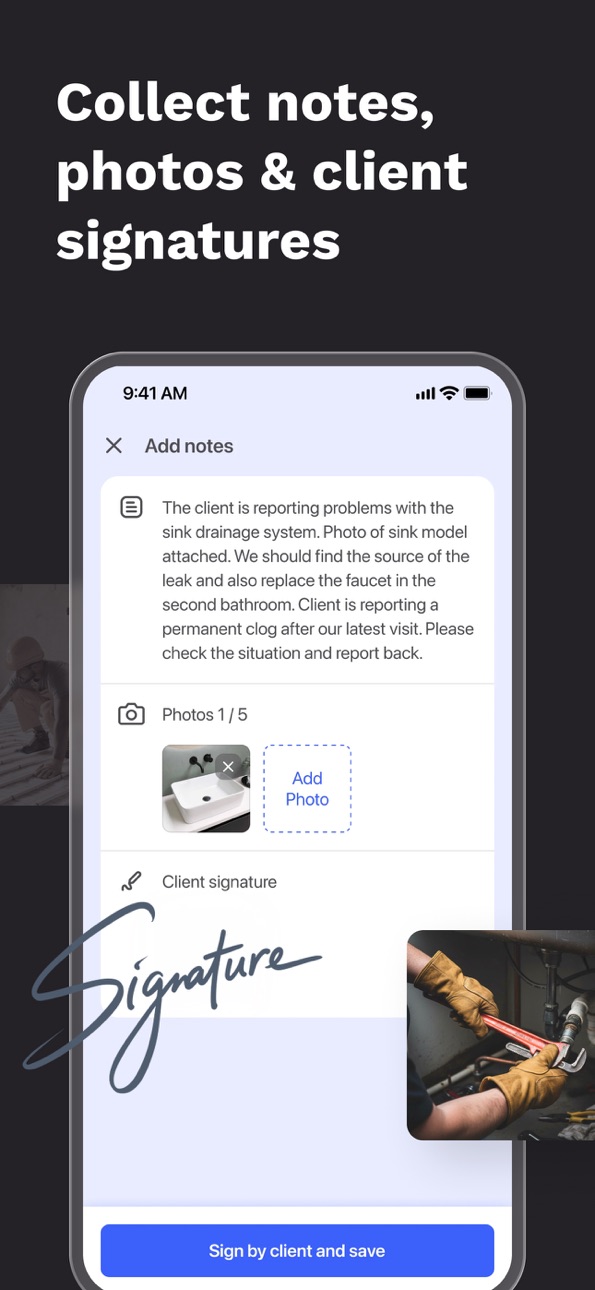


iPad 7 images


What’s New Version 4.23.1
Redesigned Job tasks and Job timeline
Description
FieldVibe is the free job scheduling app for solo professionals and home service businesses.
Built for the ones who do it all, FieldVibe offers a generous Free Plan focused on your core scheduling needs.
If you’re a lawn care pro, plumber, cleaner, HVAC tech, electrician, pest control expert, or handyman, FieldVibe is the scheduling app that helps you stay organized, reduce no-shows, and look professional.
Free plan that actually works (long-term):
• Unlimited jobs & clients
• Manual text reminders (sent from your own number)
• Client history
• Work request page (clients can book you online)
• Mobile + web app, fully synced
No limits that force you to upgrade. No complicated setup.
Only upgrade when you need more:
• Quotes (send professional estimates on-site)
• Automated text reminders
• Customizable text message templates
• Adding job extras (tasks, journal and payment tracking)
• Time tracking & simple reports
• Staff & team management
Why service pros choose FieldVibe:
• Built for solo pros first
Simple, fast, and focused on real field work
• Cut no-shows
Send quick text reminders so clients don’t forget appointments.
• Schedule in seconds
Create jobs, add one time or recurring visits in a few taps.
• Look professional
Send quotes, track job details, and keep all client info in one place.
• No bloated features
No sales calls. No enterprise complexity. Just what you need to run your day.
Who uses FieldVibe?
FieldVibe is perfect for:
• High-frequency jobs: Lawn care, residential cleaning, pest control, car detailing, window cleaning.
• On-demand service calls: HVAC, plumbing, electrical, handyman, appliance repair.
• Other trades: Locksmiths, pool cleaning, garage doors, solar panel maintenance, and more.
FieldVibe is built for the people who do it all.
It’s the ideal free scheduling app for lawn care pros managing multiple jobs per day and recurring routes. It’s also a free scheduling app for solo plumbers handling urgent repairs or follow-up visits with ease. For cleaners with regular clients, often when no one’s home, FieldVibe is the free cleaning business scheduling app that keeps every visit and reminder organized.
Electricians, HVAC techs, pest control pros, appliance repair specialists, and handymen rely on FieldVibe as their free field service scheduling app to organize work, reduce no-shows, and look professional.
Simple pricing
• Solo (Free)
All core scheduling tools, unlimited jobs/clients
• Solo Pro ($20/mo)
Quotes, automated reminders, time tracking, reports
• Crews ($50/mo)
Everything in Pro + unlimited staff
No contracts. No hidden fees.
Stop wasting time with paper agendas or complicated apps.
Stay organized, reduce no-shows, and grow your business with FieldVibe: the free job scheduling app for home service providers
Terms and conditions: https://www.fieldvibe.com/terms-and-conditions
Privacy policy: https://www.fieldvibe.com/privacy-policy
Payment Policy: Subscriptions are charged to your Apple ID account and auto-renew unless canceled at least 24 hours before the current period ends. Manage subscriptions in your Apple ID Account Settings.
In-App Purchases US pricing
Extra text messages Subscription
3000 reminders · Monthly$99.99
1000 reminders · Monthly$34.99
400 reminders · Monthly$16.99
200 reminders · Monthly$8.99
50 reminders · Monthly$2.99
Plans Subscription
CREWS - Yearly · Yearly 1-year free trial$449.99
SOLO PRO - Yearly · Yearly 1-year free trial$179.99
CREWS - Monthly · Monthly 1-month free trial$49.99
SOLO PRO - Monthly · Monthly 1-month free trial$19.99
Capabilities
In-App Purchases
Accessibility
ipadiphonemacrealityDevicetvoswatch
Version history 25 versions
Build 887892256v4.23.12026-07-06 21:26:16
Redesigned Job tasks and Job timeline
Build 887386716v4.23.02026-06-24 21:26:00
- New feature: User roles and permissions
- Client details: view jobs, quotes, requests, journal, client reviews and messages
- Staff details: view jobs and client reviews
Build 887187728v4.22.02026-06-22 10:02:22
Introducing Custom User Roles & Permissions!
Running a team just got a lot more secure. You can now control exactly what your crew can see and do inside FieldVibe.
- Protect Sensitive Data: Keep your job prices, quotes, and revenue reports private from employees.
- Control Access: Decide who has permission to create, edit, or delete quotes, jobs, clients and scheduled visits.
Build 886781681v4.21.22026-06-10 18:05:37
Turn client reviews into ready-made social posts. FieldVibe handles the writing for you. You just review the text and share it to keep your business active online.
Build 886430670v4.21.12026-06-03 17:08:53
A new Calendar experience:
• Quick add: Long-press an empty slot and drag to set the duration.
• Reschedule: Long-press a visit and drag it to a new time, day, or staff member.
• Staff zoom: Pinch to expand staff columns in the day view.
Build 886238582v4.21.02026-06-02 10:56:07
Drag & Drop Scheduling
We've upgraded the FieldVibe calendar so job creation and rescheduling feel effortless.
- Create jobs in seconds: tap an empty slot to place one, or hold and drag to stretch it to the right duration before the editor opens.
- Drag to reschedule or reassign: press and hold to move jobs across days or staff columns in one gesture.
Build 886005796v4.20.02026-05-22 20:30:37
- Individual columns for each staff. No more scheduling blindspots: The Day view now gives you a clear view of your team's day.
- Performance boost: We’ve optimized visit lists for much smoother scrolling in the field.
- Custom calendar starts: Tailor your workflow by selecting Saturday, Sunday, or Monday as your start day.
Build 885802486v4.19.22026-05-19 06:23:56
New: Professional websites for your business
You can now create a professional website with FieldVibe — for free.
Add your business info, services, and photos of your work, then share your page anywhere.
Clients can also send work requests directly through your website.
Build 885667847v4.19.12026-05-15 04:35:27
New: Professional websites for your business
You can now create a professional website with FieldVibe — for free.
Add your business info, services, and photos of your work, then share your page anywhere.
Clients can also send work requests directly through your website.
Build 885581122v4.19.02026-05-14 12:18:12
New: Professional websites for your business
You can now create a professional website with FieldVibe — for free.
Add your business info, services, and photos of your work, then share your page anywhere.
Clients can also send work requests directly through your website.
Build 885027076v4.18.02026-04-29 20:04:02
We’ve reorganized the Settings menu from the ground up. By separating Personal and Company settings, we’ve made it easier to manage your account and your business without the confusion.
Build 884760588v4.17.12026-04-21 20:07:32
- New photo markup: Add text and shapes to your photos for clearer documentation.
- Mobile Work requests: Create requests directly from your phone
- Client insights: View a client's history instantly while scheduling a new job.
- Updated UI: Enjoy a refreshed, more user-friendly "Clock Out" experience.
- Bug fixes
Build 884315607v4.17.02026-04-09 17:37:07
- New "My Day" Tab: Stay focused on what matters now. The "My Day" tab gives you a dedicated view of today’s visits, making it easier than ever to track your progress.
- Photo Markup Tool: You can now draw directly over pictures taken in FieldVibe. Circle a leak, point out a specific part, or leave notes right on the photo to show exactly what needs attention.
Build 884020836v4.16.12026-04-03 22:16:33
New feature: Quotes are here!
You can now win more jobs without leaving FieldVibe. Go from a price estimate to a scheduled visit in one seamless flow.
• Create professional quotes: Add services, taxes, and discounts in seconds.
• Send your way: Share a professional link via text/email or export a clean PDF.
• Get approved: Clients can review and approve the work digitally.
• One-tap scheduling: Instantly convert approved quotes into scheduled jobs.
Build 883978246v4.16.02026-04-01 08:48:37
New feature: Quotes are here!
You can now win more jobs without leaving FieldVibe. Go from a price estimate to a scheduled visit in one seamless flow.
• Create professional quotes: Add services, taxes, and discounts in seconds.
• Send your way: Share a professional link via text/email or export a clean PDF.
• Get approved: Clients can review and approve the work digitally.
• One-tap scheduling: Instantly convert approved quotes into scheduled jobs.
Build 883585610v4.15.02026-03-20 22:39:30
- Improved location picking
- Redesigned the sending message method
- Bug fixes
Build 883456247v4.14.22026-03-17 18:40:26
New feature: Client reviews.
You can now collect reviews automatically.
- Get feedback: Clients can rate your service via a link sent in the "Ask for review" text message.
- Show off your work: Easily share your best reviews as professional images on Facebook and Instagram.
- Grow your business: Use your five-star ratings to win more jobs and look like a pro.
Build 883267305v4.14.12026-03-11 23:30:56
New feature: Client reviews.
You can now collect reviews automatically.
- Get feedback: Clients can rate your service via a link sent in the "Ask for review" text message.
- Show off your work: Easily share your best reviews as professional images on Facebook and Instagram.
- Grow your business: Use your five-star ratings to win more jobs and look like a pro.
Build 882979375v4.13.22026-03-03 20:20:08
New way to choose clients when adding new jobs
Build 882813303v4.13.12026-02-27 22:45:55
- New way to choose clients when adding new jobs
- Improvements in creating and viewing jobs
- Unscheduled jobs error fixed
- Improvements in the Left menu of the Calendar
- Custom message templates, Tasks, Journal and Payment tracking starting with Solo Pro
- Missing texts in Spanish, Portuguese and Deutsch
Build 882450665v4.12.22026-02-15 06:32:05
- iOS 26 friendly
- Bug fixes
Build 882116607v4.12.12026-02-06 21:14:39
- New onboarding
- Sample jobs for new accounts
Build 882091733v4.11.12026-02-03 05:22:32
- New Message settings screen
- "Ask for review" setting
- WhatsApp reminders fixed
Build 881845943v4.10.42026-01-26 21:24:19
• Job numbers: every job now gets a unique number, making it easier to reference, track, and talk about work with clients.
• Staff management for admins: Admin employees can now add new staff members directly from the app.
• Bug fixes & small improvements: things should feel a bit smoother and more reliable.
Build 881391430v4.10.32026-01-12 08:56:07
Services & Products are here!
Set up your services and products once, then attach them to jobs in seconds.
No more rewriting the same details, just faster scheduling and cleaner job descriptions, built for solo pros and micro service businesses.
Price history by region
Currency
Show
Columns
Search
Availability 1 of 1 storefronts
| Region | Language | Price | Ratings | Avg | Version |
|---|---|---|---|---|---|
| US | en-US | Free | 242 | 4.8 | 4.23.1 |
Change log 29 changes · US
✎
releaseNotes updated
Redesigned Job tasks and Job timeline
✎
description updated
FieldVibe is the free job scheduling app for solo professionals and home service businesses.
Built for the ones who do it all, FieldVibe offers a generous Free
✎
subtitle updated
For home service professionals
✎
name updated
FieldVibe: Job scheduling app
◆
Version 4.23.1 released
Redesigned Job tasks and Job timeline
◆
Version 4.23.0 released
- New feature: User roles and permissions
- Client details: view jobs, quotes, requests, journal, client reviews and messages
- Staff details: view jobs and client reviews
◆
Version 4.22.0 released
Introducing Custom User Roles & Permissions!
Running a team just got a lot more secure. You can now control exactly what your crew can see and do inside FieldVibe.
- Protect Sensitive Data: Keep your job prices, quotes, and revenue report
◆
Version 4.21.2 released
Turn client reviews into ready-made social posts. FieldVibe handles the writing for you. You just review the text and share it to keep your business active online.
◆
Version 4.21.1 released
A new Calendar experience:
• Quick add: Long-press an empty slot and drag to set the duration.
• Reschedule: Long-press a visit and drag it to a new time, day, or staff member.
• Staff zoom: Pinch to expand staff columns in the day view.
◆
Version 4.21.0 released
Drag & Drop Scheduling
We've upgraded the FieldVibe calendar so job creation and rescheduling feel effortless.
- Create jobs in seconds: tap an empty slot to place one, or hold and drag to stretch it to the right duration before the editor
◆
Version 4.20.0 released
- Individual columns for each staff. No more scheduling blindspots: The Day view now gives you a clear view of your team's day.
- Performance boost: We’ve optimized visit lists for much smoother scrolling in the field.
- Custom calendar sta
◆
Version 4.19.2 released
New: Professional websites for your business
You can now create a professional website with FieldVibe — for free.
Add your business info, services, and photos of your work, then share your page anywhere.
Clients can also send work requests
◆
Version 4.19.1 released
New: Professional websites for your business
You can now create a professional website with FieldVibe — for free.
Add your business info, services, and photos of your work, then share your page anywhere.
Clients can also send work requests
◆
Version 4.19.0 released
New: Professional websites for your business
You can now create a professional website with FieldVibe — for free.
Add your business info, services, and photos of your work, then share your page anywhere.
Clients can also send work requests
◆
Version 4.18.0 released
We’ve reorganized the Settings menu from the ground up. By separating Personal and Company settings, we’ve made it easier to manage your account and your business without the confusion.
◆
Version 4.17.1 released
- New photo markup: Add text and shapes to your photos for clearer documentation.
- Mobile Work requests: Create requests directly from your phone
- Client insights: View a client's history instantly while scheduling a new job.
- Updated UI
◆
Version 4.17.0 released
- New "My Day" Tab: Stay focused on what matters now. The "My Day" tab gives you a dedicated view of today’s visits, making it easier than ever to track your progress.
- Photo Markup Tool: You can now draw directly over pictures taken in Fi
◆
Version 4.16.1 released
New feature: Quotes are here!
You can now win more jobs without leaving FieldVibe. Go from a price estimate to a scheduled visit in one seamless flow.
• Create professional quotes: Add services, taxes, and discounts in seconds.
• Send your
◆
Version 4.16.0 released
New feature: Quotes are here!
You can now win more jobs without leaving FieldVibe. Go from a price estimate to a scheduled visit in one seamless flow.
• Create professional quotes: Add services, taxes, and discounts in seconds.
• Send your
◆
Version 4.15.0 released
- Improved location picking
- Redesigned the sending message method
- Bug fixes
◆
Version 4.14.2 released
New feature: Client reviews.
You can now collect reviews automatically.
- Get feedback: Clients can rate your service via a link sent in the "Ask for review" text message.
- Show off your work: Easily share your best reviews as professional
◆
Version 4.14.1 released
New feature: Client reviews.
You can now collect reviews automatically.
- Get feedback: Clients can rate your service via a link sent in the "Ask for review" text message.
- Show off your work: Easily share your best reviews as professional
◆
Version 4.13.2 released
New way to choose clients when adding new jobs
◆
Version 4.13.1 released
- New way to choose clients when adding new jobs
- Improvements in creating and viewing jobs
- Unscheduled jobs error fixed
- Improvements in the Left menu of the Calendar
- Custom message templates, Tasks, Journal and Payment tracking star
◆
Version 4.12.2 released
- iOS 26 friendly
- Bug fixes
◆
Version 4.12.1 released
- New onboarding
- Sample jobs for new accounts
◆
Version 4.11.1 released
- New Message settings screen
- "Ask for review" setting
- WhatsApp reminders fixed
◆
Version 4.10.4 released
• Job numbers: every job now gets a unique number, making it easier to reference, track, and talk about work with clients.
• Staff management for admins: Admin employees can now add new staff members directly from the app.
• Bug fixes & sma
◆
Version 4.10.3 released
Services & Products are here!
Set up your services and products once, then attach them to jobs in seconds.
No more rewriting the same details, just faster scheduling and cleaner job descriptions, built for solo pros and micro service busine