Home › Utilities

2 of 2 storefronts
Content in en-US
Content in en-US
Information
Preview 2 platforms
iPhone 4 images


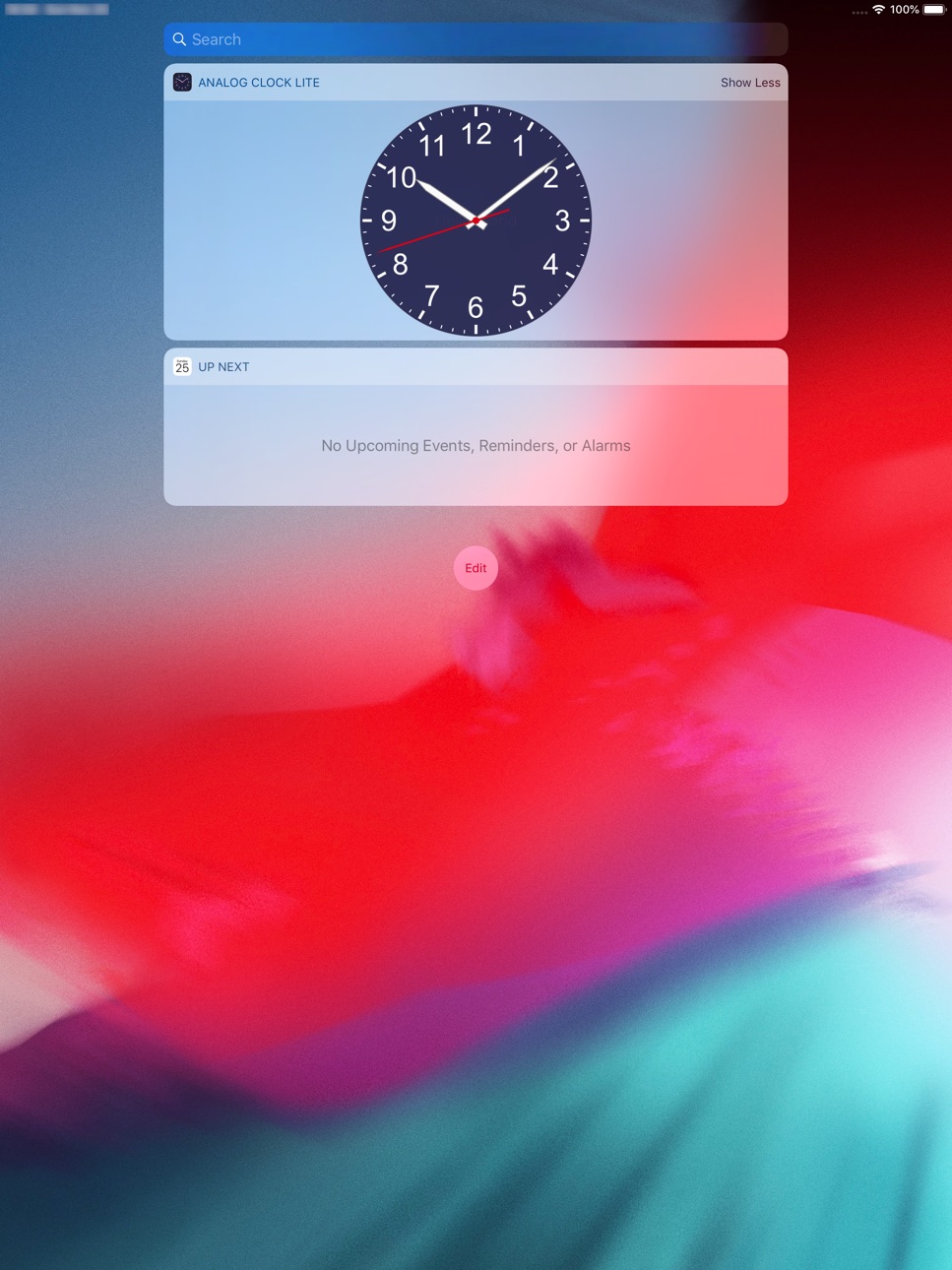
iPad 4 images


What’s New Version 1.8.0
New function
- It is now possible to share custom clock settings (design). You can send your design to another device via AirDrop or save it as a file. Open the clock selection screen in settings and share from the menu that appears by long-pressing the clock row.
Improvement
- It is now possible to change the name of the custom clock. Change the name from the menu displayed by long-pressing the clock row on the clock selection screen.
- Fixed an issue where the thumbnail of the clock was missing and the position/size of the clock in the detailed settings were displayed out of view when the device's screen display was enlarged.
****** Important Note ******
This version will be the last to support iOS 10 and earlier (iOS 9.3.x ~ iOS 10.x.x). From the next version update, only iOS 11, iPadOS 11 or later will be supported.
Description
It is an analog clock application that can also display a pendulum clock.
Clock
Changeable clock position and size.
- Indigo Blue Clock - Second hand ticks away the time
- White Clock - Second hand moves smoothly
- Pendulum Clock - Pendulum ticks away the time
- Custom Clock - You can customize the clock yourself
(In the Lite version, you can create up to 6 custom clocks)
Background Image
Changeable background image position and size.
- Single Color - You can customize the color
- 10 preset background images
- Select background photo from photo library
Other features
- Status bar display switch
- Automatic sleep suppression
- Smooth Display selection (trade-off with battery consumption)
- Enlarging the background image (displayed on the whole screen)
- Digital time display
- Widget display (also supports iOS14)
- Support Dark Mode of iOS13
- Support sharing custom clock settings (design) using AirDrop, file saving, etc.
---
This Lite Version App displays Ads banner.
No Ads Version App 'Analog Clock - Pendulum' is in AppStore, too.
(Ads will no longer be displayed on iOS 9 devices.)
Accessibility
ipadiphonemacrealityDevicetvoswatch
Version history 17 versions
Build 855653942v1.8.02023-03-20 13:50:34
New function
- It is now possible to share custom clock settings (design). You can send your design to another device via AirDrop or save it as a file. Open the clock selection screen in settings and share from the menu that appears by long-pressing the clock row.
Improvement
- It is now possible to change the name of the custom clock. Change the name from the menu displayed by long-pressing the clock row on the clock selection screen.
- Fixed an issue where the thumbnail of the clock was missing and the position/size of the clock in the detailed settings were displayed out of view when the device's screen display was enlarged.
****** Important Note ******
This version will be the last to support iOS 10 and earlier (iOS 9.3.x ~ iOS 10.x.x). From the next version update, only iOS 11, iPadOS 11 or later will be supported.
Build 844436513v1.7.12021-10-02 22:03:49
New function
- Added a custom item that moves the minute hand every minute (step). In the custom clock setting item, you can set it with "Motions - Step drive the minute hand".
Compatible with iOS 15
- Updated the development environment for iOS 15.
- Fixed the problem that a large number of system fonts were included in the selection when selecting a custom clock font in iOS 15.
- Fixed the case where the ad tracking could not be selected in iOS 15 and the ad was not displayed.
Improvement
- Fixed the part where the UI layout is broken when the text size of the device is changed to make it larger (with Dynamic Type).
- Fixed the problem that the thumbnail of the clock in the settings may be black in rare cases.
- Other minor fixes.
Build 842577599v1.7.02021-06-09 16:01:22
Improvement
・In the custom clock, the adjustment range of the length behind the hands has been expanded so that only the tip can be used.
・In the custom clock, the title of the font specification screen can be understood as to what font is specified.
Added support for selecting ad tracking from iOS 14.5.
(From this version, ads will no longer be displayed on iOS 9 devices.)
Build 839069483v1.6.22020-11-13 08:16:56
Improvements and bug fixes.
- Expanded display smoothness settings
- Added "Optimized for battery"
- Added "Smoothest"
- Fixed an issue where the clock could be delayed by up to 1 minute when the second hand and pendulum were hidden.
Version 1.6.0
New
・Supports new widget for iOS14
Improvement
・Increased clock customization items.
- Widget background color (new Widget only)
- Minute numerals (every 5 minutes)
- Digital time display
* If the conventional widget disappears on iOS 14, restart the device and then reselect the widget to display.
(It seems that it may disappear after installing the new version app.)
Build 838477173v1.6.12020-11-02 09:23:51
Improvement and bug fix.
- Widgets can be used by selecting from built-in clocks (3 types).
- Fixed an issue where the time would go wrong for 1 minute from 6:00 and 18:00.
Version 1.6.0
New
・Supports new widget for iOS14
Improvement
・Increased clock customization items.
- Widget background color (new Widget only)
- Minute numerals (every 5 minutes)
- Digital time display
* If the conventional widget disappears on iOS 14, restart the device and then reselect the widget to display.
(It seems that it may disappear after installing the new version app.)
Build 838388687v1.6.02020-10-27 10:14:19
New
・Supports new widget for iOS14
Improvement
・Custom clocks can now be managed on the widget selection page.
・Increased clock customization items.
- Widget background color (new Widget only)
- Minute numerals (every 5 minutes)
- Digital time display
* If the conventional widget disappears on iOS 14, restart the device and then reselect the widget to display.
(It seems that it may disappear after installing the new version app.)
Build 834077077v1.5.42019-12-19 22:21:37
Fixes
- Fixed the clock customization screen layout may not be displayed correctly.
- Fixed possible crash when selecting background from photo library.
- Fixed a rare crash caused by an ad.
Build 833729781v1.5.32019-11-23 16:01:47
Improved the problem that Widget becomes “Unable to Load” and is not displayed.
Build 833377225v1.5.22019-10-29 18:24:47
Improvement
- The date can be displayed on the widget.
- The target character is displayed as a sample in the font setting of custom clock.
Fixes
- Fixed an issue where the hands may take some time to return to the current time when returning from the background.
- Minor Fixes.
Build 832983103v1.5.12019-10-01 08:54:23
Version 1.5.1
App Icon changed.
Version 1.5.0
New
- iOS 13 compatibility improvements
- Support Dark Mode
Other
- Minor bug fix
Build 832965102v1.5.02019-09-29 14:21:12
New
- iOS 13 compatibility improvements
- Support Dark Mode
Other
- Minor bug fix
Build 832401246v1.4.12019-08-16 08:49:47
New - Now, you can create some custom clocks.
You can create custom clocks up to 6 by changing settings based on existing clocks.
The setting items can be changed relatively in detail about dial, date display, hands, pendulum and movement.
Improvement
- Improved display of clock thumbnails displayed in detail settings of setting page.
- Clock thumbnails are now displayed by select clock and select widget of setting page.
Bug fix
- Fixed an issue where ads might appear in the wrong position after editing a custom clock.
Build 832191704v1.4.02019-08-14 00:12:44
New - Now, you can create some custom clocks.
You can create custom clocks up to 6 by changing settings based on existing clocks.
The setting items can be changed relatively in detail about dial, date display, hands, pendulum and movement.
Improvement
- Improved display of clock thumbnails displayed in detail settings of setting page.
- Clock thumbnails are now displayed by select clock and select widget of setting page.
Build 829412891v1.3.02018-11-27 17:41:23
New - It corresponds to the widget.
Others
- Fix the resolution of thumbnail of position/size in detail setting was displayed roughly.
- Fix the clock and background was displayed roughly on the next device.
(all iPad, iPhone X,XS,XS Max,6 Plus,6s Plus,7 Plus,8 Plus)
Build 828635674v1.2.02018-09-19 23:50:04
New - Background image position and size changeable.
Others
- Fix the resolution of background image was displayed roughly.
- Fix bug.
Build 828234349v1.1.02018-08-15 16:18:50
New - Clock position and size changeable.
Others
- Fix the setting button position when device rotation.
- Fix some memory leaks.
- Fix part of setting page for iPad.
- Split view for iPad was disabled.
Build 828083065v1.0.22018-08-06 23:33:26
No pricing data captured yet — comparisons appear once the app has paid storefronts or in-app purchases.
Availability 2 of 2 storefronts
| Region | Language | Price | Ratings | Avg | Version |
|---|---|---|---|---|---|
 US US | en-US | Free | 8 | 2.5 | 1.8.0 |
 GB GB | en-GB | Free | 4 | 4.8 | 1.8.0 |
Change log 21 changes · US
✎
releaseNotes updated
New function
- It is now possible to share custom clock settings (design). You can send your design to another device via AirDrop or save it as a file. Open the
✎
description updated
It is an analog clock application that can also display a pendulum clock.
Clock
Changeable clock position and size.
- Indigo Blue Clock - Second hand ticks awa
✎
subtitle updated
Simple Analog Clock (Pendulum)
✎
name updated
Analog Clock Lite - Pendulum
◆
Version 1.8.0 released
New function
- It is now possible to share custom clock settings (design). You can send your design to another device via AirDrop or save it as a file. Open the clock selection screen in settings and share from the menu that appears by long
◆
Version 1.7.1 released
New function
- Added a custom item that moves the minute hand every minute (step). In the custom clock setting item, you can set it with "Motions - Step drive the minute hand".
Compatible with iOS 15
- Updated the development environment f
◆
Version 1.7.0 released
Improvement
・In the custom clock, the adjustment range of the length behind the hands has been expanded so that only the tip can be used.
・In the custom clock, the title of the font specification screen can be understood as to what font is
◆
Version 1.6.2 released
Improvements and bug fixes.
- Expanded display smoothness settings
- Added "Optimized for battery"
- Added "Smoothest"
- Fixed an issue where the clock could be delayed by up to 1 minute when the second hand and pendulum were hidden.
◆
Version 1.6.1 released
Improvement and bug fix.
- Widgets can be used by selecting from built-in clocks (3 types).
- Fixed an issue where the time would go wrong for 1 minute from 6:00 and 18:00.
Version 1.6.0
New
・Supports new widget for iOS14
Improvement
・In
◆
Version 1.6.0 released
New
・Supports new widget for iOS14
Improvement
・Custom clocks can now be managed on the widget selection page.
・Increased clock customization items.
- Widget background color (new Widget only)
- Minute numerals (every 5 minutes)
- Digit
◆
Version 1.5.4 released
Fixes
- Fixed the clock customization screen layout may not be displayed correctly.
- Fixed possible crash when selecting background from photo library.
- Fixed a rare crash caused by an ad.
◆
Version 1.5.3 released
Improved the problem that Widget becomes “Unable to Load” and is not displayed.
◆
Version 1.5.2 released
Improvement
- The date can be displayed on the widget.
- The target character is displayed as a sample in the font setting of custom clock.
Fixes
- Fixed an issue where the hands may take some time to return to the current time when returni
◆
Version 1.5.1 released
Version 1.5.1
App Icon changed.
Version 1.5.0
New
- iOS 13 compatibility improvements
- Support Dark Mode
Other
- Minor bug fix
◆
Version 1.5.0 released
New
- iOS 13 compatibility improvements
- Support Dark Mode
Other
- Minor bug fix
◆
Version 1.4.1 released
New - Now, you can create some custom clocks.
You can create custom clocks up to 6 by changing settings based on existing clocks.
The setting items can be changed relatively in detail about dial, date display, hands, pendulum and movement.
◆
Version 1.4.0 released
New - Now, you can create some custom clocks.
You can create custom clocks up to 6 by changing settings based on existing clocks.
The setting items can be changed relatively in detail about dial, date display, hands, pendulum and movement.
◆
Version 1.3.0 released
New - It corresponds to the widget.
Others
- Fix the resolution of thumbnail of position/size in detail setting was displayed roughly.
- Fix the clock and background was displayed roughly on the next device.
(all iPad, iPhone X,XS,XS Max,
◆
Version 1.2.0 released
New - Background image position and size changeable.
Others
- Fix the resolution of background image was displayed roughly.
- Fix bug.
◆
Version 1.1.0 released
New - Clock position and size changeable.
Others
- Fix the setting button position when device rotation.
- Fix some memory leaks.
- Fix part of setting page for iPad.
- Split view for iPad was disabled.
◆
Version 1.0.2 released