Home › Business

 US
US
1 of 1 storefronts
Content in en-US
Content in en-US
Information
Preview 2 platforms
iPhone 10 images


iPad 10 images





What’s New Version iOS App Version EBizCharge Mobile App v2.2.0.0
- Minor bug fixes and UI enhancements
- Customer page enhancement
Description
EBizCharge Mobile allows you to accept credit, debit, and ACH payments on your phone or mobile device. Once a transaction is run, it syncs back to your accounting software, so there’s no manual reconciling. Simply run a credit card and move on.
EBizCharge Mobile is built for merchants on the go, whether you’re in the field, at a show, or traveling. Easily create invoices, issue refunds, and manage customer profiles with the peace of mind that all your data is automatically updated in your accounting software in the home office.
EBizCharge Mobile is PCI compliant, you can securely save customer payment information for repeat use. EBizCharge Mobile is protected by encryption, tokenization, and TLS 1.2, so you can rest easy knowing your customers’ information is safe. Key in credit cards or use a physical terminal to accept EMV chip cards
.
EBizCharge Mobile gives your business the power to make sales, run credit cards, and manage transactions on the go.
Features:
Quick Payment
o Scan, manually key in, or use an EMV reader to process payments
o Select a tip amount
o Email or text a receipt to the customer
o Choose to require a customer signature in Settings
Issue Refund
o Quickly issue refunds to customers
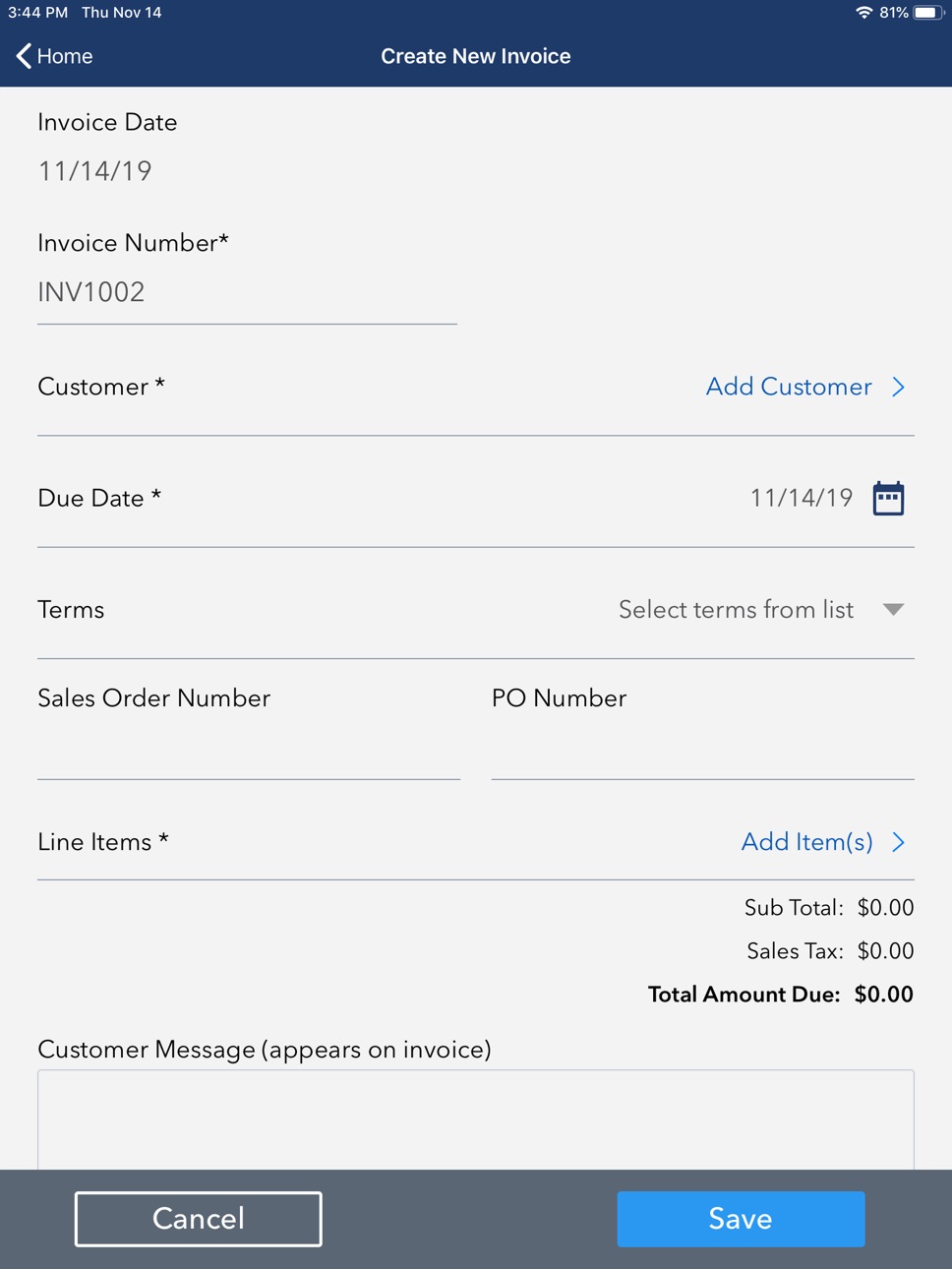
Pay Invoice
o View all invoices and filter by status, including past due, open, partially paid, or paid
o Create new invoices with line items, terms, sales reps, and more that sync back to your
o Customers can pay off their invoices with full or partial
o Once paid, invoices are synced back to your ERP
Take Payments on Sales Orders
o Create sales orders on the go that sync back to your ERP
o Run pre-authorizations or accept deposits on sales orders and automatically sync these payments back to your ERP
Inventory
o Sync inventory from your ERP and view/filter your item list with up-to-date quantity on hand in real time
Transactions
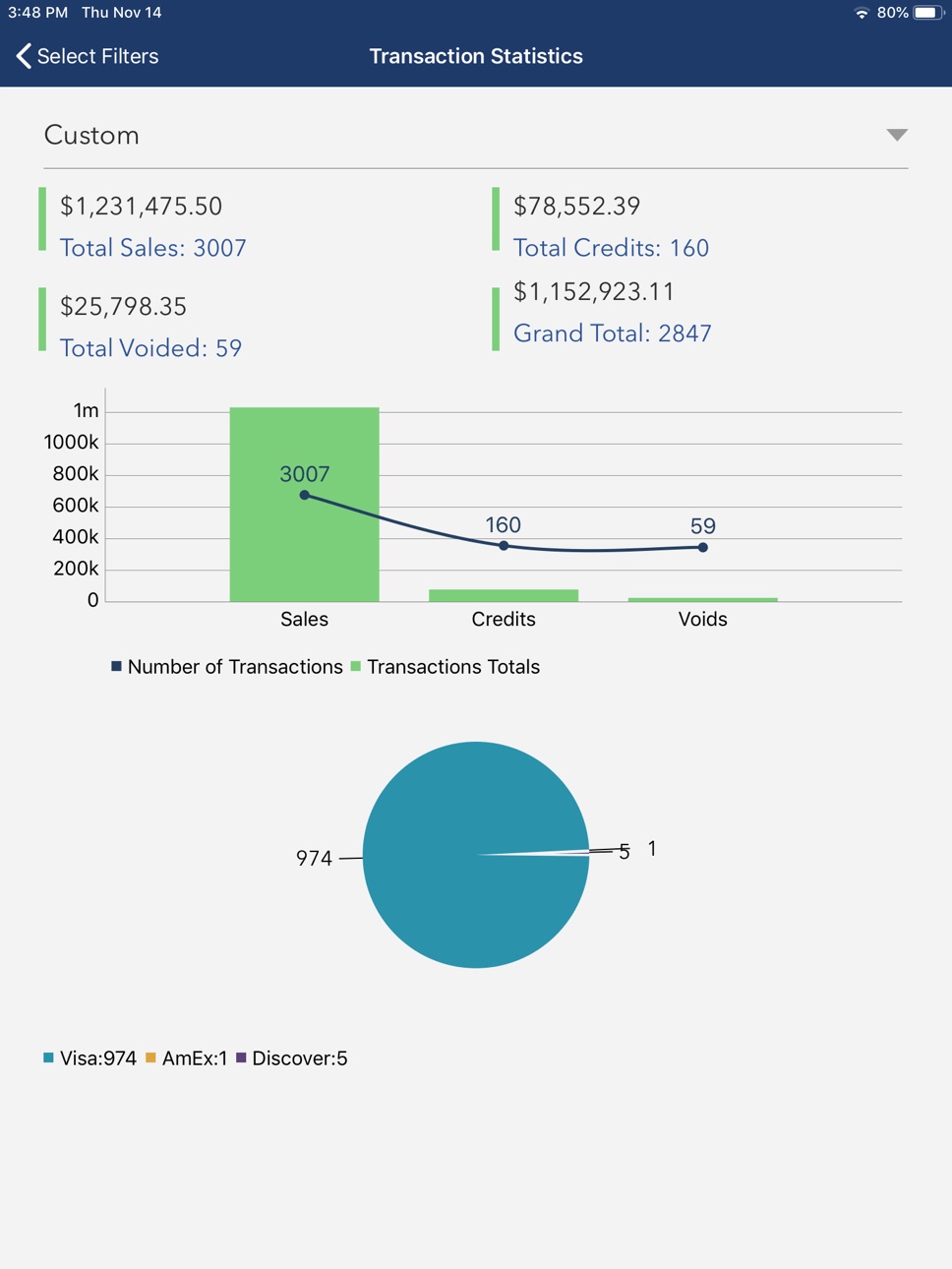
o View all transactions and transaction details
o View all transactions within a date range
o View all transactions for a single customer
Customers
o View all customers and customer details
o Create new customers
o Edit customer information
o Call or email customers right from the customer screen
To use EBizCharge Mobile, you must have a merchant account with EBizCharge/Century Business Solutions.
Accessibility
ipadiphonemacrealityDevicetvoswatch
Version history 13 versions
Build 878641952viOS App Version EBizCharge Mobile App v2.2.0.02025-10-03 17:07:48
- Minor bug fixes and UI enhancements
- Customer page enhancement
Build 874251485vEBizCharge Mobile App v2.1.0.02025-05-13 15:22:35
- Minor bug fixes and UI enhancements
Build 871649368vEBizCharge Mobile App v2.0.0.02025-01-10 19:38:38
- More robust invoice handling
- Minor bug fixes and UI enhancements
Build 864964101viOS App Version iOS App EBizCharge Mobile App v1.9.0.02024-04-05 00:52:00
- Resolved Issue with Manual Sales Order Uploads
- Minor Bug Fixing
- Enhanced Performance
Build 862831738viOS App EBizCharge Mobile App v1.8.0.02024-01-16 17:14:31
- Customer list screen is updated
- Minor Bug Fixing
- Enhanced Performance
Build 858882211viOS App EBizCharge Mobile App v1.6.0.02023-11-20 22:42:18
o Invoices list and Sales Order list screen design has been updated.
o Credit Card screens has been updated for saving new credit card. Cardholder Name, AVS Street and AVS Zip/Postal Code will be required fields.
o Payment Detail screen has been updated.
o Customers list screen design has been updated.
o Customer Quick Payment flow has been updated.
o Help & Contact Us screen has been updated.
o Enhanced Performance
Build 853882724viOS App EBizCharge Mobile App v1.5.0.02023-03-30 10:15:20
o Merchant can search customer list by company name in customer list screen. Sorting can be done by company name as well.
o For invoice payment, invoice notes text field is added in payment screen.
o In payment screen, in Saved Card section, CVV will show below the selected card
Build 851788983viOS App EBizCharge Mobile App v1.4.0.02022-08-24 23:13:40
Credit card scanning enhancements.
Update Item Info verbiage to say Item Information.
New Help & Contact Us Screen.
Build 848416150vEBizCharge Mobile App v1.3.1.02022-05-29 04:33:57
Updated login screen.
Create New Sales Order button has been updated.
Minor U/UI enhancement to create a smoother experience for users.
Build 834173155vEBizCharge Mobile App v1.3.0.02022-01-11 19:51:07
EBizCharge Mobile App v1.3.0.0 has been updated with several Bank Account(s) (formerly known as ACH) changes. The following updates have been made:
o Issue Refunds
Refunds can be issued using the Bank Account option in the payment screen.
o Create a Recurring Payment
This can be done using Bank Accounts and saved Bank Accounts. End-users can Create a Recurring Payment by adding a new Bank Account or select a saved Bank Account as a payment method.
o Enable/Disable Bank Accounts tab
Bank Account tab in the payment screens can be enabled or disabled for the following functionalities:
o Issue Refunds
o Create a Recurring Payment
o Deposit on Sales Order, and
o Invoice Payment
o Pre Auth on Sales Orders
o Deposit on Sales Orders
o Invoice Payment
o Mobile App for Invoices and Sales Orders. There are several other integrations that will be supported in
upcoming releases.
Build 830049244v1.22019-12-05 16:47:08
We've added the ability to sync data from the mobile app to your ERP in real time, including sales orders, payment terms, inventory, sales reps, and invoices created in the field.
This allows you to:
Create sales orders on the go with line items, shipping information, and customer details
Run pre-authorizations or accept deposits on sales orders and automatically apply these payments back to your ERP
Create invoices with line items, billing and shipping information, and payment terms
Take payments against invoices and automatically post them back to your ERP
View/edit sales rep information and add new reps
View and filter your inventory with up-to-date quantity on hand in real time
Build 829675916v1.12019-01-13 19:31:29
- Signature with Tip added
- All, approved and decline filter added in transactions list.
Build 827502904v1.02018-11-11 16:08:22
No pricing data captured yet — comparisons appear once the app has paid storefronts or in-app purchases.
Availability 1 of 1 storefronts
| Region | Language | Price | Ratings | Avg | Version |
|---|---|---|---|---|---|
| US | en-US | Free | 1 | 5.0 | iOS App Version EBizCharge Mobile App v2.2.0.0 |
Change log 16 changes · US
✎
releaseNotes updated
- Minor bug fixes and UI enhancements
- Customer page enhancement
✎
description updated
EBizCharge Mobile allows you to accept credit, debit, and ACH payments on your phone or mobile device. Once a transaction is run, it syncs back to your accounti
✎
name updated
EBizCharge Mobile
◆
Version iOS App Version EBizCharge Mobile App v2.2.0.0 released
- Minor bug fixes and UI enhancements
- Customer page enhancement
◆
Version EBizCharge Mobile App v2.1.0.0 released
- Minor bug fixes and UI enhancements
◆
Version EBizCharge Mobile App v2.0.0.0 released
- More robust invoice handling
- Minor bug fixes and UI enhancements
◆
Version iOS App Version iOS App EBizCharge Mobile App v1.9.0.0 released
- Resolved Issue with Manual Sales Order Uploads
- Minor Bug Fixing
- Enhanced Performance
◆
Version iOS App EBizCharge Mobile App v1.8.0.0 released
- Customer list screen is updated
- Minor Bug Fixing
- Enhanced Performance
◆
Version iOS App EBizCharge Mobile App v1.6.0.0 released
o Invoices list and Sales Order list screen design has been updated.
o Credit Card screens has been updated for saving new credit card. Cardholder Name, AVS Street and AVS Zip/Postal Code will be required fields.
o Payment Detail screen has
◆
Version iOS App EBizCharge Mobile App v1.5.0.0 released
o Merchant can search customer list by company name in customer list screen. Sorting can be done by company name as well.
o For invoice payment, invoice notes text field is added in payment screen.
o In payment screen, in Saved Card section
◆
Version iOS App EBizCharge Mobile App v1.4.0.0 released
Credit card scanning enhancements.
Update Item Info verbiage to say Item Information.
New Help & Contact Us Screen.
◆
Version EBizCharge Mobile App v1.3.1.0 released
Updated login screen.
Create New Sales Order button has been updated.
Minor U/UI enhancement to create a smoother experience for users.
◆
Version EBizCharge Mobile App v1.3.0.0 released
EBizCharge Mobile App v1.3.0.0 has been updated with several Bank Account(s) (formerly known as ACH) changes. The following updates have been made:
o Issue Refunds
Refunds can be issued using the Bank Account option in the payment screen.
◆
Version 1.2 released
We've added the ability to sync data from the mobile app to your ERP in real time, including sales orders, payment terms, inventory, sales reps, and invoices created in the field.
This allows you to:
Create sales orders on the go with li
◆
Version 1.1 released
- Signature with Tip added
- All, approved and decline filter added in transactions list.
◆
Version 1.0 released